I renovated my WFH desk one papercut at a time. The keyboard was the last holdout — and the biggest fix. Here's the honest, first-person case for a good mechanical keyboard (and the one mouse worth pairing with it).
This post contains affiliate links. If you buy through them, Aliteq may earn a commission — at no extra cost to you. Prices verified at publish time.
I've been renovating my desk one small piece at a time for about three years, the way some people renovate a bathroom — never all at once, always the thing that annoyed me most that month. A better chair. A monitor arm so I stopped hunching. A lamp that isn't the overhead light of an interrogation room. Each one was a fifty-to-two-hundred-dollar fix for a daily papercut, and every single one was worth it. The keyboard was the last holdout. I typed on the flat membrane thing that came free with a computer I no longer own, and I told myself it was fine. It was not fine. It was the papercut I'd stopped noticing.
So this is the desk upgrade I'd actually push you toward if you work from a keyboard all day: a real mechanical keyboard, and the one mouse worth pairing with it. Not the RGB gaming battlestation stuff — the boring, grown-up version that just makes eight hours of typing feel better. Here's what I bought, what I'd buy again, and where I'd tell you to spend less.
The fear that stopped me for years: noise
Let's get the thing everyone's actually worried about out of the way. Mechanical keyboards have a reputation for being obnoxiously loud, and it's earned — but only by a specific kind. The clicky "blue" switches, the ones that go CLACK like a typewriter in a movie, are the reason your coworker's keyboard made you want to move desks. Read any office thread and it's the same story: someone brings the loud one into an open-plan room and becomes a legend for the wrong reasons.
Here's what took me too long to learn: you get to choose. Tactile "brown" switches give you the bump you can feel without the announcement. Silent switches go further. And on a hot-swappable board you can literally change your mind later — pull a switch out with a little tool, push a quieter one in, no soldering, no new keyboard. That single fact is what got me over the line. I wasn't committing to a sound forever; I was buying something I could adjust like everything else on my desk.
Where I started: the Keychron K8 Pro
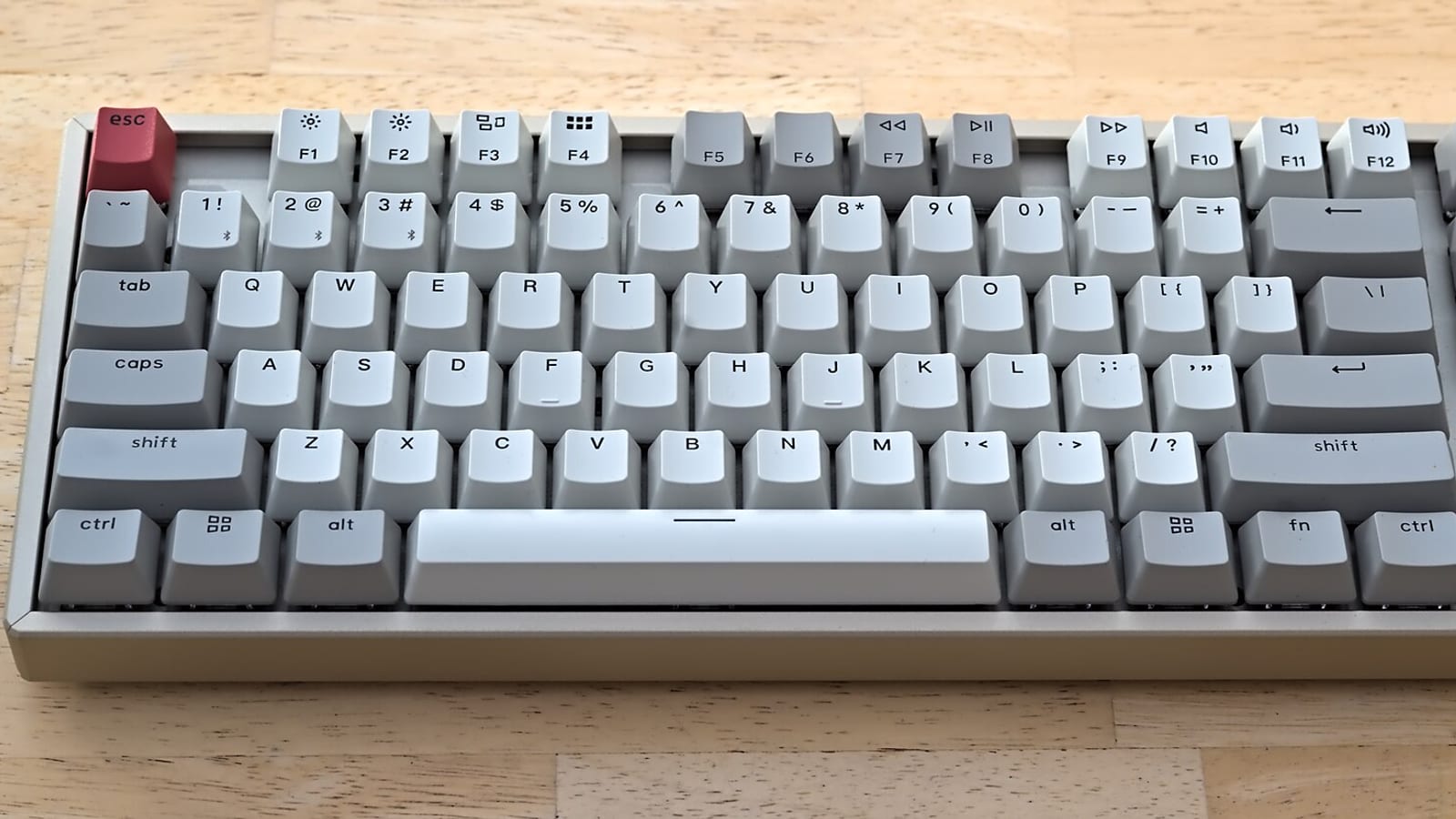
The K8 Pro is the board I'd hand to anyone dipping a toe in. It's an 80% layout — full typing area, arrow keys and function row, just no number pad, which is exactly the width I wanted back on my desk after years of a bloated full-size. It came with pre-lubed Gateron browns that sounded good out of the box, PBT keycaps that don't go shiny after a few months, and — the part that matters — hot-swap sockets so I could swap switches on a rainy Sunday when I got curious. I've since put slightly quieter switches in the ones near my mic. Took ten minutes.
The other quietly great thing: it does Mac and Windows properly. There's a physical toggle, the keycaps for both are in the box, and I move between a work Windows laptop and a personal Mac without the modifier keys turning into a puzzle. It's QMK/VIA too, so if you ever want to remap a key or build a macro you can — but you don't have to touch any of that to be happy. I ignored it for a month and the keyboard was still the best thing on my desk.
The honest part: it's a bit tall, so if you don't already use a wrist rest you'll want one (they're ten dollars). And the sea of options — switches, keycaps, layouts — can send you down a rabbit hole where you spend more on the hobby than the keyboard. You don't have to. Buy it with browns, add a wrist rest, walk away.
Keychron K8 Pro
The hot-swap gateway board. ~$100, 80% layout, pre-lubed browns, PBT keycaps, and a real Mac/Windows toggle. Hot-swap sockets mean you can change how it sounds later without soldering — the reason I finally stopped being scared of mechanical keyboards.
+ Hot-swappable — change switches later, no soldering
+ Proper Mac + Windows support with a physical toggle
+ Pre-lubed browns and PBT keycaps feel good out of the box
+ 80% layout: full function without the number-pad bloat
+ QMK/VIA remapping if you ever want it (you don't have to)
Cons
− Fairly tall — you'll want a wrist rest
− The customization world is a rabbit hole if you let it be
− Not the quietest option unless you swap switches
If you never want to think about switches: MX Mechanical
The K8 Pro is a hobby you can grow into. The Logitech MX Mechanical is the opposite pitch: a finished object. It's low-profile — the keys sit close to the deck, more like a nice laptop than a chunky tower — and after a couple of days of adjustment I was typing faster and cleaner than on my old board. Reviewers who lived with it for months describe it the way I'd describe a good chair: it spoils you, and you stop noticing it, which is the whole point.
What you're really paying for is calm. It's quiet enough for a call, the battery goes weeks, the backlight fades up when your hands approach, and it pairs to three devices so one keyboard covers your work laptop, personal machine and whatever else. If you live in Logitech's world already, it slots right in.
The honest part, and it's a real one: it's ~$170, which is a lot, and it is barely customizable. No hot-swap, no wired mode, the switches are the switches forever. If tinkering is the appeal, this is the wrong keyboard. If tinkering is the thing you're trying to avoid, it's the right one. I bought the Keychron because I wanted a project. I recommend the MX Mechanical to the half of my friends who visibly do not.
Logitech MX Mechanical
The finished-object premium pick. Low-profile, quiet, weeks of battery, proximity backlight, and multi-device pairing across three machines. ~$170 and barely customizable — no hot-swap, no wired mode — which is exactly why the right person will love it.
+ Genuinely quiet — fine on calls in a shared room
+ Multi-device: switches cleanly across three machines
+ Weeks of battery and a smart proximity backlight
Cons
− ~$170 is a premium price
− Barely customizable — no hot-swap, no wired mode
− Wrong buy if tinkering is the appeal
The mouse worth pairing (and the one it isn't)
A good keyboard exposes a bad mouse. Once typing felt nice, the cheap mouse next to it started to feel like the last unfinished corner of the renovation. The pairing I'd actually make is the MX Master 3S — and I want to be clear about what it is and isn't, because the internet loves to argue about mice.
It is a productivity mouse. The wins are boring and daily: a scroll wheel that free-spins when you flick it — one flick and a thousand-line document just goes — then ratchets back to click-by-click for precision. The 3S swapped in near-silent clicks over the old model, which, next to a keyboard you chose partly for its sound, matters more than I expected. It's shaped like it was cast from a hand, the battery lasts over two months, and there are enough thumb buttons to map a couple of shortcuts you'll actually use.
It is not a gaming mouse. It's heavy, it's ergonomic rather than fast, and it's built for right hands and average-to-large ones — small hands and lefties should look elsewhere. If you want to frag, buy something light and cheap for that. For eight hours of documents, tabs and spreadsheets, this is the one that made my wrist stop complaining.
Logitech MX Master 3S
The productivity mouse to pair with any of these boards. ~$100. Free-spin scroll wheel, near-silent clicks, a hand-shaped body and 70-day battery. Not a gaming mouse — heavy, ergonomic, right-handed — and I wouldn't pretend otherwise.
+ Free-spin scroll wheel is a genuine daily upgrade
+ Near-silent clicks — quiet next to a nice keyboard
+ Ergonomic shape that eases wrist fatigue over long days
+ Multi-device, and battery that lasts months
Cons
− Not a gaming mouse — heavy and slow by design
− Right-handed only; not for small hands
− ~$100 for a mouse takes a second to swallow
9/ 10
Verdict
Marcus's verdict
Start with the Keychron K8 Pro if a keyboard you can tweak sounds fun, or the MX Mechanical if you want it done and dusted — then pair whichever with the MX Master 3S. Of every fifty-to-two-hundred-dollar fix I've made to this desk, the keyboard is the one I should have done first. It's the tool your hands are on all day; treat it like it matters, because it does.
Best for: Anyone who works from a keyboard all day and has been quietly tolerating a bad one.
If you want the fuller shortlist — including the quieter switch options and the smaller layouts — I keep it on the best mechanical keyboards page, and the whole PC gear guide if the monitor or the desk is next on your slow renovation. No 200-item lists — just the stuff worth living with.
Quick answers
Will a mechanical keyboard annoy everyone on my video calls?
Only if you buy a loud one. Skip clicky 'blue' switches; get tactile 'brown' or silent switches. The MX Mechanical is quiet enough for calls out of the box, and on a hot-swap board like the K8 Pro you can put quieter switches in later. The typewriter racket is a choice, not a requirement.
What does 'hot-swappable' actually mean, and do I need it?
It means the switches pull out and push in by hand — no soldering — so you can change how the keyboard feels and sounds after you buy it. You don't strictly need it, but it's insurance: if the sound or feel isn't right, you fix it for a few dollars instead of buying a new board. It's the main reason I'd point a nervous first-timer at the K8 Pro.
Is the MX Master 3S good for gaming?
No, and that's fine. It's a heavy, ergonomic productivity mouse built for long days of documents and spreadsheets, not for fast aiming. If you game seriously, keep a light dedicated mouse for that and use the 3S for work. As a work mouse it's about the best there is.
Is the Logitech worth ~$170 when the Keychron is ~$100?
Depends what you want. The MX Mechanical is low-profile, quiet and effortless but locked-down — no hot-swap, no wired mode. The K8 Pro is cheaper and endlessly adjustable but a slightly bigger project. Pay the Logitech premium for 'done'; save the money and buy the Keychron for 'mine to tweak'.