A script can press your sign-up or AI button thousands of times, and you pay for each press. Where the limits already exist (Supabase Auth, Cloudflare), where they don't, and the spending cap that stops the bill.
You open your email or your provider's dashboard and the number is wrong. Texts you never sent, AI calls from users you don't have, or a sign-up list full of nonsense. The usual cause is not a clever hack. It is a button with no limit on how often it can be pressed.
This is the sixth check on the vibe-coded security checklist, expanded. The idea itself is in rate limits, explained. Here is where each limit lives and who sets it. I read the docs on 3 October 2026 and did not test any of these settings myself. This page has no affiliate links and no sponsored placements.
Why can an unlimited button cost you real money?
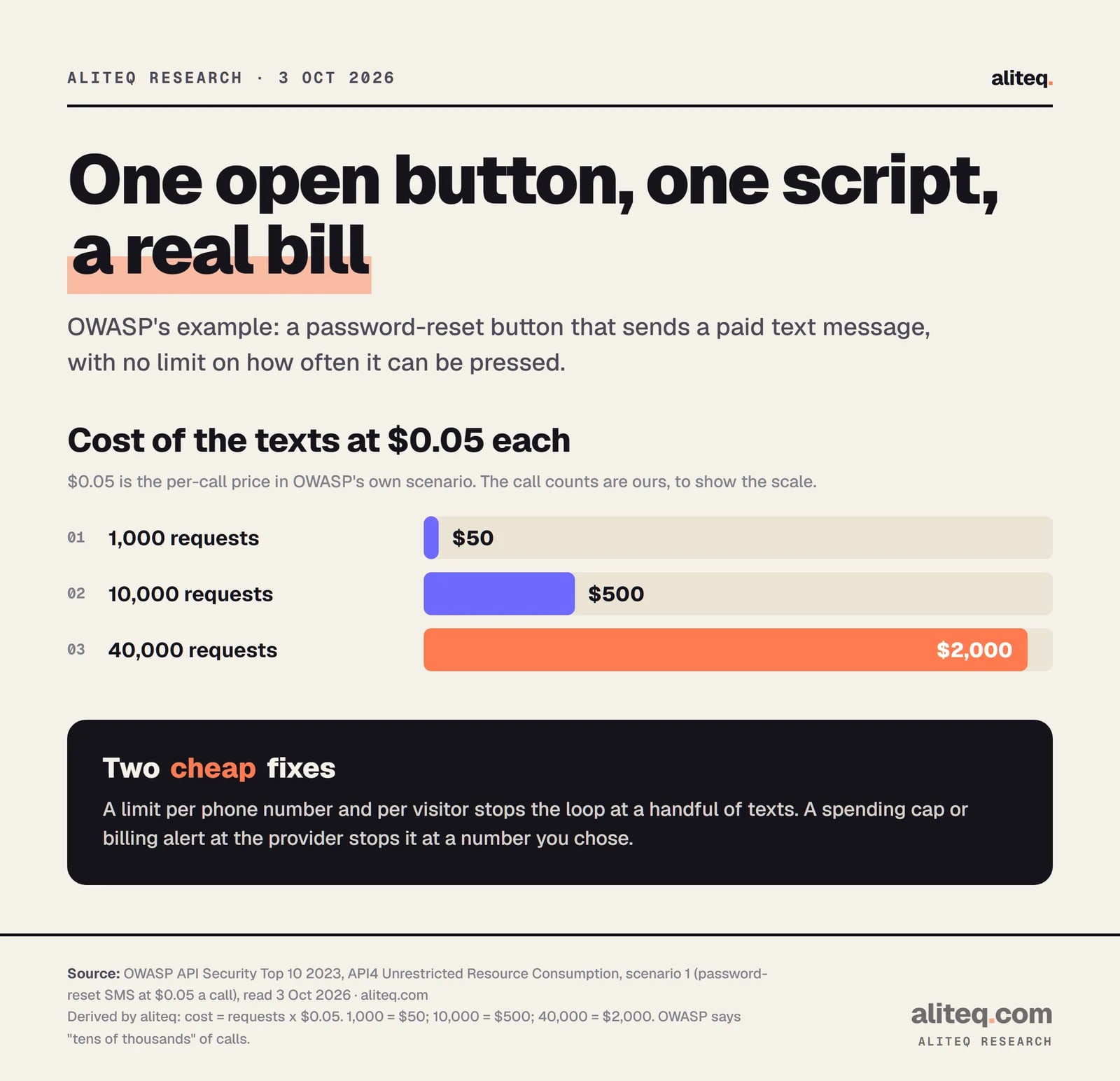
Some actions cost you money every time they run: a text message, an email, an AI model call. If anyone can trigger them without limit, a script can run up your bill. OWASP's own example is a password-reset button that sends a paid text.
OWASP's API security list calls this unrestricted resource consumption. It notes that some services are "paid for per request, such as sending emails/SMS/phone calls". In its example, the provider charges $0.05 a call and a script hits the reset button "tens of thousands of times". OWASP says that leads the company to "lose thousands of dollars in a matter of minutes".
The $0.05 price is OWASP's. The request counts are ours: 40,000 x $0.05 = $2,000. · aliteq research
A second OWASP example is a monthly bill that rose from about US$13 to US$8k because "there were no consumption cost alerts, nor a maximum cost allowance". The same hole shows up in AI apps, where the paid call is a model request. For why that matters, see your API keys are in the browser.
It also happens on the free side. Wiz found that on Moltbook "anyone could register millions of agents with a simple loop and no rate limiting". About 17,000 humans stood behind 1.5 million registered agents.
What does Supabase Auth already limit?
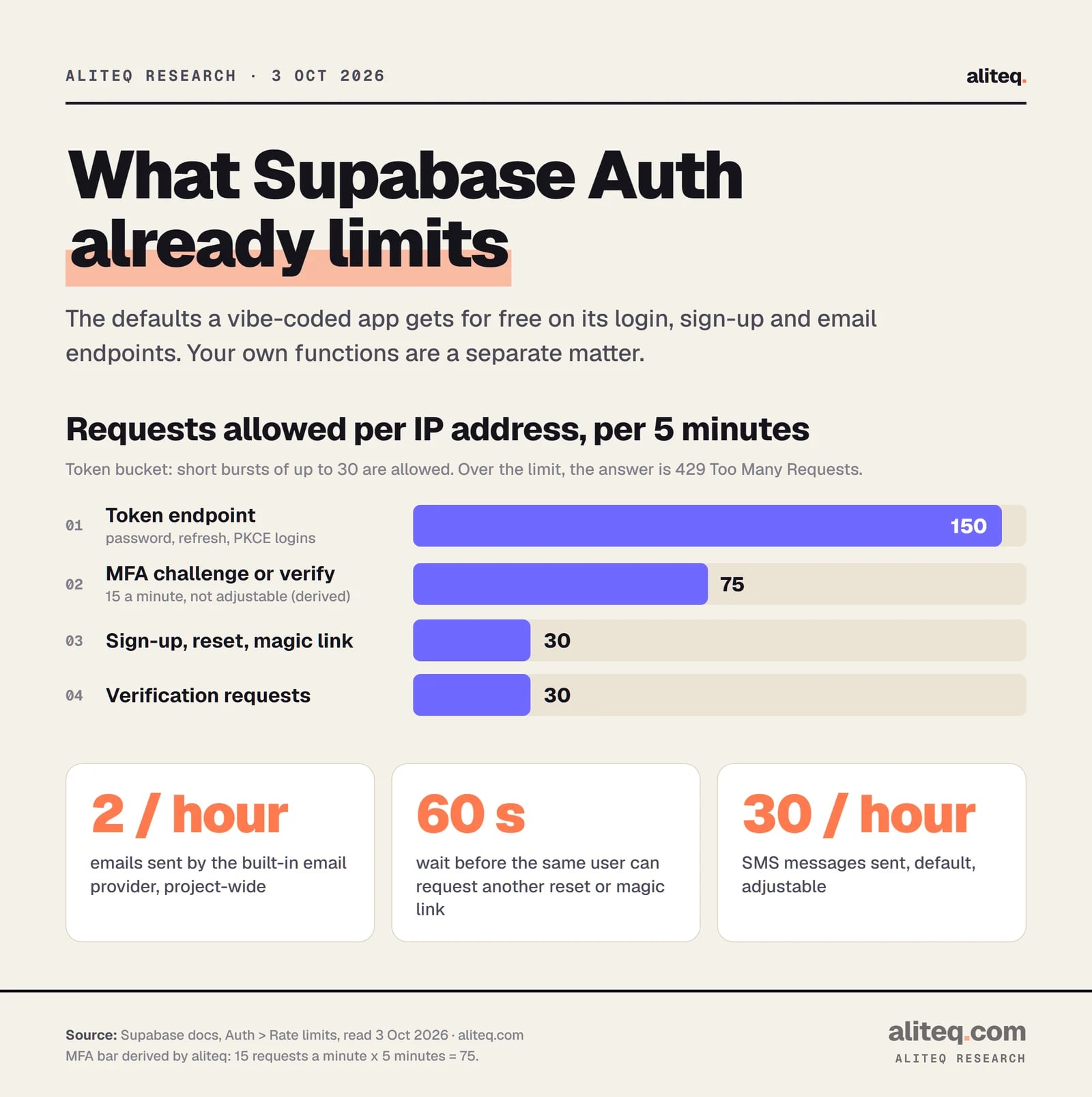
Supabase Auth limits its own login endpoints by IP address. Sign-ups, resets and magic links default to 30 requests per 5 minutes. The token endpoint, which handles password logins, defaults to 150 per 5 minutes. Over the limit, the answer is a 429 error.
Supabase says its Auth service "enforces rate limits on authentication endpoints to prevent abuse". Short bursts of up to 30 requests are allowed, and sustained traffic above the rate is refused. Several limits can be changed in your project under Authentication, Rate Limits.
Supabase's documented defaults, read 3 Oct 2026. The MFA figure is 15 a minute times 5. · aliteq research
Three details matter for a vibe-coded app:
The built-in email is tiny. Supabase's built-in email provider sends 2 emails per hour. That protects you from email floods, and it also means real sign-up emails stall once you have a few users. Custom SMTP lifts the cap, so set your own limit then.
Per-user waits exist too. The same user must wait 60 seconds between password-reset or magic-link requests.
A server in front can break the IP count. Supabase warns that behind a server-side framework or proxy, users may "be rate limited based on the address of the server-side client". It offers an opt-in setting to forward the real IP.
This page covers Auth. Your own tables and functions are a separate matter, and I did not find a default limit described for them there. Ask your tool what protects them.
Can Cloudflare rate limit my app for free?
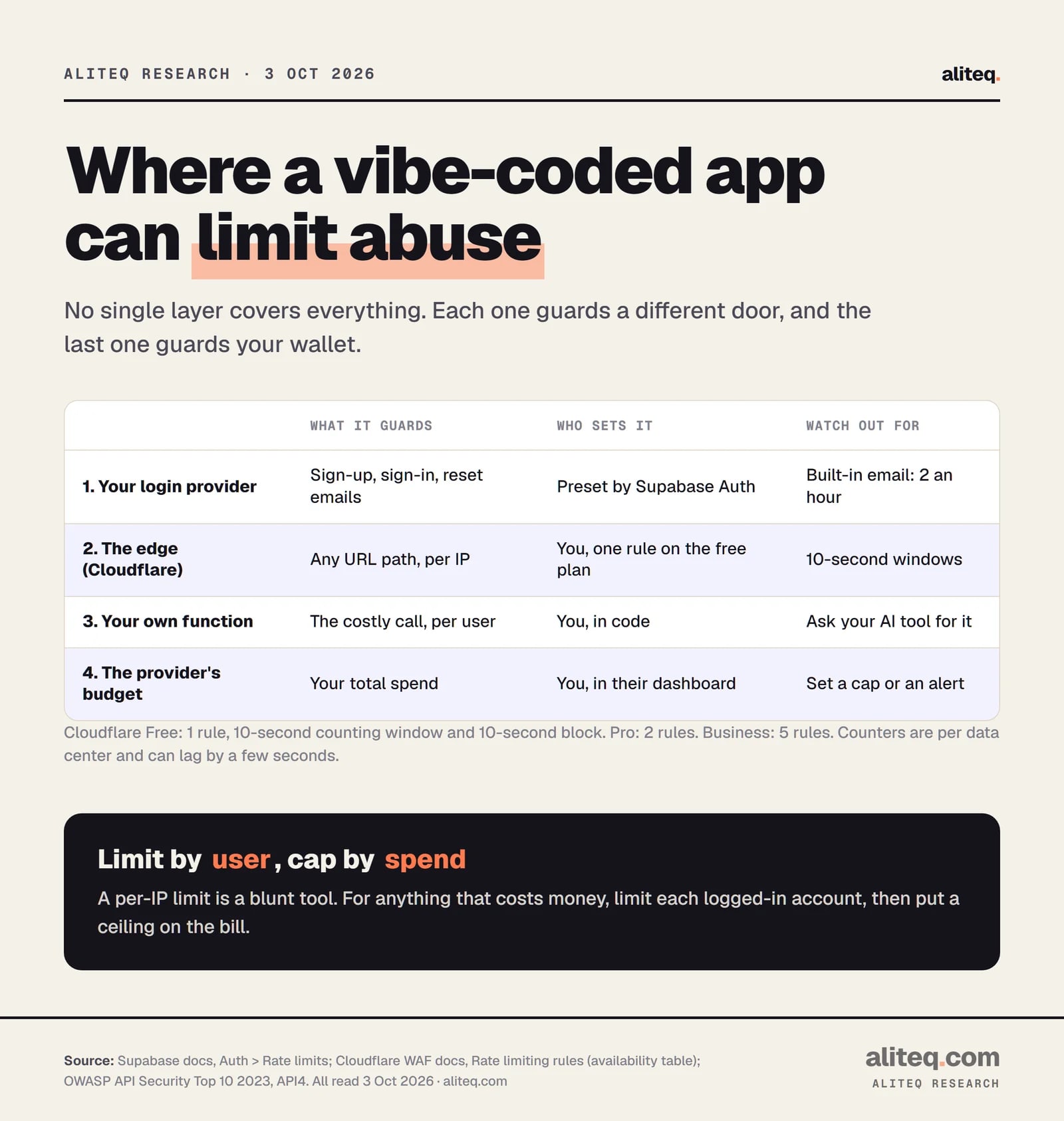
Yes, with tight limits. Cloudflare's free plan allows one rate limiting rule, counted per IP over a 10-second window, with a 10-second block. Pro allows 2 rules and Business 5. It only helps if your domain's traffic goes through Cloudflare.
Cloudflare's docs describe the use plainly: "to protect a login endpoint from brute-force attacks or to cap how many API calls a single client can make in a given time window". A rule has a match (such as a URL path), a request count, a period and an action. The default action when blocking is a 429 response.
Two cautions from the same docs. First, rate limiting rules "are not designed to allow a precise number of requests to reach your origin server", because counters can lag by a few seconds and are kept per data center. Second, applying rules to verified bots "might affect Search Engine Optimization", so keep search crawlers out of a rule meant for your login.
Each layer guards a different door. Only the last one caps what you owe. · aliteq research
Where should you limit the expensive call?
Limit the paid call inside your own function, per logged-in user, not just per IP. An IP limit is a blunt tool: one office or school shares an address, and a script can come from many. A per-account limit follows the person.
OWASP's advice is to limit "how many times or how often a single API client/user can execute a single operation", and it names one-time codes and password recovery as examples. It adds that "some API endpoints might require stricter policies". So the AI button should get a tighter limit than the home page.
Model
Hosting + database
fine for a demo; pauses or throttles when real traffic arrives
Estimated monthly bill$0.21
AI calls (500)$0.21
Hosting$0
Database$0
AI calls are 100% of the bill and they scale with users; hosting is flat until you outgrow a tier. Cheapest lever: fewer calls per action, then a smaller model for the easy steps.
Round teaching tiers, not live prices (assumes ~1,200 input + 400 output tokens per AI call). The lesson links the real pricing pages; this shows the shape of the bill.
Try the calculator to see how a few extra calls per user change a monthly bill. Then ask your AI tool for the limit. A prompt that works in plain English:
"Add a limit to the function that calls the AI model. Each logged-in user gets at most 10 calls an hour. Over that, return a 429 error with a friendly message. Store the counts server-side, not in the browser."
Check the answer by looking for two things. The count must live on the server, and the function must refuse requests from people who aren't logged in. If your tool stores the count in the browser, it protects nothing. How to read AI code without coding shows how to spot that.
Why set a spending cap as well?
A limit can be wrong, forgotten or bypassed by a bug. A spending cap at the provider is the last line: it stops the bill at a number you chose. OWASP says to configure spending limits for every provider, and billing alerts when a cap isn't possible.
OWASP lists a missing "third-party service providers' spending limit" as one of the ways an API is vulnerable. In your AI, email or SMS provider's dashboard, look for words like "usage limit", "budget" or "billing alert". Set the number to what you could stand to lose in a bad week, not what you expect to spend. I did not check each provider's wording, so look for the closest option in yours.
Find every button that costs money per press: sign-up emails, password resets, texts, AI calls.
Ask your AI tool to limit each of those per logged-in user, with the count stored on the server.
Check that login and reset endpoints are covered by Supabase Auth's limits, and raise the built-in email cap only by moving to custom SMTP.
If your domain runs through Cloudflare, add one rule on your login path, and leave search crawlers out of it.
Set a spending cap or billing alert at each paid provider.
Retest by using your own app normally. Real users should never see a 429.
It caps how often one visitor or account can do something in a set time. Go over and the app answers with a 429 "Too Many Requests" error instead of doing the work. It protects your bill and keeps one noisy script from crowding out real users.
Does Supabase rate limit my app automatically?
Its Auth service does, for login, sign-up and reset endpoints, by IP address. The defaults include 30 requests per 5 minutes for sign-ups and 150 per 5 minutes for the token endpoint. Your own functions and tables are not covered by that page, so check them separately.
Can I rate limit with Cloudflare's free plan?
Yes, one rule, counted per IP over a 10-second window with a 10-second block, per Cloudflare's docs. It only works if your site's traffic goes through Cloudflare. Pro allows 2 rules and Business allows 5.
How do I stop a surprise AI bill?
Do two things. Limit the AI function per logged-in user, with the count kept on the server, and set a spending cap or billing alert in the AI provider's dashboard. OWASP recommends both.
Will a rate limit block real users?
It can if set too low, or if many users share one IP address, such as an office. Start generous on public pages and strict on costly actions, and watch for 429 errors in normal use.
Use this in your own page
Teaching this? Paste the live version into your course, blog or answer. Free, no sign-up; the credit line links back here.