Lovable scans your app when you publish, but its own docs say findings don't block publishing by default and the scans can't guarantee security. The six things to check first, where each one lives in Lovable, and how to test them without reading code. Checked on Lovable's docs Nov 3, 2026.
Is my Lovable app safe to share? Not automatically. Lovable runs a Quick security scan every time you publish, but its own docs say "Findings do not block publishing by default", the deeper code scan only runs if you start it, and the scans "cannot guarantee complete security". So before you send the link, do six checks: run the Deep scan and fix what it flags, prove with a second test account that users can't see each other's data, keep the secret key out of the browser, keep API keys in Secrets, protect anything that spends your credits, and choose who can open the app. All of it is settings and questions, not code. Checked on Lovable's and Supabase's own docs on November 3, 2026.
What does Lovable's security scan check, and what does it miss?
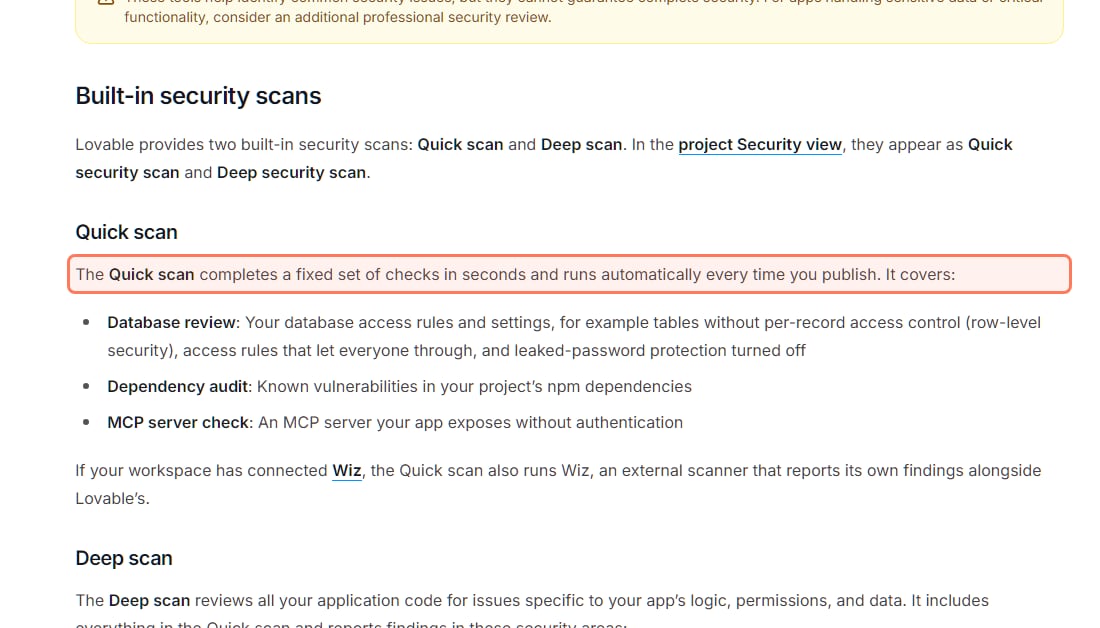
Lovable has two built-in scans. The Quick scan runs in seconds, every time you publish. The Deep scan reads your whole app's code, but you have to start it. Both are free: Lovable's Security view docs say "Both are free and do not consume credits."
What runs when you press Publish: the Quick scan (docs.lovable.dev/features/security, read November 3, 2026). · Screenshot of docs.lovable.dev by aliteq
Lovable's two security scans (Lovable docs, read Nov 3, 2026)
When it runs
Quick scan
Automatically every time you publish
Deep scan
Only when you start it (Security view or chat)
How long
Quick scan
Seconds
Deep scan
Usually 3 to 13 minutes, at most 15
What it checks
Quick scan
Database access rules (tables without row-level security, rules that let everyone through, leaked-password protection off), npm dependencies, an MCP server without sign-in
Deep scan
Everything in the Quick scan, plus your code — who can reach whose data, endpoints anyone can trigger, unsafe input, leaked secrets, payment and sign-in flaws
Cost
Quick scan
Free
Deep scan
Free
Blocks publishing?
Quick scan
No, not by default
Deep scan
No, not by default
Quick scan
Deep scan
When it runs
Automatically every time you publish
Only when you start it (Security view or chat)
How long
Seconds
Usually 3 to 13 minutes, at most 15
What it checks
Database access rules (tables without row-level security, rules that let everyone through, leaked-password protection off), npm dependencies, an MCP server without sign-in
Everything in the Quick scan, plus your code — who can reach whose data, endpoints anyone can trigger, unsafe input, leaked secrets, payment and sign-in flaws
Cost
Free
Free
Blocks publishing?
No, not by default
No, not by default
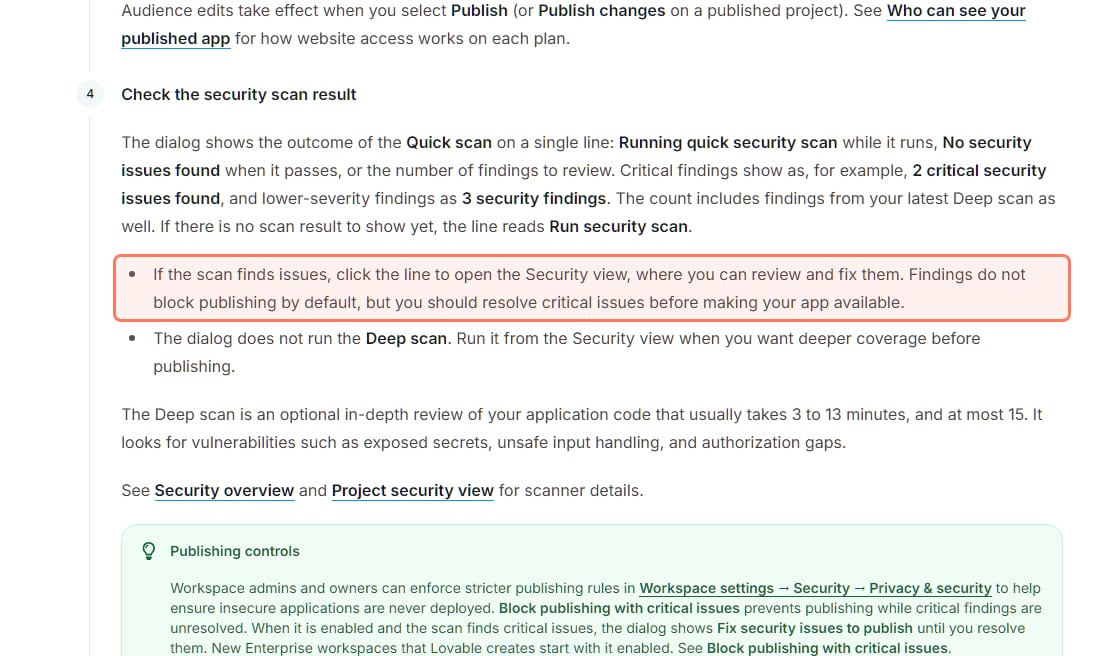
The catch is in the publish dialog. It shows the Quick scan result on one line, and Lovable's publish docs say: "Findings do not block publishing by default, but you should resolve critical issues before making your app available." The same page says "The dialog does not run the Deep scan." (Workspace admins can turn on Block publishing with critical issues in workspace settings; Lovable says new Enterprise workspaces start with it on.)
Step 4 of Lovable's publish flow (docs.lovable.dev/features/publish, read November 3, 2026). The outlined line is the reason this checklist exists. · Screenshot of docs.lovable.dev by aliteq
So step zero, before the six checks: open More → Security in your project, press Run deep scan, and fix every Critical finding. Lovable labels findings Critical, Warning or Info, and the Security view has a Try to fix all button. Fixes come out of 10 free fixes (each comes back 24 hours after you use it), then use credits.
Even then, Lovable is blunt about the limit: its Security overview says the scans "cannot guarantee complete security" and that "You are responsible for ensuring that your app meets the security requirements appropriate for its use case". That's why the checks below ask you to test, not just trust a green line.
Run the Deep scan (More → Security) and fix every Critical finding
Log in as a second test user and confirm you can't see the first user's data
Only the publishable key is in the browser; the secret key never is
Private API keys live in Secrets (More → Settings → Secrets)
Sign-up and AI features can't be hammered into a big credit bill
You know where your 14 days of backups are and you've exported once
The published app is Invite only until you're ready for strangers
1. Can other users see my data?
They can if a table has no Row Level Security (RLS), or has a rule that lets everyone through. RLS is the per-row rule that says "users can only read their own orders". Lovable's docs say it sets these rules up "automatically when it builds features that store user data", and the Quick scan flags tables that lack them. But a rule can exist and still be wrong, which is why you test it.
Tap the switch below to see the difference RLS makes to who can read a simple orders table.
orders.id
owner
item
total
101
alice
Running shoes
$89
102
bob
Desk lamp
$34
103
alice
Headphones
$149
104
carol
Coffee grinder
$59
105
bob
Monitor arm
$72
RLS is off, so every row is readable with the same public key your app sends to every browser — including Carol's, and she never logged in here. This is the exact state the Moltbook and Lovable incidents were found in.
This isn't theoretical for Lovable apps. In March 2025 a researcher, Matt Palmer, scanned 1,645 apps from Lovable's own showcase and reported "303 endpoints across 170 projects" (about 10.3%) with inadequate RLS. It became CVE-2025-48757, which NIST's database describes as an RLS weakness "in Lovable through 2025-04-15". Lovable disputes it; the NVD entry records the dispute as "each individual customer of the Lovable platform accepts a responsibility over protecting the data of their application." Either way, the job lands on you. Palmer also wrote that Lovable's scanner at the time "merely checks for the existence of any RLS policy, not its correctness". Lovable's current docs describe a wider check, including "access rules that let everyone through", plus a Deep scan of your code, but the lesson still holds: a policy existing isn't the same as a policy working.
How to check, no code:
Open More → Database → Manage → Policies. Every table that holds user data should have policies. The view is read-only; to change a rule, ask in the chat.
Make two test accounts. Log in as the first, create a few records. Log in as the second in a private window and try to find them: lists, search, a direct link to the first user's page.
Ask Lovable the questions its own best-practice page lists before going live: is RLS on for all sensitive tables, can users reach other users' private data, does shared data behave as intended, are new tables missing policies?
Paste into your Lovable chat before you publish
Find the gaps
List every table in my database, whether Row Level Security is enabled on it, and every policy on it in plain English. Flag any table with no policy, and any policy that lets anonymous or all signed-in users read or change rows that belong to someone else.
Fix one table
Only allow users to see and change their own rows in the orders table. Shared data stays readable by everyone, but only its owner can edit it.
Supabase's RLS docs put the stakes in one line: "A table in an exposed schema without RLS is readable and writable by any role with a grant on it." The idea, drawn out, is in Row Level Security explained; writing a correct rule is in the RLS policy for a users table, and the "new row violates row-level security policy" error is decoded in this fix. The same setting was behind the Moltbook exposure.
2. Is my Supabase key in the browser a problem?
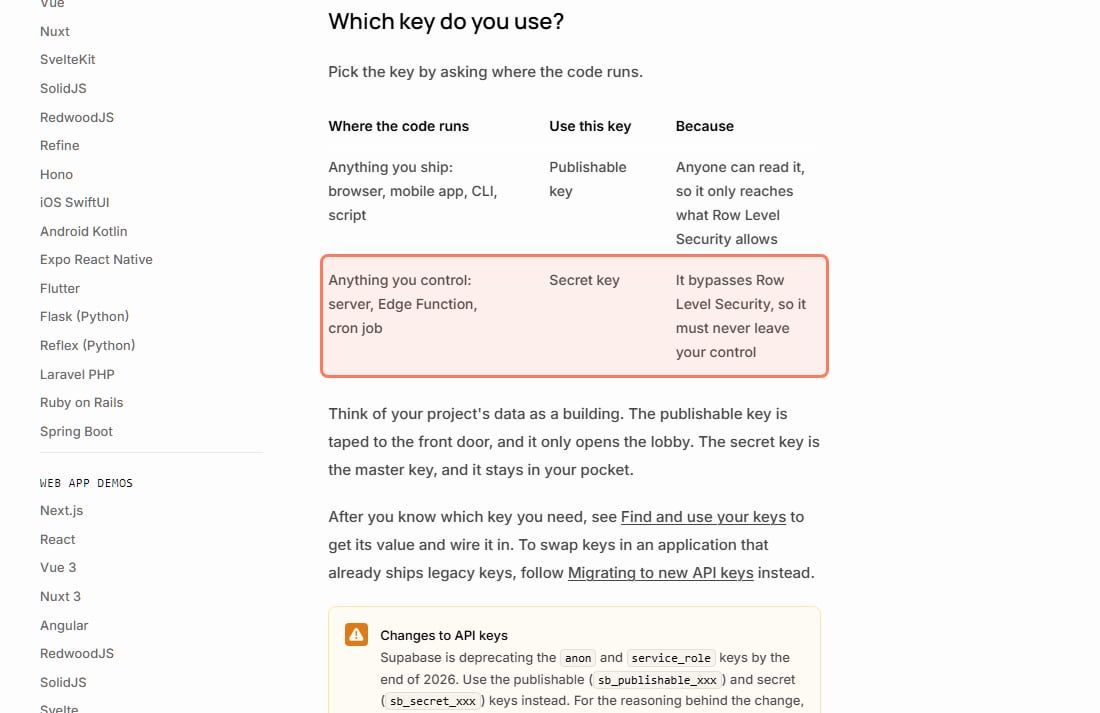
The publishable key in the browser is normal; the secret key in the browser is an emergency. Lovable apps talk to the database straight from the page, so one key has to ship to every visitor. Supabase's API-key docs split it plainly:
Supabase's own rule for its two keys (supabase.com/docs/guides/api/api-keys, read November 3, 2026). · Screenshot of supabase.com by aliteq
Lovable's Secrets docs say the same from its side: values like VITE_SUPABASE_URL and VITE_SUPABASE_PUBLISHABLE_KEY "are embedded into the client bundle at build time and are safe to be public". The secret key (older projects call it service_role) lives only in your backend functions as SUPABASE_SERVICE_ROLE_KEY, and Lovable fills it in for you. Supabase's docs add that RLS policies "never apply to a secret key".
How to check: ask Lovable, "Is a secret, service-role, or private API key anywhere in my frontend code or .env file?" Anything prefixed VITE_ ships to the browser, so nothing private should carry that prefix. If a secret key ever did reach the page, treat it as leaked and replace it at the service that issued it. More in your API keys are in the browser and is an exposed Supabase anon key a problem?
3. Where do I put my API keys in Lovable?
In Secrets: More → Settings → Secrets, or the secure input Lovable opens in the chat when a feature needs a key. Lovable's docs say secrets are "encrypted, injected into your Edge Functions automatically, and never reach the browser", and they're write-only: "after you save a secret, its value can never be viewed again in Lovable, only replaced or deleted."
Lovable now catches keys pasted into the chat: its docs say it "automatically detects API keys pasted into the project chat" and guides you to store them in Secrets instead. The better habit is still the secure input, for two reasons. A key typed into a message is part of your chat history. And since September 9, 2026, Lovable's privacy docs say content from Free and Pro plans, prompts included, "may be used to train, develop, and improve Lovable's AI models" unless you switch off Account settings → Preferences → AI model training. Business and Enterprise workspaces are excluded by default.
One more thing to know: if you turn on Public remixing, Lovable's docs say people "can view your project's source code in their copy. Make sure it does not include passwords, API keys, or personal data." What .env files and environment variables actually are is in environment variables and secrets, explained.
4. Can someone run up my bill?
Yes, if anyone can call the parts of your app that cost money. Lovable charges run credits when your published app runs its built-in backend: database work, AI calls, storage, network. Its usage docs say each AI call inside your app "deducts credits based on the model used and the number of tokens processed", and more calls from more users mean more credits. A script that signs up a thousand accounts or hits your AI chat in a loop is spending your balance.
What Lovable gives you, per its docs on November 3, 2026:
The Deep scan looks for it. One of its areas is "Unauthenticated & abusable endpoints: Functions and routes that anyone can trigger, upload to, or use to send messages without permission."
Usage limits and alerts. On paid plans, workspace owners and admins can cap credits per member, project or workspace and get alerted at a threshold, in Workspace settings → Usage limits & alerts.
A usage view.More → Usage shows what a project spends, by category, so a spike stands out.
A hard stop, of a kind. If the workspace runs out of credits, Lovable says the site stays live but "AI features in deployed apps stop working". That limits the damage, but it also means one abuser can take your AI feature down for everyone.
We couldn't find a built-in per-user rate-limit setting in Lovable's docs, so treat this as a question for your project. Ask Lovable: "Which of my functions can be called without signing in? Which ones call a paid AI model? What stops one account sending 1,000 requests a minute, and can you add a per-user limit?" If the answer is "nothing stops it", that's your finding. Why every public endpoint needs one is in what is rate limiting.
5. Can I get my data back if something breaks?
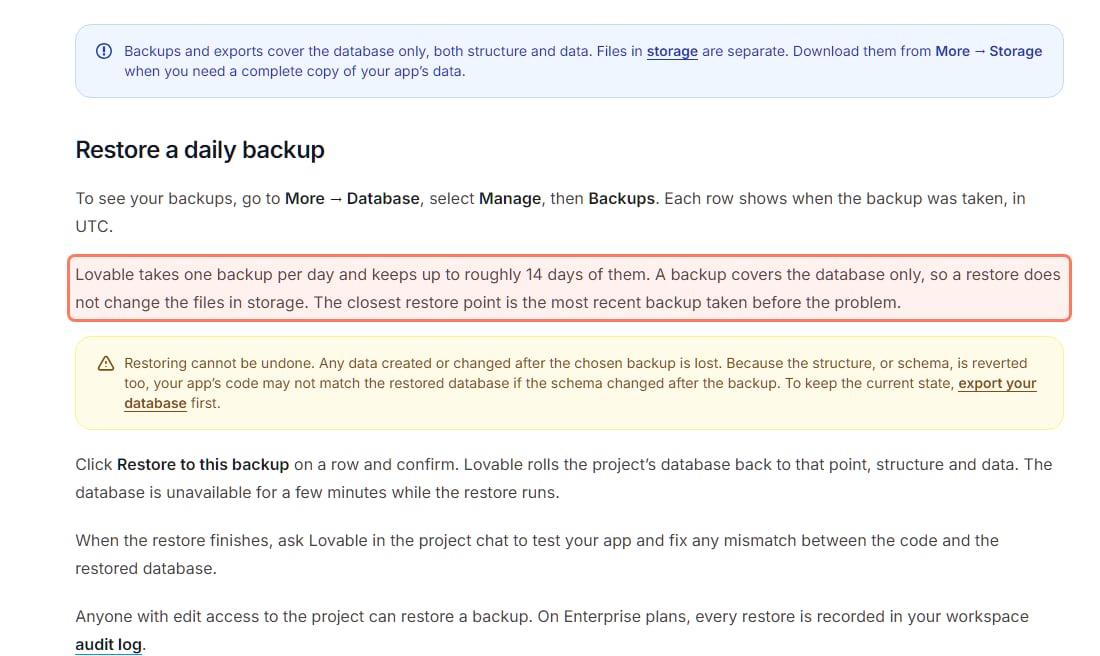
Mostly, if you know the limits. Lovable's backup docs say it "takes one backup per day and keeps up to roughly 14 days of them". You restore from More → Database → Manage → Backups.
Lovable's backup rules (docs.lovable.dev/features/database-backups, read November 3, 2026). · Screenshot of docs.lovable.dev by aliteq
Three limits to know before launch day, all from that page:
Daily, not any moment. "Can I restore my database to any point in time? No." A mistake at 4 p.m. rolls back to the last daily backup, and everything since is lost.
Database only. Uploaded files in storage aren't in the backup; download them from More → Storage.
A restore can't be undone and reverts the structure too, so your app's code may stop matching. Lovable's advice: export first.
How to check: open the Backups list once so you know it's there, and run one export (More → Database → Manage → Settings → Export data) so you've done it before you need it. Lovable allows one export every 24 hours. Why this matters, including the AI agent that deleted a live database, is in backups, and losing everything.
6. Who can see my Lovable app before launch?
You choose that in the publish dialog, and there are two separate settings. Website access decides who can open the published URL; project access decides who can open the editor, your code and chat history. Lovable's docs say "These settings are independent."
Website access: Public means "anyone with the URL can visit". On Free and Pro plans, Invite only lets you grant access to named workspace members or people invited by email. Business and Enterprise add Workspace and Custom audiences.
Project access: since December 2025 every workspace defaults to workspace access, and since April 22, 2026, Lovable says "You can no longer create public projects." Workspace owners can still see every project in the workspace.
How to check: for your first testers, publish to Invite only, run checks 1 to 5 with them, and switch to Public when the Deep scan is clean. Internal tools should never be Public; Lovable's best-practice page says to "Require authentication even for internal tools".
Did Lovable build it the way I asked?
The scans read your code; they don't know what you meant. Wiz's researchers found an exposed Supabase database behind the Moltbook social network (1.5 million API tokens and 35,000 email addresses, per Wiz), and in their February 2, 2026 write-up they put it this way: "today’s AI tools don’t yet reason about security posture or access controls on a developer’s behalf". The habit that closes the gap is to make the tool attack its own work. Ask Lovable "Review my app's security" (a chat review uses credits and also starts a Deep scan), then ask how one user could reach another user's data, and test what it tells you with your two accounts. That loop is in the verify loop, and the tool-agnostic version of this list is the checks before you share any vibe-coded app.
Not automatically. Lovable's Quick scan runs every time you publish, but per its docs (read Nov 3, 2026) findings don't block publishing by default and the Deep scan of your code only runs when you start it. Run the Deep scan, fix Critical findings, test with a second account that users can't see each other's data, and publish to Invite only first.
Does Lovable check security for me?
Partly. The Quick scan checks database access rules, npm dependencies and an unprotected MCP server on every publish; the free Deep scan, which you start from More → Security, reviews your code for access-control, endpoint, input, secret, payment and sign-in issues. Lovable's docs say these tools cannot guarantee complete security and that you are responsible for your app.
Is the Supabase key in my Lovable app's browser code a problem?
The publishable key is meant to be there and is safe only if Row Level Security protects every table it can reach. The secret (service-role) key must never be in the browser, because Supabase's docs say it bypasses Row Level Security. Lovable keeps it in server-side functions.
Where do I put an API key in Lovable?
In Secrets (More → Settings → Secrets), or the secure input Lovable opens in the chat. Secrets are encrypted, write-only and never reach the browser, per Lovable's docs. Never give a private key a VITE_ prefix, because VITE_ values ship to the browser.
Does Lovable back up my app's database?
Yes. Per Lovable's docs (Nov 3, 2026) it takes one backup a day and keeps up to roughly 14 days. You can restore to a daily backup, not to any moment, backups cover the database only (not uploaded files), and a restore can't be undone, so export first.
Can I share a Lovable app with only a few people?
Yes. In the publish dialog, Free and Pro plans can choose Invite only and add people by name or email; Business and Enterprise plans can also limit the app to the workspace or a custom audience.
Do Lovable's security scans cost credits?
No. Lovable's docs say the Quick and Deep scans are free. Fixing findings uses 10 free fixes that come back after 24 hours, then credits; asking Lovable for a security review in the chat uses credits.
This page has no affiliate links or sponsored placements: security advice is only useful if nobody's paying for it. It isn't a substitute for a security review. If your app holds other people's personal data, payments or health information, have a developer or a security professional look at it before launch.
Use this in your own page
Teaching this? Paste the live version into your course, blog or answer. Free, no sign-up; the credit line links back here.