The AI says it's done and the app runs. That tells you almost nothing about whether it's safe. Five checks, each a question you can ask or a screen you can open, on secrets, who's allowed in, user input, invented packages and errors.
The AI told you it's finished, the preview loads, the button works. That proves the happy path works. It says nothing about the unhappy paths, which are where security lives. Veracode's 2025 report, which tested code from over 100 models, says "AI-generated code introduced risky security flaws in 45% of tests." Veracode sells scanning tools, and its full method sits behind a form, so treat 45% as a vendor's warning rather than a measurement of your app. The direction is still fair. Generated code needs a review pass. This page is that pass, built for someone who can't read the code.
It's different from our six-check app security list, which covers settings: database rules, admin pages, webhooks. This one covers the code itself, and you can run it again every time the AI changes something. If you'd rather practice spotting changes first, try reading an AI diff without coding.
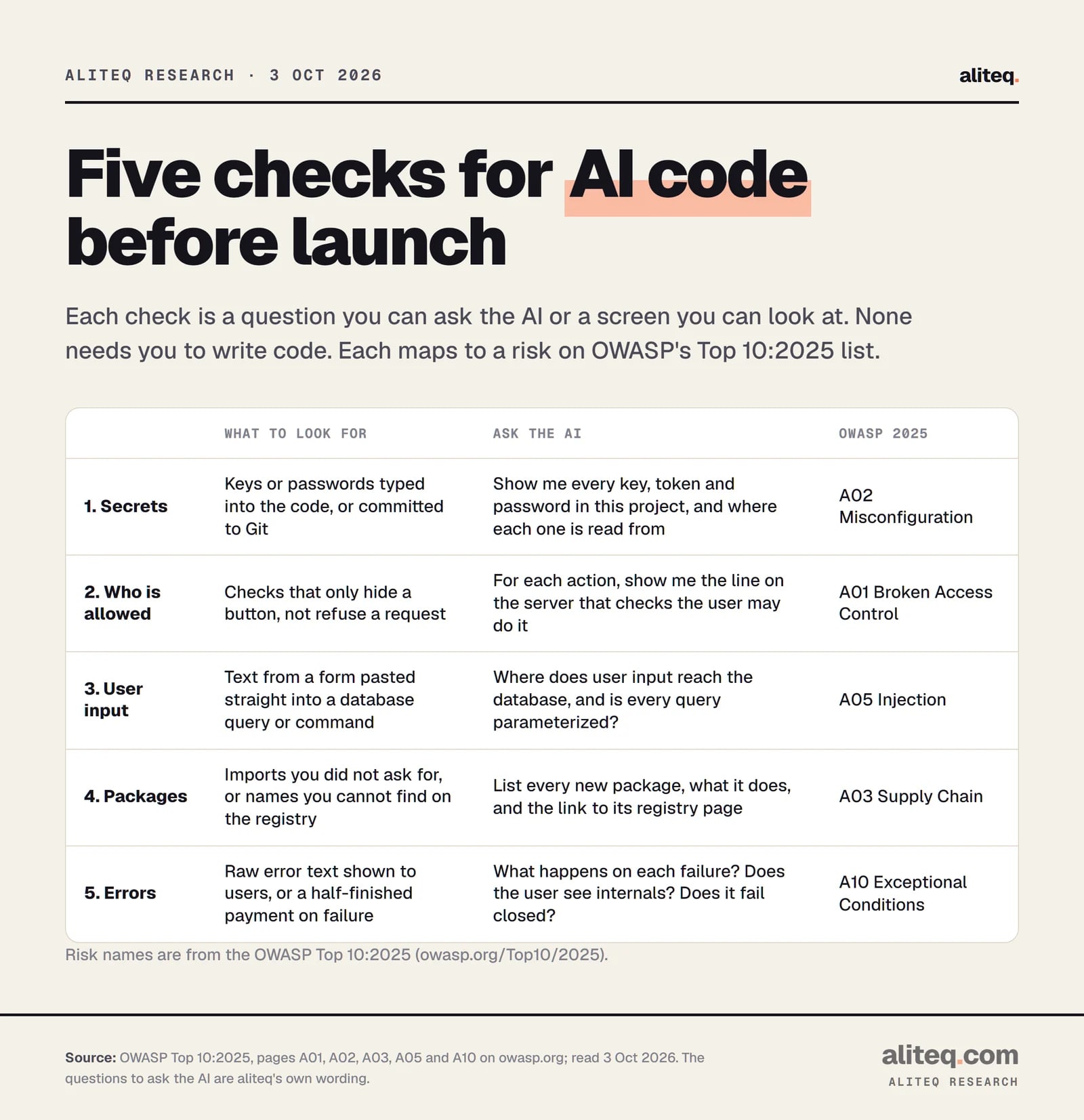
The five checks, what to look for, and the question to ask. Risk names are from OWASP Top 10:2025. · aliteq research
Check 1: Look for secrets in the code
Answer first: a secret is any key, token or password that proves your app is allowed to do something. If one is typed into a file, anyone who sees the file can use it. Ask the AI to list every secret and where each is read from. The right answer is "from an environment variable," never "it's in the file."
OWASP's misconfiguration page says to use platform-provided access mechanisms "instead of embedding static keys or secrets in code, configuration files, or pipelines." In plain English: keys belong in your host's settings screen, not in your files.
Ask your AI tool: "List every API key, token and password this project uses. For each, show where the value comes from. Flag any that are written directly in a file."
Then check the repository, not just the files. Git remembers everything. A key that was deleted last week is still in the history. GitHub's secret scanning "scans your entire Git history on all branches of your repository for hardcoded credentials." It runs automatically and free on public repositories. For private ones, GitHub's docs list it under paid Secret Protection for organization repositories, so check what your plan includes.
Push protection is the better habit. GitHub says it "blocks pushes that contain secrets before they reach your repository." Push protection for users is on by default on GitHub.com, but it only stops pushes to public repositories. Repository-level push protection is off until an admin enables it.
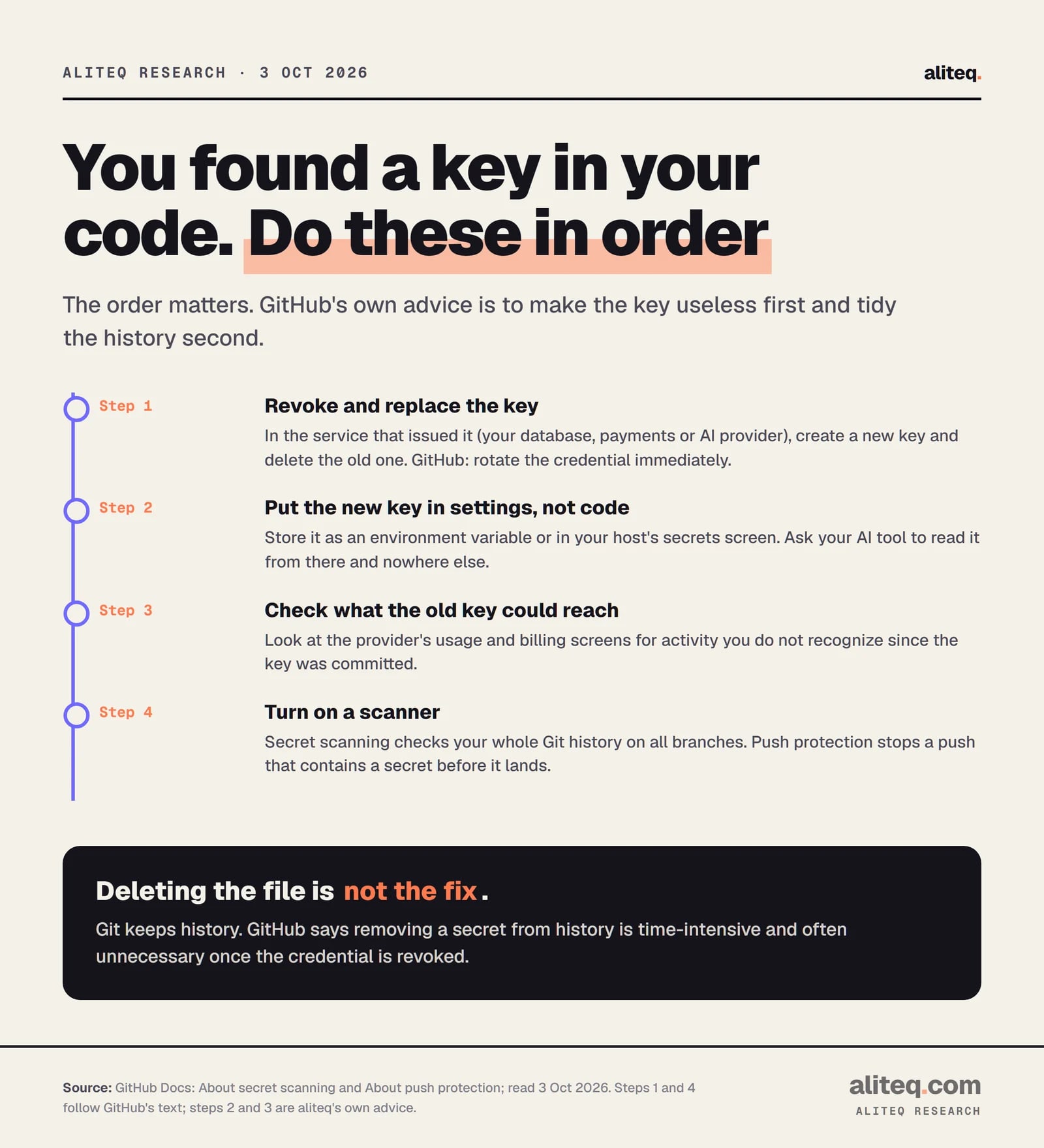
Revoke first. GitHub's docs say removing a secret from history is often unnecessary once the credential is revoked. · aliteq research
Check 2: Make sure the server decides who's allowed
Answer first: a permission check only counts if it runs where the user can't change it, which is the server or the database. A hidden button is decoration. Ask the AI to show you, for every action, the exact place the server confirms the user is allowed. If it can't point to one, that action is open.
OWASP ranks broken access control first and says "100% of the applications tested were found to have some form of broken access control." Its prevention advice is blunt: "Access control is only effective when implemented in trusted server-side code or serverless APIs, where the attacker cannot modify the access control check or metadata." And: "Except for public resources, deny by default."
The classic version is one account reaching another account's data by changing an ID in the address. OWASP lists "viewing or editing someone else's account by providing its unique identifier."
Ask your AI tool: "For each action a user can take, show me the server-side check that the logged-in user owns or may access that record. What happens if user A asks for user B's record?"
Answer first: anything a visitor types is untrusted, including form fields, search boxes and URLs. The danger is when that text is glued into a database query or command, so the system treats it as instructions. The safe pattern keeps data and commands separate. Ask the AI where input reaches the database and whether every query is parameterized.
OWASP's definition: injection "allows untrusted user input to be sent to an interpreter (e.g. a browser, database, the command line) and causes the interpreter to execute parts of that input as commands." Its advice: "The best means to prevent injection requires keeping data separate from commands and queries," with a safe API that "provides a parameterized interface" as the preferred option. It also warns that server-side validation is "not a complete defense."
You don't need to know the syntax. You need to ask the question and read the answer for the words "parameterized" or "prepared statement," or the name of the database library's normal query method.
Ask your AI tool: "Show me every place user input reaches the database or a system command. Is any query built by joining strings together? Rewrite any that are."
If your app passes user text to an AI model, that's a different risk. OWASP points to its separate LLM Top 10 for prompt injection, which this page doesn't cover.
Check 4: Verify every package really exists
Answer first: when an AI adds a library, it sometimes names one that doesn't exist. That's harmless until someone registers that name with bad code in it. Before you install anything new, look up each package on its registry page and confirm the name, the publisher and the download history. It takes thirty seconds a package.
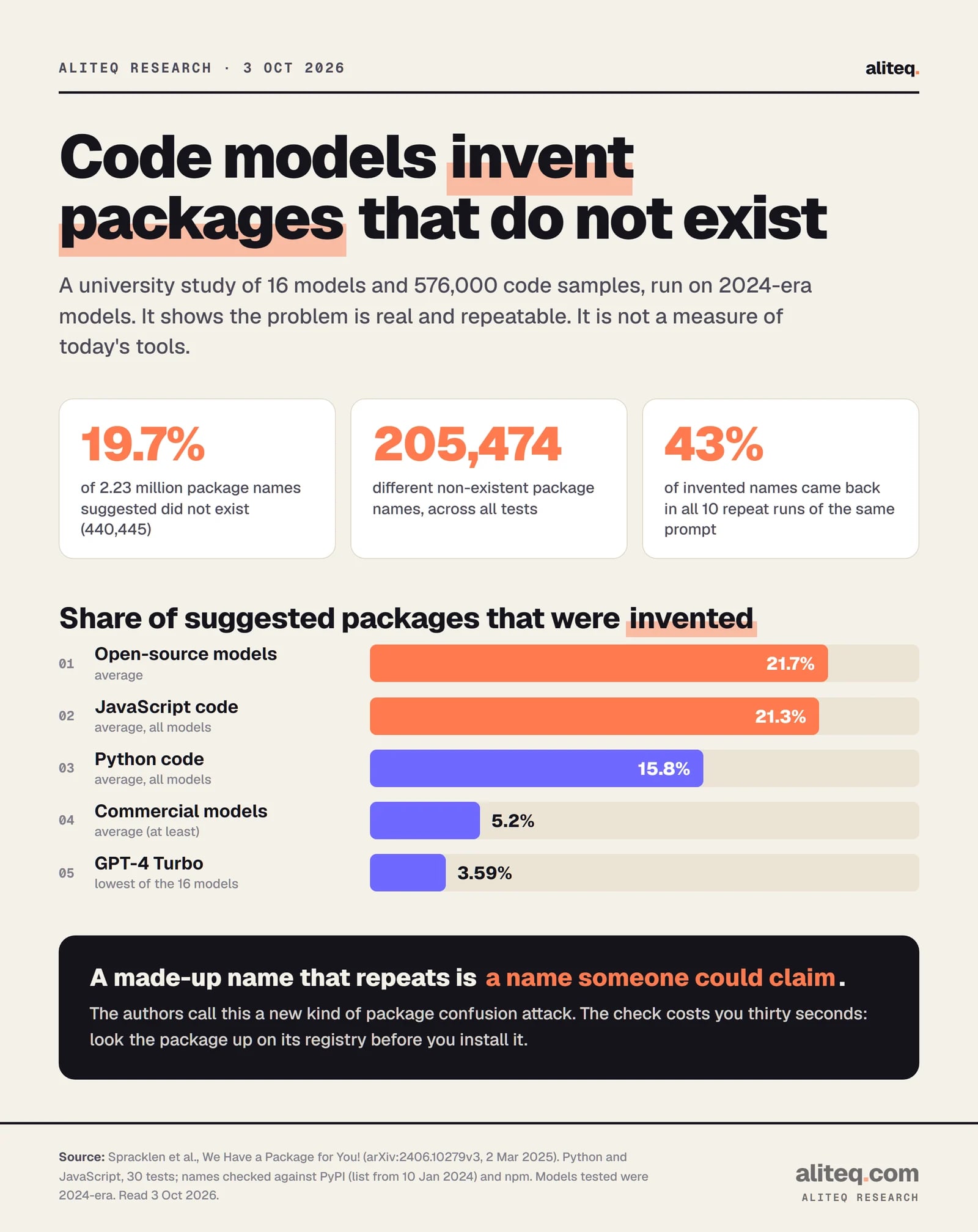
This isn't a guess. A University of Texas at San Antonio-led study (arXiv, v3 March 2025) generated 576,000 code samples across 16 models in Python and JavaScript. Of 2.23 million packages suggested, 440,445 (19.7%) did not exist, spanning 205,474 distinct invented names. Commercial models averaged at least 5.2% invented, open-source models 21.7%. JavaScript averaged 21.3% against 15.8% for Python.
Two caveats matter. The models tested were 2024-era, and package lists were checked against early-2024 snapshots, so this is not a rate for today's tools. And the repeat finding is the useful one: of invented names re-tested ten times, 43% came back every time, 39% never did. A name that repeats is one an attacker could plan around. The authors call it "a novel form of package confusion attack." We describe the risk only, not how it's exploited.
OWASP's supply chain page gives the control: "Only obtain components from official (trusted) sources over secure links," and "Reduce attack surface by removing unused dependencies." It also warns that "No single person should be able to write code and promote it all the way to production without oversight from another human being." That human is you.
Ask your AI tool: "List every package you added or changed in this session, with one line on what each does and its page on npmjs.com or pypi.org. Remove any we don't need."
Then open each link. A real, maintained package has a history, a repository and a publisher you can see. One more thing: npm audit is worth running, but npm's own docs say it asks the registry "for a report of known vulnerabilities." It won't tell you that a name is a lookalike of the one you meant.
From Spracklen et al., run on 2024-era models. It shows the problem is real, not what today's tools do. · aliteq research
Check 5: Look at what happens when things fail
Answer first: generated code is written for the happy path. Ask what happens when the database is down, a payment fails halfway, or a visitor sends garbage. Two things must be true: users see a plain message with no internals, and a failed step undoes the steps before it. OWASP calls this failing closed.
OWASP's page on exceptional conditions says "Any time an application is unsure of its next instruction, an exceptional condition has been mishandled." It names a scenario that applies to quick builds: showing "the full system error to the user" leaks details an attacker can learn from. And for anything with several steps: "roll back every part of the transaction ... (also known as failing closed)."
Its list also includes a line that's a money point for vibe coders: "Nothing in information technology should be limitless, as this leads to ... extraordinary cloud bills." Limits on how often someone can call an expensive feature belong here. See rate limits, explained.
Ask your AI tool: "What does the user see when each step fails? Does any error message show file paths, database details or keys? If a payment or save fails halfway, what's rolled back?"
Then try it yourself, on your own app, in a test account: submit an empty form, a very long entry, and a repeat click. Read the message. If it reads like a stack trace, ask for a plain one.
Run it every time, in this order
Answer first: do the checks after every meaningful change, not once. The cheapest order is secrets, packages, permissions, input, then errors, because the first two can be done from a list and a search box. Keep the five questions in a note and paste them to your AI tool as a standing review prompt.
Secrets: ask for the list of keys and where each is read from. Confirm none are in files or Git history.
Packages: ask for the list of new libraries with registry links. Open each one.
Permissions: ask where the server checks each action. Test with two accounts.
Input: ask where user text reaches the database. Look for 'parameterized'.
Errors: break things on purpose in a test account and read what comes back.
One limit on this approach: you're asking the same kind of system that wrote the code to review it. It can miss its own mistakes. So treat its answers as leads to confirm, not proof. Where the answer matters most, such as payments, other people's personal data or health information, pay a developer or a security professional for a few hours of review before launch. A checklist narrows the risk. It doesn't remove it.
Can I review AI-written code without knowing how to code?
Mostly yes. The five checks are questions to put to your AI tool plus screens you can open: your host's settings, your repository's security tab, a package's registry page, and a test account. You're confirming answers, not reading syntax. For anything involving payments or personal data, add a human reviewer.
How do I know if the AI invented a package?
Look it up on the registry (npmjs.com for JavaScript, pypi.org for Python). A real package has a publisher, a repository link and a download history. A study of 16 models found 19.7% of suggested packages did not exist, though it used 2024-era models, so it isn't a current rate.
I found an API key in my code. What now?
Revoke it and issue a new one first. GitHub's docs say to "rotate the affected credential immediately," and that scrubbing Git history is often unnecessary once the key is revoked. Then move the new key into your host's settings and check the provider's usage screen for activity you don't recognize.
Is GitHub secret scanning free?
On public repositories, yes, per GitHub's docs: it "runs automatically for free." For private repositories in organizations it needs GitHub Secret Protection. Push protection for users is on by default on GitHub.com but only guards public repositories. Check your own plan.
Does npm audit catch fake packages?
Not by design. npm's docs describe it as asking the registry for "a report of known vulnerabilities." A made-up or lookalike name has no known vulnerabilities yet, so verify new packages by hand on the registry.
Should I ask the AI to review its own code?
It's a good first pass, and the questions above are written for it. But it can repeat its own blind spots, so confirm the answers yourself, and use a human reviewer when real money or other people's data is involved.