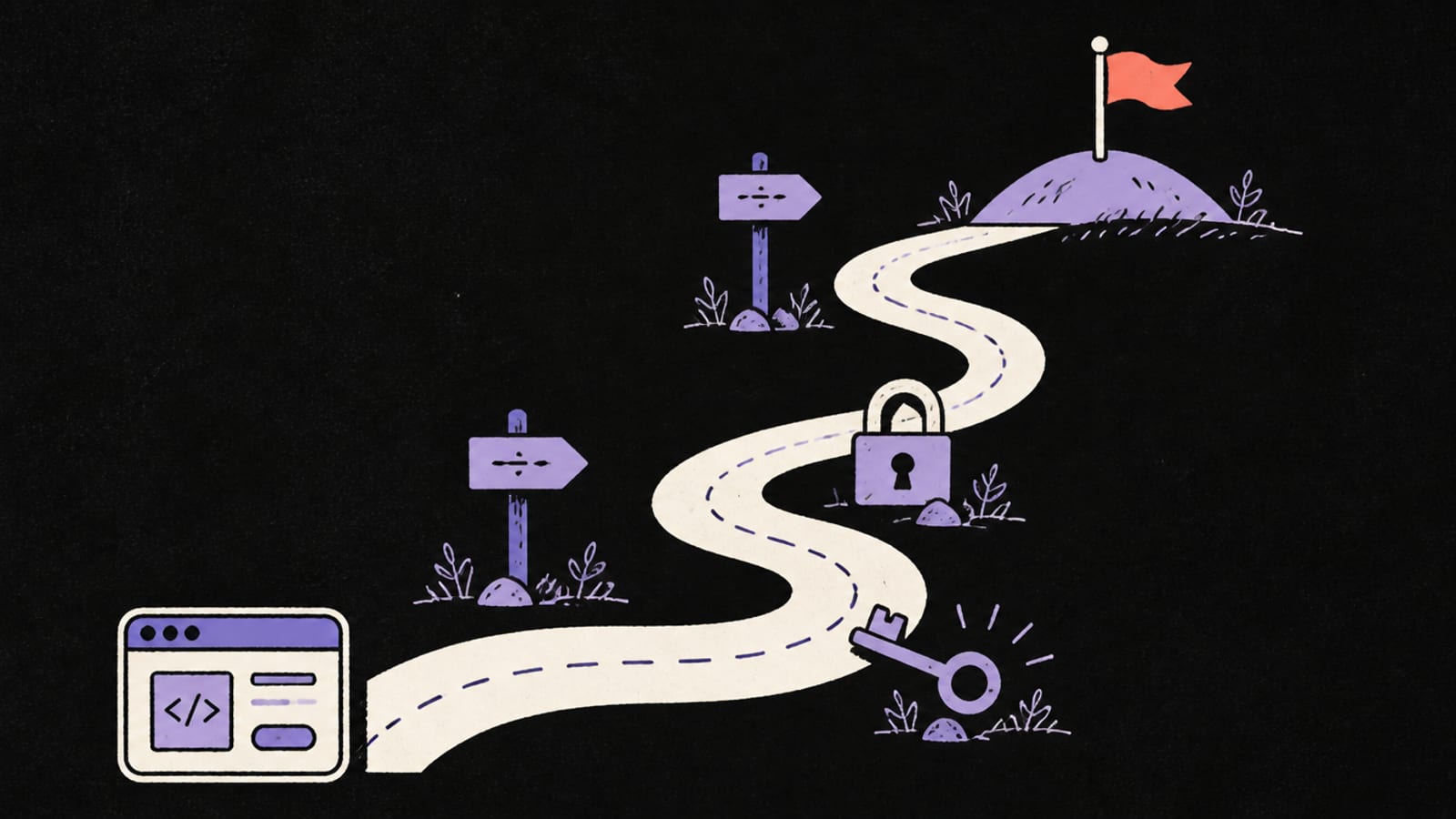
Expired certificates, free-plan limits, paused databases, too many connections and no backup. None are glamorous, all are in the vendors' own docs, and one gave our own site error pages for days.
I build with AI tools the same way you do. The apps I ship are not usually broken by hackers. They are broken by a number I never looked up. This page lists the five numbers, what each failure looks like from the outside, and the one check that catches it. If you want the security side, that is a different list: the 6 security checks. This one is about staying up.
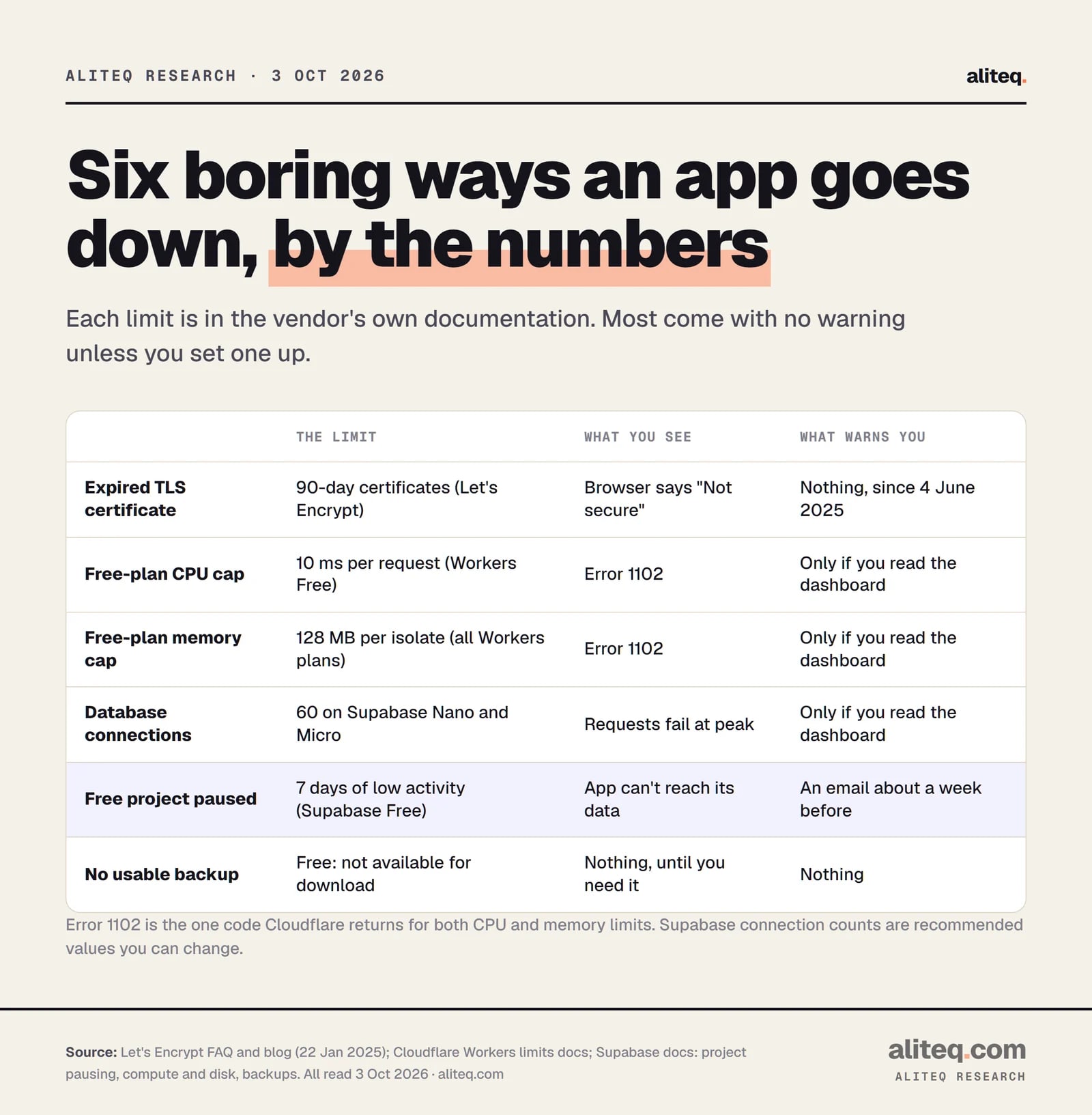
Six limits, where each one lives, and what warns you. · aliteq research
1. The TLS certificate that quietly expires
Short answer: A TLS certificate is the file that lets your site load over HTTPS. Let's Encrypt certificates last 90 days. If renewal fails and nobody is told, browsers show a full-page "Not secure" warning and visitors leave.
Most hosts renew certificates for you, so this feels like someone else's job. It becomes yours when you bring your own domain, run your own server, or the renewal job breaks without noise. Let's Encrypt says its default certificates are valid for 90 days and recommends renewing every 60. Until 4 June 2025 it also emailed you before expiry. It ended that service, and its own announcement points to third-party monitors instead, naming one that is free for up to 250 certificates.
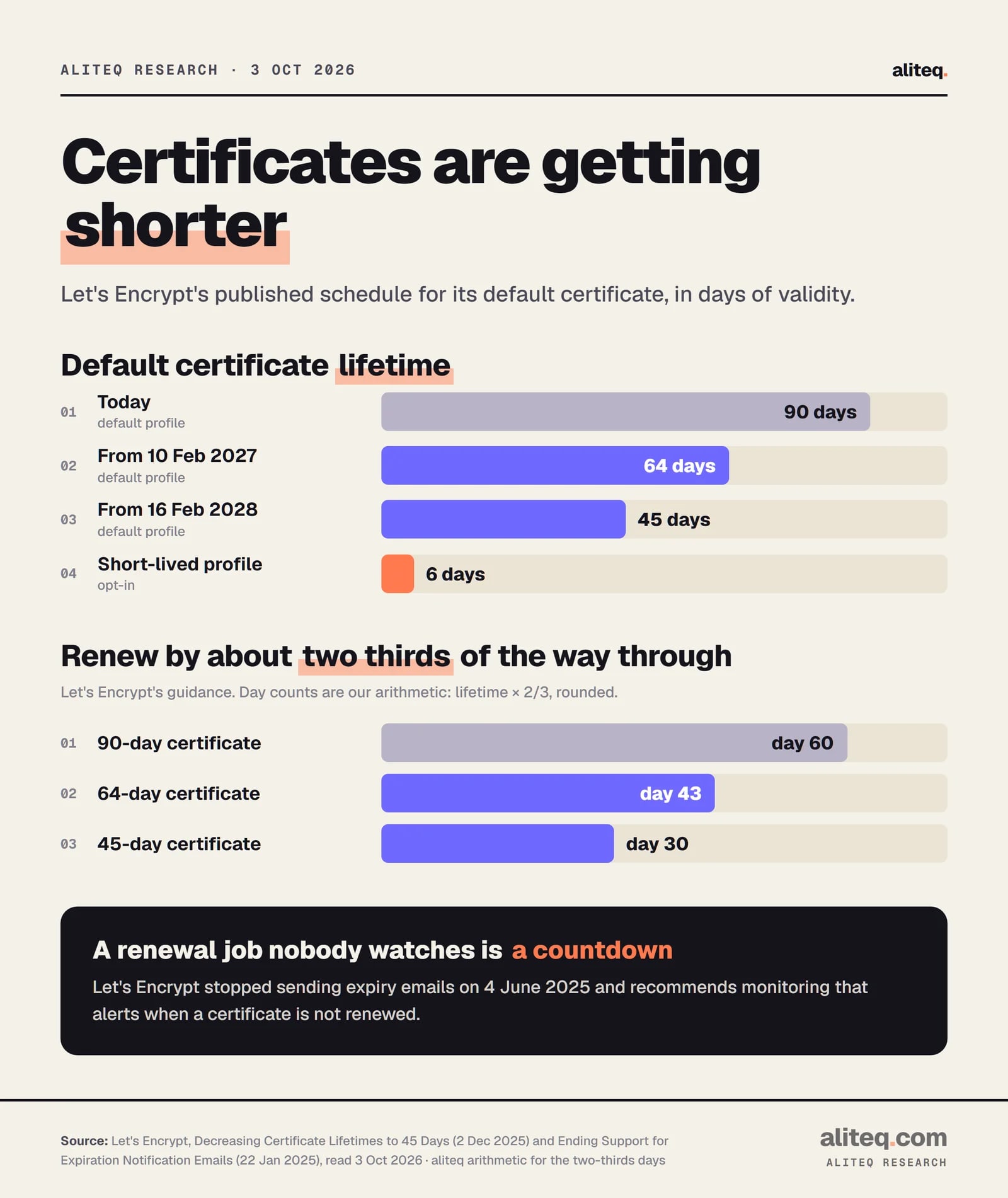
Certificates are also getting shorter. Per Let's Encrypt's published schedule, the default moves to 64 days on 10 February 2027 and to 45 days on 16 February 2028. A shorter life means a broken renewal hurts sooner. Their blog says a hardcoded 60-day renewal "will no longer be sufficient" and recommends renewing about two thirds of the way through. That is day 60 for 90 days, about day 43 for 64 and day 30 for 45 (our arithmetic).
Let's Encrypt's published schedule, and the renewal point it recommends. · aliteq research
What it looks like: a browser warning on your own domain, while the app itself is fine.
The check: ask your AI tool, "Who renews my certificate, and what tells me if that fails?" Then add an expiry alert from any monitor that checks certificates.
The quote that matters: Let's Encrypt recommends "sufficient monitoring in place to alert appropriately if certificates aren't renewed when expected."
2. The free plan runs out of CPU, memory or requests
Short answer: Free hosting plans cap how much work one request may do. On Cloudflare Workers Free that is 10 ms of CPU and 128 MB of memory, plus 100,000 requests a day. Go over and your visitor sees an error page, not a slow page.
Cloudflare's limits page lists the Free plan at 100,000 requests a day, 10 ms of CPU time per request and 128 MB of memory. Waiting on a database or an outside API does not count as CPU. Heavy work does. Cloudflare says an average Worker uses about 2.2 ms per request, while pages that render on the server or parse big payloads often use 10 to 20 ms. Break the CPU or memory limit and the visitor gets Error 1102, "Worker exceeded resource limits". Break the daily request limit and they get Error 1027.
This is not theory for me. aliteq.com is vibe-coded and runs on Workers, and it hit these limits twice.
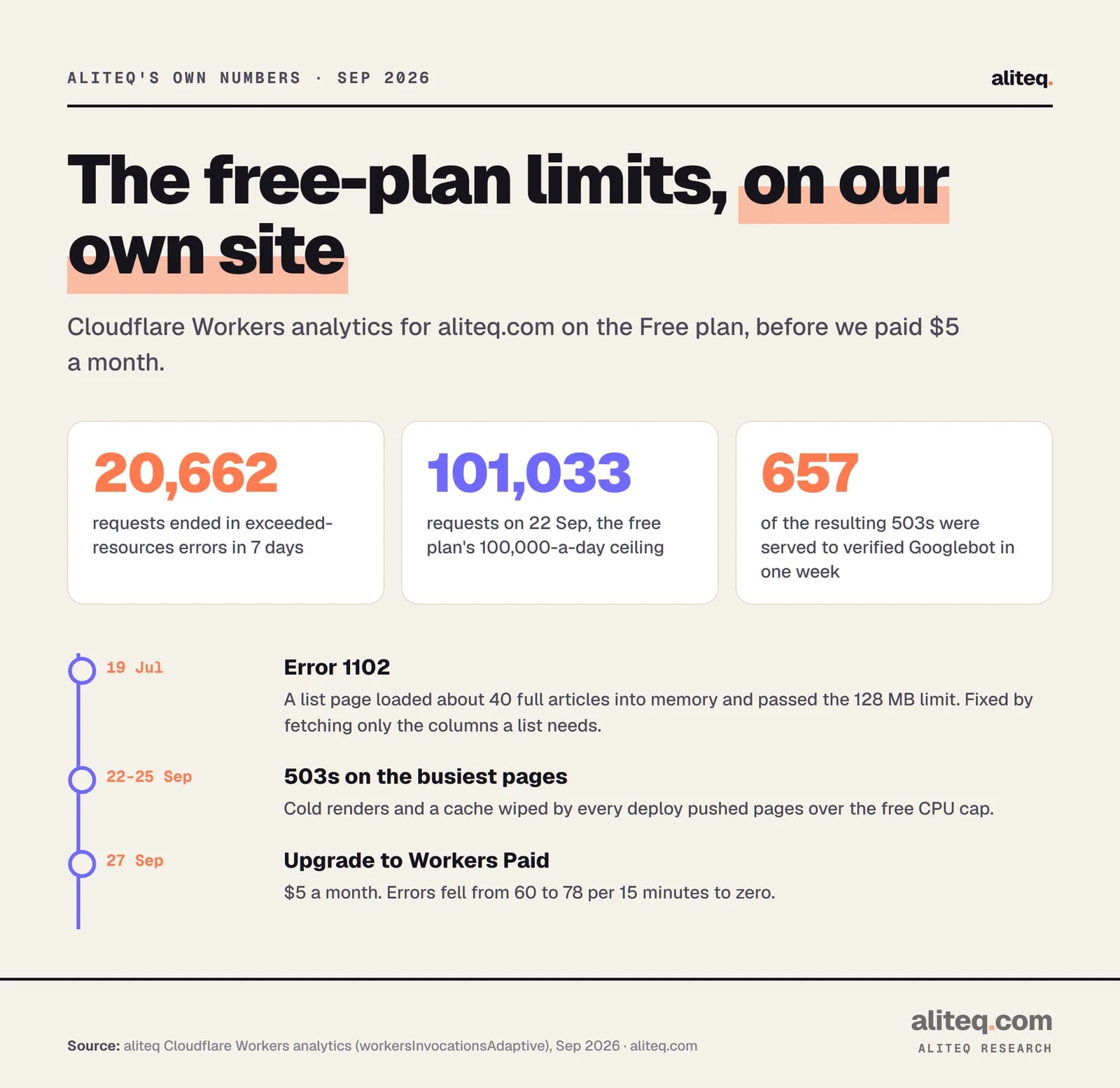
19 July 2026: our homepage loaded the full text of about 40 articles to draw a list of cards. That blew past the 128 MB memory limit and the site threw Error 1102. The fix was to fetch only the columns a card needs.
22 to 25 September 2026: on the Free plan our Worker returned 20,662 exceeded-resources errors in seven days. Our busiest day, 22 September, was 101,033 requests, right at the 100,000 ceiling. Those errors showed up as 503s on our main pages, and verified Googlebot received 657 of them in one week. We found it by reading the Workers analytics, not because anything alerted us.
27 September 2026: we upgraded to Workers Paid, $5 a month. The errors went from 60 to 78 per 15 minutes to zero right after.
Our own numbers from Cloudflare Workers analytics, September 2026. · aliteq research
The lesson is not "pay for hosting". It is that a free plan has a ceiling, and the ceiling arrives on the day you get attention. On Workers Paid, Cloudflare's docs say the default CPU limit is 30 seconds per request, configurable up to 5 minutes, and there is no daily request cap. Memory stays at 128 MB on both plans.
What it looks like: random error pages on your busiest or heaviest routes, while a quiet page works.
The check: find the "errors" or "invocation statuses" view in your host's dashboard and look at it once a week. Ask your AI tool, "Which of my pages loads the most data into memory?"
Short answer: Supabase pauses Free Plan projects that show low activity over a 7-day period. Your app then cannot reach its data until you resume it. Paid projects are not paused.
This one fits a pattern with vibe-coded side projects: you build it, share it, then get busy. Supabase's docs say a Free project is considered inactive if it does not get enough user database activity over the past week, and that a few user requests a day is typically enough to avoid a pause. It sends a warning email about a week before and another when the pause happens. A paused project can be restored from the dashboard for up to a year after pausing (the docs said 90 days until recently; they say one year as of 4 October 2026). The docs also say Pro and higher plans are not paused for inactivity.
The email is the only warning, and it goes to the project owner. If that is an address you never read, the first sign is your app showing empty pages or errors.
What it looks like: a working app that suddenly cannot load any data.
The check: open the project's owner email once and make sure Supabase's pausing warning would reach you. If the app matters, the docs' own fix is the Pro Plan.
Short answer: Every database allows only so many open connections at once. Supabase's smallest compute sizes (Nano on Free, Micro on paid plans) list 60 direct database connections and 200 pooler clients. Past the limit, new requests fail at peak.
A connection is an open line between your app and the database. A busy app, or one that opens a fresh line on every request, can use them all up. Supabase's compute docs list 60 maximum database connections and 200 pooler clients for both Nano and Micro, and say these are recommended values you can change. Its connection guide says a serverless or edge function should use the shared pooler in transaction mode, because those environments "open many short-lived connections". A long-running server can connect directly.
So the right connection string depends on where your code runs. AI tools often paste in the first one they find. That works in testing with one user and fails with fifty.
What it looks like: the app is fine on a quiet afternoon and throws database errors when a post gets shared.
The check: ask your AI tool, "Does my backend run as a long-lived server or as serverless functions, and which Supabase connection string is it using?" Match it to Supabase's connection guide.
Short answer: On Supabase, daily backups are for paid plans: 7 days on Pro, 14 on Team. Free projects should export their own data. A backup that does not exist cannot fail visibly, so nobody notices until the day you need it.
Supabase's backup docs say Pro Plan projects can access the last 7 days of daily backups, Team 14 and Enterprise up to 30. For Free projects they recommend regular exports with the CLI db dump command and off-site copies, and the production checklist says backups are not available for download on Free. Two more details matter. Backups do not include files you stored through the Storage API, only the metadata. And deleting a project permanently removes its data and all backups.
That last one is the scary combination for a vibe coder: an AI agent with the right permissions, a request to "clean up the old project", and no copy anywhere else.
What it looks like: nothing, until data is gone. Then it is final.
The check: write down where a copy of your data lives other than the project itself. If the answer is "nowhere", run an export today and put it somewhere that is not the same account.
The test that counts: a backup you have never restored is a guess. Restore it once into a scratch project.
The one alert to set today
You do not need a monitoring stack. You need to find out before your visitors do. Here are the smallest useful versions of each check.
Add an expiry alert for your domain. Let's Encrypt no longer emails you.
Look at your host's errors page. Error 1102 on Cloudflare means a CPU or memory limit.
On Supabase Free, make sure the 7-day pause warning email reaches a real inbox.
Serverless functions use the pooler in transaction mode. Servers can connect directly.
Export the database and storage files, then restore once into a scratch project.
If you only do one, set the uptime alert. An external checker that loads your homepage and emails you when it fails will catch an expired certificate, a free-plan error page and a paused database, because all three break the page. Let's Encrypt lists certificate monitors on its Monitoring Service Options page, which is a place to start. We have not tested any of them. For the rest of the path from a working app to a live one, read how to ship a vibe-coded app.
Quick answers
Why did my vibe-coded app show "Not secure" when nothing changed?
Most likely the TLS certificate expired or failed to renew. Let's Encrypt certificates last 90 days and the service stopped sending expiry emails on 4 June 2025, so a broken renewal can go unnoticed until browsers warn visitors.
What is Cloudflare Error 1102?
It means a Worker exceeded its resource limits. Cloudflare uses the same code for exceeding the CPU time limit and the memory limit. On the Free plan the CPU limit is 10 ms per request and memory is 128 MB per isolate.
Will my Supabase free project be deleted if it pauses?
No, it is paused, not deleted. Supabase's docs say you can restore a paused project from the dashboard for up to one year after it was paused. Paid projects are not paused for inactivity.
How many database connections can I use on Supabase?
On Nano (Free) and Micro compute, the docs list 60 maximum database connections and 200 pooler clients. These are recommended values you can change, and serverless code should use the pooler in transaction mode.
Do I need backups if I am on the free plan?
Yes. Supabase says Free projects should export their own data and keep off-site copies, because daily backups are a paid feature. Storage files are not included in database backups either.
Is upgrading to a paid plan the fix?
It removes some limits, such as Supabase pausing and the Workers daily request cap, and it did stop our errors. It does not renew certificates, check your connections or make a restorable backup for you.