Windows Server 2016 stops getting free security fixes on January 12, 2027. Three years of extended updates cost $2,999 per 16-core Standard host, a new Windows Server 2025 license costs $1,176, and Azure gives the updates away if you move. Here is every path priced for 1, 2 and 4 servers, from Microsoft's own pages.
Windows Server 2016 is the server operating system a lot of small companies bought with their last server refresh and never had a reason to touch. It runs the file shares, the domain controller, the line-of-business app. On January 12, 2027 it stops getting security fixes unless you pay for them.
I should say where I stand. From 2019 to 2024 I ran Aliteq, a PC hardware shop in Kathmandu where we built, repaired and sold machines. Today Aliteq is a US-based company and I build AI apps. I have never administered Windows Server for a client, so nothing here comes from running these upgrades myself. What I did is read Microsoft's lifecycle, licensing, pricing and Learn pages, and multiply the published prices out for 1, 2 and 4 servers.
When does Windows Server 2016 support end?
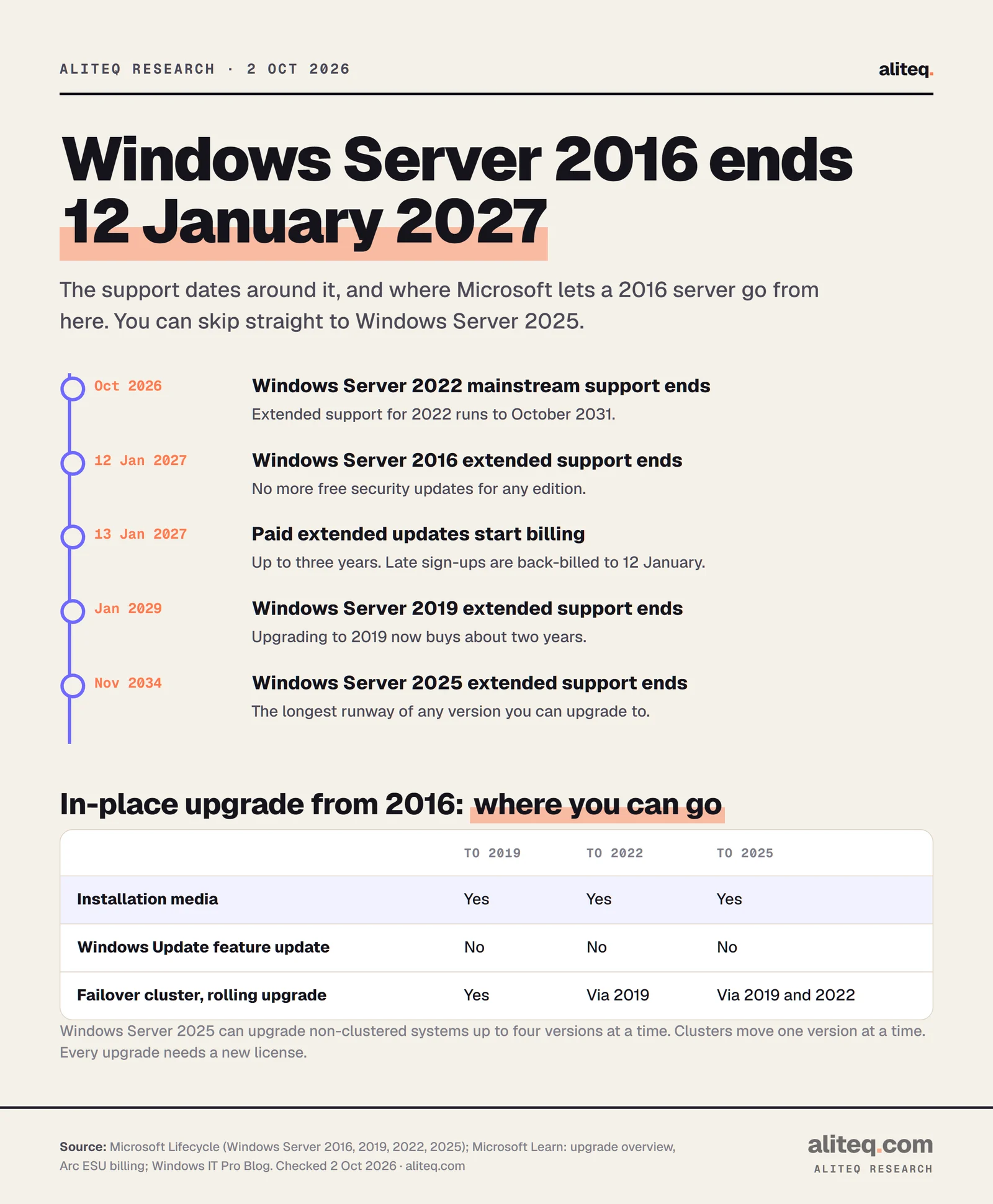
Extended support for Windows Server 2016 ends on January 12, 2027. Mainstream support already ended on January 12, 2022. After the January date, Microsoft stops shipping free security updates for every edition.
Microsoft's own advice is direct. Its Windows IT Pro blog says: "As Windows Server 2016 reaches end of support, we recommend upgrading your servers to Windows Server 2025." For anyone who can't, it adds that "you can purchase Extended Security Updates (ESU) for up to three years."
ESU is a narrow product. It delivers critical and important security updates only. Microsoft's blog says the program does "not include new features, quality fixes, or design change requests" and does not extend technical support. It is a bridge, not a stay of execution.
Support dates from Microsoft Lifecycle, and the in-place upgrade paths Microsoft Learn lists for Windows Server 2016. · aliteq research
The calendar matters for what you upgrade to. Windows Server 2019 itself leaves extended support in January 2029, and Windows Server 2022 ends mainstream support this month, in October 2026, with extended support running to October 2031. Windows Server 2025 is supported until November 2034. If you're paying for a license anyway, the newest version buys the most years.
What each path costs for 1, 2 and 4 servers
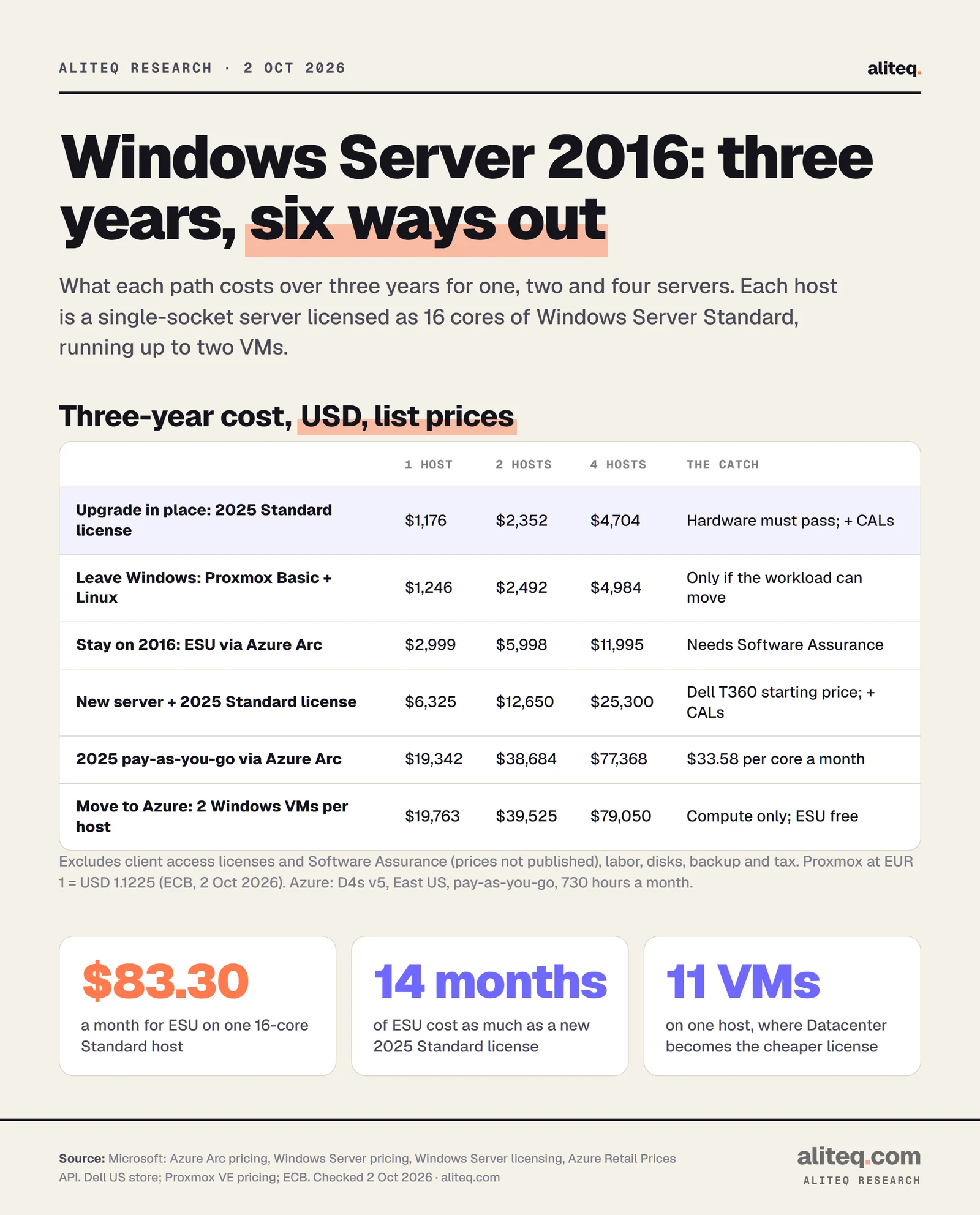
Over three years, upgrading one host to Windows Server 2025 Standard costs $1,176 in licenses, against $2,999 for extended updates on the same host. A new server plus the license starts around $6,325. Moving the same workloads to Azure costs about $19,763 in compute. The full table, for 1, 2 and 4 hosts:
Windows Server 2016: three-year cost by path (USD, list prices, excl. tax)
A. Stay on 2016, ESU via Azure Arc (Standard)
1 host
$2,999
2 hosts
$5,998
4 hosts
$11,995
A2. Same, Datacenter edition
1 host
$17,268
2 hosts
$34,536
4 hosts
$69,071
B. In-place upgrade, Windows Server 2025 Standard license
1 host
$1,176
2 hosts
$2,352
4 hosts
$4,704
C. New Dell T360 (starting price) + 2025 Standard license
1 host
$6,325
2 hosts
$12,650
4 hosts
$25,300
D. Windows Server 2025 pay-as-you-go via Azure Arc
1 host
$19,342
2 hosts
$38,684
4 hosts
$77,368
E. Two Azure D4s v5 Windows VMs per host, pay-as-you-go
1 host
$19,763
2 hosts
$39,525
4 hosts
$79,050
E2. Same VMs with Azure Hybrid Benefit
1 host
$10,092
2 hosts
$20,183
4 hosts
$40,366
F. Proxmox + Linux workloads (Basic subscription)
1 host
$1,246
2 hosts
$2,492
4 hosts
$4,984
1 host
2 hosts
4 hosts
A. Stay on 2016, ESU via Azure Arc (Standard)
$2,999
$5,998
$11,995
A2. Same, Datacenter edition
$17,268
$34,536
$69,071
B. In-place upgrade, Windows Server 2025 Standard license
$1,176
$2,352
$4,704
C. New Dell T360 (starting price) + 2025 Standard license
$6,325
$12,650
$25,300
D. Windows Server 2025 pay-as-you-go via Azure Arc
$19,342
$38,684
$77,368
E. Two Azure D4s v5 Windows VMs per host, pay-as-you-go
$19,763
$39,525
$79,050
E2. Same VMs with Azure Hybrid Benefit
$10,092
$20,183
$40,366
F. Proxmox + Linux workloads (Basic subscription)
$1,246
$2,492
$4,984
Each host is one single-socket server licensed as 16 cores of Windows Server Standard, running up to two VMs. License and listed prices only. · aliteq research
Here is how I built each row, so you can swap in your own numbers:
The host. One single-socket server, licensed as 16 cores of Windows Server Standard, running up to two Windows VMs. That's my assumption for a typical small office server. Labor, backup, disks, bandwidth and power are not in any row.
A and A2. Microsoft's Azure Arc price for Windows Server 2016 ESU is $10.41272 per 2-core pack per month for Standard and $59.95782 for Datacenter. A 16-core host is eight packs, so $83.30 or $479.66 a month, times 36 months.
B. Microsoft's suggested price for Windows Server 2025 Standard is $1,176 for 16 cores. It's a one-off purchase. CALs come on top.
C. Dell's PowerEdge T360, a single-socket tower, lists "Starting at $5,149.00" on Dell's US store. A real configuration with more memory and drives will cost more.
D. Microsoft lists Windows Server 2025 pay-as-you-go through Azure Arc at "$33.58 per CPU core / month", so $537.28 a month for 16 cores.
E and E2. Azure's retail price list shows a D4s v5 VM (4 vCPU) in East US at $0.376 an hour with Windows and $0.192 without. Two VMs, 730 hours a month, 36 months. Disks and backup are extra.
F. Proxmox VE's Basic subscription is €370 per CPU socket per year, $415.33 at the ECB rate of 2 October 2026 (EUR 1 = USD 1.1225).
Two numbers fall out of the table. First, the Standard license costs less than three years of Standard ESU at every host count, as long as the hardware can run 2025. Second, ESU only beats the license if the server will be gone within about 14 months, because $1,176 divided by $83.30 a month is 14.1 months.
How Windows Server 2016 extended updates are priced and bought
Through Azure Arc, extended updates cost $10.41272 per 2-core pack per month for Standard and $59.95782 for Datacenter, the same in every Azure region. A 16-core Standard host pays $83.30 a month, which is $999.62 a year. Microsoft's Arc pricing page says customers "will pay the same list price" whether they buy through a Microsoft Customer Agreement, an Enterprise Agreement or a Cloud Solution Provider partner.
The rules sit in Microsoft Learn's licensing article for Arc ESU, and they decide what you actually pay:
16-core minimum. Physical-core licenses require "a minimum of 16 physical cores per machine". An 8-core box pays for 16.
Virtual-core option. You can license per VM instead, with "a minimum of eight virtual cores per Virtual Machine". This suits a single 2016 VM on a newer host, or a 2016 VM running in AWS or Google Cloud.
Standard covers two VMs. "Standard licensing can be applied to up to two virtual machines (VMs), Datacenter licensing has no limit."
Software Assurance is required. "For Windows Server 2016, you need Software Assurance (or an equivalent Server Subscription) for on-premises workloads." Microsoft does not publish the price of Software Assurance. If your 2016 licenses came with a server and never had it, this path may not be open to you.
No SPLA, no Visual Studio shortcut. The licensing article says the Services Provider License Agreement "isn't available for Windows Server 2016 ESUs", and neither is the free Visual Studio dev/test benefit.
Timing has a catch. Microsoft's billing article says: "Billing for Windows Server 2016 ESUs enabled by Azure Arc begins January 13, 2027." If you sign up later, "Licenses provisioned after that date are back-billed to January 12, 2027." Waiting until March saves nothing. An activated license also bills whether or not it is linked to a server, and cancelling still bills up to five more days.
Arc or volume licensing?
The other route is the classic one: yearly ESU licenses bought through volume licensing. Microsoft's ESU page describes Arc as "a pay-as-you-go subscription model, compared to the classic Extended Security Updates offered through the Volume Licensing Center which are purchased in yearly increments." For the yearly option it says to "reach out to your Microsoft representative."
Microsoft has not published a volume-licensing price for Windows Server 2016 ESU. For Windows Server 2012, its ESU FAQ priced each of the three years at "100% of full license price annually", and you could only buy year 2 after buying year 1. Don't assume 2016 works the same way until a reseller quotes you. Also note that the billing article says moving from volume licensing to Arc mid-program "isn't supported for Windows Server 2016 ESUs."
Does the price go up each year?
The Arc page shows one monthly rate, so year 1, year 2 and year 3 each come to $999.62 for a 16-core Standard host and $5,755.95 for Datacenter. That's different from the Windows 10 commercial ESU, which Microsoft prices at $61 a device in year one and doubles every year. Check the rate when you renew, since it's a list price that Microsoft can change.
Upgrading: what the Windows Server 2025 license covers
A Windows Server 2025 Standard license costs $1,176 for 16 cores and lets you run two VMs on the licensed host. Datacenter costs $6,771 and allows unlimited VMs. Both need CALs for every user or device that connects.
Microsoft's licensing page sets the rules:
16 cores per server, minimum. "Each physical server, including single-processor servers, needs to be licensed with a minimum of 16 core licenses," and each processor needs at least eight. Extra cores are bought in packs of 2 or 16.
CALs are separate. Standard and Datacenter "continue to require Windows Server CALs for every user or device accessing a server." Remote Desktop needs its own CALs on top. Microsoft's pricing page lists no CAL price, so get one from your reseller.
Two VMs per Standard license. To run two more, you "fully relicense the server based on physical cores," which Microsoft calls stacking.
Every upgrade needs a new license. Microsoft Learn says: "Unlike Windows client, each Windows Server upgrade requires a separate license." Your 2016 key won't activate 2025.
Stacking sets the point where Datacenter becomes the cheaper edition. On one 16-core host, ten VMs need five Standard licenses, $5,880. Eleven or twelve VMs need six, $7,056, which is more than Datacenter's $6,771. So for 11 or more VMs on one host, Datacenter is cheaper.
Pay-as-you-go through Azure Arc ($33.58 per core a month) needs no CALs, apart from Remote Desktop CALs. But it doesn't include unlimited virtualization, and over three years it costs 16 times the Standard license on one host. It suits a server you only need for a few months.
Will your server run Windows Server 2025?
Most servers from the 2016 era will meet the minimums, but check two CPU instructions first. Windows Server 2025 adds two requirements that earlier versions didn't list: "Support for the SSE4.2 (Streaming SIMD Extensions 4.2) instruction set" and "Support for the POPCNT instruction". Microsoft points to Sysinternals Coreinfo to check.
The rest of Microsoft's minimums for Windows Server 2025:
CPU: 1.4 GHz 64-bit, with NX/DEP, CMPXCHG16b, LAHF/SAHF, PrefetchW and second-level address translation (EPT or NPT).
Memory: 2 GB for Server Core or Desktop Experience, 4 GB recommended for Desktop Experience, and ECC "or similar technology for physical host deployments".
Disk: 32 GB, which Microsoft calls "an absolute minimum". No IDE or PATA boot drives.
Network: a 1 Gbps Ethernet adapter.
TPM 2.0: only needed for certain features, such as BitLocker. Secured-core server features also need Secure Boot and virtualization-based security.
These are minimums for installing the system, not sizes for your workload. Microsoft says outright that it can't state recommended hardware because deployments vary too much.
Which upgrade paths does Microsoft support?
From Windows Server 2016, Microsoft supports an in-place upgrade to 2019, 2022 or 2025 using installation media. You can skip straight to 2025, because "Starting with Windows Server 2025, nonclustered systems can upgrade up to four versions at a time."
In-place upgrade from Windows Server 2016 (Microsoft Learn)
To 2019, installation media
Supported?
Yes
Note
Extended support ends January 2029
To 2022, installation media
Supported?
Yes
Note
Extended support ends October 2031
To 2025, installation media
Supported?
Yes
Note
Supported until November 2034
To 2025 through Windows Update
Supported?
No
Note
Only 2019 and 2022 are listed as sources
Failover cluster, rolling upgrade
Supported?
One version at a time
Note
2016 to 2019 to 2022 to 2025
Supported?
Note
To 2019, installation media
Yes
Extended support ends January 2029
To 2022, installation media
Yes
Extended support ends October 2031
To 2025, installation media
Yes
Supported until November 2034
To 2025 through Windows Update
No
Only 2019 and 2022 are listed as sources
Failover cluster, rolling upgrade
One version at a time
2016 to 2019 to 2022 to 2025
The upgrade restrictions are worth reading before anyone books a weekend. Among them, from the same Learn article: you can't switch between Server Core and Desktop Experience during the upgrade, you can't change language, you can go from Standard to Datacenter but not back, and NIC Teaming must be disabled first. Domain controllers have their own guidance. And Microsoft's first instruction is to "Always back up your system and important files". If yours isn't tested, our plain-English piece on backups and losing everything explains what a real backup needs.
Moving to Azure: free updates, paid compute
If you move a Windows Server 2016 machine into Azure, Microsoft gives you the extended updates for three years at no extra charge. Its ESU page covers "Azure Virtual Machines, Azure Dedicated Host, Azure VMware Solution, and the Azure Stack portfolio". In Azure, you don't need Software Assurance for the free updates.
What you pay for is the VM. A D4s v5 with 4 vCPUs in East US lists at $0.376 an hour with Windows included, about $274 a month, or $9,881 over three years. Two of them, the workload of one small host in my model, come to $19,763. Managed disks, backup and outbound bandwidth are extra. One-year and three-year reservations lower the compute price, and I haven't modeled them.
Azure Hybrid Benefit cuts that if you already own Windows Server licenses with Software Assurance. Microsoft's licensing page says each set of 16 core licenses with Software Assurance covers "up to 16 virtual cores allocated across two or fewer Azure virtual machines", and the benefit applies "a discount to the base compute rate". The same D4s v5 without Windows lists at $0.192 an hour, which is how row E2 comes to $10,092 per host.
Azure makes the most sense when the hardware is due for replacement anyway. Compare it with path C, a new server plus license, before you decide: $6,325 per host against $19,763 over three years, before Azure's disks. If you're weighing the wider question of renting compute or owning it, the cloud vs own server cost comparison works through the same trade-off for AI hardware.
Leaving Windows: Linux and Proxmox
Moving workloads to Linux removes the Windows license entirely, but only for workloads that can run without Windows. Proxmox VE, an open-source virtualization platform, costs €370 per CPU socket per year for its Basic support subscription, about $1,246 per single-socket host over three years. The Community tier is €120 a year, about $404 over three years, and is meant for labs and non-critical systems.
The catch is easy to miss. Proxmox runs Windows VMs well, but a Windows Server guest on Proxmox still needs a Windows Server license for every physical core of the host. Swapping the hypervisor doesn't change Microsoft's licensing. The saving only appears when the workload itself moves: a web app to Linux, file shares to a cloud service, an old app retired.
Proxmox also has a deadline of its own. If you go this way, start on the current release. Our Proxmox 8.4 end of support guide covers the 9.x upgrade.
Which path fits your servers
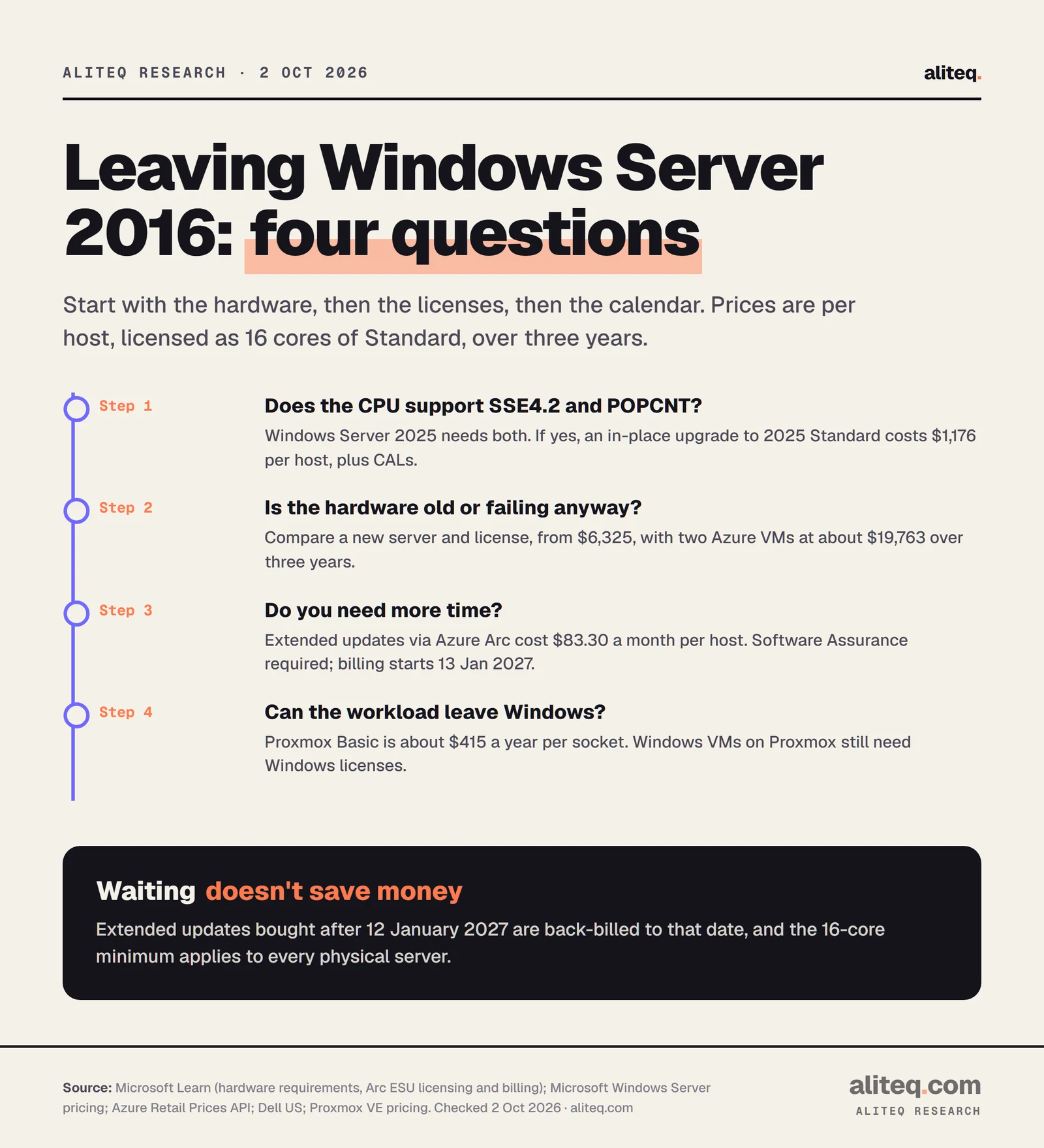
Start with the hardware, then the licenses, then the calendar. Four questions settle it for most small companies.
Prices per 16-core Standard host, three years, from Microsoft, Dell and Proxmox list prices checked 2 October 2026. · aliteq research
Can the server run 2025? Check SSE4.2 and POPCNT, and that the machine has a few good years left. If yes, the $1,176 Standard license plus CALs is the cheapest way through.
Is the hardware due anyway? Then price a new server and a 2025 license against Azure. On these list prices, a new box wins over three years. Azure wins on not owning hardware.
Do you need more time? Buy ESU through Arc for the months you need, if you have Software Assurance. Remember back-billing to January 12, 2027 and the 16-core minimum.
Can the workload leave Windows? Then the license cost drops to zero, and only support subscriptions and the migration work remain.
What I'd do with one, two or four servers
Based on these numbers, and not on experience running Windows Server, here is how I'd read it:
One server that passes the hardware check: buy the Windows Server 2025 Standard license and plan the in-place upgrade before January. $1,176 against $2,999 of ESU.
Two servers, one of them old: upgrade the healthy one and price the replacement against Azure for the other. ESU only for the gap if the replacement slips past January 12.
Four servers: count your VMs per host before buying Standard. With 11 or more VMs on a host, Datacenter at $6,771 is the cheaper license there. If a managed IT provider will do the work, our managed IT pricing guide shows what that costs per month.
An unpatched 2016 server is a real exposure after January. We've covered recent Windows Server flaws like the wormable DNS Server bug and the DHCP Server remote code execution this year. From January 13, fixes like those reach a 2016 server only if someone is paying for ESU. The rest of the Cloud & IT Infrastructure section prices the other decisions on the same list.
Quick answers
When does Windows Server 2016 support end?
Extended support ends on January 12, 2027, according to Microsoft Lifecycle. Mainstream support ended on January 12, 2022. After January 12, 2027, security updates come only through the paid Extended Security Updates program, for up to three years.
How much does Windows Server 2016 ESU cost?
Through Azure Arc, $10.41272 per 2-core pack per month for Standard and $59.95782 for Datacenter. With the 16-core minimum, that's $83.30 a month for a Standard host, or $2,999 over three years, and $479.66 a month for Datacenter, or $17,268. You need Software Assurance or a Server Subscription for on-premises servers.
Can I upgrade Windows Server 2016 directly to 2025?
Yes. Microsoft supports an in-place upgrade from 2016 to 2019, 2022 or 2025 using installation media, because Windows Server 2025 can upgrade up to four versions at a time. Clusters doing a rolling upgrade must go one version at a time. Each upgrade needs a new license.
How much does a Windows Server 2025 license cost?
Microsoft's suggested price is $1,176 for Standard and $6,771 for Datacenter, each covering 16 cores. Every server needs at least 16 core licenses. Client access licenses are extra, and Microsoft doesn't publish their price.
Are Windows Server 2016 extended updates free in Azure?
Yes. Microsoft gives three years of ESU at no extra charge for servers running in Azure VMs, Azure Dedicated Host, Azure VMware Solution and Azure Stack. You pay for the Azure compute, for example $0.376 an hour for a D4s v5 Windows VM in East US.
What happens if I sign up for ESU after January 12, 2027?
You're back-billed. Microsoft's billing documentation says Arc ESU licenses provisioned after that date are back-billed to January 12, 2027, and billing starts January 13, 2027. Signing up late doesn't save money, and it leaves the server unpatched in the meantime.