A hook is a small script Claude Code runs for you at fixed moments, such as before a tool call or when Claude finishes. Here is every piece in Anthropic's docs that matters: events, matchers, exit codes, JSON, where the file lives, and the security warning.
Say you tell Claude Code to leave .env alone. A rule written in a prompt is a request. A hook is code that runs whether or not Claude remembers the request, and that is the whole appeal.
This page reads Anthropic's hooks documentation and puts the parts you need in one place. It is not a tutorial I ran. Where an example is not in the docs, it is labeled as mine and untested. New to the tool itself? Start with Claude Code for vibe coders. For how it compares with other builders, see Lovable vs Cursor vs Claude Code.
What is a Claude Code hook?
A hook is a shell command, HTTP endpoint, MCP tool call, LLM prompt or subagent that Claude Code runs automatically at a defined point in a session. When the event fires and your matcher fits, Claude Code sends JSON about the event to your handler, which can inspect it and optionally answer.
Anthropic's reference describes five handler types: command, http, mcp_tool, prompt and agent. A command hook gets the event JSON on stdin and answers with an exit code and text on stdout and stderr. An HTTP hook gets the JSON as a POST body. A prompt hook asks a Claude model a yes or no question. An agent hook starts a subagent that can read files first. The docs call agent hooks "experimental and may change."
Hooks come in a three-level shape, straight from the docs: choose a hook event, add a matcher group to filter when it fires, then define one or more hook handlers.
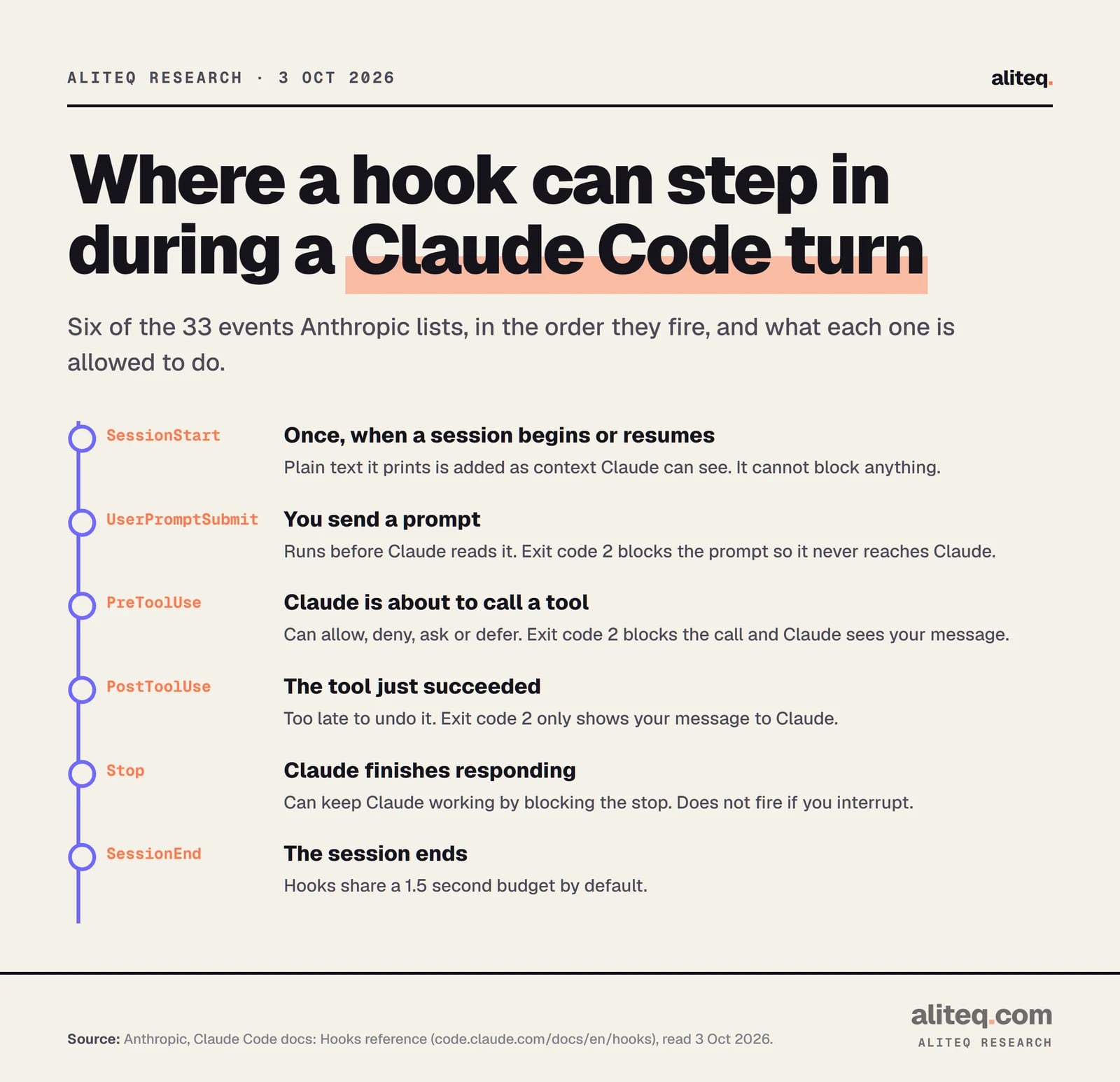
Six of the 33 events, in the order they fire. From Anthropic's Hooks reference, read 3 Oct 2026. · aliteq research
Which events can you hook into?
Anthropic's lifecycle table lists 33 events as of 3 October 2026. Most people use four: PreToolUse (before a tool runs), PostToolUse (after it succeeds), Stop (when Claude finishes responding) and Notification (when Claude Code wants your attention). Events fall into three cadences.
Per session:SessionStart and SessionEnd.
Per turn:UserPromptSubmit, Stop and StopFailure.
On every tool call in the agentic loop:PreToolUse and PostToolUse. The docs say EndConversation calls skip both.
The table has plenty more: PermissionRequest, PermissionDenied, PostToolUseFailure, PostToolBatch, SubagentStart, SubagentStop, TaskCreated, TaskCompleted, PreCompact, PostCompact, ConfigChange, FileChanged, CwdChanged, WorktreeCreate, WorktreeRemove and more. I would not memorize them. Open the reference when you need one.
Three rules from the docs matter early:
PreToolUse "Runs after Claude creates tool parameters and before processing the tool call." It can allow, deny, ask or defer.
PostToolUse fires after success, and "PostToolUse hooks can't undo actions since the tool has already executed."
Stop fires "whenever Claude finishes responding, not only at task completion." It does not fire on a user interrupt. An API error fires StopFailure instead.
One gap is easy to miss. PreToolUse runs only when Claude calls a tool. Files you reference with @ in your prompt are inserted while the prompt is built, so no PreToolUse hook fires for them, even a hook that matches Read. The docs say to use a Read deny rule for those paths.
How do matchers pick which tool a hook runs on?
A matcher is a filter on the event. For tool events it matches the tool name. Leave it empty, omit it or use "*" and the hook fires every time. Plain names and lists with | are exact matches. Anything with other characters is a JavaScript regular expression.
Anthropic's evaluation rules, in a table:
`"*"`, `""` or omitted
Evaluated as
Match all
Example
fires on every occurrence
Only letters, digits, `_`, `-`, spaces, `,` and `|`
Evaluated as
Exact string, or a list
Example
Bash matches only the Bash tool; Edit|Write matches either
Any other character
Evaluated as
JavaScript regex, unanchored
Example
^Notebook matches tools starting with Notebook
Evaluated as
Example
`"*"`, `""` or omitted
Match all
fires on every occurrence
Only letters, digits, `_`, `-`, spaces, `,` and `|`
Exact string, or a list
Bash matches only the Bash tool; Edit|Write matches either
Any other character
JavaScript regex, unanchored
^Notebook matches tools starting with Notebook
Three details trip people up. Regex matchers are unanchored, so Edit.* matches both Edit and NotebookEdit; write ^Edit$ for a whole-string match. Matchers are case-sensitive, so bash will not match Bash. And MCP tools are named mcp__<server>__<tool>, so mcp__memory__.* matches every tool from a server called memory.
Not every event takes a matcher. Per the docs, UserPromptSubmit, Stop and several others "always fire on every occurrence." Other events match on something else: SessionStart matches how the session began (startup, resume, clear, compact, fork), and Notification matches the notification type (permission_prompt, idle_prompt and others).
There is also an optional if field on a handler. It uses permission-rule syntax such as Bash(git *) or Edit(*.ts) and applies to tool events only. It narrows a matcher further, for example "Bash, but only git commands."
What do exit codes and JSON output do?
Exit code 0 means success. Exit code 2 means a blocking error. Any other code is a non-blocking error on most events. For finer control, exit 0 and print a JSON object. The exit-2 block is the one outcome JSON cannot override.
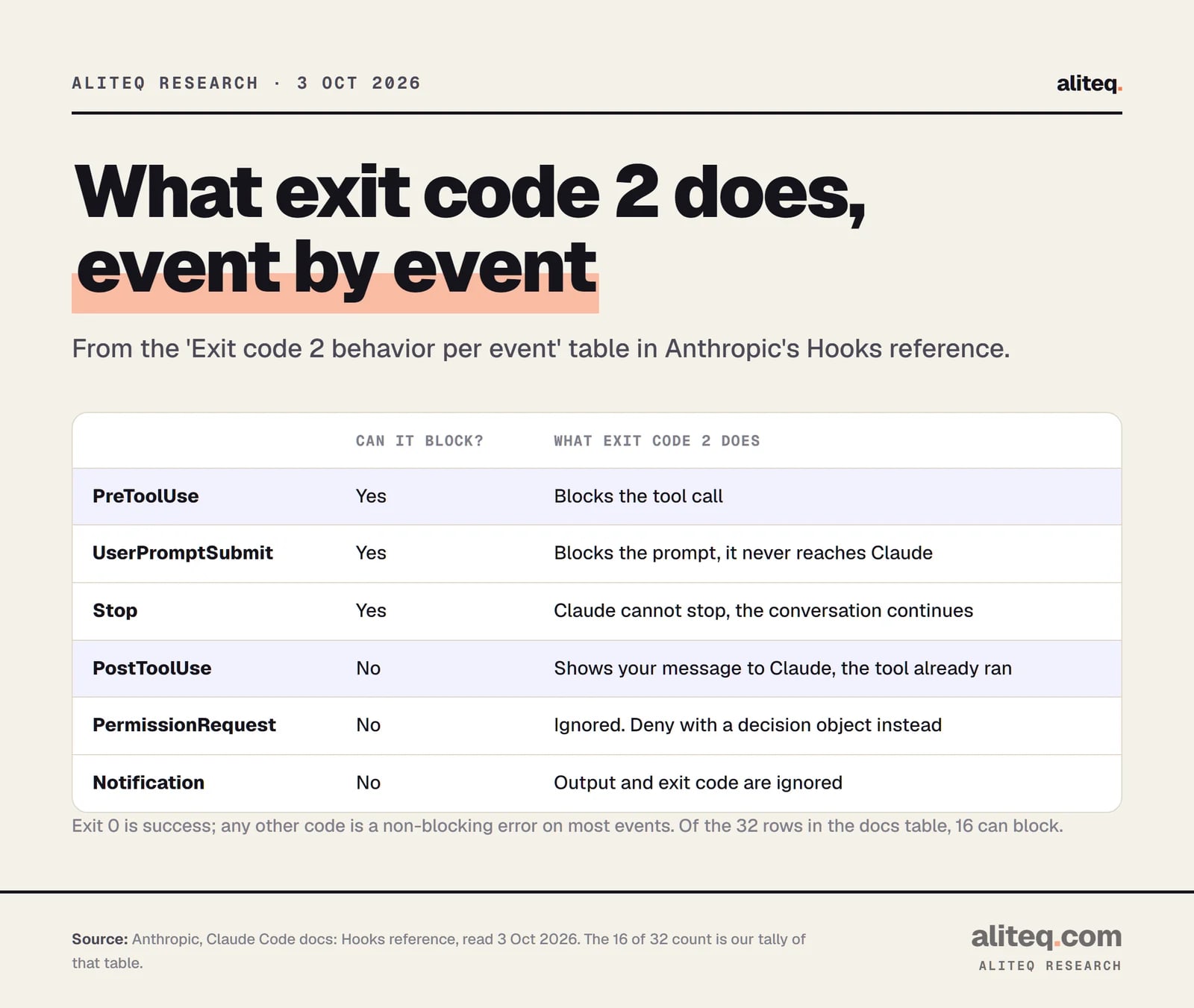
Exit code 2 per event, from the Hooks reference 'Exit code 2 behavior per event' table, read 3 Oct 2026. · aliteq research
Here is how the three outcomes work, from the docs:
Exit 0. Success. Claude Code parses stdout as JSON only if it starts with { and ends with }. For most events, plain text on stdout is not shown in the transcript. The exceptions are UserPromptSubmit, UserPromptExpansion, SessionStart and PostModelSwitch, where plain text is added as context Claude can see.
Exit 2. A blocking error on events that can block. It blocks "whether or not you print JSON: even a JSON permissionDecision of "allow" can't override it." The blocking message is the reason from your JSON, or your stderr text if there is none.
Any other code. For most events it does not block. You see a "hook error" notice carrying the first line of stderr, and the action goes ahead.
Not every event can be blocked. In the docs' exit-2 table, 16 of 32 rows say "Yes." The ones you will care about: PreToolUse blocks the tool call, UserPromptSubmit blocks the prompt before Claude sees it, and Stop stops Claude from stopping so the turn continues. PostToolUse cannot block anything. Exit 2 there "Shows stderr to Claude; the tool already ran." PermissionRequest ignores exit 2, so you deny with a decision object instead.
What can a PreToolUse hook return as JSON?
A PreToolUse hook prints a hookSpecificOutput object. permissionDecision is allow, deny, ask or defer. permissionDecisionReason is shown to Claude on a deny. updatedInput replaces the tool's whole input object before it runs. additionalContext adds text to Claude's context.
This is the docs' own shape:
{
  "hookSpecificOutput": {
    "hookEventName": "PreToolUse",
    "permissionDecision": "allow",
    "permissionDecisionReason": "My reason here",
    "updatedInput": {
      "field_to_modify": "new value"
    },
    "additionalContext": "Current environment: production. Proceed with caution."
  }
}
Several hooks can answer the same call. Precedence is deny over defer over ask over allow. A hook that says allow does not bypass the deny rules in your settings. A hook that says deny blocks the tool even in bypassPermissions mode or with --dangerously-skip-permissions, according to the guide. That is why hooks are the right tool for rules you want enforced.
Stop hooks use a different shape: top-level decision: "block" plus a reason. Two gotchas from the docs. A field at the wrong level is ignored without an error, so permissionDecision must sit inside hookSpecificOutput. And if your shell profile echoes text unconditionally, that text lands before your JSON, the output no longer starts with {, and the JSON is treated as plain text.
Where do hooks live? (settings.json locations)
Put a hooks block in a settings file. The file decides who gets the hook. .claude/settings.json is project-wide and can be committed. .claude/settings.local.json is yours only. ~/.claude/settings.json covers all your projects. Managed policy settings apply organization-wide.
The reference's table:
`~/.claude/settings.json`
Scope
All your projects
Shareable
No, local to your machine
`.claude/settings.json`
Scope
Single project
Shareable
Yes, can be committed to the repo
`.claude/settings.local.json`
Scope
Single project
Shareable
No, gitignored when Claude Code saves a setting to it
Managed policy settings
Scope
Organization-wide
Shareable
Yes, admin-controlled
Plugin `hooks/hooks.json`
Scope
When the plugin is enabled
Shareable
Yes, bundled with the plugin
Skill or subagent frontmatter
Scope
While the skill or subagent is active
Shareable
Yes, defined in that file
Scope
Shareable
`~/.claude/settings.json`
All your projects
No, local to your machine
`.claude/settings.json`
Single project
Yes, can be committed to the repo
`.claude/settings.local.json`
Single project
No, gitignored when Claude Code saves a setting to it
Managed policy settings
Organization-wide
Yes, admin-controlled
Plugin `hooks/hooks.json`
When the plugin is enabled
Yes, bundled with the plugin
Skill or subagent frontmatter
While the skill or subagent is active
Yes, defined in that file
Hooks from different levels merge instead of replacing each other. Administrators can set allowManagedHooksOnly to block user, project, local and plugin hooks. Type /hooks in Claude Code to see a read-only list of what is configured and where each hook came from. To turn everything off, set "disableAllHooks": true, or start one run with claude --settings '{"disableAllHooks": true}'. There is no way to disable one hook while keeping it in the file.
What do real hook configs look like?
These examples are copied from Anthropic's pages. I did not run them. Each shows the same three-level shape: event, matcher, handler. They are good starting points for a project you already trust.
Auto-format after every edit
From the hooks guide. PostToolUse fires after a tool succeeds, the matcher limits it to Edit and Write, and the command pulls the edited file path out of the stdin JSON with jq and hands it to Prettier. Add it to .claude/settings.json.
Also from the guide. A PreToolUse hook runs a script before any Edit or Write. The script exits with code 2 when the path matches .env, package-lock.json or .git/. Claude gets the Blocked: message as feedback and can change course. Save the script as .claude/hooks/protect-files.sh:
#!/bin/bash
# protect-files.sh

INPUT=$(cat)
FILE_PATH=$(echo "$INPUT" | jq -r '.tool_input.file_path // empty')

# Normalize Windows backslash separators so the patterns below match
FILE_PATH="${FILE_PATH//\\//}"

PROTECTED_PATTERNS=(".env" "package-lock.json" ".git/")

for pattern in "${PROTECTED_PATTERNS[@]}"; do
  if [[ "$FILE_PATH" == *"$pattern"* ]]; then
    echo "Blocked: $FILE_PATH matches protected pattern '$pattern'" >&2
    exit 2
  fi
done

exit 0
Make it executable on macOS and Linux with chmod +x .claude/hooks/protect-files.sh, then register it:
The Windows line is not decoration. The docs note that on Windows tool_input.file_path arrives with backslashes, so a check written with forward slashes never matches and the edit goes through. One caveat on this whole example: a hook only sees tool calls. @ references skip it, as covered above.
Deny a destructive command with JSON
From the reference's complete example. Instead of exit 2, the script prints a deny decision. The hook is registered on Bash with an if of Bash(rm *), so it only runs for rm commands. Save as .claude/hooks/block-rm.sh:
#!/bin/bash
# .claude/hooks/block-rm.sh
COMMAND=$(jq -r '.tool_input.command')

if echo "$COMMAND" | grep -q 'rm -rf'; then
  jq -n '{
    hookSpecificOutput: {
      hookEventName: "PreToolUse",
      permissionDecision: "deny",
      permissionDecisionReason: "Destructive command blocked by hook"
    }
  }'
else
  exit 0  # no decision; normal permission flow applies
fi
Note what exit 0 means here: no decision, so Claude Code's normal permission flow still applies. A hook that stays quiet does not approve anything.
Get a desktop notification when Claude needs you
The guide's first example. A Notification hook with an empty matcher fires for every notification type. This macOS version uses osascript. The guide also lists Linux and Windows commands.
Our illustration: make Claude check the tests before it stops
This one is mine, not from the docs, and I have not run it. It is built from the documented Stop fields: stop_hook_active in the input, and decision: "block" with a reason in the output. The guard matters. The docs say Claude Code caps a stop hook at eight consecutive continuations and tell you to check stop_hook_active so you do not block on something that never resolves.
#!/bin/bash
# Our illustration, untested. Stop hook: ask Claude to run tests once before finishing.
INPUT=$(cat)

# Already continuing because of a stop hook? Let Claude stop.
if [ "$(echo "$INPUT" | jq -r '.stop_hook_active')" = "true" ]; then
  exit 0
fi

jq -n '{decision: "block", reason: "Run the test suite and fix any failures before finishing."}'
For a softer version, the docs also describe hookSpecificOutput.additionalContext on Stop, which keeps the conversation going without a hook error notice. And a prompt hook can do the judging for you: the docs' example asks a model to "Evaluate if Claude should stop" and check whether all tasks are complete.
How long can a hook run?
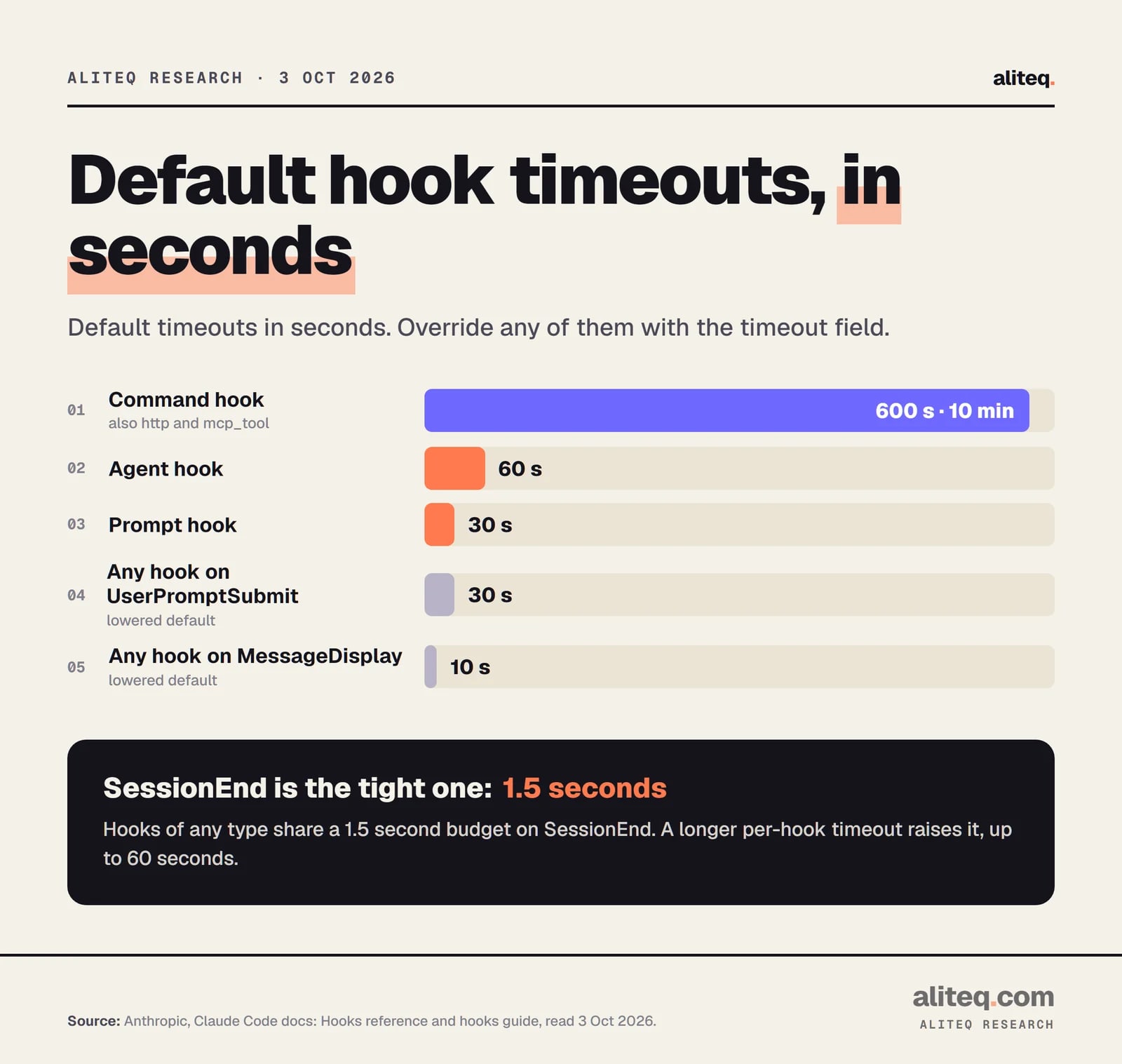
Command, HTTP and MCP tool hooks time out after 10 minutes by default. Prompt hooks get 30 seconds and agent hooks 60. Some events are tighter: UserPromptSubmit is 30 seconds and MessageDisplay is 10. Override any of them with the timeout field, in seconds.
Default timeouts from the Hooks reference, read 3 Oct 2026. Override with the timeout field. · aliteq research
SessionEnd is the odd one. Its hooks share a 1.5-second budget, and if your settings set a longer per-hook timeout, Claude Code raises the budget to match, up to 60 seconds. Slow hooks are not free. A UserPromptSubmit hook runs before Claude reads your prompt, so a heavy script there delays every message. If a job is slow and Claude does not need the answer now, the docs offer "async": true, which runs a command hook in the background. Its output arrives on the next turn, and each firing is a separate process.
Are hooks safe?
Only as safe as the scripts you put in them. Anthropic's warning is blunt: "Command hooks execute shell commands with your full user permissions. They can modify, delete, or access any files your user account can access. Review and test all hook commands before adding them to your configuration."
Two details change how you should treat a cloned repo:
In an interactive session, Claude Code holds back hooks from every settings file until you accept the workspace trust dialog for that folder or a parent.
In a -p or SDK session there is no dialog. The docs say Claude Code "treats the folder as trusted, so hooks committed in a repository's .claude/settings.json run in a folder you've never trusted."
So before you script claude -p over a repository you did not write, read its .claude/ settings files. The docs suggest starting with --bare or turning hooks off for that run with --settings '{"disableAllHooks": true}'.
Anthropic's best-practice list for writing hooks is five lines, and it is a good review checklist:
Validate and sanitize inputs. Never trust input data blindly.
Always quote shell variables: use "$VAR", not $VAR.
Block path traversal by checking for .. in file paths.
Use absolute paths for scripts.
Skip sensitive files such as .env, .git/ and keys.
The same cloned-repo caution applies to hooks you paste from a blog, including this one. Read them first. If you build apps with an AI tool and want a wider set of checks, see the vibe-coded app security checklist. Hooks are one guardrail among several. They pair with how you set up context for the model. For more on agents in general, see the AI agents hub.
Why isn't my hook firing?
Run /hooks first and confirm the hook appears under the right event. Then check the matcher spelling, because matchers are case-sensitive. Make sure the script is executable, test it by piping sample JSON into it, and read the debug log. The docs list these steps.
Type /hooks in Claude Code. Is your hook listed under the right event? If the file was just edited and it is missing, restart the session.
Check the JSON. The docs say trailing commas and comments are not allowed in settings files.
Check the matcher. It is case-sensitive, and regex matchers are unanchored. Edit.* also matches NotebookEdit.
Run the script by hand: echo '{"tool_name":"Bash","tool_input":{"command":"ls"}}' | ./my-hook.sh, then echo $? for the exit code.
Read the log. Start with claude --debug-file /tmp/claude.log, or run /debug mid-session. Ctrl+O shows the transcript view.
If a hook runs but its JSON does nothing, look for a field at the wrong level or stray text printed before the {. If the shell says jq: command not found, install jq or parse the JSON in Python or Node. If a Stop hook keeps Claude running and then ends the turn with a warning, you hit the eight-continuation cap. Check stop_hook_active.
Quick answers
What is a Claude Code hook?
It is a handler you configure in a settings file that Claude Code runs at a defined point in a session, such as before a tool call or when Claude finishes. Handlers can be shell commands, HTTP endpoints, MCP tool calls, LLM prompts or subagents. Source: Anthropic's Hooks reference, read 3 Oct 2026.
Which settings file should I put a hook in?
Use .claude/settings.json for a hook the whole team should get, since it can be committed. Use .claude/settings.local.json for your own project-only hooks. Use ~/.claude/settings.json for hooks that apply to every project on your machine.
What does exit code 2 do in a Claude Code hook?
On events that can block, it blocks the action. On PreToolUse it stops the tool call, on UserPromptSubmit it stops the prompt, and on Stop it keeps Claude working. Your stderr text is sent as the reason. On PostToolUse it cannot undo the tool, which already ran.
Can a hook stop Claude from editing a file?
Yes, with a PreToolUse hook that matches Edit and Write and exits 2 or returns a deny decision. One limit from the docs: files you reference with @ in a prompt skip PreToolUse, so use a Read deny rule for those paths.
Do hooks run with extra safety, or can they hurt my files?
No extra safety. The docs say command hooks run with your full user permissions and can modify, delete or access any file your account can. Read every hook before adding it, and review a cloned repo's .claude settings before running it non-interactively.
How do I turn hooks off?
Set "disableAllHooks": true in a settings file, or run claude --settings '{"disableAllHooks": true}' for one session. You cannot disable a single hook and keep it in the file. Hooks set in managed policy settings cannot be disabled from user, project or local settings.