Seven CRMs now document a vendor-run MCP server. They differ on plan gates, whether you can start read-only, and how many requests an AI can make a second.
Every fact here comes from the vendor's own docs, pricing or GitHub page, which we read on 3 October 2026. MCP details change fast, so each claim is dated and you should check the page before you buy.
aliteq is a US company and we haven't connected any of these CRMs ourselves. This is a docs read, not a test. If a vendor's docs don't say something, we say "not stated", not "no". For what each CRM costs, see Attio vs HubSpot pricing and HubSpot vs Salesforce cost for startups.
What an MCP server is, in plain words
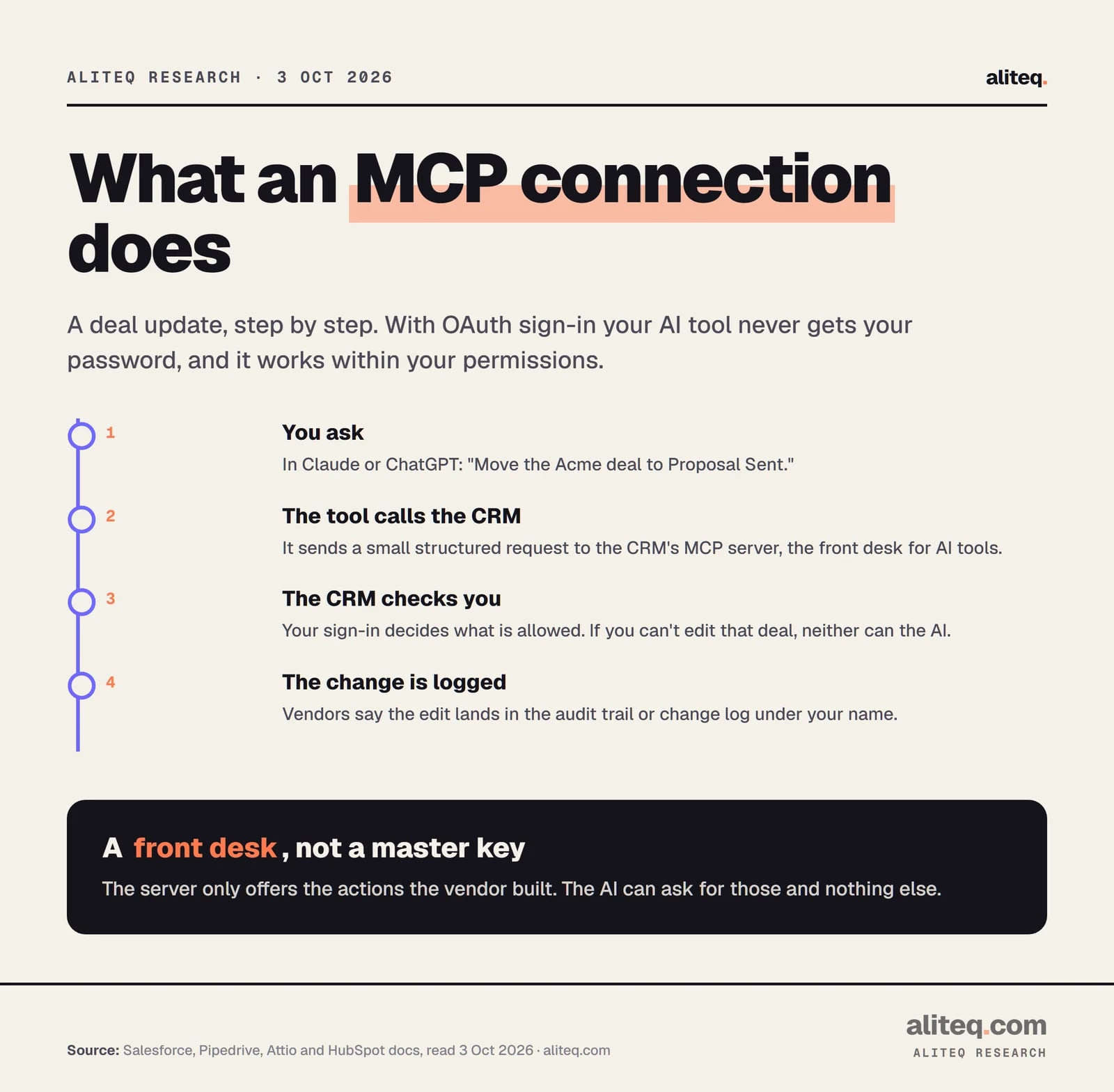
An MCP server is a front desk that a CRM puts up for AI tools. MCP stands for Model Context Protocol, an open standard. Without it, an AI assistant like Claude or ChatGPT can only talk about your deals if you paste them in. With it, the assistant can ask the CRM for a deal, or ask it to change one, through a small set of actions the vendor built.
Think of a filing cabinet with a clerk. You tell the clerk what you want. The clerk checks who you are, then fetches or updates the folder. The AI never opens the drawers itself. In the vendors' docs, the clerk uses your sign-in, so it can only do what you could do by hand.
One deal update through an MCP connection. Steps summarized from Salesforce, Pipedrive, Attio and HubSpot docs, read 3 Oct 2026. · aliteq research
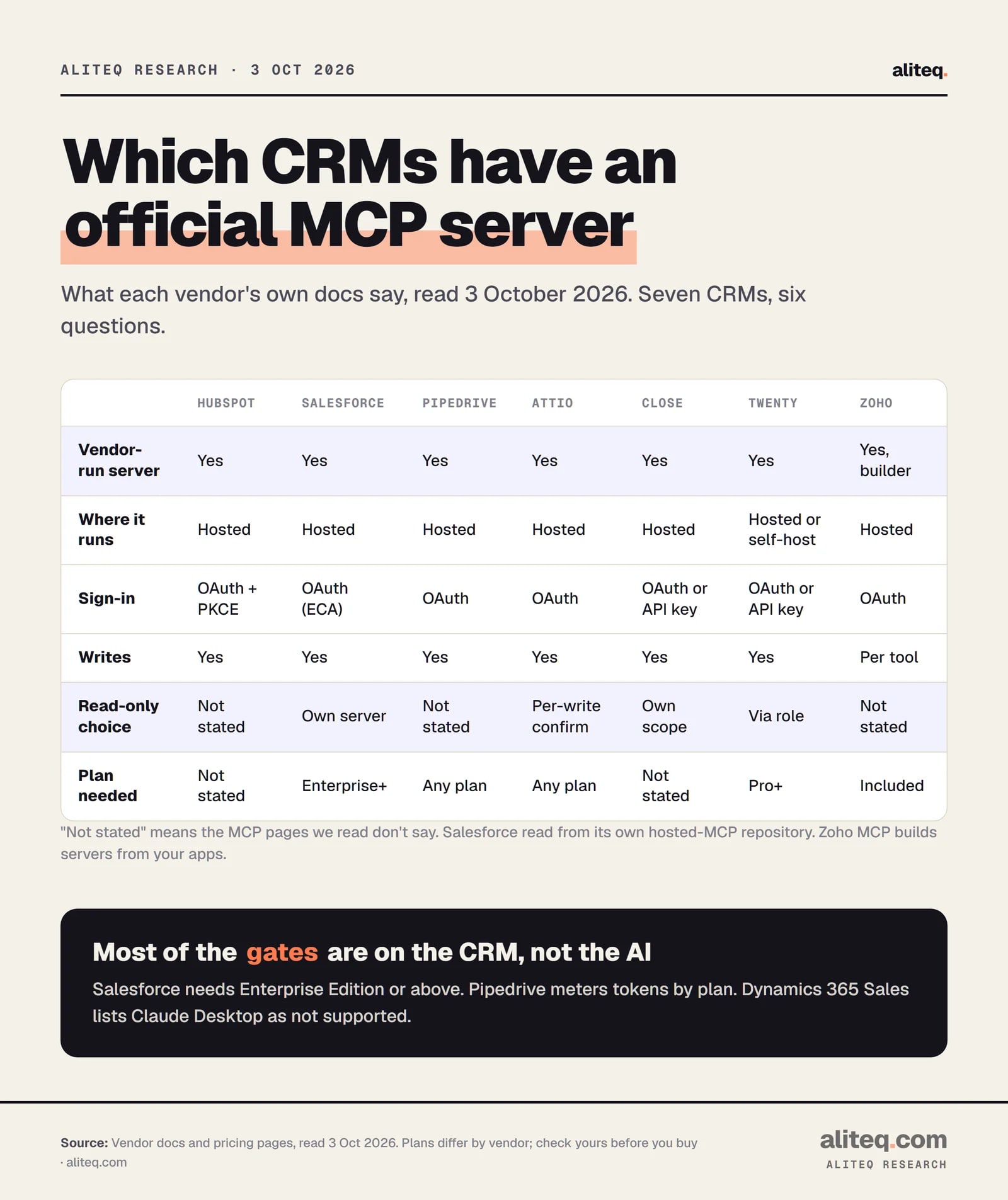
The scorecard: seven CRMs, six questions
All seven vendors run an MCP server themselves and let it write data. Where they differ is the plan you need, and whether you can limit the AI to reading.
What each vendor's docs state, read 3 Oct 2026. "Not stated" means the MCP pages we read don't say. · aliteq research
CRM MCP servers at a glance (vendor docs, read 3 October 2026)
HubSpot
Plan needed
No minimum named for CRM objects; some tools need Marketing Hub or Revenue Hub Pro
Sign-in
OAuth with PKCE, via an MCP connector
Stated limit
None stated on the MCP page
Salesforce
Plan needed
Enterprise Edition or above; Developer Edition also
Sign-in
OAuth through an External Client App
Stated limit
Counts against the org's daily API quota
Pipedrive
Plan needed
All plans
Sign-in
OAuth
Stated limit
Token limits by plan; extra tokens can be bought
Attio
Plan needed
Listed as Yes on Free, Plus, Pro and Enterprise
Sign-in
OAuth
Stated limit
Read 100 a second, write 25 a second, search 300 a minute
Close
Plan needed
None stated on the MCP pages
Sign-in
OAuth, or API key plus a scope header
Stated limit
None stated for MCP
Twenty
Plan needed
Listed as Yes on Pro, Organization and Enterprise
Sign-in
OAuth, or API key
Stated limit
API calls: 50 a minute (Pro), 100 (Organization)
Zoho
Plan needed
Included at no extra cost
Sign-in
OAuth
Stated limit
Your Zoho edition's API limits
Plan needed
Sign-in
Stated limit
HubSpot
No minimum named for CRM objects; some tools need Marketing Hub or Revenue Hub Pro
OAuth with PKCE, via an MCP connector
None stated on the MCP page
Salesforce
Enterprise Edition or above; Developer Edition also
OAuth through an External Client App
Counts against the org's daily API quota
Pipedrive
All plans
OAuth
Token limits by plan; extra tokens can be bought
Attio
Listed as Yes on Free, Plus, Pro and Enterprise
OAuth
Read 100 a second, write 25 a second, search 300 a minute
Close
None stated on the MCP pages
OAuth, or API key plus a scope header
None stated for MCP
Twenty
Listed as Yes on Pro, Organization and Enterprise
OAuth, or API key
API calls: 50 a minute (Pro), 100 (Organization)
Zoho
Included at no extra cost
OAuth
Your Zoho edition's API limits
HubSpot: hosted, OAuth with PKCE, broad write access
HubSpot runs a hosted MCP server at mcp.hubspot.com. You create an "MCP connector" in your account, then point an MCP client at it. HubSpot's docs require OAuth with PKCE, a safer sign-in step that some clients don't handle on their own.
Read and write. The docs list read access to contacts, companies, deals, tickets, leads, custom objects, activities, conversations and marketing data. Writes cover creating and editing those records, plus notes and tasks, pipelines and custom properties. It can also create, edit and publish landing pages, site pages and blog posts. That last one is a reminder to scope who connects it.
Plan. The MCP docs name no minimum plan for CRM records. They say tool availability "varies by HubSpot subscription, user permissions, and account configuration", and tell you to run the get_user_details tool to see what your account gets. A few features are tied to plans: quotes (in beta) need Revenue Hub Professional or Enterprise, and the AI search metrics need Marketing Hub Professional or Enterprise. On free tools you can edit the default pipeline but not create custom ones.
Permissions and data. HubSpot says every action respects the user's existing permissions. You don't pick scopes on the connector. They follow the tools installed and what the user grants, and installed connectors may need re-installing when tools change. If an account has Sensitive Data turned on, activity and conversation data are blocked through MCP. HubSpot's docs name Claude (Enterprise admins can limit connectors to company accounts) and the MCP Inspector. They state no request limit for the MCP server.
HubSpot's overview page says the server is "primarily aimed at developers, technical teams". Expect a developer-style setup, not a one-click button.
Salesforce: hosted, switched off by default, Enterprise or above
Salesforce's hosted MCP servers are generally available, and an admin has to turn each one on. Salesforce's own repository says hosted MCP servers "require Enterprise Edition or above", and that Developer Edition orgs can use them too. Lower editions are "not available at this time". (Salesforce's developer site blocked our fetch, so we read its official GitHub repository for hosted MCP.)
Read-only is a real option. The platform/sobject-reads server is read-only: the repository says there is "physically no tool available" that can create, update or delete a record. The platform/sobject-all server can read, write and delete. Admins can also build custom servers with only the tools they choose.
Sign-in. You create an External Client App, and Salesforce says older Connected Apps aren't supported. It uses the OAuth authorization code flow with PKCE, with no service accounts. Salesforce says the agent gets the signed-in user's object, field-level and sharing-rule permissions, and that "the authenticated user's name appears in the audit trail as the editor."
Limits. Salesforce states that MCP tool calls "consume API calls against your org's daily API quota". It says no language model runs on the Salesforce side, so the AI sits entirely in your client. Named clients are Postman, Claude, ChatGPT, Cursor and Microsoft Copilot Studio. Production and sandbox orgs use different server addresses, which makes a sandbox trial easy.
Pipedrive: every plan, metered by tokens
Pipedrive calls its server "native", built and maintained by Pipedrive, and says it is available on every plan. Its FAQ says usage is "subject to token limits based on your plan" and that extra tokens can be bought. We couldn't find the token amounts or prices on the pages we read, so ask before you plan a heavy rollout.
The sign-in is OAuth. Pipedrive says the AI can only see and edit what your Pipedrive user can, and that "all actions are recorded in the change log". It says it can find deals, contacts, organizations and leads, create and update deals, contacts and activities, and convert leads. It doesn't state a read-only switch. Setup guides exist for ChatGPT and Claude, and other assistants connect with the server URL.
Attio: one hosted server, every plan, writes ask first
Attio's hosted server uses OAuth and, per Attio's docs, needs "no API keys". Its pricing page lists "MCP server: Yes" on all four plans, Free to Enterprise. One tool, the SQL query, "is not available on every billing plan".
Read and write. The tool list covers searching and listing records, creating, updating, upserting and merging them, notes, tasks, comments, emails, call recordings and reports. Attio says read operations are auto-approved, and write operations "request user confirmation". That is the closest thing to a built-in brake in this group.
Limits. Attio publishes rate limits per workspace: 100 requests a second for reads, 25 for writes, 5 for merges, 300 a minute for search, and 2 a second for semantic search, reports and SQL. Attio says normal chat use stays within them. It also says all operations are logged and auditable, and sessions can be revoked from your account. Named clients: Claude (Desktop and claude.ai), ChatGPT and Cursor.
Close: three scopes, from read-only to delete
Close runs a remote server and lets you choose how much power to hand over. The Close-Scope header sets it: mcp.read for read-only, mcp.write_safe for read and write, and mcp.write_destructive for read, write and delete. Each level includes the one below.
OAuth is the recommended sign-in. You can also use an API key plus the scope header. Close says its server is "officially supported across the Claude ecosystem", with guides for Claude, Claude Code, ChatGPT, Cursor, VS Code and n8n. The MCP pages name no minimum plan and no MCP-specific rate limit. Close's general API docs describe limits per endpoint group and per organization.
Twenty: open source, hosted or self-run
Twenty is the one open-source CRM here. Its docs give a server address on your workspace, for both Twenty Cloud and a self-hosted install, so you can run the whole thing yourself.
Sign-in is OAuth, or an API key sent as a bearer token. Permissions come from the user's role, or from a role you assign to the API key, which is how you narrow access. The pricing page lists "MCP server: Yes" on Pro (from $9 a user a month on yearly billing), Organization and Enterprise. It lists API calls at 50 a minute on Pro and 100 on Organization, while the API docs say 100 a minute. No MCP-specific limit is stated. Named clients: Claude Desktop, Claude Code, Cursor and ChatGPT. If self-hosting is on your list, our self-hosted CRM cost breakdown covers the server side.
Zoho and the rest: a builder, a gap and a caveat
Zoho. Zoho MCP isn't one fixed CRM server. It is a Zoho product for building MCP servers that expose tools from Zoho apps, CRM included, and from 500+ third-party apps. Zoho's pricing page says it is "included at no additional cost for all Zoho users" and uses your existing API limits. Zoho says agents run under user-level permissions with OAuth, and that it keeps audit trails. A fixed read-only versus write table wasn't on the pages we read, so treat scope as something you set per tool.
Dynamics 365 Sales. Microsoft documents a Sales MCP server and a Dataverse MCP server. The Microsoft Learn page says the Sales server works with Copilot Studio and other MCP-capable assistants such as GitHub Copilot, and states that "Claude Desktop isn't supported at this time". It also needs Copilot Studio admin rights and enough Copilot Studio credits.
Freshsales. None found in the vendor's docs. Freshworks documents a Developer MCP server, but it manages app publishing on the developer portal, not CRM records.
We didn't check Copper, monday CRM, Zendesk Sell, Insightly or Folk.
The security basics the vendors themselves state
Every vendor above says the AI works within the signed-in user's permissions, so the first control is who connects it. A sales rep's login gives the AI a rep's access. An admin's login gives it an admin's.
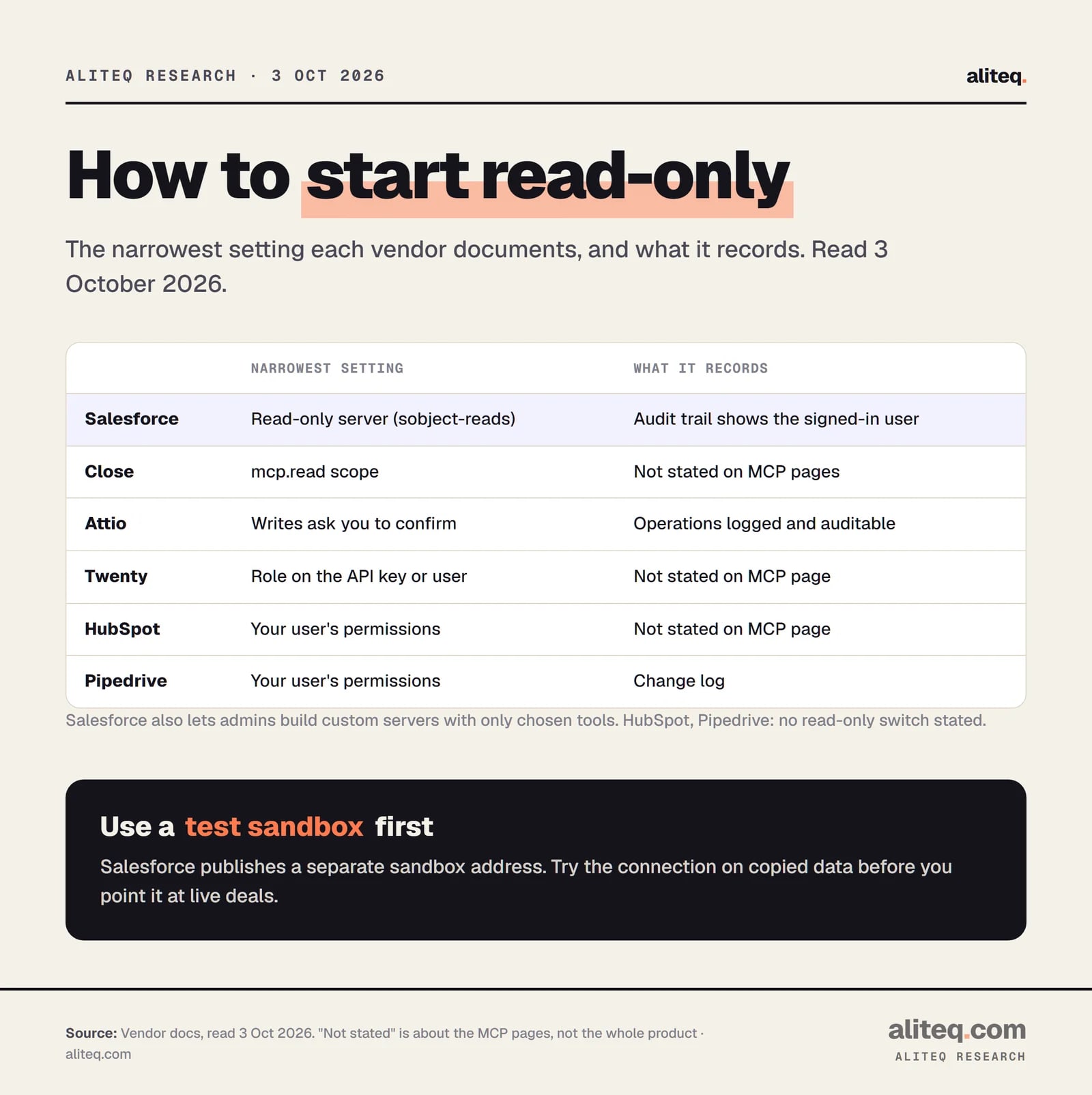
The narrowest setting each vendor documents, read 3 Oct 2026. · aliteq research
The same short list shows up across the docs.
Least privilege. Start read-only where the vendor offers it: Salesforce's sobject-reads server or Close's mcp.read scope. Give Twenty API keys a narrow role.
Scoped sign-in. Prefer OAuth over a pasted API key. Attio notes sessions can be revoked, and Twenty warns you to keep API keys out of version control.
Admin control. Salesforce leaves every server off until an admin enables it. HubSpot says Claude Enterprise admins can limit connectors to company accounts.
Audit logs. Salesforce records the signed-in user as the editor. Pipedrive records actions in its change log. Attio says operations are logged.
Try it on a sandbox first. Salesforce publishes a separate sandbox server address.
Pipedrive adds one more line worth reading: your AI provider's own privacy and security policies also apply. When a buyer sends a security questionnaire, you may need to say that an AI tool can reach CRM data. Our AI security questionnaire answers shows how to word it. If you plan to let an agent act on its own, read OpenClaw security risks and sandboxing first.
Which one fits which team
Pick by the gate that matters most to you, then confirm it on the vendor's page.
You want read-only first: Salesforce (sobject-reads) or Close (mcp.read) give you a documented switch. Attio asks you to confirm each write.
You're on a small plan: Attio (every plan), Pipedrive (every plan, token-metered), Zoho (included) and Twenty (Pro) state no Enterprise gate.
You're on Salesforce: confirm you have Enterprise Edition or above before you plan anything, and watch your daily API quota.
You want to run it yourself: Twenty is the one CRM here that documents a self-hosted MCP address.
You're on Dynamics 365 Sales and use Claude Desktop: Microsoft's page says it isn't supported at this time. Re-check before you commit.
It is a service the CRM vendor runs so AI tools like Claude and ChatGPT can ask for deals and contacts, or update them, through a fixed set of actions. It signs in as you, so it can only do what your user account can do.
Which CRMs have an official MCP server?
In their own docs, as read on 3 October 2026: HubSpot, Salesforce, Pipedrive, Attio, Close, Twenty and Dynamics 365 Sales each document one, and Zoho offers a builder for them. We found none in Freshworks' docs for Freshsales, only a developer-tools server.
Do I need a paid plan to use a CRM MCP server?
It depends. Pipedrive says every plan, Attio's pricing page lists it on every plan including Free, and Zoho says no extra cost. Twenty lists it on Pro and up. Salesforce needs Enterprise Edition or above. HubSpot and Close name no minimum plan on their MCP pages.
Can I let an AI read my CRM but not change it?
Some vendors document this. Salesforce has a read-only server, and Close has a read-only scope. Attio asks you to confirm every write. HubSpot and Pipedrive don't state a read-only switch on the pages we read, so the control there is the permissions of the person who connects.
Does Claude work with these servers?
HubSpot, Salesforce, Pipedrive, Attio, Close and Twenty name Claude in their docs. ChatGPT is named by Salesforce, Pipedrive, Attio, Close and Twenty. Microsoft's page says Claude Desktop isn't supported for the Dynamics 365 Sales server at this time.
Is it safe to connect an AI agent to my CRM?
Safer than sharing a login, but not risk-free. Vendors say the AI is limited to the connecting user's permissions. Start read-only where possible, use OAuth, connect with a least-privilege user, check the audit log, and try a sandbox first.