A reserve email, a payout that keeps moving, a balance you can see but can't touch. What Stripe's own pages say each kind of hold is, how long it normally lasts, what to send when they ask, and how much cash a rolling reserve really ties up.
You open the Dashboard and the balance is there. The payout isn't. Or an email arrives with the word "reserve" in it and a percentage you didn't agree to. The forums are full of people guessing at why. Stripe actually publishes most of the answer, across a dozen help pages and its services agreement.
We read those pages on 4 October 2026 and put them in one place. aliteq has never had a Stripe reserve, and we didn't ask Stripe about anyone's account. Every rule below is quoted or paraphrased from Stripe's own pages. The cash-flow numbers are our arithmetic, labelled as such.
Check two places first: your email and the Balance page in the Dashboard. A reserve shows in the "Reserve" pane at the bottom of the Balance page. A payout that keeps moving forward usually means a verification task is open. A pending withdrawal banner means you're paying back a negative balance.
The four situations look alike from the outside but come from different rules:
An email about a reserve, and a "Reserve" pane on the Balance page
What it usually is
A reserve: a share of your funds held for a set period
Where Stripe says so
Reserves FAQ; reserve status help page
The payout date keeps getting pushed to a later day
What it usually is
An open account verification requirement
Where Stripe says so
Late and missing payouts FAQ
A banner: "A withdrawal from your bank account is pending."
What it usually is
Payouts paused while Stripe recovers a negative balance
Where Stripe says so
Payout paused help page
A new account, and no payout yet after the first sale
What it usually is
The first payout, which Stripe typically schedules for 7 to 14 days later
Where Stripe says so
Receive payouts docs
What it usually is
Where Stripe says so
An email about a reserve, and a "Reserve" pane on the Balance page
A reserve: a share of your funds held for a set period
Reserves FAQ; reserve status help page
The payout date keeps getting pushed to a later day
An open account verification requirement
Late and missing payouts FAQ
A banner: "A withdrawal from your bank account is pending."
Payouts paused while Stripe recovers a negative balance
Payout paused help page
A new account, and no payout yet after the first sale
The first payout, which Stripe typically schedules for 7 to 14 days later
Receive payouts docs
Two of these fix themselves. The first payout arrives on its own, and a negative-balance pause lifts once the withdrawal completes. A verification delay ends when you finish the task. The Dashboard links it under account verifications, and Stripe's FAQ says to check both the Dashboard and your email. A reserve is the one with its own rules, and the rest of this article is mostly about it.
One more case: if Stripe has emailed asking for documents as part of a credit review, answer that first. A reserve is one of the outcomes a review can lead to.
What a Stripe reserve is
A reserve is a share of your money that Stripe holds for a set period to cover refunds and chargebacks. Stripe calls it "a temporary hold on a portion of a business's funds for a predetermined period of time". You keep taking payments; only the payout of the held share waits.
The Reserves FAQ is explicit on that last point: "Reserves do not impact a business's ability to continue accepting payments with Stripe." Your checkout keeps working. What changes is how much of each sale reaches your bank, and when.
When a refund or dispute hits, Stripe pays it from the reserve first. The FAQ says the matching reserve "will be released and used to cover the refund/dispute immediately". Whatever isn't used is "released in full at the end of the reserve period".
The legal version lives in Stripe's Services Agreement. Section 3.3 says Stripe "will notify User of the Reserve terms (the "Reserve Notice")". It also says Stripe will release reserve funds "only if, and to the extent that, Stripe is satisfied that the relevant risk exposure has been mitigated". That sentence is why the help page's time periods are described as normal, not guaranteed.
The three kinds of reserve, with Stripe's own example
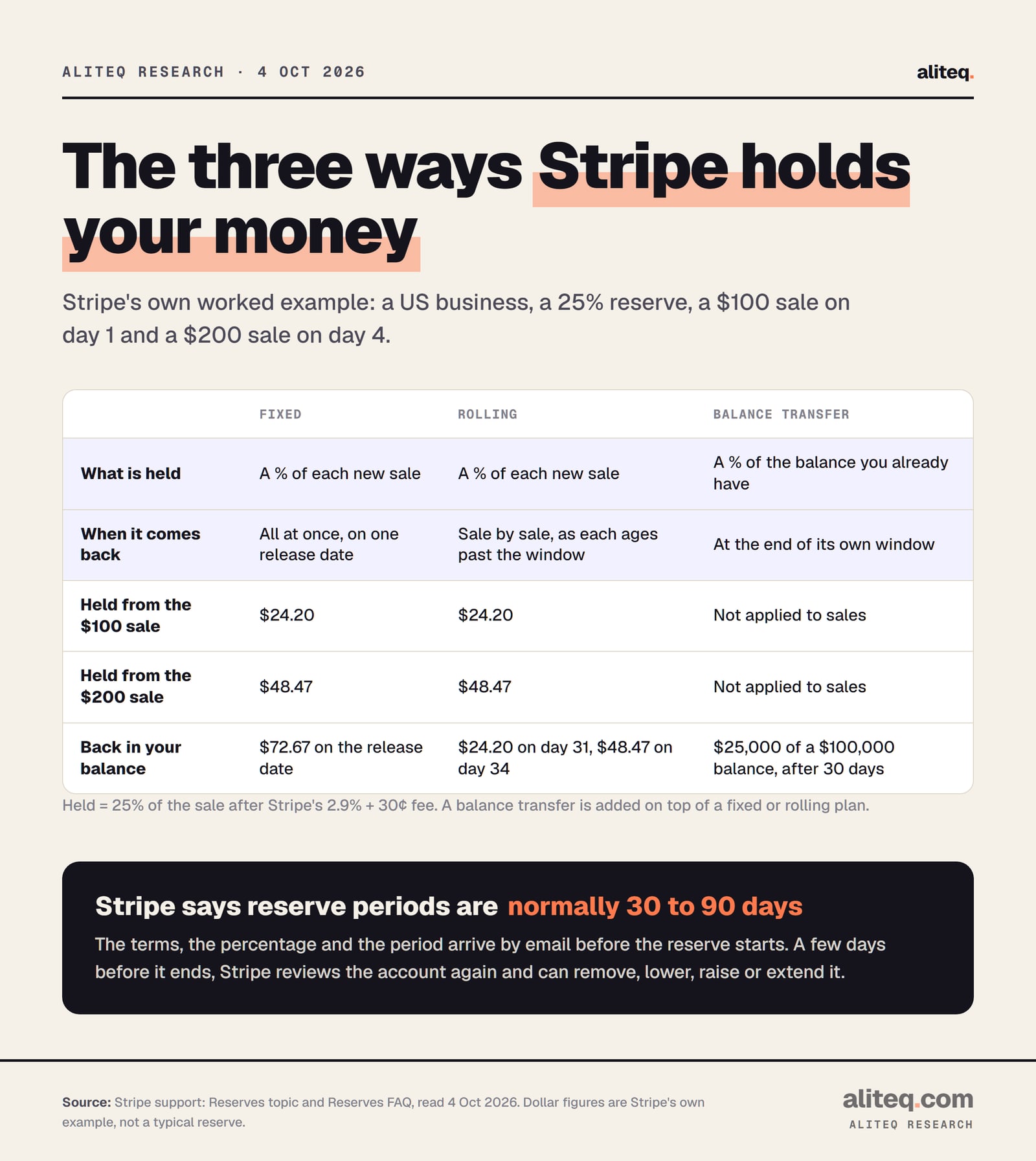
Stripe uses a fixed reserve, a rolling reserve, or a balance transfer on top of either. Fixed releases everything on one date. Rolling releases each sale's share once it ages past the window. A balance transfer moves part of the money you already have into the reserve.
Stripe's reserves page walks through each one with the same numbers: a US business, a 25% reserve, a $100 sale and a $200 sale. The 25% is Stripe's example, not a typical rate. Stripe doesn't publish one.
Stripe's own worked example of the three reserve types. The 25% rate is an example, not a typical reserve. · aliteq research
How the example works, in Stripe's numbers:
The $100 sale. Stripe's fee is 2.9% + 30¢, or $3.20. Of the $96.80 left, 75% ($72.60) is paid out on the normal schedule. The other 25% ($24.20) goes into the reserve.
The $200 sale. The fee is $6.10. Of the $193.90 left, $145.43 is paid out and $48.47 is reserved.
Fixed reserve. Both reserved amounts, $72.67 in total, come back together on the release date.
Rolling reserve, 30 days. The $24.20 comes back on day 31 and the $48.47 on day 34. Every new sale starts its own 30-day clock.
Balance transfer. In Stripe's example, 25% of a $100,000 balance, or $25,000, is held for 30 days. It sits on top of a fixed or rolling plan, which only touches new sales.
Notice that the reserve is a share of what's left after Stripe's fee, not of the sale price.
Why Stripe puts a reserve on an account
Stripe places a reserve when it decides your account carries a higher risk of refunds or disputes it might have to cover. Its pages name the signals: disputes above 0.75%, a sharp jump in refunds or volume, long gaps between payment and delivery, and annual or prepaid billing.
The Reserves FAQ lists four reasons, "including, but not limited to":
The business is in an industry "with longer-than-average delivery windows".
The business has an increased risk of not fulfilling customer orders.
The account has elevated dispute activity.
The account shows "an unexplainable sharp increase in processing volume".
The credit review FAQ puts numbers on two of them. "Stripe accounts with elevated (more than 0.75%) dispute rates are considered high risk." A refund spike is described as "a 100% increase from the week or month before". Stripe's disputes docs add that won and lost disputes both count toward your dispute rate.
The part that hits SaaS sellers
Annual plans and prepaid credits are a named risk signal. Stripe's credit review FAQ lists "Businesses with long billing periods" and gives "annual billing, retainers, or account credits" as examples. The reason is simple: a customer who paid for twelve months can dispute or ask for a refund for months afterward.
That matters if you just launched an annual plan with a big discount, or sell credit packs for an AI app. A good launch month can look like the "sharp increase in processing volume" on the list. Stripe's own advice is to charge "as close as possible to the date on which they will receive the product or service". If you sell usage credits, our guide to usage-based billing for an AI app covers the trade-offs of credits against metered billing.
The Services Agreement goes further. Its Payments Terms list the triggers that let Stripe change your payout schedule, delay payouts or set a reserve. They include excessive disputes, refunds or reversals, and a negative balance. They also include charging "for goods or services not immediately deliverable to the Customer without first obtaining Stripe's consent". Changing your business model without Stripe's consent is on the list too. If you plan to start pre-selling or move to annual billing, tell Stripe first.
How long Stripe holds the money
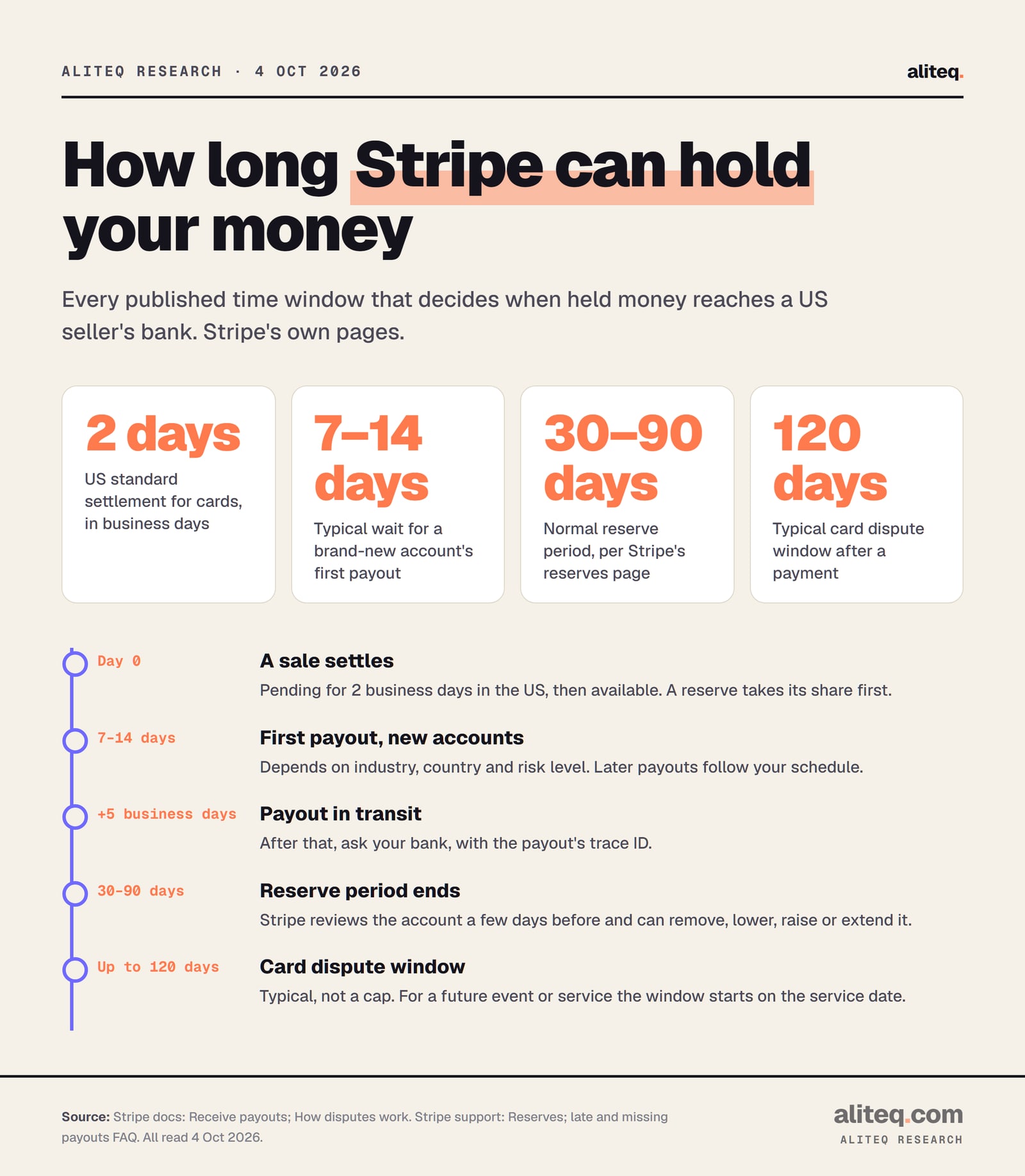
Stripe's reserves page says reserve periods are "normally" 30 to 90 days, "to give time for customers' refunds and chargebacks to process". Your reserve email states your actual period. A few days before it ends, Stripe reviews the account and can remove, lower, raise or extend it.
The FAQ is plain about extensions: "if after completing this review, we continue to see an elevated level of risk, we may need to extend the reserve". It also says that "in some rare cases, a reserve may be required indefinitely".
Every published time window between a sale and your bank, from Stripe's own pages. · aliteq research
Where "120 days" comes from
No Stripe page we read says Stripe holds funds for 120 days as a rule. The number comes from the card networks. Stripe's disputes docs say that "Card networks typically allow cardholders to initiate disputes within 120 days of the original payment, but their rules allow more time in some situations."
For a future event or service, the dispute window starts on the service date, not the payment date. That's why a business that sells far ahead of delivery can see longer holds. If your reserve email gives a 120-day period, it lines up with that dispute window. It's still your email, not this article, that sets the date.
The other clocks, from Stripe's payout docs:
Card settlement in the US: 2 business days before a payment becomes available. Stripe notes that "risk criteria might prevent your account from changing to the default settlement timing".
First payout on a new account: typically 7 to 14 days after the first live payment, "depending on your industry, country of operation, and risk level".
Bank payments settle slower: ACH Debit takes 4 business days and USD bank transfers 5.
A payout in transit: if it hasn't arrived after 5 business days, Stripe says to contact your bank with the payout's trace ID.
How much cash a reserve ties up
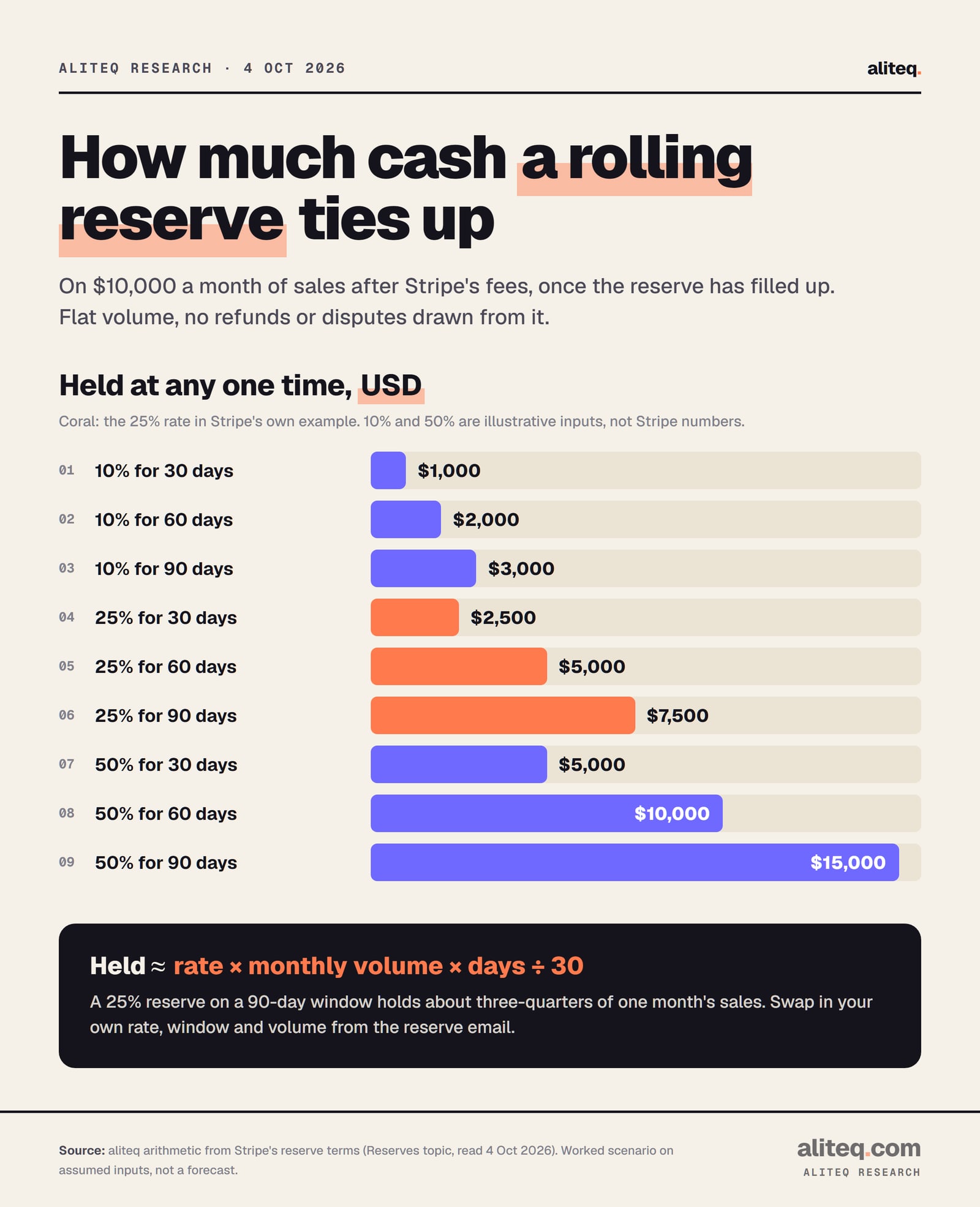
A rolling reserve holds roughly your reserve rate × monthly sales after fees × window in days ÷ 30, once it has filled. At 25% over 90 days that's about three-quarters of one month's sales. This is our arithmetic on assumed inputs, not a Stripe figure.
This is the number that decides whether a reserve is an annoyance or a payroll problem. On $10,000 a month of sales after Stripe's fees:
Cash held at any one time by a rolling reserve, on $10,000 a month after fees. Worked scenario, not a forecast. · aliteq research
10% (illustrative)
30-day window
$1,000
60-day window
$2,000
90-day window
$3,000
25% (Stripe's example rate)
30-day window
$2,500
60-day window
$5,000
90-day window
$7,500
50% (illustrative)
30-day window
$5,000
60-day window
$10,000
90-day window
$15,000
30-day window
60-day window
90-day window
10% (illustrative)
$1,000
$2,000
$3,000
25% (Stripe's example rate)
$2,500
$5,000
$7,500
50% (illustrative)
$5,000
$10,000
$15,000
Assumptions, so you can redo it with your own numbers: flat monthly volume, 30-day months, and no refunds or disputes drawn from the reserve. Only the 25% comes from Stripe's example; the $10,000, the 10% and the 50% are inputs we chose to show the range.
Two things the table hides. First, a rolling reserve fills up over its window. For the first 90 days of a 90-day reserve your payouts shrink and nothing comes back. Second, a fixed reserve with a release date 90 days out builds to about the same peak, then pays it all out at once. Either way, the first month of a reserve is when cash is tightest. Plan payroll and ad spend for it.
What to send Stripe in a review
Stripe's credit review FAQ names the documents it may ask for: bank balance and transaction history, financial statements and management accounts. It also checks that your site shows how to contact you, your refund, cancellation and delivery policies, and the terms of any free trial.
Stripe asks for "as much detail as possible" and "any relevant supporting documentation". In practice, that means a short, complete package:
Financials. Recent bank balance and transaction history, financial statements and management accounts. Stripe's FAQ names all of these. Linking your bank account in the Dashboard can, in Stripe's words, potentially reduce the frequency of reviews.
Your customer-facing policies. Refund, cancellation and delivery policies on your site, plus the terms of any free trial and how a customer contacts you. Stripe checks for each of these.
How you deliver. When customers pay and when they receive the product. For SaaS: monthly or annual, and what happens on cancellation. For credits: how long they last.
Proof of delivery. Receipts and agreements, and for a digital product, access logs or records that tie usage back to the customer. Stripe lists these as ways to lower risk.
Your dispute picture. Your dispute and refund rates from the Dashboard, what caused any spike, and what you changed. Respond to open disputes quickly.
Stripe also checks that your statement descriptor and product descriptions are "clear and accurate", and that your website meets card network standards. A customer who doesn't recognize the charge on their card statement is a common cause of disputes.
If you can't provide something, Stripe's FAQ says to reach out "as soon as possible" and that "We'll work with you to try and find alternative solutions". Silence is the worst answer. The FAQ warns that without the information, Stripe may be "left with an incomplete profile of your business".
How to appeal a reserve
If a reserve can be appealed, the option appears on the Balance page in the Dashboard. If you don't see it, Stripe's FAQ says to contact support. Either way, send the same package as for a review: financials, policies and an explanation of what changed.
Things that lower the risk Stripe sees, from its own lists:
Refund before it becomes a dispute. Stripe advises you to "Proactively cancel and refund charges that are likely to be disputed". A refund costs you the sale. A dispute costs the sale plus a $15 fee in the US, and another $15 if you counter it (returned if you win).
Make policies easy to find. Shipping terms, return and refund policies and any money-back guarantee, where customers can see them.
Make yourself easy to reach. An angry customer who can't find you calls their bank instead.
Pause recurring charges if your service is disrupted, and tell customers about delays.
Watch your dispute activity in the Dashboard. Stripe's disputes docs call activity above 0.75% "excessive" by industry standard. A sudden spike can trigger a card network monitoring program before that line.
None of this is a way around Stripe's review. It's the record Stripe asks for. We don't cover opening second accounts, splitting volume or rewording what you sell to avoid a review. Stripe's terms treat an undisclosed change of business model as a risk trigger, and those moves tend to make a hold worse.
What can happen next
In most cases a review ends with normal processing, Stripe's FAQ says. A higher-risk account gets a reserve. In rare cases, such as very high risk, a long stay in a card network monitoring program, or a breach of the Services Agreement, Stripe may close the account. Closing doesn't end your liability.
Stripe's account closure page says that "Closing a Stripe account doesn't release the owner from any liability related to the account balance". It also notes that an account "cannot be closed with an existing balance". The Payments Terms let Stripe apply its remedies, including holding funds, if it may incur losses after the terms end. So a closed account can still have money held for the dispute window.
If the balance goes negative, Stripe can debit your bank account, and payouts in that currency pause while the withdrawal is pending. Stripe's Services Agreement also lets it fund a reserve by "debiting the User Bank Accounts".
Keep a buffer yourself
Stripe offers a tool for this: minimum balances. You set an amount that stays in your Stripe balance after each automatic payout, to cover refunds, disputes and fees. Stripe says to "Only use minimum balances to cover anticipated refunds, disputes, and fees." It doesn't stop a reserve, but it can keep a refund spike from turning into a negative balance and a paused payout.
If the account risk is a reason you're weighing a merchant of record instead, our merchant of record vs Stripe Tax break-even and the cheapest merchant of record compare the fees. A merchant of record holds the money before paying you too, under its own terms, so read those before you move.
Quick answers
Why is Stripe holding my funds?
Usually one of three reasons: a reserve set after a risk review, an open verification task that keeps pushing your payout date out, or a negative balance being recovered. A brand-new account also waits for its first payout, typically 7 to 14 days after the first live payment. The Balance page and your email tell you which one it is.
How long can Stripe hold my money?
Stripe's reserves page says reserve periods are normally 30 to 90 days, and your reserve email states the exact period. A few days before it ends, Stripe reviews the account and can remove, lower, raise or extend it. Stripe says that in rare cases a reserve may be required indefinitely.
Why do people say Stripe holds funds for 120 days?
120 days is the typical card dispute window. Stripe's disputes docs say card networks typically allow disputes within 120 days of the payment, longer in some cases, such as future services. No Stripe page we read sets 120 days as a reserve rule.
Can I still take payments while Stripe has a reserve on my account?
Yes. Stripe's Reserves FAQ says reserves "do not impact a business's ability to continue accepting payments with Stripe." What changes is the share of each sale that is paid out, and when the rest comes back.
How do I get a Stripe reserve removed?
If the appeal option shows on the Balance page, use it; otherwise contact Stripe support. Send detailed financials, your refund and cancellation policies, proof of delivery and your dispute history. Stripe decides based on risk, so lowering disputes and refunds matters more than the wording of the appeal.
What dispute rate puts a Stripe account at risk?
Stripe's credit review FAQ says accounts with dispute rates above 0.75% are considered high risk. Its disputes docs add that won and lost disputes both count, and that a sudden spike can trigger a card network monitoring program before you reach that line.