Your app is deployed, Google sign-in works, and then the browser lands on localhost:3000 and shows nothing. Supabase did that on purpose. Why it happens, the one setting to change, and the short list that keeps www, previews and your laptop working.
You deployed. You opened the live site, tapped "Sign in with Google," picked your account, and the browser landed on http://localhost:3000. On your phone that is a dead page. On your laptop it might even half-work, which is somehow worse.
Good news: nothing is broken. Supabase is doing exactly what it was told. It just was never told about your live site. I read Supabase's docs, its troubleshooting page and the code of the Supabase Auth server on 4 October 2026, plus the GitHub threads where people hit this. I did not set up a test project for this piece. No affiliate links here.
You walked through the front door of your live site. Supabase sent you back to your bedroom laptop. · Illustration made in Higgsfield with the GPT Image model
Why does Google login send me to localhost after I deploy?
Because Supabase did not trust the live address it was asked to send you to, so it used its default. That default is the Site URL. Supabase's docs call it the "default redirect URL when no redirectTo is specified", and they tell you to change it "from http://localhost:3000 to your production URL". If nobody changed it, localhost is where users go.
Here is the hand-off in plain words. Your app sends the user to Supabase. Supabase sends them to Google. Google sends them back to Supabase. Then Supabase has to pick the final stop in your app. If you want the bigger picture of that dance, Sign in with Google, explained walks through it.
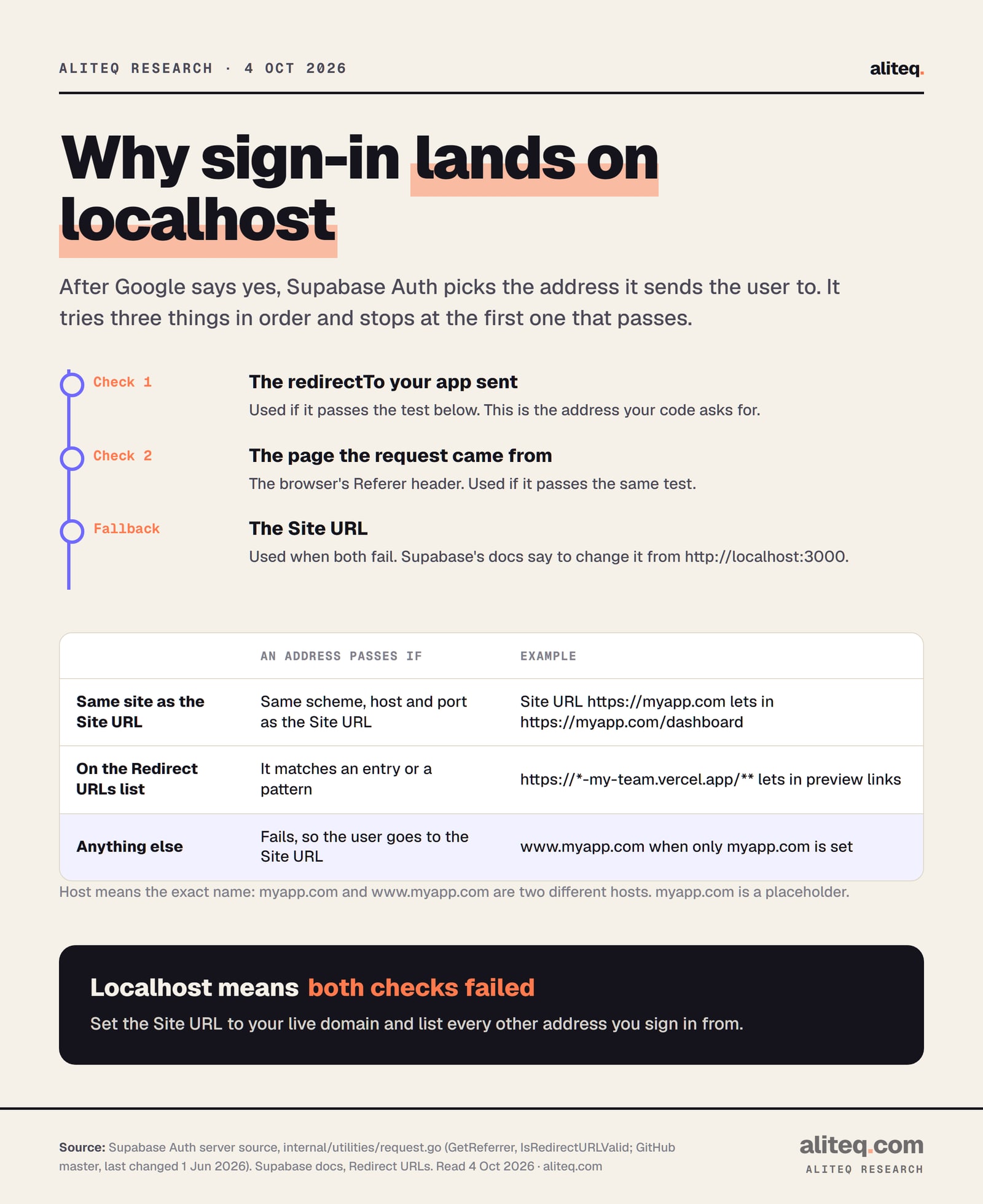
That last pick is where it goes wrong. I read the function in the Supabase Auth server that makes it, called GetReferrer. It tries three things, in order:
The address your app asked for. That is the redirectTo option in your code. Supabase's own type definition describes it as "A URL to send the user to after they are confirmed."
The page the request came from. Browsers send this as the Referer header. Supabase tries it if the first one fails.
The Site URL. Used when both fail. No error, no warning. You just land there.
An address "passes" only in two cases. It is on the same site as the Site URL, meaning the same scheme (http or https), host and port. Or it matches an entry on the Redirect URLs list. So with the Site URL still on localhost and an empty list, your live domain fails both checks every time.
Our reading of Supabase Auth's request.go (GitHub master, read 4 Oct 2026). Localhost means both checks failed. · aliteq research
Supabase's troubleshooting page asks the question almost word for word: "Why are redirects going to localhost instead of the production site URL?" Its answer is one line: "you must set the exact URL in the shown Redirect URL's setting."
How do I fix it in the Supabase dashboard?
Open your project in the Supabase dashboard, go to Authentication, then URL Configuration. Set the Site URL to your live address, such as https://myapp.com. Then add every other address you sign in from to Redirect URLs. Save, and sign in again from the live site.
That first change does most of the work. Once the Site URL is your live domain, any page on that same domain passes the first check automatically. So https://myapp.com/dashboard works without its own list entry. Supabase's docs still recommend "setting the exact redirect URL path" for production, and listing the exact page you send people to costs nothing.
The Site URL matters beyond Google, too. Supabase says the setting "is critical for email confirmations and password resets." Fix it once and those links stop pointing at your laptop as well.
Write down every address your app runs at: the live domain, the www version if you use it, preview links and your laptop.
In Supabase, open Authentication, then URL Configuration.
Set the Site URL to your main live address, such as https://myapp.com. Not localhost, not a preview link.
Add the other addresses to Redirect URLs: the www version, a preview pattern scoped to your team, and http://localhost:3000/** for your laptop.
Sign in from the live site in a private window. You should land on your app, signed in.
Why does it work on www but not without it (or the other way round)?
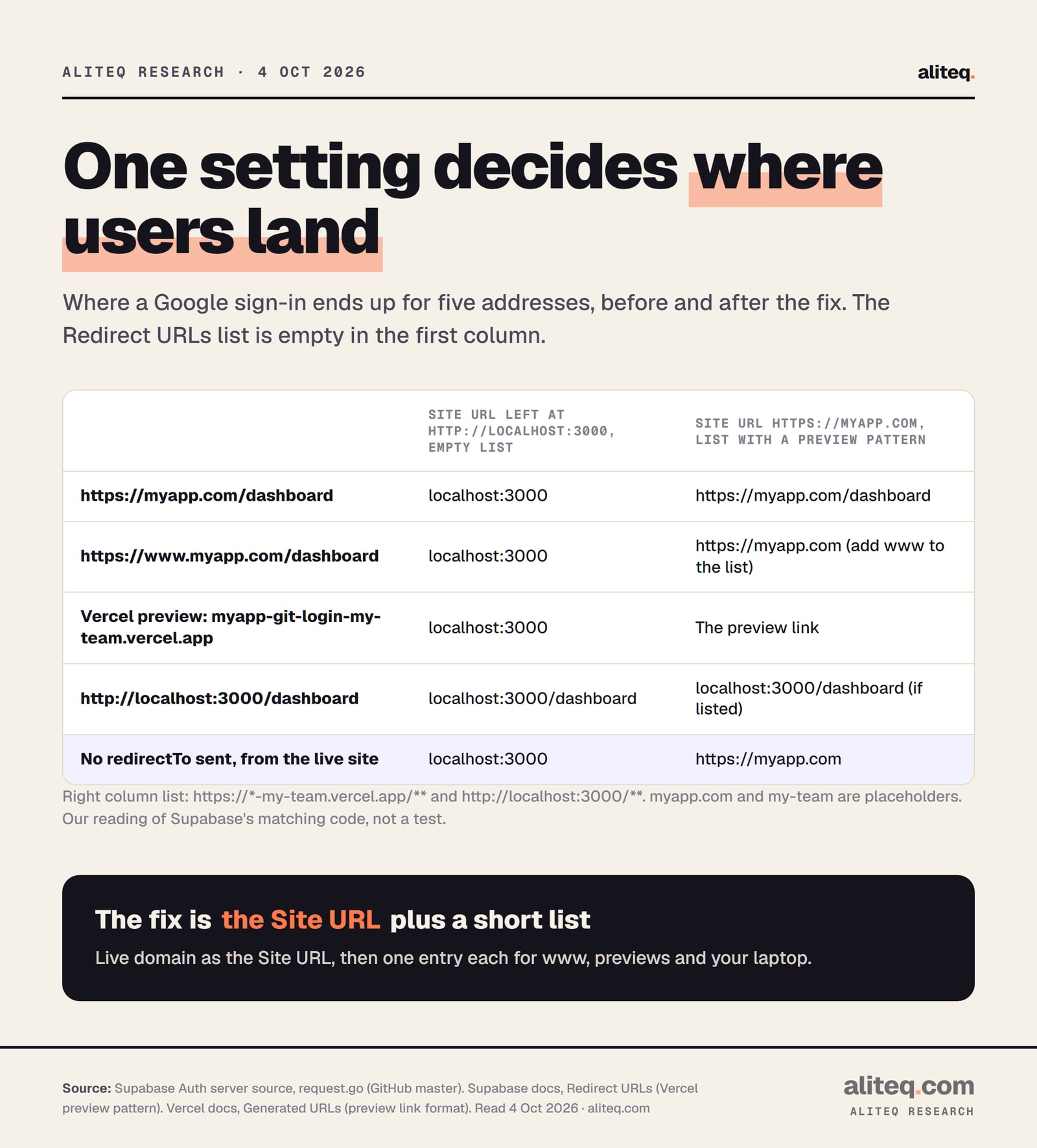
Because to Supabase, myapp.com and www.myapp.com are two different hosts. Its code compares the host name exactly. If your Site URL is one and visitors use the other, the other fails the check and falls back. If your Site URL is still localhost, both fail.
This exact case is on GitHub. Issue #41700 from January 2026 is titled "Google OAuth redirects to localhost instead of configured Site URL." The reporter wrote: "My domain without www → redirects to localhost:3000" while "Same domain with www → works correctly." They had rebuilt the app, cleared caches and made a new project. Replies pointed them to the Redirect URLs list, and the thread was later closed for inactivity.
It is not new, either. Issue #12941 from March 2023 is titled "signInWIthOAuth always redirects to localhost:3000 in production." A community reply there said the person "likely did not set your exact URL's", so it would "always" go to the default Site URL. Three years apart, same setting.
The fix is the same both ways. Pick one main address as the Site URL. Add the other one to Redirect URLs. Better still, have your host forward one to the other, so visitors only ever see one address.
What about preview links on Vercel or Netlify?
Every preview deploy gets its own address, and none of them match your Site URL. Supabase's allow list accepts patterns for this. For Vercel, Supabase's docs suggest https://*-<team-or-account-slug>.vercel.app/**. For Netlify, https://**--my_org.netlify.app/**. Swap in your own team or org name.
Vercel's docs explain why that pattern fits. A branch preview link looks like <project-name>-git-<branch-name>-<scope-slug>.vercel.app, where the scope slug is your account or team. So a star before -my-team.vercel.app covers every preview your team makes. In Supabase's patterns, * matches anything except a dot or a slash, and ** matches anything at all.
Keep the star inside your own name. A pattern over the whole vercel.app domain would trust apps that are not yours. Supabase itself says the double star is for "local development and preview URLs" and recommends the exact path for production.
Five addresses, before and after. Our reading of Supabase Auth's matching code and docs, read 4 Oct 2026, not a live test. · aliteq research
If "preview" and "production" are fuzzy terms for you, this walks through the stages most apps go through, from your laptop to your own domain. Each stage is a new address that sign-in has to come back to.
Drag from "works on my laptop" to "a real product"
local
preview
prod
domain
scale
localhost:3000
Who can open it
Only you, on your machine
Where it runs
Your laptop
Rough cost
$0
What this stage adds: The app runs, but only where the code is. Close the laptop and it's gone.
Watch out: Nothing is exposed — and nothing is shareable.
What if the localhost is in my code, not the dashboard?
Then the dashboard fix will not help. If your code passes redirectTo: "http://localhost:3000", that address passes Supabase's check on purpose, because you listed localhost for your laptop. Everyone gets sent there. Search your project for "localhost" and for redirectTo, and replace any fixed address.
AI tools write this line a lot, because they test on your laptop. The usual safe version builds the address from wherever the page is running. In the browser, window.location.origin gives you the scheme, host and port of the current page, per MDN. On the live site that is your domain; on your laptop it is localhost.
Supabase's docs show another version for Next.js on Vercel. It reads a NEXT_PUBLIC_SITE_URL environment variable that you set to your live domain, then Vercel's own deployment URL, then localhost as a last resort. If your app does this, check that the variable is set in your host's production settings, not just in a file on your laptop. Environment variables and secrets, explained covers why a value can exist on your machine and be missing in production.
It depends on which backend your app uses. If you connected your own Supabase project, the setting lives in the Supabase dashboard, not in Lovable. If you use Lovable's built-in backend with Google sign-in managed by Lovable, Lovable handles the redirects and you may never see this.
Lovable's docs say it plainly for your own project: "Authentication settings themselves live in your Supabase project, not in Lovable." Its comparison table lists "Auth settings and social login providers" as "Configured in the Supabase dashboard" for a connected project. For its built-in backend, the managed Google option means "Lovable manages the OAuth client, credentials, redirect handling, and related security updates."
So if you see localhost after deploying a Lovable app on your own Supabase, use the steps above. The same goes for Bolt, Cursor, Replit or v0 apps on your own Supabase project. The tool wrote the code; the Supabase dashboard still holds the list. New to the pieces? What is Supabase? explains what the dashboard is for.
Why do so many people hit this?
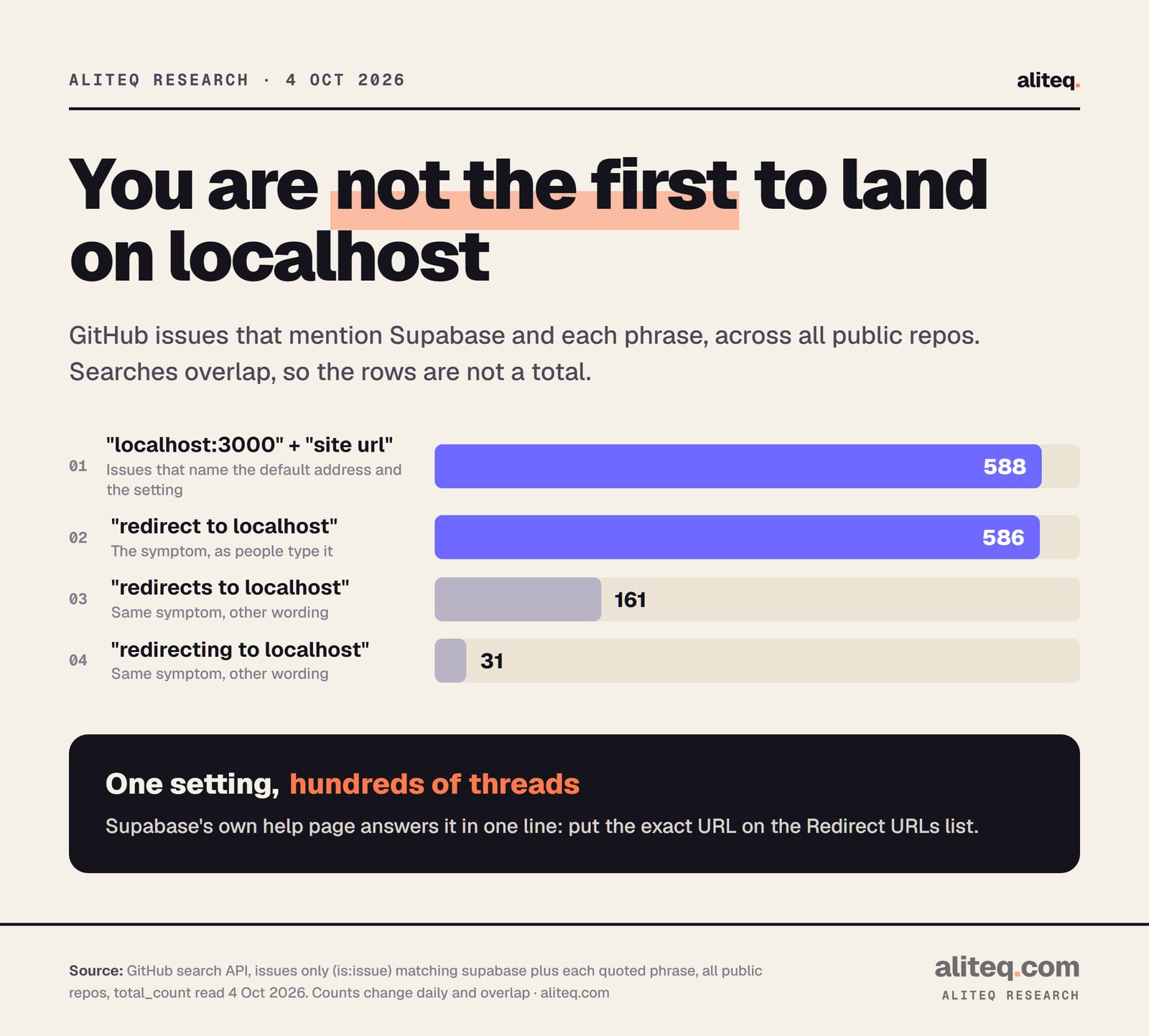
Because the default only works on the machine you built on, and nothing warns you when you deploy. We ran GitHub searches on 4 October 2026 for issues that mention Supabase with each phrase. The counts overlap, so they are not a total, but the pattern is clear.
GitHub search API, issues only, all public repos, counted 4 Oct 2026. Counts change daily and overlap. · aliteq research
"redirect to localhost" alone matched 586 issues. Issues naming both "localhost:3000" and "site url" matched 588. That is a lot of people finding the same one setting the hard way.
What should I tell my AI tool?
Give it the symptom, say you use Supabase, and ask it to show every redirectTo in your code. Then change the dashboard settings yourself. Your AI tool cannot see your Supabase dashboard, so it can only guess about the Site URL and the list.
A prompt that works in plain English:
"After deploying, Google sign-in on my live site sends users to http://localhost:3000. I use Supabase Auth. Find every call to signInWithOAuth, signUp and resetPasswordForEmail, and show me the redirectTo or emailRedirectTo each one passes. Replace any hardcoded localhost with the current page's origin. Do not change anything else. Then tell me exactly what to put in Supabase's Site URL and Redirect URLs for my live domain, my www domain and my preview links."
If your login code came from an AI prompt in the first place, the Supabase login prompt lab shows how to ask for redirects up front, so this never ships.
Quick answers
Why does Supabase redirect to localhost after Google login in production?
Supabase only sends users to an address on the same site as its Site URL or on its Redirect URLs list. If your live address is neither, it falls back to the Site URL, which Supabase's docs tell you to change from http://localhost:3000. Set the Site URL to your live domain in Authentication, URL Configuration.
Where is the Site URL setting in Supabase?
In the Supabase dashboard, open your project, go to Authentication, then URL Configuration. The Site URL and the Redirect URLs list are both on that page. If you run Supabase locally with the CLI, the same settings live in its configuration file instead.
I set the Site URL and it still goes to localhost. Why?
Check your code. If it passes redirectTo with a fixed localhost address, and localhost is on your list, Supabase sends everyone there on purpose. Also check www: myapp.com and www.myapp.com are different hosts, so list whichever one is not your Site URL.
How do I make Supabase sign-in work on Vercel preview links?
Add a pattern to Redirect URLs. Supabase's docs suggest https://-<team-or-account-slug>.vercel.app/* with your own team or account slug. Keep the star inside your own name, and keep your Site URL as your real live domain.
Do I need to change anything in Google Cloud?
Not for this symptom. If Google showed its account picker and then you landed on localhost, Google already accepted the sign-in. The final stop is chosen by Supabase, so the fix is in Supabase's URL Configuration and in your code.
Does the Site URL affect password reset and confirmation emails too?
Yes. Supabase's docs say the Site URL is critical for email confirmations and password resets. If it is still localhost, those email links can point at localhost as well. Fixing it for Google login helps those emails too.
Use this in your own page
Teaching this? Paste the live version into your course, blog or answer. Free, no sign-up; the credit line links back here.