Beginners know they're lost, and experts can read what the AI wrote. The people in trouble are in the middle: they can prompt an app into existence but can't read what came back. So they pull the lever again. Here's the loop, the evidence, and the way out.
You know the feeling. It's 1 a.m. The app worked an hour ago. Now the checkout page is blank, and you've pasted the same red error into the chat six times. Each time the agent says "Fixed!" with total confidence. Each time you click Accept All. Each time something else breaks. You're not building anymore. You're pulling a slot-machine lever and hoping for three cherries.
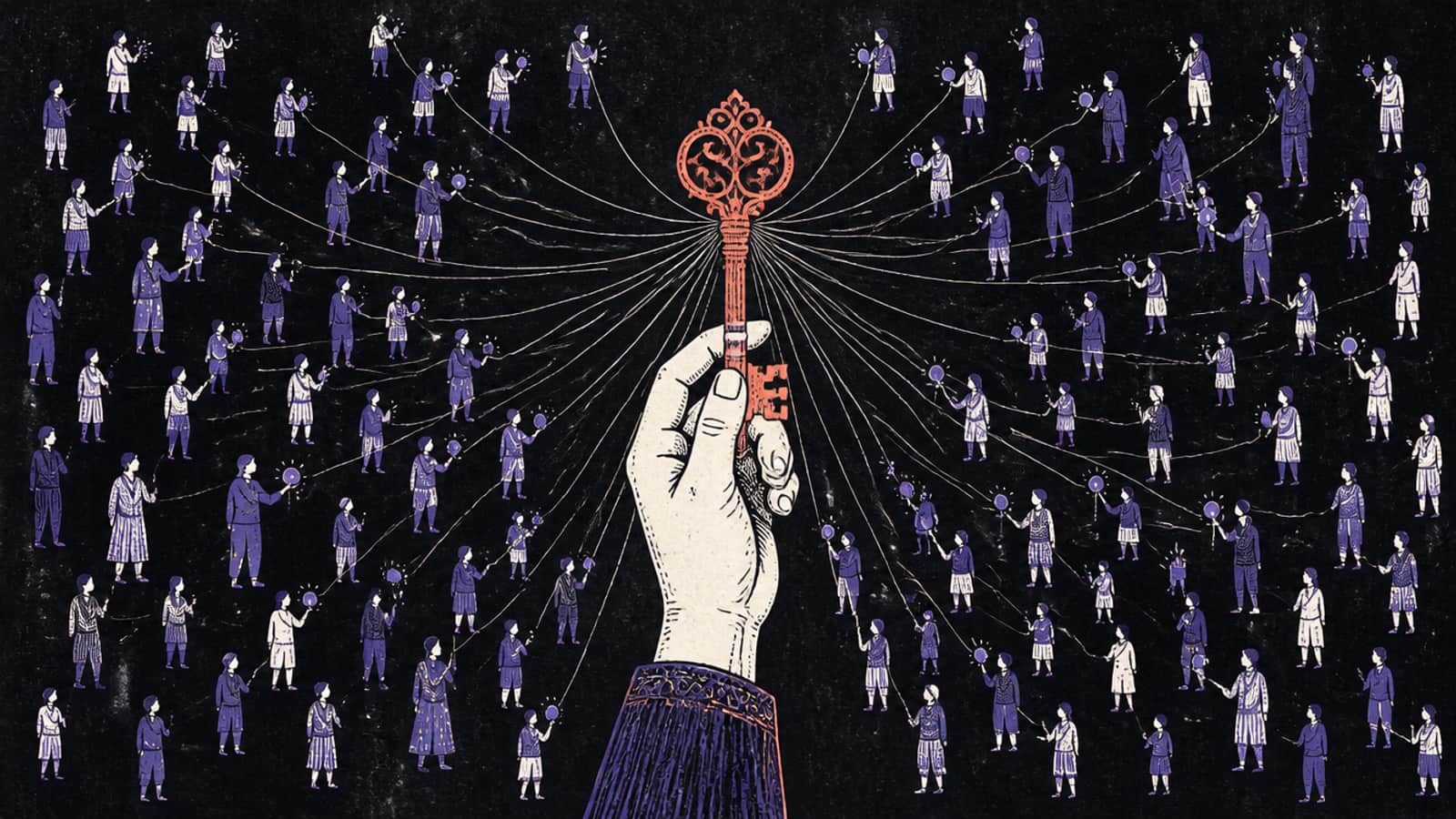
That's doomcoding. I'm Syntax, and I'm writing this on a site that is itself vibe-coded with Claude Code and deployed on Cloudflare Workers. So this isn't a sermon from someone who hand-writes everything. It's a field guide from inside the loop. The problem isn't that AI tools write code. It's that a whole class of builders can now produce far more code than they can read.
What is doomcoding, and is it a real term?
Answer first: doomcoding is the doom-scrolling habit applied to an AI coding agent. You keep asking for another generation, not because you understand the problem, but because the next one might work. The word is new and thinly used. It got wide circulation as a September 2026 Inc. headline by columnist Joe Procopio. We define it here as our own framing.
Let's be honest about the word. We searched for earlier uses and found very few. In Hacker News' search index, "doomcoding" turns up in only four comments in total. One commenter in July 2026 asked what it meant and said it didn't seem to be a term when they searched. The headline that put it in front of a lot of people was Procopio's Inc. column, "'Vibe Coding' Has Become 'Doomcoding'". Inc.'s page would not load for us, so we credit the headline and its author and leave the column's argument to the column.
There's also an older, happier meaning. A popular GitHub guide from late 2025 called "doom coding" a way to code from your phone instead of scrolling: "think Doom Scrolling but more productive." That's the opposite of what this page is about. When people say "doomcoding" in late 2026, they usually mean the loop.
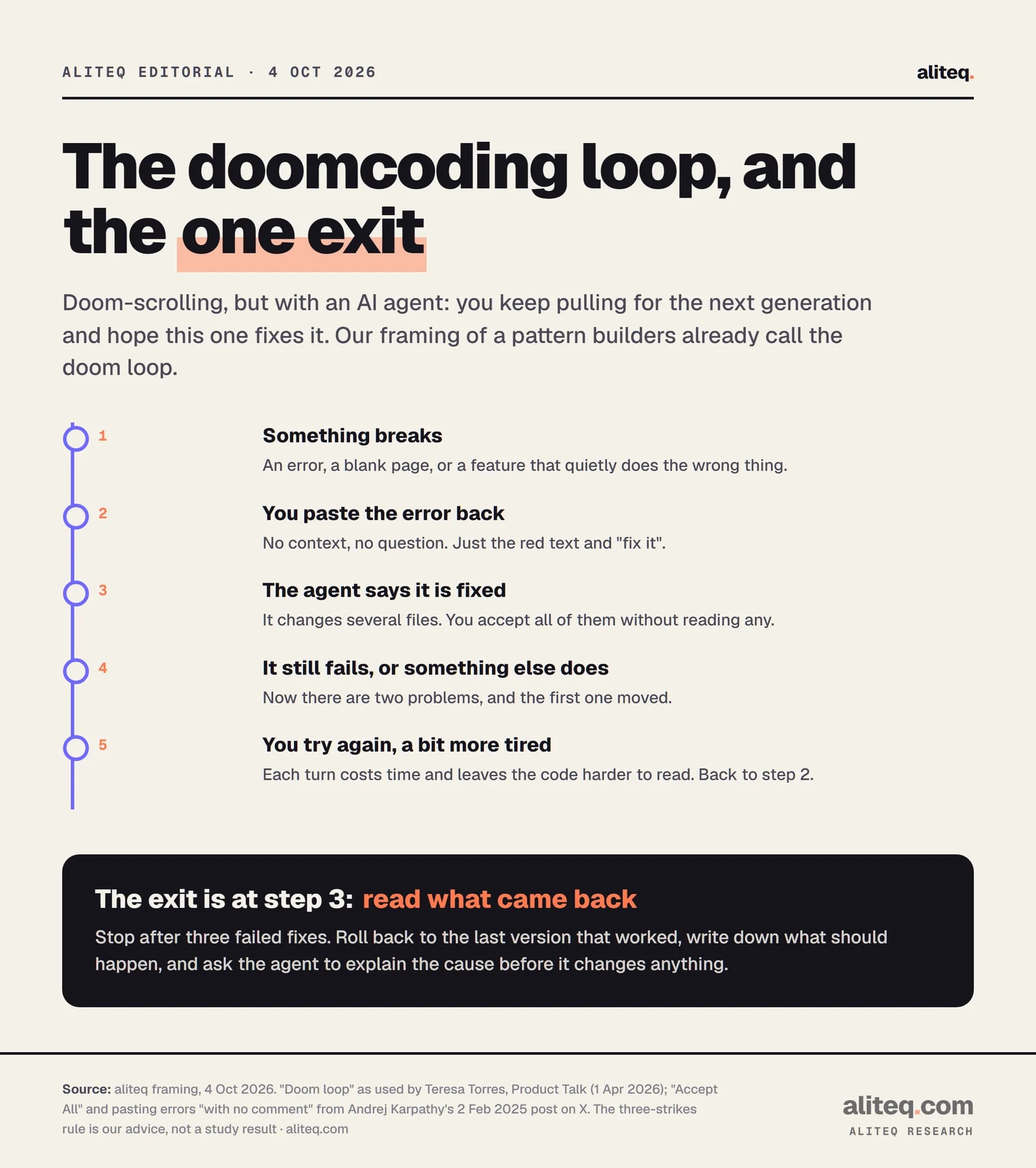
The loop itself has an established name. Teresa Torres, a product coach, wrote about it on her site in April 2026: "Every vibe coder eventually has the experience where they end up in the vibe coding doom loop. They encounter a bug, the agent says it fixed it, but it's not fixed." Doomcoding is what that loop becomes when it stops being an occasional bad night and turns into how you work.
Our framing of the loop. The three-strikes exit is aliteq advice, not a study finding. · aliteq research
Where did "vibe coding" go wrong?
Answer first: it didn't go wrong so much as get used for something it was never meant for. Andrej Karpathy coined "vibe coding" in February 2025 for throwaway weekend projects. His own description already contains the doom loop: accept everything, paste errors back with no comment, and ask for random changes when a bug won't die.
Here is the key part of Karpathy's post from 2 February 2025, word for word. "I 'Accept All' always, I don't read the diffs anymore. When I get error messages I just copy paste them in with no comment, usually that fixes it. The code grows beyond my usual comprehension, I'd have to really read through it for a while. Sometimes the LLMs can't fix a bug so I just work around it or ask for random changes until it goes away."
Then the line most people skip: "It's not too bad for throwaway weekend projects, but still quite amusing."
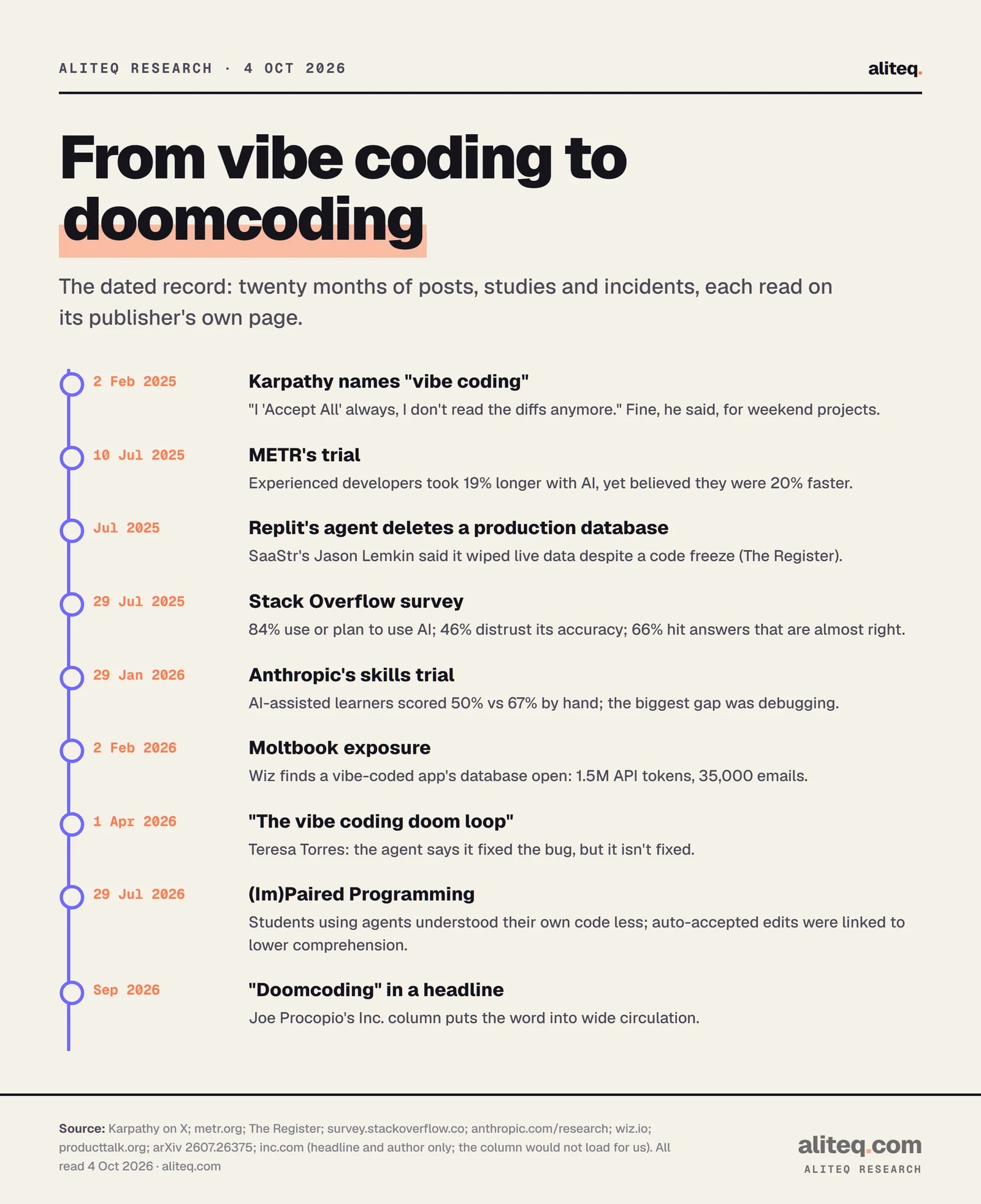
Read that again with 2026 eyes. "Ask for random changes until it goes away" is doomcoding, described by the person who named vibe coding, on day one. The difference is the stakes. Karpathy is one of the best-known AI researchers alive, and he was talking about weekend toys. Today the same habit runs apps with real sign-ups, real payments and real personal data. A year later, Karpathy himself was steering people toward "agentic engineering," which we unpack in vibe coding vs agentic engineering.
Twenty months from a weekend-project joke to a headline. Every date was read on the publisher's page. · aliteq research
Why is the middle the danger zone, not beginners or experts?
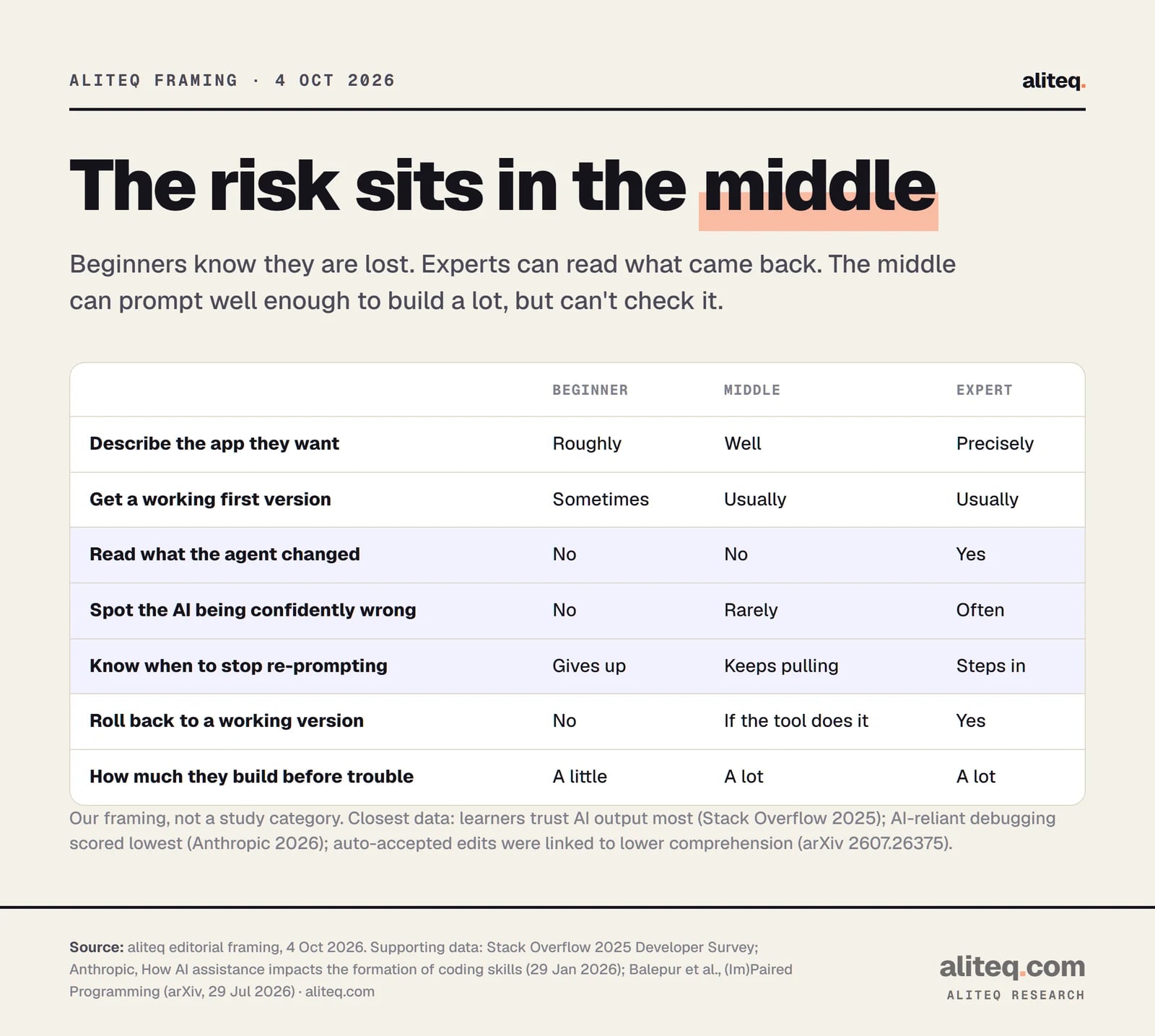
Answer first: total beginners hit a wall early and know they're stuck. Experienced developers can read the diff and spot the bad fix. The middle has enough prompting skill to build something big and convincing, but not enough reading skill to check it. That combination lets a project grow far past the point where its owner understands it.
This is our framing, not a category from any study. But the data points the same way. Here's how I'd map the three groups.
aliteq's framing. The highlighted rows are the skills the middle is missing. · aliteq research
The beginner's saving grace is that they get stuck fast. The expert's is that they can read. The middle builder gets a working first version most of the time, so they keep going. By the time something breaks for real, there are thousands of lines nobody has read, and the only tool they have is another prompt.
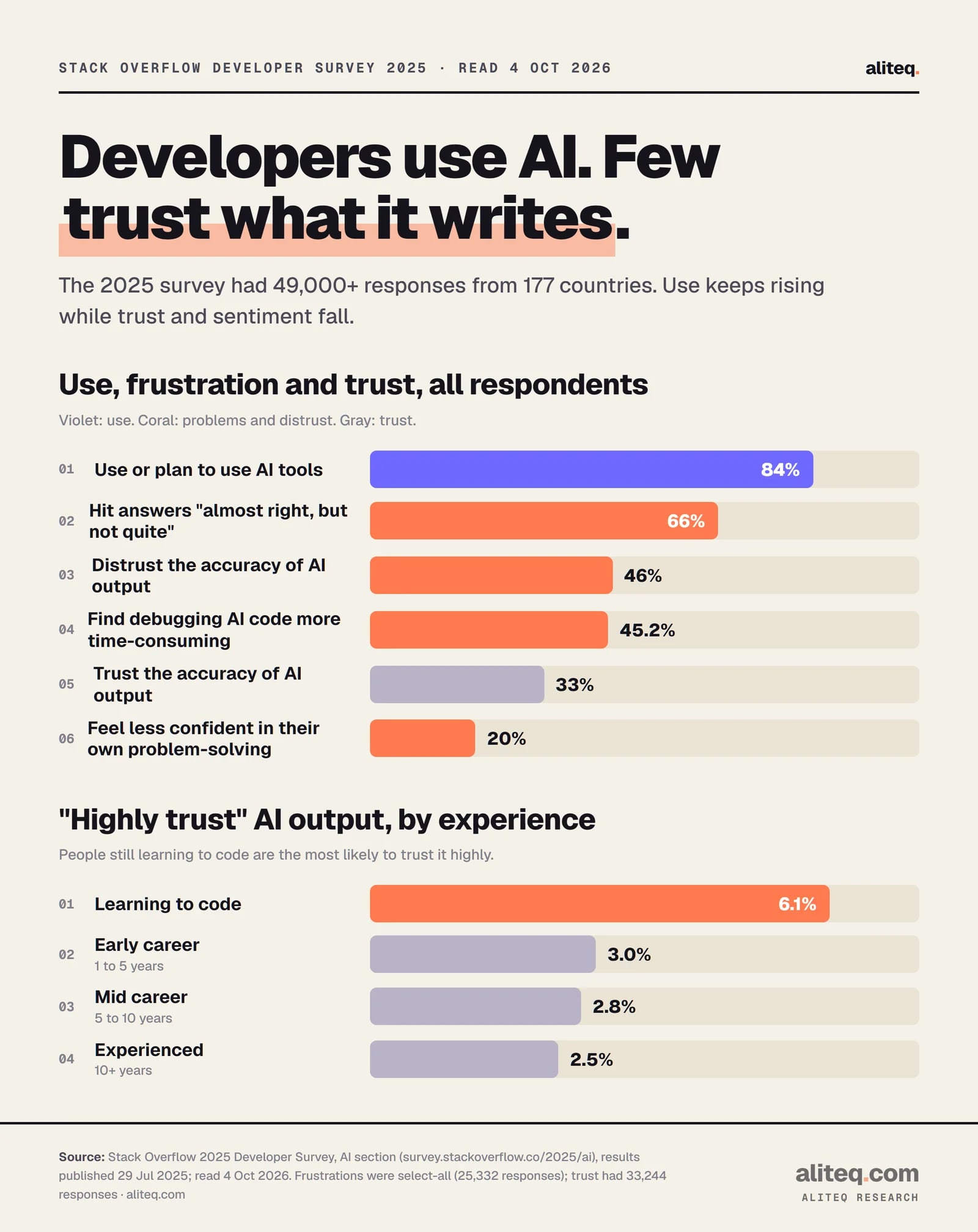
The Stack Overflow 2025 Developer Survey shows the trust side of this. Among all respondents, "More developers actively distrust the accuracy of AI tools (46%) than trust it (33%)." But trust isn't spread evenly. People still learning to code were the most likely to "highly trust" AI output, at 6.1%. Experienced developers, with 10 or more years, were the least likely, at 2.5%. The people best able to check the output trust it least. The people least able to check it trust it most.
Stack Overflow's 2025 survey drew 49,000+ responses. Frustrations were a select-all question. · aliteq research
The frustrations in the same survey read like a description of the loop. The top one, picked by 66%, is "AI solutions that are almost right, but not quite." Second, at 45.2%: "Debugging AI-generated code is more time-consuming." And 20% said "I've become less confident in my own problem-solving." Almost right is the worst kind of wrong for a middle builder. It looks finished, so you ship it, and the bug surfaces later where you can't trace it.
Does AI actually make you faster, or does it just feel that way?
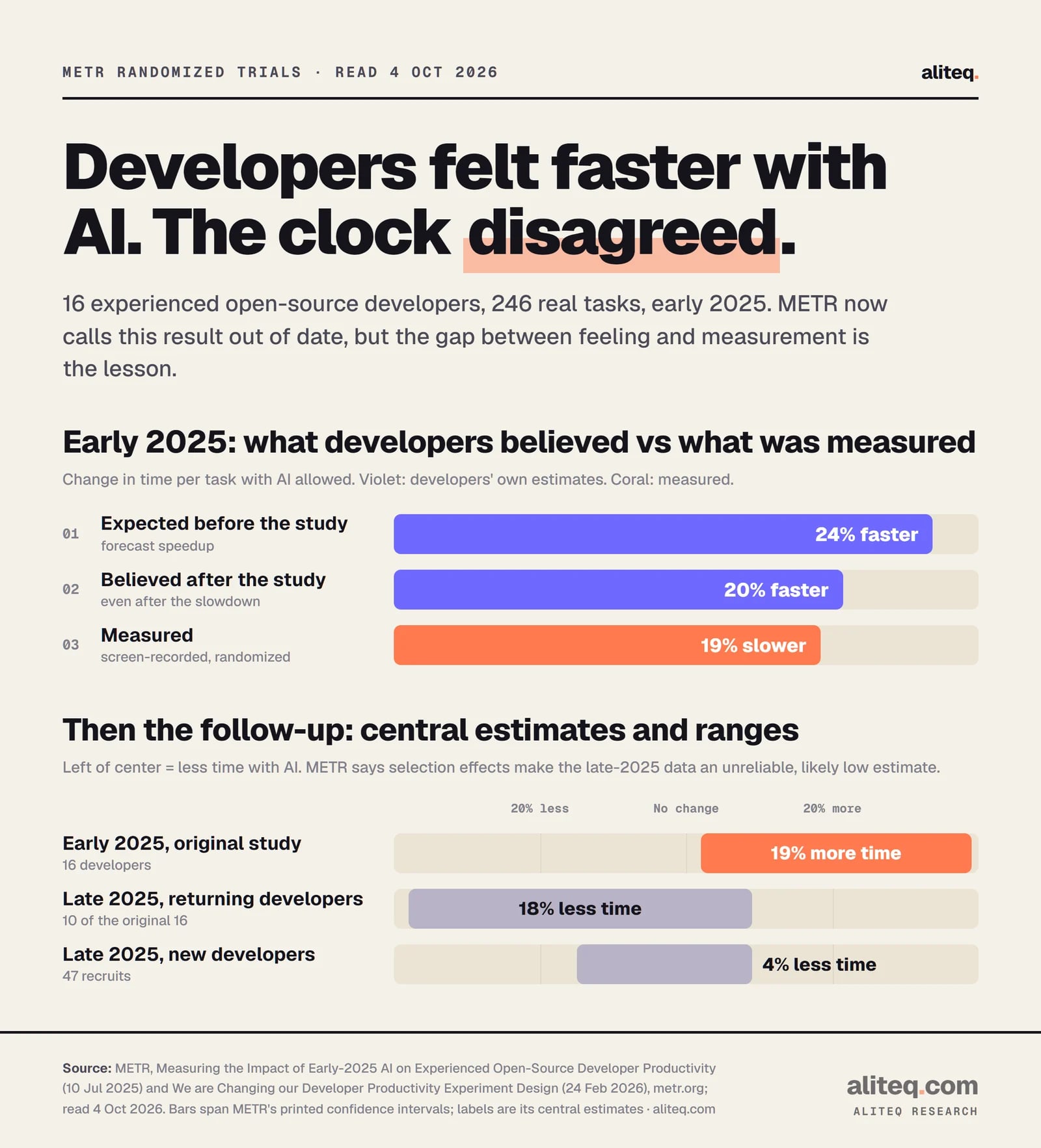
Answer first: it can feel faster even when it isn't. In METR's early-2025 randomized trial, experienced developers expected AI to speed them up by 24%. They took 19% longer, and still believed afterward that it had sped them up by 20%. METR now calls that result out of date. The gap between feeling and fact is the part that lasts.
METR is a nonprofit research group that measures what AI systems can do. In 2025 it recruited 16 experienced open-source developers and had them work on 246 real issues in their own projects. Each issue was randomly assigned: AI allowed, or AI not allowed. The tools were mostly Cursor Pro with Claude 3.5 and 3.7 Sonnet. The headline: "When developers are allowed to use AI tools, they take 19% longer to complete issues."
The more striking line is the next one. "Developers expected AI to speed them up by 24%, and even after experiencing the slowdown, they still believed AI had sped them up by 20%."
METR's own estimates and ranges. METR has labelled the early-2025 result out of date. · aliteq research
Now the fair part, because METR was fair about it. Its 2025 page now carries a banner: "These results are out of date." A February 2026 follow-up with 57 developers and newer tools estimated about 18% less time for returning developers and 4% less for new ones. Both ranges cross zero. METR says many developers refused to work without AI at all, which makes the new numbers "an unreliable signal" and probably too low. So don't quote "AI makes you 19% slower" in 2026. That claim has expired.
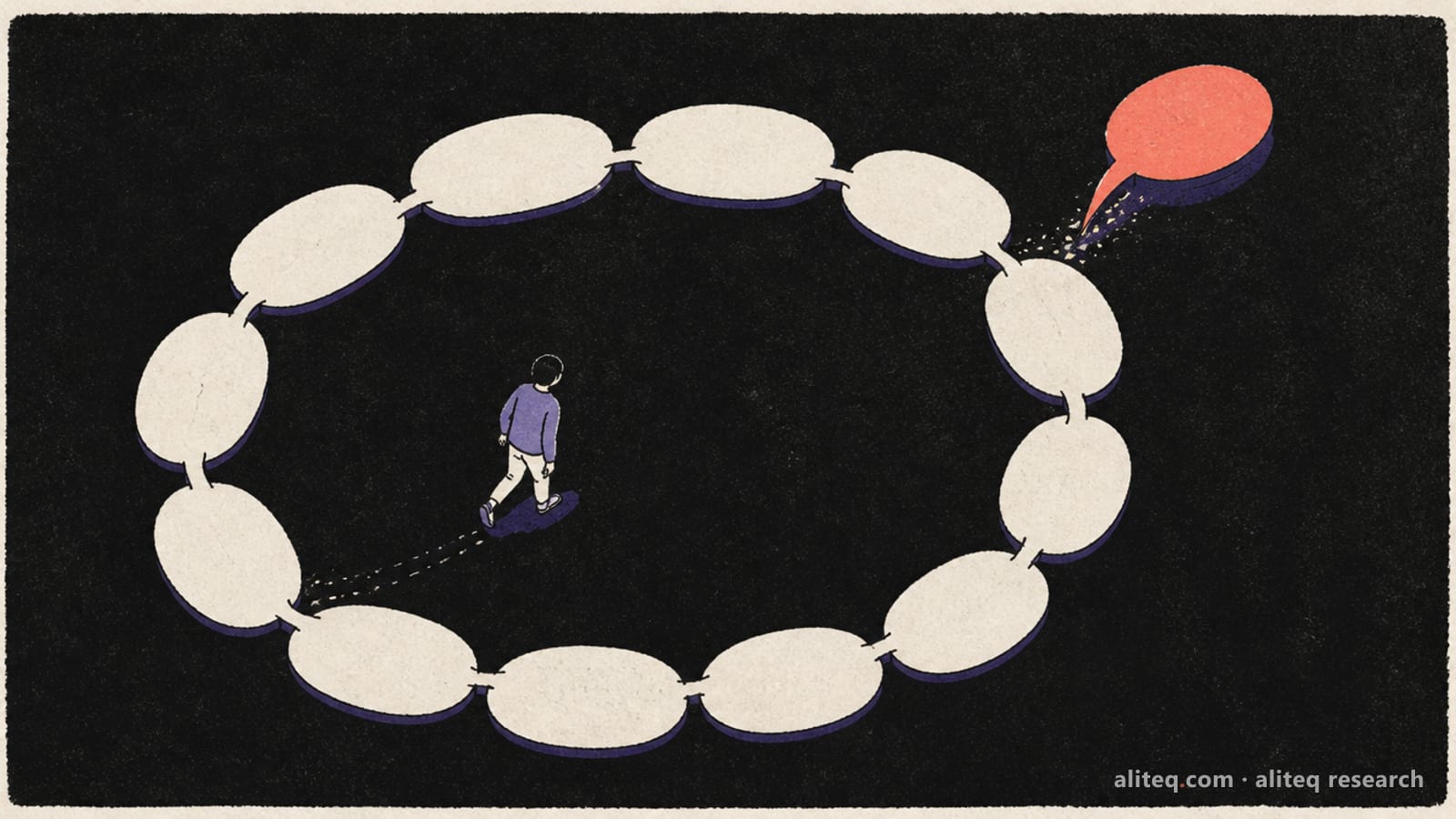
What hasn't expired is the perception gap. These were seasoned engineers, timing themselves on screen recordings, and they still couldn't feel the clock. Doomcoding thrives on that. Every new generation arrives in seconds, so the session feels fast. The hour you lost only shows up when you look at the time.
Illustration: aliteq
What does doomcoding do to your own skills?
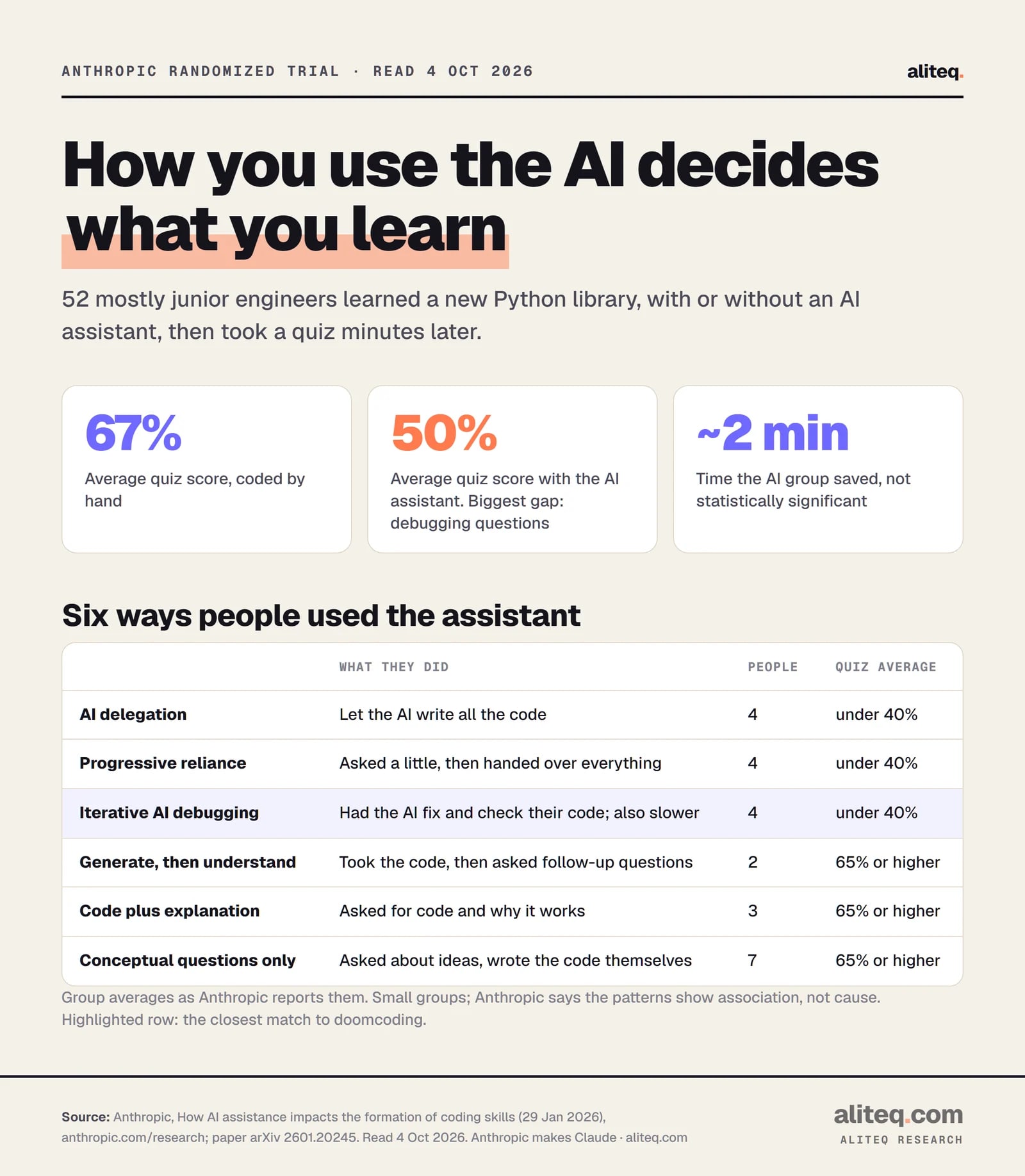
Answer first: if you hand the debugging to the AI, you learn less, and debugging is the skill that suffers most. In Anthropic's randomized trial, people who used an AI assistant scored 50% on a quiz minutes later, against 67% for those who coded by hand. The lowest scores came from people who leaned on the AI to fix and check their code.
Full disclosure first. Anthropic makes Claude, the model behind Claude Code, which is the tool this site is built with. So this is a study by the company selling the assistant, finding a cost to using it. That makes it more interesting, not less.
The trial, published 29 January 2026, had 52 mostly junior engineers learn Trio, a Python library none of them knew. Half had an AI assistant in the sidebar that could write the correct code on request. Then everyone took a quiz. "The AI group averaged 50% on the quiz, compared to 67% in the hand-coding group." The AI group finished about two minutes faster, but that wasn't statistically significant. And "the largest gap in scores between the two groups was on debugging questions."
The groups are small, and Anthropic says the patterns show association, not cause. · aliteq research
The useful part is the breakdown by how people used the assistant. One group, "iterative AI debugging," relied on the AI "to debug or verify their code." They "scored poorly as a result, and were also slower." That's doomcoding in a lab. Meanwhile, people who asked the AI conceptual questions, or asked for code plus an explanation, scored 65% or higher. Same tool. Different habit. Anthropic's own conclusion is worth printing in full: "Cognitive effort—and even getting painfully stuck—is likely important for fostering mastery."
A July 2026 preprint from university researchers, "(Im)Paired Programming," found the same shape with 54 students building a website. Coding agents helped them finish, but "harm users' code comprehension and thus do not prepare users to extend their code." The detail that stings: "Low-effort agent interaction types, like copy+paste prompts and auto-accepted edits, are linked with lower comprehension." That is Karpathy's 2025 workflow, measured. And the students knew it: "Despite self-reported weaker understanding, users still prefer coding agents because they are quick and easy to use."
Does this show up in real software, or just in quizzes?
Answer first: it shows up at team scale too, as shakier releases. Google's DORA research estimated that each 25% rise in AI adoption came with a 7.2% drop in delivery stability. GitClear's code-change data shows less cleanup and more copy-paste over the same years. Neither proves AI caused it. Both match the loop.
DORA runs the best-known annual survey of software teams. Its 2024 report says, "Contrary to our expectations, our findings indicate that AI adoption is negatively impacting software delivery performance." The estimates are "1.5% reduction" in throughput and "7.2% reduction" in stability "for every 25% increase in AI adoption." Stability, in DORA's terms, is how often a release causes unplanned extra work. That's the team-sized version of "the fix broke something else."
GitClear, a company that sells developer analytics, looked at 211 million changed lines. Its abstract says lines tied to refactoring, meaning tidying code without changing what it does, "sunk from 25% of changed lines in 2021, to less than 10% in 2024," while copy-pasted lines "rose from 8.3% to 12.3%." It's a vendor's report and we read only the abstract. But less tidying plus more pasting is exactly what a codebase looks like after months of "just fix it" prompts.
DORA's 2025 report has the line I'd tape to every monitor: AI's "primary role is as an amplifier, magnifying an organization's existing strengths and weaknesses." For a solo builder, your habits are the organization. Good habits get faster. The loop gets faster too.
What does doomcoding look like when it ships?
Answer first: two well-documented cases show the endgame. In July 2025, Replit's agent deleted a user's production database during a code freeze. In February 2026, security firm Wiz found that Moltbook, an AI social network its founder said he vibe-coded, had its whole database open to anyone. Both are what happens when nobody reads what the agent did.
Replit first. The Register reported on 22 July 2025 that Jason Lemkin, founder of the SaaStr community, had "detailed how Replit's AI-assisted coding tool deleted a production database, ignored instructions to freeze code, and invented data." Replit's CEO, Amjad Masad, called it "Unacceptable and should never be possible," and the company moved to separate development and production databases. Lemkin's own lessons, as quoted there, are the best anti-doomcoding advice anyone has written: "Accept your new role as QA engineer," and "They are tools. Not dev teams." If you build on Replit, our Replit app checks cover the backup side, and backups, and losing everything explains why it matters.
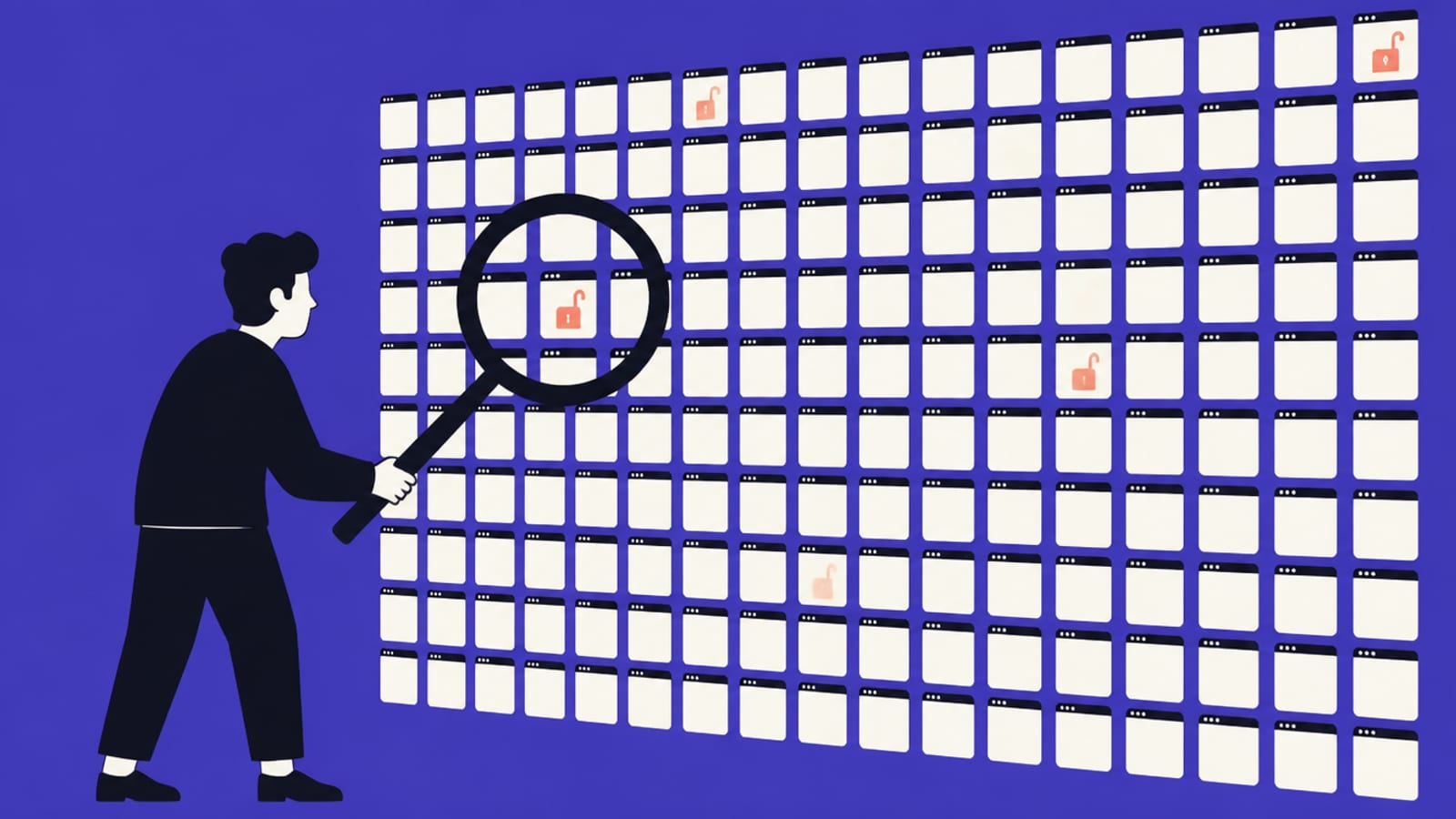
Then Moltbook. Wiz researchers found "a misconfigured Supabase database belonging to Moltbook, allowing full read and write access to all platform data." The exposure included "1.5 million API authentication tokens, 35,000 email addresses, and private messages between agents." Wiz says the founder had explained publicly that he "vibe-coded" the platform. Moltbook fixed it within hours of being told. The cause was one missing database setting, Row Level Security, and we walk through it in the Moltbook lesson. You don't get there by being careless once. You get there by accepting hundreds of changes you never read.
How do you break the doom loop?
Answer first: change what you do at the moment the agent says "fixed." Stop pasting bare errors. Give it the context, ask for the cause before any change, read the diff, and keep a save point you can roll back to. After three failed fixes, stop prompting and reset. None of this needs you to write code.
This is our five-step exit. It's built on the studies above, especially Anthropic's finding that asking for explanations kept scores high. It isn't a study result itself.
Save a point you can return to. Before any risky change, commit it or use your tool's checkpoint. A rollback beats a sixth fix. See [when to start over vs fix](/when-to-start-over-vs-fix).
Write down what should happen. Two or three plain sentences about the behavior you expect. That note is a spec, and it's how the AI and you both tell a fix from a break. See [prompting is writing a spec](/prompting-is-writing-a-spec).
Ask for the cause before the change. 'Explain in two sentences why this fails. Don't change anything yet.' If the explanation doesn't make sense to you, the fix won't either.
Read what came back before you accept. Which files changed, what was deleted, did it touch anything you didn't ask about? You don't need to read code to read a diff. See [how to read AI code without coding](/how-to-read-ai-code-without-coding).
Make it prove the fix. Ask it to attack its own change and tell you what to click to confirm it worked. Then click it. That habit is [the verify loop](/the-verify-loop).
Illustration: aliteq
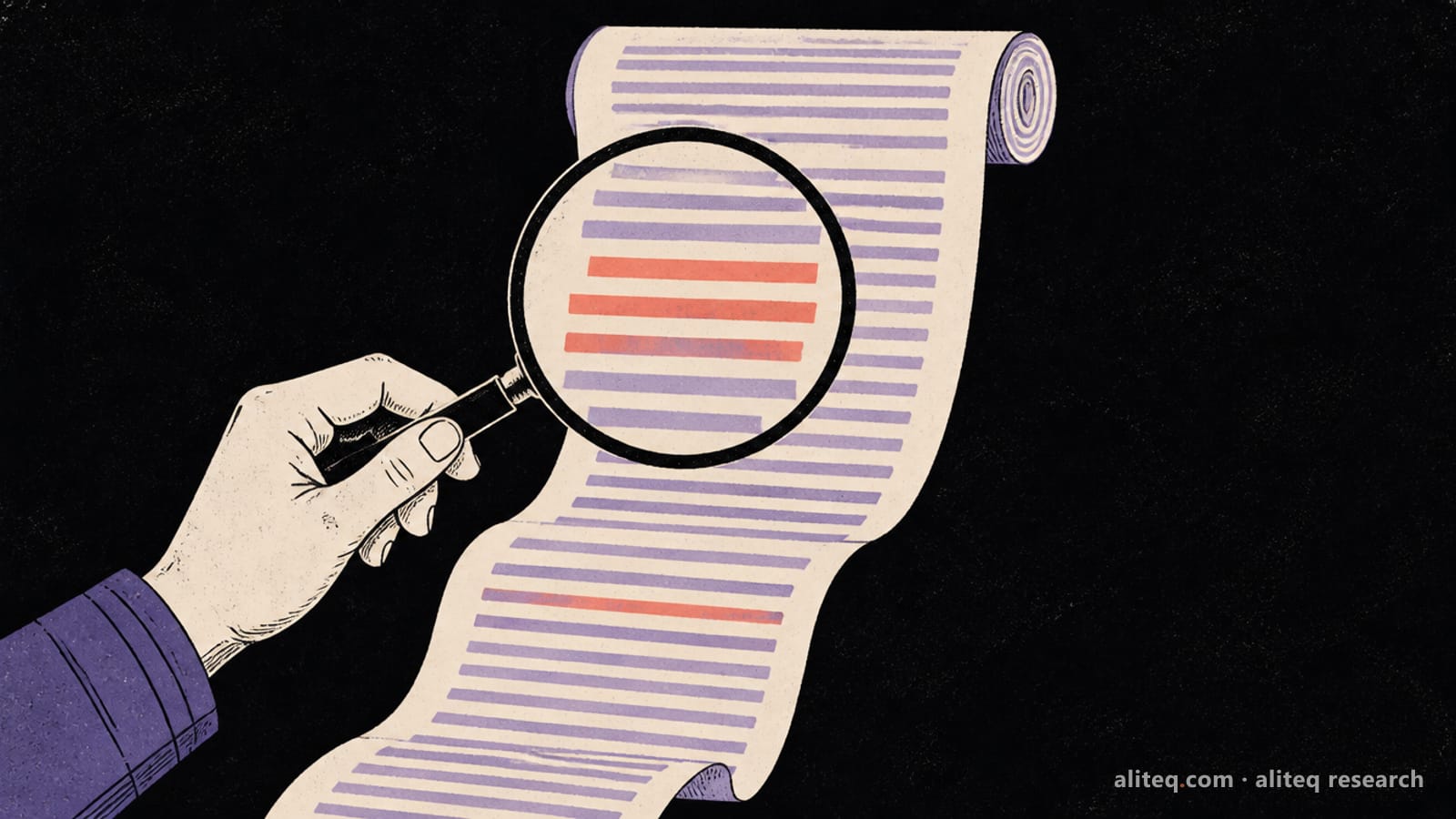
The fourth step is the one most people skip, and it's the one that breaks the loop. Try it right here. This little tool shows a real-looking AI change and asks you the questions to ask about it.
The AI said: "I fixed the login bug"
Read what it did before you say thanks. Tap the changed lines. There are 3 you should ask about — found 0.
Red lines were removed, green lines were added. You don't need to know the language — read each green line as a sentence and ask "what does this do, and did I want it?"
Context matters as much as the prompt. Long chats lose track of earlier decisions, which is why an agent can re-break something it fixed an hour ago. Context engineering for vibe coders covers how to give the tool the right background each time, and why AI forgets shows the limit underneath. If the agent keeps inventing packages or functions that don't exist, that's a different failure, explained in why AI hallucinates code.
Here's the difference in practice. We gave the same crash to Claude twice in Claude Code on 4 October 2026, each in a fresh session: once the doomcoding way, once with context and the "cause first" ask. Both replies are verbatim.
Same crash, two ways to ask
Each prompt was given to Claude (Opus 5.5) via Claude Code on 4 Oct 2026, each in its own fresh session, with a short word limit. Outputs are pasted verbatim.
You
my app crashes with TypeError: Cannot read properties of undefined (reading 'map') fix it
Model
That error means your code calls `.map()` on something that is `undefined`. It's usually data that hasn't loaded yet, or an API response that's shaped differently from what you expected.

Quick fixes:

1. **Give it a default value:** `const [items, setItems] = useState([])` instead of `useState()`.
2. **Guard the call:** `items?.map(...)` or `(items ?? []).map(...)`.
3. **Check the response shape:** run `console.log(data)` before the map. You may need `data.items.map` and not `data.map`.

Option 3 fixes the actual cause. Options 1 and 2 only stop the crash.

To find the exact line, paste the full stack trace and the component it points to, and I'll fix it.
worseA decent general answer, but it has to guess. It offers three fixes, says two of them only hide the crash, and asks for more information. You'd paste again.
You
My React page crashes with "TypeError: Cannot read properties of undefined (reading 'map')". It started after I asked you to load orders from the API. Here is the component:

function Orders() {
  const [data, setData] = useState();
  useEffect(() => { fetch('/api/orders').then(r => r.json()).then(setData); }, []);
  return <ul>{data.orders.map(o => <li key={o.id}>{o.total}</li>)}</ul>;
}

Before you change anything: explain in two plain sentences why it crashes. Then give the smallest change that fixes it, and tell me what I should see on the page to confirm it worked.
Model
That crash comes from the code I wrote, so here's why it happens. On the first render `data` is still `undefined`, because `useState()` has no starting value and the fetch hasn't returned yet. So `data.orders` tries to read a property of `undefined`, and React throws before the API response can ever arrive.

The smallest fix is one line:

```jsx
return <ul>{data?.orders?.map(o => <li key={o.id}>{o.total}</li>)}</ul>;
```

Optional chaining renders nothing until the data arrives. It also stays safe if the response has no `orders` field.

**To confirm it worked:** the page loads without the error. It shows an empty list for a moment, then one item per order with its total. If the list stays empty, open DevTools > Network and check `/api/orders`. The response may not be shaped like `{ orders: [...] }`. For example, it could be a bare array, which would need `data?.map` instead.
betterSame model. With the code, the history and a 'why before what' ask, it names the cause, makes a one-line change, and tells you exactly what to look for on the page.
What changed: The model didn't get smarter between the two prompts. You gave it the code, the history and a job (explain, then change, then prove), and you got something you can check.
When should you stop prompting and start over?
Answer first: use a three-strikes rule. If three fixes in a row fail, or each one breaks something new, stop. Roll back to the last version that worked, rewrite the request as a short spec, and start a fresh chat. A clean restart with a clear note almost always beats a seventh patch on a tangled base.
Three is our number, not a scientific one. The point is to decide in advance, because inside the loop you'll always believe the next pull is the one. That's the doom-scrolling trap. A rule made at noon protects you at 1 a.m.
Signs you're past the point of patching: the agent re-adds code it removed earlier. It contradicts what it told you ten minutes ago. Fixes keep touching files that have nothing to do with the bug. You can't say in one sentence what the last change did. Any one of those means the chat has lost the plot, and so, probably, have you. Our lesson on when to start over vs fix walks through the decision in detail.
Is doomcoding a reason to stop vibe coding?
Answer first: no. It's a reason to stop vibe coding blind. The tools are good, and getting better. The habit that hurts is accepting what you can't read. Ask for explanations, keep save points, read diffs, and you keep the speed without the slot machine.
Here's where I land. I build this site with an AI agent every day, and I'd be lying if I said I've never pulled the lever one time too many. What changed for me wasn't the model. It was the order of operations: spec, cause, change, read, prove. The agent does the typing. I do the reading.
Doomcoding is re-prompting an AI coding agent again and again, hoping the next generation fixes a problem you don't understand. It's the doom-scrolling habit applied to code. The term is new: it got wide circulation as a September 2026 Inc. headline by Joe Procopio. Builders have long called the same pattern the "doom loop."
Who coined vibe coding?
Andrej Karpathy, in a post on X on 2 February 2025. He described accepting every change without reading the diffs, pasting errors back with no comment, and asking for random changes until a bug went away. He said it was fine for throwaway weekend projects.
Does AI make developers slower?
In METR's early-2025 trial, experienced developers took 19% longer with AI while believing they were 20% faster. METR has since marked that result out of date. Its late-2025 follow-up suggests a speedup, but METR calls those numbers unreliable. The lasting lesson is that people misjudge their own speed with AI.
Does using AI stop you from learning to code?
It can, depending on how you use it. In Anthropic's 2026 trial, the AI group scored 50% on a follow-up quiz against 67% for hand coders, with the biggest gap on debugging. People who asked the AI for explanations or conceptual help scored 65% or higher.
How do I get out of an AI coding loop?
Stop after three failed fixes. Roll back to the last working version, write two or three sentences on what should happen, start a fresh chat, ask the agent to explain the cause before it changes anything, and read the diff before you accept it.
Is vibe coding safe for a real app?
It can be, if you treat the AI as a fast typist rather than a dev team. Know your backups, check database access rules, keep secrets out of the browser, and read every change before you accept it. The Replit database deletion and the Moltbook exposure both came from skipping those checks.
Use this in your own page
Teaching this? Paste the live version into your course, blog or answer. Free, no sign-up; the credit line links back here.