CVE-2026-58608 is a fresh remote code execution flaw in the same Windows service that gave us PrintNightmare. It's on by default on virtually every Windows machine — and most servers have no reason to run it at all.
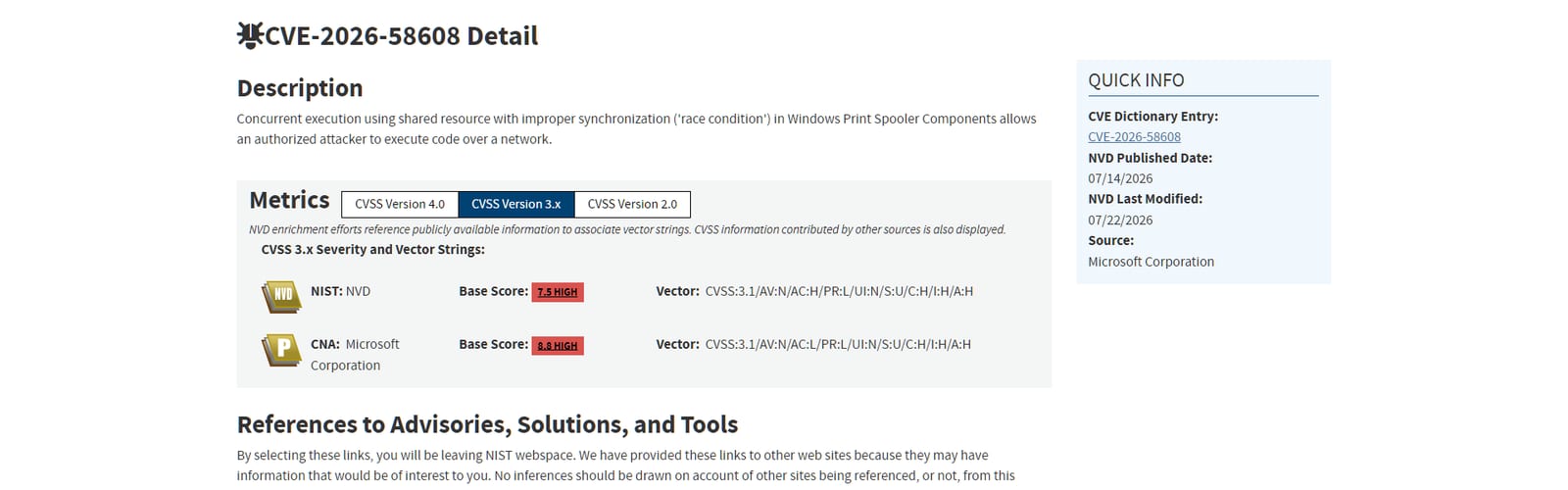
If the phrase 'Print Spooler vulnerability' gives you a flashback, you're not imagining it. The Windows Print Spooler — the background service that manages print jobs — is back in the security headlines with CVE-2026-58608, a remote code execution flaw rated 8.8. This is the same component that produced the PrintNightmare chaos in 2021, and it's back for the same structural reason: Print Spooler runs by default on essentially every Windows machine, including servers that will never print a single page. Patch it, yes — but the real lesson is one most admins keep putting off, and this is your reminder to finally do it.
8.8/ 10
CVSS severity: High
RCE over the network, low privilege, no user interaction — and it's on by default everywhere.
Why Print Spooler keeps being a target
Print Spooler is old, complex, runs with high privileges, and is switched on everywhere — the four qualities that make a service a permanent magnet for vulnerability research. It was written in an era with very different security assumptions, it has to handle untrusted input from network print jobs, and it runs as SYSTEM. Every year or two, someone finds a new way to abuse it, and because it's on by default on domain controllers, file servers and workstations alike, each new flaw has an enormous blast radius. CVE-2026-58608 is the latest in a long line, exploiting a use-after-free: the service is tricked into referencing freed memory by creating and closing a printer handle while leaving a related notification handle in an invalid state.
How the use-after-free is triggered
Get a foothold
A low-privileged authenticated position on the network — a normal user account is enough.
Race the handles
Create and close a printer handle while leaving a related notification handle invalid.
Use-after-free
The Spooler references freed memory (CWE-416), a corruption primitive.
Code execution
The corruption is leveraged to run code in the Spooler's SYSTEM context.
Get a foothold
A low-privileged authenticated position on the network — a normal user account is enough.
Race the handles
Create and close a printer handle while leaving a related notification handle invalid.
Use-after-free
The Spooler references freed memory (CWE-416), a corruption primitive.
Code execution
The corruption is leveraged to run code in the Spooler's SYSTEM context.
A race between handle operations leaves the service pointing at freed memory — the classic use-after-free primitive.
The fix most admins keep postponing
Patching CVE-2026-58608 closes this specific hole. But if you've patched Print Spooler flaws before — and if you run Windows Server, you have — you know another one is coming. The durable fix is to stop running the service where you don't need it. A domain controller does not need to print. A web server does not need to print. A database server does not need to print. Microsoft's own long-standing hardening guidance is to disable the Print Spooler service on systems that don't perform printing, and it's the single most effective thing you can do to shrink this recurring attack surface for good.
The NVD entry: a race condition in Windows Print Spooler allowing an authorized attacker to execute code over a network. · NIST National Vulnerability Database (screenshot)
What to do
Apply the July 2026 security update across Windows 10, 11 and Server 2012–2025 — anything running Print Spooler is affected.
Disable the Print Spooler service on every server and endpoint that doesn't actually print. This neutralises this CVE and future ones.
Where printing is needed, restrict which accounts and networks can reach the Spooler, and monitor for suspicious print-subsystem activity.
Review the rest of the July batch — the exploited SharePoint and AD FS zero-days and the DHCP Server RCEs belong in the same push.
Quick answers
Is this the same as PrintNightmare?
Not the same vulnerability, but the same service and the same family of problem. PrintNightmare (2021) was a series of Print Spooler flaws that allowed remote code execution and privilege escalation; CVE-2026-58608 is a new use-after-free RCE in the same component. The recurrence is the point — Print Spooler is a structurally risky service, which is exactly why disabling it where possible beats patching it forever.
Can I really just disable Print Spooler?
On systems that don't print, yes — and you should. Domain controllers, application servers, database servers and most cloud VMs have no need for it, and Microsoft's hardening guidance has recommended disabling it on such systems for years. The only machines that need it running are those that actually send or manage print jobs. Disabling it there would break printing, so patch those instead.
How urgent is an 8.8 that needs low privileges?
Urgent. 'Low privilege required' means an attacker needs some authenticated foothold — a standard user account, a compromised low-level service — not that it's hard to exploit. In a real network, attackers routinely have that level of access after an initial breach, and a Spooler RCE running as SYSTEM is exactly the privilege-escalation step they want. Treat it as a high-priority patch, not a nice-to-have.
Does this affect my home PC?
Windows 10 and 11 are listed as affected, so technically yes, but the risk profile is different — the attack needs network access and an authenticated foothold, which is a bigger deal on a corporate network than a home machine behind a router. Home users should just let Windows Update apply the fix. The urgency is really for organisations running Windows Server and domain-joined fleets.
Primary detail is on the NVD entry and Microsoft's advisory; CrowdStrike's roundup has the wider July context. The takeaway that outlives this one CVE: some services are worth removing rather than repeatedly patching, and Print Spooler on a non-printing server is the textbook case. While you're patching, the DHCP Server RCE and SharePoint zero-day from the same batch deserve the same afternoon.