A green check on your pull request means a robot ran your tests. Here is what that robot is, how the workflow file works, how many minutes you get free, and the three settings that keep a bad third-party action from reaching your secrets.
I read security the way an attacker would, and a CI pipeline is a gift to one. It runs code from strangers, it holds your deploy keys, and nobody watches it. The good news is that the safe settings are short, and most of them fit in a few lines of YAML.
This is an explainer, not a tutorial from experience. I haven't run the sample workflow below. Everything comes from GitHub's documentation and security advisory database, which I read on October 3, 2026. The sample is built only from documented keys, so treat it as untested.
What is CI, and what does GitHub Actions do about it?
Continuous integration means every change is automatically built and tested before it merges. GitHub Actions is GitHub's service for that. GitHub's docs call it a "continuous integration and continuous delivery (CI/CD) platform" that automates your build, test and deployment pipeline.
Without CI, "does it still work?" depends on a person remembering to run the tests. With CI, a robot does it on every pull request and puts a green check or a red cross next to the change. Reviewers see the result without pulling the branch.
Actions also reaches beyond tests. The docs say you can run a workflow when other things happen in your repository, such as labeling a new issue. The same machinery that runs your tests can deploy your app after a merge, which is where hosting costs and options come in.
How does a workflow file work?
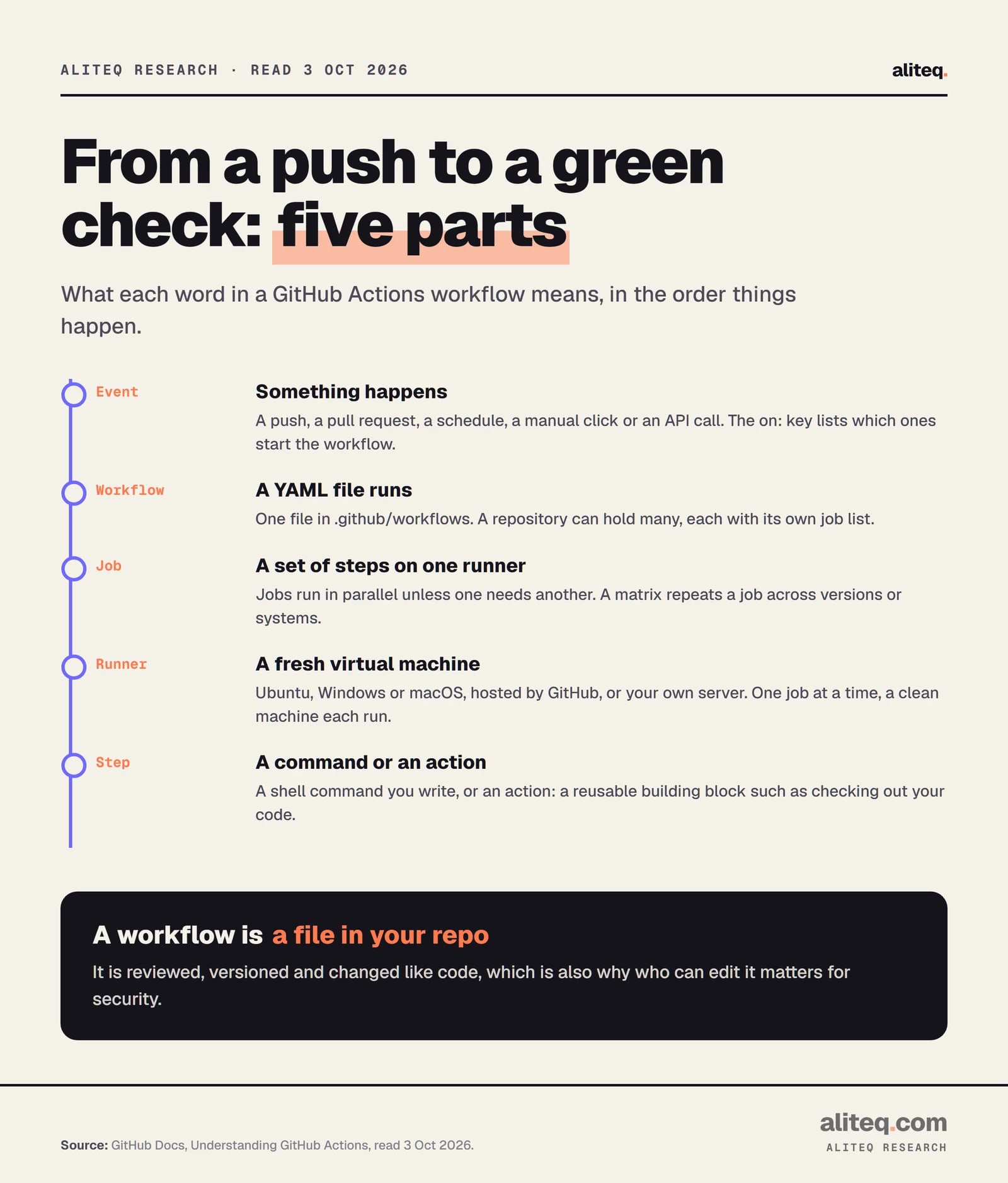
A workflow is one YAML file in the .github/workflows folder. It names an event, then lists jobs, and each job lists steps. Each job runs on its own fresh virtual machine, called a runner, and a step is either a shell command or a reusable action.
GitHub Docs, Understanding GitHub Actions, read October 3, 2026. · aliteq research
Here is a small CI file. I built it from documented keys and have not run it. Replace the commands with whatever your project uses.
name: ci
on:
  pull_request:
  push:
    branches: [main]
permissions:
  contents: read
jobs:
  test:
    runs-on: ubuntu-latest
    timeout-minutes: 10
    steps:
      - uses: actions/checkout@3d3c42e5aac5ba805825da76410c181273ba90b1 # v7.0.1
      - run: npm ci
      - run: npm test
Line by line:
on: is the trigger list. This file runs on every pull request and on every push to main.
permissions: contents: read limits the automatic token to reading your code. More on that below.
runs-on: ubuntu-latest picks a GitHub-hosted Linux runner. Docs say every run gets "a fresh, newly-provisioned virtual machine."
timeout-minutes: 10 stops a hung job early. This matters because you pay for minutes on private repos, and a job can otherwise run up to 6 hours on a hosted runner.
actions/checkout is the action that copies your repository onto the runner. The long string after the @ is a commit SHA, and the comment records which version it is.
run: steps are plain shell commands. Jobs run in parallel by default, so a second job would not wait for test unless you add a dependency.
I read the SHA above from GitHub's API on October 3, 2026, where the v7.0.1 tag of actions/checkout points at that commit. Check it yourself before you copy it. A SHA you didn't verify is just a longer tag.
What starts a workflow?
An event starts it. The common ones are push, pull_request, schedule and workflow_dispatch, which is a manual button. GitHub's events page lists many more, from issues and releases to comments and forks.
A few rules from that page are worth knowing:
schedule uses cron syntax in UTC by default. The shortest interval is every 5 minutes. It only runs on the default branch.
Scheduled runs can be late. Docs say load is high "at the start of every hour," and "some queued jobs may be dropped." Pick an odd minute, not :00.
Idle public repos go quiet. In a public repository, scheduled workflows are automatically disabled after 60 days with no repository activity.
Fork pull requests get fewer powers. "With the exception of GITHUB_TOKEN, secrets are not passed to the runner when a workflow is triggered from a forked repository," and the token is read-only there.
First-timers may need approval. For a first-time contributor's pull request to a public repo, a maintainer may have to approve the run.
The limits page adds a few hard edges. A matrix can create at most 256 jobs per run. A workflow file over 500 KB won't start. A workflow run is cancelled at 35 days.
How do secrets and the GITHUB_TOKEN work?
A secret is an encrypted value you store in repository, environment or organization settings, then read in a workflow as secrets.NAME. The GITHUB_TOKEN is a separate, automatic credential for talking to GitHub itself. Both can leak, so both should be small.
For secrets, the documented limits are 100 per repository, 100 per environment and 1,000 per organization, each up to 48 KB. Names can't start with GITHUB_ or a digit. If the same name exists at several levels, the lowest level wins, so an environment secret beats a repository one.
Here is the part beginners miss. GitHub's security guide says: "Any user with write access to your repository has read access to all secrets configured in your repository." A workflow is code, and anyone who can change it can make it print or send a secret. Redaction in logs helps, but the docs say it "is not guaranteed."
A few documented habits cut the risk:
Use one secret per value. Don't store a JSON blob as a secret, because log redaction relies on matching the exact value.
Rotate and delete. If a secret ever appears in a log, delete the log and rotate the secret.
Gate the important ones. Put production secrets in an environment with required reviewers. A job can't read them until a person approves.
Skip long-lived cloud keys. GitHub recommends OpenID Connect so your workflow gets short-lived tokens from your cloud provider instead of a stored key.
The token is the second half. Docs say an action can read it "even if the workflow does not explicitly pass the GITHUB_TOKEN to the action." So you can't rely on what you pass in. You limit it with the permissions key. Once you list any permission, every permission you don't list is set to none. In a new personal repository, the default token has read access to contents and packages. In an organization repository, it follows the organization's setting. GitHub's advice: default to read-only for contents, and raise it per job only when a job needs more.
How many free minutes do you get?
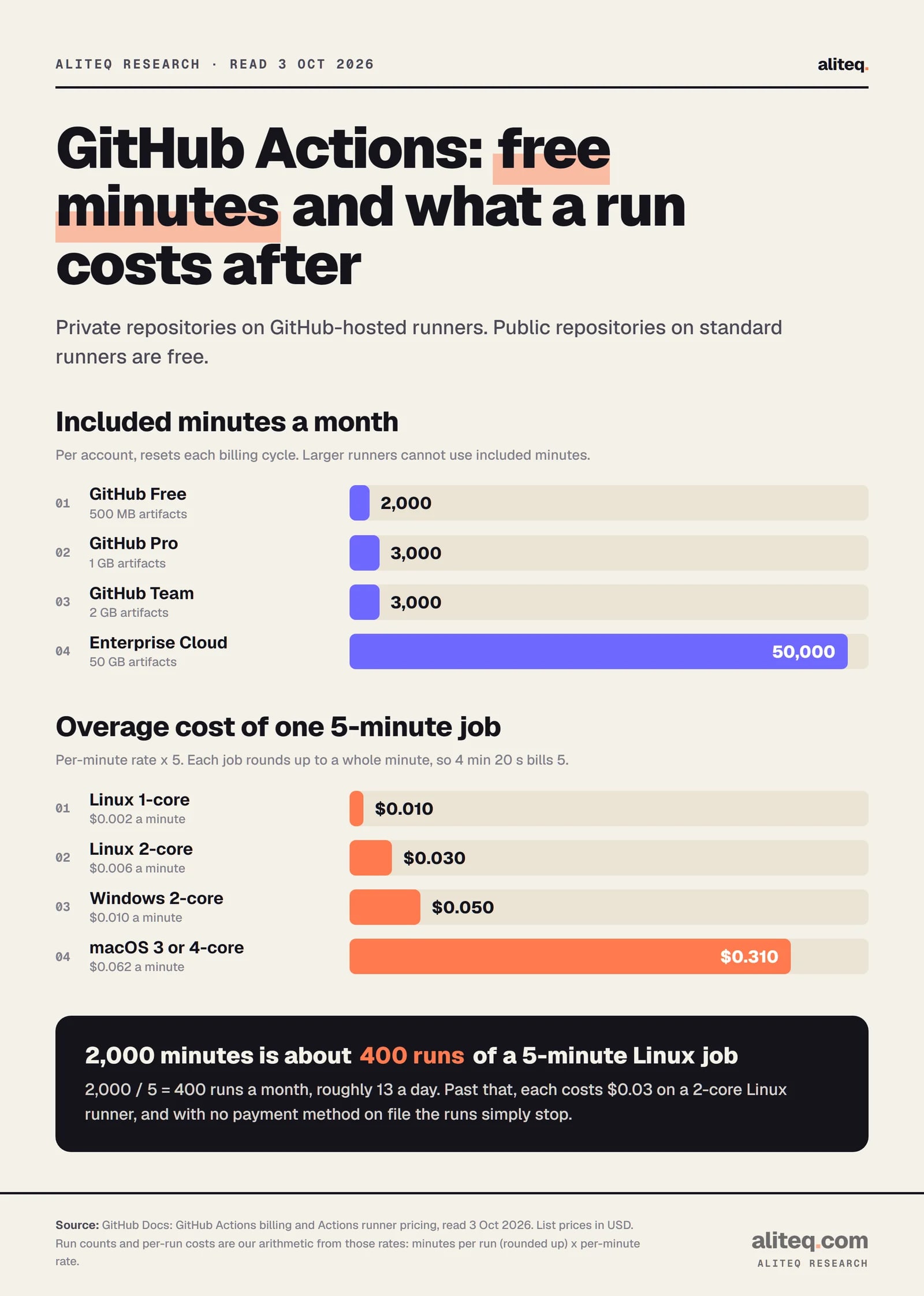
Public repositories using standard GitHub-hosted runners are free. For private repositories, the GitHub Free plan includes 2,000 minutes a month, Pro and Team include 3,000, and Enterprise Cloud includes 50,000. After that you pay per minute, by operating system.
GitHub Docs, billing and runner pricing pages, read October 3, 2026. Run counts and per-run costs are our arithmetic. · aliteq research
The per-minute rates for standard runners, from GitHub's runner pricing page, are:
Linux 1-core (x64)
Rate per minute
$0.002
Linux 2-core (x64)
Rate per minute
$0.006
Linux 2-core (arm64)
Rate per minute
$0.005
Windows 2-core
Rate per minute
$0.010
macOS 3 or 4-core
Rate per minute
$0.062
Rate per minute
Linux 1-core (x64)
$0.002
Linux 2-core (x64)
$0.006
Linux 2-core (arm64)
$0.005
Windows 2-core
$0.010
macOS 3 or 4-core
$0.062
Four rules decide your bill:
Rounding. GitHub "rounds the minutes and partial minutes each job uses up to the nearest whole minute." A 4 minute 20 second job bills 5.
Failed runs count. GitHub's own example: a job that fails at minute 5 uses 5 minutes, and a successful re-run adds more.
The repo owner pays. Minutes are charged to the repository owner, "not the person who triggered the workflow runs."
Larger runners are extra. Included minutes cannot be used on them, and they aren't free even for public repos.
Here is my arithmetic. A 5-minute Linux job on a 2-core runner costs 5 x $0.006 = $0.03 once you're past the free minutes. On the Free plan, 2,000 / 5 = 400 runs a month before that starts, roughly 13 a day. If no payment method is on file, GitHub says usage "is blocked once you use up your quota." With one on file, you can set budgets, and GitHub emails you at 90% and 100% of included usage.
Storage has its own meter. Artifacts and GitHub Packages share one pool (500 MB on Free), billed at $0.25 per GB-month beyond it. The cache gets 10 GB per repository, then $0.07 per GB-month. Artifacts and logs are kept 90 days by default.
I can't tell you how included minutes are deducted for Windows or macOS jobs. The billing page I read prints dollar rates, not multipliers, so I won't guess. Check your own usage page.
How do you keep a third-party action from stealing your secrets?
Treat every uses: line as code you are running with your secrets in reach. GitHub's guide says a compromised action "would have access to all secrets configured on your repository, and may be able to use the GITHUB_TOKEN to write to the repository." Pin, limit and review.
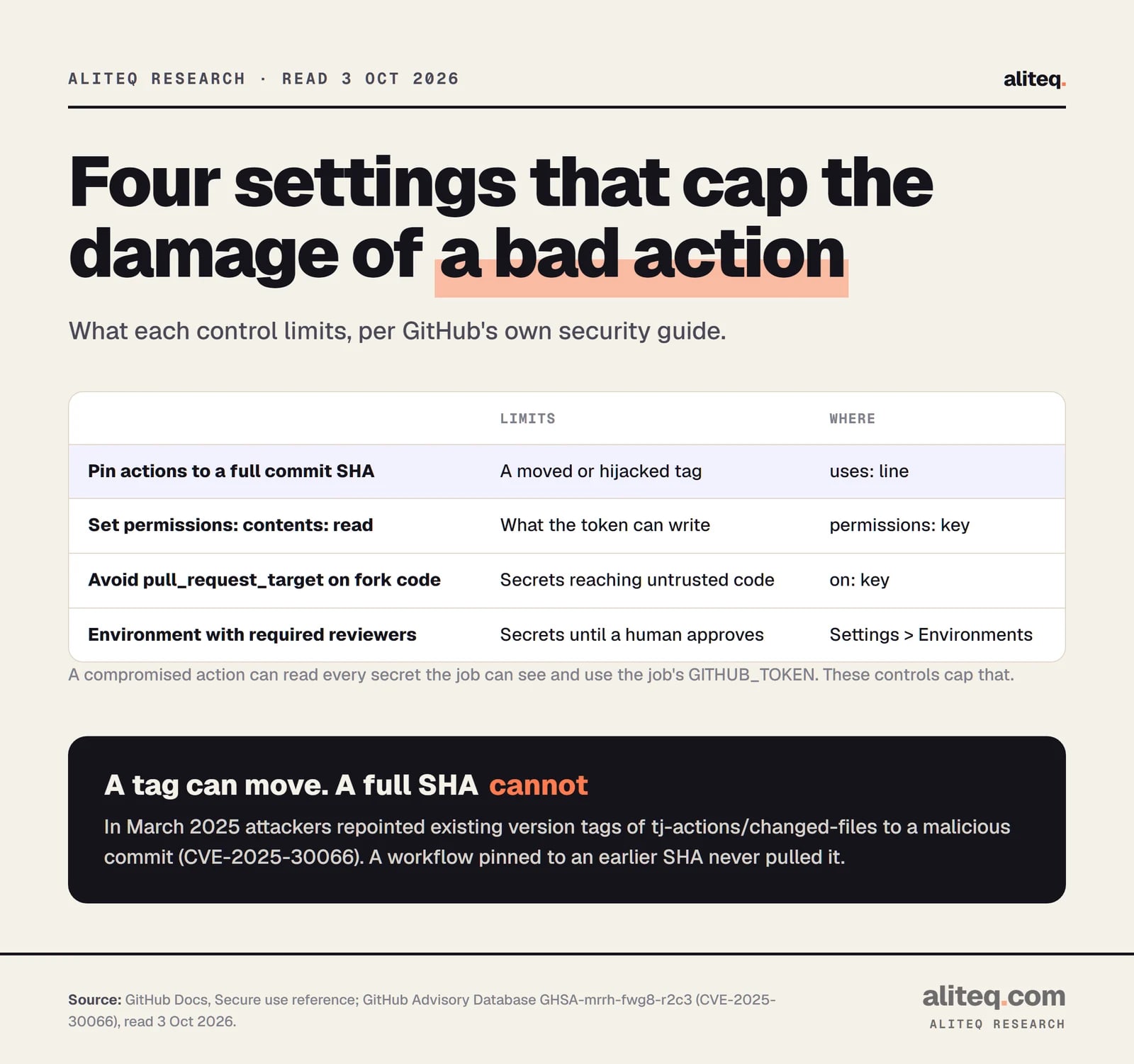
The incident that proves it is dated and public. GitHub's advisory for CVE-2025-30066 says attackers "retroactively modified multiple version tags" of the tj-actions/changed-files action to point at a malicious commit, exposing secrets in workflow logs. It describes the window as 14 to March 15, 2025 and says over 23,000 repositories were affected. The fix was version 46.0.1.
The lesson is in the word "tags." A tag like @v44 is a label that the owner, or someone who breaks into the owner's account, can move. GitHub's guide says "a tag can be moved or deleted if a bad actor gains access to the repository storing the action." A full-length commit SHA can't be moved. The docs call it "currently the only way to use an action as an immutable release."
GitHub Docs secure use reference and GitHub Advisory Database, read October 3, 2026. · aliteq research
The defensive checklist, all from GitHub's documentation:
Pin to a full commit SHA, and check the SHA belongs to the action's own repository, not a fork. You can also turn on a repository or organization policy that requires SHA pinning.
Keep a version comment on the same line, like # v7.0.1. Dependabot reads it and can open pull requests to update pinned actions.
Know a trade-off. Dependabot security alerts for actions only cover those using semantic versioning, not ones pinned to a SHA. Pinning gives you immutability, and you take on the job of updating.
Set permissions at the top of every workflow, and widen it per job. A job that only runs tests needs contents: read.
Review workflow changes. A CODEOWNERS entry for .github/workflows makes changes to those files need a designated reviewer.
Scan the workflows. CodeQL can flag risky patterns in workflow files, and OpenSSF Scorecards checks token permissions and pinned actions.
Don't put untrusted text straight into a shell command either. GitHub's guide says to pass values like a pull request title through an intermediate environment variable, or to an action, and not to paste ${{ ... }} into a run: script.
When is pull_request_target risky?
pull_request_target runs in the context of your base branch, so it can have your secrets and write access. That makes it useful for labeling fork pull requests and dangerous if it also builds or runs the fork's code. GitHub says to avoid it if you need to run code from the pull request.
This is the one trigger worth a flat warning. GitHub's docs say running untrusted code on it "may lead to security vulnerabilities," including "cache poisoning and granting unintended access to write privileges or secrets." The security guide adds that pairing pull_request_target or workflow_run with a checkout of an untrusted pull request can be exploited "to take over a repository."
A safe rule of thumb, again from GitHub's guidance:
Use plain pull_request to test code from forks. It runs with a read-only token and no secrets.
Use pull_request_target only for jobs that never check out or run the pull request's code, such as adding a label.
If you need privileged follow-up work, GitHub says workflow_run is a better trigger for privilege separation, and artifacts from the other workflow still deserve caution.
Never run self-hosted runners on public repositories. GitHub says they "should almost never be used" there, because anyone can open a pull request and a self-hosted machine isn't guaranteed to be wiped between jobs.
The quick version of everything above:
Put one workflow in .github/workflows with on:, a job and steps. Add timeout-minutes so a hung job can't burn your free minutes.
Add permissions: contents: read at the top, and widen it per job only when a job needs to write.
Pin every third-party action to a full commit SHA from the action's own repo, with a version comment for Dependabot.
Test fork pull requests with pull_request, and keep pull_request_target away from code you didn't write.
Keep production secrets in an environment with required reviewers, and prefer short-lived OIDC credentials over stored keys.
If you're hardening more than CI, the security hub collects our guides, and the software hub covers the dev tooling around it. aliteq sells nothing here and earns nothing from these links.
Quick answers
Is GitHub Actions free?
For public repositories using standard GitHub-hosted runners, yes. For private repositories, the Free plan includes 2,000 minutes a month, Pro and Team include 3,000, and Enterprise Cloud includes 50,000. Past that, usage is billed per minute, for example $0.006 a minute on a 2-core Linux runner.
What happens when my free minutes run out?
Without a payment method on file, GitHub says usage is blocked once the quota is used. With one on file, extra usage is billed, and you can set budgets. GitHub also emails you at 90% and 100% of your included usage.
Why pin an action to a SHA instead of a version tag?
A tag can be moved to different code if the action's repository is compromised, as happened to tj-actions/changed-files in March 2025. A full commit SHA can't be moved. GitHub's docs call SHA pinning the only way to use an action as an immutable release.
Can anyone with repo access read my Actions secrets?
Effectively yes. GitHub's guide says anyone with write access has read access to the repository's secrets, since they can edit a workflow that uses them. Use environment secrets with required reviewers for sensitive ones, and keep each credential minimal.
What does permissions: contents: read do?
It limits the automatic GITHUB_TOKEN to reading your repository contents. When you list any permission, all unlisted ones are set to none. GitHub recommends read-only by default, then raising permissions for individual jobs.
Is pull_request_target safe to use?
Only if it never checks out or runs code from the pull request. It runs with your base branch's context, so it can have secrets and write access. GitHub warns that running untrusted code there can lead to secret exposure and repository takeover.