The card went through, Stripe shows the money, and your app still says Free plan. The missing piece is almost always the webhook. Here are the six usual causes, how Stripe's retries and duplicates work, and how to test it before a real customer finds the gap.
A customer emails you. They paid, the charge sits in your Stripe dashboard, and your app still shows them the Free plan. You didn't lose the money. You lost the message that should have told your app about it.
That message is a webhook. I read Stripe's webhook, Checkout and subscription docs on October 3, 2026 and turned them into the checklist below. I haven't built or run the handlers in this piece; the code is adapted from Stripe's own samples and labeled that way. If you're still choosing a processor, our Stripe vs Paddle vs Lemon Squeezy comparison covers the fees. This page is about the plumbing after you pick.
What a Stripe webhook actually is
A webhook is Stripe calling your server. When something happens in your account, such as a paid invoice, Stripe sends an HTTPS POST with a JSON "event" to a URL you registered. Your app reacts by upgrading the plan. No webhook, no reaction.
Stripe's docs describe it as a push of real-time data to your endpoint. They name the jobs it's built for: a bank confirming a payment, a dispute, a recurring payment succeeding. Those are things that happen when your user isn't looking at your app.
Three facts set the ground rules:
It must be public HTTPS. Stripe says registered endpoints "must be publicly accessible HTTPS URLs," with TLS 1.2 or 1.3. A route behind your login page fails.
Test and live are separate worlds. A sandbox has its own keys, objects and endpoints. An endpoint you set up while testing doesn't receive live payments.
You get up to 16 endpoints. One endpoint can take many event types. Most small apps need one.
Why "paid but not upgraded" happens: six usual causes
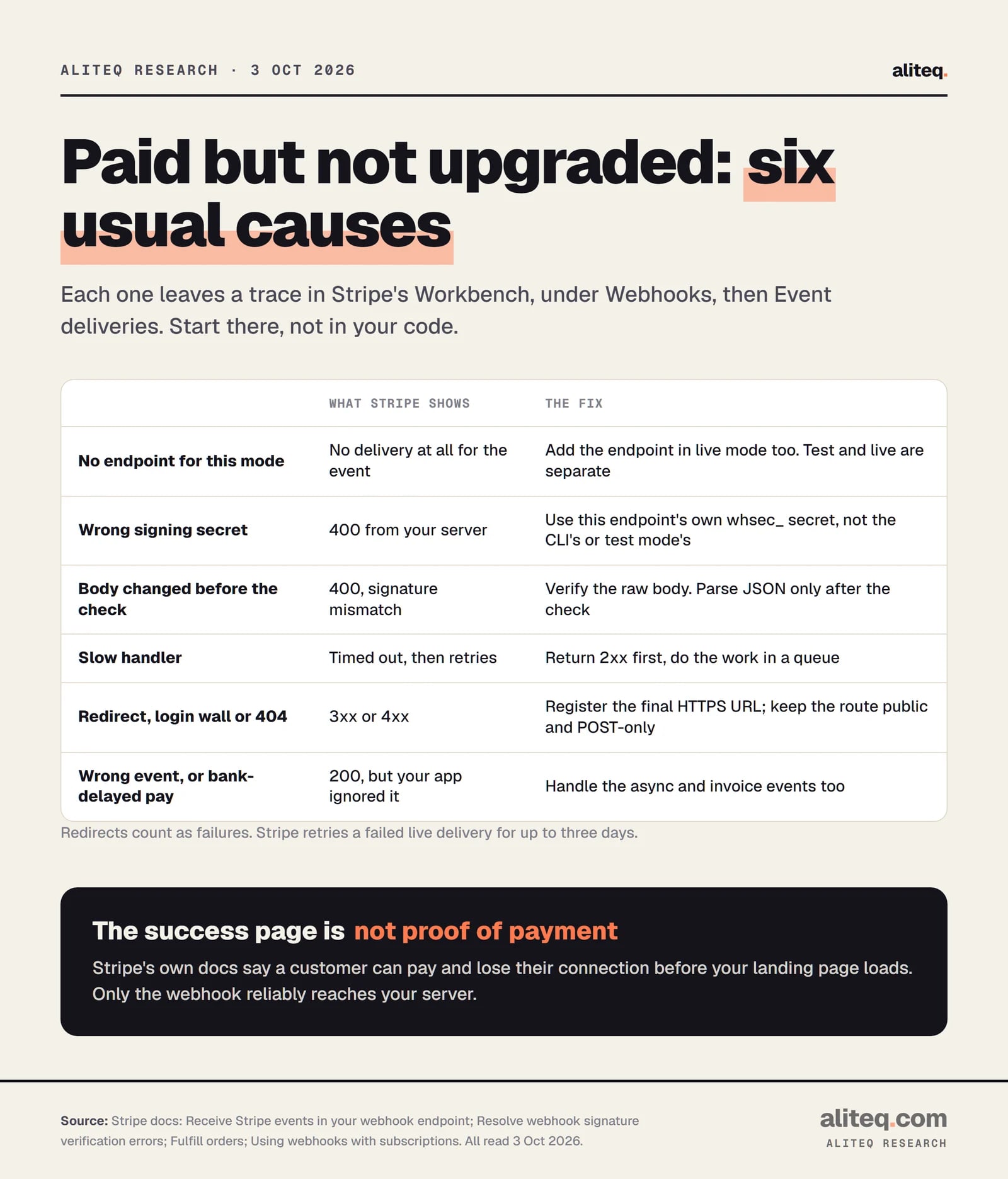
Almost every case fits one of six causes, and each one leaves a trace in Stripe. Open Workbench, choose Webhooks, pick your endpoint and open Event deliveries. Stripe lists each event as Delivered, Pending or Failed, with the HTTP status your server returned.
Read the status code on the failed delivery first. It usually names the cause. · aliteq research
The status code points you to the fix:
No delivery at all. You tested in a sandbox and never added the endpoint in live mode. Add it there.
400 from your server. Usually the signature check failed. Stripe calls the wrong signing secret "the most common error."
Timed out. Your handler did slow work before replying. Stripe says to return 2xx "before any complex logic that might cause a timeout."
3xx. Your URL redirects, say from http to https or to www. Stripe treats a redirect as a failure. Register the final URL.
401, 403, 404 or 405. The route needs a login, doesn't exist, or doesn't accept POST.
200, but nothing changed. Delivery worked and your code ignored it. You listened for the wrong event, or the customer paid by bank debit and the money cleared later.
That last one surprises people. With bank payments such as ACH direct debit, Checkout finishes before the money arrives. Stripe sends checkout.session.async_payment_succeeded later, when it clears. If you only handle checkout.session.completed, those customers wait forever.
Why the success page isn't proof of payment
Your success page is a redirect in the buyer's browser. It isn't a message from Stripe. Stripe's fulfillment guide says you can't rely on it, because "a customer can pay successfully and then lose their internet connection before your landing page loads." The webhook goes server to server.
Stripe does suggest one safe use of the success page. Put {CHECKOUT_SESSION_ID} in the success URL. Have your server look that session up from Stripe's API and check its payment_status before showing access. That makes the upgrade instant when the buyer is present. The webhook still has to run the same function for everyone who never comes back.
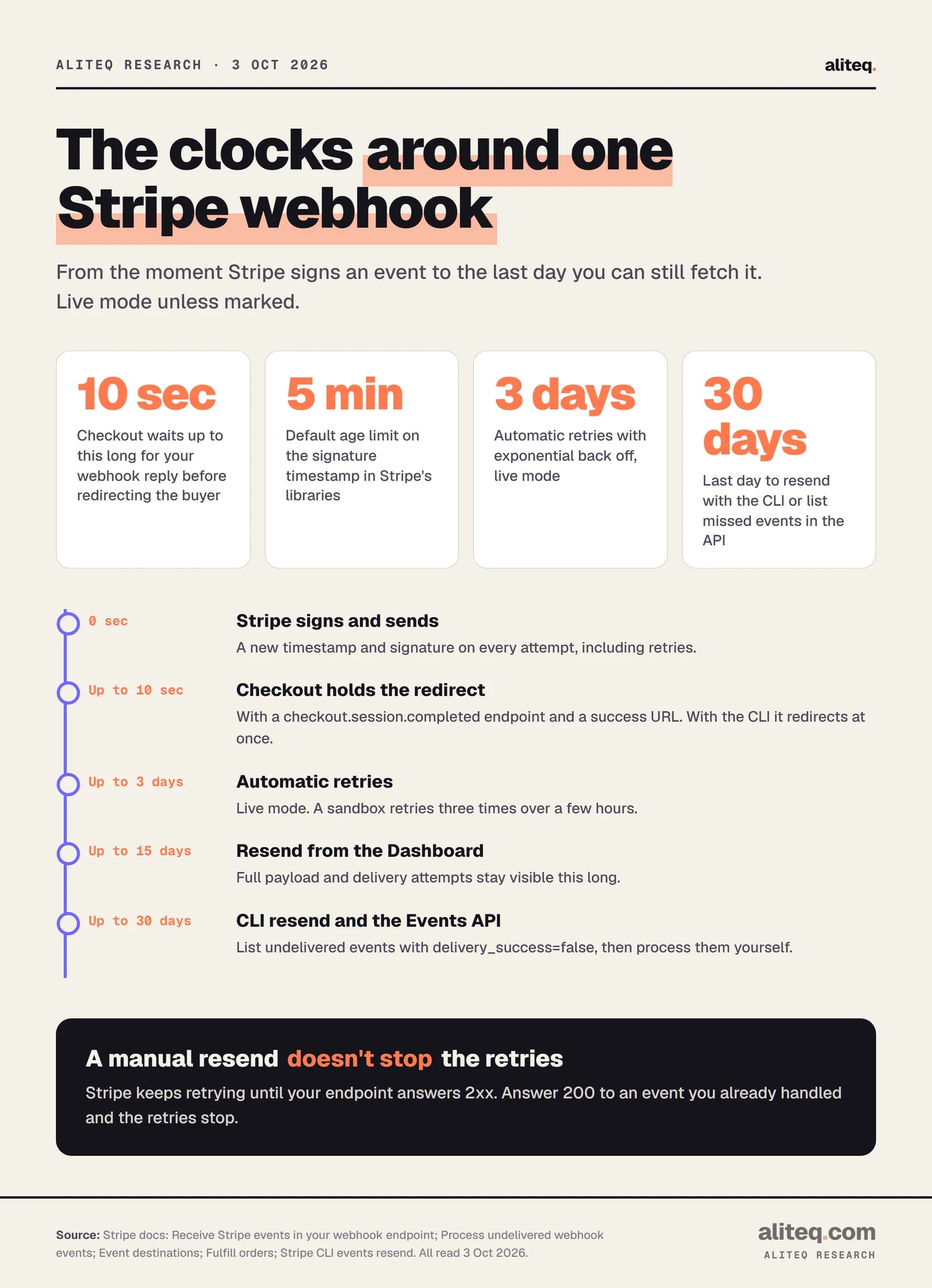
There's also a built-in grace period. With a checkout.session.completed endpoint and a success URL set, Stripe says Checkout "waits up to 10 seconds" for your server to answer before redirecting. A fast handler often finishes the upgrade before the buyer lands.
Signature verification: why it matters
Your webhook URL is public, so anyone can send it a request. Verification proves a message came from Stripe and wasn't changed. Stripe's warning is blunt: without it, "an attacker could send fake webhook events to your endpoint to trigger actions like fulfilling orders, granting account access, or modifying records."
Here's how the check works, in plain terms:
A shared secret. Each endpoint gets a signing secret that starts whsec_. Only you and Stripe know it. Keep it in an environment variable, never in code.
A signature header. Stripe signs every delivery and puts the result in the Stripe-Signature header. It's an HMAC with SHA-256, a keyed fingerprint of the message.
A timestamp. The header carries the time it was signed. Stripe's libraries reject anything older than 5 minutes by default. That blocks a captured message from being replayed later. Stripe says never to set the tolerance to 0, which turns the check off.
Use Stripe's official library for this. It does the comparison safely, including the constant-time comparison Stripe asks for. Stripe also publishes the IP addresses webhooks come from (15 on its list on October 3, 2026) and recommends allowlisting them as a second layer, not instead of the signature.
The raw-body trap
This is the bug that makes correct code fail. Stripe checks the signature against the exact bytes it sent. Stripe's docs say "any manipulation to the raw body of the request causes the verification to fail."
Many frameworks parse JSON for you before your code runs. Parsing changes the bytes, so the check fails with Stripe's error "No signatures found matching the expected signature for payload." The fix is to hand the library the raw body, then parse.
In Express, Stripe's quickstart uses express.raw on the webhook route. Stripe's signature guide adds that a global app.use(express.json()) must come after that route, not before.
// Adapted from Stripe's Node webhook quickstart (docs.stripe.com/webhooks/quickstart, read Oct 3, 2026).
// Not run by aliteq. Secrets come from environment variables.
const stripe = require('stripe')(process.env.STRIPE_SECRET_KEY);
const express = require('express');
const app = express();
const endpointSecret = process.env.STRIPE_WEBHOOK_SECRET;

// Raw body on this route only, so the signature check sees Stripe's exact bytes.
app.post('/webhook', express.raw({ type: 'application/json' }), (req, res) => {
  let event;
  try {
    event = stripe.webhooks.constructEvent(req.body, req.headers['stripe-signature'], endpointSecret);
  } catch (err) {
    return res.sendStatus(400); // reject anything that fails verification
  }
  // Hand the event to a queue or a fast function, then answer.
  res.sendStatus(200);
});

app.use(express.json()); // JSON parsing for every other route goes AFTER the webhook route
One edit from Stripe's sample. The quickstart only verifies "if endpointSecret" is set, which quietly accepts unsigned events when the variable is missing. Our version always verifies, so a missing secret fails closed.
In a Next.js App Router route, the stripe-node example reads the body with await req.text() and passes that string to constructEvent. Don't call req.json() first.
// Adapted from stripe-node's Next.js App Router example (GitHub, read Oct 3, 2026). Not run by aliteq.
import Stripe from 'stripe';

const stripe = new Stripe(process.env.STRIPE_SECRET_KEY as string);

export async function POST(req: Request) {
  const secret = process.env.STRIPE_WEBHOOK_SECRET;
  if (!secret) return new Response('Webhook secret not set', { status: 500 });
  let event: Stripe.Event;
  try {
    event = stripe.webhooks.constructEvent(await req.text(), req.headers.get('stripe-signature') ?? '', secret);
  } catch {
    return new Response('Bad signature', { status: 400 });
  }
  // ...record event.id, then do the work (see the next section)
  return new Response('ok', { status: 200 });
}
If you use Rails or Django, Stripe also notes that CSRF protection can block Stripe's POST. Exempt only the webhook route. The signature check does that job there.
Retries: Stripe keeps knocking
When your endpoint fails, Stripe tries again. In live mode it retries "for up to three days with an exponential back off," meaning the gaps between tries grow. In a sandbox it retries three times over a few hours. So a fix you ship today can still catch yesterday's payment.
Live mode unless marked. From Stripe's docs, read October 3, 2026. · aliteq research
After the automatic window, you can still recover:
Dashboard resend works for up to 15 days after the event was created.
The Stripe CLI can resend with stripe events resend for up to 30 days.
The Events API lists missed events with delivery_success=false, again for the last 30 days. Stripe's guide walks through processing them in order.
One catch Stripe spells out: a manual resend doesn't cancel the automatic retries, even when it succeeds. Those retries keep arriving. That's fine if your handler ignores events it has already processed and answers 200. Stripe says exactly that: "ignore the event and return a successful response to stop future retries."
There's a second clock for subscriptions. If your endpoint doesn't answer invoice.created successfully, Stripe says it can delay finalizing automatically collected invoices for up to 72 hours. A broken webhook can slow down your own renewals, not just your upgrades.
Duplicates and idempotency: upgrade once
Your handler will sometimes see the same event twice. Stripe says endpoints "might occasionally receive the same event more than once." Retries add more. The fix is idempotency: running the handler twice has the same effect as running it once. You get there by recording each event ID before acting.
In practice that looks like this:
Store every event ID you process in a table with a unique constraint. If the insert fails because the ID exists, return 200 and stop.
Make the action itself safe to repeat. "Set plan to Pro until date X" is safe twice. "Add 30 days" or "add 1,000 credits" is not.
Mark the order as fulfilled. Stripe's Checkout guide says your fulfillment function "might be called multiple times, possibly concurrently, for the same Checkout Session." It should check and record fulfillment for that session ID.
Watch for twin events. Stripe notes that sometimes two separate events are sent for one change. Match them by the object ID in data.object plus the event type.
// Pseudo-code for the dedupe step, from the pattern in Stripe's docs. Not run by aliteq.
on webhook(event):
  verify signature (above)
  try insert event.id into processed_events   // unique column
  if duplicate: return 200                     // already handled, stop the retries
  enqueue(event.id)                            // slow work happens off the request
  return 200
A naming note, because the words collide. Stripe's "idempotency keys" are something else: a header you send when your server calls Stripe's API, so a retried request doesn't create two charges. Stripe says to use them on POST requests, with random keys such as V4 UUIDs, up to 255 characters. For incoming webhooks, the event ID is your key.
Event ordering: don't assume first things come first
Stripe doesn't promise order. Its docs say it "doesn't guarantee the delivery of events in the order that they're generated." Creating a subscription can fire customer.subscription.created, invoice.created, invoice.paid and charge.created, and invoice.paid may land first. Your handler has to cope.
Three habits make order stop mattering:
Don't sort by the created time. Stripe records it in seconds, so different events can share it. Stripe says not to use it for order or duplicate checks.
Re-read the object. An event carries a snapshot, which Stripe warns "can be stale by the time you process it." Fetch the current subscription or session from the API, then set the plan from that.
Fetch what's missing. If invoice.paid arrives before you've seen the subscription, look the subscription up by its ID instead of waiting.
The events that unlock and lock a plan
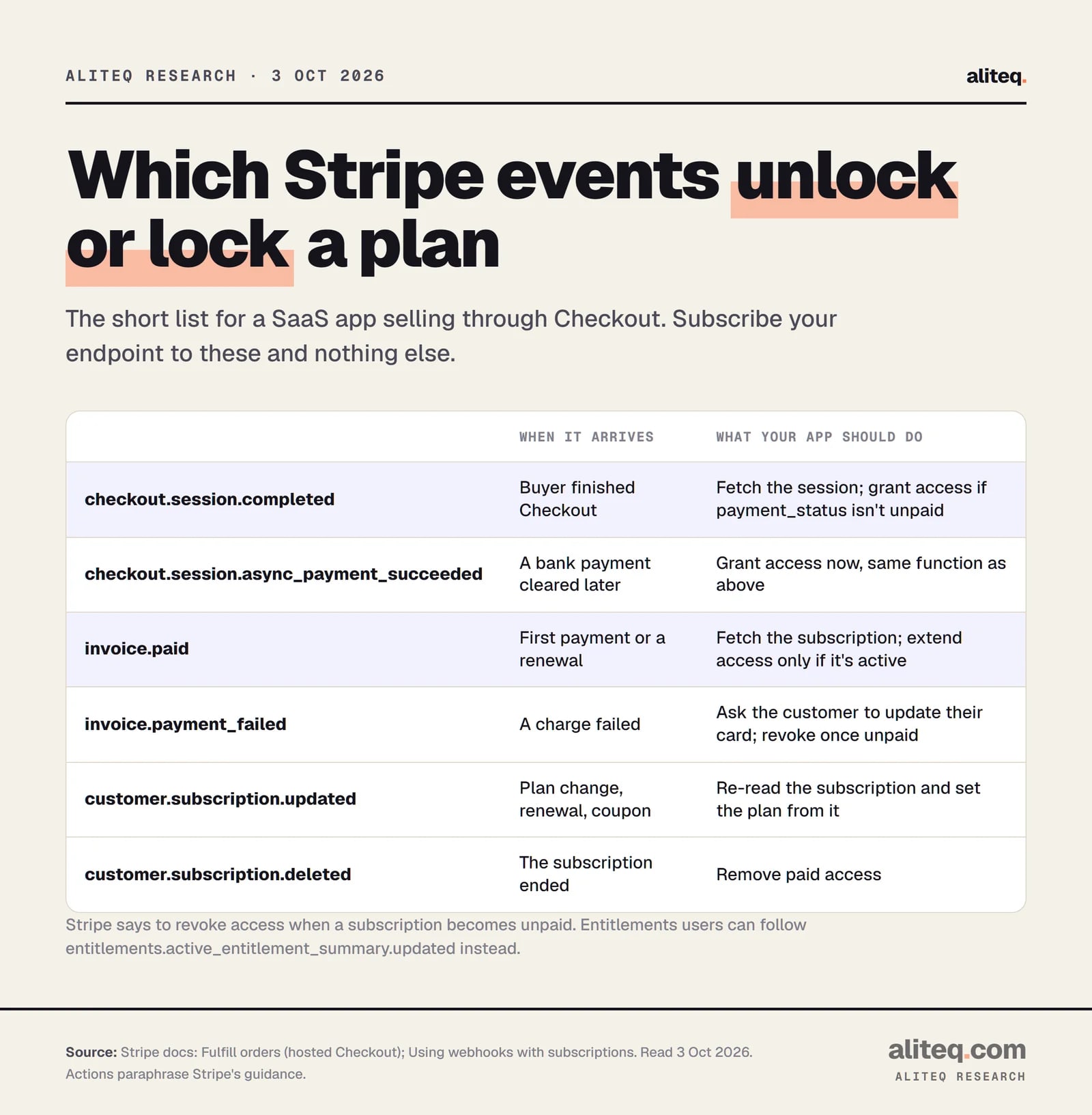
For a SaaS app selling through Checkout, six events cover the money moments. Stripe advises subscribing only to the events you need; listening to everything "puts undue strain on your server."
Actions paraphrase Stripe's Checkout and subscription guides, read October 3, 2026. · aliteq research
Six events and what to do
checkout.session.completed
When it arrives
Buyer finished Checkout
What your app should do
Fetch the session; grant access if payment_status isn't unpaid
checkout.session.async_payment_succeeded
When it arrives
A bank payment cleared later
What your app should do
Grant access, same function as above
invoice.paid
When it arrives
First payment or a renewal
What your app should do
Fetch the subscription; extend access only if it's active
invoice.payment_failed
When it arrives
A charge failed
What your app should do
Ask the customer to update their card; revoke once unpaid
customer.subscription.updated
When it arrives
Plan change, renewal, coupon
What your app should do
Re-read the subscription and set the plan from it
customer.subscription.deleted
When it arrives
The subscription ended
What your app should do
Remove paid access
When it arrives
What your app should do
checkout.session.completed
Buyer finished Checkout
Fetch the session; grant access if payment_status isn't unpaid
checkout.session.async_payment_succeeded
A bank payment cleared later
Grant access, same function as above
invoice.paid
First payment or a renewal
Fetch the subscription; extend access only if it's active
invoice.payment_failed
A charge failed
Ask the customer to update their card; revoke once unpaid
customer.subscription.updated
Plan change, renewal, coupon
Re-read the subscription and set the plan from it
customer.subscription.deleted
The subscription ended
Remove paid access
Stripe adds one subtle rule for renewals. After invoice.paid, "retrieve the associated subscription and confirm that its status is active" before extending access. A paid invoice doesn't always make the subscription active. Stripe's suggested model is simple: store an access-expiry date per customer and check it at login.
If you use Stripe's metered billing, the event list grows. Our usage-based billing guide covers that setup.
Test it with stripe listen before a customer does
Test mode, now called a sandbox, lets you run the whole flow with fake cards. The Stripe CLI's stripe listen forwards sandbox events to your laptop, so you can test webhooks with no public URL. Stripe says you "don't need to configure any webhook endpoints" in the Dashboard for this.
Install the Stripe CLI, run stripe login, then stripe listen --forward-to localhost:4242/webhook (use your own port and route).
Copy the whsec_ secret it prints into your local environment. It's different from your Dashboard endpoint's secret, and Stripe says it doesn't change between restarts.
Run stripe trigger checkout.session.completed or pay in your own Checkout with the test card 4242 4242 4242 4242, any future date, any 3-digit CVC.
Watch the listen window for each event and its status. Confirm your app upgraded the test user exactly once.
Send the same event again with stripe events resend. The second copy should change nothing and return 200.
Going live: create the endpoint in live mode, copy its own whsec_ secret, and pay once with a real card. Refund it after.
A few things the CLI docs flag. stripe trigger creates real sandbox objects, so it can fire extra events alongside the one you asked for. stripe listen runs in a sandbox unless you add --live. And with the CLI, Checkout skips the 10-second wait, so a slow handler can look fine locally and still miss the redirect in production.
The most common go-live mistake follows from all this. Your local tests used the CLI's secret, and production needs the live endpoint's secret. Both start with whsec_, but Stripe says the secrets themselves differ, and mixing them up is its top cause of signature failures.
A short checklist for your handler
Run through these before you take real money. Each one maps to a cause above.
Live-mode endpoint exists, on the final public HTTPS URL, accepting POST.
Signature checked with Stripe's library, on the raw body, with the live secret from an environment variable.
Returns 2xx fast; slow work goes to a queue.
Event IDs stored; repeats return 200 and do nothing.
Access set from the current object fetched from Stripe, not from event order.
Both Checkout events handled, plus the invoice and subscription events.
Signing secret rolled if it ever leaks. Stripe lets the old one live up to 24 hours while you switch.
Your app never processed the webhook. Open Workbench, then Webhooks, then Event deliveries in Stripe. A failed delivery shows the status your server returned: 400 usually means a signature problem, a timeout means slow code, 3xx means a redirect. No delivery at all often means no live-mode endpoint.
Why does Stripe webhook signature verification fail?
Stripe names the wrong signing secret as the most common cause, such as using the CLI's secret in production. The second is a framework parsing the JSON before the check. Stripe needs the raw, unchanged request body.
How long does Stripe retry a failed webhook?
In live mode, for up to three days with growing gaps between tries. In a sandbox, three times over a few hours. After that you can resend from the Dashboard for 15 days, or with the CLI for 30 days.
Can Stripe send the same webhook twice?
Yes. Stripe says endpoints may receive the same event more than once, and retries add more. Store each event ID and return 200 without acting when you see one again.
Do Stripe webhooks arrive in order?
No. Stripe doesn't guarantee order, and its created timestamps are in seconds, so don't sort by them. Fetch the current object from the API and act on that.
How do I test Stripe webhooks locally?
Run stripe listen --forward-to with your local URL and use the whsec_ secret it prints. Then trigger events with stripe trigger or pay in Checkout with the test card 4242 4242 4242 4242. You don't need a public URL for this.