Your first real users try to sign up and Supabase answers with a 429. The built-in sender was never meant for production. What the limit counts, how to plug in your own sender (Resend, Postmark or Amazon SES), and the rate-limit settings to change after.
You shared your app. Three friends signed up. The fourth got a red message: email rate limit exceeded. Or nobody got a confirmation email at all, and your Supabase logs are full of 429s.
Nothing is wrong with your code. You hit a limit that Supabase put on its free starter email service on purpose. That service is a demo tool, and Supabase says so in its own docs. This page shows what the limit counts, how to swap in your own email sender, and which settings to change afterward. I read the Supabase, Resend, Postmark and Amazon docs on 4 October 2026. I did not set up a test project for this piece. This page has no affiliate links.
A pile of sign-up emails, and a sender that lets two through an hour. · Illustration made in Higgsfield with the GPT Image model
What does "email rate limit exceeded" mean in Supabase?
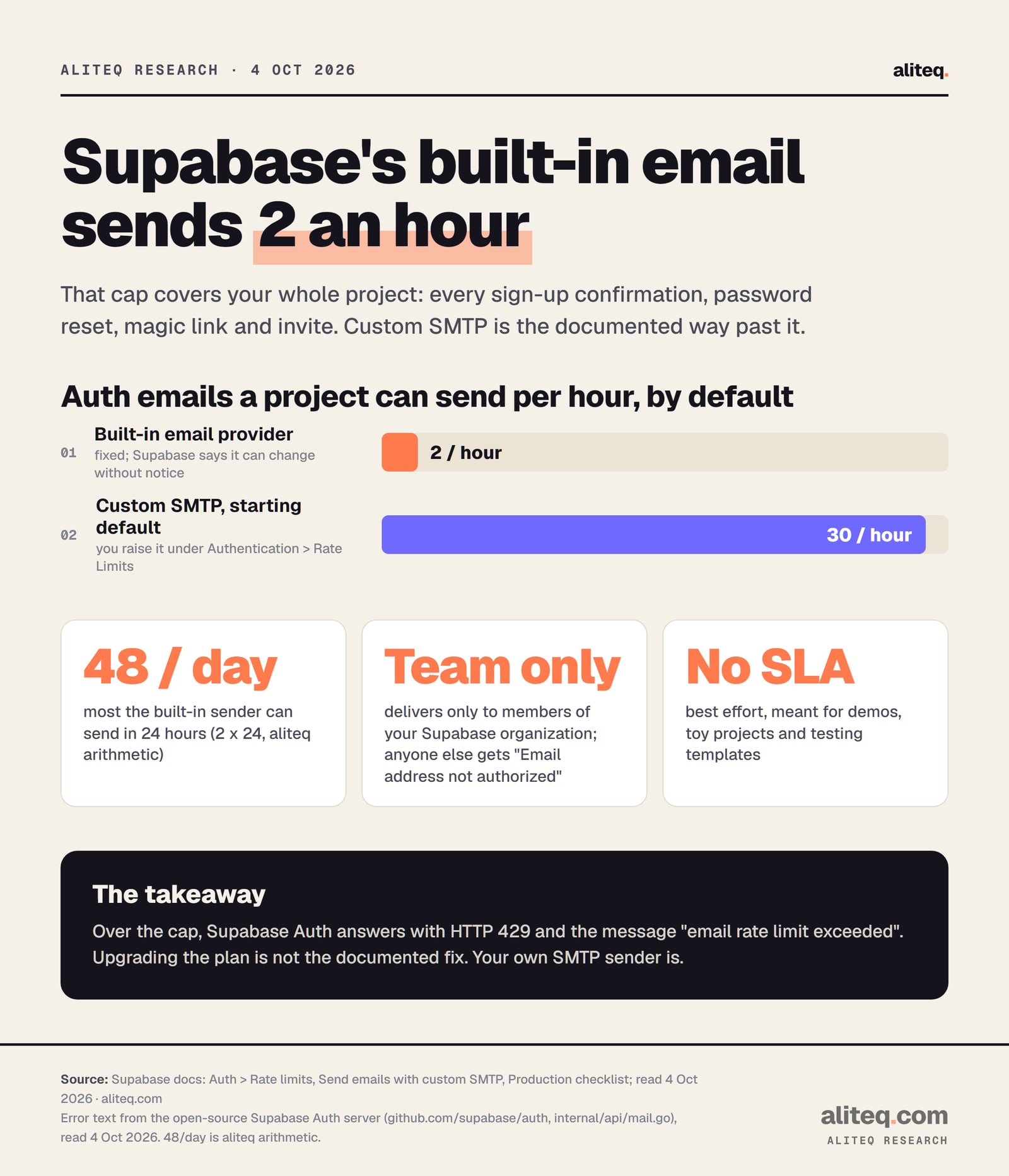
It means Supabase Auth refused to send another email because your project already sent its hourly allowance. Auth is the part of Supabase that handles sign-up and login. The reply is an HTTP 429 "Too Many Requests" error with the code over_email_send_rate_limit. No email goes out until the allowance refills.
The exact words come from the Supabase Auth server, which is open source. In its email code, the error is defined as email rate limit exceeded. When that limit trips, the server answers with status 429 and the code over_email_send_rate_limit.
The allowance belongs to the whole project, not to one user. Supabase's rate-limit table lists "Emails sent by Supabase Auth" as limited by "Project", across "All email-sending Auth endpoints". So these all draw from the same small pot:
Sign-up confirmations, the "confirm your email" message
Password resets
Magic links and one-time codes sent by email
Invites you send from the Supabase dashboard
Email change confirmations
That is why the error feels random. One user's password reset can block the next person's sign-up. Your own testing burns the same allowance, too.
Supabase's documented defaults, read 4 Oct 2026. The 48-a-day figure is our arithmetic: 2 an hour times 24. · aliteq research
Why is Supabase's built-in email so limited?
Because it is a free starter service shared by every Supabase project, and Supabase protects its reputation with spam filters. Its docs say the built-in server "is not meant for production use". The limit is "currently" 2 messages an hour, and it only delivers to members of your Supabase team.
Supabase's custom SMTP guide lists three restrictions on the built-in sender:
Team addresses only. Without your own sender, Supabase "will refuse to deliver messages to addresses that are not part of the project's team". Anyone else gets the error Email address not authorized.
A tiny, moving limit. "Currently this value is set to 2 messages per hour", and the number "can change without notice". Supabase's production checklist dates the change to 2 an hour to 3 September 2024.
No guarantee. The service is "best-effort only". Supabase lists its intended uses as exploring Auth, testing email templates with your team, and "toy projects, demos or any non-mission-critical application".
Here is the plain-English version. Supabase lends every project the same shared mailbox to try things out. If one project used it to send thousands of messages, mail providers would start treating all of them as spam. So the shared mailbox lets each project send a trickle, and only to people who work on it.
So the moment you have real users, you need your own mailbox. Supabase's words are direct: "We urge all customers to set up custom SMTP server for all other use cases."
Will upgrading to Supabase Pro fix it?
Not according to Supabase's docs. They tie the 2-an-hour cap to the built-in email provider, not to your plan. The production checklist says you "can only change this with your own custom SMTP setup". The rate-limit page adds one more route, the Send Email hook, which is a code option for advanced setups.
This trips people up because most Supabase limits do grow when you pay. The email cap is different. It exists to protect a shared sender, so it stays tiny for everyone who uses that sender. If you are deciding whether to upgrade for other reasons, decide that on its own. Then set up custom SMTP either way.
Is it the same error as "you can only request this after 60 seconds"?
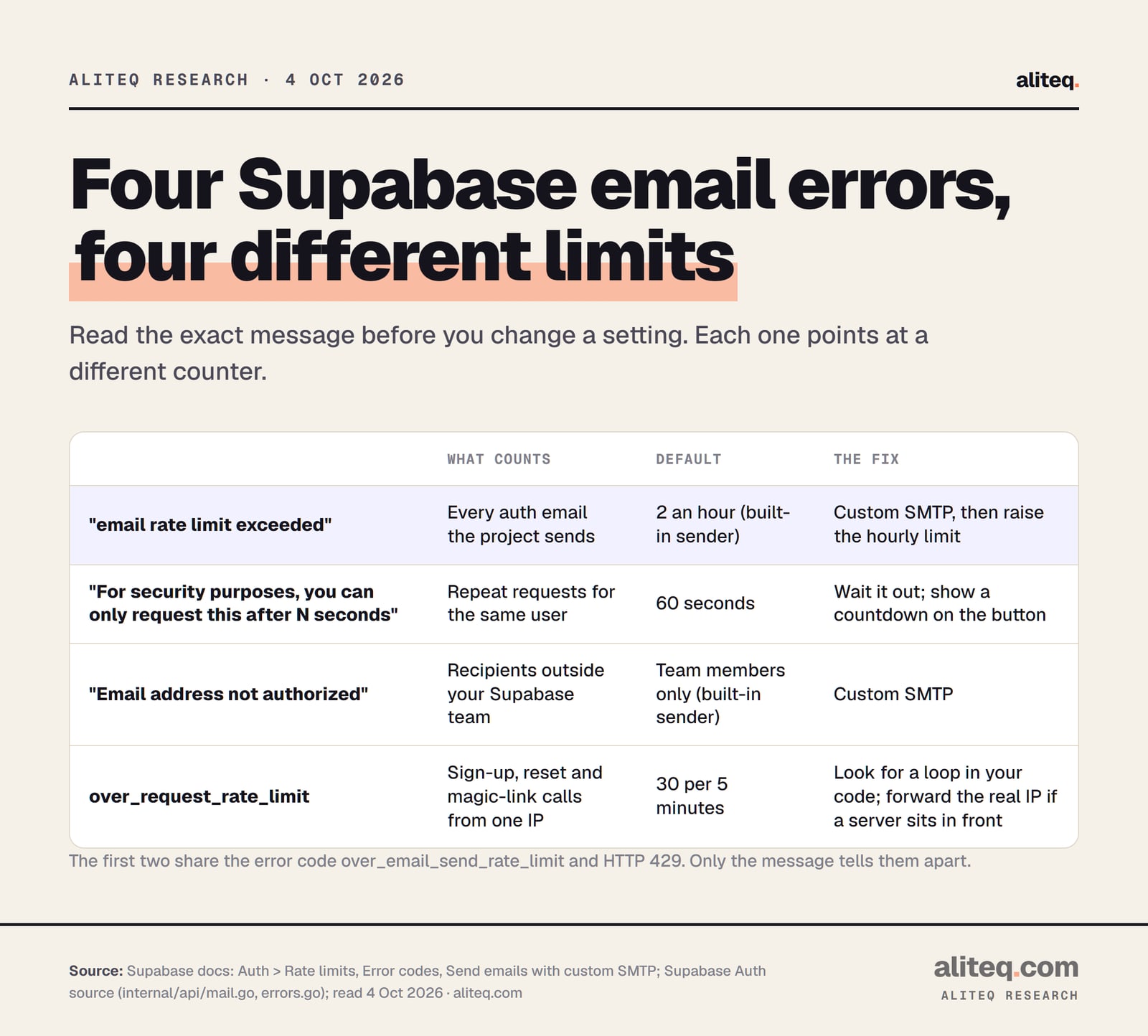
No, but they share an error code, which causes confusion. "Email rate limit exceeded" is the project-wide hourly cap. "For security purposes, you can only request this after N seconds" is a per-user cooldown on the same request. Both come back as 429 with over_email_send_rate_limit. Only the message tells them apart.
The cooldown is a separate safety rule. Supabase's rate-limit table gives sign-up confirmations, password resets and magic links each a default "60 seconds window before a new request is allowed for the same user". So if someone taps "resend email" twice in a row, the second tap fails with the countdown message. That is working as intended. The fix is a disabled button with a visible countdown, not a settings change.
There are two more neighbors worth knowing. Email address not authorized means the built-in sender refused a non-team address. And over_request_rate_limit means too many sign-up, reset or magic-link calls came from one IP address, by default 30 per 5 minutes. Supabase's error-code page notes this one can point to a bug in your app, such as a React effect that fires the same request over and over.
Messages from the Supabase Auth source and error-code docs; defaults from Supabase's rate-limit page. Read 4 Oct 2026. · aliteq research
Create an account with an email sending service, verify your domain with it, and copy four settings: host, port, username and password. Paste them into Supabase's SMTP Settings page under Authentication, with a sender address on your domain. Save, and Supabase starts sending to everyone. SMTP is simply the standard way one mail server hands email to another.
Supabase says its Auth "works with any email sending service that supports the SMTP protocol". Its guide names six that work: Resend, AWS SES, Postmark, Twilio SendGrid, ZeptoMail and Brevo. You also choose a "From" address, which Supabase suggests should look like no-reply@example.com on your own domain.
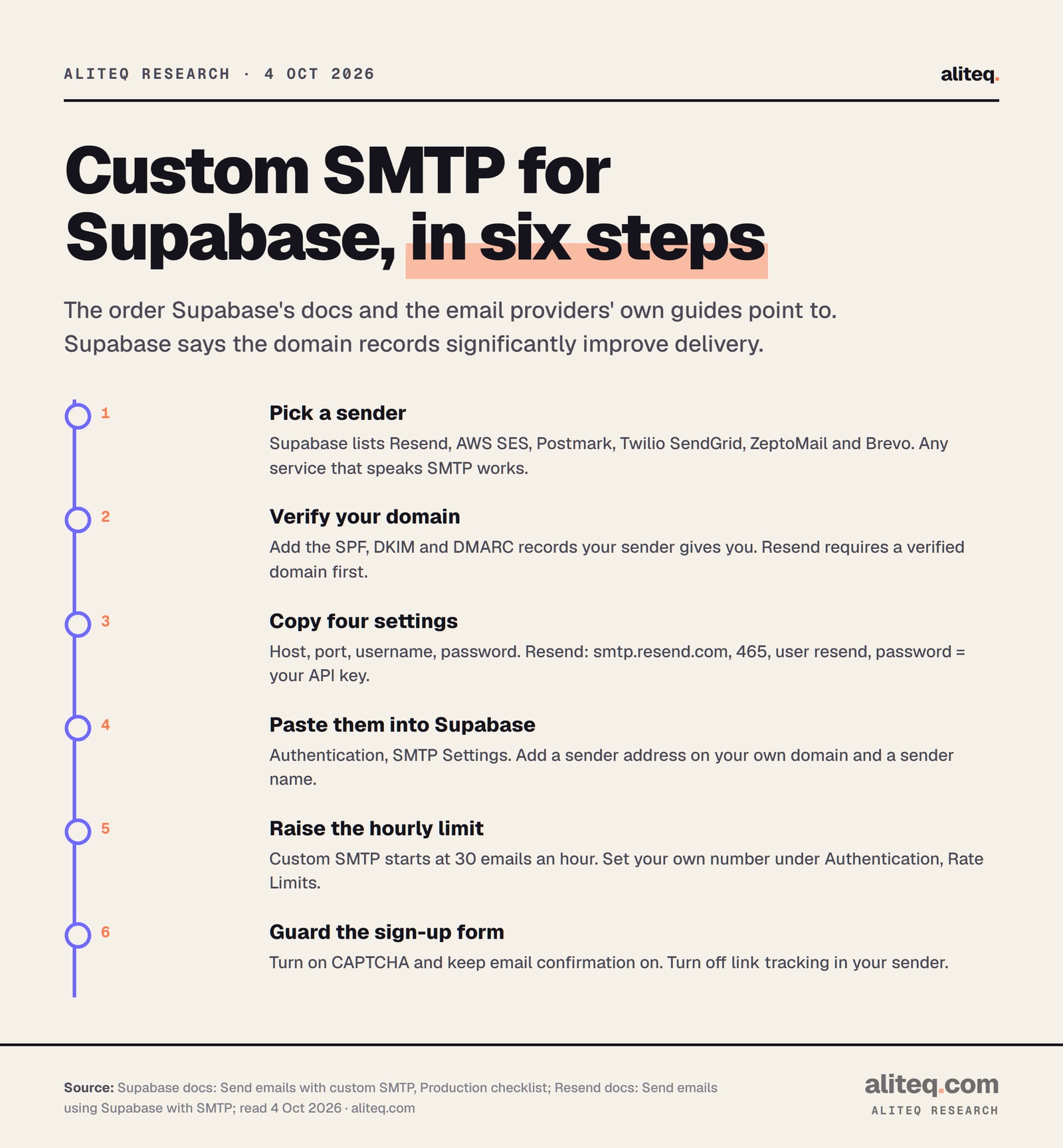
The steps, in order:
Pick a sender. Any of the six above. Pick one and stick with it; you can switch later.
Verify your domain. The service gives you DNS records to add where your domain is managed. Supabase says setting up DKIM, DMARC and SPF "will significantly increase the deliverability of your messages". Those are three records that prove the email really comes from you.
Copy the SMTP settings. Host, port, username, password, from the service's dashboard.
Paste them into Supabase. In the dashboard, open Authentication, find the email settings, open SMTP Settings and turn on custom SMTP. Supabase's production checklist names the spot "Authentication > Emails > SMTP Settings". Resend's guide shows the same page reached through Email under Notifications. Fill in the sender email and sender name too.
Raise the hourly limit. See the next section.
Send yourself a test. Sign up with an address outside your team and check it arrives.
If your AI tool offers to "fix" the error, give it this page's facts and do the dashboard steps yourself. The SMTP password is a secret. It belongs in the Supabase dashboard, never in your app's code. Your API keys are in the browser explains why anything in frontend code is public.
From Supabase's custom SMTP guide and production checklist, and Resend's Supabase guide. Read 4 Oct 2026. · aliteq research
What are the SMTP settings for Resend, Postmark and Amazon SES?
Each service publishes its own four values. Resend uses host smtp.resend.com, port 465, username resend and your API key as the password. Postmark uses smtp.postmarkapp.com with your Server API token as both username and password. Amazon SES uses a regional endpoint and separate SMTP credentials, not your normal AWS keys.
Resend
Host
smtp.resend.com
Port
465
Username
resend
Password
Your Resend API key
Watch out for
Needs a verified domain first
Postmark
Host
smtp.postmarkapp.com
Port
587 (25 and 2525 also work)
Username
Server API token
Password
The same Server API token
Watch out for
Use the Server token, not the Account token
Amazon SES
Host
Your region's SES SMTP endpoint
Port
587 (STARTTLS) or 465 (TLS)
Username
SES SMTP username
Password
SES SMTP password
Watch out for
New accounts start in a sandbox
Host
Port
Username
Password
Watch out for
Resend
smtp.resend.com
465
resend
Your Resend API key
Needs a verified domain first
Postmark
smtp.postmarkapp.com
587 (25 and 2525 also work)
Server API token
The same Server API token
Use the Server token, not the Account token
Amazon SES
Your region's SES SMTP endpoint
587 (STARTTLS) or 465 (TLS)
SES SMTP username
SES SMTP password
New accounts start in a sandbox
A few details from each provider's own docs:
Resend lists two prerequisites in its Supabase guide: an API key and "a verified domain". It notes the sender email and name are required fields in Supabase.
Postmark says to use "your Server API token as both your Username and Password, and not your Account API Token". Its transactional host is smtp.postmarkapp.com; a separate broadcast host exists for bulk mail, which auth emails are not.
Amazon SES requires an encrypted connection. Its SMTP credentials are "unique to each AWS Region", and "your SMTP password is different from your AWS secret access key". New accounts start in a sandbox, where you "can only send mail to verified email addresses and domains" and at most 200 messages per 24 hours. You request production access to leave it.
Supabase's checklist adds one setting to switch off. Some senders have link tracking on, which rewrites links in your emails. Supabase says this "may overwrite or deform the email confirmation links", and recommends you "disable link tracking when using a custom SMTP service".
If your login email now fails with Error sending confirmation email instead, that is progress of a kind. It is the message the Auth server returns when the send itself fails, usually a wrong password, port or unverified sender. Recheck the four values against your provider's page.
Which Supabase rate-limit settings should you change after?
Raise the email limit to fit your real sign-ups. After you add custom SMTP, Supabase sets "a low rate-limit of 30 messages per hour" to protect your new sender. Change it under Authentication, Rate Limits. Leave the 60-second per-user cooldowns alone; they stop people spamming one inbox.
Supabase's production checklist puts the 30 in plain terms: "30 new users per hour". It adds that "if you are doing a major public announcement, you will likely require more than this". If you expect a launch spike, also tell your email service ahead of time. Supabase notes that "most email sending services dislike spikes in the number of messages being sent".
How high should you go? Count your worst hour, not your average. A launch post can bring a burst of sign-ups, and each one needs a confirmation email. Some will also ask for a reset. I would set the limit above that peak, and check your email provider's own sending cap so the two numbers agree. Supabase's limit cannot make your provider send faster than your plan with them allows.
The setting has an API name too. Supabase's docs show it as rate_limit_email_sent in the Management API, the same number you see in the dashboard.
How do you stop bots from burning your email limit?
Turn on CAPTCHA for sign-up, keep email confirmation switched on, and handle the 429 kindly in your app. Supabase's SMTP guide says bots signing up lists of addresses is "a common source of abuse", and calls CAPTCHA "the most effective way to control bots in this scenario".
Supabase explains why bots bother. Fake sign-ups can damage your sender's reputation, block real users from signing up or resetting passwords, or pressure you into weakening security. Its mitigation list, in short:
Add CAPTCHA to sign-up, sign-in and password reset. Invisible versions rarely bother real users.
Offer social login, such as Sign in with Google, which sends no confirmation email.
Prefer one-time codes over passwords for email login.
"Do not disable email confirmations under pressure." Switching off Confirm email makes this error vanish on sign-up, because no confirmation is sent. It also lets anyone sign up as an address they do not own.
Two app-side habits also save emails. Supabase suggests longer user sessions, since short ones force people to sign in, and receive emails, more often. And it warns that a bug in a server-rendered setup can end sessions early, so check your login code if sign-ins spike for no reason. What is login, actually? and sessions and tokens cover how a session works.
In your app, catch the error instead of showing raw text. Supabase's JavaScript client gives API errors a code property, so your sign-up form can check for over_email_send_rate_limit and show "We couldn't send your email right now. Try again in a few minutes." If an AI tool wrote your login, add login with Supabase shows how to prompt for that kind of error handling.
Read the exact message. 'email rate limit exceeded' is the project cap; 'only request this after N seconds' is the per-user cooldown.
Sign up with an email service (Resend, Postmark, Amazon SES or another SMTP sender) and verify your domain with its SPF, DKIM and DMARC records.
Paste the host, port, username and password into Supabase's SMTP Settings. Keep the password in the dashboard, never in code.
Raise the email limit from 30 an hour under Authentication, Rate Limits, to cover your busiest hour.
Turn on CAPTCHA, keep Confirm email on, switch off link tracking, and test with an address outside your team.
What does "email rate limit exceeded" mean in Supabase?
Your project has sent its hourly allowance of auth emails, so Supabase Auth refused the next one with an HTTP 429 and the code over_email_send_rate_limit. With the built-in email provider, the allowance is 2 emails an hour for the whole project. It refills over time.
How many emails can Supabase's built-in email send?
Supabase's docs say 2 messages an hour, and that the number can change without notice. The built-in sender also only delivers to members of your Supabase organization's team, and comes with no delivery guarantee. Supabase says it is not meant for production.
Does upgrading to Supabase Pro remove the email rate limit?
Not according to Supabase's docs. The production checklist says the 2-an-hour cap can only be changed with your own custom SMTP setup. The rate-limit page also mentions the Send Email hook. Set up your own sender either way.
What is the email limit after I add custom SMTP?
Supabase starts it at 30 emails an hour to protect your new sender's reputation. You can change it under Authentication, Rate Limits in the dashboard. Set it above your busiest expected hour and within your email provider's own limits.
Which email service should I use with Supabase?
Any service that supports SMTP. Supabase names Resend, AWS SES, Postmark, Twilio SendGrid, ZeptoMail and Brevo. Each needs a verified domain and gives you a host, port, username and password to paste into Supabase's SMTP Settings.
Why do I get "you can only request this after 60 seconds"?
That is a per-user cooldown, not the hourly cap. By default Supabase allows one sign-up confirmation, password reset or magic link request per user every 60 seconds. Show a countdown on the resend button instead of changing the setting.