Your vibe-coded app added a table and Supabase now answers with error 42501. A new table can be locked before Row Level Security even runs. On 30 October 2026 that becomes the rule for every existing project. The one safe fix, and the two popular fixes that open your data to anyone.
Your AI tool added a table. The page that reads it now shows nothing, and the browser console shows this:
{
  "code": "42501",
  "message": "permission denied for table your_table",
  "hint": "Grant the required privileges to the current role with: GRANT SELECT ON public.your_table TO anon;"
}
That shape is Supabase's own example, from the changelog that announced the change. If you build with Lovable, Bolt or any tool that wires Supabase up for you, this error is about to get common. Supabase is closing a door that used to be open by default, on purpose. I'm the security editor here, so I'll tell you why I think that's the right call, and how to fix the error without reopening the door.
I read Supabase's changelog and docs and the PostgreSQL docs on 4 October 2026. I did not create a test project or run any of this SQL. The snippets below are adapted from Supabase's own examples. Supabase does not pay us, and this page has no affiliate links.
What does "permission denied for table" mean in Supabase?
It means the Postgres role behind your request has no privilege on that table. Your app talks to Supabase as anon (nobody signed in) or authenticated (a user signed in). If that role was never granted SELECT, INSERT, UPDATE or DELETE on the table, Postgres refuses the query outright. Code 42501 is Postgres's insufficient_privilege.
Supabase's docs put it in one line: "A table isn't reachable through the Data API unless you have granted a role privileges on it." The Data API is the layer your app's supabase-js calls go through. If your code talks to the database over a direct connection string instead, this change doesn't touch you.
The useful part is the hint. Supabase says it "shows you which role is missing which privilege, along with the GRANT needed to fix it." Read the role name in it before you do anything. If the hint says anon, ask yourself whether signed-out visitors should see that table at all.
Why is my new table suddenly throwing this?
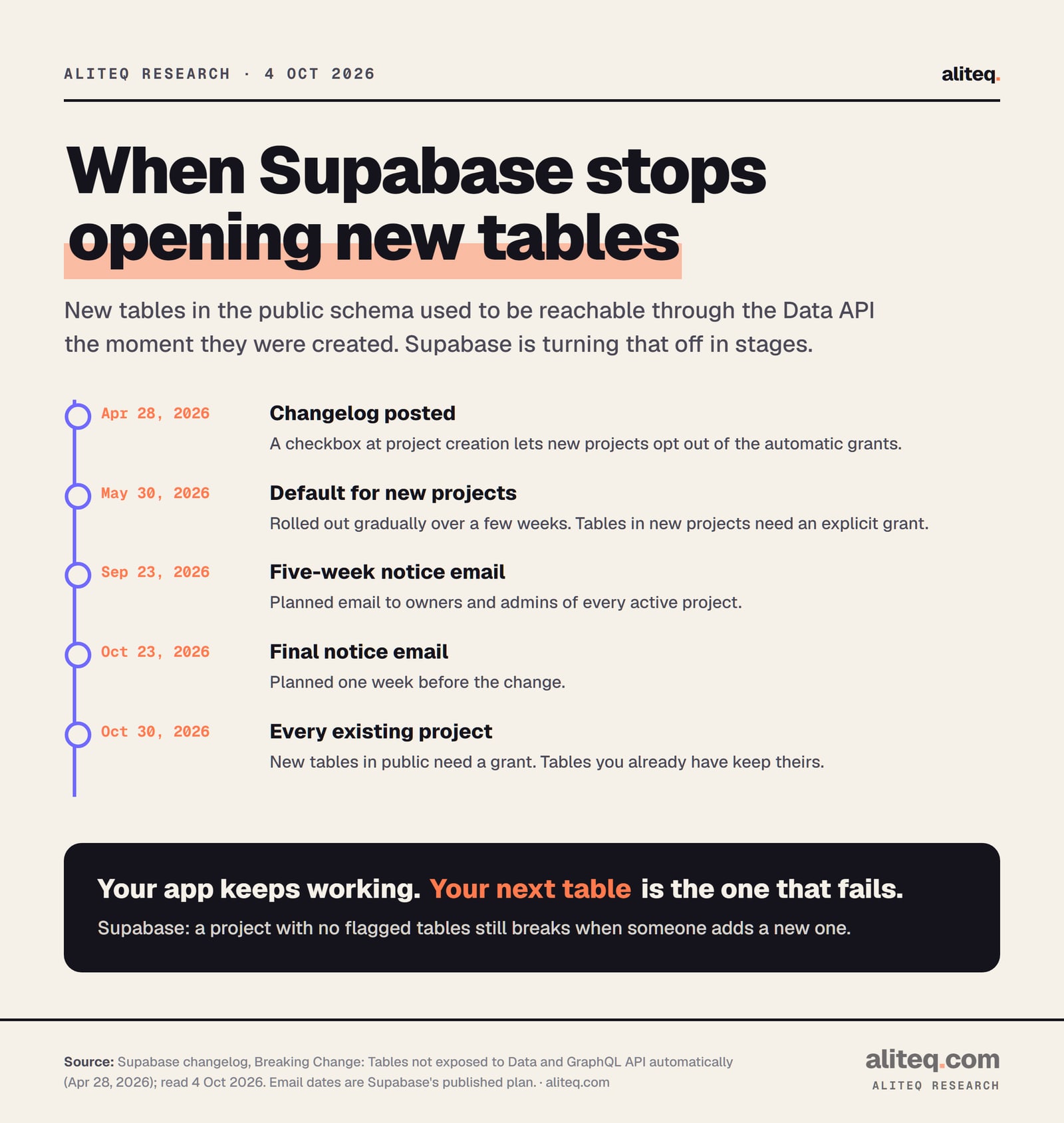
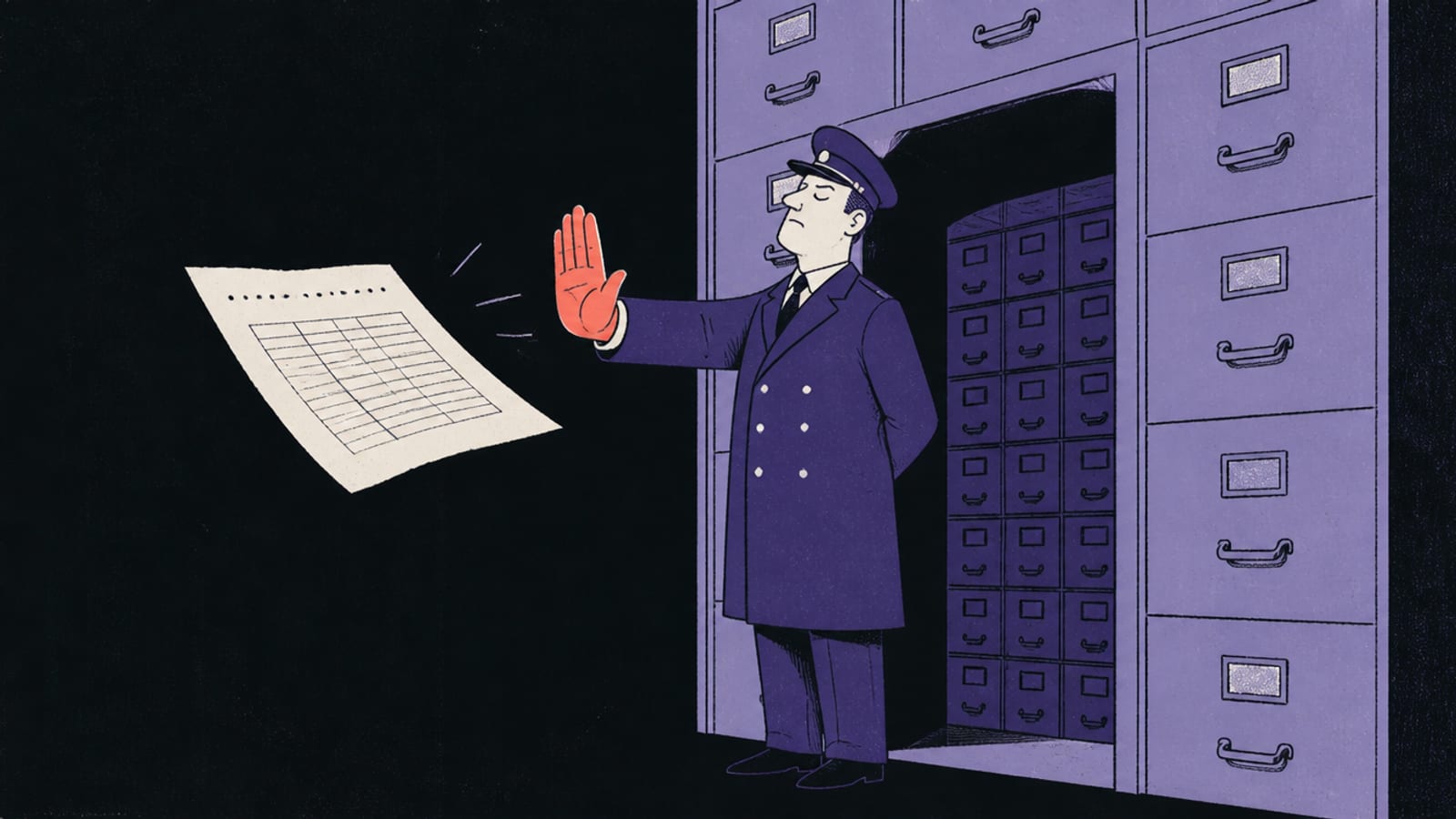
Because Supabase stopped opening new tables automatically. Its changelog says: "New tables in the public schema will no longer be exposed to the Data API automatically." That became the default for new projects from 30 May 2026. On 30 October 2026 it applies to every existing project.
Supabase's published rollout, read 4 Oct 2026. The two email dates are Supabase's plan; we did not see the emails. · aliteq research
Before the change, every table you created in public got SELECT, INSERT, UPDATE and DELETE for anon, authenticated and service_role on the spot. In Supabase's words, "Every table you create becomes reachable via the Data API on creation." After the change, a new table exists but stays unreachable until you grant access.
Two details matter for a vibe-coded app:
Your existing tables keep working. Supabase says they "keep their current grants and stay reachable." Nothing breaks on the morning of 30 October.
Your next table is the one that fails. Supabase's own warning: "a project with no flagged tables today still breaks the first time someone adds a new one." If your AI tool creates a table without a grant, the feature it just built returns 42501.
If your project was created after the 30 May rollout, you may already be on the new behavior. Supabase called it "a gradual rollout over a few weeks", so I can't tell you the exact day your project switched.
Why Supabase made the change
Follow the incentives and it makes sense. Supabase's reason is blunt: "it's easy to accidentally expose new tables before you've secured them." It names who creates those tables now: "agents, CLI scripts, and AI platforms," often with no human reviewing the change. The old default meant a forgotten table was public the moment it existed. The new default means a forgotten table is an error message. An error you can see beats a leak you can't.
Is this the same error as "new row violates row-level security policy"?
No, though both carry code 42501. "Permission denied for table" means the grant is missing, so Postgres stops before Row Level Security runs. "New row violates row-level security policy" means the grant exists, RLS is on, and no policy allows that write. Different lock, different fix.
In the PostgreSQL source, both messages are raised with the same insufficient_privilege code. That's why searching for "42501" alone mixes them up. Read the message, not just the number. If yours says "new row violates", you want the RLS write error fix instead.
What's the difference between a grant and Row Level Security?
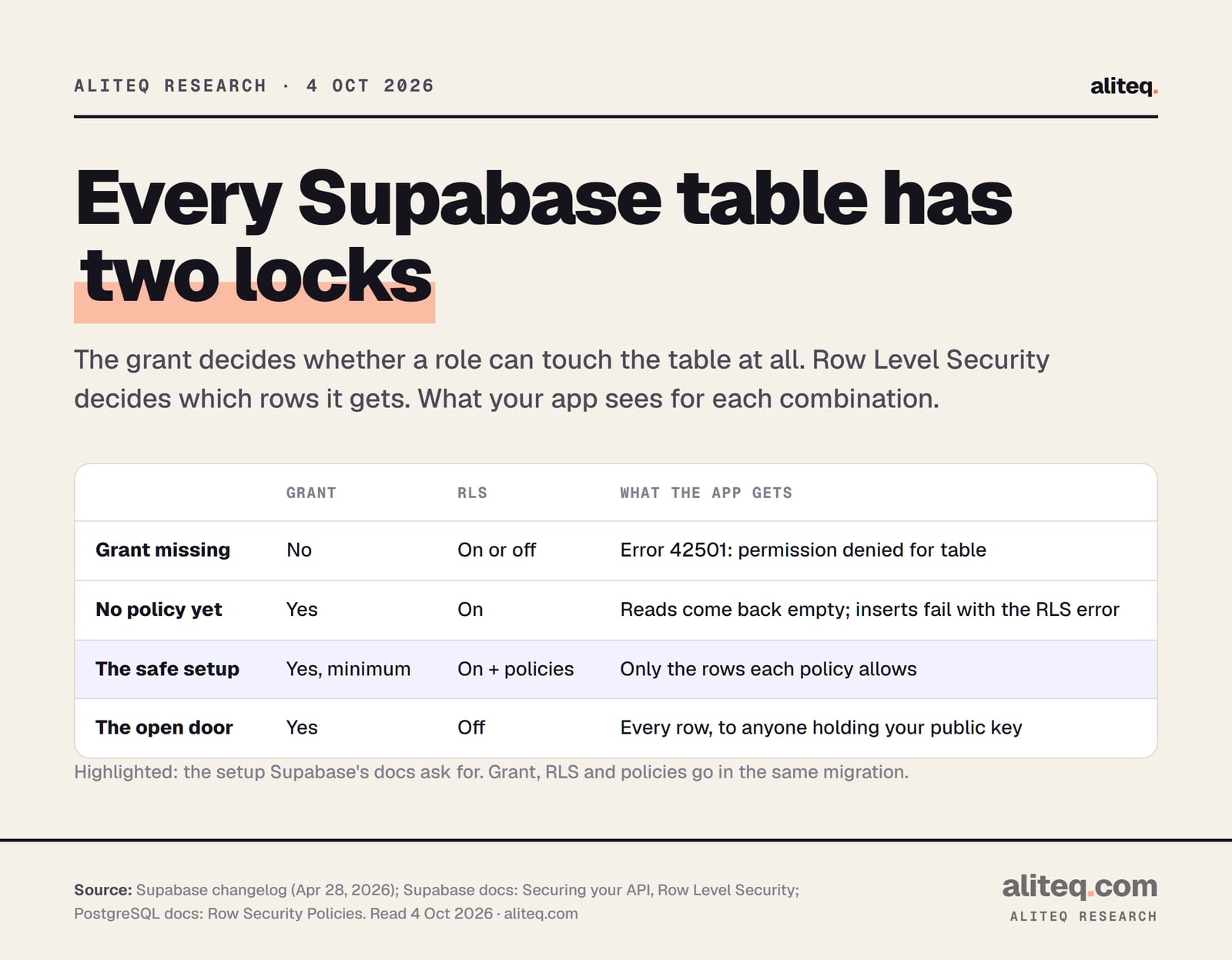
They are two separate locks on the same table. The grant decides whether a role can touch the table at all. Row Level Security (RLS) decides which rows that role gets once it's in. Supabase's changelog says it directly: "Grants are a separate layer." You need both.
What the app gets for each combination. Drawn from Supabase's changelog and docs and the PostgreSQL RLS docs, read 4 Oct 2026. · aliteq research
The docs' own summary: "Grants control whether a role can access an object. RLS controls which rows the role can access. Use both controls for every exposed object." The order matters. If the grant is missing, Supabase says "Postgres rejects the query before RLS comes into play." Once you add the grant, RLS takes over. With RLS on and no policy yet, Postgres uses "a default-deny policy," so reads come back empty.
If RLS is a new idea, Row Level Security explained draws it out with a toggle you can flip. The quick version is below: watch what each user can see with RLS on, then off.
orders.id
owner
item
total
101
alice
Running shoes
$89
102
bob
Desk lamp
$34
103
alice
Headphones
$149
104
carol
Coffee grinder
$59
105
bob
Monitor arm
$72
RLS is off, so every row is readable with the same public key your app sends to every browser — including Carol's, and she never logged in here. This is the exact state the Moltbook and Lovable incidents were found in.
How do I fix "permission denied for table" safely?
Grant each role only what it needs on that one table, keep RLS on, and write the policies, in the same migration. Supabase calls these three steps "a unit." Signed-in users usually need more than signed-out visitors, and many tables should give signed-out visitors nothing at all.
Here is the shape, adapted from Supabase's changelog example. Swap your_table for your table's name and user_id for the column that holds the owner:
-- 1. Grant only what each role needs
grant select, insert, update, delete on public.your_table to authenticated;
-- Only if signed-out visitors should read this table:
-- grant select on public.your_table to anon;

-- 2. Keep Row Level Security on
alter table public.your_table enable row level security;

-- 3. Say which rows each user may touch
create policy "users can read their own rows"
on public.your_table
for select
to authenticated
using (auth.uid() = user_id);
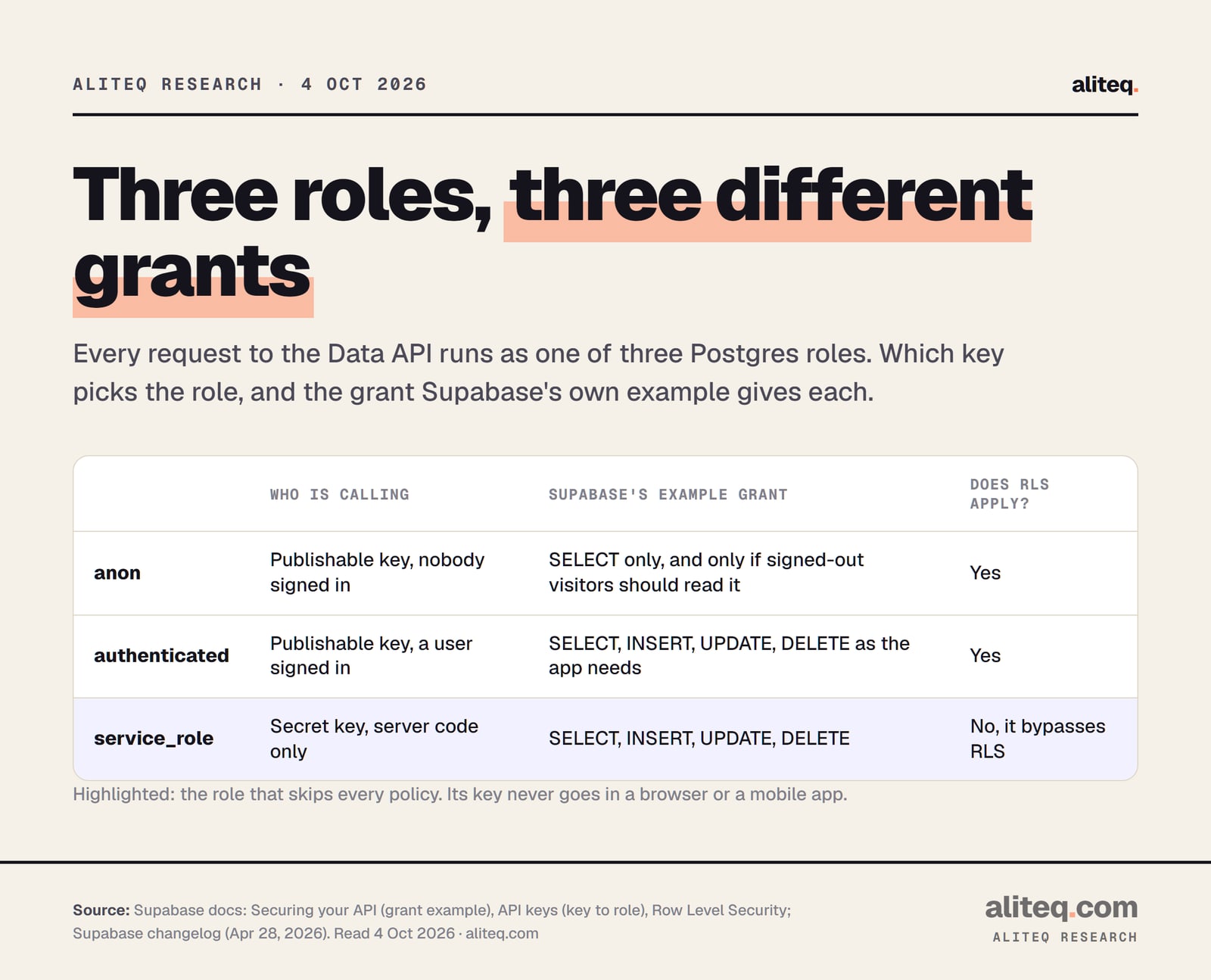
Supabase's example also grants service_role, the role behind your secret key, for server-side code. Add that line only if your own server or Edge Functions use that table.
Which key maps to which role, and the grant Supabase's own example gives each. Read 4 Oct 2026. · aliteq research
Three questions decide your grant:
Should someone who isn't logged in see this table? A public list of blog posts, maybe. A table of orders, no. If no, give anon nothing.
Do signed-in users write to it, or only read? A read-only catalog needs SELECT. A notes table needs all four.
Who owns each row? That answer becomes the policy. For a users table, this RLS policy walkthrough covers the common traps.
What should I never do to make the error go away?
Don't hand anon everything, and don't turn RLS off. Both make the error disappear by removing the protection the error was pointing at. A third trap is the bulk grant on every table in the schema. It quietly re-exposes every private table you have.
Granting all privileges to anon.anon is anyone holding your publishable key, and that key ships inside your app on purpose. Our page on whether an exposed anon key is a problem explains why that key is safe only while RLS does its job. Supabase's docs say anon should keep "Only what signed-out visitors are meant to read."
Disabling RLS. Supabase's RLS docs: "A table in an exposed schema without RLS is readable and writable by any role with a grant on it." Add a grant and switch RLS off, and you've built the open door from the table above.
The bulk grant. Supabase's changelog does print a grant on "all tables in schema public" to all three roles. Read the context: it's the rollback for someone who opted in early and wants the old behavior back. It is not a fix for one table.
Putting the secret key in the app. The service_role role "bypasses RLS, so keep it server-side," per Supabase. If an AI tool suggests swapping in the secret key to stop the error, say no.
If you're not sure which of these your tool just did, the Lovable and Bolt checklists walk through where to look.
What should I tell my AI coding tool?
Ask for the grant, the RLS line and the policy together, and name the roles. Supabase's advice for AI tools is to "update its system prompt or adopt the Supabase agent skill, which includes the grants step." In practice, you add one rule to your project instructions.
Then check the result. Open the migration your tool wrote and look for three things: a grant line, an enable row level security line and a create policy line. If one is missing, ask for it before you ship.
How do I check my project before 30 October?
Open the Security Advisor in your Supabase dashboard. Supabase says it flags affected tables between now and 30 October and "shows the remediation SQL." The Table Editor also shows a Data API exposure badge. Supabase planned owner emails for 23 September and 23 October.
A short pass that takes minutes:
Look at the Advisor list. Every flagged table is one to decide on: should it be reachable from the app at all?
Read your AI tool's instructions. If they say nothing about grants, add the rule above now. That's the fix that holds after 30 October.
Find the tables you never meant to expose. The old default opened everything in public. Supabase's changelog gives a per-table revoke for those, and its docs list the same three steps for the ones you keep.
If the data behind your app is other people's personal information, payments or health records, have a developer review the grants and policies before launch. A wrong grant fails loudly. A wrong policy can fail silently, by showing rows to the wrong person without any error at all. The wider pre-launch list is in our vibe-coded app security checklist.
Quick answers
What does Supabase error 42501 "permission denied for table" mean?
The role your app uses, usually anon or authenticated, has no privilege on that table. Postgres refuses the query before Row Level Security runs. The error's hint names the role and the GRANT that would fix it.
Is Supabase really changing grants on 30 October 2026?
Yes. Supabase's changelog of 28 April 2026 says the setting "will be applied" to all existing projects on 30 October 2026. New projects got it by default from 30 May 2026. Existing tables keep their grants; new tables in public need an explicit grant.
Will my live app break on 30 October?
Not by itself. Tables you already have keep their current grants. What breaks is the next table you or your AI tool creates without a grant: the feature using it returns 42501.
Is "permission denied for table" the same as "new row violates row-level security policy"?
No. Both use code 42501, but the first means the grant is missing and the second means the grant exists and no RLS policy allows the write. Fix the first with a grant and the second with a policy.
Can I just run GRANT ALL to anon?
Don't. anon is anyone holding your publishable key, which ships in your app. Grant anon SELECT only on tables signed-out visitors should read, and nothing on the rest. Keep RLS on either way.
Do I still need Row Level Security if I use grants?
Yes. A grant lets a role into the table; RLS decides which rows it sees. Supabase's docs say to "use both controls for every exposed object." A table with a grant and no RLS is readable by anyone with that grant.
This page has no affiliate links or sponsored placements. It explains a configuration change and its safe setup; it isn't a security review of your app.
Use this in your own page
Teaching this? Paste the live version into your course, blog or answer. Free, no sign-up; the credit line links back here.