An index speeds up reads and taxes every write. Here is when it pays, how to order the columns, and how to read EXPLAIN, using the PostgreSQL docs and our own price table, where five indexes take up more room than the data.
Voltage here. I like a spreadsheet that proves me wrong, and indexes are the database version. Everyone says "just add an index". Then you look at what it costs in disk space and write time. I checked our own price table for this piece, and its five indexes weigh 39 MB against 22 MB of actual data.
What does an index actually do?
An index is a separate, sorted structure the database keeps next to your table so it can find rows without reading all of them. PostgreSQL's default type is a B-tree. It handles equality and range comparisons such as =, <, >, BETWEEN and IN.
The docs use a familiar picture: "terms and concepts that are frequently looked up by readers are collected in an alphabetic index at the end of the book." Without it, the database scans the whole table row by row. With it, the database walks a few levels of a search tree.
If you want the plain-English version first, start with our guide to a database query and the Lovable app that got slow. This page goes further: the costs, the column order and the proof.
Two facts to keep in mind. By default, CREATE INDEX makes a B-tree. And once an index exists, you do nothing more. The docs say "the system will update the index when the table is modified, and it will use the index in queries when it thinks doing so would be more efficient than a sequential table scan."
When does an index help?
An index helps when a query picks out a small slice of a large table. The classic cases are a filter on one column, a join column, and a sort with a LIMIT. In all three, the database can jump to the rows instead of reading everything.
Selective filters.WHERE user_id = 42 on a table of millions returns a few rows. That is the textbook win.
Join columns. The docs say an index on a column in a join condition "can also significantly speed up queries with joins." Supabase's database linter flags foreign keys with no index for the same reason: "Database queries that filter or join on these columns will be slower because there is no index to speed them up."
ORDER BY with LIMIT. Only B-tree can return rows in sorted order. The docs say an explicit sort "will have to process all the data to identify the first n rows, but if there is an index matching the ORDER BY, the first n rows can be retrieved directly." Think "latest 20 orders".
UPDATE and DELETE with a search condition. They have to find the row first, so they benefit too.
Now the cases where it does not help. A tiny table is the first. The docs put it bluntly: "selecting 1 out of 100 rows will hardly be [a candidate], because the 100 rows probably fit within a single disk page, and there is no plan that can beat sequentially fetching 1 disk page."
The second is a query that wants a large share of the table. For a big fraction, the docs say an explicit sort "is likely to be faster than using an index" because it reads in a sequential pattern. The third is an unselective column. A column where a few values make up most rows is a poor candidate, and the planner will ignore the index for those values anyway.
When does an index hurt?
An index hurts in two ways. It must be updated every time you insert, update or delete a row, so writes get slower. It also takes disk space, sometimes more than the data. The PostgreSQL docs say indexes seldom or never used "should be removed."
Here is the quote that matters: "After an index is created, the system has to keep it synchronized with the table. This adds overhead to data manipulation operations. Indexes can also prevent the creation of heap-only tuples." Heap-only tuples are a Postgres shortcut for cheaper updates. The docs say only that indexes can prevent them. Supabase says the same in plain words: "While indexes can speed up reads, they also slow down writes."
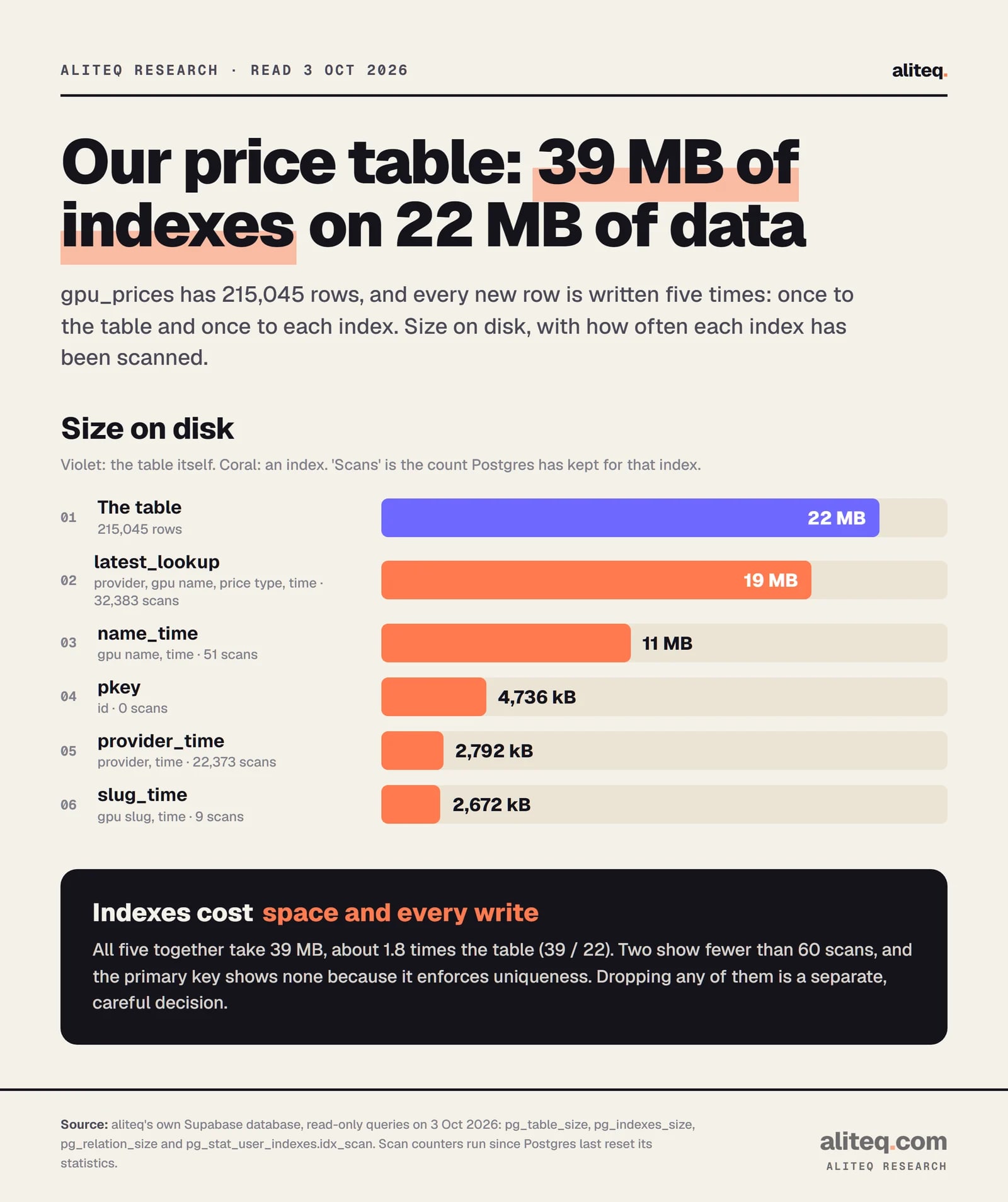
Our own table makes the size point better than any warning does. gpu_prices is where we store Vast and Runpod rental prices for every GPU we track. It is append-only: a new batch of prices lands every hour, and old rows are never updated. On 3 October 2026 it had 215,045 rows going back to 21 July.
Read-only queries on aliteq's Supabase database, 3 Oct 2026. Scan counts run since Postgres last reset its statistics. · aliteq research
The table itself is 22 MB. The five indexes together are 39 MB, about 1.8 times the table (39 divided by 22). Every new row is written to the table and to each of the five. Two of the indexes show 51 and 9 scans, and one shows 22,373, so they clearly do not all earn the same keep.
I will not tell you to drop any of them. I did not drop or add any for this article. The scan counters run since Postgres last reset its statistics, and I did not check when that was. Supabase's own guidance on unused indexes says to consider future usage patterns and to test the removal in dev or staging first. A table this small is not hurting either. But it shows the shape of the cost: an index you added "just in case" keeps costing disk and write time until you look at it again.
How does column order work in a composite index?
A composite (multicolumn) index sorts by its first column, then the second within that. So it is most useful when your query constrains the leading column. Put the columns you test with equality first, then the one you filter by range or sort by.
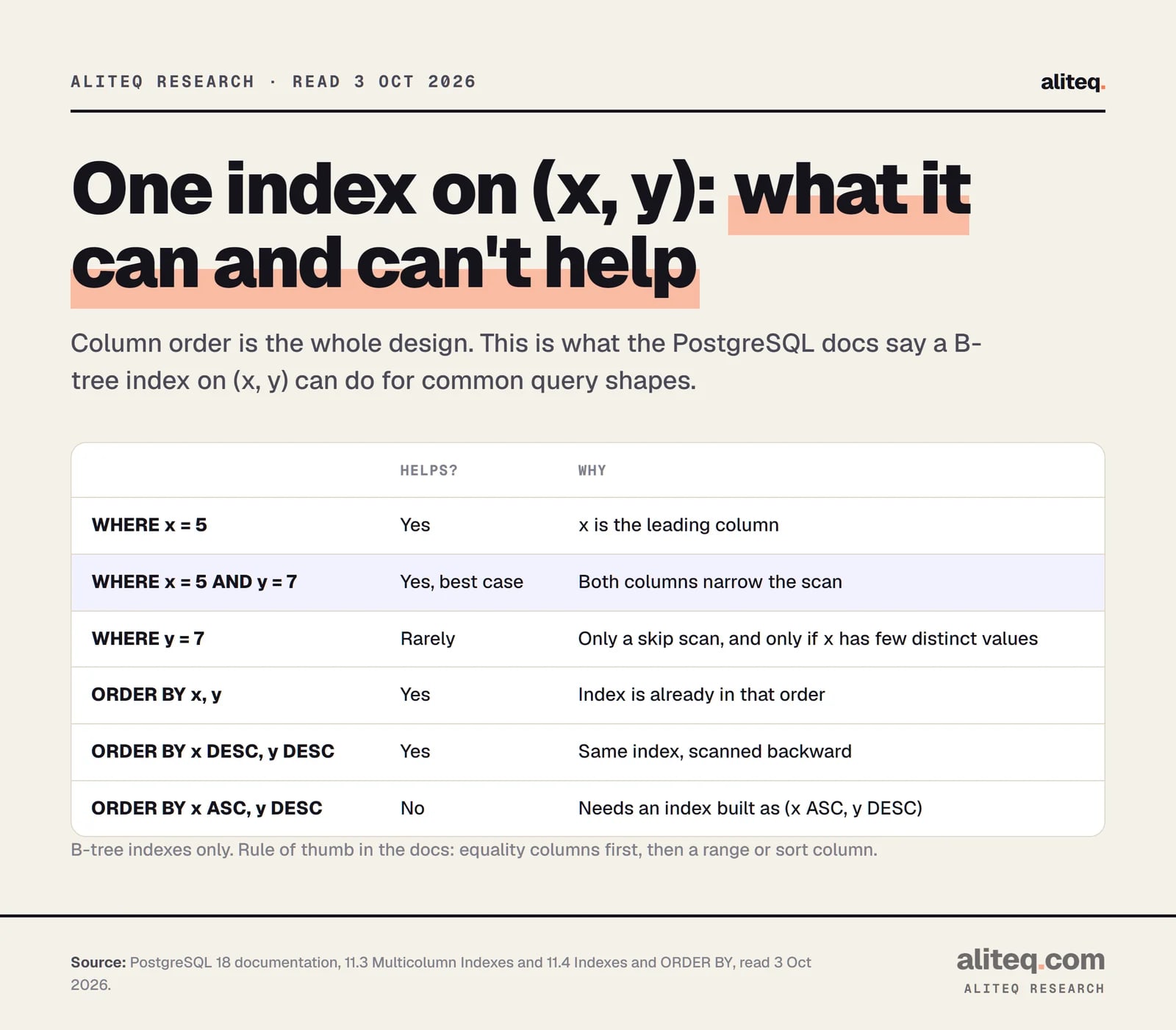
The docs say a multicolumn B-tree can be used with any subset of its columns, "but the index is most efficient when there are constraints on the leading (leftmost) columns." Equality on the leading columns, plus a range on the next one, limits the part of the index that gets scanned.
PostgreSQL 18 docs, 11.3 and 11.4, read 3 Oct 2026. · aliteq research
What about a query on y alone? PostgreSQL 18's docs describe a "skip scan" that can sometimes use the index, "generally only" when there are "so few distinct x values" that the planner can skip most of it. They also say that with many distinct values "the entire index will have to be scanned, so in most cases the planner will prefer a sequential table scan." Do not design around it.
Sorting adds one more rule. An index on (x, y) serves ORDER BY x, y going forward, and ORDER BY x DESC, y DESC going backward. A mixed order such as x ASC, y DESC needs an index built as (x ASC, y DESC).
Keep composite indexes small. The docs say: "Multicolumn indexes should be used sparingly. In most situations, an index on a single column is sufficient and saves space and time. Indexes with more than three columns are unlikely to be helpful unless the usage of the table is extremely stylized."
Our table has a good example. One of its indexes is (provider, provider_gpu_name, price_type, captured_at DESC). That order matches the query behind our "latest price" view, which picks the newest row for each provider, GPU name and price type. Equality-style columns first, the time column last.
How do I read EXPLAIN?
EXPLAIN shows the plan the database chose, one node per line. Look for a Seq Scan on a big table, which means it read every row. Compare the estimated row count with reality using EXPLAIN ANALYZE. If estimates are far off, the planner is guessing, and ANALYZE (the statistics command) is the first fix.
Start with plain EXPLAIN. It plans the query and does not run it. The docs' example reads a 10,000-row table with no filter and gets Seq Scan on tenk1 (cost=0.00..445.00 rows=10000 width=244). Fetching one row by an indexed value on the same table gets Index Scan using tenk1_unique1 on tenk1 (cost=0.29..8.30 rows=1 width=244).
Those costs are not milliseconds. The docs call them "arbitrary units determined by the planner's cost parameters." They are two different queries, so do not read it as a speed-up. It shows what the plan names mean:
Common EXPLAIN nodes (PostgreSQL docs, read 3 Oct 2026)
Seq Scan
What it means
Reads every row of the table. Fine for small tables or when you want most rows.
Index Scan
What it means
Walks the index, then fetches each row. Typical for one or a few rows, or when the index order matches ORDER BY.
Bitmap Index Scan + Bitmap Heap Scan
What it means
Collects row locations from the index, sorts them, then fetches the rows. Used for a medium-sized slice.
Sort
What it means
An explicit sort step. If an index matched your ORDER BY, you would not see this.
What it means
Seq Scan
Reads every row of the table. Fine for small tables or when you want most rows.
Index Scan
Walks the index, then fetches each row. Typical for one or a few rows, or when the index order matches ORDER BY.
Bitmap Index Scan + Bitmap Heap Scan
Collects row locations from the index, sorts them, then fetches the rows. Used for a medium-sized slice.
Sort
An explicit sort step. If an index matched your ORDER BY, you would not see this.
Now add ANALYZE. The docs say it "actually executes the query" and shows true row counts and times next to the estimates. Two warnings. First, an INSERT, UPDATE or DELETE really runs, so the docs suggest wrapping it: BEGIN; EXPLAIN ANALYZE ...; ROLLBACK;. Second, the docs say that "the thing that's usually most important to look for is whether the estimated row counts are reasonably close to reality."
Add BUFFERS to see how many blocks came from cache ("hit") versus being fetched ("read"). Here is the real plan from our price view, trimmed to the lines that matter:
Index Scan using gpu_prices_provider_time on gpu_prices
  (cost=0.42..2290.74 rows=334 width=90)
  (actual time=0.102..12.529 rows=18854 loops=1)
  Index Cond: (captured_at > (now() - '7 days'::interval))
Execution Time: 86.219 ms
Read that carefully, because it teaches something. The estimate was rows=334. The actual was rows=18854. That is a large gap, which is exactly what the docs tell you to watch. I did not dig into why the planner guessed that low, so I will not guess in print. The same plan also shows the planner picked gpu_prices_provider_time, not the four-column index whose column order matches this view. The filter is a time range with no provider in it, so the leading columns of the bigger index probably gave it nothing to grab. I cannot tell you from one plan that the bigger index is wasted. I can tell you that a plan is how you find out.
What is the 7-day window in our price view?
It is a second way to make a query cheap: read fewer rows. Our price table only grows, so the "latest prices" view only looks at the last seven days. In that plan above, it read 18,854 rows instead of the whole 215,045.
Our own notes carry a rule: never remove that seven-day filter, because the view's "newest row per group" logic would otherwise scan the whole history, and the table adds roughly 130 rows an hour for as long as we keep tracking prices. Indexes did not replace that filter. They work with it. Think of it as a two-part answer: narrow the rows, then make finding them cheap.
If you have an append-only table like a log, event stream or price history, that is worth a thought before you add your fifth index. Does the query need all of the history? If not, a time window might do more than any index.
What about partial, covering and other index types?
A partial index covers only some rows, and a covering index carries extra columns so the database can skip the table. Both are specialized. The docs are cautious about both. Reach for them after a plain index and EXPLAIN have told you what is left to fix.
Partial. Built with a WHERE clause, it can avoid indexing common values and shrink the index. The docs' example is unbilled orders, a small share of a big table that is queried a lot. The catch: a query can use it only if its own WHERE clause implies the index's predicate, and "parameterized query clauses do not work with a partial index." The docs also warn that "in most cases, the advantage of a partial index over a regular index will be minimal."
Covering.CREATE INDEX tab_x_y ON tab(x) INCLUDE (y); stores y in the index so a query for x and y can skip the table. The docs warn that these extra columns "duplicate data from the index's table and bloat the size of the index," and that there is "little point" unless the table changes slowly enough for index-only scans to work.
Other types. B-tree is the default. Hash handles only equality. GIN, GiST, SP-GiST and BRIN each suit particular data and operators, and the docs list them under index types. Supabase's query guide shows BRIN for a column that always increases, like created_at in a table that is rarely updated.
How do I add one safely?
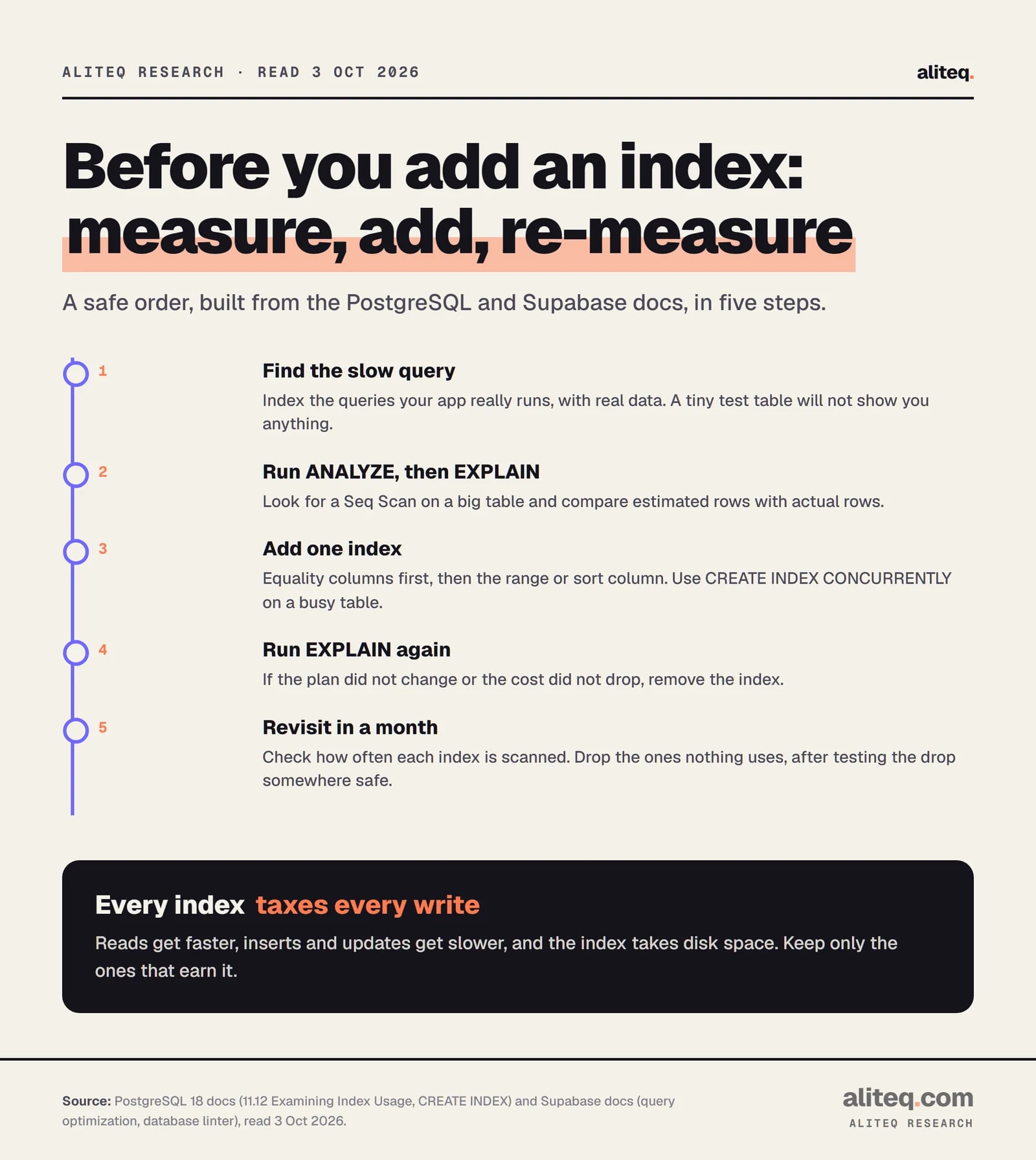
Measure first, add one index, measure again, and keep it only if the plan improved. On a live table, use CREATE INDEX CONCURRENTLY so writes are not blocked. Supabase's index advisor can suggest a starting point, but it only recommends single-column B-tree indexes.
Built from the PostgreSQL 18 and Supabase docs, read 3 Oct 2026. · aliteq research
A few details that save pain:
Use real data. The docs say that test data "will tell you what indexes you need for the test data, but that is all." Always run ANALYZE first so the planner has real statistics.
A normal build blocks writes. The docs say reads can continue, but "writes (INSERT, UPDATE, DELETE) are blocked until the index build is finished." CONCURRENTLY avoids that, takes "significantly longer," and cannot run inside a transaction block. If it fails, it can leave an invalid index that you drop and retry.
Supabase index advisor. Run create extension index_advisor;, then select * from index_advisor('select book.id from book where title = $1');. It returns costs before and after, and a CREATE INDEX statement. In Supabase's own example, total cost drops from 25.88 to 6.40. Its docs say it will "only recommend single column, B-tree indexes," so it will not design a composite one for you.
Remove what does not pay. Supabase's guide says: "If creating an index does not reduce the cost of the query plan, remove it."
If your app is vibe-coded, the same logic applies. Ask your builder which queries the app runs most, and check them with EXPLAIN. For where such an app runs and why it feels slow under load, see how to ship a vibe-coded app and what scaling means. Caching can also remove the query entirely; see what is caching.
Should you add this index? A quick test
Run through these before you add one. If the first three are not yes, wait.
Does the query run often, on a table large enough that a sequential scan is slow?
Does the filter, join or sort return a small slice of the table?
Did EXPLAIN show a Seq Scan, and did an index change the plan and the cost?
Is the table write-heavy? If yes, count the write cost and the size before you add the fifth one.
Does an existing index already cover this query by its leading columns? Check before you add a near-duplicate.
Quick answers
When should I add an index in Postgres?
Add one when a frequent query filters, joins or sorts a large table on specific columns and returns a small share of its rows. Confirm with EXPLAIN that the query does a sequential scan first, then check again after adding the index. Keep it only if the plan or cost improves.
Do indexes slow down writes?
Yes. The PostgreSQL docs say the system must keep each index synchronized with the table, which "adds overhead to data manipulation operations." Every insert, update and delete touches each index on the table. Supabase's guide says the same: indexes speed up reads and slow down writes.
Does the order of columns in a composite index matter?
Yes. A B-tree index is most efficient when the query constrains its leading, leftmost columns. Put columns you compare with equality first, then the range or sort column. An index on (x, y) does not reliably help a query that filters only on y.
What is the difference between EXPLAIN and EXPLAIN ANALYZE?
EXPLAIN shows the plan and estimated costs without running the query. EXPLAIN ANALYZE actually executes it and adds real times and row counts. Because it runs the statement, wrap INSERT, UPDATE or DELETE in BEGIN and ROLLBACK, as the PostgreSQL docs suggest.
Should I index every foreign key?
Often, yes. Supabase's database linter flags unindexed foreign keys because queries that join or filter on them are slower without an index. The linter is level INFO, so it is a prompt to check, not a rule. A rarely queried or tiny table may not need one.
How do I find indexes I should drop?
Check how often each index is scanned, using Postgres's index statistics, and look at the Supabase advisor's unused-index lint. Supabase advises considering future use and testing the removal in dev or staging first. Counters reset, so one low number is a reason to look, not to drop.