GROUP BY collapses your rows and you lose the detail. A window function keeps every row and adds the total, the rank or the previous value beside it. Eight runnable PostgreSQL examples, including the tie trap that makes running totals jump.
Glitch here. I usually read launch threads, not query planners, but window functions are the SQL feature that makes people say "wait, that was one line?" Instead of a self-join and a subquery, you add an OVER clause.
What is a window function?
A window function calculates across a set of rows related to the current row, then returns one value per row. The PostgreSQL docs say that, unlike an aggregate, "the rows retain their separate identities." You get the detail and the calculation side by side, in the same result.
Here is the table every example uses. It is eight orders from three customers. I built in two ties on purpose, because ties are where window functions surprise people. Ben has two orders on the same date. Cy has two orders of the same amount.
CREATE TABLE orders (id int PRIMARY KEY, customer text, order_date date, amount int);
INSERT INTO orders VALUES
(1,'ana','2026-01-05',40),(2,'ana','2026-01-20',25),(3,'ana','2026-02-02',60),
(4,'ben','2026-01-07',30),(5,'ben','2026-01-07',50),(6,'ben','2026-02-11',20),
(7,'cy','2026-01-15',100),(8,'cy','2026-03-01',100);
How is it different from GROUP BY?
GROUP BY turns many rows into one row per group, so the individual rows disappear. A window function keeps all the rows and adds a calculated column. Use GROUP BY when you want a summary table. Use a window function when you want the detail and the summary together.
Compare the two on the same data. First, GROUP BY:
SELECT customer, sum(amount) AS total
FROM orders GROUP BY customer ORDER BY customer;
 customer | total
----------+-------
 ana      |   125
 ben      |   100
 cy       |   200
Three rows out, from eight rows in. Now the window version:
SELECT id, customer, amount,
       sum(amount) OVER (PARTITION BY customer) AS customer_total
FROM orders ORDER BY id;
 id | customer | amount | customer_total
----+----------+--------+----------------
  1 | ana      |     40 |            125
  2 | ana      |     25 |            125
  3 | ana      |     60 |            125
  4 | ben      |     30 |            100
  5 | ben      |     50 |            100
  6 | ben      |     20 |            100
  7 | cy       |    100 |            200
  8 | cy       |    100 |            200
Eight rows in, eight out, and each one carries its customer's total. The word OVER is what turns sum from an aggregate into a window function. The docs say the OVER clause "is what syntactically distinguishes it from a normal function or non-window aggregate."
That layout makes percent-of-total easy, which is a common ask:
SELECT id, customer, amount,
       ROUND(100.0 * amount / sum(amount) OVER (PARTITION BY customer)) AS pct
FROM orders ORDER BY id;
 id | customer | amount | pct
----+----------+--------+-----
  1 | ana      |     40 |  32
  2 | ana      |     25 |  20
  3 | ana      |     60 |  48
  4 | ben      |     30 |  30
  5 | ben      |     50 |  50
  6 | ben      |     20 |  20
  7 | cy       |    100 |  50
  8 | cy       |    100 |  50
Ana's 40 is 32 percent of her 125. Each order is divided by its own customer's total, because that is the partition.
What do OVER, PARTITION BY and ORDER BY do?
OVER (...) defines the window. PARTITION BY splits the rows into groups that are processed separately. ORDER BY inside OVER sets the order of rows within each group. Leave out PARTITION BY and all rows form one group. The shape is: function, then OVER (PARTITION BY ... ORDER BY ... frame).
The docs spell it out: "The PARTITION BY clause within OVER divides the rows into groups, or partitions, that share the same values of the PARTITION BY expression(s). For each row, the window function is computed across the rows that fall into the same partition as the current row."
Two details worth knowing:
The ORDER BY inside OVER does not have to match the order of your final output. The docs say it "does not even have to match the order in which the rows are output."
Without a PARTITION BY, there is a single partition with every row in it. sum(amount) OVER () is a grand total on every row.
If you use several window functions with the same OVER definition, name it once with a WINDOW clause and reuse the name. The next section does that.
What is the difference between ROW_NUMBER, RANK and DENSE_RANK?
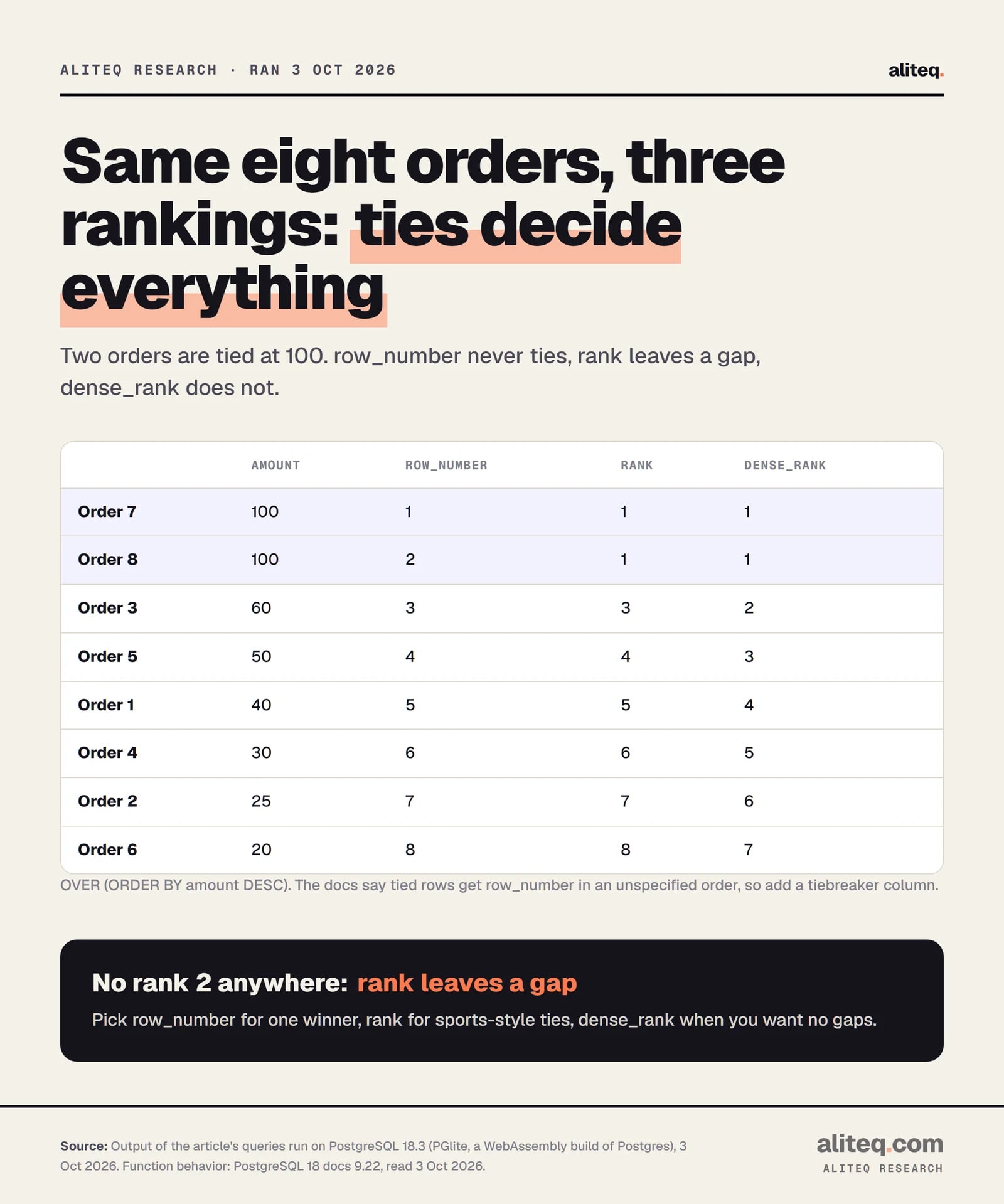
All three number rows in order. They differ only when rows tie. row_number gives every row a unique number, rank gives ties the same number then skips ahead, and dense_rank gives ties the same number without skipping. Rank by amount and the two 100s show the difference.
SELECT id, amount,
       row_number() OVER w AS row_number,
       rank()       OVER w AS rank,
       dense_rank() OVER w AS dense_rank
FROM orders
WINDOW w AS (ORDER BY amount DESC)
ORDER BY amount DESC, id;
Orders 7 and 8 tie. rank gives both a 1, then jumps to 3. The docs define it as "the row_number of the first row in its peer group." dense_rank gives both a 1, then goes to 2. Notice WINDOW w AS (...): one definition, three functions.
Output of the query above on PostgreSQL 18.3 (PGlite), Oct 3, 2026. Function definitions: PostgreSQL 18 docs, 9.22. · aliteq research
One warning from the tutorial. With row_number, "tied rows" are numbered "in an unspecified order." So if two rows tie and you need a stable answer, add a second sort column. I use id as the tiebreaker in the next example.
How do I get the top row per group?
Number the rows in each group, then keep number one. A window function cannot go in WHERE, so you wrap the query in a subquery. This is the standard answer to "latest order per customer" and "top three per category."
SELECT id, customer, order_date, amount
FROM (
  SELECT *,
         row_number() OVER (PARTITION BY customer
                            ORDER BY order_date DESC, id DESC) AS rn
  FROM orders
) AS t
WHERE rn = 1
ORDER BY customer;
 id | customer | order_date | amount
----+----------+------------+--------
  3 | ana      | 2026-02-02 |     60
  6 | ben      | 2026-02-11 |     20
  8 | cy       | 2026-03-01 |    100
Each customer's most recent order. Change rn = 1 to rn <= 2 for the last two. The PostgreSQL tutorial uses the same pattern, with WHERE pos < 3 to show "the first two rows for each department."
Why the subquery? Try putting the window function straight into WHERE:
SELECT id, customer, amount FROM orders
WHERE row_number() OVER (ORDER BY id) = 1;
ERROR: window functions are not allowed in WHERE
That is the exact error I got. The docs explain why: window functions "are permitted only in the SELECT list and the ORDER BY clause" because "they logically execute after the processing of those clauses." WHERE runs first, so the window value does not exist yet. The same goes for GROUP BY and HAVING.
One more consequence. Rows removed by WHERE are never seen by the window function. Filter to February onward, and the "running" total starts over from February.
How do I compare a row to the previous one with LAG and LEAD?
lag(value) returns the value from the previous row in the partition, and lead(value) returns the value from the next row. Both take an optional offset, which defaults to 1, and an optional default for when no such row exists. Without a default, you get NULL at the edges.
SELECT id, customer, order_date, amount,
       lag(amount) OVER (PARTITION BY customer ORDER BY order_date, id) AS prev_amount,
       amount - lag(amount) OVER (PARTITION BY customer ORDER BY order_date, id) AS change
FROM orders
ORDER BY customer, order_date, id;
The first order for each customer has no previous row, so prev_amount is NULL (blank above). The partition matters: lag never reaches across customers. Ben's first row does not borrow Ana's last one.
Notice the sort is order_date, id, not order_date alone. Ben's two orders share a date, and without the id tiebreaker the docs give no promise about which comes first. Always make ORDER BY unique when the answer depends on sequence.
Now lead and the default argument:
SELECT id, customer, amount,
       lead(order_date) OVER (PARTITION BY customer ORDER BY order_date, id) AS next_order,
       lag(amount, 1, 0) OVER (PARTITION BY customer ORDER BY order_date, id) AS prev_or_zero
FROM orders
ORDER BY customer, order_date, id;
lag(amount, 1, 0) means "one row back, and use 0 if there is none." The default must be a type compatible with the value. And note that PostgreSQL does not implement IGNORE NULLS: the docs say the behavior "is always the same as the standard's default, namely RESPECT NULLS."
How do I build a running total?
Add ORDER BY inside OVER to an aggregate such as sum. The sum then runs from the start of each partition to the current row. Order by a unique column set and it behaves exactly like a running total. The docs call this "a 'running sum' type of behavior."
SELECT id, customer, order_date, amount,
       sum(amount) OVER (PARTITION BY customer ORDER BY order_date, id) AS running_total
FROM orders
ORDER BY customer, order_date, id;
Each customer's final running total equals the GROUP BY total from earlier (125, 100, 200). That is a good sanity check to run on your own data.
Any ordinary aggregate works the same way: count, avg, min, max. The docs say "any built-in or user-defined ordinary aggregate" can be a window function when an OVER clause follows. An aggregate used this way can also take a FILTER (WHERE ...) clause before OVER. The docs say only window functions that are aggregates accept it, so rank does not.
What is a window frame, and why did my running total jump?
The frame is the set of rows, inside the partition, that the function actually reads for the current row. Its default, when you use ORDER BY, runs from the partition start through the current row and every row tied with it. Tied rows count as one step, so a running total can jump past them.
Run Ben's orders with the default frame, and then with an explicit ROWS frame:
SELECT id, order_date, amount,
       sum(amount) OVER (ORDER BY order_date)                       AS default_frame,
       sum(amount) OVER (ORDER BY order_date ROWS UNBOUNDED PRECEDING) AS rows_frame
FROM orders WHERE customer = 'ben'
ORDER BY order_date, id;
Look at order 4. The default frame says 80, but only 30 has happened so far on that row. Orders 4 and 5 share a date, so they are peers. The docs say the default frame includes "any following rows that are equal to the current row according to the ORDER BY clause." The ROWS frame counts them one at a time: 30, then 80.
Output of the query above on PostgreSQL 18.3 (PGlite), Oct 3, 2026. Default frame: PostgreSQL 18 docs, 4.2.8. · aliteq research
Two fixes. Add a unique tiebreaker to ORDER BY (the earlier running total used order_date, id and got 30, 80, 100). Or state the frame yourself with ROWS. Both are fine. Relying on the default with possible ties is the bug.
The tutorial describes the default more simply: "By default, if ORDER BY is supplied then the frame consists of all rows from the start of the partition up through the current row, plus any following rows that are equal to the current row." With no ORDER BY, the frame is the whole partition, which is why sum(amount) OVER () gives one grand total.
How do I write a moving average with ROWS BETWEEN?
State the frame with ROWS BETWEEN <start> AND <end>. ROWS counts physical rows, so 1 PRECEDING means the previous row. For a two-order moving average, use ROWS BETWEEN 1 PRECEDING AND CURRENT ROW. The frame shrinks at partition edges, so the first row averages only itself.
SELECT id, customer, order_date, amount,
       round(avg(amount) OVER (PARTITION BY customer ORDER BY order_date, id
                               ROWS BETWEEN 1 PRECEDING AND CURRENT ROW), 1) AS avg_last_2
FROM orders
ORDER BY customer, order_date, id;
Ana's second row averages 40 and 25 to get 32.5. Her first row has no previous row, so it is just 40. The docs put it this way: "the distance to the end of the frame is limited by the distance to the end of the partition, so that for rows near the partition ends the frame might contain fewer rows than elsewhere."
There are three frame modes, and the docs describe each:
Frame modes in PostgreSQL (docs, read Oct 3, 2026)
ROWS
How it counts
Offsets count rows. 1 PRECEDING is the previous row. CURRENT ROW is just this row.
RANGE
How it counts
Offsets are a value distance on the one ORDER BY column. For dates the offset is an interval, such as RANGE BETWEEN '1 day' PRECEDING AND '10 days' FOLLOWING. CURRENT ROW includes peers.
GROUPS
How it counts
Offsets count peer groups (rows that tie on ORDER BY). Needs an ORDER BY. Described from the docs; I did not run it.
How it counts
ROWS
Offsets count rows. 1 PRECEDING is the previous row. CURRENT ROW is just this row.
RANGE
Offsets are a value distance on the one ORDER BY column. For dates the offset is an interval, such as RANGE BETWEEN '1 day' PRECEDING AND '10 days' FOLLOWING. CURRENT ROW includes peers.
GROUPS
Offsets count peer groups (rows that tie on ORDER BY). Needs an ORDER BY. Described from the docs; I did not run it.
RANGE is the one that suits calendar windows. A "last 14 days" count looks like this:
SELECT id, order_date, amount,
       count(*) OVER (ORDER BY order_date
                      RANGE BETWEEN INTERVAL '14 days' PRECEDING AND CURRENT ROW) AS orders_last_14d
FROM orders ORDER BY order_date, id;
Read the 7 January rows: orders 1, 4 and 5 fall in the 14 days up to that date, so both get 3. Because RANGE includes peers, the two tied rows match.
The docs also list EXCLUDE CURRENT ROW, EXCLUDE GROUP, EXCLUDE TIES and EXCLUDE NO OTHERS as frame exclusions. I did not run those.
Why does LAST_VALUE give the wrong answer?
Because first_value, last_value and nth_value read the frame, not the whole partition, and the default frame stops at the current row (plus ties). So last_value returns the current row's own value. The docs warn this is "likely to give unhelpful results for last_value." Set the frame to the full partition.
SELECT id, customer, amount,
       last_value(amount) OVER (PARTITION BY customer ORDER BY order_date, id) AS last_default,
       last_value(amount) OVER (PARTITION BY customer ORDER BY order_date, id
                                ROWS BETWEEN UNBOUNDED PRECEDING AND UNBOUNDED FOLLOWING) AS last_full
FROM orders
ORDER BY customer, order_date, id;
last_default just echoes each row's own amount. last_full returns the actual last order's amount for each customer (60, 20, 100). The docs name the same fix for aggregates: "To obtain aggregation over the whole partition, omit ORDER BY or use ROWS BETWEEN UNBOUNDED PRECEDING AND UNBOUNDED FOLLOWING."
Can I rank the results of a GROUP BY?
Yes. Window functions run after GROUP BY and after the ordinary aggregates, so you can use an aggregate inside the window function's arguments or its ORDER BY. The reverse is not allowed. The docs say it "is valid to include an aggregate function call in the arguments of a window function, but not vice versa."
SELECT customer, sum(amount) AS total,
       rank() OVER (ORDER BY sum(amount) DESC) AS rank
FROM orders
GROUP BY customer
ORDER BY rank, customer;
 customer | total | rank
----------+-------+------
 cy       |   200 |    1
 ana      |   125 |    2
 ben      |   100 |    3
That is a leaderboard in one query: group first, then rank the groups.
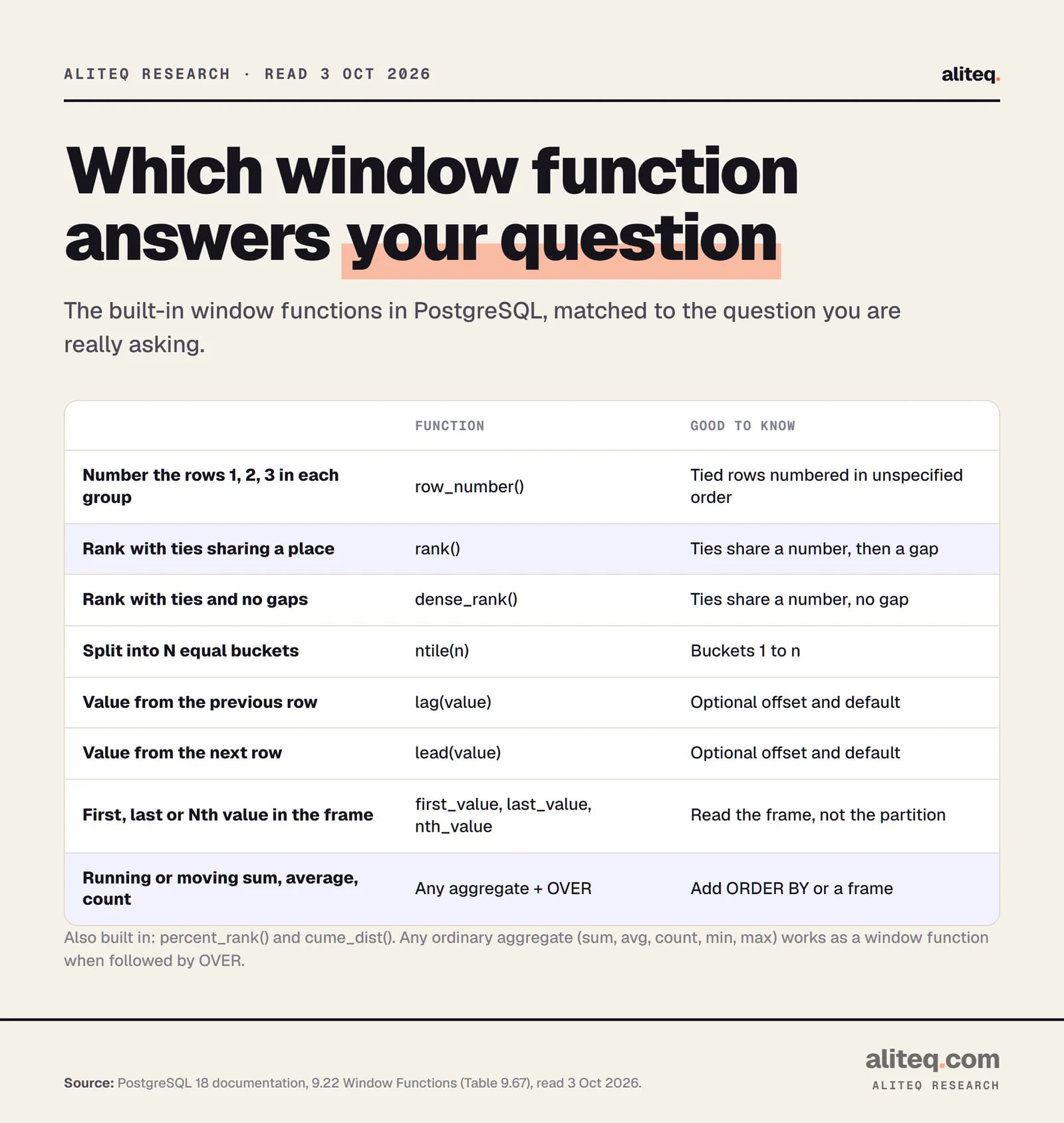
Built from PostgreSQL 18 docs, 9.22 (Table 9.67), read Oct 3, 2026. · aliteq research
The graphic above is the cheat sheet. Also built in are percent_rank, cume_dist and ntile for percentiles and buckets. I did not run those three, so check the docs for their exact output before you rely on them.
What are the common mistakes?
Most window-function bugs are one of five things: a missing tiebreaker, the default frame with ties, a window function in WHERE, a filter applied before the window instead of after, and last_value without a full frame. Each has a one-line fix. Check these first when the numbers look off.
Non-unique ORDER BY. Ties are numbered in an unspecified order. Add a unique column last, such as id.
Default frame with ties. A running total can jump. Add a tiebreaker, or write ROWS UNBOUNDED PRECEDING.
Window function in WHERE. It errors. Wrap the query in a subquery or a CTE, then filter the result.
Filtering too early. A WHERE clause removes rows before the window sees them. My February-only test restarted every running total from zero. If you need the full history in the total and only want some rows displayed, filter in the outer query.
last_value without a frame. It returns the current row. Use UNBOUNDED FOLLOWING.
A smaller trap: OVER wname is not the same as OVER (wname ...). The docs say the second form "implies copying and modifying the window definition, and will be rejected if the referenced window specification includes a frame clause."
If your app was built with a tool like Lovable and a page feels slow as data grows, the cause can be many small queries. For that symptom, see why a Lovable app gets slow as data grows. I measured no speed difference for window functions, so nothing here is a benchmark.
Quick answers
What is the difference between a window function and GROUP BY?
GROUP BY collapses rows into one row per group. A window function keeps every row and adds a calculated column. The PostgreSQL docs say that with window functions "the rows retain their separate identities." Use GROUP BY for a summary table, and a window function when you need the detail and the summary together.
Can I use a window function in WHERE?
No. PostgreSQL raises "window functions are not allowed in WHERE." They are only allowed in the SELECT list and ORDER BY, because they run after WHERE, GROUP BY and HAVING. Compute the window value in a subquery or CTE, then filter it in the outer query.
What is the difference between RANK and DENSE_RANK?
Both give tied rows the same number. rank then skips numbers, so two rows tied at 1 are followed by 3. dense_rank does not skip, so the next row is 2. row_number never repeats, and numbers tied rows in an unspecified order unless you add a tiebreaker.
Why is my running total wrong when two rows share a date?
The default frame includes every row that ties with the current row on the ORDER BY columns, so tied rows show the same total. Add a unique tiebreaker column to ORDER BY, or write ROWS UNBOUNDED PRECEDING to count one row at a time.
Does PARTITION BY change how many rows I get back?
No. It only decides which rows each calculation looks at. The result has the same number of rows as before, unless a WHERE, join or outer query changes it. Leave PARTITION BY out and all rows form one partition.
Does Postgres support IGNORE NULLS in LAG and LEAD?
No. The PostgreSQL docs say IGNORE NULLS is not implemented, and the behavior is always RESPECT NULLS. A NULL value in a row stays a NULL when lag or lead reads it. To skip NULLs you need a different query shape.