You can't change the email on a Higgsfield account, and credits, plans and generations never move to a new one. Here are Higgsfield's own steps for signing in, getting back in, deleting the account with its 30-day undo, and reaching Support, read on 26 October 2026.
This post contains affiliate links. If you buy through them, Aliteq may earn a commission — at no extra cost to you. Prices verified at publish time.
Share
Higgsfield accounts in four numbers
4
Ways to sign in
Google, Apple, Microsoft or email
6-digit
Code for email sign-ups
Sent at sign-up and for password resets
30 days
To undo a deletion
Restore by signing back in
0
Ways to change the email
Make a new account instead
Can I change the email on my Higgsfield account?
No. Higgsfield doesn't let anyone change the email on an existing account, including its own Support team. Its account recovery article says: "The email address is permanently linked to your account at registration and can't be changed."
The sign-in article gives the only route: "If you'd like to use a different email, create a new account." Each Higgsfield account also needs its own email, so you can't attach one address to two accounts.
The catch is what stays behind. Higgsfield says "credits, subscriptions, and generations can't be transferred between accounts", and asked whether a subscription can move to a new email, the answer is a flat "No."
This is the most common account complaint we found. On Trustpilot, where Higgsfield had 5,176 reviews and a TrustScore of 4.0 on 26 October 2026, a one-star review from 25 October describes exactly this. The reviewer signed up with Sign in with Apple, which handed Higgsfield a private relay address, later asked Support about "updating my account to my actual personal email address", and was told to make a new account and delete the old one. That is one user's account, not audited data, but it matches the help center word for word.
What can I do instead?
You have two real options, and one of them keeps everything you paid for.
You signed in with Apple and Higgsfield has a private relay address
What to do
Keep the account. Change where the relay forwards on Apple's side (needs iCloud+)
What you keep
Everything: account, plan, credits, files
You only want Higgsfield's emails in another inbox
What to do
Set up forwarding in your current mailbox
What you keep
Everything
You must log in with a different email
What to do
Open a new Higgsfield account, then delete or cancel the old one
What you keep
Nothing moves; download files first
The old email is gone and you can't log in
What to do
Contact Support; see the locked-out section below
What you keep
Depends on Support's identity check
What to do
What you keep
You signed in with Apple and Higgsfield has a private relay address
Keep the account. Change where the relay forwards on Apple's side (needs iCloud+)
Everything: account, plan, credits, files
You only want Higgsfield's emails in another inbox
Set up forwarding in your current mailbox
Everything
You must log in with a different email
Open a new Higgsfield account, then delete or cancel the old one
Nothing moves; download files first
The old email is gone and you can't log in
Contact Support; see the locked-out section below
Depends on Support's identity check
The Apple route is worth knowing. Apple's Hide My Email help page says relay addresses end in @privaterelay.appleid.com and forward to the email on your Apple Account, and that with iCloud+ you can change the address they forward to. That changes where Higgsfield's mail lands. It doesn't change the address Higgsfield has on file, and you still log in with Apple.
If you do start a new account, cancel the old plan first so it doesn't renew, and save your generations from Assets before deleting anything. Our Higgsfield cancel and refund guide has the cancel steps and the refund rules.
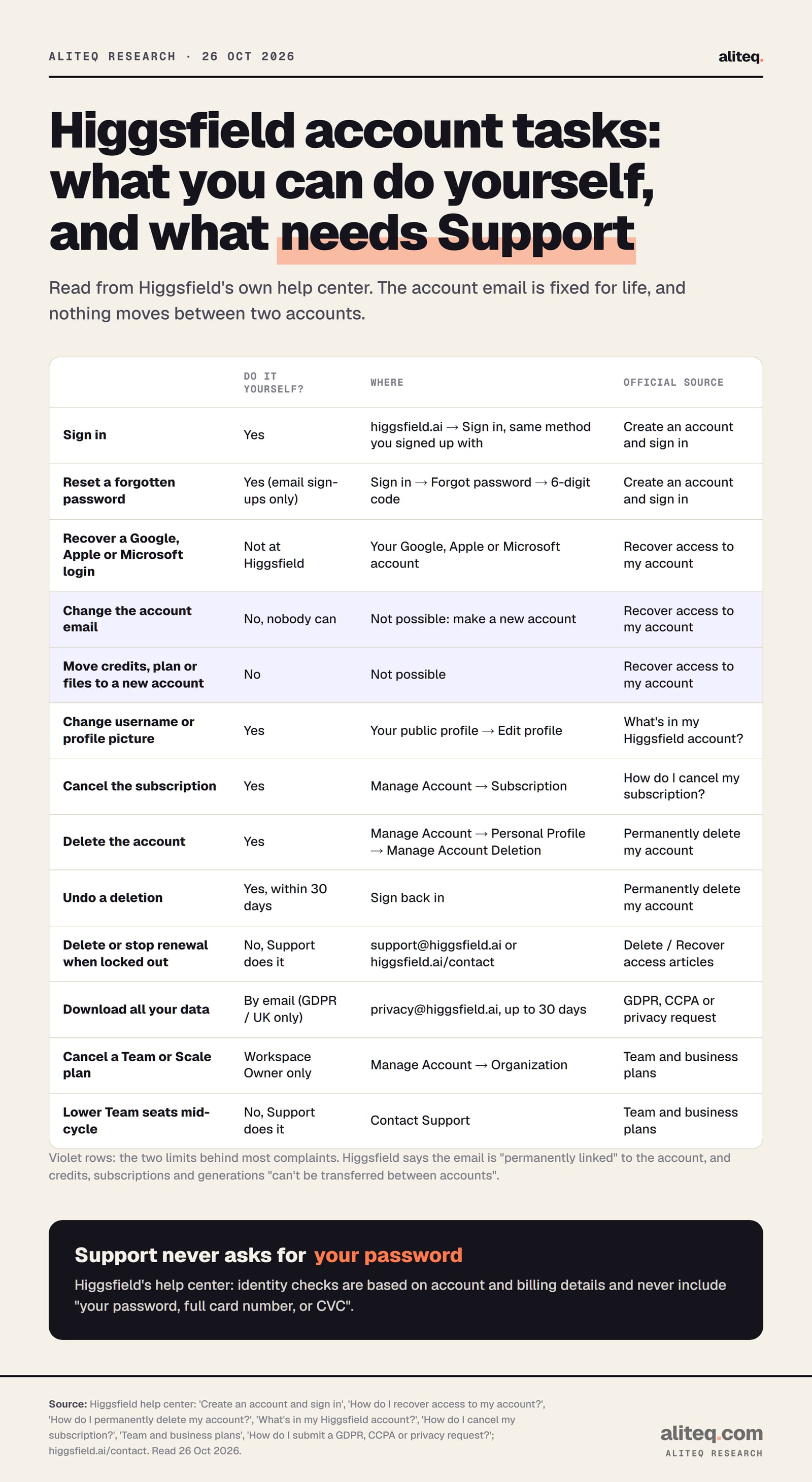
Every Higgsfield account task we could find, what you can do yourself and where. Built from seven Higgsfield help-center articles and the contact page, read 26 October 2026. · aliteq research
How do I log in to Higgsfield?
Sign in at higgsfield.ai with the same method you used to create the account. Higgsfield supports four: Google, Apple, Microsoft, or email with a password. The help center's first rule for any login trouble is "Make sure you're using the same method you used when you created your account."
That rule explains most "my account is empty" moments. If you signed up with Google and later type the same Gmail address into the email form, you aren't using the same method. Higgsfield doesn't document what happens in that case, so go back to the button you used the first time.
Higgsfield's login fixes, in the order we'd try them:
Use the same button you signed up with: Google, Apple, Microsoft, or email and password. Higgsfield gives no separate password to Google or Apple sign-ups.
Forgot an email password? Sign in, then Forgot password. Enter your email, type the 6-digit code from your inbox, and set a new password.
No code arriving? Check spam, confirm the address is spelled right, and request a new code. Codes only go to email sign-ups.
Google, Apple or Microsoft account broken? Recover it with that company first. Higgsfield says it "can't reset those credentials".
Removed Higgsfield's access in your Google, Apple or Microsoft settings? You may need to re-authorize the connection before you can sign in.
Page won't load at all? That's a site problem, not a login one. Try a hard refresh, a private window, and no ad blocker or VPN.
One line from the sign-in article is worth repeating: "never share your verification code with anyone." Higgsfield's Terms of Use (section 2) also say you "may not share your Account or login credentials with anyone". Nobody legitimate needs your code or your password to help you, and that includes us.
I can't get into my Higgsfield account. What now?
It depends on how you signed up. Google, Apple and Microsoft logins are recovered at that company, because Higgsfield "doesn't have access to these credentials". Email logins are recovered with Forgot password. If the email inbox itself is gone, only Higgsfield Support can help.
Most Higgsfield login problems come down to one thing, the sign-in method. Illustration made with Higgsfield on 26 October 2026; the person is fictional. · Generated with Higgsfield (GPT Image 2)
You lost the Google account you signed up with. "Higgsfield can't recover social login accounts: recover your Google account first, then return to sign in." The same goes for Apple and Microsoft.
The Forgot password email never arrives. Check spam, then contact Support with your account email address.
You no longer have the email inbox. Higgsfield's answer is to contact Support. It doesn't publish what Support will accept as proof in that case.
You think someone else got in. Change your password through Forgot password, then contact Support, who will "help you log out of all active sessions". Higgsfield doesn't document a sign-out-everywhere button you can press yourself.
You're locked out and a renewal is coming. Support "can cancel an upcoming renewal to prevent further charges while you work on recovering access."
When you contact Support about access, Higgsfield says you'll be asked to verify the account is yours, based on account and billing details, and that it "never includes your password, full card number, or CVC." If someone asks for those, it isn't Higgsfield. Higgsfield's help center doesn't mention two-factor authentication for email-and-password logins.
How do I delete my Higgsfield account?
Delete it yourself from Manage Account, Personal Profile, Manage Account Deletion. Higgsfield's deletion article says deleting "cancels your subscription automatically and removes all generations, trained characters, and projects", and gives you 30 days to restore the account by signing back in.
Deleting a Higgsfield account, step by step
Save your files first
Download what you want to keep from Assets. Nothing can be recovered after the window closes
Avatar, then Manage Account
Open Personal Profile and scroll to Manage Account Deletion at the bottom
Confirm the checklist
Generations, Assets and Community content, discounts and plan, settings and presets, remaining credits
Select Delete Account
The plan cancels and future payments stop at once
30-day recovery window
Sign back in to restore the account with content and credits intact
Deletion becomes permanent
Content and personal data leave Higgsfield's active systems
Save your files first
Download what you want to keep from Assets. Nothing can be recovered after the window closes
Avatar, then Manage Account
Open Personal Profile and scroll to Manage Account Deletion at the bottom
Confirm the checklist
Generations, Assets and Community content, discounts and plan, settings and presets, remaining credits
Select Delete Account
The plan cancels and future payments stop at once
30-day recovery window
Sign back in to restore the account with content and credits intact
Deletion becomes permanent
Content and personal data leave Higgsfield's active systems
The path from Higgsfield's help center, read 26 October 2026. You don't need to cancel the subscription first; deletion does it.
You don't need to cancel first. Higgsfield: "When you delete your account, your subscription is canceled automatically and all future payments stop immediately."
What happens to my credits, subscription and generations?
They go with the account. This is Higgsfield's own table, condensed:
Account and login access
What Higgsfield says happens
Deleted immediately
All generations (Assets and Community content)
What Higgsfield says happens
Permanently deleted
Trained Soul characters, saved settings, presets
What Higgsfield says happens
Permanently deleted
Remaining credits, discounts, subscription
What Higgsfield says happens
Lost
Billing information
What Higgsfield says happens
Held and removed by Stripe under its own privacy policy
Personal data
What Higgsfield says happens
Deleted from active systems after the 30-day window
What Higgsfield says happens
Account and login access
Deleted immediately
All generations (Assets and Community content)
Permanently deleted
Trained Soul characters, saved settings, presets
Permanently deleted
Remaining credits, discounts, subscription
Lost
Billing information
Held and removed by Stripe under its own privacy policy
Personal data
Deleted from active systems after the 30-day window
On credits, Higgsfield is blunt: "credits can't be transferred, refunded, or restored after deletion." If you restore the account inside 30 days, the balance comes back with it.
Two things the table doesn't tell you. First, deleting is not a refund request. If you might be owed money, sort that out before you delete; our cancel and refund guide covers who qualifies. Second, deletion doesn't undo training. Higgsfield keeps data it must keep by law and anonymized data, and content "already used to train AI models before deletion" can't be separated from those models. Deleted content isn't used for training from then on.
Should I cancel or delete?
If you just want the charges to stop, cancel. Higgsfield says cancelling "doesn't delete your account or your generations", and the account drops to the free tier when the paid period ends. Delete only when you want your files, characters and personal data gone. Long-idle accounts aren't wiped either: Higgsfield says older content "may be moved to cold storage" under its terms, "but it isn't deleted."
What if I can't log in to delete it?
Email support@higgsfield.ai "from any address you have." Higgsfield says that after it verifies your identity, the team "can process the deletion manually."
Can I switch between Higgsfield accounts or team workspaces?
Higgsfield doesn't document an account switcher. One email is one account, so using two accounts means signing out and signing in with the other login method or email. For teams, the workspace lives inside your account: Team, Scale and Enterprise plans are run from Manage Account by the workspace's Owner and admins.
Who controls it. From Manage Account, owners and admins invite members, assign roles, view usage by member and manage Auto-Refill. On Scale and Enterprise they can pause a member's credit spending.
Privacy inside a team. Other members can't see your assets, but owners and admins can. Higgsfield warns that "workspace content isn't private from admins."
Leaving a team. Shared Assets stay in the workspace. The person who made them loses access to that project, and gets it back if they rejoin.
Cancelling a team plan. Only the Owner can. The path is Manage Account, Organization, Manage Account, Cancel Subscription, then a cancellation request form.
Fewer seats. You can't lower seats mid-cycle yourself; Support changes the subscription so the next renewal starts with fewer.
Higgsfield doesn't document how to move between a personal space and a team workspace on one login, how to transfer team ownership, or what happens to a workspace if its Owner deletes their account. If you need any of those, ask Support before you act.
How do I contact Higgsfield Support?
Use the email for anything about your own account. Higgsfield's contact page splits it in two: Discord for "product and technical questions", and support@higgsfield.ai for "billing, refunds, and anything that needs a look at your account." The contact page lists no phone number.
Login, locked account, deletion, renewal you can't stop
Where to send it
support@higgsfield.ai
A bug, with screenshots and steps to reproduce
Where to send it
The contact page, or Discord for quick help
Feature requests
Where to send it
Discord, #suggestions channel
Data export or CCPA request
Where to send it
privacy@higgsfield.ai (export: GDPR and UK users; up to 30 days, CCPA up to 45)
Security vulnerability
Where to send it
support@higgsfield.ai, privately
Where to send it
Login, locked account, deletion, renewal you can't stop
support@higgsfield.ai
A bug, with screenshots and steps to reproduce
The contact page, or Discord for quick help
Feature requests
Discord, #suggestions channel
Data export or CCPA request
privacy@higgsfield.ai (export: GDPR and UK users; up to 30 days, CCPA up to 45)
Security vulnerability
support@higgsfield.ai, privately
The bug-report article adds a useful rule: for "credit loss or account-specific problems", use the support email rather than Discord, "so the team can check your account details securely." Write from the email on the account if you still can, include that address, and never paste a password or verification code into a message or a public channel. If your problem is a failed generation rather than the account, our Higgsfield error messages guide decodes each message, and our is Higgsfield legit page covers billing complaints and how Support has handled them.
What we couldn't verify
Whether Support will ever change an email by hand. Every help article says no, and the Trustpilot review says Support refused. We found no exception.
What proof Support accepts when you've lost the email inbox. Higgsfield only says the team "will tell you exactly what to confirm".
Two-factor authentication. No help article mentions it for email-and-password logins.
Switching between a personal account and a team workspace. Not documented; we didn't have a team account to look.
How fast Support answers. Higgsfield publishes no response time for support@, only the 30-day and 45-day limits for privacy requests.
What the screens look like. We didn't log in and click through deletion; the menu names above are Higgsfield's own wording.
Our verdict
Treat the email you sign up with as permanent, because on Higgsfield it is. If you already have the wrong address and you paid for a plan, don't delete anything yet: an Apple relay can be re-pointed on Apple's side, and an inbox can forward. Only open a second account if you truly must log in with a different email, and then download your files and stop the old plan's renewal first.
If you're done with Higgsfield, cancelling is enough to stop charges and keeps your files. Delete when you want the data gone, knowing the credits go with it and you have 30 days to change your mind. And if anything asks for your password or a 6-digit code "to help", stop: Higgsfield says its Support never asks for your password, and to never share a verification code with anyone.
New to Higgsfield? Sign up at higgsfield.ai itself, with the email you plan to keep.
Quick answers
Can I change my Higgsfield email address?
No. Higgsfield says the email is permanently linked to the account at registration and can't be changed. To use another email you have to create a new account.
Can I move my credits or subscription to a new Higgsfield account?
No. Higgsfield's help center says subscriptions, credits and account data can't be transferred between accounts.
How do I delete my Higgsfield account?
Click your avatar, open Manage Account, then Personal Profile, and use Manage Account Deletion at the bottom. Confirm the checklist and select Delete Account. You have 30 days to restore it by signing back in.
Does deleting my Higgsfield account cancel my subscription?
Yes. Higgsfield says deleting cancels the subscription automatically and future payments stop at once. Remaining credits are lost and aren't refunded.
I signed up with Google and lost that account. Can Higgsfield get me back in?
No. Higgsfield can't recover Google, Apple or Microsoft logins. Recover the account with that provider first, then sign in to Higgsfield the same way.
How do I contact Higgsfield about my account?
Email support@higgsfield.ai. Higgsfield's contact page sends billing, refunds and anything that needs a look at your account there, and product questions to Discord.