Syntax here. An AI wrote your script, it works, and then it sits on read_csv for ten seconds. The pandas docs name five levers. I timed each on a 3-million-row file, and the one everyone reaches for first barely moved the clock.
An AI tool wrote you a pandas script. It works on the sample file. Then you point it at the real export and it sits there. Nine times out of ten the slow line is the first one, pd.read_csv("orders.csv"). This page covers why, which fixes the pandas docs recommend, and what each one did on a file I timed.
Why is pandas read_csv slow on a big file?
By default, read_csv reads every column, works out each column's type by looking at the text, and builds the whole table in memory. A CSV is plain text, so every number has to be parsed from characters. The docs say multithreading is only supported by the pyarrow engine, so the default parser uses one core.
So there are three costs: parsing text, holding unused columns, and keeping the whole frame in RAM. Each lever below attacks one of them. If you have never opened AI-written code and want to know what a line like this does, start with how to read AI code without coding.
What did I measure, and how?
I made a fake orders file: 3,000,000 rows, 10 columns (ids, a region and status, an amount, a timestamp, a note, a SKU, a discount). It is 256.7 MB as CSV and 71.2 MB as Parquet. Each case ran five times in one process after the file was written, so the operating system had the file cached. I report the median.
I did not measure peak memory, cold-cache reads, other operating systems, or the time to write the Parquet file.
aliteq benchmark, Oct 3, 2026. One laptop, synthetic file, median of 5 runs. · aliteq research
Does usecols make read_csv faster?
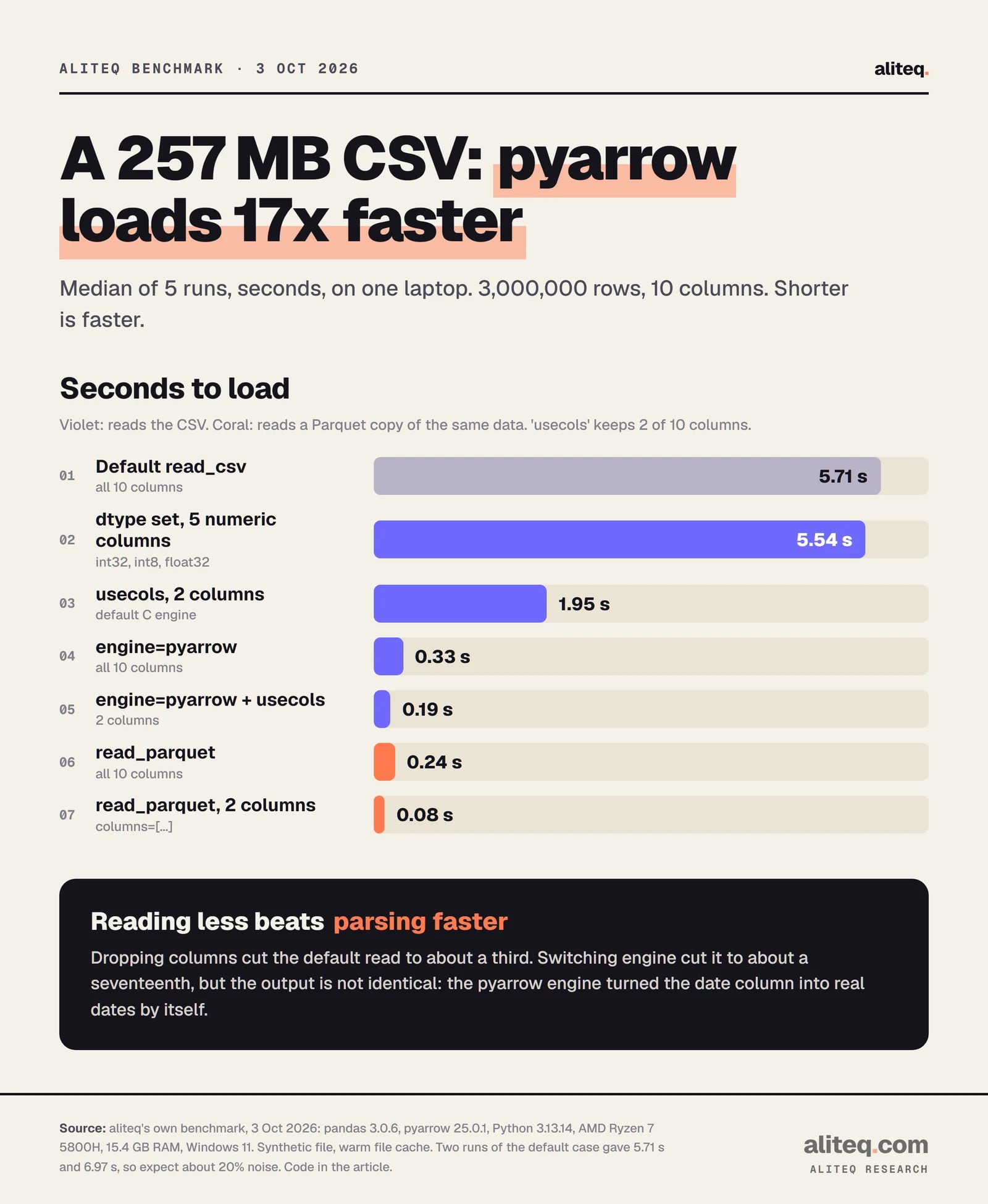
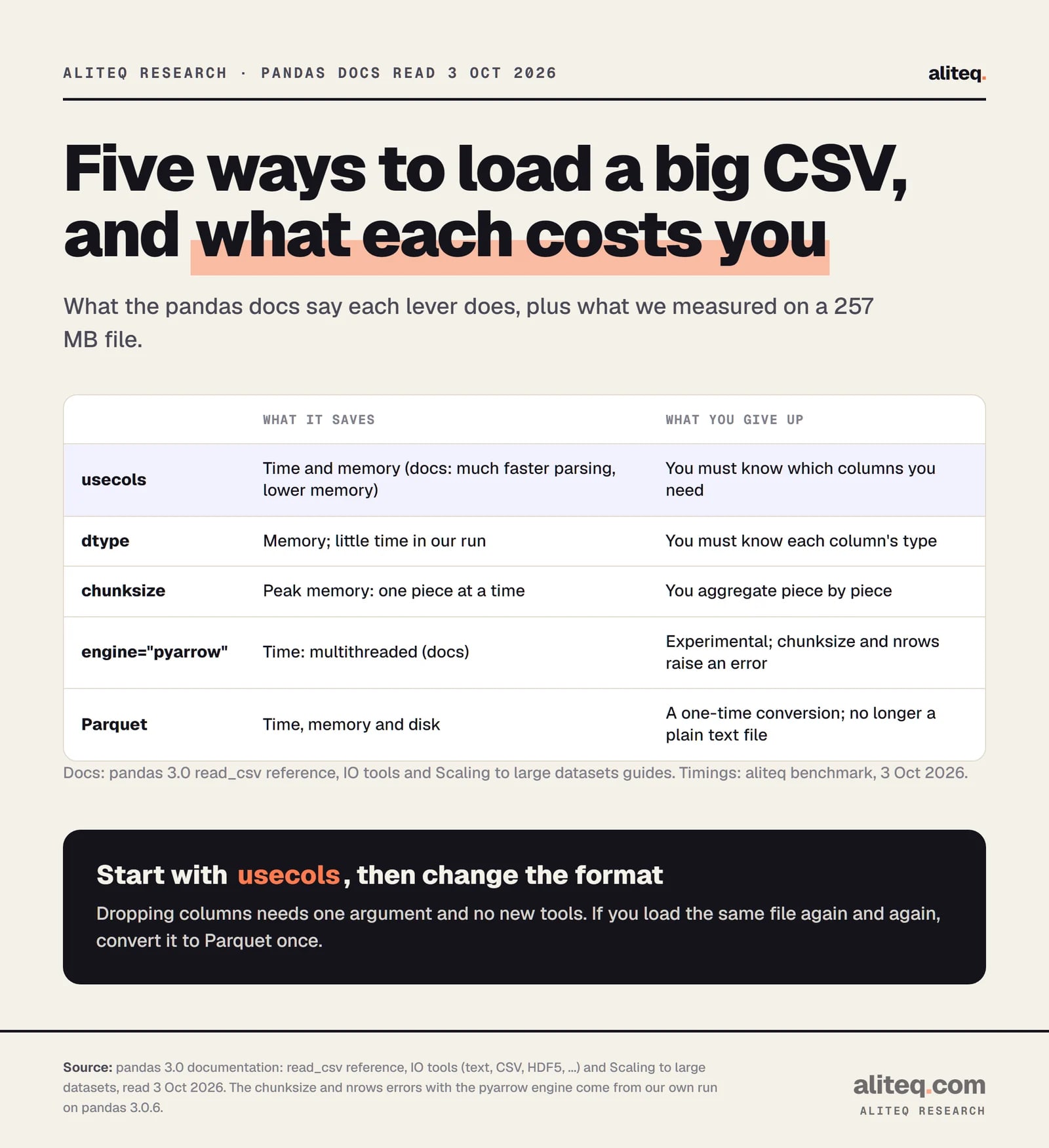
Yes. usecols tells pandas which columns to keep, so it skips the rest. The docs say: "Using this parameter results in much faster parsing time and lower memory usage." Keeping 2 of 10 columns took the load from 5.71 s to 1.95 s here, about 3x, and the frame from 394 MB to 63 MB.
Two details from the docs. Column order is ignored, so usecols=["a", "b"] and ["b", "a"] give the same frame. And usecols can take a function, which helps when you want every column whose name starts with a prefix. This is the cheapest fix because it needs no new tools. Ask your AI assistant which columns the script really uses.
Should I set dtype to speed it up?
Set dtype to save memory, not time. In my run, giving five numeric columns smaller types changed the load from 5.71 s to 5.54 s, within noise. The frame shrank from 394 MB to 325 MB. Adding category for two text columns reached 249 MB.
The Scaling guide explains why: "The default pandas data types are not the most memory efficient. This is especially true for text data columns with relatively few unique values." A category stores each distinct value once. The docs let you ask for it while reading: dtype={"region": "category"}.
DataFrame.memory_usage(deep=True), aliteq benchmark, Oct 3, 2026. · aliteq research
One more reason to set dtype: the docs say low_memory (on by default) processes the file in chunks, "but possibly mixed type inference." To avoid mixed types you set low_memory=False or "specify the type with the dtype parameter." Pinning types also stops a column changing type between files.
What does chunksize do?
chunksize reads the file a piece at a time, so you never hold all of it. It does not make the total faster. In my test, summing one column over 500,000-row chunks with usecols took 2.01 s, the same as a plain usecols read. What it buys is a small peak memory, which I did not measure.
total = 0.0
for chunk in pd.read_csv("orders.csv", usecols=["region", "amount"], chunksize=500_000):
    total += chunk["amount"].sum()
The docs say passing chunksize "will cause the function to return a TextFileReader object for iteration." The Scaling guide adds that chunking works well when the work needs "zero or minimal coordination between chunks": totals, filters, and converting a big CSV to Parquet piece by piece. A median or a join across the whole file is harder.
Is engine="pyarrow" faster?
On this file, a lot: 0.33 s against 5.71 s, about 17x. The docs say the pyarrow engine is "fastest on larger workloads" and the only one with multithreading. They also call it experimental and "much less robust than the C engine." Read that as a trade-off, not a free upgrade.
df = pd.read_csv("orders.csv", engine="pyarrow")
What I ran into: chunksize and nrows both raise ValueError: The 'chunksize' option is not supported with the 'pyarrow' engine. The output also differed. The pyarrow engine turned my timestamp column into real dates by itself, which the default engine left as text, so the two loads were not doing identical work. The IO guide lists the options the engines do not support, so read that list before switching. Try it, compare df.dtypes and df.head() with the default result, and keep it if they match.
Is Parquet worth converting to?
If you read the same data more than once, yes. Parquet is a binary column format. Loading the whole file took 0.24 s and two columns took 0.08 s, and the file was 71.2 MB against 256.7 MB for the CSV. The Scaling guide shows columns= on read_parquet for the same reason as usecols.
df.to_parquet("orders.parquet")           # once
df = pd.read_parquet("orders.parquet", columns=["region", "amount"])
The catch is the one-time conversion, which I did not time, and that people can no longer open the file in a text editor. If a CSV arrives from someone else every day, you pay parsing every day, so combine chunksize with Parquet: read each CSV once, write Parquet, query that.
pandas 3.0 docs, read Oct 3, 2026, plus aliteq benchmark. · aliteq research
Which fix should I try first?
Go in order of effort. Each step is small, and you stop when the script is fast enough. Check the output after each change, because types and dates can shift.
Add usecols. It is one argument and the docs promise faster parsing and less memory.
Add dtype for numbers and category for text columns with few distinct values. Expect a memory win, not a speed win.
Compare dtypes and a few rows with the default result. Skip it if you need chunksize or nrows.
Do it once, then use read_parquet with columns. If the file is bigger than memory, convert it chunk by chunk.
Quick answers
Why is pandas read_csv so slow?
By default it reads every column, infers each type from text and builds the whole table in memory. The docs say multithreading is only supported by the pyarrow engine, so the default parser uses one core.
What is the fastest way to read a CSV in pandas?
On our 257 MB test file, engine="pyarrow" with usecols was fastest for a CSV at 0.19 s. Reading a Parquet copy with two columns took 0.08 s. Both depend on your file and machine.
Does dtype make read_csv faster?
Not much in our run: 5.71 s default against 5.54 s with numeric dtypes. It cut memory from 394 MB to 325 MB, and to 249 MB with category columns.
Can I use chunksize with engine="pyarrow"?
No. In pandas 3.0.6, chunksize and nrows raise a ValueError with the pyarrow engine. Use the default C engine for chunked reads.
Should I use Polars or DuckDB instead?
I did not test them, so I make no claim. The pandas docs cover pandas only, and these five levers work without leaving it.
Will my numbers match yours?
No. These are medians of five runs on one Windows laptop with a synthetic file and a warm file cache. Two runs of the default case differed by about 20%.