Your clip has said Queued for ten minutes, or it failed and your credits look gone. Here's what each status means, why some jobs wait longer than others, when you get credits back, and the fix order Higgsfield's own help center gives.
This post contains affiliate links. If you buy through them, Aliteq may earn a commission — at no extra cost to you. Prices change; check the seller’s own page for today’s price.
Share
Why is Higgsfield stuck or slow? Usually the queue, not a fault. Credit generations run in Higgsfield's priority queue; Unlimited and free generations share a slower pool, and users report waits of around 20 minutes per clip there at busy times. A job stuck at Processing for much longer, credits that didn't arrive, or a filter block are different problems with different fixes, all below. Checked on Higgsfield's help center, terms and status page on November 3, 2026.
You hit Generate, and the tile just sits there. Five minutes. Ten. Is Higgsfield down, is it your browser, or did you just burn 22 credits on nothing?
We read every troubleshooting article in Higgsfield's help center on October 4, 2026, plus its pricing page, contact page and status page, and re-checked the key pages and its Terms of Use on November 3, 2026. We didn't time any generations ourselves, so wait times below are what users report, attributed. Where Higgsfield doesn't publish something, we say so.
Which kind of "slow" do you have?
Four different problems look the same from your side: a tile that doesn't finish. Find yours first, because the fixes are different.
Find your problem, then the fix (from Higgsfield's help center, Nov 3, 2026)
Slow on an Unlimited or free model
What you see
Long waits, worse at busy hours
What it is
The shared Unlimited queue, by design
What to do
Switch Unlimited off (Credit Mode) for priority speed, or wait
Stuck at Queued
What you see
The tile never starts
What it is
Your parallel slots are full
What to do
Cancel the Queued job; credits come back instantly
Stuck at Processing for a long time
What you see
Started, then nothing
What it is
A fault on the job
What to do
Wait; failed jobs refund automatically. Then contact support
Failed with a filter message
What you see
"IP detected" or flagged as NSFW
What it is
The copyright or content filter fired
What to do
Reword or swap the reference; the credits are refunded
Credits didn't arrive after paying
What you see
Balance unchanged after a top-up
What it is
A billing problem, not the queue
What to do
Check Manage Account, then Usage; then email support
What you see
What it is
What to do
Slow on an Unlimited or free model
Long waits, worse at busy hours
The shared Unlimited queue, by design
Switch Unlimited off (Credit Mode) for priority speed, or wait
Stuck at Queued
The tile never starts
Your parallel slots are full
Cancel the Queued job; credits come back instantly
Stuck at Processing for a long time
Started, then nothing
A fault on the job
Wait; failed jobs refund automatically. Then contact support
Failed with a filter message
"IP detected" or flagged as NSFW
The copyright or content filter fired
Reword or swap the reference; the credits are refunded
Credits didn't arrive after paying
Balance unchanged after a top-up
A billing problem, not the queue
Check Manage Account, then Usage; then email support
How long do people actually wait on Unlimited?
Longer than on credits, and Higgsfield says so in its Terms of Use: unlimited models "operate on a dedicated processing queue, separate from the priority queue used for credit-based generations", and "Processing speed and parallel generation capacity are not guaranteed." Users put numbers on it. One wrote "you've also got to wait 20 minutes between each image / clip" on an unlimited pass; another replied "ten hours into my 24 hour unlimited. ive only produced about 13 videos" (r/generativeAI). A third pointed out that "20 minutes per clip wait isn't actually that bad. On Runway it was 50 minutes." These are individual reports from August to October 2026, not Higgsfield figures, but they show why a 1-day or 7-day unlimited pass makes fewer clips than its name suggests.
Two other problems users report alongside slowness: generations that ran slow all morning and then "fully stopped", and credits that didn't arrive after a top-up (r/generativeAI). The first is worth a check on the status page; the second is a billing issue for support, with your payment receipt.
Why is Higgsfield so slow?
Most slowness comes from the queue you're in. Higgsfield runs credit generations in a priority queue. Unlimited and free generations run on a shared pool, the standard queue, and that pool slows when traffic peaks. Long prompts, heavy uploads and high resolutions take longer too.
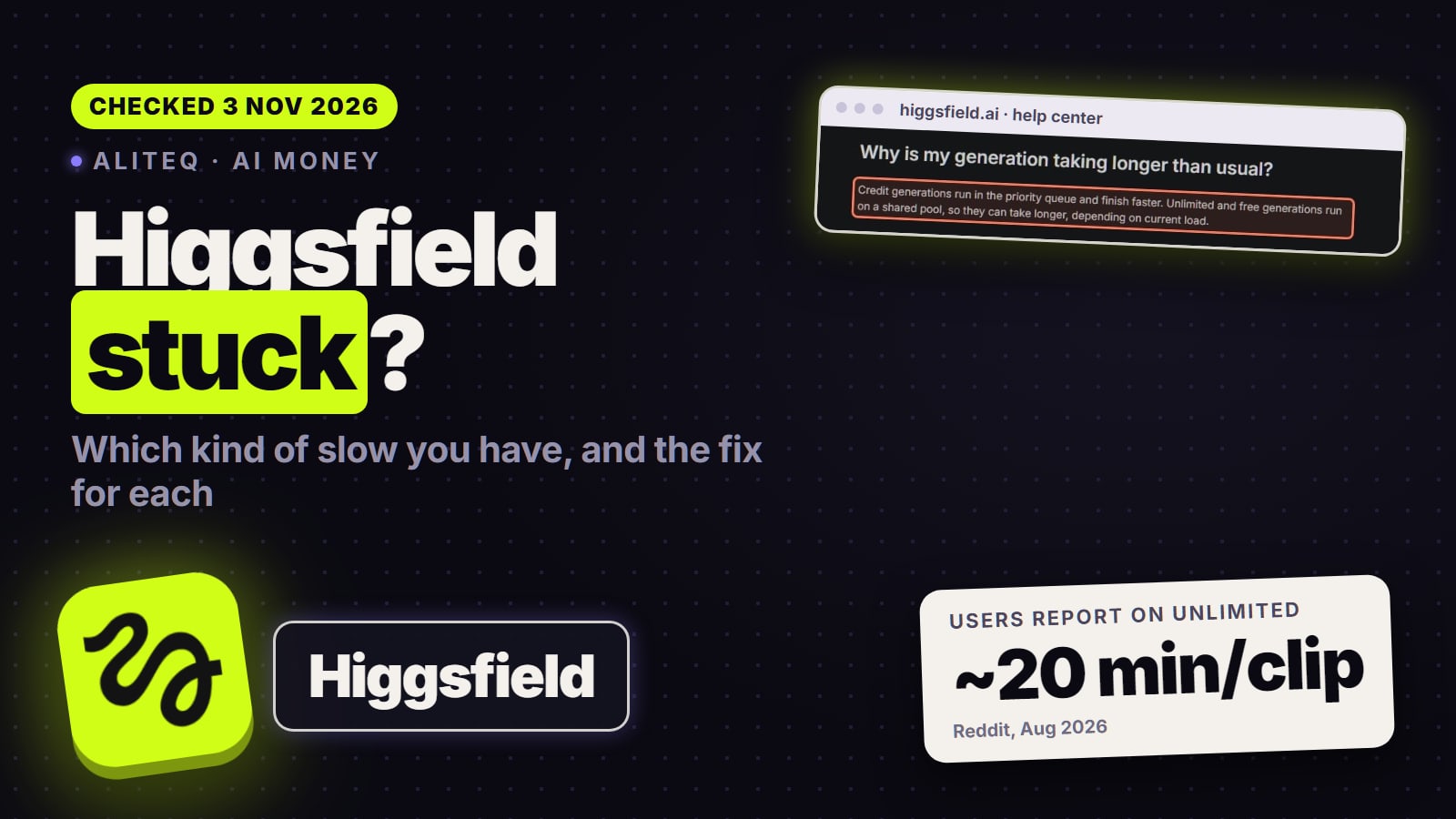
Higgsfield's help center says it plainly: "Credit generations run in the priority queue and finish faster. Unlimited and free generations run on a shared pool, so they can take longer, depending on current load."
So the same model can feel fast one day and slow the next. If you're generating on Unlimited, you're in the slower lane by design. The pricing page adds a footnote that "Unlimited usage may be subject to dynamic speed adjustments during high-traffic periods."
Higgsfield's own explanation of the two queues (help center, read November 3, 2026). · Screenshot of higgsfield.ai by aliteq
Other things Higgsfield lists that slow a job down or make it fail:
Resolution and media type. Its getting-started guide says generation usually takes "a few minutes", images are faster, and video "can take longer, especially at higher resolutions."
Heavy inputs. "Very long or complex prompts and heavy input files can fail or take longer than usual." Higgsfield's advice is to simplify and retry.
Upscales in a busy queue. A video upscale "normally finishes within 1 to 5 minutes", but "during high platform load, upscale jobs may queue longer than usual."
Higgsfield doesn't publish wait times per model, so nobody can honestly tell you how long a 10-second Kling clip should take.
What do Queued, Processing and Generating mean?
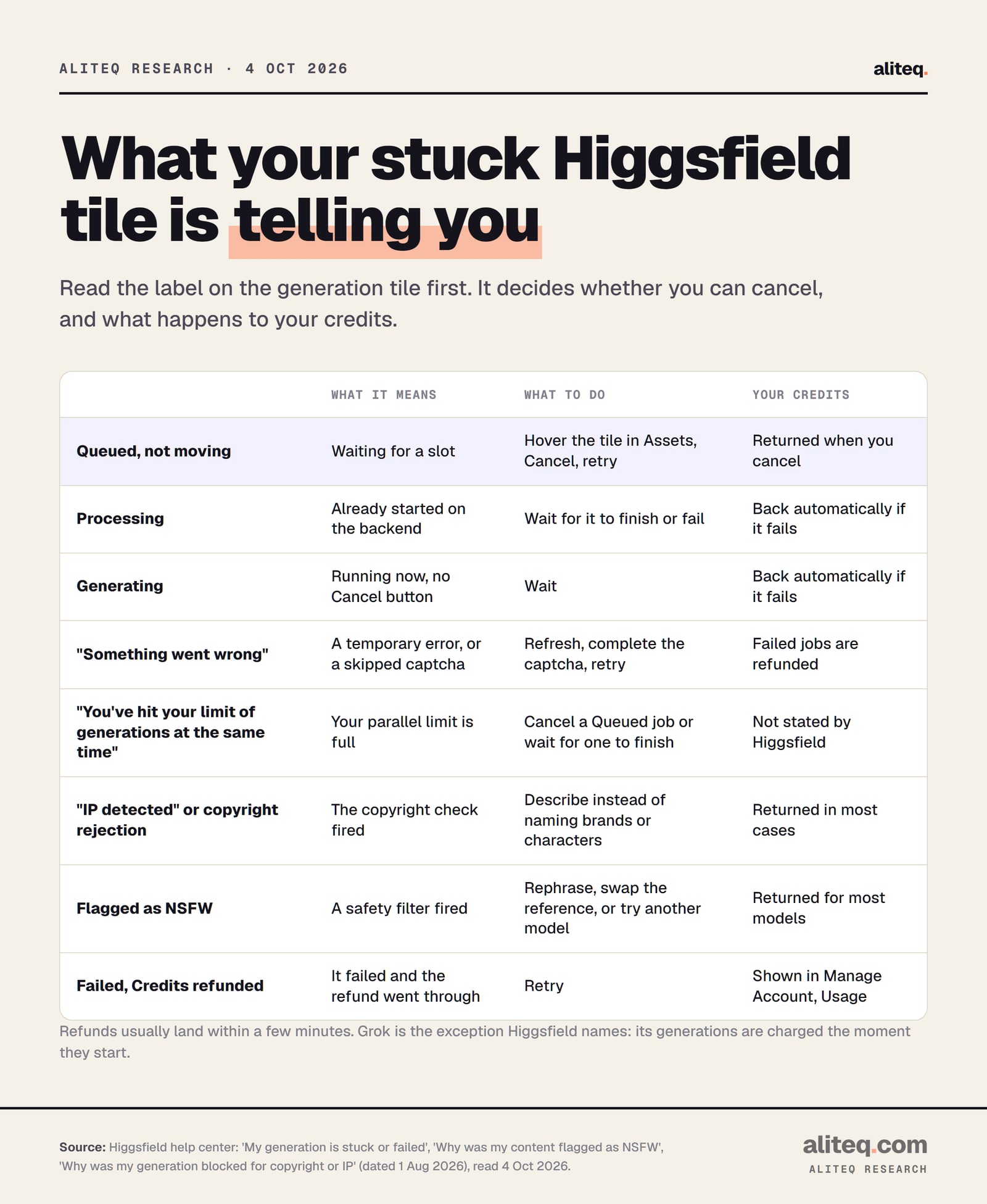
They're three stages, and they decide what you can do. Queued means the job is waiting for a slot, and you can cancel it with your credits returned instantly. Processing means it has started on the backend. Generating means it's running. In those last two stages you wait for it to finish or fail.
What each label on a Higgsfield generation tile means, from its help center, read October 4, 2026. · aliteq research
To cancel a Queued job, hover over its tile in Assets. A Cancel button appears in the top-right corner. Higgsfield says canceling at that stage "works instantly, and the credits are returned."
If you click Cancel and get an error, the job has already left the queue. Higgsfield's answer is to wait: "failed generations return credits automatically."
The error messages map to causes too:
"Something went wrong" is "a temporary error, or a captcha wasn't completed." Refresh, complete the captcha if one appears, and retry. Skipping a captcha fails the job with exactly this message.
"You've hit your limit of generations at the same time" means your parallel slots are full. More on that next.
"Rejected due to copyright restrictions" or "IP detected" means the copyright check fired on a brand, character or artist name, or on your reference image. Describe the look instead of naming it. If the image is yours, Higgsfield may show an "I own the rights for this image" button that can unblock eligible inputs.
Flagged as NSFW can be a false positive. Higgsfield names swimwear, fitness shots, medical imagery and vague wording as common triggers. Rephrase, swap the reference, or try another model, since each provider runs its own filter.
Why does Higgsfield say I've hit my limit?
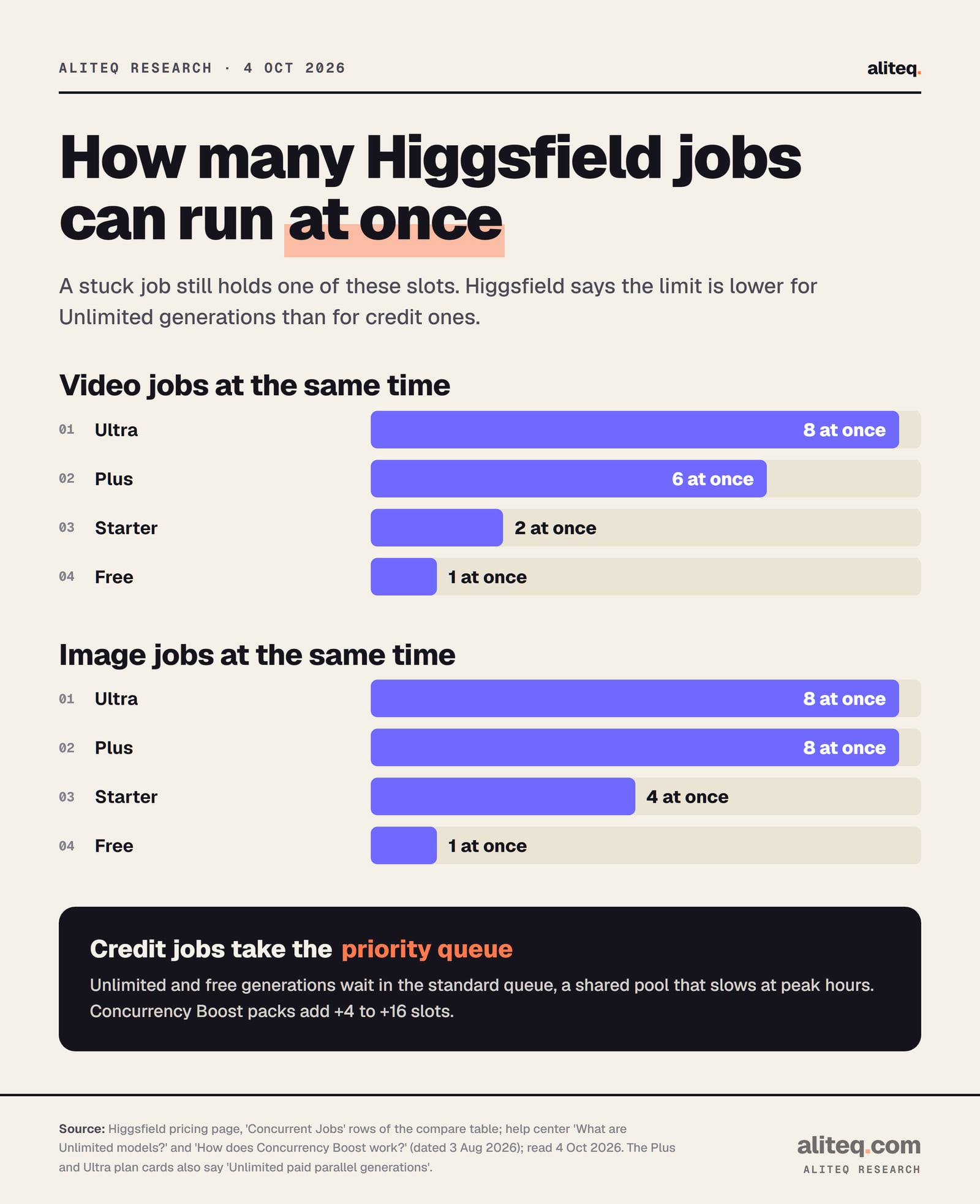
Every plan caps how many jobs run at the same time, and a stuck job still uses one of those slots. On October 4, 2026 the pricing page's compare table listed 1 video job at a time on Free, 2 on Starter, 6 on Plus and 8 on Ultra. Higgsfield says the cap is lower for Unlimited generations.
Concurrent jobs per plan from the compare table on Higgsfield's pricing page, read October 4, 2026. · aliteq research
Free
Video jobs at once
1
Image jobs at once
1
Lipsync jobs at once
1
Starter
Video jobs at once
2
Image jobs at once
4
Lipsync jobs at once
2
Plus
Video jobs at once
6
Image jobs at once
8
Lipsync jobs at once
6
Ultra
Video jobs at once
8
Image jobs at once
8
Lipsync jobs at once
8
Video jobs at once
Image jobs at once
Lipsync jobs at once
Free
1
1
1
Starter
2
4
2
Plus
6
8
6
Ultra
8
8
8
One oddity to know. The Plus and Ultra plan cards on the same page say "Unlimited paid parallel generations." The compare table under them still lists 6 and 8 video jobs. The help center says "Every plan has a base concurrency limit." We'd trust the numbers in the table until Higgsfield cleans that up.
The fix for the limit message is boring. Cancel a job that's still Queued, or wait for one to finish. Higgsfield also sells Concurrency Boost, a one-time pack that adds "+4, +8, +12, or +16" slots on top of your base limit. Its Boost Credits are a separate balance that expires 90 days after purchase. The help page doesn't list a price.
Do you get your credits back when a generation fails?
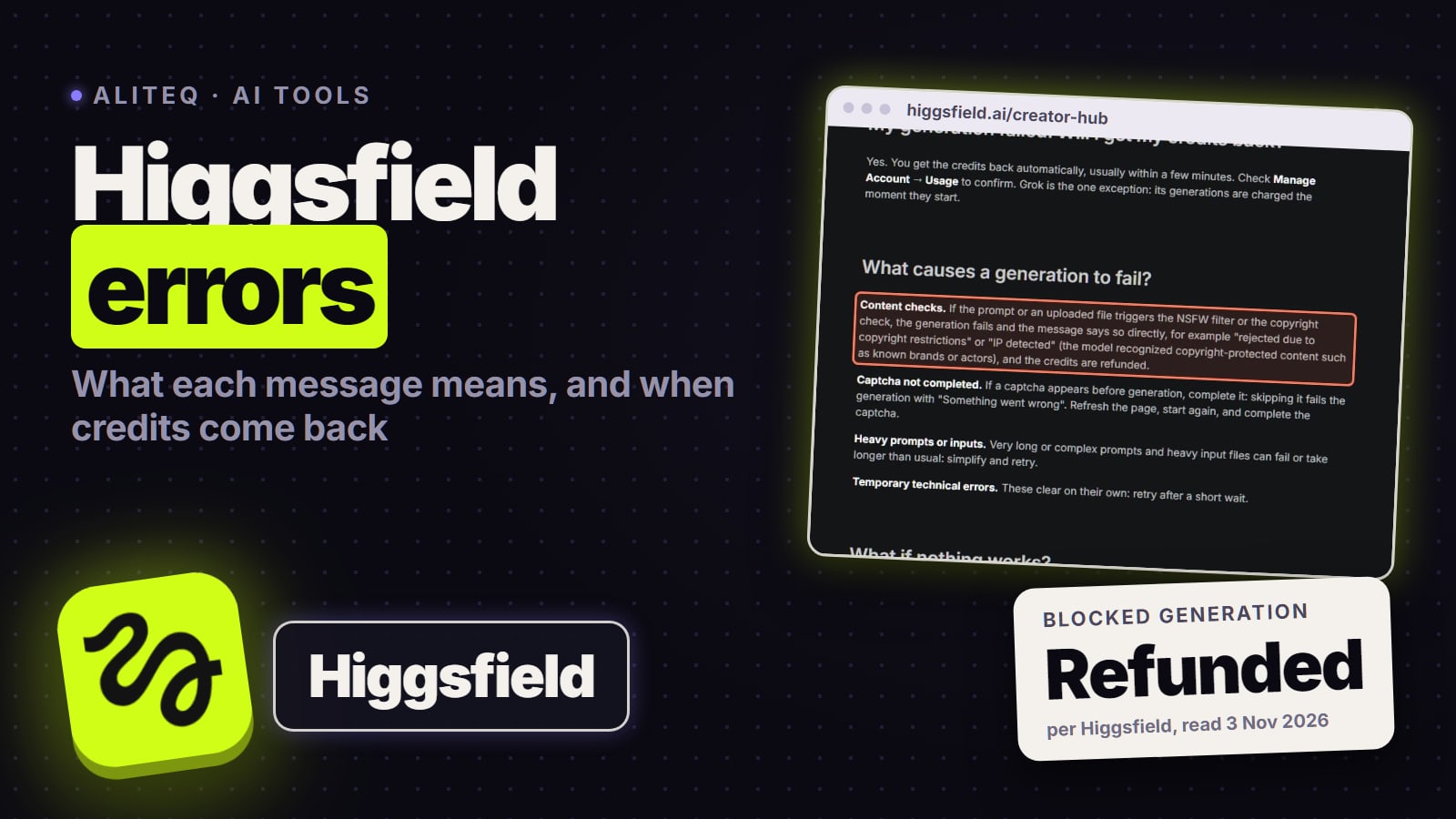
Yes, in almost every case, and you don't have to ask. Higgsfield says credits for a failed generation come back "automatically, usually within a few minutes." One named exception is Grok, whose generations "are charged the moment they start." When a prompt or upload triggers the NSFW filter or the copyright check, Higgsfield's article (re-read November 3, 2026) says "the generation fails" and "the credits are refunded."
Check before you message support. Every charge and refund shows under Manage Account, then Usage, with the model and a timestamp. Higgsfield's own advice: "Check this before contacting Support, the reason is almost always there."
If a refund is missing, contact Higgsfield with the generation ID. You find it by opening the generation in Assets and copying the last part of the page URL. A job blocked by a filter has no page in Assets, so send the approximate time, the model and your prompt instead.
This is about single failed generations. For refunds on a subscription you didn't want, our Higgsfield cancel and refund guide covers Higgsfield's 7-day rule.
Is Higgsfield down right now?
Check status.higgsfield.ai first. When we wrote this page on October 4, 2026, that status page covered only the API. Higgsfield has since expanded it: on October 26, 2026 it had a "Platform — higgsfield.ai" group with separate components for Web App, Image Generation, Video Generation, Audio Generation, Billing & Credits, MCP and Supercomputer, next to the API group (API, Developer Console, Models API, Webhooks). Each shows 90 days of uptime, and that day it read "All services are online".
So a red or yellow component there is now real evidence of a platform problem, and a green page makes a local cause (browser, extension, VPN, your own queue) more likely. Higgsfield's help center also says that if the site fails on several browsers or devices, it's "likely a platform-wide incident" and to check the #announcements channel in the Higgsfield Discord. You can subscribe to status updates from the page's "Get updates" button.
Higgsfield won't load or download: the fix order
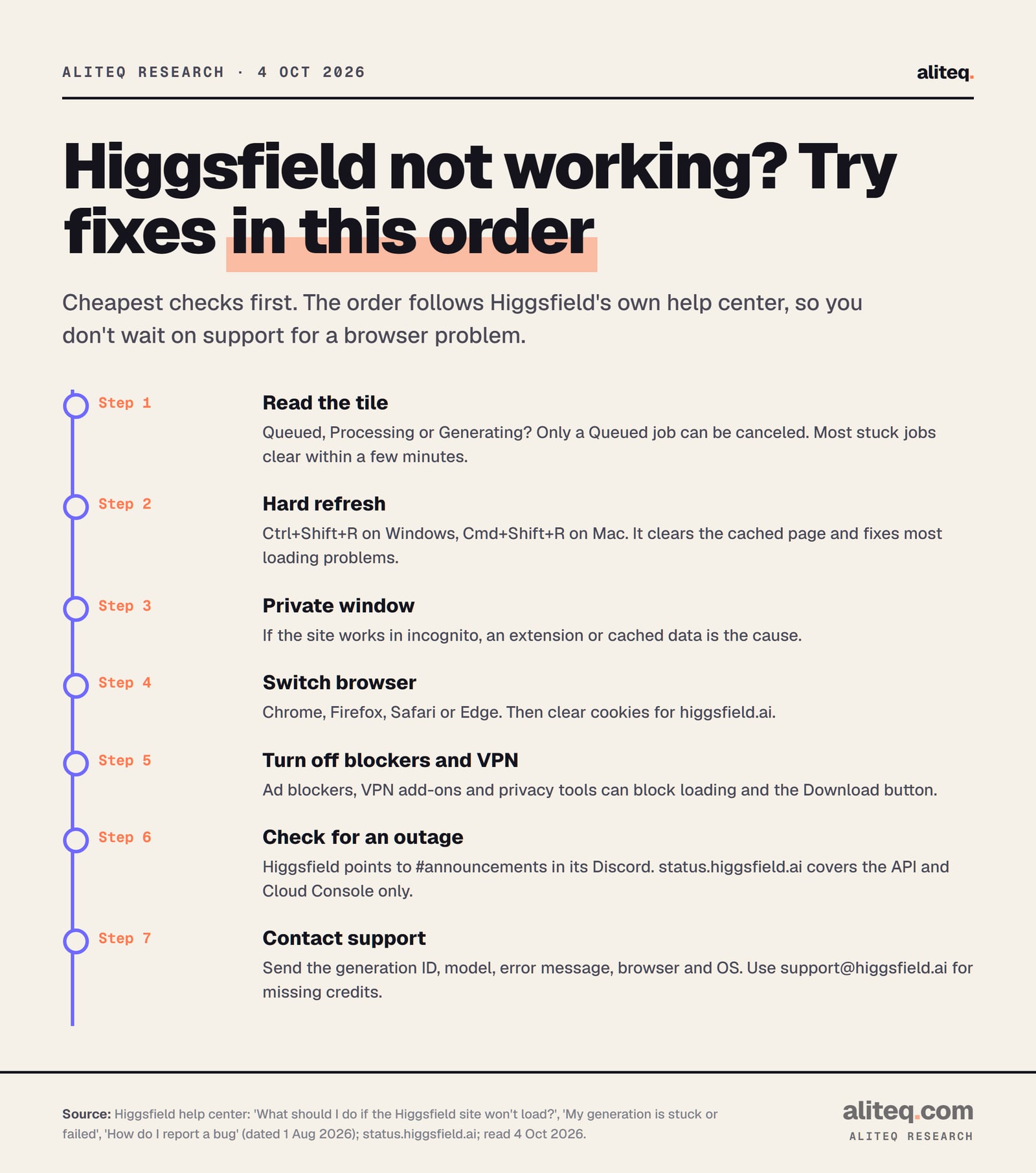
Higgsfield's help center gives a clear order, and the first two steps fix most problems. Start with a refresh, then a hard refresh (Ctrl+Shift+R on Windows, Cmd+Shift+R on Mac). Then try a private window, another browser, cleared cookies, and no ad blocker or VPN. Only then contact support.
The fix order from Higgsfield's troubleshooting articles, read October 4, 2026. · aliteq research
Read the label on the generation tile. Only a Queued job can be canceled and retried.
Give a Processing or Generating job a few minutes. Higgsfield says most stuck generations clear on their own.
Hard refresh, then try a private window. If the site works there, an extension or cached data is the cause.
Turn off ad blockers, privacy tools and VPN add-ons. Higgsfield says they can block loading and downloads.
If it fails on every browser and device, check the #announcements channel in the Higgsfield Discord for an outage.
Contact support with the generation ID, model, error message, browser and OS.
A few specific symptoms have their own fixes in the help center:
The Download button does nothing. An ad blocker or privacy extension is "the most common cause." Also check that your browser allows downloads from higgsfield.ai. Higgsfield says switching to Chrome or Safari "usually resolves it."
A blank white page. Hard refresh first, then incognito, then support with your browser and OS.
The VPN was the problem. "Some VPN configurations block certain platform resources." Try a different server location if you need a VPN.
Canvas or Supercomputer freezes. Hard refresh. "Canvas autosaves periodically", so a refresh restores the most recent save. Canvas can also load slowly on lower-end hardware or slow connections.
An upscale is stuck. Past 5 minutes, cancel from the tile in Assets and retry. Use a standard file such as MP4 with H.264, and a source that isn't heavily compressed.
How do you get faster results on Higgsfield?
Generate with credits, not Unlimited, when speed matters. Credit jobs go to the priority queue. On a model you have Unlimited for, Higgsfield's Unlimited article says switching the toggle off puts you in Credit Mode, which "runs in the priority queue at maximum speed." Keep jobs light, and don't let stuck jobs hog your slots.
That's a trade, not a free fix. Credit Mode spends credits on a model you're already paying Unlimited for. The cheap wins come first:
Simplify heavy jobs. Trim very long prompts and swap huge reference files. Higgsfield names both as causes of slow or failed runs. Our Higgsfield prompts that work guide helps you get a usable clip in fewer tries.
Clear the slots. Cancel anything still Queued that you don't need.
Watch the resolution. Higher resolutions take longer, by Higgsfield's own account. Draft at a lower one, then go up for the final clip.
Don't automate Unlimited. Higgsfield says unusual activity can get generations "slowed or moved to a lower-priority queue" and Unlimited paused for review.
If speed is the deciding factor before you buy, compare the concurrent job limits per plan, not just the credits. Our is Higgsfield worth it breakdown covers the plans, and is Higgsfield free covers what the free tier gets.
Where to get help from Higgsfield
Higgsfield has three channels. Its help center covers the common fixes. Its Discord handles "product and technical questions, answered by our support team and other creators." Email support@higgsfield.ai is for "billing, refunds, and anything that needs a look at your account", which includes missing credits.
For a bug, Higgsfield asks for your browser name and version, your operating system, a screenshot or screen recording, and what you expected versus what happened. For a generation, add its approximate time, the model and its page URL from Assets. Higgsfield says a specific report with steps to reproduce reaches the right team faster.
If Higgsfield keeps failing on the model you need, the same models often run elsewhere. Our Higgsfield vs Kling comparison and the best AI video generators roundup cover the alternatives. The AI Money hub has the rest of this lane.
Quick answers
Why is Higgsfield so slow today?
Usually the queue. Higgsfield runs credit generations in a priority queue, while Unlimited and free generations share a standard queue that slows at peak hours. High resolutions, long prompts and heavy uploads also take longer. Higgsfield doesn't publish wait times per model.
Why is Higgsfield Unlimited so slow?
Unlimited models run on a separate, lower-priority queue. Higgsfield's Terms of Use say they "operate on a dedicated processing queue, separate from the priority queue used for credit-based generations", and speed isn't guaranteed. Users report waits of around 20 minutes per clip at busy times. Switching Unlimited off (Credit Mode) uses the priority queue.
How long should a Higgsfield generation take?
Higgsfield's help center says "usually a few minutes", with images faster than video and higher resolutions slower. A video upscale normally finishes in 1 to 5 minutes. Higgsfield says most stuck generations resolve on their own within a few minutes.
Can I cancel a stuck Higgsfield generation?
Only while it says Queued. Hover over the tile in Assets and select Cancel, and the credits come back instantly. Once it shows Processing or Generating, it has started on the backend, so you wait for it to finish or fail.
Do I get my credits back if a Higgsfield generation fails?
Yes, automatically and usually within a few minutes. Check Manage Account, then Usage, for the refund line. Grok is the exception Higgsfield names, because its generations are charged when they start. Generations blocked by the NSFW or copyright filter are refunded too.
Is there a Higgsfield status page?
Yes, status.higgsfield.ai. Since mid-October 2026 it covers the website (Web App, image, video and audio generation, billing and credits, MCP, Supercomputer) as well as the API. Higgsfield's Discord #announcements channel also posts incidents.
What does "You've hit your limit of generations at the same time" mean?
Your plan's parallel slots are full, and a stuck job counts as one. The pricing table lists 1 to 8 video jobs at once depending on plan. Cancel a Queued job or wait for one to finish. Concurrency Boost packs add 4 to 16 slots.