Yes, partly. Checked Nov 12, 2026: a free Kling account gets 66 credits a month plus 3 HD trials, with a watermark and no commercial use. What that buys, what Kling's paid plans cost now, the cheapest ways to pay, and which Kling sites aren't Kling.
Some links on this page are referral links: we may earn a commission, at no cost to you.
Share
Is Kling AI free? Yes, partly: Kling's Basic plan costs $0, and on Nov 12, 2026 a free Kling account showed a monthly "Trial Package" of 66 free credits plus 3 trials of 1080p/4K video, valid 31 days. By Kling's own count (660 credits = 33 videos at 720p), 66 credits is about three short 720p clips a month. Free exports carry a Kling watermark and Kling says Basic output is "not for commercial use". Watermark-free, commercial clips start at Standard: $6.99 for the first month, then $8.80 a month for 660 credits. Checked November 12, 2026 on Kling's own plans page and credit rules.
Kling free vs paid today (kling.ai plans page, checked Nov 12, 2026)
Price
Basic (free)
$0
Standard
$6.99 first month, then $8.80 a month ($79.20 a year)
Pro
$25.99 first month, then $32.56 a month ($293.04 a year)
Credits
Basic (free)
66 a month, claimed at login, valid 31 days (the free account we checked)
Standard
660 a month
Pro
3,000 a month
1080p / 4K video
Basic (free)
3 trials in the free package
Standard
Yes
Pro
Yes
Watermark
Basic (free)
Yes
Standard
Removed
Pro
Removed
Commercial use
Basic (free)
No
Standard
Yes
Pro
Yes
Queue and volume
Basic (free)
Standard queue, 1 video per generation
Standard
Fast-track, unlimited queued tasks, up to 4 per generation
Pro
Fast-track, unlimited queued tasks, up to 4 per generation
Daily bonus credits
Basic (free)
No
Standard
During Kling promotions
Pro
During Kling promotions
Basic (free)
Standard
Pro
Price
$0
$6.99 first month, then $8.80 a month ($79.20 a year)
$25.99 first month, then $32.56 a month ($293.04 a year)
Credits
66 a month, claimed at login, valid 31 days (the free account we checked)
660 a month
3,000 a month
1080p / 4K video
3 trials in the free package
Yes
Yes
Watermark
Yes
Removed
Removed
Commercial use
No
Yes
Yes
Queue and volume
Standard queue, 1 video per generation
Fast-track, unlimited queued tasks, up to 4 per generation
Fast-track, unlimited queued tasks, up to 4 per generation
Daily bonus credits
No
During Kling promotions
During Kling promotions
The first month's price is a one-time 30% discount. Bigger plans: Premier from $64.99 for the first month, then $80.96 a month for 8,000 credits (Premier also comes in 18K, 28K and 38K sizes), and Ultra+ at $432.99 for the first month, then $544.99 a month for 57,000 credits. The old Ultra plan (26,000 credits for $159.99) no longer appears on Kling's plans page.
What does Kling's free plan include?
A $0 Basic account, a monthly allowance of free credits you claim by logging in, a watermark and no commercial use. There's one official free route: a Basic account on kling.ai. Here's what Kling's own pages say, read again on November 12, 2026.
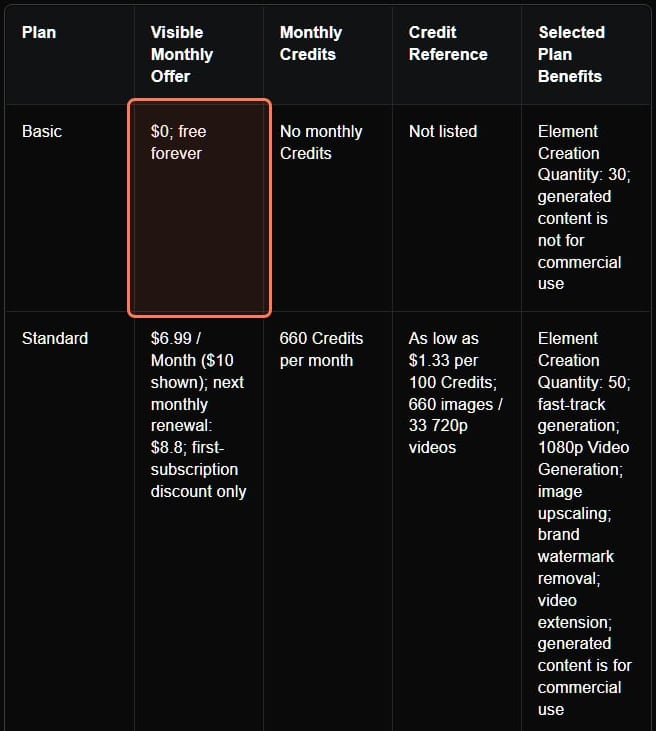
The Basic plan. Kling's credit guide (its blog, July 28, 2026) lists Basic as "$0; free forever" with "No monthly Credits" and "generated content is not for commercial use". "No monthly Credits" means the plan includes no subscription credits; the free allowance below is separate.
Monthly free credits. Kling's plans FAQ says: "Monthly Free Credits for Non-Subscribers: Claimed upon login each month and valid for 31 days." On November 12, 2026 a free account we checked showed "Trial Package", 66 credits, valid to December 8, and the package's info icon listed "Free Credits: 66" and "1080p/4K Video Generation Trials: 3", "Available on Kling platforms only".
Daily credits are for subscribers. Kling's Credits Policy says: "During the event (as shown in the interface), Kling subscribers can claim daily credits upon login/refresh." The plans page lists "Daily Free Credits for Subscribers" on paid plans only.
Promotional credits. The plans FAQ says Kling "occasionally offers promotional campaigns that grant free Credits", valid for whatever period the promotion page states.
Kling's own plan table, kling.ai credit guide, read November 3, 2026; the Basic and Standard rows were unchanged on November 12. The Basic row is outlined. · Screenshot of kling.ai by aliteq
How to use Kling for free, step by step
Sign up on kling.ai. It's the official site; klingai.com redirects there (checked November 12, 2026).
Log in once a month. That's how a non-subscriber claims the monthly free credits; they expire after 31 days, so they don't pile up.
Check your Trial Package. The bar at the top of Kling's plans page shows your credits and their expiry; the info icon lists what the package includes (66 credits and 3 HD trials on the account we checked).
Read the cost before you press Generate. Settings change the price: model, length, resolution and number of outputs. Kling 4.0 makes clips of up to 30 seconds and Kling 3.0 up to 15, so start short.
Use the HD trials on your best prompt. Free clips are otherwise below 1080p, so save the three 1080p/4K trials for a prompt you've already tested.
Don't worry about failed jobs. Kling's Credits Policy says: "If the generation fails, the corresponding Credits will be refunded."
Why your free credit number may not match what you read
If a guide promised you "66 free credits a day", that was a different deal. In May 2026 a Kling user asked "Does Kling AI no longer give free 66 per day?" after receiving 66 credits "as a monthly allowance instead of daily allowance" (r/KlingAI_Videos). In June another asked "Why do I only have 20 free credits a day now instead of 66 free credits?" (r/KLING). On November 12, 2026 the free account we checked had 66 credits for the month, not per day, which matches the first report. Kling doesn't publish the amount and its Credits Policy says the rules "may be changed", so trust the counter in your own account, including over this page.
The catches, as Kling states them
Watermark. "free-tier exports generally include a watermark. Watermark removal is a membership benefit" (Kling's daily-credits FAQ).
No commercial use. Basic content "is not for commercial use" (credit guide). The plans FAQ grants commercial use to "Paid Subscribers", provided the content isn't used to build a product that competes with Kling.
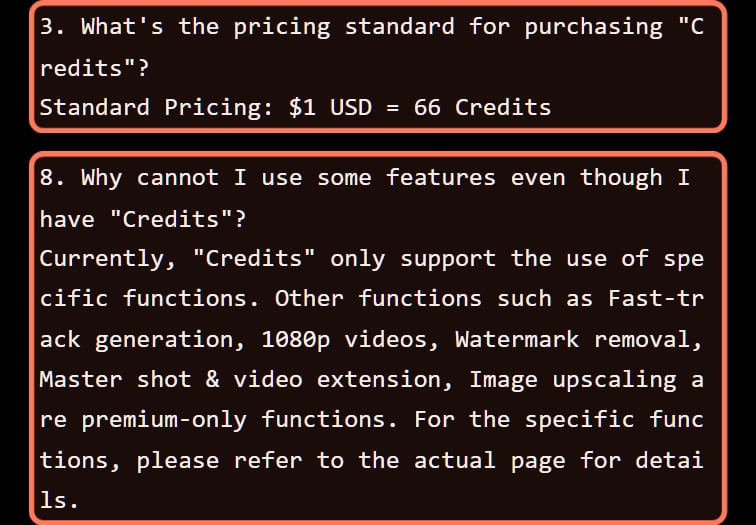
Credits don't unlock features. "Owning Credits does not grant Subscription benefits. Some features, such as watermark removal and 4K generation, are available only with an active Subscription" (plans FAQ). The Credits Policy names "Fast-track generation, 1080p videos, Watermark removal, Master shot & video extension, Image upscaling" as premium-only.
Queue. Paid plans list "Fast-track generation" and "Queue unlimited tasks"; free accounts make one video per generation and wait in the normal queue.
Kling only. Free credits "are valid only within Kling AI platforms" (a note on the plans page).
Two lines from Kling's Credits Policy (kling.ai/docs/point-policy), read November 3, 2026 and unchanged on November 12: the credit price, and what credits alone can't unlock. · Screenshot of kling.ai by aliteq
So a free Kling clip is a watermarked clip you can't use commercially, with three HD tries a month. That's fine for learning prompts. It isn't fine for a client video or an ad.
Why does Kling say "too busy" on a free account?
Because free accounts wait in the normal queue, and credits alone may not skip it. Kling lists fast-track generation as a subscription benefit, and its plans FAQ says subscribers get "a dedicated generation queue". A student in r/AI_India looking for a free Kling alternative said Kling "just keeps showing “too busy” and won’t let me generate the video" (r/AI_India). Another user bought a credit pack and said "I STILL CAN'T GENERATE A SINGLE SECOND OF VIDEO BECAUSE OF A "BUSY QUEUE"" (r/generativeAI).
The lesson: credits pay for the generation, priority comes with a membership. If you need a clip by a deadline, a credit pack on a free account may not be enough. For a clip that's stuck, failed or refused, Kling AI not working goes through each message and when Kling gives the credits back.
What are the cheapest ways to pay for Kling?
Kling's own Standard plan is the cheapest way in, and the yearly plans are the cheapest per credit. Kling doesn't publish a simple price per clip, and Kling users say the same: one wrote that "the pricing is super messy" (r/KLING). So we turned Kling's own prices into a price per 100 credits.
What 100 Kling credits cost you (our arithmetic from kling.ai's plans page, Nov 12, 2026)
Buying credits on their own ($1 = 66)$1.52
Credits on their own last two years
Standard monthly ($8.80, 660 credits)$1.33
Premier 8K monthly ($80.96, 8,000 credits)$1.01
Pro monthly is $1.09
Standard yearly ($79.20 a year, 660 a month)$1.00
Kling shows $1.00 per 100 credits
Ultra+ monthly ($544.99, 57,000 credits)$0.96
Ultra+ yearly ($4,902.99 a year)$0.72
Kling shows $0.72 per 100 credits
Monthly bars use the renewal price, assuming you use every credit before it expires. Subscription credits last 31 days, while bought credits last two years, which is why the dearer option can still be cheaper if you make only a few clips.
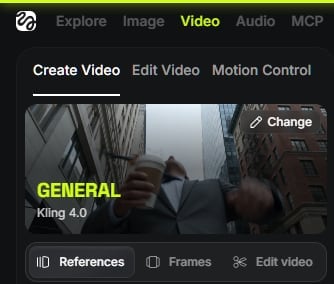
In clips: Kling's own count is 660 credits = 33 videos at 720p, so a 720p video is about 27 cents on Standard at $8.80 (our arithmetic; Kling doesn't say which model or length that count assumes). Native 4K on the Kling 3.0 series is "30 credits per second", so a 5-second 4K clip is 150 credits: $2.27 with bought credits, $2.00 on Standard monthly, $1.50 on Standard yearly and $1.08 on Ultra+ yearly. Kling still doesn't publish a credit price for Kling 4.0; the free account's Generate panel opened on Kling 4.0 at 720p and 5 seconds, so read the cost there before you generate. And plan for retries: few prompts give a usable clip on the first try.
Kling on Higgsfield
Higgsfield runs Kling 4.0, Kling 3.0 and older Kling models next to Seedance, Veo and others on one credit plan. On November 12, 2026 its Generate button priced a 10-second 1080p Kling 4.0 clip at 32.5 credits (40 struck through, a temporary discount), read signed out. No individual Higgsfield plan makes Kling unlimited; only the Scale business plan lists 7 days of unlimited Kling 3.0.
Kling 4.0 on Higgsfield: one 10-second 1080p clip (32.5 credits), by plan (our arithmetic, plans read Nov 17, 2026)
Starter
Price
$19 a month
Credits a month
270
Per clip
$2.29
Plus, monthly
Price
$47 the first month, then $59
Credits a month
1,200
Per clip
$1.27, then $1.60
Plus, yearly (Black Friday sale)
Price
$33 a month billed yearly
Credits a month
1,200
Per clip
$0.89
Ultra 3K, monthly
Price
$79 the first month, then $129
Credits a month
3,000
Per clip
$0.86, then $1.40
Ultra 3K, yearly (Black Friday sale)
Price
$50 a month billed yearly
Credits a month
3,000
Per clip
$0.54
Price
Credits a month
Per clip
Starter
$19 a month
270
$2.29
Plus, monthly
$47 the first month, then $59
1,200
$1.27, then $1.60
Plus, yearly (Black Friday sale)
$33 a month billed yearly
1,200
$0.89
Ultra 3K, monthly
$79 the first month, then $129
3,000
$0.86, then $1.40
Ultra 3K, yearly (Black Friday sale)
$50 a month billed yearly
3,000
$0.54
Prices from Higgsfield's pricing page, read signed out on November 17, 2026, in US dollars before tax. The yearly prices are Higgsfield's Black Friday sale (the page's countdown pointed at midnight UTC on November 18, later extended to midnight UTC on November 20); outside sales, the last non-sale yearly prices we read (Nov 8, 2026) were $47 (Plus) and $99 (Ultra), about $1.27 and $1.07 a clip. The monthly first-month prices renew at $59 (Plus) and $129 (Ultra). The 11.11 sale (yearly Plus $35, Ultra $65) ended November 14. Higgsfield's FAQ says its free plan has "limited access to selected AI models, no monthly credits, and one generation at a time".
On November 12, 2026 there was also a $0 route to try it: Higgsfield's 11.11 deals post (November 11, 2026) says "The Higgsfield MCP free trial now offers 3 days of Unlimited access to all models for $0", and that after 3 days "your subscription automatically renews on the Ultra 3K plan at a discounted price". Cancel before day three if you don't want Ultra. Note that Higgsfield's pricing page fine print says unlimited models are "not accessible on MCP/CLI"; the two Higgsfield pages disagree, so check what the trial shows you.
Should you pay Kling directly or use Kling on Higgsfield?
Pay Kling directly if Kling is most of what you make; use a multi-model platform if you also want Veo or Seedance. Those are the two legitimate ways to pay for Kling: Kling's own membership, or a platform that licenses Kling models alongside others.
Higgsfield's video page with Kling 4.0 selected (higgsfield.ai, read November 3, 2026, logged out). · Screenshot of higgsfield.ai by aliteq
Kling's own plan vs Kling inside Higgsfield (checked Nov 12, 2026)
kling.ai
Kling's own site
vs
Higgsfield
Several models, one plan
Basic, $0, 66 credits a month on the account we checked, watermark, non-commercial
Free plan
Free plan with no monthly credits and one generation at a time
Standard, $6.99 first month, then $8.80 (660 credits)
Cheapest paid plan
Starter, $19 a month (270 credits)
Not published; shown in the app
Kling 4.0 price before you generate
Shown on the Generate button, signed out
Kling only
Other models
Kling, Seedance, Veo and more
30% off the first month, once
Offers right now
Black Friday sale on yearly plans and the first month (read Nov 17, 2026); the 11.11 sale ended Nov 14
kling.ai wins 2wins 2 Higgsfield
If you only ever use Kling, Kling's own plan is the direct route and Standard is the low-cost entry. If you also want Veo, Seedance or Higgsfield's own camera and character tools in the same place, one Higgsfield plan can replace several subscriptions. It isn't automatically cheaper per clip. We compare the two in Higgsfield vs Kling; Higgsfield credits explained shows how its credits work, and what Kling 4.0 costs on Higgsfield goes setting by setting.
Do "free Kling credits" codes work?
Not as free Kling: they're bonuses for paying. Kling's own plans page has a box that says "Enter a referral code to upgrade +10%", so a referral code adds credits to a paid plan; it doesn't make Kling free. Search Reddit for free Kling credits and you'll mostly find those codes. Posts promising a Kling "credit hack" or "unlimited credits" are the same kind of thing. Kling's own free routes are the ones on its pages: the monthly free credits, the HD trials in the free package and promotions announced in the app.
Paying for Kling from outside the US
Many people searching "is Kling free" are in India, Pakistan, Africa or the Middle East, where paying for a US-priced tool is its own hurdle. Two things readers there run into:
The card is declined. Indian and Pakistani cards often have international payments switched off by default. Turn them on in your banking app before you subscribe.
The price is higher than the card shows. Currency conversion and local taxes are added by your bank, so the total is above the listed dollar price.
How do I cancel Kling?
Cancel in the same place you started paying. Kling's plans FAQ (read November 12, 2026) gives three routes: on the web, Profile > Manage Plan > Cancel Subscription; on iPhone, Settings > your Apple ID > Subscriptions; on Android, Google Play > Payments & subscriptions > Subscriptions. One user who was still charged after cancelling got contradictory answers from Kling support, ending with "you have to cancel through Google Play" (r/KlingAI_Videos). Keep the confirmation email, and check your statement on the next billing date.
Is kling-ai-free.com or kling.movie the official Kling site?
No. Search "kling ai free" and the results mix Kling's own site with domains that use the Kling name. In late October 2026 Bing's top results included kling-ai-free.com and kling-4.ai, and on November 12, 2026 ChatGPT's answer to "is kling ai free" cited kling.movie, which calls itself a "Kling AI Help Center" and describes Lite, Pro and Premium plans that aren't on kling.ai. None of them is kling.ai, so none is Kling's official site. We aren't saying what those sites do with your money or data; we're saying they aren't Kling.
Check the domain. Kling's official site is kling.ai. The older klingai.com address redirects there (checked November 12, 2026).
Be wary of "free unlimited Kling". Kling's own free allowance is a few dozen credits a month. A site promising unlimited free Kling 4.0 isn't describing Kling's plan.
Pay only where the account lives. Kling's Credits Policy says credits "can only be obtained and used by logged-in users within the KLlNG AI platform" (sic). Credits bought on another site aren't Kling credits, unless that site is a platform that licenses Kling and says so, like Higgsfield.
Other free ways to make AI video
If Kling's free credits run out, the honest alternatives are other official free allowances, each with its own catch:
Wan: see is Wan 3 free, including the open model you can run on your own GPU.
Sora: OpenAI's Sora is gone, and sites offering it aren't OpenAI. See is Sora 2 free.
Ready to pay but not sure Kling is the one? Kling AI alternatives prices other video models per clip, and Kling vs Seedance puts Kling 4.0 and Seedance 2.5 on the same brief, frame by frame. Everything else we've checked about Kling is on our Kling AI page.
6/ 10
Verdict
Free to try, not free to use
Kling's Basic plan is a real free plan, but 66 credits a month, a watermark, no commercial use and the normal queue make it a test drive. Use the free credits to learn prompts and the three HD trials on your best one. Pay when you need watermark-free, commercial clips, and pick the plan by what 100 credits cost you.
Best for: Anyone deciding whether to pay for Kling, or where
Making images too? Is Nano Banana Pro free covers what Google's free tier includes and which Nano Banana sites aren't Google.
Partly. Kling's Basic plan is $0. Non-subscribers can claim monthly free credits on login, valid for 31 days; a free account we checked on Nov 12, 2026 had 66 credits plus 3 trials of 1080p/4K video. Free exports carry a watermark and Basic output is not for commercial use.
How many free credits does Kling give?
Kling doesn't publish a fixed number. On Nov 12, 2026 a free account showed a monthly Trial Package of 66 credits and 3 HD video trials, valid 31 days. By Kling's own count of 660 credits = 33 videos at 720p, 66 credits is about three short 720p clips.
Does Kling AI give free daily credits?
Not on the free plan. Kling's plans page lists "Daily Free Credits for Subscribers" on paid plans only, and its Credits Policy says subscribers can claim daily credits during events. Free accounts get the monthly allowance instead.
Why do I only get 20 free Kling credits a day instead of 66?
Users reported that drop in mid-2026. On Nov 12, 2026 the free account we checked had 66 credits for the month, not per day. Kling says its credit rules may change, so check the counter in your own account.
Can I use free Kling videos commercially?
No. Kling's credit guide says Basic content "is not for commercial use", and its plans FAQ grants commercial use to paid subscribers. Commercial use and watermark removal start with Standard, $6.99 for the first month, then $8.80 a month.
Does buying Kling credits skip the queue?
Not necessarily. Kling says owning credits doesn't grant subscription benefits; fast-track generation and a dedicated queue come with a subscription. Users who bought credit packs on a free account reported still waiting in a busy queue.
How much does Kling AI cost?
On Kling's plans page (Nov 12, 2026): Standard $6.99 first month, then $8.80 a month for 660 credits ($79.20 a year); Pro $25.99, then $32.56 for 3,000; Premier from $64.99, then $80.96 for 8,000; Ultra+ $432.99, then $544.99 for 57,000. Extra credits cost $1 per 66.
Is Kling cheaper on Higgsfield?
Not by default. A 10-second 1080p Kling 4.0 clip is 32.5 credits on Higgsfield (Nov 12, 2026), about $0.89 on yearly Plus at the Black Friday sale price of $33 a month (read Nov 17, 2026) or $2.29 on Starter. See Higgsfield's plans. It makes sense when you also use other models.
How do I cancel a Kling subscription?
Cancel where you started paying: on the web, Profile > Manage Plan > Cancel Subscription; in the iPhone app, through your Apple ID subscriptions; in the Android app, through Google Play. Keep the confirmation email.
Is kling.movie or kling-ai-free.com the official Kling site?
No. Kling's official site is kling.ai, and klingai.com redirects there. Domains like kling.movie, kling-ai-free.com and kling-4.ai aren't kling.ai, so they aren't Kling's official site. Sign up and pay only on kling.ai, or on a platform that openly licenses Kling models.
The short version: Kling is free to try with 66 credits a month on a watermarked, non-commercial Basic plan, and real use starts at Standard. If you're weighing Higgsfield's own pricing too, see is Higgsfield free.
Higgsfield sales like 11.11 and Black Friday change prices for a few days at a time. When one starts, we read the real prices on Higgsfield's own page and email you what changed.
Written and sent by hand. One-click unsubscribe in every email. Emails may contain referral links.