SQLite is a whole database in one file, and its own docs say it fits most websites. The catch is one writer at a time and a backup plan you have to build. Here is when it is enough, what WAL mode changes, and where D1 and Turso fit.
I will say the honest part first. We do not run SQLite in production. aliteq.com runs on Cloudflare Workers with Supabase, which is Postgres, as the database. I have not installed Litestream or created a D1 or Turso database for this piece. What I did was read the primary docs on October 3, 2026, and they are blunter and more useful than most blog posts about it.
If a database is a new word, start with what a database is. The short version is that SQLite is the one that lives in a single file inside your app, with no separate server to run.
Is SQLite good enough for production?
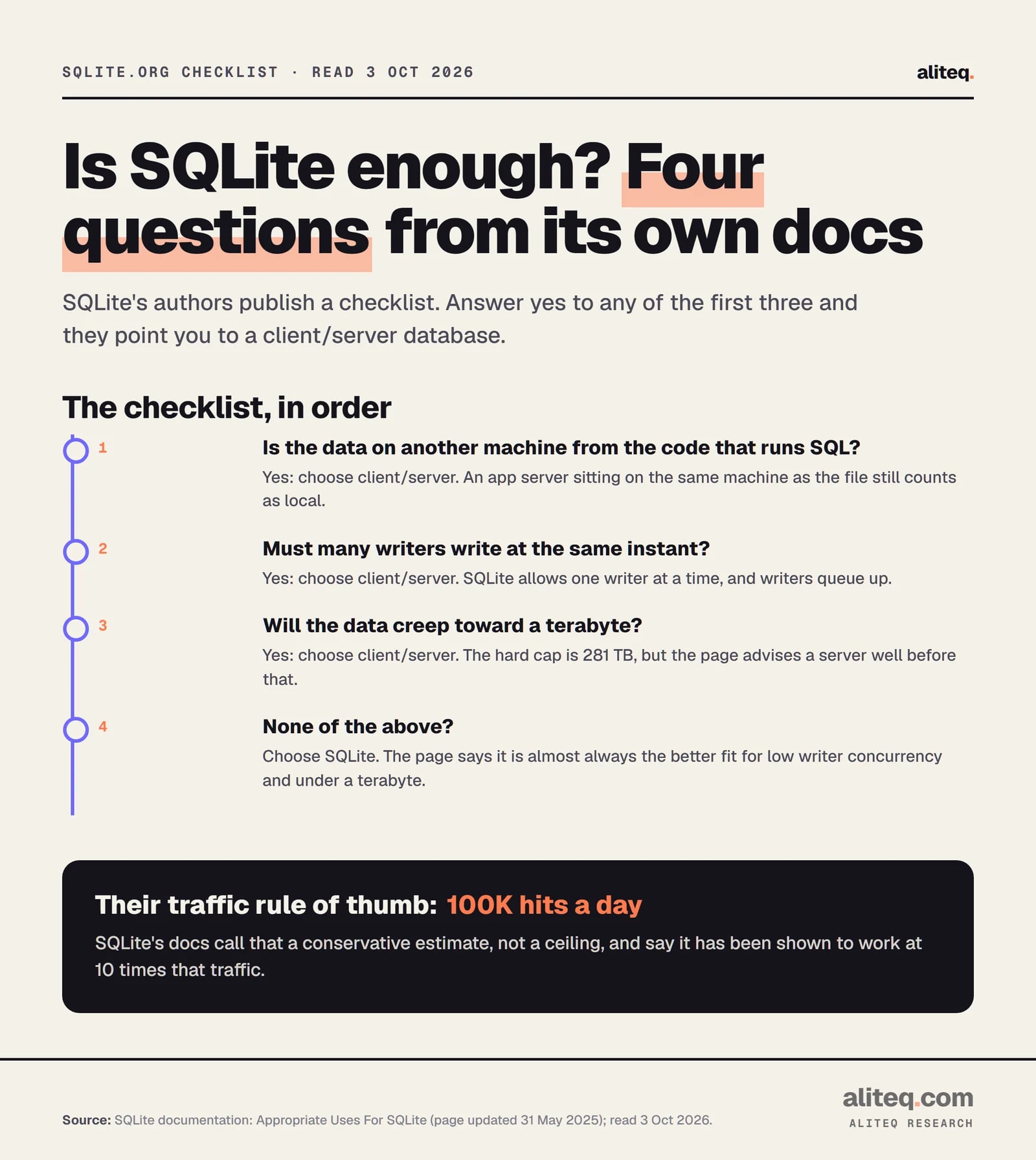
Yes, for a lot of apps. SQLite's own documentation says it "works great as the database engine for most low to medium traffic websites," and that any site under 100,000 hits a day "should work fine." It calls that figure a conservative estimate, not a hard limit, and says SQLite has been shown to handle ten times that.
The same page has a line I like: "SQLite does not compete with client/server databases. SQLite competes with fopen()." In other words, the real alternative is not Postgres. It is a pile of files you wrote yourself.
One caution. The page gives sqlite.org's own traffic as an example, and that number is dated 2015 on the page. Treat it as a sketch of the idea, not a current benchmark.
The pattern that works is a server in front. The docs describe SQLite as the data store behind an application server, where "database requests are serialized by the server, so concurrency is not an issue." Your users talk to your app. Only your app touches the file.
What does SQLite not do well?
SQLite struggles when many machines need the same database, when many writers need to write at the same instant, or when data grows very large. Its docs say these cases favor a client/server database. A network disk is the classic trap.
SQLite documentation, Appropriate Uses For SQLite, read Oct 3, 2026. · aliteq research
The limits, from SQLite's pages:
One writer at a time. "SQLite supports an unlimited number of simultaneous readers, but it will only allow one writer at any instant in time." Writers queue, and the docs say no lock normally lasts more than a few dozen milliseconds.
Not over a network disk. The docs warn that "file locking logic is buggy in many network filesystem implementations," which can corrupt the file. Keep the file on the same machine as the code that opens it.
Several servers. If your site "requires multiple servers," the docs say to consider an enterprise-class client/server database.
Size. The ceiling is 281 terabytes, but the docs suggest a client/server database once you creep into the terabyte range.
This is why serverless setups, where your code runs in many short-lived copies, do not mix with a plain SQLite file. There is no single disk for the copies to share. I covered how that model works in our guide to what hosting is and what it costs.
What does WAL mode change?
WAL stands for write-ahead log. In WAL mode SQLite writes changes to a separate log file first, so readers and the writer stop blocking each other. SQLite's docs call it significantly faster in most scenarios. You turn it on once with a pragma, and it stays on.
The command is one line: PRAGMA journal_mode=WAL;. The docs note the setting is persistent, so the database "will come back in WAL mode" after a restart.
What you gain and what you give up, from the WAL page:
Readers and a writer run together. There is still only one writer. The docs say that "since there is only one WAL file, there can only be one writer at a time."
Same machine only. "All processes using a database must be on the same host computer; WAL does not work over a network filesystem."
Extra files. You will see -wal and -shm files next to your database. Copy them with the database or you can lose recent writes.
Checkpoints. SQLite moves the log back into the main file automatically once it reaches about 1,000 pages. If a reader is always active, checkpoints can starve and the log grows without bound, per the docs.
The setup most guides settle on is a few lines run on every new connection. Litestream's tips page recommends a five-second busy timeout, and says synchronous = NORMAL is safe in WAL mode because the log is append-only, at the cost of some durability after a power cut.
I have not run these against a production workload. They come straight from the SQLite and Litestream docs. foreign_keys is off by default in SQLite and has to be set on every connection.
How do you back up a live SQLite database?
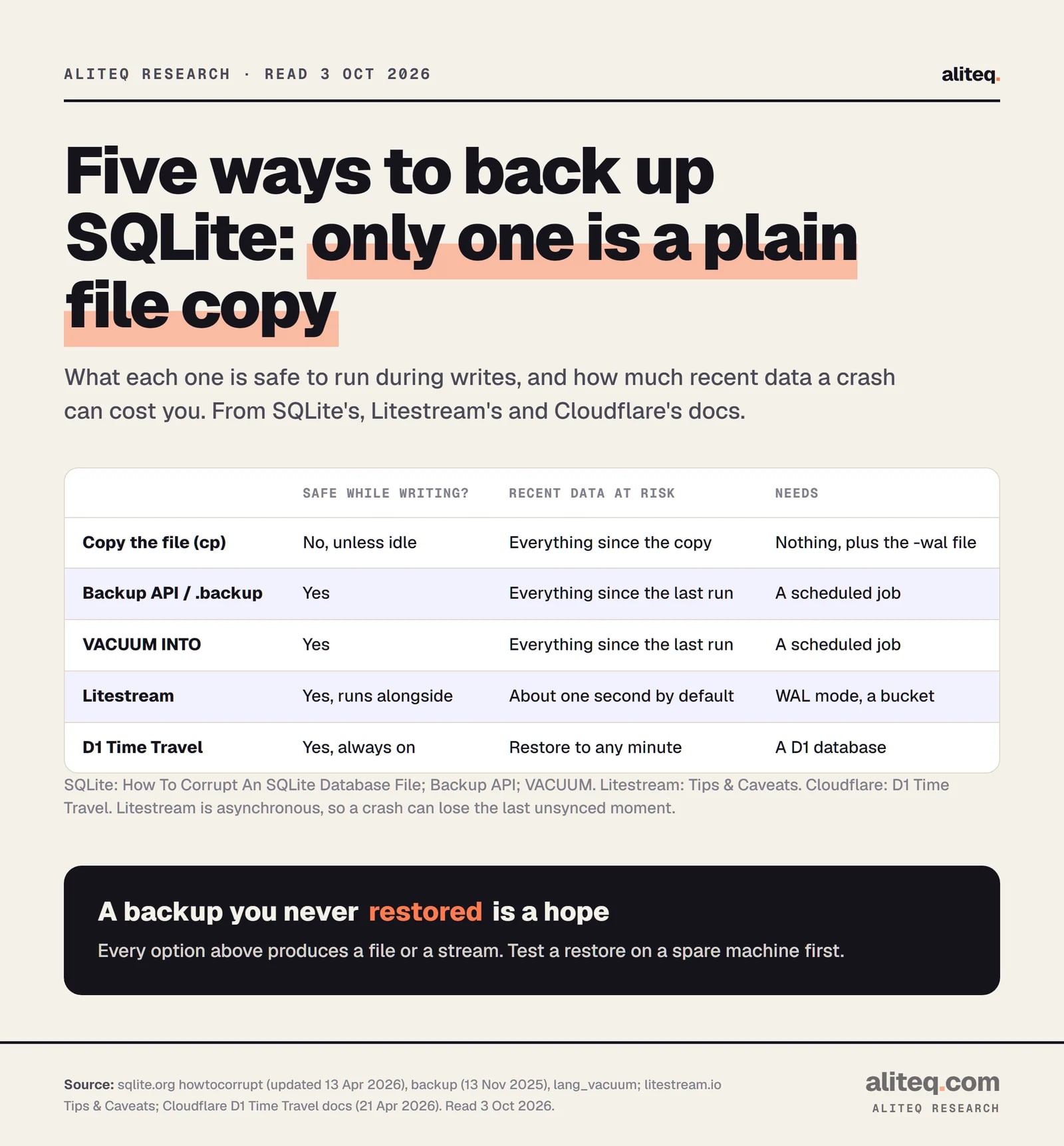
Do not copy the file while the app is writing. SQLite's docs warn that a copy taken mid-transaction "might contain some old and some new content, and thus be corrupt." Use the backup API, VACUUM INTO, or a replication tool like Litestream. Then test a restore.
SQLite, Litestream and Cloudflare docs, read Oct 3, 2026. · aliteq research
Your options, in order of effort:
Backup API or .backup. SQLite calls the backup API "the original method for making backups of a live SQLite databases." The command-line shell wraps it as .backup FILE. It copies in steps, and if another connection writes during the copy, it restarts. The docs warn that if it restarts often enough it "may never run to completion."
VACUUM INTO 'file'. It writes a consistent, compact copy and leaves deleted content out. SQLite says the backup API uses fewer CPU cycles and can run incrementally, while VACUUM INTO gives a smaller file. If it is cut off by a power loss mid-write, the output may be incomplete.
sqlite3_rsync. It copies a live database over SSH. SQLite added it in version 3.47.0 (October 21, 2024).
A plain copy, only when nothing is writing, and only with the -wal file alongside.
Run one of these on a schedule, ship the result off the machine, and you have a backup. Litestream's own docs say a cron job every day or every hour is a fair choice for a small database "that do[es] not have high durability requirements."
What does Litestream add?
Litestream is a separate background process that copies the write-ahead log to a replica such as an S3-style bucket, continuously. Its docs call it "a streaming replication tool for SQLite databases." You get a restore point seconds old instead of hours old. The price is that it replicates asynchronously.
The trade is spelled out on its tips page. "By default, Litestream will replicate new changes to an S3 replica every second," and a crash in that window loses that data. Synchronous replication "is on the Litestream roadmap but has not yet been implemented." Other facts from the docs, read October 3, 2026:
It only works in WAL mode, and it takes over checkpointing to do its job.
It takes a full snapshot every 24 hours by default and compacts the small files in between.
Each database replicates to one destination, and two apps writing to the same bucket path can make a restore impossible.
A restore replays the latest snapshot plus every change file since, so frequent writes make restores slower unless you snapshot more often.
I have not run Litestream. If you do, the step that matters is the one most people skip: restore into a fresh folder once, and open the result. A backup nobody has restored is a hope.
What are Cloudflare D1 and Turso?
D1 and Turso are hosted databases that speak SQLite's SQL. You do not own the disk or the backups. Cloudflare D1 is built for Workers. Turso offers a cloud service and an open source SQLite-compatible engine. Both keep SQLite's one-writer-at-a-time habit by default.
Cloudflare describes D1 as "managed, serverless database with SQLite's SQL semantics, built-in disaster recovery, and Worker and HTTP API access." We run on Workers, so D1 is the SQLite option nearest to our stack. We do not use it.
Cloudflare D1 docs (Apr 21, 2026) and turso.tech/pricing, read Oct 3, 2026. · aliteq research
What should you know about D1?
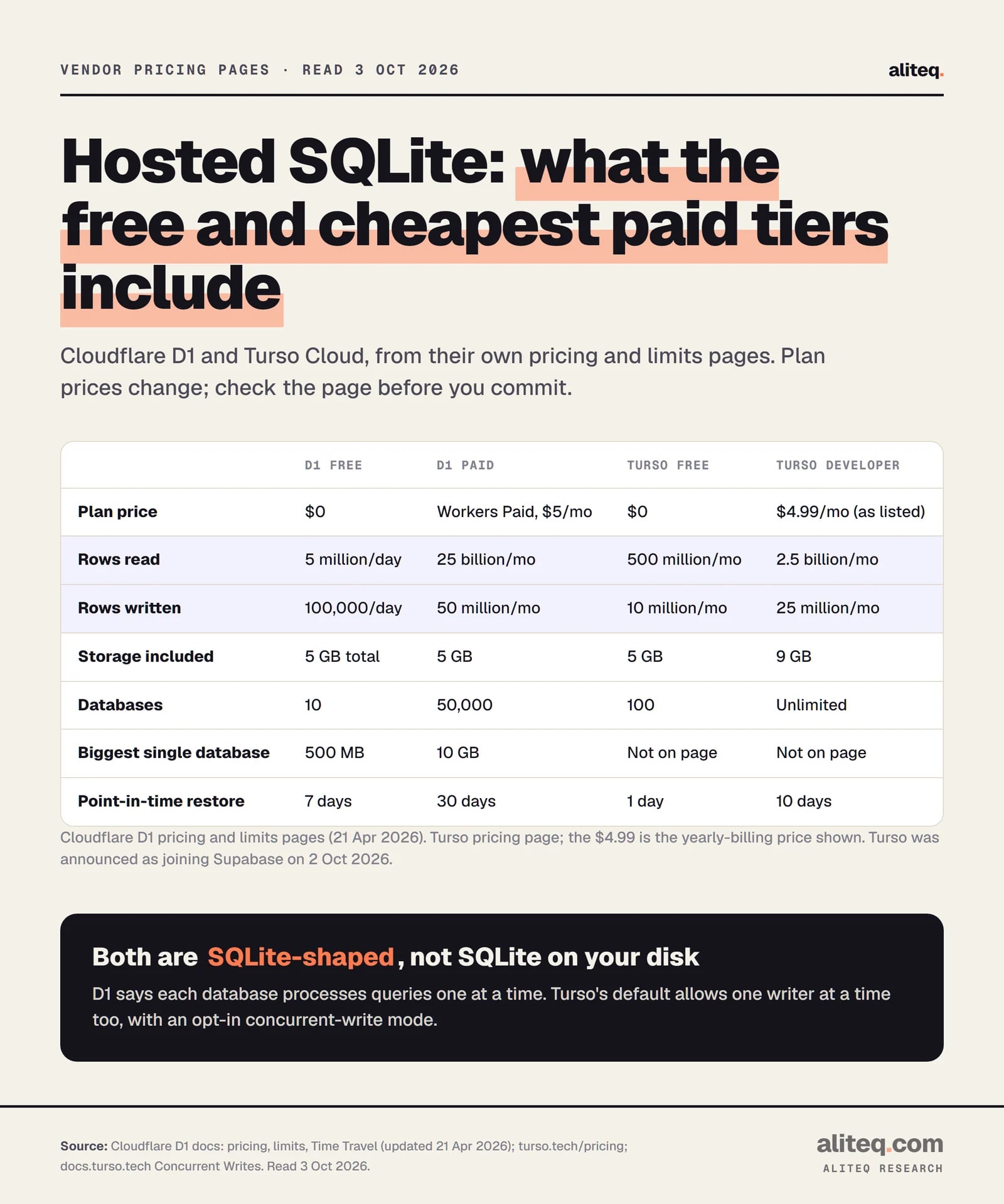
D1 bills for rows read and rows written, with no egress or bandwidth charge. On the paid Workers plan, each database is capped at 10 GB, a cap Cloudflare says cannot be raised, and Cloudflare designs it for many small databases, such as one per user or tenant. Backups are built in.
Facts from the D1 pages, read October 3, 2026:
Pricing. On Workers Paid, the first 25 billion rows read and 50 million rows written each month are included. After that it is $0.001 per million rows read and $1.00 per million rows written. Storage past 5 GB is $0.75 per GB-month. Workers compute is billed separately.
Rows read means rows scanned. A query on an unindexed column reads every row it checks, even if it returns one. An index cuts the bill and the time.
Throughput. Cloudflare says each database "is inherently single-threaded, and processes queries one at a time." Its rule of thumb: a 1 ms average query gives about 1,000 queries per second, and a 100 ms query about 10. If the queue fills, you get an "overloaded" error.
Restore. Time Travel is always on and free. It restores to any minute in the last 30 days on Paid and 7 days on Free.
Reads near users. Read replication exists, but you must use the Sessions API or all queries go to the primary database.
What should you know about Turso?
Turso sells a cloud service for SQLite-compatible databases and develops an open source engine written in Rust. Its Free plan lists 100 databases, 5 GB and 500 million rows read a month. Its default allows one writer at a time too, and an opt-in mode allows concurrent writers that must retry on conflict.
Three things to weigh before you choose it, all from Turso's own pages:
Change of ownership. A post dated October 2, 2026 says Turso "is being acquired by Supabase," that "Turso keeps running," and that the open source database stays open. That is one day old as I write. The post does not say what changes for pricing.
Maturity. The engine's README says it has "not yet reached 1.0," that some features are experimental, and that you should "keep independent backups."
Concurrent writes. The docs say that "with MVCC (Multi-Version Concurrency Control), multiple connections can write simultaneously," and that if two transactions touch the same data, "one will receive a conflict error and must roll back and retry." Turso's own 0.8 post publishes speed claims. They are the vendor's benchmark, so I am not repeating the numbers.
The plan prices on the pricing page change with billing period, so the table above shows the figure as listed. Check the page on the day you decide.
Which should you pick?
Pick plain SQLite on one machine for a small app you control. Pick D1 if you already run on Workers and want a managed SQLite-style database. Pick Turso for many small databases or local-first sync. Pick Postgres when several servers or many writers need one shared database.
Where each option fits (read Oct 3, 2026)
Who owns the disk and backups
Plain SQLite
You
Cloudflare D1
Cloudflare (Time Travel, 30 days on Paid)
Turso
Turso (plan-based restore window)
Writers at once
Plain SQLite
One at a time, they queue
Cloudflare D1
One at a time per database
Turso
One by default; opt-in concurrent writes
Several app servers share it
Plain SQLite
No, keep the file on one machine
Cloudflare D1
Yes, through Workers or the HTTP API
Turso
Yes, through the cloud service
Size ceiling
Plain SQLite
281 TB, advised under about a terabyte
Cloudflare D1
10 GB per database on Paid
Turso
Check the current plan docs
Main risk
Plain SQLite
Backups are yours to build
Cloudflare D1
A 10 GB cap per database
Turso
Young engine, new owner
Plain SQLite
Cloudflare D1
Turso
Who owns the disk and backups
You
Cloudflare (Time Travel, 30 days on Paid)
Turso (plan-based restore window)
Writers at once
One at a time, they queue
One at a time per database
One by default; opt-in concurrent writes
Several app servers share it
No, keep the file on one machine
Yes, through Workers or the HTTP API
Yes, through the cloud service
Size ceiling
281 TB, advised under about a terabyte
10 GB per database on Paid
Check the current plan docs
Main risk
Backups are yours to build
A 10 GB cap per database
Young engine, new owner
The question underneath all of this is where your single writer lives. If it is one process on one disk, SQLite is hard to beat for simplicity. If your code runs in many places, the "file" has to become a service, and that is when D1, Turso or Postgres earn their keep.
Why do we use Postgres instead?
We use Supabase, which is Postgres, because our site reads the same data from many short-lived Worker copies, and a service handles that better than a file. That is our situation, not a verdict on SQLite. I never ran a SQLite production system, so I will not tell you it was easy or hard.
If you are shipping your first app, the bigger risks are rarely the database engine. They are secrets, backups and access rules. Our guide to shipping a vibe-coded app covers that checklist. And if you are asking what a query is when you read a bill that counts "rows read," start at what a query is.
Quick answers
Is SQLite good for production?
Yes, for apps where one machine owns the database file and writes can queue. SQLite's docs say sites under about 100,000 hits a day should work fine and that it has been shown to handle ten times that. It is a poor fit when many servers share one database or many writers must write at once.
How many users can SQLite handle?
SQLite's documentation gives traffic, not users: under 100,000 hits a day is a conservative rule of thumb. It allows unlimited simultaneous readers and one writer at a time. How far you get depends on how long your writes take, which I did not measure.
Is SQLite safe with multiple processes?
Yes on one machine. SQLite is built to be used by several processes at once, and WAL mode lets readers and a writer run together. It is not safe on a network filesystem, because file locking is unreliable there, and WAL does not work across machines at all.
What is the difference between SQLite and D1?
SQLite is a library and a file you run yourself. D1 is Cloudflare's managed database that uses SQLite's SQL. You get backups, scaling by database count and Workers access, and you give up owning the file. A D1 database tops out at 10 GB on the paid plan.
How do I back up SQLite while the app is running?
Use the backup API (.backup in the shell), VACUUM INTO, or Litestream. Do not copy the file mid-write. SQLite says that can produce a corrupt copy. Then restore the backup somewhere else once, to prove it works.
Should I use SQLite or Postgres for a new project?
Use SQLite if one server runs the app and you want the least to operate. Use Postgres if several servers need one database, many users write at once, or you need features only a server provides. You can move later, but plan the move before the data gets big.