It is almost always a payment to Higgsfield, the AI video and image platform run by Higgsfield Inc. of San Francisco. The usual causes are a plan renewal, a promo price ending, an upgrade, Auto-Refill or a top-up. Here is how to match the charge to your account, stop the next one and ask for money back.
This post contains affiliate links. If you buy through them, Aliteq may earn a commission — at no extra cost to you. Prices verified at publish time.
Share
Who is Higgsfield Inc.?
Higgsfield Inc. is the company behind Higgsfield, a browser-based AI platform for making videos and images. Its Terms of Use open by naming "Higgsfield Inc. and our affiliated entities" as the party you contract with, and give its legal address as 535 Mission St, 14th Floor, San Francisco, CA 94105.
Higgsfield sells monthly and annual plans (Starter, Plus and Ultra for individuals; Team, Scale and Enterprise for businesses), extra credits, and a separate developer API. All payments go through Stripe. Section 9.1 of the Terms says "Company uses Stripe, Inc. and its affiliates as its third-party service provider for payment services." Higgsfield says it "does not store or access full card details."
If you never signed up, or don't remember signing up, read the section on unknown charges below before anything else. Higgsfield's billing article names one cause that catches people out: "If two accounts are registered to the same card, both are charged."
Why is Higgsfield charging my card?
Most surprise Higgsfield charges are a plan that renewed on its own. Higgsfield's billing article says subscriptions "auto-renew on the same calendar date each month or year until you cancel." Its own list of reasons for "an unexpected or different amount" has six entries:
Auto-renewal
Why, in Higgsfield's words or close paraphrase
"Subscriptions charge automatically on the same date each month or year"
Prorated upgrade
Why, in Higgsfield's words or close paraphrase
"Upgrading mid-cycle generates an immediate charge for the difference"
Credit Pack or Auto-Refill
Why, in Higgsfield's words or close paraphrase
"These appear as separate charges from your subscription"
Tax
Why, in Higgsfield's words or close paraphrase
"Local tax is added at checkout and varies by billing location"
Promo expiry
Why, in Higgsfield's words or close paraphrase
A promotional price ends and "the standard rate applies from the next cycle"
Second account
Why, in Higgsfield's words or close paraphrase
"If two accounts are registered to the same card, both are charged"
Why, in Higgsfield's words or close paraphrase
Auto-renewal
"Subscriptions charge automatically on the same date each month or year"
Prorated upgrade
"Upgrading mid-cycle generates an immediate charge for the difference"
Credit Pack or Auto-Refill
"These appear as separate charges from your subscription"
Tax
"Local tax is added at checkout and varies by billing location"
Promo expiry
A promotional price ends and "the standard rate applies from the next cycle"
Second account
"If two accounts are registered to the same card, both are charged"
A few rules behind those rows explain the amounts you see:
Annual plans charge once a year. An annual plan bought on 12 March 2026 renews on 12 March 2027, per the renewal article. On 26 October the Ultra 3,000-credit plan billed yearly came to $1,188 before tax, so an annual renewal can be a big single charge.
Promo prices last one payment. Higgsfield's promo article: "The promo price applied only to the first payment of that offer. From the next billing cycle, your subscription renews at the standard plan price."
Upgrades reset your billing date. Upgrades "take effect immediately: you pay a prorated amount and your billing date resets" (upgrade article). So the next renewal moves to the upgrade date.
Auto-Refill charges whenever credits run low. It is off by default. Once you turn it on, Higgsfield charges "your saved payment method for the amount you chose", which is $20, $40, $90, $150 or $300, at $1 = 18 credits (Auto-Refill article). It can fire more than once a month.
Credit Packs and Concurrency Boost are one-off purchases. A Credit Pack "doesn't renew automatically" (Credit Packs article), and Concurrency Boost "is a one-time purchase" (Boost article).
Team and Scale bill per seat. Both plans "are priced per seat", and seats "can't be lowered mid-cycle on your own" (team plans article).
The API is billed separately. The developer API runs on a prepaid US-dollar balance with a "minimum top-up" of $5, and it has its own optional auto top-up (API article). Those charges are managed at open.higgsfield.ai, not in your higgsfield.ai account.
What about a "free trial" that turned into a charge?
Higgsfield's plans article says today: "There's no trial period." But trials have existed. Higgsfield's changelog mentions a one-day free trial of All Unlimited for new users in July 2026, and section 10.7 of the Terms covers trials in general: "at the end of the trial or promotional period your Subscription will automatically convert to a paid Subscription and renew at Company's then-current standard price for that plan." If you joined through a trial or a first-month discount, the second charge is the full price.
Charge decoder: match what you see to its cause
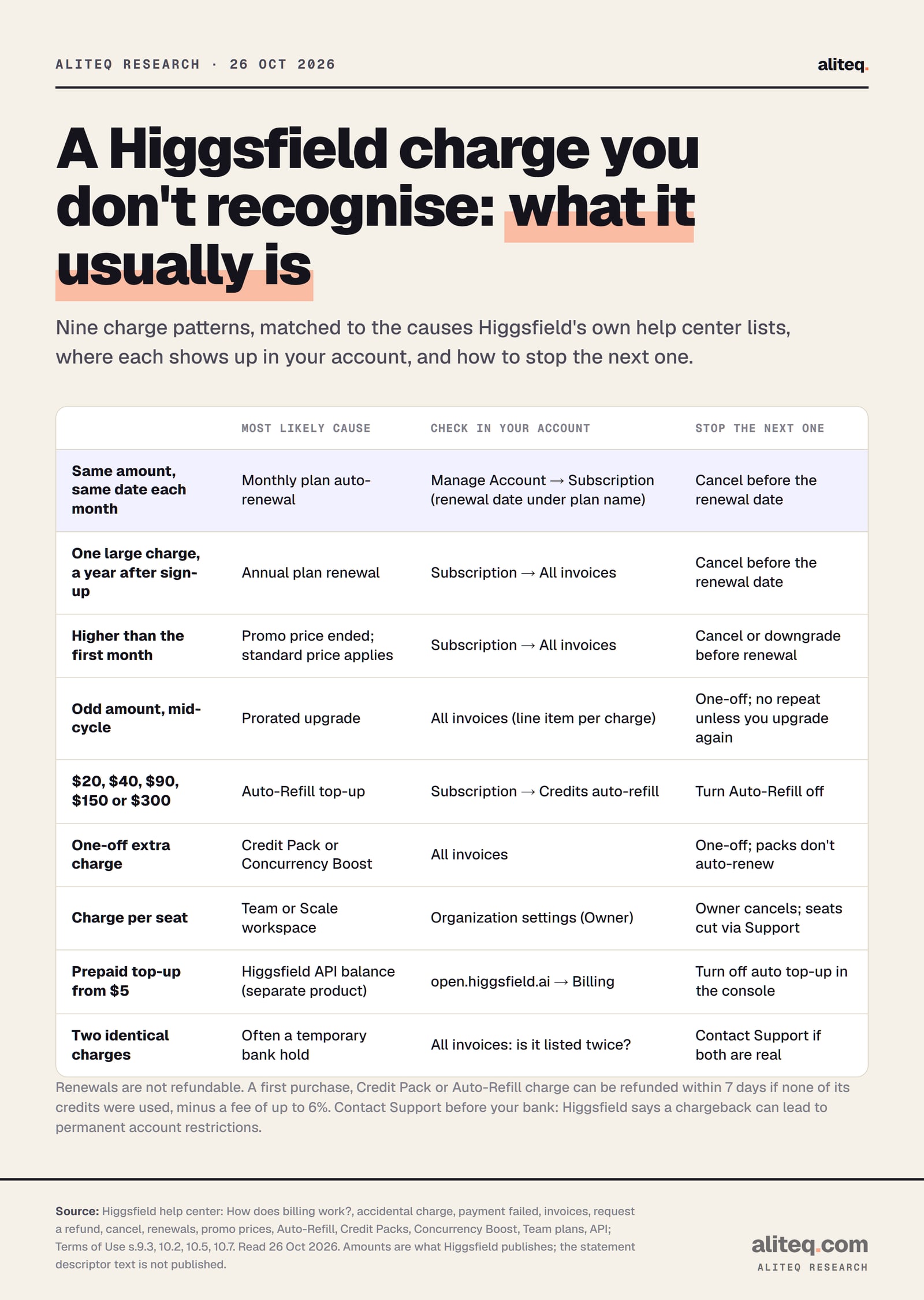
This is our own table, built from the help-center articles above. Higgsfield doesn't group charges this way; we did, so you can go from the line on your statement to the setting that controls it.
Charge you see, most likely cause, where to check and how to stop it. Built by aliteq from Higgsfield's help center and Terms of Use, read 26 October 2026. · aliteq research
Same amount, same date every month
Most likely cause
Monthly plan auto-renewal
Where to check
Manage Account → Subscription (renewal date under the plan name)
How to stop it
Cancel before the renewal date
One large charge about a year after sign-up
Most likely cause
Annual plan renewal
Where to check
Subscription → Upcoming Invoice → All invoices
How to stop it
Cancel before the renewal date
Higher than your first month
Most likely cause
Promo or first-month price ended
Where to check
All invoices
How to stop it
Cancel or downgrade before the next renewal
An odd amount in the middle of a cycle
Most likely cause
Prorated upgrade
Where to check
All invoices (one line item per charge)
How to stop it
One-off; it repeats only if you upgrade again
$20, $40, $90, $150 or $300
Most likely cause
Auto-Refill top-up
Where to check
Subscription → Credits auto-refill
How to stop it
Turn Auto-Refill off
A one-off extra amount
Most likely cause
Credit Pack or Concurrency Boost
Where to check
All invoices
How to stop it
Nothing to stop; neither renews
A multiple of a per-seat price
Most likely cause
Team or Scale workspace
Where to check
Organization settings (the Owner)
How to stop it
The Owner cancels; Support lowers seats for the next renewal
A prepaid top-up of $5 or more
Most likely cause
Higgsfield API balance
Where to check
open.higgsfield.ai → Billing
How to stop it
Turn off auto top-up in the API console
Two identical charges
Most likely cause
Often a temporary bank hold
Where to check
All invoices: is it listed twice?
How to stop it
Contact Support with both dates if both are real
A charge you can't match at all
Most likely cause
Second account on the same card, or not Higgsfield
Where to check
Every account you might have; your card's other merchants
How to stop it
Contact Higgsfield Support, then your bank
Most likely cause
Where to check
How to stop it
Same amount, same date every month
Monthly plan auto-renewal
Manage Account → Subscription (renewal date under the plan name)
Cancel before the renewal date
One large charge about a year after sign-up
Annual plan renewal
Subscription → Upcoming Invoice → All invoices
Cancel before the renewal date
Higher than your first month
Promo or first-month price ended
All invoices
Cancel or downgrade before the next renewal
An odd amount in the middle of a cycle
Prorated upgrade
All invoices (one line item per charge)
One-off; it repeats only if you upgrade again
$20, $40, $90, $150 or $300
Auto-Refill top-up
Subscription → Credits auto-refill
Turn Auto-Refill off
A one-off extra amount
Credit Pack or Concurrency Boost
All invoices
Nothing to stop; neither renews
A multiple of a per-seat price
Team or Scale workspace
Organization settings (the Owner)
The Owner cancels; Support lowers seats for the next renewal
A prepaid top-up of $5 or more
Higgsfield API balance
open.higgsfield.ai → Billing
Turn off auto top-up in the API console
Two identical charges
Often a temporary bank hold
All invoices: is it listed twice?
Contact Support with both dates if both are real
A charge you can't match at all
Second account on the same card, or not Higgsfield
Every account you might have; your card's other merchants
Contact Higgsfield Support, then your bank
Prices for comparison, as served to us on 26 October 2026 before tax: Starter $19 a month; Plus $59 monthly or $564 a year; Ultra 3,000 credits $129 monthly or $1,188 a year (pricing page). Tax is added at checkout, so the amount on your statement can be higher than the list price. Higgsfield: "This isn't a fee set by Higgsfield, and Higgsfield doesn't keep it."
What a plan charge can look like (list prices before tax, 26 Oct 2026)
Starter, monthly$19
Plus, monthly$59
Ultra 3,000, monthly$129
Plus, yearly$564 once a year
Ultra 3,000, yearly$1,188 once a year
How do I check what a Higgsfield charge was for?
Open your Higgsfield invoice list. Higgsfield's invoice article gives the path: click your avatar, then Manage Account → Subscription → Upcoming Invoice → All invoices. It says "Every subscription charge, Credit Pack purchase, and Auto-Refill top-up generates an invoice automatically", and each line has a Download button.
Search your email for a Higgsfield or Stripe receipt on the date of the charge. Match the amount, including tax.
Open All invoices and find the line with the same date and amount. The line item shows "the date, amount, and type of charge."
Read your renewal date at the top of Manage Account → Subscription, under your plan name ("Your plan renews [date]").
Check every account you might have. One account per email is allowed, so a Google sign-in and an email sign-in can be two different accounts on the same card.
If the charge is on an API balance, look at Billing in the console at open.higgsfield.ai instead.
If two identical amounts appear, check whether both are in your invoice list. Higgsfield says "Some banks show a temporary authorization hold alongside the actual charge: it's not a real charge, and it drops off on its own" (accidental charge article).
Match the line on your statement to an invoice in your Higgsfield account before you call the bank. Illustration made by us with Higgsfield, 26 October 2026. · Generated with Higgsfield (GPT Image 2) by aliteq
What if I don't have a Higgsfield account at all?
Contact Higgsfield Support with the date and amount, and talk to your bank. Higgsfield's payment-failed article says the date and amount are "enough for the team to locate the charge" and that the last 4 digits of the card can help, but "never share the full card number, expiry, or CVC with anyone." It adds that Higgsfield "will never ask for your card details by email." If you are sure nobody in your household signed up, your bank can tell you whether to replace the card.
How do I stop Higgsfield charging me?
Cancel the subscription and turn off Auto-Refill. They are two separate switches, though Higgsfield says cancelling also stops Auto-Refill: "Auto-Refill stops triggering once the subscription is canceled."
Cancel the plan: Manage Account → Subscription → Plan Settings → Manage Subscription → Show → Cancel Subscription (cancel article). "Canceling turns off auto-renewal": the plan stays active to the end of the period you paid for, then the account drops to the free tier. Your account and generations are not deleted.
Turn off Auto-Refill only: Manage Account → Subscription → Credits auto-refill. After that, "your balance no longer tops up automatically."
Team, Scale or Enterprise: only the workspace Owner can cancel, from the Organization settings.
API: manage the balance and any auto top-up in the console at open.higgsfield.ai.
Cancel before the renewal date shown in your account, not on it. The Terms (s.10.3) also allow cancellation by email to support@higgsfield.ai, but the request "must be sent from the subscriber's email address on the Account." Our cancel and refund guide walks through the steps in more detail.
Can I get my money back from Higgsfield?
Sometimes. Higgsfield refunds a first purchase, not a renewal. Its refund article sets three conditions that must all be met: initial purchase only, within "7 days or as permitted by the law in your jurisdiction", and zero credits used. "A service fee of up to 6% applies."
First subscription purchase
Refundable? (Higgsfield's refund table)
Yes, if the conditions are met
Any renewal
Refundable? (Higgsfield's refund table)
No
Credit Pack
Refundable? (Higgsfield's refund table)
Yes, within 7 days if no credits from that pack were used
Auto-Refill charge
Refundable? (Higgsfield's refund table)
Yes, within 7 days of the charge if no credits from it were used
Exclusive Offer that adds credits
Refundable? (Higgsfield's refund table)
Yes, within 7 days if unused
Offer that unlocks access or features
Refundable? (Higgsfield's refund table)
No, once the access is granted
Refundable? (Higgsfield's refund table)
First subscription purchase
Yes, if the conditions are met
Any renewal
No
Credit Pack
Yes, within 7 days if no credits from that pack were used
Auto-Refill charge
Yes, within 7 days of the charge if no credits from it were used
Exclusive Offer that adds credits
Yes, within 7 days if unused
Offer that unlocks access or features
No, once the access is granted
Unnoticed renewals: "Automatic renewals aren't refundable. A renewal isn't an initial purchase, so it falls outside the standard refund policy whether or not you noticed it."
Never used it: logging in doesn't count. Using free generations or Unlimited generations "doesn't count as credit usage and doesn't affect eligibility."
Accidental purchases: an accidental upgrade, annual instead of monthly, or a duplicate charge go through the same refund process. Contact Support "as soon as you notice the charge."
EEA and UK consumers: a 14-day right of withdrawal, which "ends early once you start using digital content from that purchase." Email support@higgsfield.ai to use it.
Two other cases: a pro-rata refund if Higgsfield materially degrades a paid plan or ends a paid feature (Terms s.1.7), and a refund of unused fees and purchased credits if Higgsfield terminates your account "through no fault of yours."
To ask, use Higgsfield's contact page with your account email, the date and amount of the charge, and a short reason. An approved refund cancels the plan straight away, and the money returns "within 5–10 business days, depending on your bank."
Should I dispute the Higgsfield charge with my bank?
Contact Higgsfield first. Its billing article answers the question "I see a charge I don't recognize" with: "Check your billing history first … Contact Support before disputing with your bank: a chargeback can result in permanent account restrictions." So a dispute on a charge you did make can cost you the account.
The order to handle a charge you don't expect
Find it in All invoices
Match the date and amount, including tax
Contact Higgsfield Support
Date and amount are enough to locate it
Refund, if eligible
First purchase, within 7 days, zero credits used, fee up to 6%
Bank dispute last
If the charge isn't yours or a real error isn't fixed; US cards, within 60 days
Find it in All invoices
Match the date and amount, including tax
Contact Higgsfield Support
Date and amount are enough to locate it
Refund, if eligible
First purchase, within 7 days, zero credits used, fee up to 6%
Bank dispute last
If the charge isn't yours or a real error isn't fixed; US cards, within 60 days
From Higgsfield's billing and refund articles and the CFPB's dispute guide, read 26 October 2026. General information, not legal advice.
A bank dispute is still your right, and it is the route if the charge isn't yours or Support doesn't resolve a real error. In the US, the Consumer Financial Protection Bureau's guide to credit card disputes says to send the card company a written billing-error notice within 60 days of the charge appearing on your statement. Rules differ by country and card type, so ask your bank. Keep the invoice, your cancellation confirmation and your Support messages; they are what a bank will ask for.
What do other customers report?
Charges and refunds are the main complaint. On 26 October 2026 Higgsfield's Trustpilot page showed a 4.0 TrustScore from 5,176 reviews. We searched those reviews for "charge" and read the first page of 20 results. Sixteen were 1-star and three were 5-star.
Trustpilot reviews that mention a charge (26 Oct 2026)
4.0
TrustScore
All reviews
5176
Reviews on Higgsfield's page in total
20
Results we read
First page of the "charge" search
16
Of those, 1-star
The recurring themes in those reviews, posted between mid-September and late October 2026:
a first payment or "trial" followed by a full-price charge, with the refund refused because it was a renewal;
a charge after the reviewer believed they had cancelled;
a renewal higher than the previous month;
refunds offered minus the service fee;
a few reviewers who got a full refund after contacting Support.
These are user reports. Trustpilot doesn't fact-check them, we can't verify the amounts, and several describe plan names Higgsfield no longer sells. They match the rules above, though: renewals aren't refundable, promo prices last one payment, and the refund fee is up to 6%. For the wider picture on the company and its reviews, see is Higgsfield legit.
What we couldn't verify
The exact text on your statement. Higgsfield doesn't publish its card descriptor, and we didn't make a purchase to see it. We can't say whether it reads "Higgsfield", "Higgsfield Inc", "HIGGSFIELD.AI" or something else, or whether it differs by bank or for the API.
Which legal entity bills you outside the US. The Terms name "Higgsfield Inc. and our affiliated entities". We didn't find which entity appears on invoices in each country.
Your Auto-Refill threshold. Higgsfield says it "depends on your plan" and shows it only in the set-up window.
Credit Pack and Boost prices. Higgsfield shows them only at checkout.
Current trial offers. The plans article says there is no trial; older promos and the Terms say trials can exist. Check what was shown to you at sign-up.
The Trustpilot amounts. Reviewers' prices and stories are their own reports.
US prices. Our pricing data came back with a Danish country code; a US visitor may see different prices or promos.
Our verdict
A Higgsfield Inc charge is a real company billing for a real product, and most surprise charges trace back to auto-renewal, a promo price ending, an upgrade or Auto-Refill. Open All invoices first, find the line, then decide.
If you still use Higgsfield, the fix is usually a setting: turn off Auto-Refill or put a reminder before your renewal date. If you don't use it, cancel before the next renewal, because renewals aren't refundable. If the charge is a first purchase from the last 7 days and you haven't spent credits, ask for a refund through Support, expecting a fee of up to 6%. Go to your bank only after Support, or straight away if the charge isn't yours.
If you're signing up, do it on higgsfield.ai itself, read the renewal price rather than the first-month price, and note your renewal date. Our Higgsfield credits guide explains what each plan's credits buy, so you can pick a plan you won't need to top up.
Quick answers
What is Higgsfield Inc on my bank statement?
A payment to Higgsfield, the AI video and image platform at higgsfield.ai. Higgsfield Inc. is the San Francisco company named in its Terms of Use, and it takes payments through Stripe.
Why did Higgsfield charge me again?
Plans auto-renew on the same date each month or year until you cancel. Other common causes Higgsfield lists are a prorated upgrade, Auto-Refill, a Credit Pack, tax, or a promo price ending.
Can I get a refund for a Higgsfield renewal?
No. Higgsfield refunds only the initial purchase, within 7 days, with zero credits used, minus a fee of up to 6%. Credit Packs and Auto-Refill charges follow the same 7-day, unused rule.
How do I stop Higgsfield charging my card?
Cancel in Manage Account, Subscription, Plan Settings, Manage Subscription, before the renewal date, and turn off Credits auto-refill. Cancelling keeps access to the end of the paid period.
Should I do a chargeback on Higgsfield?
Contact Higgsfield Support first. Higgsfield says a chargeback can result in permanent account restrictions. If the charge isn't yours or Support doesn't fix a real error, your bank can open a dispute.
Does Higgsfield have a free trial?
Higgsfield's help center said on 26 October 2026 that there is no trial period. Its Terms say any trial or promo converts to a paid plan at the standard price unless you cancel before it ends.