Manual, accept edits, plan, auto, don't ask, bypass: each one changes what Claude can do before it checks with you. Here is what Anthropic's docs say each does, how Shift+Tab moves between them, and where the safety lines sit.
You told Claude Code to fix one bug. It wants your permission to run a command. Then another. Then another. That prompt fatigue is exactly what the modes are for.
I am Neon, and I like tools that let me pick the right gear for the job. This guide reads Anthropic's own documentation and puts the six gears in one place. New to the tool? Start with Claude Code for vibe coders. For how it stacks up against other builders, see Lovable vs Cursor vs Claude Code.
What is a Claude Code permission mode?
A permission mode sets which actions Claude can take in a session without asking you first. Anthropic's docs put it that way. In Manual mode, Claude stops and asks before most edits, shell commands and network access. Other modes loosen or tighten that line.
Modes are only the baseline. You can layer permission rules on top to pre-approve or block specific tools. The docs say deny rules block in every mode, including bypassPermissions, and allow rules have no effect in bypassPermissions.
Naming trips people up. The mode that reviews every action is labeled Manual in the CLI, the VS Code and JetBrains extensions and the desktop app. Its config value is default. The CLI also accepts manual as an alias, from v2.1.200.
What does each of the six modes do?
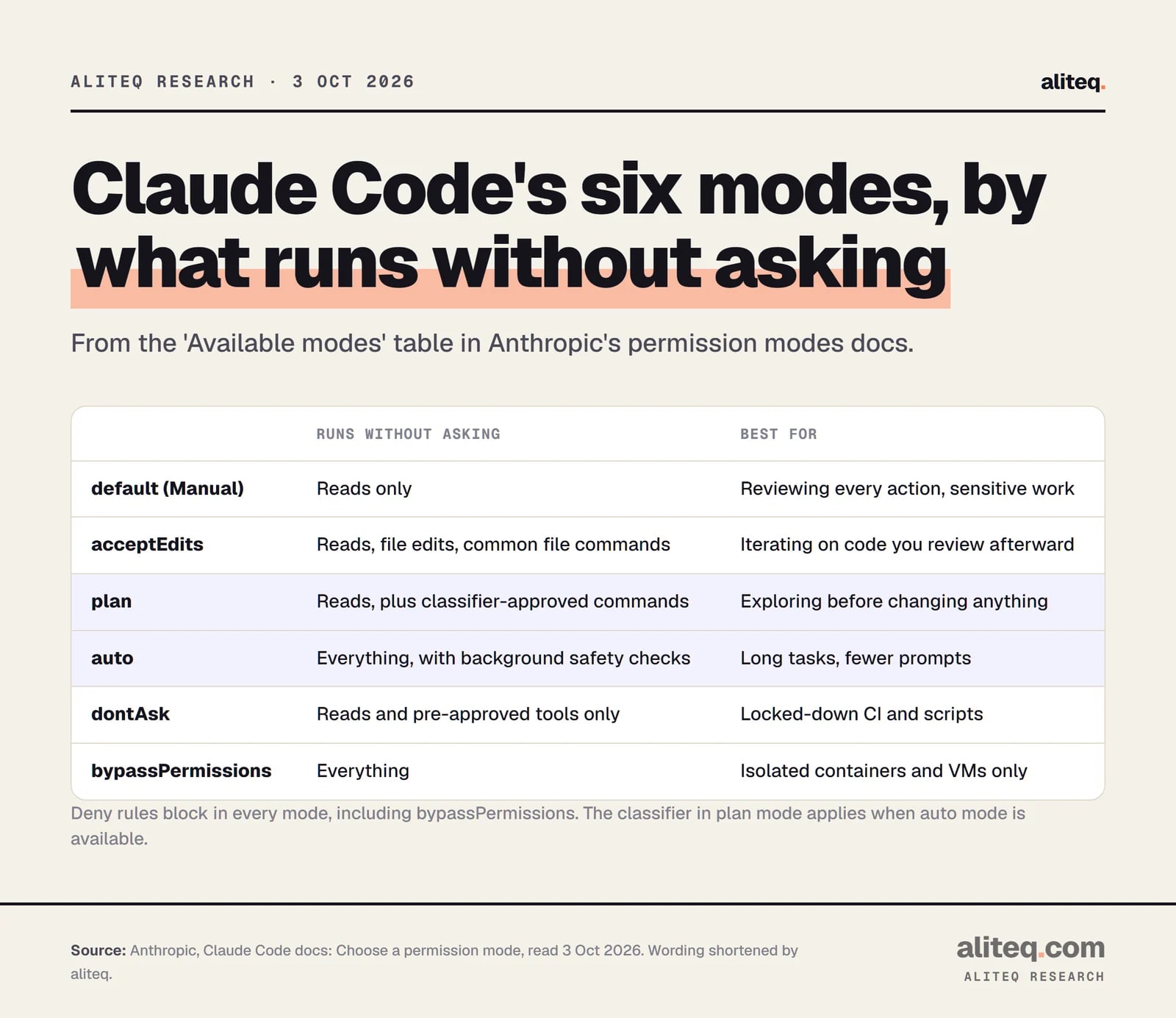
Each mode trades convenience for oversight. The docs table below shows what runs without a prompt in each. Reads are allowed everywhere except where a mode says otherwise. The further down the table, the less you are asked.
The 'Available modes' table from Anthropic's permission modes docs, wording shortened. Read 3 Oct 2026. · aliteq research
`default` (Manual)
What runs without asking
Reads only
Best for (per the docs)
Reviewing every action, sensitive work
`acceptEdits`
What runs without asking
Reads, file edits, common file commands
Best for (per the docs)
Iterating on code you review
`plan`
What runs without asking
Reads, plus classifier-approved commands
Best for (per the docs)
Exploring before changing anything
`auto`
What runs without asking
Everything, with background safety checks
Best for (per the docs)
Long tasks, fewer prompts
`dontAsk`
What runs without asking
Reads and pre-approved tools; the rest is denied
Best for (per the docs)
Locked-down CI and scripts
`bypassPermissions`
What runs without asking
Everything
Best for (per the docs)
Isolated containers and VMs only
What runs without asking
Best for (per the docs)
`default` (Manual)
Reads only
Reviewing every action, sensitive work
`acceptEdits`
Reads, file edits, common file commands
Iterating on code you review
`plan`
Reads, plus classifier-approved commands
Exploring before changing anything
`auto`
Everything, with background safety checks
Long tasks, fewer prompts
`dontAsk`
Reads and pre-approved tools; the rest is denied
Locked-down CI and scripts
`bypassPermissions`
Everything
Isolated containers and VMs only
Two things no mode will approve, even bypass: tools matched by an explicit ask rule, and rm or rmdir removals that target a critical path such as rm -rf / or rm -rf ~.
How do you switch modes with Shift+Tab?
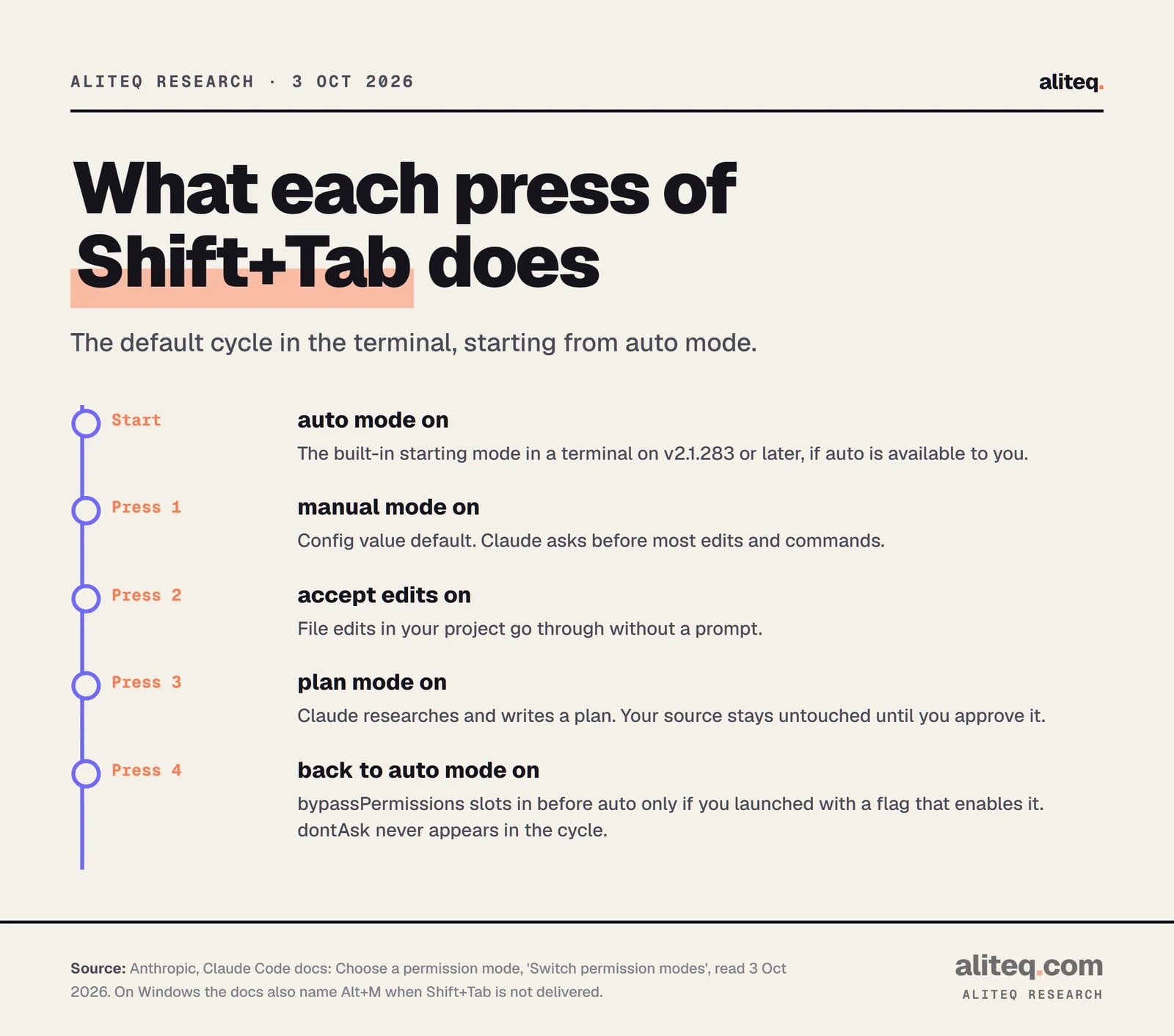
Press Shift+Tab in the terminal to cycle modes during a session. From auto, the first press goes to Manual, then accept edits, then plan. Optional modes slot in after plan. The status bar shows which mode is on, such as "accept edits on" or "plan mode on".
The default Shift+Tab cycle, from Anthropic's permission modes docs. Read 3 Oct 2026. · aliteq research
Not every mode is in the cycle. Auto appears when it is available to you. bypassPermissions appears only if you launched with --permission-mode bypassPermissions, --dangerously-skip-permissions or --allow-dangerously-skip-permissions. And dontAsk never appears, so you set it with --permission-mode dontAsk. On Windows, the docs name Alt+M as the key when your runtime does not deliver Shift+Tab.
To start a session in one mode, pass the flag:
claude --permission-mode plan
The flag accepts default, acceptEdits, plan, auto, dontAsk, bypassPermissions or manual. To set a default, put permissions.defaultMode in a settings file. One catch from the docs: "auto" or "bypassPermissions" in a project's .claude/settings.json or .claude/settings.local.json does not take effect. Put them in your user file at ~/.claude/settings.json instead.
Is auto really the default mode now?
In a terminal or the VS Code extension, yes, on Claude Code v2.1.283 or later. Earlier versions started in auto only on Pro, Max and Team plans, and only in some sessions. If auto is unavailable to you, the session starts in Manual instead. Check the status bar before you assume.
Anthropic's page says the first time the built-in default starts a session in auto mode, you see a notice. If your own ~/.claude/settings.json already sets another defaultMode, your sessions keep starting in that mode.
Auto mode has requirements. The docs list all plans, and on Team and Enterprise it is on by default unless an admin turns it off. On the Anthropic API it needs Claude Opus 4.6 or later, Sonnet 4.6 or later, or a Fable model. Older models such as Haiku are not supported.
How does plan mode work?
Plan mode tells Claude to research and propose changes without making them. Claude reads files, runs shell commands to explore and writes a plan, but does not edit your source. Edits stay blocked until you approve the plan. Enter it with Shift+Tab, or prefix one prompt with /plan.
When the plan is ready, Claude asks how to proceed. Per the docs you can pick:
Yes, and use auto mode. Approve and let Claude run in auto mode. If auto is unavailable, this reads "Yes, auto-accept edits".
Yes, manually approve edits. Approve, then review each edit one by one.
No, keep planning. Stay in plan mode and tell Claude what to change.
Press Ctrl+G to open the plan in your text editor and change it before Claude starts. Press Shift+Tab again to leave plan mode without approving.
One exception is worth knowing. In an interactive terminal where bypass permissions is available, the docs say plan mode's blocks are not enforced. Claude is still told to plan without editing, but an edit it attempts would run without a prompt. Plan mode keeps its blocks in -p runs, Agent SDK sessions and the VS Code chat panel.
To make plan the default for a project, set defaultMode to plan in that project's .claude/settings.json.
What does acceptEdits mode let Claude do?
acceptEdits lets Claude create and edit files in your working directory without prompting. It also auto-approves common file commands: mkdir, touch, rm, rmdir, mv, cp and sed. All of this applies only inside your working directory or any extra directories you added.
Everything else still prompts: paths outside that scope, protected paths, critical-path removals and other shell commands outside the read-only set. The docs' advice is the best summary of the mode: use it when you want to review changes in your editor or with git diff after the fact, rather than approving each edit inline.
What does auto mode block?
In auto mode a separate classifier model reviews actions before they run. The docs say it blocks anything that escalates beyond your request, targets unrecognized infrastructure, or appears driven by hostile content Claude read. Explicit ask rules still force a prompt.
Blocked by default, from Anthropic's list (a selection):
Downloading and executing code, like curl | bash
Sending sensitive data to external endpoints
Production deploys and migrations
Granting IAM or repo permissions
Force push
Irreversibly destroying files that existed before the session
git reset --hard and similar commands that would discard uncommitted changes
terraform destroy and its cousins
The classifier trusts your working directory and the git remotes set up when the session started. A remote added mid-session is not trusted. Blocked actions show up in /permissions under "Recently denied", where you can press r to retry with a manual approval.
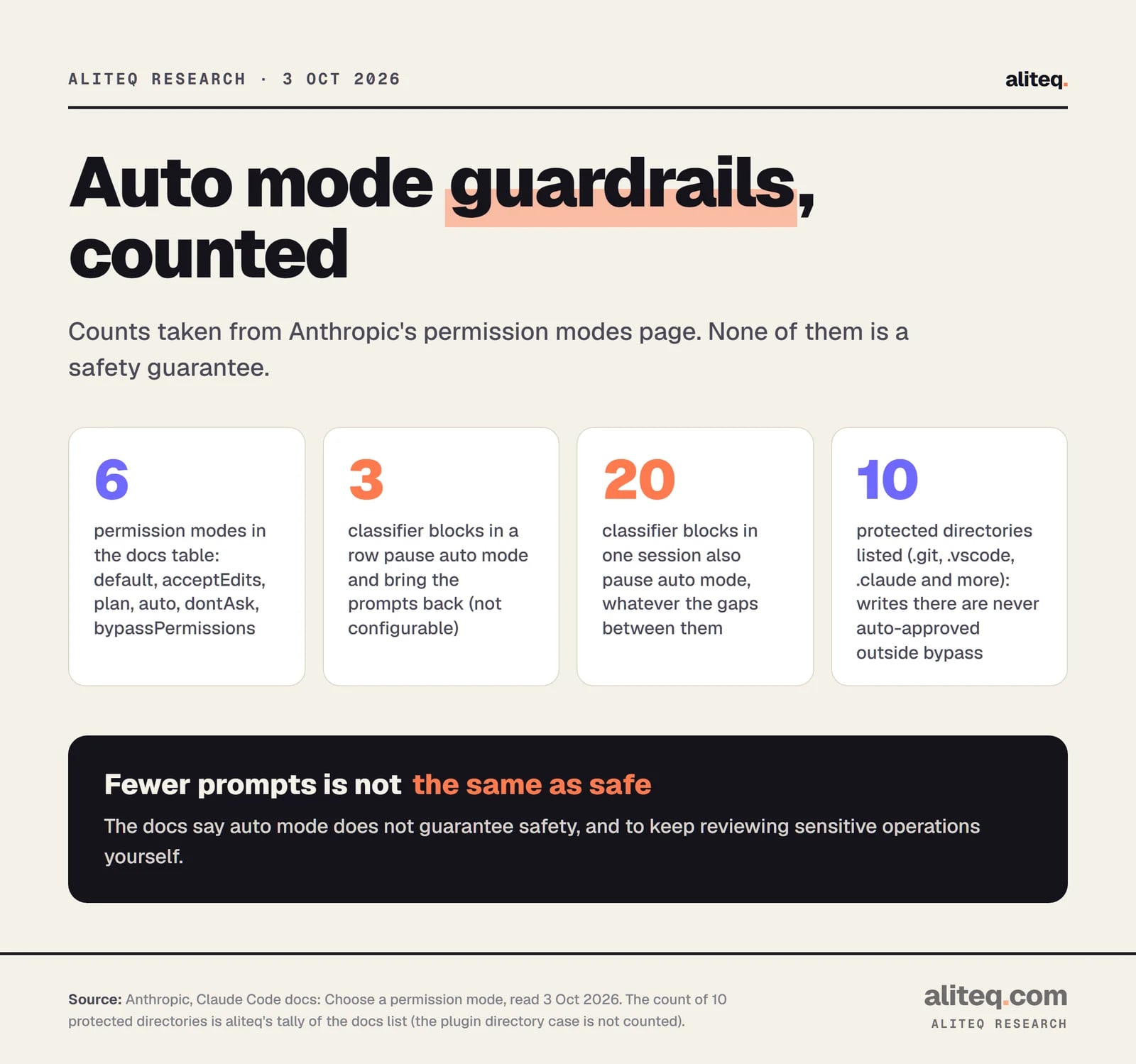
Counts from Anthropic's permission modes docs, read 3 Oct 2026. The 10 is aliteq's tally of the protected-directory list. · aliteq research
If the classifier blocks 3 times in a row, or 20 times in total, auto mode pauses and Claude Code goes back to prompting. Approving the prompted action resumes auto mode. Those limits are not configurable. In a -p run with no prompt to fall back to, the docs say the action does not run and Claude keeps working.
Read the docs' own warning before you lean on this: "Auto mode reduces permission prompts but does not guarantee safety. Use it for tasks where you trust the general direction, not as a replacement for review on sensitive operations."
What are protected paths?
Protected paths are files and folders where writes are never auto-approved, except in bypassPermissions. They guard repository state and Claude's own configuration. In Manual and accept edits you are prompted. In auto the write goes to the classifier. In dontAsk it is denied.
The docs list ten directories by name: .git, .config/git, .vscode, .idea, .husky, .cargo, .devcontainer, .yarn, .mvn and .claude. Protected files include .gitconfig, shell startup files such as .bashrc and .zshrc, .npmrc, .mcp.json and .claude.json. Allow rules in your settings do not pre-approve writes there, because the safety check runs first.
When should you use dontAsk or bypassPermissions?
Use dontAsk for scripts and CI where nothing can answer a prompt. It denies every call that would prompt and still allows reads, read-only commands and tools you pre-approved. Use bypassPermissions only inside an isolated container or VM. The docs say it offers no protection against prompt injection or unintended actions.
Here is the docs' CI example for dontAsk:
claude -p "run the test suite" --permission-mode dontAsk --allowedTools "Bash(npm test)" "Read"
The docs' fully unattended example, which needs a container, a VM or the sandbox runtime around it:
claude -p "" --dangerously-skip-permissions
Anthropic is blunt about bypass: "Only use this mode in isolated environments like containers, VMs, or dev containers without internet access, where Claude Code cannot damage your host system." Some guardrails still apply. You cannot switch into it from a session started without it enabled. On Linux and macOS Claude Code refuses to start in it as root or under sudo. The first interactive run shows a warning dialog, and declining exits. For fewer prompts with safety checks, the docs point you to auto mode instead.
How do modes work with headless -p runs?
Add -p (or --print) to run Claude Code without the interactive screen, as in claude -p "What does the auth module do?". There is no one to ask, so the mode matters more. Pass --permission-mode, or list tools with --allowedTools, to say what can run.
The docs give this example for file changes: claude -p "Apply the lint fixes" --permission-mode acceptEdits. A -p run exits 0 on success and non-zero on failure, so scripts can branch on it.
What mode does a bare -p run start in? The docs say default in sessions that fetch feature flags. In sessions that do not, such as a third-party provider or telemetry off, it is auto on v2.1.285 or later and default before. Set the flag yourself and you never have to guess.
Which mode should you pick?
Match the mode to how much you trust the task and how easily you can undo it. This is my reading of the docs, not a tested recommendation.
Unfamiliar codebase or sensitive work: stay in Manual and approve each action.
Big or unclear change: use plan first. Read the plan, edit it with Ctrl+G, then approve.
Changes you will review in git diff afterward: acceptEdits.
Long task you trust the direction of: auto, and keep reviewing anything sensitive.
CI or scripts: dontAsk with an exact allowlist. Bypass only in a container or VM.
Quick answers
Quick answers
What is the difference between plan mode and Manual mode?
Manual asks before most edits and commands, but Claude can still make them once you approve. Plan mode tells Claude to research and propose without editing your source. Edits stay blocked until you approve the plan, and approving switches you to the mode you choose.
How do I get out of auto mode?
Press Shift+Tab. From auto, the first press switches to Manual. You can also start with --permission-mode default, or set defaultMode to default in ~/.claude/settings.json, which makes new sessions start in Manual.
Why does my project's settings file not start Claude in auto or bypass?
Anthropic's docs say "auto" and "bypassPermissions" in .claude/settings.json or .claude/settings.local.json do not take effect. A checked-in file cannot turn them on for everyone. Put those values in your user settings file at ~/.claude/settings.json.
Is --dangerously-skip-permissions the same as bypassPermissions?
Yes. The CLI reference says the flag is equivalent to --permission-mode bypassPermissions. It disables prompts and safety checks, including for protected paths, so use it only inside a container or VM.
Can an admin turn off auto or bypass for a team?
Per the docs, admins can set permissions.disableAutoMode to "disable" in managed settings to remove auto, and permissions.disableBypassPermissionsMode to "disable" to block bypass.
Which models can use auto mode?
On the Anthropic API, Claude Opus 4.6 or later, Sonnet 4.6 or later, or a Fable model. On Amazon Bedrock, Google Cloud's Agent Platform and Microsoft Foundry, only Sonnet 5 or later, Opus 4.7 or later and the Fable models. Older models, including Haiku, are not supported.