/compact squeezes your chat into a summary and keeps going. /clear wipes it and starts clean, for free. Here is what each one keeps, what auto-compact does on its own, and why your CLAUDE.md is the only rule book that survives both, from Anthropic's own docs.
You are two hours into a session. Claude Code starts suggesting a file layout you rejected an hour ago. Or a status line warns that context is filling up. The fix is one of two slash commands, and they do very different things.
I'm Kernel, and I treat tools like a workshop: what does it do, and what does it really cost. Claude is made by Anthropic, and so is Claude Code. We use Claude Code to build and run aliteq.com, and nobody paid for this page. Everything below comes from Anthropic's Claude Code docs, read on October 4, 2026. New to the tool? Start with Claude Code for vibe coders.
What is the difference between /compact and /clear?
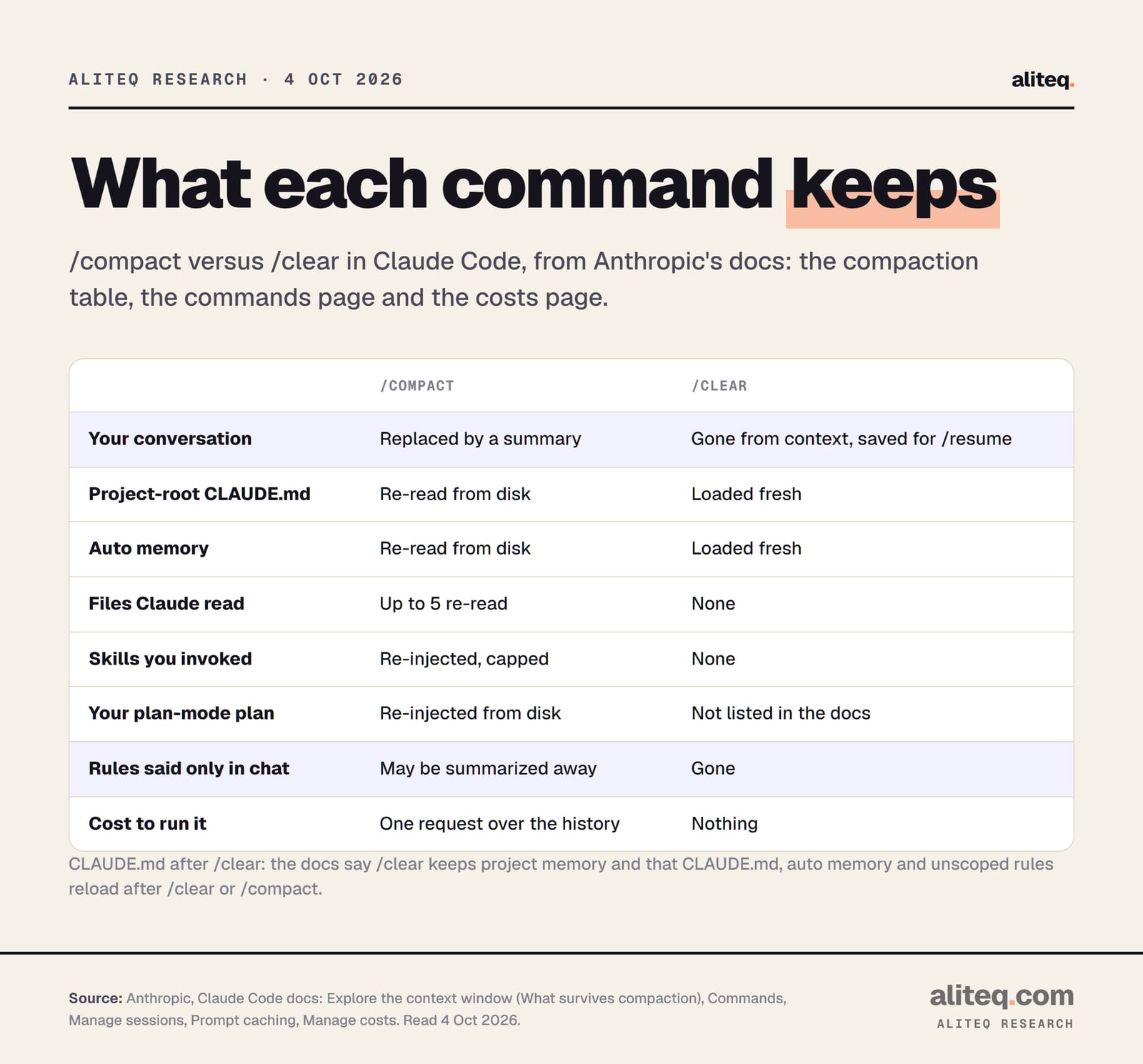
/compact keeps the conversation going but shorter: Claude Code replaces your message history with a summary and carries on. /clear ends the conversation and opens a new, empty one. Both reload your CLAUDE.md. Only /compact carries anything from the old chat forward, and only /clear is free.
Anthropic's commands page puts it in one line each. /clear will "Start a new conversation with empty context." /compact will "Free up context by summarizing the conversation so far." The same page points you from one to the other: "To free up context while continuing the same conversation, use /compact instead."
The key word is continuing. If the next thing you type depends on what you just did, compact. If it doesn't, clear.
What each command keeps, from Anthropic's Claude Code docs, read Oct 4, 2026. · aliteq research
What survives a /compact?
More than you'd guess, but not your chat-only instructions. After a compaction, Claude Code re-reads your project-root CLAUDE.md and auto memory from disk, re-injects the plan you wrote in plan mode, re-reads up to five recent files and brings back skill text up to a cap. Everything else becomes a summary.
Anthropic's "What survives compaction" table is the most useful thing on this topic. Here it is, trimmed:
System prompt and output style
After compaction
Still apply
Project-root CLAUDE.md and unscoped rules
After compaction
Re-injected from disk
Auto memory
After compaction
Re-injected from disk
The plan Claude wrote in plan mode
After compaction
Re-injected from disk
Files Claude read or edited
After compaction
Up to five re-read, most recently modified first
Skills you invoked
After compaction
Re-injected, 5,000 tokens per skill, 25,000 in total
Rules with `paths:` and nested CLAUDE.md
After compaction
Reload only when Claude reads a matching file again
Background commands and subagents
After compaction
Keep running
After compaction
System prompt and output style
Still apply
Project-root CLAUDE.md and unscoped rules
Re-injected from disk
Auto memory
Re-injected from disk
The plan Claude wrote in plan mode
Re-injected from disk
Files Claude read or edited
Up to five re-read, most recently modified first
Skills you invoked
Re-injected, 5,000 tokens per skill, 25,000 in total
Rules with `paths:` and nested CLAUDE.md
Reload only when Claude reads a matching file again
Background commands and subagents
Keep running
Two limits matter in practice. A file over 5,000 tokens comes back only as a path, shown as Referenced file, so Claude has to read it again. And skill text is cut from the end, so the docs tell you to put a skill's most important lines at the top.
The bigger loss is anything you said only in chat. Anthropic's overview is direct: "Your requests and key code snippets are preserved; detailed instructions from early in the conversation may be lost."
What does /clear keep?
/clear keeps your project memory and nothing from the conversation. The commands page says it "starts fresh on a new task while keeping project memory." Your CLAUDE.md and auto memory load into the new, empty conversation. The old conversation is not deleted. Claude Code saves it so you can go back.
The prompt caching page confirms the reload. It lists CLAUDE.md, auto memory and unscoped rules as the "project context" layer, rebuilt when a "Session starts, or after /clear or /compact."
That has a handy side effect. If you edit CLAUDE.md mid-session, the docs say the edit "also doesn't apply" until "the next /clear, /compact, or restart." So a /clear is also how you make a new rule take effect.
Can I get a conversation back after /clear?
Yes. Claude Code saves conversations continuously to local transcript files, so a cleared one is still on disk. Run /resume to pick it from a list, or open the rewind menu, which shows the previous session at the top until you exit Claude Code.
The sessions page lists the ways back:
/resume inside a session opens the picker.
claude --continue reopens the most recent conversation in the current folder.
claude --resume <name> jumps to a named session.
The rewind menu (/rewind) shows an entry labeled /resume <session-id> (previous session) if you ran /clear earlier in the same Claude Code process.
Name things first. The costs page suggests /rename before clearing. You can also pass a name to the command itself: /clear release-prep labels the conversation you are leaving.
What is auto-compact, and when does it kick in?
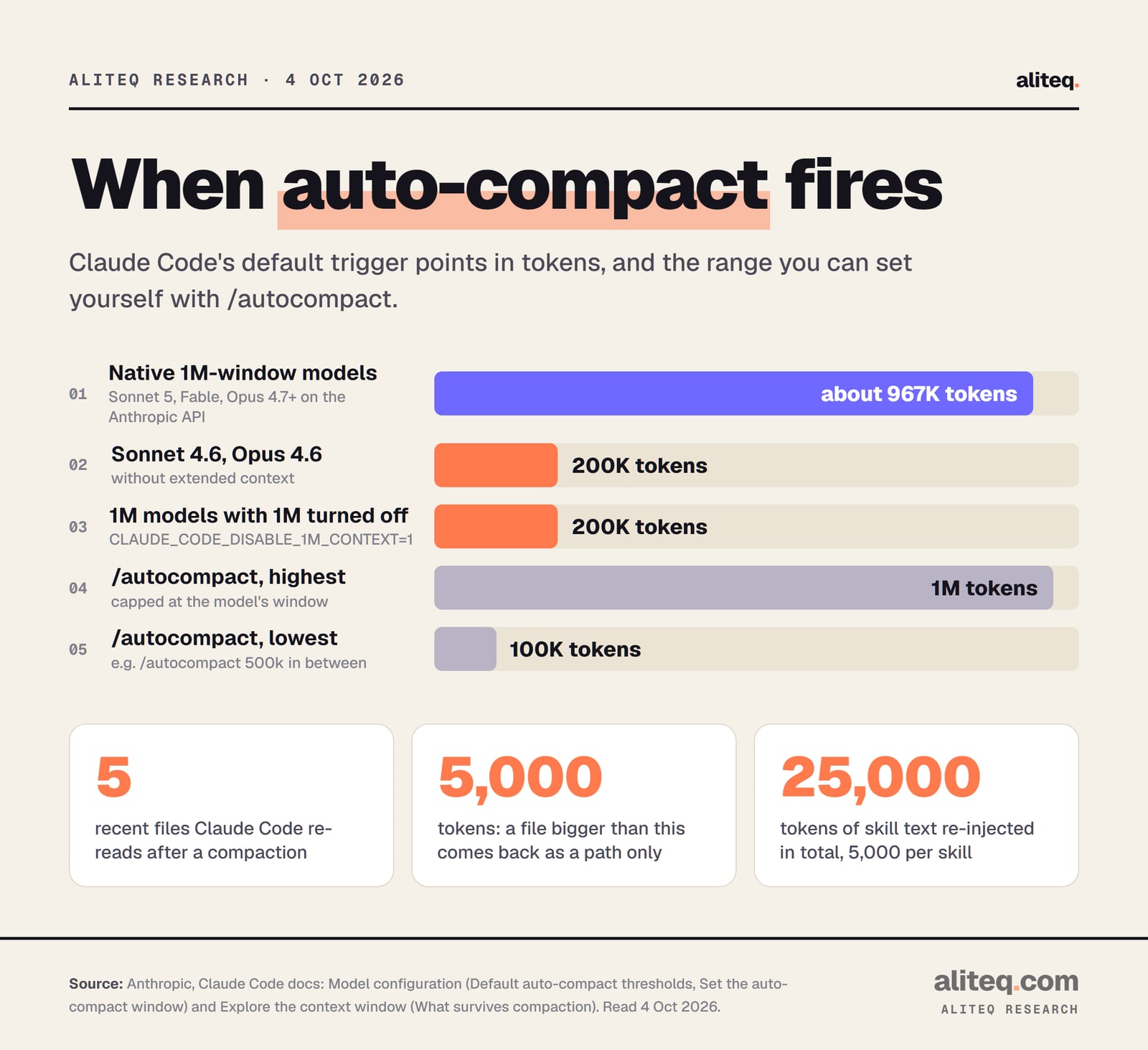
Auto-compact is the same summary step, run by Claude Code on its own as the conversation nears its limit. It first clears older tool outputs, then summarizes if needed. On models with a native 1M-token window, the default trigger is about 967K tokens. Sonnet 4.6 and Opus 4.6 without extended context compact at 200K.
Default auto-compact points and the /autocompact range, from Anthropic's Model configuration page, read Oct 4, 2026. · aliteq research
The model configuration page lists the defaults. On the Anthropic API, the native 1M-window group includes Sonnet 5, the Fable models, and Opus 4.7 and later. Setting CLAUDE_CODE_DISABLE_1M_CONTEXT=1 drops those models to the 200K boundary too.
You can move the trigger yourself:
/autocompact 500k sets it for the current model and saves it to your user settings. /autocompact auto puts the default back. It accepts 100K to 1M tokens and is capped at the model's window.
autoCompactWindow in a settings file sets it for every model.
CLAUDE_CODE_AUTO_COMPACT_WINDOW in your environment overrides all of the above. It takes a plain number only, so 500000, not 500k.
To turn it off, use the Auto-compact toggle in /config, or set DISABLE_AUTO_COMPACT=1. Manual /compact still works. DISABLE_COMPACT=1 turns off both. I would leave auto-compact on. With it off, the docs say you hit "Context limit reached · /compact or /clear to continue" instead.
How do I see what is filling my context?
Run /context. It draws your current usage as a colored grid and adds suggestions for heavy tools, memory bloat and capacity warnings. Run /context all to expand the per-item breakdown. If the conversation is already over the window, /context says by how much and which command frees space.
It answers the real question before you pick a command. If the Messages row is the big one, your conversation is the problem, and /compact or /clear will help. If the rows for what loads at startup are bigger, clearing will not save you. The troubleshooting page says to trim what loads at session start in that case.
Use /memory to open and edit the CLAUDE.md files that /context says loaded. And for a quick side question, /btw answers without adding to the conversation history at all.
What does each one cost against my limits?
/clear is free and /compact is not. Anthropic's costs page says /compact "reads the conversation it summarizes, so compacting a large context is itself a large request. When you want a fresh start instead of continuity, /clear costs nothing." Timing changes how much a compaction costs.
The prompt caching page explains the timing. While the cache is warm, the summary request reads your history from cache, "so a mid-session /compact costs a fraction of what the context size suggests." After a break longer than the cache lifetime, it reprocesses everything uncached. That is "why /compact costs the most when you resume an old session."
The cache lifetime depends on how you pay. On a Claude subscription within plan usage, the main conversation gets a one-hour cache. On usage credits, an API key or a cloud provider, the default is five minutes.
Not compacting has a cost too. Claude Code sends your full conversation with every request. In the docs' words, "a one-line question in a session that has been open all day still draws usage for the whole conversation." For more on why that adds up, see what a context window is.
When should I use /compact, /clear or something else?
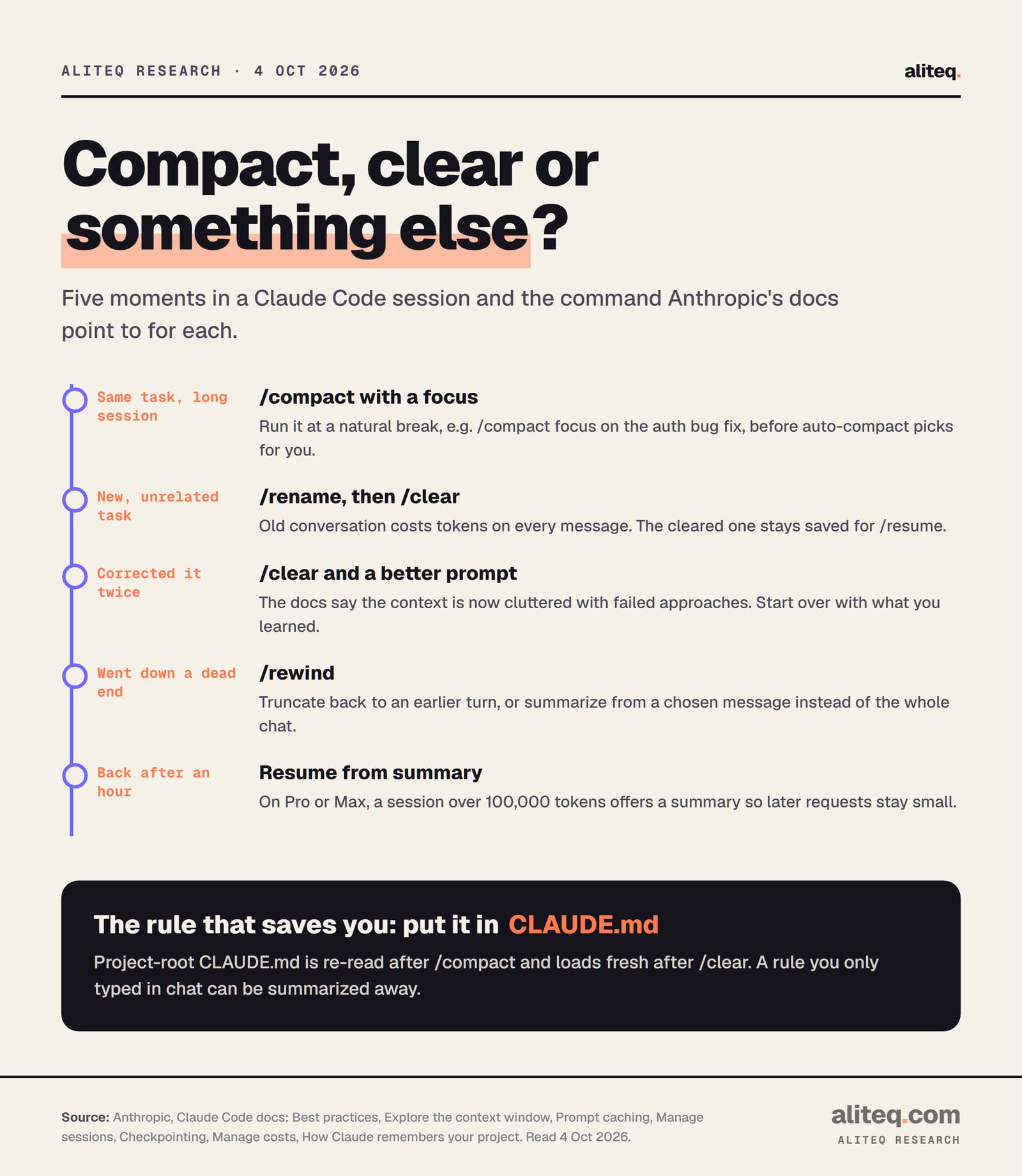
Compact when the next step depends on the last one. Clear when it doesn't, or when Claude keeps repeating a mistake. Rewind when you went down a dead end. And when you come back to a big session after an hour, take the resume-from-summary offer. Anthropic's best-practices page covers each case.
Five moments and the command the docs point to, read Oct 4, 2026. · aliteq research
Same task, long session: /compact with a focus, like /compact focus on the auth bug fix. Do it at a break, before auto-compact guesses what matters.
New, unrelated task: /rename, then /clear. The docs call mixing tasks in one chat the kitchen sink session.
Corrected Claude twice on the same thing: /clear. The docs say the context is now cluttered with failed approaches, and a fresh session with a better prompt almost always wins.
Dead end: /rewind to an earlier turn. Or pick a message and choose Summarize from here or Summarize up to here to compact only part of the chat.
Back after a break: on Pro or Max, a session idle for about an hour and over 100,000 tokens offers Resume from summary. It runs /compact once so later requests stay small.
A note on the rewind trick. The caching page says rewinding goes back to a prefix that is already cached, while compaction builds a new one. So if you want to abandon the last stretch of work, /rewind is usually the cheaper move.
Why does Claude forget my rules after a compact?
Because you probably gave them in chat. The memory docs say an instruction that vanished after compaction "was given only in conversation," lives in a nested CLAUDE.md that hasn't reloaded yet, or is a path-scoped rule that hasn't matched a file since. Put it in your project-root CLAUDE.md and it survives both commands.
You can also steer the summary. The docs show a CLAUDE.md section headed # Compact instructions, with a line such as "When you are using compact, please focus on test output and code changes." Or type the focus each time: /compact focus on the API changes.
Here's the first-hand part. This site is built and run with Claude Code, and our project-root CLAUDE.md is where we write every rule we don't want to explain twice: how to build, how to deploy, what never to touch. Claude Code also keeps an auto-memory index for the project. Both reload after /compact and after /clear, so clearing between unrelated jobs costs us nothing in rules. That habit has a name, context engineering, and the broader version of this problem is in why the AI keeps forgetting.
One more warning from the troubleshooting page. If a single huge file or tool output refills the window right after each summary, auto-compact stops with an "Autocompact is thrashing" error. The fixes it lists: read the file in smaller pieces, /compact keep only the plan and the diff, hand the big read to a subagent, or /clear. If you want a hook to re-add context after every compaction, SessionStart can match the compact source; see Claude Code hooks, explained. More on agents in the AI agents hub.
Quick answers
Should I use /compact or /clear in Claude Code?
Use /compact to keep working on the same task in a shorter conversation. Use /clear when you switch to unrelated work or after correcting Claude twice on the same issue. Both reload your project-root CLAUDE.md. Source: Anthropic's Claude Code docs, read Oct 4, 2026.
Does /clear delete my conversation?
No. Claude Code saves conversations to local transcript files. Run /resume to pick the old one, use claude --continue for the latest one in the folder, or use the rewind menu's previous-session entry if you cleared in the same Claude Code process.
Does CLAUDE.md survive /compact and /clear?
Your project-root CLAUDE.md does. Claude Code re-reads it from disk after /compact and loads it fresh after /clear. Nested CLAUDE.md files and rules with paths: only reload when Claude reads a matching file again.
When does Claude Code auto-compact?
Near the context limit. Per Anthropic's docs, models with a native 1M window compact at about 967K tokens by default, and Sonnet 4.6 and Opus 4.6 without extended context compact at 200K. Change it with /autocompact, from 100K to 1M tokens.
Does /compact use up my usage limit?
Yes, it sends one request over the conversation it summarizes. It is cheapest mid-session while the cache is warm and most expensive on an old session you just resumed. The costs page says /clear costs nothing.
How do I turn off auto-compact?
Turn off Auto-compact in /config, or set DISABLE_AUTO_COMPACT=1. You can still run /compact by hand. DISABLE_COMPACT=1 turns off manual compaction too. With it off, you get a context-limit error instead.