Every vibe coding tool has an undo button, and each one lives somewhere different. Where to find it in six tools, what it brings back, and the catch most people learn too late: it rewinds your code, not your data. Plus the one undo that works everywhere.
You asked for a small change. The AI rewrote half your app, and now the login page is blank. You want the version from ten minutes ago back.
Good news: every tool you might be holding has an undo for exactly this. Less good news: each one hides it somewhere different, and each one restores a slightly different set of things. I'm the build editor here. I'll show you where the button is in Lovable, Bolt, Replit, Cursor, Claude Code and v0, what it brings back, and what it leaves broken.
I read each tool's own documentation on October 4, 2026. I did not press these buttons for this piece; every step below comes from the vendor's docs. This site is built with Claude Code, and git is our undo too. No vendor pays us, and this page has no affiliate links.
Before you press undo: stop, look, then rewind
Stop the AI first, so it can't keep "fixing" things while you undo. Then look at what it changed, using the tool's diff or preview. Then pick the last version that worked and restore it. Finally, check your data separately, because the undo button almost certainly didn't touch it.
A diff is the list of exactly which lines were added and removed. Lovable shows one per version under View code changes, and v0 shows one per message. If reading a diff is new to you, how to read AI code without coding walks you through it in plain English.
Stop the agent. Don't send another 'fix it' message while you work out what happened
Open the history and preview the versions. Find the last one where the app worked
Restore that version with your tool's button, below
Check your data on its own. Records the AI added, changed or deleted are usually still that way
What does undo actually restore?
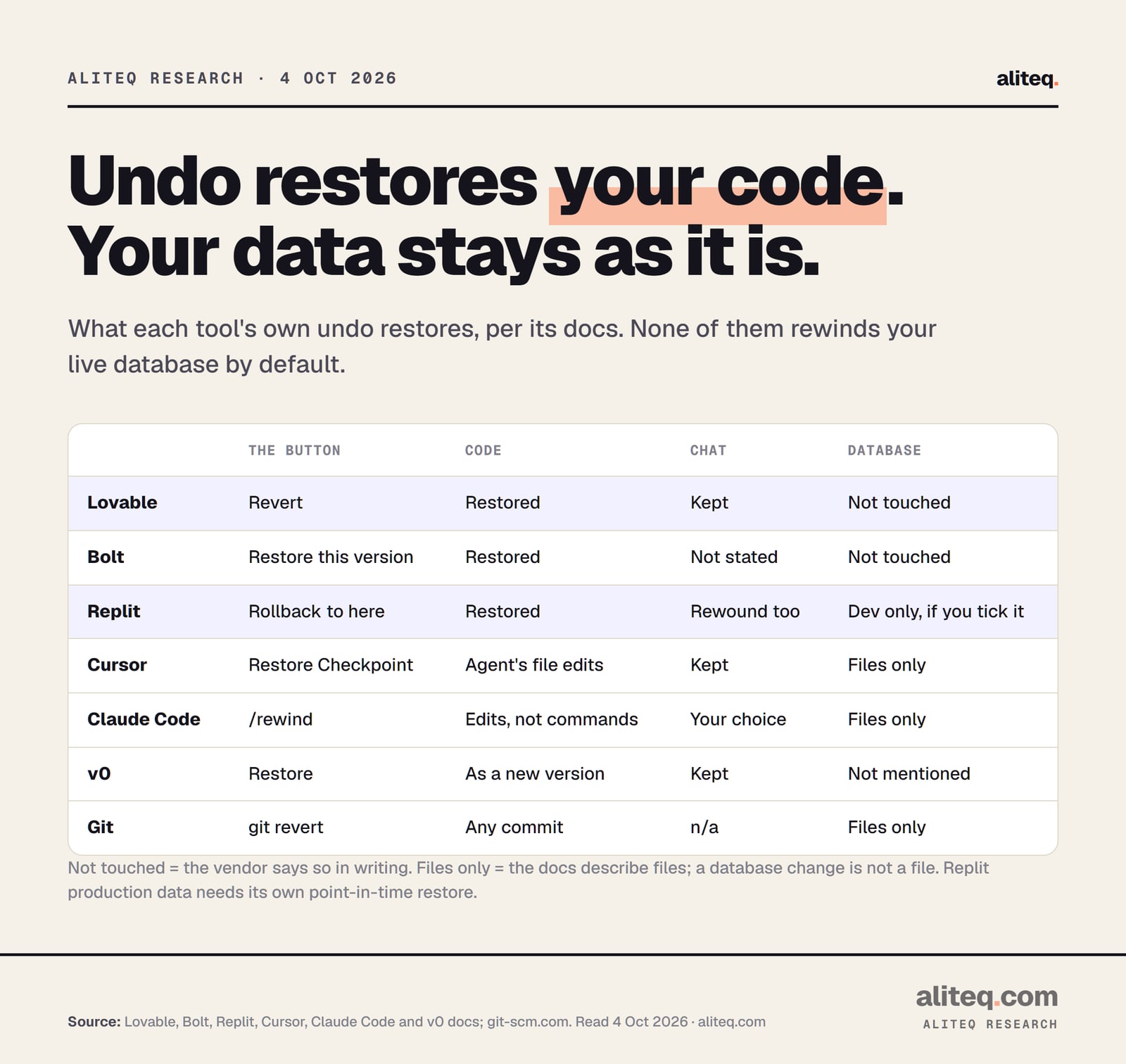
Your code. That's the honest one-line answer across all six tools. Lovable's docs say a revert restores "code only". Bolt's say a restore "will not change your current Bolt or Supabase databases". Replit's say rollbacks "do not change your database" by default. Cursor and Claude Code describe files, and v0's Versions page describes code.
What each tool's undo brings back, per its own docs. Lovable, Bolt, Replit, Cursor, Claude Code and v0 docs, and git-scm.com, read Oct 4, 2026. · aliteq research
Why does that matter? Your app is two things. The code is the instructions: pages, buttons, rules. The database is the stuff your users put in: accounts, orders, posts. If what a database is is still fuzzy, that page draws it out. Undo rewinds the instructions. It leaves the stuff exactly where the mistake put it.
So if the AI ran a change that deleted rows or renamed a column, reverting the code won't bring those rows back. Lovable's docs spell it out: if messages after that version "added records, changed data, or ran migrations against your data, reverting the code does not undo those data changes." For getting data back, see AI deleted my database.
Here's where each button lives, at a glance:
Lovable
The undo button
Revert
Where to find it
History toggle in the top bar, then a version
Bolt
The undo button
Restore this version
Where to find it
Version history (clock icon) in the top menu
Replit
The undo button
Rollback to here
Where to find it
Agent tab, next to each checkpoint
Cursor
The undo button
Restore Checkpoint
Where to find it
Chat timeline, or on a previous request
Claude Code
The undo button
/rewind
Where to find it
Type /rewind, or press Esc twice on an empty prompt
v0
The undo button
Restore
Where to find it
Version controls on each generated message
The undo button
Where to find it
Lovable
Revert
History toggle in the top bar, then a version
Bolt
Restore this version
Version history (clock icon) in the top menu
Replit
Rollback to here
Agent tab, next to each checkpoint
Cursor
Restore Checkpoint
Chat timeline, or on a previous request
Claude Code
/rewind
Type /rewind, or press Esc twice on an empty prompt
v0
Restore
Version controls on each generated message
How do I revert to a previous version in Lovable?
Open History, pick the version that worked, and click Revert. Lovable saves a version for every change automatically, so there's always one to go back to. It asks you to confirm, showing the version's date. Your chat continues from where you are, and the edits made after that point stay in the chat to reapply.
Step by step, from Lovable's docs:
Click the History toggle in the top bar of the editor. (Or open the + menu next to the chat input and choose Project, then History.)
Click a version to open it in a snapshot view. Nothing changes yet. You can look around that old state of your app.
Use View code changes in the More actions menu to see the diff for that version.
Click Revert (the tooltip says "Revert to this version") and confirm.
There's a second way that's handy when the AI misread you. Hover over one of your own past messages, click Edit message, change the wording, and choose Revert and resend. Lovable goes back to that point and tries your new instruction instead.
A few things Lovable's docs are clear about:
It's all or nothing per version. You can't revert half a version. To bring back one part, ask in chat. Lovable's own example: "Bring back the pricing section from before the redesign."
Credits aren't refunded. "Credits pay for the work Lovable performs, so messages you later revert still count."
It redeploys your edge functions (small pieces of server code) to match the old version. Your database data is not touched.
Bookmark a good version before a big change. Lovable suggests it before a redesign or a data model rework, so the version you want is one click away.
Lovable revert not working or greyed out?
The Revert button is disabled in three cases, per Lovable's docs. You're already on that version. The project was remixed from a project on Lovable Cloud, so versions from before the remix can't be restored. Or the version is very old: you can still preview it, but the tooltip reads "Cannot revert this far back in history."
The docs don't give an age for "very old." If you hit that wall, preview the old version, use View code changes to see what was there, and ask the chat to rebuild that part. If you'd connected GitHub, the old code is also in your repository. More on that in the git section below.
How do I restore an earlier version in Bolt?
Click Version history (the clock icon) in the top menu, click the version you want, and Bolt loads a preview. If it's the right one, click Restore this version, then Restore version to confirm. A message in the chat confirms the restore. Bolt calls this its recommended way to go back.
You can also restore straight from the chat. Scroll up to the version, click the eye icon to preview it, then the return-arrow icon to restore it, and confirm.
Two extras worth knowing from Bolt's docs:
Rename and bookmark versions. Hover over a version in the history to rename it ("checkout working") or bookmark it. That makes the good one easy to find later.
Dated backups make a copy, not a rewind. In Project settings, under Backups, you can Load an automatic backup by date. Bolt then creates a fork: "a duplicate of your project using the backup, without affecting the current version."
And the catch, in Bolt's own words: "Restoring to an earlier project version will not change your current Bolt or Supabase databases."
How do I roll back in Replit?
Open the Agent tab, find the checkpoint you want, and select Rollback to here, then confirm. Replit Agent creates checkpoints on its own: after finishing a feature, at milestones, and before it tries to fix a critical issue. Rolling back restores your files, settings and the Agent's conversation to that point.
Replit is the one tool here that can rewind data too, but only if you ask. Its docs: "By default, rollbacks do not change your database. To include your development database in a rollback, select 'Database' in 'Additional rollback options.'"
Read that carefully, because there are two databases. The development database is the one you build and test with. The production database is the one your real users write to after you publish. Replit's docs say restoring production "is not performed automatically through this rollback feature." Production has its own point-in-time restore instead.
Two more things from Replit's docs:
You can roll forward. If you went back too far, open the history icon in the Agent chat and pick a later checkpoint. That works until you make new changes. After that, the later checkpoints become "an alternate branch of history."
Checkpoints are git commits. "Each checkpoint creates a corresponding Git commit," and they show up in the Git pane. Replit still recommends manual git commits "for long-term version tracking."
How do I restore a checkpoint in Cursor?
Click any checkpoint in the Agent chat timeline to preview your files at that point, then restore it. You can also use the Restore Checkpoint button on a previous request, or the + button when you hover over a message. Cursor's Agent creates checkpoints automatically, before it makes significant changes.
Cursor's docs describe a checkpoint as a snapshot "capturing the state of all modified files." Restoring one reverts those files. If you use Cursor's command-line version, the equivalent is the /rewind command, which Cursor's changelog says has been on by default since June 22, 2026.
Cursor is also blunt about what checkpoints are for: "Checkpoints are stored locally and separate from Git. Only use them for undoing Agent changes; use Git for permanent version control."
Cursor restore checkpoint not working?
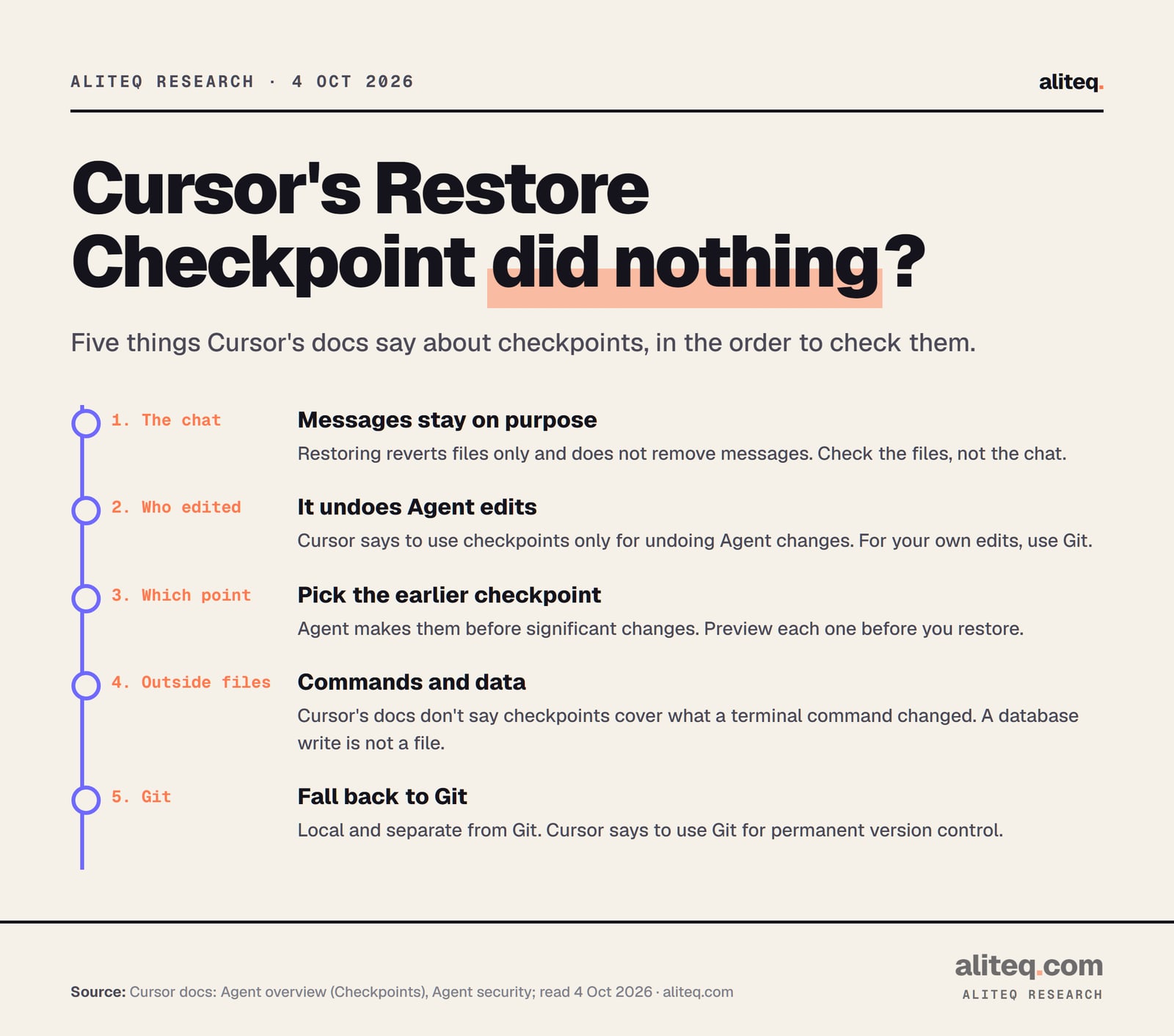
Usually it did work, just not the way you expected. Cursor's docs say restoring "reverts files only; it does not remove messages from the conversation." So the chat looks exactly the same afterward. Open the files and check. If they're unchanged too, run through the checks below, each tied to a line in Cursor's docs.
Why a Cursor restore can look like it did nothing. From Cursor's Agent overview and Agent security docs, read Oct 4, 2026. · aliteq research
The chat didn't change. That's by design. Only files go back.
The change wasn't the Agent's. Cursor says checkpoints are for undoing Agent changes. Edits you typed yourself belong in git.
You picked the wrong point. Checkpoints come before significant changes. Preview the files at the checkpoint before you restore, and go one earlier if needed.
The damage isn't in a file. Cursor's docs don't say whether checkpoints cover what a terminal command changed. Claude Code's docs say its own rewind doesn't. And a change to your database isn't a file at all.
The change already ran. Cursor's security page says agent changes "save immediately to disk," and with auto-reload on they "might execute before you can review them." A restored file can't un-send an email or un-delete a row.
How do I undo changes in Claude Code?
Type /rewind, or press Esc twice when the prompt box is empty. A menu lists every prompt you sent in the session. Pick the point before things went wrong, then choose Restore code to put the files back, Restore conversation to rewind the chat only, or Restore code and conversation for both.
Claude Code makes a checkpoint every time you send a prompt that starts a turn. It keeps file snapshots for the 100 most recent checkpoints in a session, and they survive closing and resuming the session.
Its docs are unusually specific about what rewind can't undo:
Changes made by commands. "Checkpointing does not track files modified by Bash commands." If Claude ran a command that deleted or moved files, rewind won't bring them back.
Most subagent edits. For subagents running in the background, "rewinding doesn't restore the edits. Use git to revert them."
Changes made outside the session, like your own edits in another editor, are normally not captured.
Old sessions. Snapshots are deleted about 30 days after the session last saved one, by default. Rewinding after that can fail with "No files were restored."
Anthropic's own summary: checkpoints are "designed for quick, session-level recovery," and you should keep using git for permanent history. If Claude Code itself is new to you, Claude Code for vibe coders explains what it is and how it differs from Lovable.
How do I go back to an earlier version in v0?
Use the version controls attached to each generated message. From there you can inspect a version, view its diff, or restore it. v0 creates a new version every time it updates code from a message. Restoring an old one doesn't delete anything: it creates a new, latest version with the old code.
Two details from v0's docs that trip people up:
Your own edits don't make versions. "Non-message actions (such as editing code or modifying files directly) do not generate new versions." If you changed a file by hand, v0's history won't have a copy from before your edit.
Restoring doesn't redeploy. "When deploying, the latest version of the code is used." To put an old version live, restore it first, then deploy.
v0's Versions page says nothing about databases. As with the others, treat a restore as code only.
How far back can I undo?
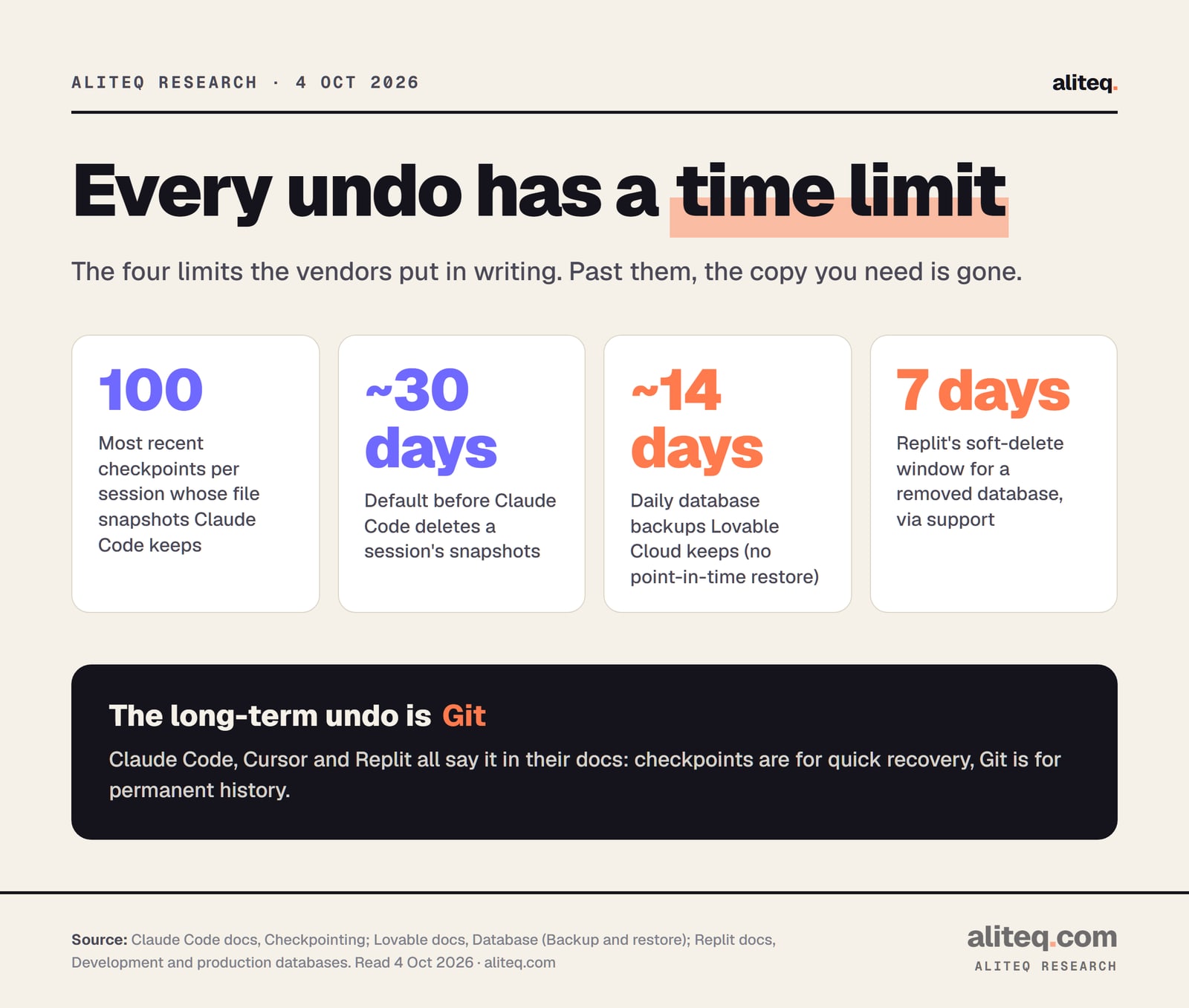
Not forever. Claude Code keeps snapshots for its 100 most recent checkpoints in a session, and deletes them about 30 days after the session last saved one. Lovable's code history has a cut-off for very old versions, with no age given. For data, Lovable Cloud keeps roughly 14 days of daily database backups.
The undo limits the vendors put in writing. Claude Code, Lovable and Replit docs, read Oct 4, 2026. · aliteq research
Lovable's backups restore to a daily snapshot, not to any moment. Its docs warn that "Restoring is permanent. Any data created or changed after the chosen backup is lost." Replit's docs say a removed database sits in a 7-day soft-delete window, where support can restore it. After that, it's gone.
Cursor, Bolt and v0 don't publish how long their checkpoints or versions last. That's not a reason to panic. It's a reason not to treat any of them as your only copy.
Git: the undo that works in every tool
Git is a free, open source tool that saves snapshots of your project's files, called commits, with a note about each. Every tool here can use it: Lovable and Bolt sync to GitHub, Replit turns checkpoints into commits, and Cursor and Claude Code work in a git folder. That's why their docs all point you to it.
The habit that saves you is one line, before you ask the AI for anything big. Commit what works now. If the AI breaks it, you have a known-good point that lives outside the tool's own checkpoints.
These are the commands, from git's own documentation. In Cursor or Claude Code you can type them in the terminal, or simply ask the agent to run them:
# Before a big AI change: save a known-good point
git add -A
git commit -m "Working: login and checkout OK"

# After the AI changed things: see what changed
git status
git diff

# Throw away ALL uncommitted changes (careful: they're gone)
git restore .

# Undo one commit that's already saved, by adding a new commit that reverses it
git revert <commit-id>
Two warnings from git's docs, in plain English. git revert undoes a saved commit by recording a new one, and it needs a clean folder first. git restore and git reset --hard "will discard uncommitted changes in your working directory." In other words, anything you haven't committed is lost. Commit first, then experiment.
In Lovable, connecting GitHub means "changes you make in Lovable are committed to your repository," per its docs. In Bolt, the GitHub integration is one of its listed ways to restore a project. Either way, your history then lives in an account you control, not only inside the builder.
What about my data?
Undo won't bring it back. If the AI deleted or changed records, go straight to your database's own backups: Lovable Cloud's daily backups, Replit's development rollback or production point-in-time restore, or Supabase's backups if your app uses it. Do that first, before more changes pile up on top.
And if you've rolled back three times and it still breaks the same way, the problem may be bigger than one bad change. When to start over instead of fixing helps you make that call. If you're still choosing a tool, Lovable vs Cursor vs Claude Code compares them side by side.
Quick answers
How do I revert to a previous version in Lovable?
Click the History toggle in the editor's top bar, click the version that worked, then click Revert and confirm. Or edit an earlier message of yours and choose Revert and resend. Reverting restores code only; your database data stays as it is, per Lovable's docs.
Does undoing an AI change restore my database?
Not by default, in any of the six tools. Lovable and Bolt say in their docs that restoring a version doesn't change your database. Replit restores your development database only if you tick Database in the rollback options, and never production. Use your database's own backups for data.
Why did Cursor's Restore Checkpoint do nothing?
It most likely did restore your files. Cursor's docs say restoring reverts files only and does not remove messages, so the chat looks the same. If the files are unchanged too, pick an earlier checkpoint, and remember checkpoints are for Agent changes. Use git for anything else.
How do I undo in Claude Code?
Type /rewind or press Esc twice on an empty prompt, pick the prompt before things went wrong, and choose Restore code. It won't undo files changed by shell commands or most background subagents, per Anthropic's docs. Use git for those.
Does reverting in Lovable refund my credits?
No. Lovable's docs say credits pay for the work Lovable performs, so messages you later revert still count.
What is the safest way to undo AI changes in any tool?
Commit a known-good version with git before a big change. A commit lives outside the tool's checkpoints, and Lovable, Bolt, Replit, Cursor and Claude Code can all work with a git repository. Claude Code, Cursor and Replit's own docs recommend git for permanent history.
This page has no affiliate links or sponsored placements. It explains each tool's documented undo; it isn't a guarantee your work can be recovered.