One YAML file starts your app, its database and the wiring between them. It also has a famous trap, because the app can come up first. Here is the file piece by piece, what depends_on really waits for, where your data lives, and when Compose stops being enough.
I'm a hardware editor, so I like things that are just a list of parts and how they connect. Docker Compose is that, for software. Instead of a README that says "start Postgres, then Redis, then the app, in that order, and don't forget the network," you write the parts list once. Then one command builds the machine.
I haven't run any of the examples below. Everything here comes from Docker's documentation and the Compose Specification, which I read on 3 October 2026, and the sample file is my own sketch built from documented settings. Treat it as a pattern to adapt, not a tested recipe.
What problem does Docker Compose solve?
Compose solves the "how do I start all the pieces" problem. Docker's docs call it "a tool for defining and running multi-container applications." You describe the pieces in a YAML file, then one command creates and starts them together.
Most real apps are not one container. You have the app, a database, maybe a cache. Running each with its own long docker run command means remembering flags, ports and order. Compose writes all of that down.
Docker's own docs list three typical jobs:
Development environments. The docs say Compose can "reduce a multi-page 'developer getting started guide' to a single machine-readable Compose file and a few commands."
Automated tests. Bring the stack up, run the tests, bring it down: docker compose up -d, ./run_tests, docker compose down.
Single host deployments. The docs say "Compose supports production deployments on single hosts."
There is also a speed benefit. According to the docs, "When you restart a service that has not changed, Compose reuses the existing containers." If you're new to running software on someone else's machine at all, what hosting is and what it costs covers the basics first.
What is actually in a compose.yaml file?
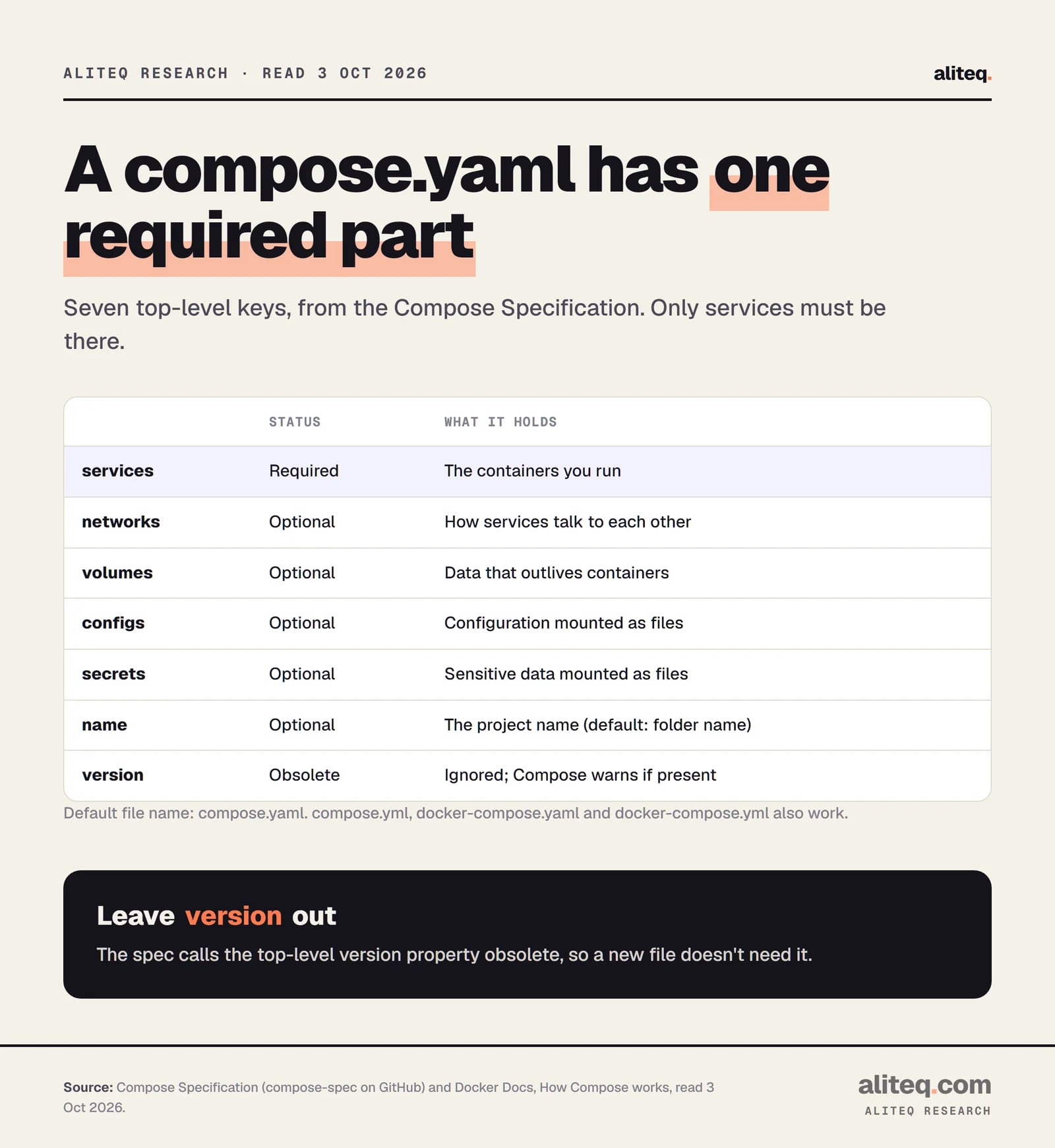
A Compose file is a YAML file with one required top-level element, services, and optional ones for networks, volumes, configs and secrets. A service is one container image plus its settings. Everything else describes what the services share.
The default file name is compose.yaml. Compose also accepts compose.yml, docker-compose.yaml and docker-compose.yml. If both the new and old names exist, it prefers compose.yaml.
Compose Specification and Docker Docs, read 3 October 2026. · aliteq research
Here is a small file I built from the documented settings. It runs a web app and a Postgres database, with a healthcheck so the app waits for the database.
name sets the project name. Without it, Compose names the project after the directory. The project name prefixes the networks and volumes Compose creates.
build: . builds an image from a Dockerfile in this folder. The db service uses a ready-made image instead. A service needs one or the other.
"8000:8000" is HOST:CONTAINER. The spec says to always quote it, to avoid a clash with YAML base-60 numbers.
${DB_PASSWORD} is filled in from your shell or a .env file in the project directory. Docker's docs warn against putting passwords in environment variables and point to Compose secrets instead. For a throwaway dev setup this is fine. For anything real, use secrets.
restart: unless-stopped is one of four restart policies: no (the default), always, on-failure and unless-stopped.
No version: line. The spec calls the top-level version property obsolete and says Compose warns you if you use it.
Why does my app start before the database is ready?
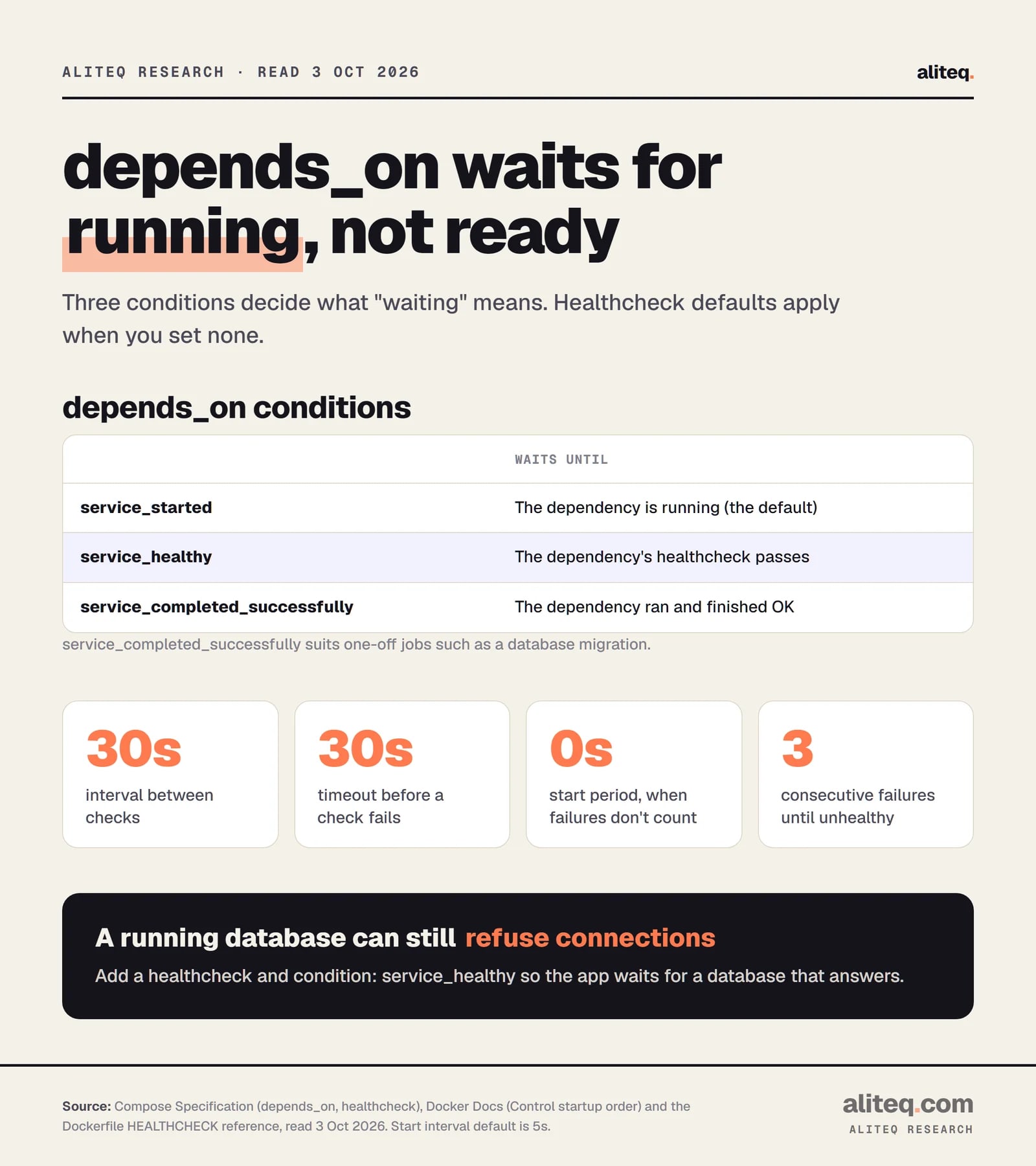
Because depends_on on its own only waits for a container to be running. Docker's docs say it plainly: "On startup, Compose does not wait until a container is 'ready', only until it's running." A database that is running may still be starting its own services.
That gap is the classic Compose bug. The app boots, tries to connect, finds nothing listening and crashes. The fix has two parts.
First, give the dependency a healthcheck. This is a command Compose runs inside the container to ask "are you actually working?" Second, change the dependency to condition: service_healthy. There are three conditions:
Compose Specification and Dockerfile HEALTHCHECK reference, read 3 October 2026. · aliteq research
The numbers on that chart are the defaults a healthcheck uses when you set nothing. Compose's healthcheck "works in the same way, and has the same default values, as the HEALTHCHECK Dockerfile instruction." The Dockerfile reference lists them: interval 30 seconds, timeout 30 seconds, start period 0 seconds, start interval 5 seconds and 3 retries.
Here's how a check moves through its states, per the Dockerfile reference:
A new container starts as starting.
A passing check makes it healthy.
After the set number of consecutive failures, it becomes unhealthy.
A check that runs longer than the timeout counts as a failure.
Failures during the start period don't count toward the retries. That's why the example above sets start_period: 30s for a database that takes a moment to boot.
Two smaller options are worth knowing. restart: true under a dependency restarts the dependent service when Compose updates or restarts that dependency, but not after an automatic crash restart by the runtime. required: false makes Compose only warn if a dependency is missing. Both arrived in specific Compose versions (2.17.0 and 2.20.0), so older installs may reject them.
Also note that depends_on controls shutdown. Compose creates services in dependency order and removes them in the reverse direction, so web goes away before db.
Where does your data go when you take it down?
Data in a named volume survives docker compose down. Data inside a container's own filesystem does not, because the container is deleted. Volumes are the persistent storage, and Compose creates them if they don't exist.
The volumes spec says: "When the services are run, the volume is created if it doesn't already exist. Otherwise, the existing volume is used." That's what makes a database survive a restart.
There are two ways to mount storage, and they look alike in short syntax:
Named volume, like db-data:/var/lib/postgresql. Docker manages where it lives. Declare it under the top-level volumes key.
Bind mount, like ./src:/app. A folder on your machine appears inside the container. Docker's spec says relative paths should start with . or .. so they aren't mistaken for volume names.
A bind mount made with short syntax creates the host folder if it's missing. Long syntax with create_host_path: false prevents that.
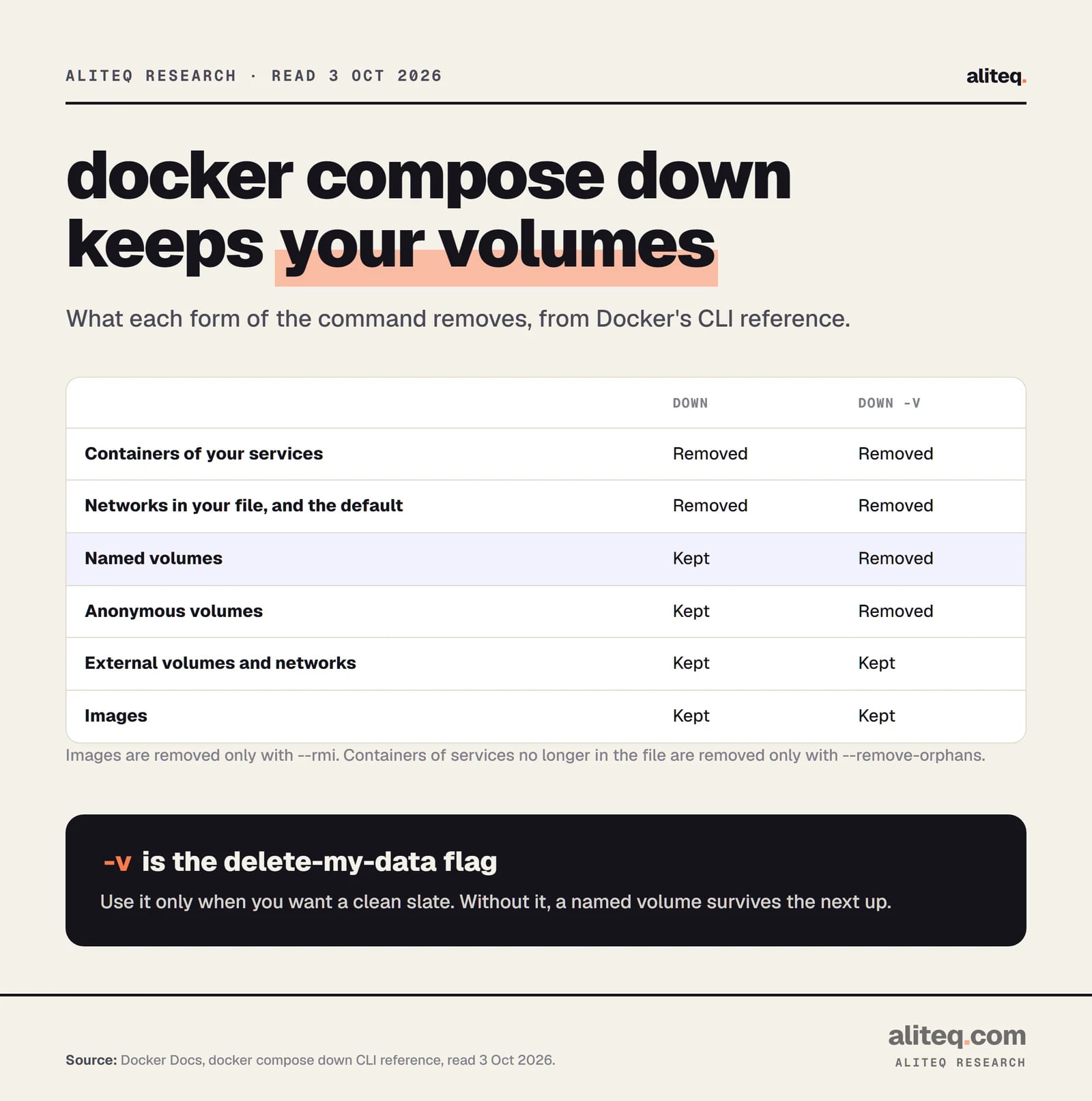
What docker compose down removes surprises people in both directions. This is from Docker's CLI reference:
docker compose down CLI reference, read 3 October 2026. · aliteq research
In short: down removes containers and networks, not your named volumes. Add -v and it removes the named volumes too, along with anonymous ones. Volumes marked external are never removed.
One trap deserves its own line, and it comes from the Postgres image docs. From PostgreSQL 18 on, the image's data folder (PGDATA) is /var/lib/postgresql/18/docker, and the declared volume is /var/lib/postgresql. For 17 and below you mounted /var/lib/postgresql/data. Mount at the wrong path and, per those docs, the runtime creates an anonymous volume that "is not reused across container re-creations." Your data looks fine until the next recreate. Always match the mount path to your image's major version.
How do containers find each other?
By service name. Compose creates one bridge network per project, named like notes_default, and every service joins it. Each service name resolves through an internal DNS server. So web reaches the database at db, not at an IP address.
Docker's networking page gives the example: web connects to postgres://db:5432. From your own machine the same database appears at the published host port, if you set one.
Two port numbers confuse beginners. In "8001:5432", 8001 is the host port and 5432 is the container port. Services talking to each other use the container port. The host port is only for you, outside the network.
IP addresses change. The docs say containers get new addresses when recreated, so "you should always reference services by name, not IP address."
You can define your own networks to keep services apart. Docker's example has three services. A proxy sits on frontend. An app sits on frontend and backend. A db sits on backend. The proxy can't reach the database because they share no network, and only the app can talk to both. Setting internal: true on a network goes further: it has no connection to the host's network interfaces and no default gateway to the outside.
There's an escape hatch, network_mode: host. The service shares the host's network stack, port mapping doesn't apply, and name-based lookup doesn't work. Docker's docs say to use it only when genuinely required.
When should you move beyond Compose?
Move beyond Compose when you need your app to run across more than one machine, or when a platform team already runs something else. Docker's docs describe Compose for a single host. Past that, they point to Swarm and to Compose Bridge, which turns your file into Kubernetes manifests.
Here's what the docs say Compose can do in production before you need to leave. Their checklist for a production file: remove bind mounts of application code, use different host ports, set environment variables differently, add a restart policy such as restart: always, and add extra services such as a log aggregator. They suggest a second file, compose.production.yaml, holding only the changes, run like this:
docker compose -f compose.yaml -f compose.production.yaml up -d
To redeploy one service, the docs show docker compose build web and then docker compose up --no-deps -d web. The --no-deps flag stops Compose from also recreating the services web depends on. To target a remote machine, set DOCKER_HOST and the TLS variables, and "all the normal docker compose commands work."
The docs don't give a list of limits, and I won't invent one. This is my reading, not a documented rule. The signals that you're outgrowing it are:
You need the app on several servers at once, not one.
Your team or employer already deploys everything to Kubernetes.
You're hand-editing the same production file on a server and nobody can say what's running.
Compose Bridge exists for the second case. Docker's page says it "converts your Docker Compose configuration into platform-specific deployment formats such as Kubernetes manifests," plus a Kustomize overlay by default. It's the documented bridge, so you can keep compose.yaml as the source.
One safety note applies at every stage. Docker's trust model page says Compose "treats every Compose file as trusted input" and that a file "has full control over how containers interact with your host." Read a Compose file from the internet the way you'd read a script before running it.
The quick version of everything above:
Write compose.yaml with a service per container. Skip the obsolete version key and quote your port mappings.
Give every dependency that must be ready a healthcheck, then use condition: service_healthy in depends_on.
Put data in a named volume, and match the mount path to the image's major version (Postgres 18 and up use /var/lib/postgresql).
Reach other services by name over the default network, and use the container port, not the host port.
Run docker compose down without -v to keep your data. Keep passwords out of environment variables once the project is real.
If you're picking apart how apps are built from pieces like this, the software hub collects our explainers. aliteq sells no Docker products and earns nothing from these links.
Quick answers
What does docker compose up do?
It reads your Compose file, creates the networks and volumes it defines, and creates and starts the services. Docker's docs list it as the command that starts all the services defined in your compose.yaml.
Does depends_on wait until my database is ready?
Not by default. Compose waits only until the dependency's container is running. To wait for a working database, give it a healthcheck and set condition: service_healthy under depends_on.
Should I still put version at the top of compose.yaml?
No. The Compose Specification calls the top-level version property obsolete. Compose ignores it for choosing a schema and warns you if it's present. Leave it out.
Does docker compose down delete my database?
Not by default. It removes containers and networks, but named volumes stay. Adding the -v flag also removes named volumes and anonymous volumes, so use it only when you want a clean slate. Volumes marked external are never removed.
Is Docker Compose okay for production?
Docker's docs say Compose supports production deployments on single hosts and describe a production override file with restart policies. For several machines, Docker points to Swarm and to Compose Bridge for Kubernetes.
What is the difference between a bind mount and a named volume?
A bind mount maps a specific folder on your machine into the container, which suits live code editing in development. A named volume is storage Docker manages for you, which suits databases. Named volumes are declared under the top-level volumes key.