Your workflows stopped and n8n Cloud says the execution limit is reached. Here's what uses up executions, what each plan includes in US dollars, the settings that cut your count, and when self-hosting the free Community edition makes sense.
Your Slack alerts went quiet. Your form stopped writing to the CRM. You open n8n and the webhook node shows a red error: "Execution limit reached. Consider upgrading your plan." That's the text n8n Cloud users have quoted in public reports, including GitHub issue #18825.
The message is blunt, but the cause is usually one or two workflows that fire far more often than you think. I read n8n's pricing page, its docs and its own checkout price data on October 4, 2026 to work out what counts, what each plan holds and which settings bring the number down. We haven't run an n8n Cloud workspace for this piece, and n8n doesn't pay us. If you're new to n8n itself, start with our n8n AI agents guide.
What "Execution limit reached" means on n8n Cloud
It means your workspace has used up the production executions in its plan, so new automatic runs are blocked. Your workflows and data are still there. Manual test runs from the editor don't count against the quota, so you can still open and edit workflows while you sort out the cause.
n8n's docs define it plainly: "An execution is a single run of a workflow." Its pricing page adds that "It doesn't matter how many steps are in the workflow or how much data it processes. It's still a single execution."
Three things are easy to confuse with the quota:
Concurrency, not quota. Each plan also caps how many runs happen at once: 5 on Starter, 20 or 50 on Pro. Runs over that cap don't fail. n8n's docs say they "queue for later processing" in first-in, first-out order. That looks like slowness, not an error.
Saved-execution history. Starter keeps 2,500 past runs for 7 days, Pro 25,000 for 30 days. n8n's pricing page says "Reaching a limit does not stop your workflows from running. It only changes how much history is retained."
The free trial. A Cloud trial runs 14 days with a limit of 1,000 executions, per n8n's docs. Hitting that limit is the same problem, earlier.
What counts as an n8n execution (and what doesn't)
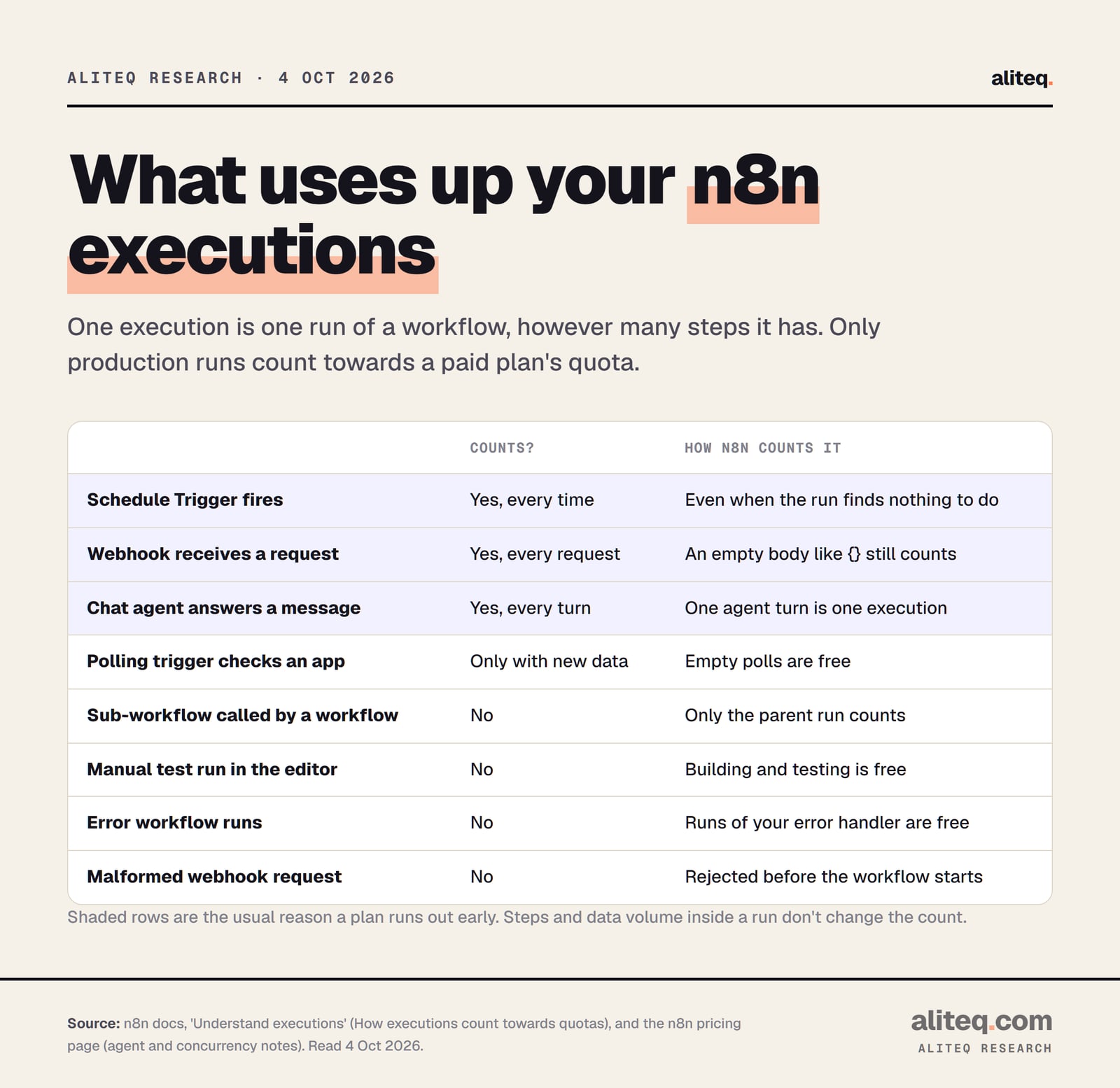
Only production executions count: runs started automatically by a trigger, schedule or polling node. Each schedule fire, webhook request and chat agent turn is one execution. Manual runs, sub-workflow calls, error workflows, empty polls and rejected webhook requests are free.
From n8n's docs, 'How executions count towards quotas', read October 4, 2026. · aliteq research
The rules, in n8n's words from its executions docs:
Schedule Trigger. "Count one execution every time the node fires, regardless of outcome." A schedule that checks for new rows and finds none still costs one.
Polling nodes, such as the Google Drive Trigger: "Count one execution only when new data is found."
Webhook Trigger. "Count one execution for every inbound request that activates the trigger. This includes requests with an empty body."
Agents. The pricing page says "One agent turn counts as one execution." So a chatbot uses one execution per message, not per conversation.
Free runs. Manual executions, sub-workflow executions ("only the parent (top-level) execution counts"), error workflow runs, polls with no data and malformed webhook requests.
The same quota rule applies to paid self-hosted plans. n8n's docs say "Paid plans, whether cloud or self-hosted, have an execution limit quota."
n8n plan limits and prices in US dollars
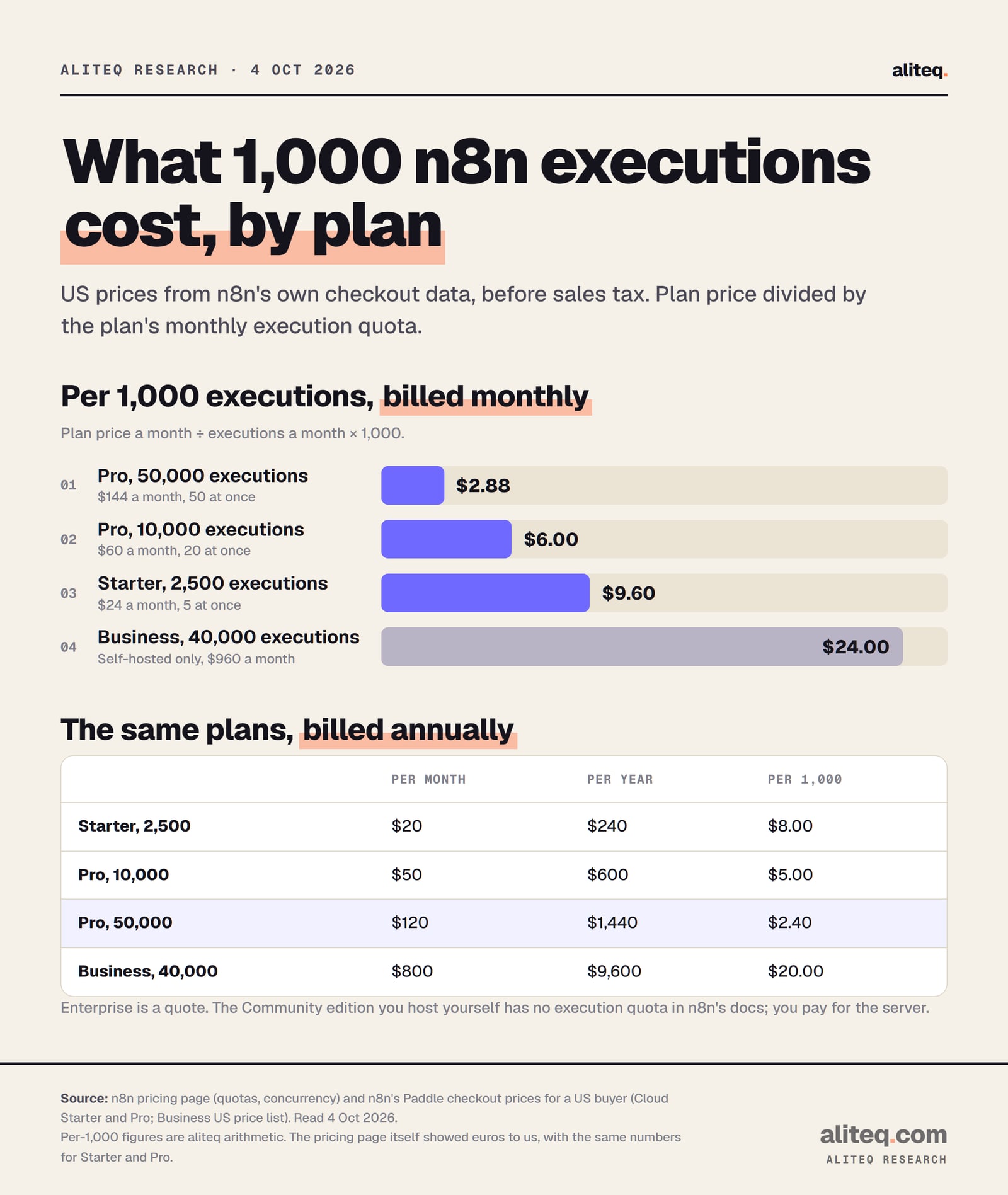
Starter costs $24 a month for 2,500 executions. Pro costs $60 for 10,000 or $144 for 50,000. Paying annually cuts that to $20, $50 and $120 a month. Business is self-hosted only, from $960 a month for 40,000 executions. Enterprise is a quote.
n8n plans: executions and US prices (read Oct 4, 2026)
Executions a month
Starter
2,500
Pro 10K
10,000
Pro 50K
50,000
Business
40,000 and up
Price, billed monthly
Starter
$24
Pro 10K
$60
Pro 50K
$144
Business
$960
Price a month, billed annually
Starter
$20 ($240 a year)
Pro 10K
$50 ($600 a year)
Pro 50K
$120 ($1,440 a year)
Business
$800 ($9,600 a year)
Runs at the same time
Starter
5
Pro 10K
20
Pro 50K
50
Business
Not listed on the page
Longest single run
Starter
5 minutes
Pro 10K
40 minutes
Pro 50K
40 minutes
Business
Not listed on the page
Where it runs
Starter
n8n Cloud
Pro 10K
n8n Cloud
Pro 50K
n8n Cloud
Business
Your own server
Starter
Pro 10K
Pro 50K
Business
Executions a month
2,500
10,000
50,000
40,000 and up
Price, billed monthly
$24
$60
$144
$960
Price a month, billed annually
$20 ($240 a year)
$50 ($600 a year)
$120 ($1,440 a year)
$800 ($9,600 a year)
Runs at the same time
5
20
50
Not listed on the page
Longest single run
5 minutes
40 minutes
40 minutes
Not listed on the page
Where it runs
n8n Cloud
n8n Cloud
n8n Cloud
Your own server
Business comes in larger sizes too, priced monthly in the US: $1,182 for 50,000, $2,071 for 100,000 and $6,294 for 500,000 executions. Enterprise lists "200+ concurrent executions" and a custom number of executions. All plans include unlimited users and workflows.
Divide price by quota and the bigger Pro plan is the cheapest way to buy executions on Cloud.
Price per 1,000 executions = plan price ÷ monthly quota × 1,000. US prices before sales tax. · aliteq research
Business costs the most per execution because you're paying for features: SSO, Git version control, multiple environments and queue mode for scaling. If you only need more runs, Pro 50K at $2.88 per 1,000 on monthly billing is the lowest list price n8n publishes.
What happens when you hit the limit
On Starter and Pro, n8n's docs don't spell out what happens at the quota. Public user reports show the "Execution limit reached" error on the trigger node and runs that don't start. On Business and Enterprise, n8n's pricing page says workflows keep running and overage may be billed.
Here is what n8n has published, word for word:
Cloud terms. n8n's Self-Serve Terms (updated August 28, 2026) say: "In the event you exceed the limit of your current plan, we may decide to upgrade your account accordingly to facilitate your usage. We will provide you with 14 days' notice prior to upgrading your account in which you can choose to object to this change of Cloud Services access."
Business and Enterprise. The pricing FAQ says "your workflows will continue running without interruption, but overage charges may apply if you do not upgrade to the next usage tier." For Business, it lists "4,000 EUR for extra buckets of 300,000 executions." n8n prints that one in euros only, so we don't convert it.
Where to see your count. The pricing page says you can review production execution counts "under your Insights Dashboard."
What we couldn't find in n8n's docs: when the monthly count resets, and whether a trigger blocked at the limit is retried later. Assume a blocked webhook call is not replayed, and check with n8n before you rely on it.
If you already upgraded and still see the error
Users on n8n's forum and GitHub have reported the error after paying for a bigger plan. n8n's reply on GitHub was to email support: "For issues related to n8n cloud billing or instances going offline please email help@n8n.io". On the forum, an n8n team member answered a similar post with "Please contact help@n8n.io for help with this." The issue tracker and forum can't see your account, so a support email with your workspace name is the route n8n points to.
Six ways to cut your n8n execution count
The fastest cuts come from schedules and webhooks, because they count on every fire. Each fix below follows directly from how n8n's docs say executions are counted. Start by finding your noisiest workflow in the Insights dashboard.
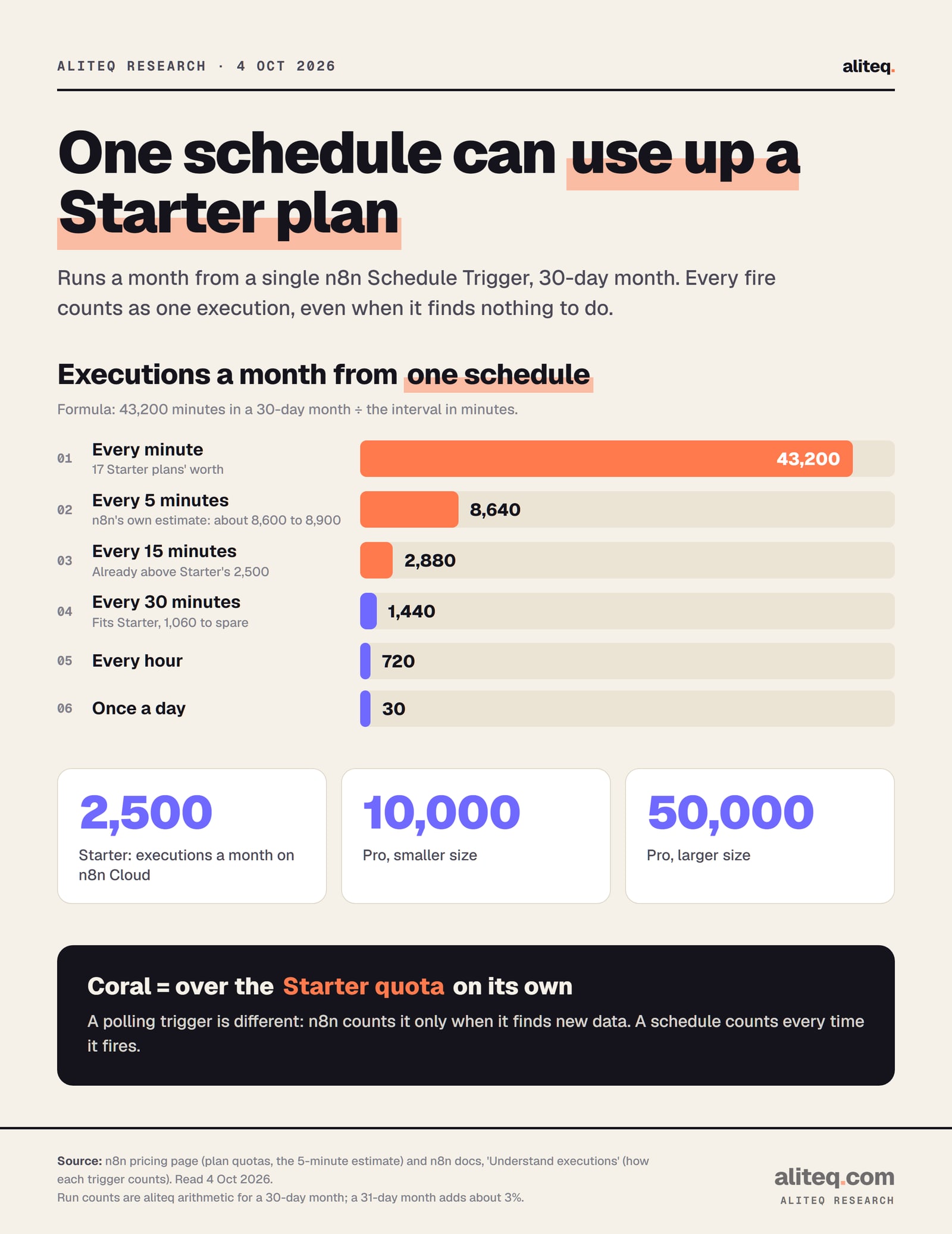
Runs a month = 43,200 minutes in a 30-day month ÷ the interval. n8n's own estimate for every 5 minutes is about 8,600 to 8,900. · aliteq research
Slow down schedules. One Schedule Trigger every 15 minutes is 2,880 runs a month, which is more than Starter's 2,500 on its own. Every 30 minutes is 1,440. Hourly is 720. Ask how fresh the data really needs to be.
Swap "check every X minutes" for a polling trigger. A schedule counts every fire, even with nothing new. A polling trigger node, such as the Google Drive Trigger, counts only when it finds new data.
Call helpers as sub-workflows, not webhooks. If workflow A calls workflow B through an HTTP request to B's webhook, that's two executions. With the Execute Sub-workflow node, only the parent run counts.
Batch instead of one run per item. An execution costs the same whatever it processes. A run that handles 200 new rows in one pass is one execution; 200 webhook calls are 200. n8n's memory guide suggests chunks of about 200 rows with the Loop Over Items node.
Cut the noise at the source. Every webhook request counts, even an empty one. In the app that sends the webhook, subscribe only to the events you act on, so filtering doesn't happen inside n8n after the run has already counted.
Test in the editor. Manual runs don't count, and data pinning lets you rerun a step with frozen input. Keep a workflow unpublished while you debug it.
Chat agents need their own math. The pricing page says to multiply conversations by average messages per conversation. As an example of ours, 20 conversations a day at 6 messages each is 3,600 executions a month, above Starter.
One thing that doesn't help: turning off "Save successful production executions". That saves storage, not quota. The run still counts.
Open the Insights dashboard and find the workflow with the most production executions.
If it's a Schedule Trigger, check the interval. Every 15 minutes is 2,880 runs a month.
Replace HTTP calls between your own workflows with the Execute Sub-workflow node.
Process items in batches inside one run instead of one run per item.
If the real need is still above your quota, compare Pro 50K ($144 a month) with self-hosting.
Self-hosting: the n8n Community edition has no execution quota
The free, self-hosted Community edition has no monthly execution quota in n8n's docs, which attach the quota to paid plans. You run it on your own server, so the cost moves to hosting and upkeep. Concurrency is unlimited by default, and you set your own limits with environment variables.
What n8n's docs say about running it yourself:
Cost and features. The Community edition is "Free" with "almost the complete feature set." It leaves out projects, SSO, sharing workflows and credentials, Git version control, environments, external secrets and log streaming. Queue mode is included.
Concurrency. "In regular mode, n8n doesn't limit how many production executions may run at the same time." You can cap it with N8N_CONCURRENCY_PRODUCTION_LIMIT, which is off (-1) by default.
Run time.EXECUTIONS_TIMEOUT is off by default, and the per-workflow ceiling EXECUTIONS_TIMEOUT_MAX defaults to 3,600 seconds.
History. Pruning is on by default. n8n deletes executions older than 336 hours (14 days) or beyond 10,000 saved runs.
The catch is the work. You own updates, backups, security and uptime. n8n's own comparison table lists self-hosting as "Required" for technical expertise. For a sense of what running your own server costs in the AI context, our self-hosted LLM vs API break-even guide prices GPU servers, which is the far end of the same decision.
What the Sustainable Use License allows
The Community edition isn't open source. It's under n8n's Sustainable Use License. The key clause in its LICENSE.md file reads, verbatim:
You may use or modify the software only for your own internal business purposes or for non-commercial or personal use. You may distribute the software or provide it to others only if you do so free of charge for non-commercial purposes. You may not alter, remove, or obscure any licensing, copyright, or other notices of the licensor in the software.
n8n, Sustainable Use License 1.0
n8n's License FAQ turns that into examples. It lists as allowed: "Use n8n community version to help run your business", "Build automations for your clients on your instance, as long as your clients do not have the possibility to create or edit them." and "Charge your customers for workflow creation, setup, and maintenance services."
It lists as not allowed: "Host n8n as a service and allow your clients to build workflows", "Fork n8n's code to launch your own automation product" and "White-label n8n by removing our branding and offering n8n as is." Files with ".ee." in their name sit under a separate Enterprise license and need a paid key.
The FAQ's one-line test: "If workflows are only created or modified by you or people in your organization, you can use n8n under the Community license for free." If your plan is to let customers build their own workflows, that's a commercial license conversation with n8n. This isn't legal advice; n8n's license team answers at license@n8n.io.
Which fix fits your situation
Cut executions first, because it's free and it usually works. Upgrade if the real workload still exceeds your plan. Self-host if you have someone who can run a server and your use is internal. Business only makes sense for its team features.
Pick a fix by situation
A schedule runs every few minutes
What to do
Lengthen the interval or switch to a polling trigger
Cost
Free
Workflows call each other over HTTP
What to do
Use Execute Sub-workflow
Cost
Free
A chatbot gets busy
What to do
Size the plan by messages, not conversations
Cost
Pro 10K $60 or Pro 50K $144 a month
Real volume above 50,000 a month
What to do
Self-host Community edition, or ask about Enterprise
Cost
Server cost, or a quote
You need SSO, Git and environments
What to do
Business (self-hosted) or Enterprise
Cost
From $960 a month, or a quote
You paid and still see the error
What to do
Email help@n8n.io with your workspace name
Cost
Free
What to do
Cost
A schedule runs every few minutes
Lengthen the interval or switch to a polling trigger
Free
Workflows call each other over HTTP
Use Execute Sub-workflow
Free
A chatbot gets busy
Size the plan by messages, not conversations
Pro 10K $60 or Pro 50K $144 a month
Real volume above 50,000 a month
Self-host Community edition, or ask about Enterprise
Server cost, or a quote
You need SSO, Git and environments
Business (self-hosted) or Enterprise
From $960 a month, or a quote
You paid and still see the error
Email help@n8n.io with your workspace name
Free
For more of what automation and AI tools cost a business, start at our AI automation hub. For the agent side of n8n, see the n8n AI agents guide. Every figure here was read on n8n's own pages and price data on October 4, 2026.
Quick answers
What does "Execution limit reached" mean in n8n?
Your n8n Cloud workspace has used the production executions included in its plan, so new automatic runs don't start. Starter includes 2,500 a month and Pro 10,000 or 50,000. Manual test runs in the editor don't count, so you can still edit workflows.
What counts as an execution in n8n?
One full run of a workflow, however many steps it has. Every Schedule Trigger fire, every webhook request (even an empty one) and every chat agent turn counts. Manual runs, sub-workflow calls, error workflows, empty polls and malformed webhook requests don't.
How much does n8n Cloud cost in US dollars?
From n8n's checkout data on October 4, 2026: Starter $24 a month, Pro $60 for 10,000 executions or $144 for 50,000. Billed annually that's $20, $50 and $120 a month. Prices are before sales tax.
Does self-hosted n8n have an execution limit?
The free Community edition has no monthly execution quota in n8n's docs, which apply the quota to paid plans. Self-hosted Business and Enterprise plans do have a quota, and n8n says workflows keep running past it with overage charges possible.
Can I use self-hosted n8n for my business for free?
Yes, for your own internal business purposes, under the Sustainable Use License. You can build automations for clients on your instance if they can't create or edit them. You can't host n8n as a service where clients build their own workflows.
Why do I still see the error after upgrading?
Users have reported this on n8n's forum and GitHub. n8n's answer in those threads was to email help@n8n.io, because the forum and issue tracker can't see your account. Include your workspace name.