The popular theory says Google sees a blank page. For a site Lovable hosts, Lovable's own docs say otherwise. Here's which of five real causes is yours, how to check each one in Search Console, and how long Google itself says to wait.
You published your Lovable app. You searched for its name on Google. Nothing. Then a free SEO checker told you the page is empty, and a forum post told you Google can't read React apps.
I run a vibe-coded site myself. aliteq.com is a Next.js app, built with AI and rendered on the server. Our new pages still sat in Search Console as "URL is unknown to Google" and "Crawled - currently not indexed" in October 2026. Server rendering didn't make that go away. So I know the feeling, and I know the panic usually points at the wrong cause.
This is not a Lovable app, and I did not build or publish one for this piece. I read Lovable's docs and Google's Search docs on October 4, 2026, and every claim below is attributed to one of them. Lovable doesn't pay us, and this page has no affiliate links.
Is Google seeing an empty page on my Lovable site?
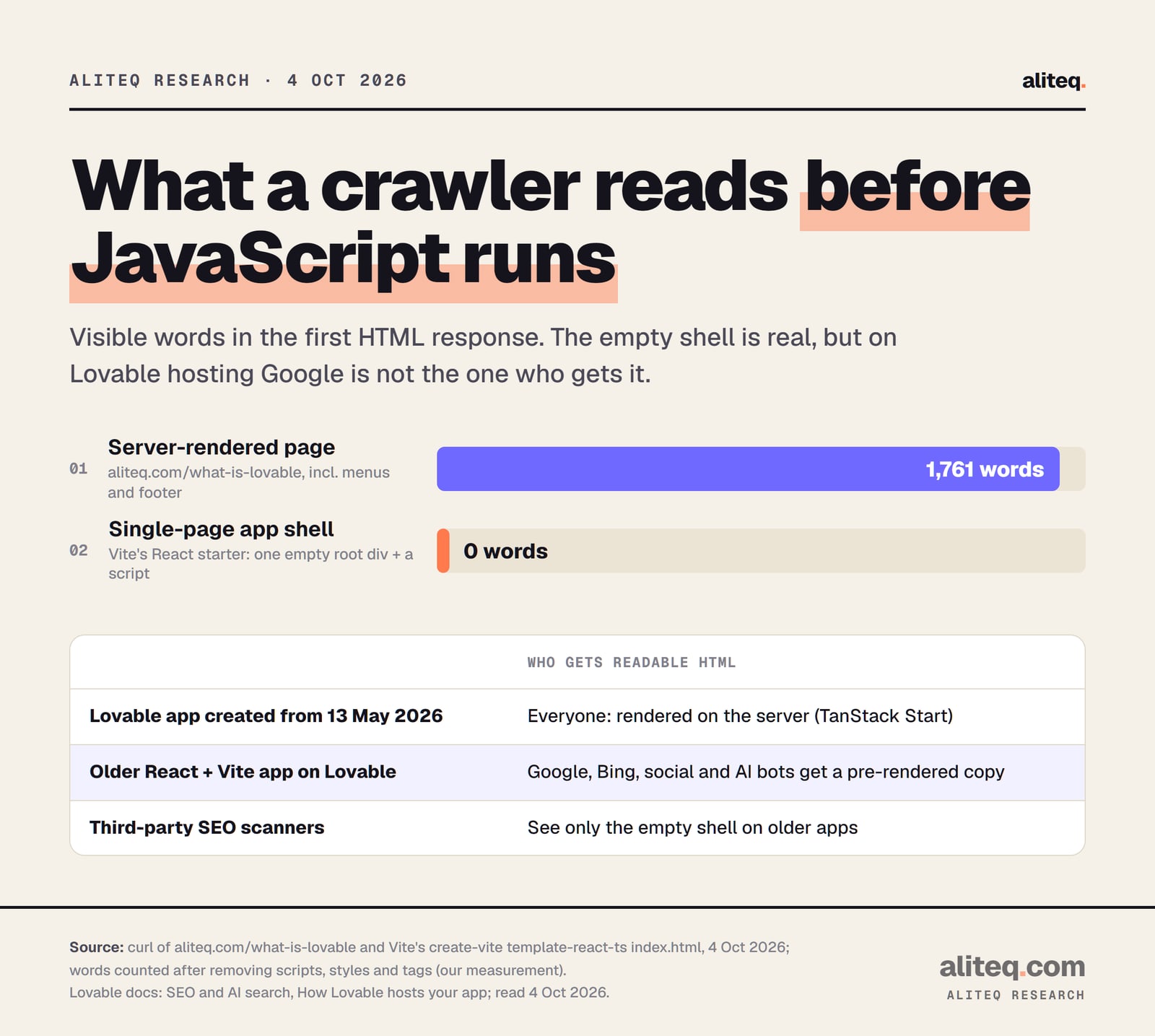
Probably not, if Lovable hosts it. Lovable's docs say apps created from May 13, 2026 render every page on the server. Older React + Vite apps get pre-rendered pages served to verified crawlers, Google included. The empty page you saw in an SEO checker is real, but it's what that checker gets, not what Google gets.
Here is where the myth comes from. A single-page app built with React and Vite starts life as a nearly empty HTML file. Vite's own React starter page has one empty box in its body and a script tag. The browser runs the script, and the script draws the whole app into that box.
Measured with curl on Oct 4, 2026. Words counted after removing scripts, styles and tags. Lovable's rendering rules are from its SEO doc. · aliteq research
Lovable describes the older stack the same way: it "sends the browser a mostly empty page, and the visitor's browser then builds the content with JavaScript." That's the shell. Google's docs call this "the app shell model," where "Google needs to execute JavaScript before being able to see the actual page content."
Google can do that. It queues the page, then "a headless Chromium renders the page and executes the JavaScript." The catch is in the next line of the same doc: the page "may stay on this queue for a few seconds, but it can take longer than that." Google still calls server rendering or pre-rendering "a great idea," because "not all bots can run JavaScript."
Why your SEO checker says the page is empty
Because it isn't on Lovable's verified list. Lovable's hosting doc says third-party SEO scanners "may report your pages as empty even though Google, social platforms, and AI search engines see the full content." Its SEO doc says the same of "link checkers, and other agents." To see what Google actually gets, use Google's own URL Inspection tool. More on that below.
Which Lovable stack is my site on, and does it matter?
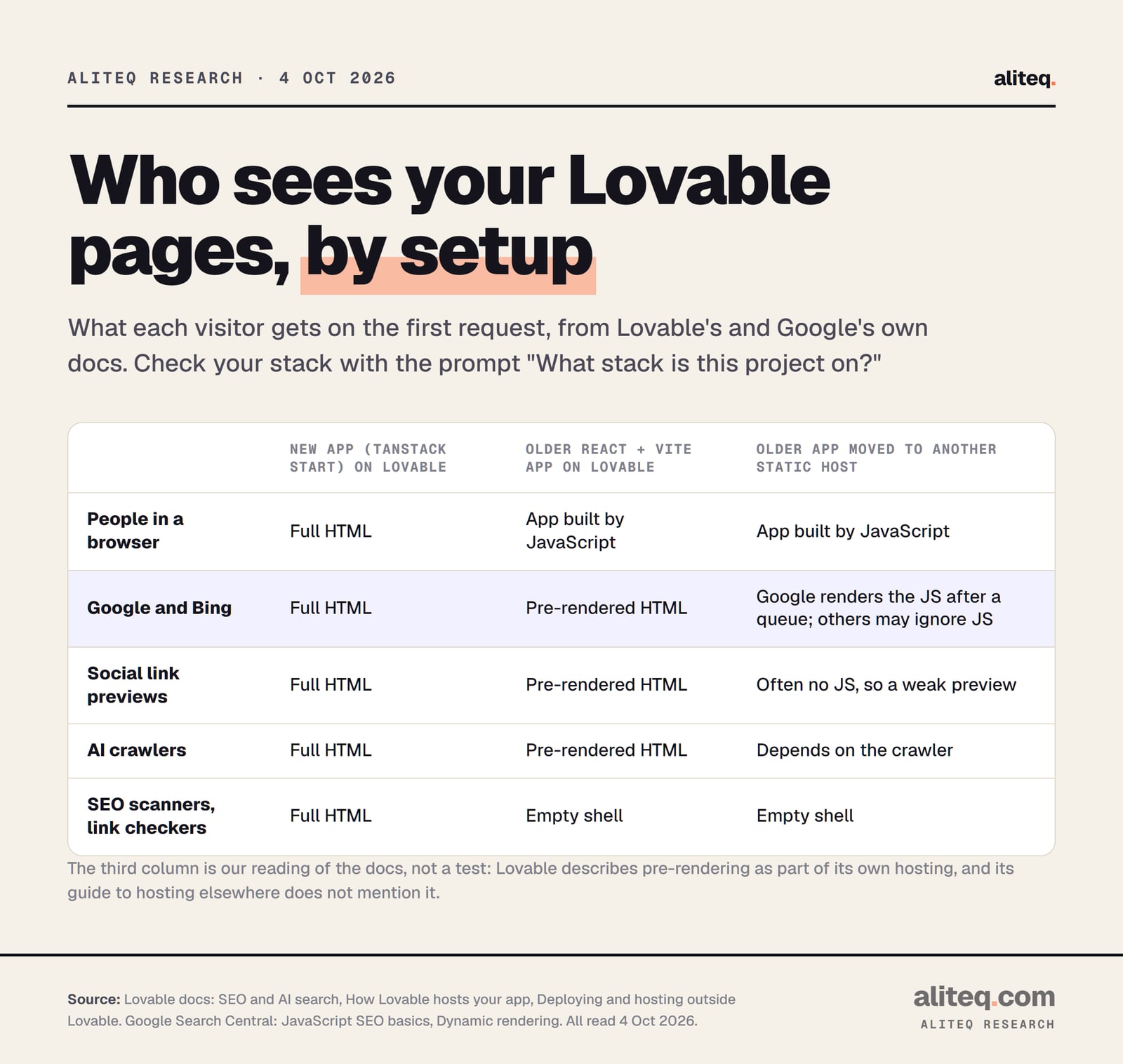
It matters for what non-Google tools see. New projects have used TanStack Start, a server-rendering framework, since May 13, 2026. Everyone gets finished HTML. Older React + Vite projects send the shell to people and to unverified tools, and a pre-rendered copy to verified crawlers. Lovable says both stacks can rank.
The quickest check is Lovable's own prompt. Ask in the project chat:
What stack is this project on?
Or open package.json in the Code tab. Lovable says a TanStack Start project lists @tanstack/react-start among its dependencies.
From Lovable's SEO, hosting and external-hosting docs and Google's JavaScript SEO docs, read Oct 4, 2026. The third column is our reading of those docs, not a test. · aliteq research
Should I upgrade an older app to TanStack Start?
You don't have to. Lovable's answer to "Do I have to upgrade?" is "No." It says older projects "keep working, and search engines can still read them through pre-rendering." The upgrade gives every visitor and tool the same full page, plus reliable link previews and a faster first load. Lovable says most upgrades cost 10 to 35 credits, and your live site doesn't change until you publish again.
One honest note on the older setup. Serving bots a rendered copy and people the JavaScript version is what Google calls dynamic rendering. Google calls it "a workaround and not a long-term solution" and recommends "server-side rendering, static rendering, or hydration" instead. Lovable's pre-rendering is that pattern, run for you. It works, per both companies. The server-rendered stack is simply the setup Google recommends.
What if I moved my Lovable app to Vercel or Netlify?
Then the pre-rendering most likely didn't come with it. Lovable describes pre-rendering as part of its own hosting, "on deployed public URLs," and its guide to hosting elsewhere doesn't mention it. An older app on a static host serves the same shell to everyone. Google can still render it. Other crawlers and link previews may not.
Lovable's external-hosting guide says an older app ships as "the static build output in dist/" with "a fallback to index.html for client-side routes." That fallback is what makes refresh work. It also means every made-up address returns your app with a normal 200 status. Google calls a friendly "not found" screen with a 200 status a soft 404, and its JavaScript docs suggest a redirect to a real 404 page or a noindex tag on error views.
If you moved a newer TanStack Start app, it needs a host that runs the server part, per Lovable. Copy only the static files and you lose the server rendering. If "server part" and "static host" are new words, what deploying actually means and what hosting costs cover them.
Is my Lovable site even allowed to be indexed?
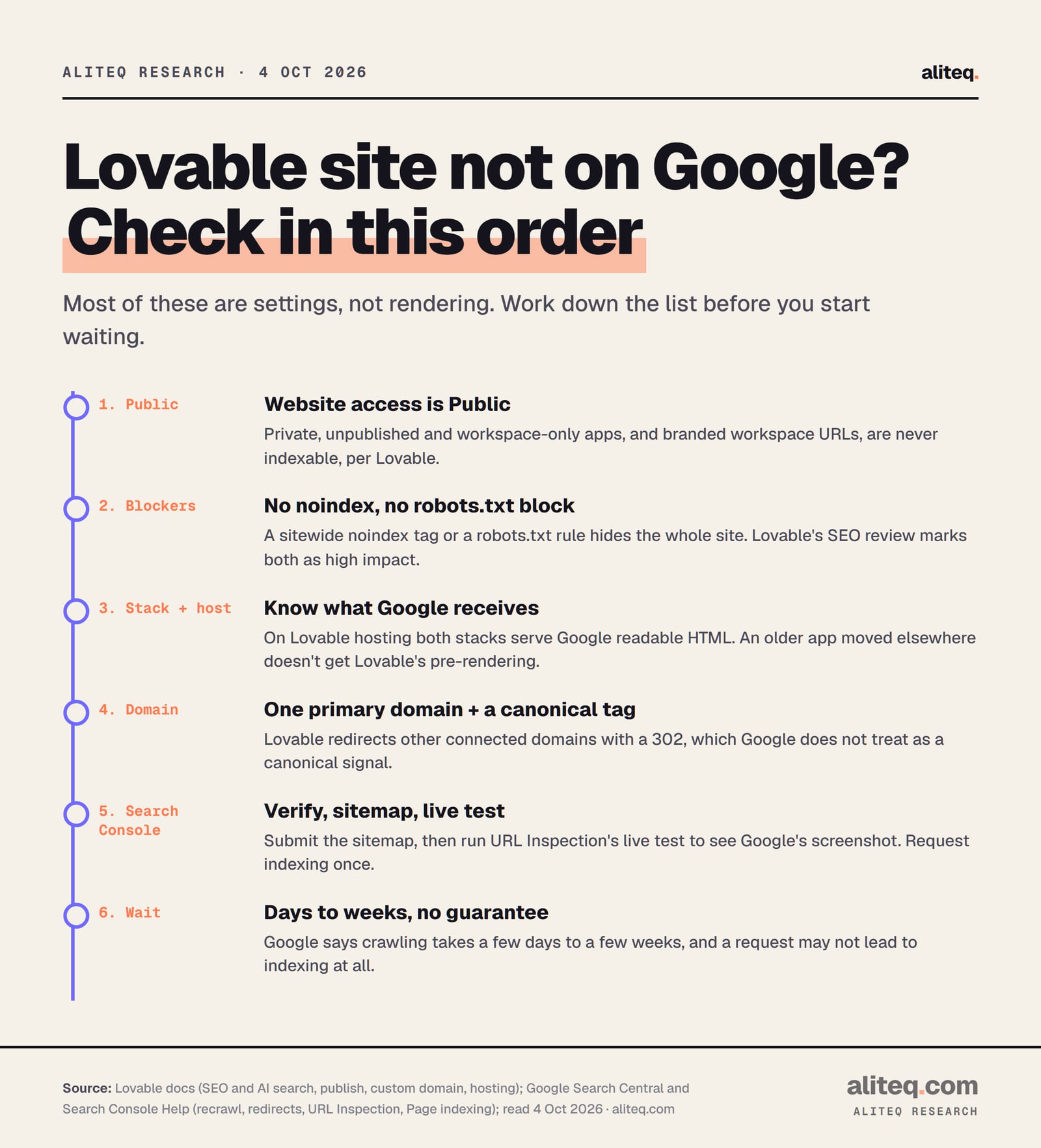
Check this before anything else. Lovable's SEO doc says "Only publicly published apps can be indexed." Private and unpublished projects never are. Neither are branded workspace URLs, the ones shaped like app-name.workspace.lovable.app. Then check for a noindex tag or a robots.txt block, which hide a public site completely.
Four things to look at:
Website access is Public. In the publish dialog, the visibility row should say anyone with the link can visit. Workspace-only apps require a login, so Google can't read them.
You're testing the right address. Your project's lovable.app address can be indexed, per Lovable. A branded workspace URL never can.
No sitewide noindex. Lovable's SEO review flags "a sitewide noindex tag" as a red, high-impact finding. Google's Page indexing report shows it as "URL marked 'noindex'."
robots.txt isn't blocking crawlers. Lovable lists "robots.txt blocking crawlers on a live site" as another red finding. Google adds a twist: a noindex only works if robots.txt lets Google fetch the page.
Lovable also warns that "Sitemaps, robots.txt, metadata, and other SEO elements are not always generated up front." Its SEO & AI search review, under More in the project toolbar, checks all of these. Lovable says running the review is free on all plans, and applying fixes uses normal message credits.
Does a custom domain change anything for Google?
Yes, in two ways. A custom domain is where Lovable recommends you build search presence. And Lovable redirects your other connected domains to the primary one with a 302, a temporary redirect. Google does not treat a 302 as a sign that the target is the main address. A canonical tag fills that gap.
Lovable says a lovable.app address "works well for" MVPs, demos and internal tools. For a site you want found, it recommends your own domain. If DNS is the confusing part, our DNS explainer walks through it.
Here's the detail most guides skip. Lovable's domain doc says other connected domains redirect to the primary "using a 302 temporary redirect," and that it "does not support 301 permanent redirects between connected project domains." Google's redirect doc says that with a temporary redirect, "the indexing pipeline doesn't use the redirect as a signal that the redirect target should be canonical."
So give Google another signal. Google says "the best way to set the canonical URL is to use HTML." Ask Lovable to add a canonical tag on every page that points at your custom domain. Lovable's SEO review already checks canonicals and flags "Canonical URLs point to the homepage" as a common mistake. Also, Lovable notes that changing your custom domain "requires re-verification" in Search Console.
How do I get my Lovable site into Google Search Console?
Verify the site, submit the sitemap, then inspect your most important URLs. Lovable's Google Search Console connector can do all three from the project chat. You can also verify by hand with a DNS record. Search Console is Google's free tool, and it's the only place that tells you what Google actually did with your pages.
Lovable's Google checks only run against the live public site. Publish your latest changes first, because Google fetches the sitemap from the live site.
The connector adds a verification meta tag and completes it for you. By hand, add the TXT record Google gives you at your DNS provider. A DNS-verified Domain property covers http, https and every subdomain.
Add it in Search Console's Sitemaps report. Google calls a sitemap merely a hint, and it needs full absolute URLs on the right domain.
URL Inspection shows the HTML Google fetched. A live test adds a screenshot of the rendered page, which settles the empty-page question.
Google sets a quota on requests, and says repeat requests for the same URL won't speed it up.
The live test is the step people skip, and it's the one that ends the blank-page argument. Google's help page says "a screenshot of the rendered page is available only in a live test." If the screenshot shows your content, rendering is not your problem. Lovable's SEO doc points at the same tool for checking its pre-rendered output.
Two limits worth knowing. You must be an owner or full user of the property to request indexing, per Google. And the connector's Search Console data "is typically delayed by a couple of days," per Lovable, so today's numbers won't show up today.
What do "URL is unknown to Google" and "Crawled - currently not indexed" mean?
They mean Google hasn't seen the page yet, or saw it and chose not to index it for now. Neither one is an error to fix with a setting. "Unknown" means Google hasn't found the URL. "Crawled - currently not indexed" means Google fetched it and decided not to index it yet. Links and better pages help. Resubmitting doesn't.
Google's own wording, from Search Console Help:
URL is unknown to Google
What Google says it means
"Google hasn't seen this URL before."
What helps
Sitemap, internal links, a single indexing request
Discovered - currently not indexed
What Google says it means
Found, not crawled yet; Google "rescheduled the crawl" to avoid overloading the site
What helps
Time, a healthy fast site
Crawled - currently not indexed
What Google says it means
Crawled, not indexed; "It may or may not be indexed in the future"
What helps
Better page content and links; Google says "no need to resubmit"
URL marked 'noindex'
What Google says it means
Google hit a noindex rule and skipped the page
What helps
Remove the noindex if you want it indexed
What Google says it means
What helps
URL is unknown to Google
"Google hasn't seen this URL before."
Sitemap, internal links, a single indexing request
Discovered - currently not indexed
Found, not crawled yet; Google "rescheduled the crawl" to avoid overloading the site
Time, a healthy fast site
Crawled - currently not indexed
Crawled, not indexed; "It may or may not be indexed in the future"
Better page content and links; Google says "no need to resubmit"
URL marked 'noindex'
Google hit a noindex rule and skipped the page
Remove the noindex if you want it indexed
This is where my own site helps. Server rendering did not fix "Crawled - currently not indexed" for us. What we could control was quality. In October 2026 we set noindex on 119 thin old news posts and kept the 90 that earned impressions. That's housekeeping, not a trick, and Google makes no promise about it either way.
Google's starter guide says it "primarily finds pages through links from other pages it already crawled." A brand-new site with no links pointing at it is the classic case for "unknown." If your launch plan is one tweet, expect that to show up here. Our guide to shipping a vibe-coded app covers the rest of the launch list.
How long until my Lovable site shows up on Google?
Google says crawling "can take anywhere from a few days to a few weeks." Lovable's docs say indexing can take "a few hours to a few days, and sometimes longer." Plan for Google's number. Neither company promises inclusion. Google says a request "does not guarantee that inclusion in search results will happen instantly or even at all."
The order to check, from Lovable's SEO, domain and hosting docs and Google's Search docs, read Oct 4, 2026. · aliteq research
Before you wait, do the one test Google suggests first. Search site:yourdomain.com. Google's starter guide says, "If you see results pointing to your site, you're in the index." If you do, your problem is ranking, not indexing. That's a different job: useful pages, clear titles, and links from other sites.
Yes, per Lovable's docs. Apps created from May 13, 2026 are server-rendered, and older React + Vite apps on Lovable hosting serve pre-rendered pages to verified crawlers including Google and Bing. Use Search Console's URL Inspection live test to see Google's rendered screenshot of your own page.
Why does my SEO checker say my Lovable page is empty?
Third-party SEO scanners aren't on Lovable's verified-crawler list, so on an older React + Vite app they get the empty app shell. Lovable's hosting doc says they "may report your pages as empty even though Google" sees the full content.
Do I need a prerendering service for a Lovable site?
Not while Lovable hosts it, per Lovable's SEO doc. If you export an older React + Vite app to another static host, Lovable's pre-rendering doesn't come along. Then you choose between upgrading to server rendering, a prerendering setup, or relying on Google's own JavaScript rendering.
Can a lovable.app subdomain rank on Google?
It can be indexed if the app is public. Lovable says a lovable.app address works well for MVPs, demos and internal tools, and recommends a custom domain to build search presence. Branded workspace URLs are never indexable.
How long does Google take to index a new Lovable site?
Google says crawling can take a few days to a few weeks, and requesting a crawl doesn't guarantee indexing. Submit a sitemap, request indexing once for key pages, and get a few real links pointing at the site.
What does "Crawled - currently not indexed" mean for my Lovable app?
Google fetched the page and chose not to index it for now. Google says it "may or may not be indexed in the future" and that there's no need to resubmit. Improving the page and its links is what helps.
This page has no affiliate links or sponsored placements. It explains how indexing works for a Lovable site; it isn't a ranking promise or an audit of your app.