You added Sign in with Google and Google blocked the very first click. The error is a safety check, not a bug. Where the address has to match, why it must match exactly, and the fix for Supabase, localhost and preview links.
You added "Sign in with Google" to your app. You clicked the button to test it. Instead of the Google account picker, you got a Google error page with Error 400: redirect_uri_mismatch on it.
Nothing is broken in your code's logic. Google refused to continue because the return address did not match its list. That refusal is one of the most useful security checks in the whole login flow. This page shows where the two lists live, how to make them match, and why "just make it match anything" is the wrong fix. I read the Google, Supabase and IETF pages on October 3, 2026. I did not set up a test app for this piece. This page has no affiliate links.
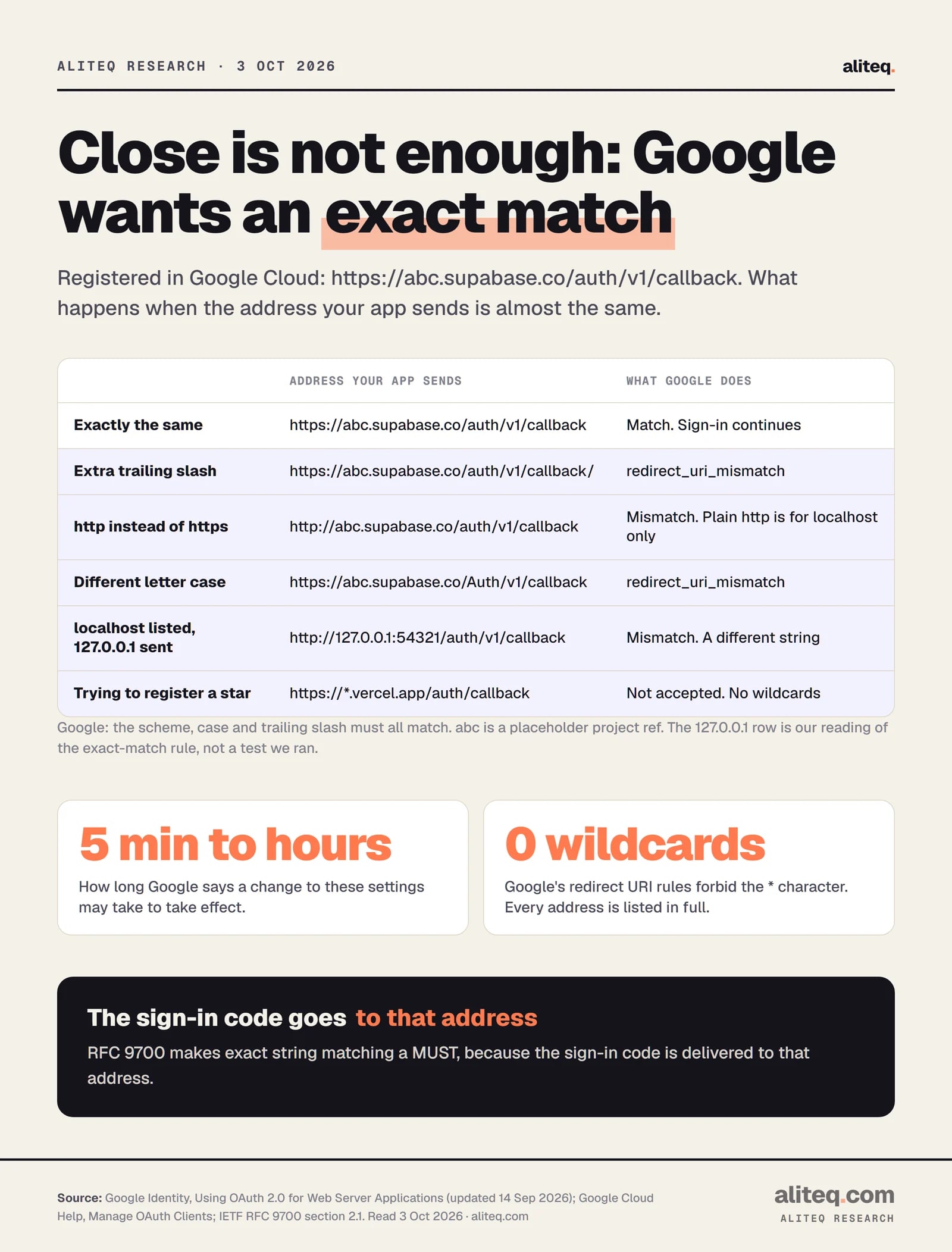
Close is not a match. Google checks the return address character by character. · Illustration made in Higgsfield with the GPT Image model
What does "Error 400: redirect_uri_mismatch" mean?
It means the return address in your sign-in request is not on your Google client's approved list. A redirect URI is the page Google sends the user back to after they approve. Google's docs say the value "must exactly match one of the authorized redirect URIs" you set in the Cloud console. Anything else gets this error.
Here is the flow in plain words. Your app sends the user to Google with a few details attached. One is your client ID, which tells Google which app is asking. Another is redirect_uri, the address to come back to. Google looks up your client, reads its list of authorized redirect URIs, and compares.
The comparison is strict. Google's docs spell it out: "the http or https scheme, case, and trailing slash ('/') must all match." So https://your-app.example/auth/callback and https://your-app.example/auth/callback/ are two different addresses to Google. One extra slash is enough to block every sign-in.
Google's error table gives one more cause. The value may point to the old "out-of-band" flow, which Google says "has been deprecated and is no longer supported". That mostly affects old desktop and command-line tools, not a new web app.
If you want the bigger picture of what Google is doing for you here, Sign in with Google, explained walks through the hand-off. This page is about the one setting that breaks it.
Why does the address have to match exactly?
Because the return address is where the proof of sign-in gets delivered. Google sends a one-time code, or sometimes a token, to that address. If Google accepted any address close enough, a crafted request could have that proof delivered somewhere you do not control. Exact matching shuts that door.
The current security standard for OAuth makes this a hard rule. RFC 9700, the IETF's Best Current Practice for OAuth 2.0 Security, published in January 2025, says servers "MUST utilize exact string matching" when they compare redirect URIs. It says this "contributes to the prevention of leakage of authorization codes and access tokens".
The RFC also explains why looser rules were dropped. Pattern matching "turned out to be more complex to implement and more error-prone to manage than exact redirection URI matching". It adds that "several successful attacks exploiting flaws in the pattern-matching implementation or concrete configurations have been observed in the wild". Even a well-built wildcard over a whole domain is risky, the RFC notes, if someone ever gains control of one forgotten subdomain on it.
That is how I read the error as a security person. It is annoying for ten minutes. It is also the reason a stranger cannot borrow your Google client to collect your users' sign-ins. The fix is never to loosen the check. It is to register the right address.
Where do you set the redirect URI in Google Cloud?
In the Google Cloud console, open your project's Clients page, pick your OAuth client of type Web application, and edit Authorized redirect URIs. Paste the exact address your app sends, save, and wait. Google's help page says changes "may take 5 minutes to a few hours" to take effect.
The same client form has a second list called Authorized JavaScript origins. People mix the two up. An origin is just the site, such as https://your-app.example, with no path. Google's help page says origins "cannot contain the path component". A redirect URI is a full address, path included. A wrong origin gives a different error, origin_mismatch.
Google also has rules for what it will accept in the redirect list at all:
HTTPS only, with one exception: localhost addresses, including localhost IP addresses, may use plain http.
No raw IP addresses as the host, except localhost ones.
No wildcard characters such as *. Every address is listed in full.
No fragment (the #part at the end) and no open redirects.
So you cannot register https://*.vercel.app with Google. That matters for preview links, as you will see below.
Google's matching rules, from its web server OAuth guide and Cloud console help, read Oct 3, 2026. · aliteq research
What goes where when you use Supabase?
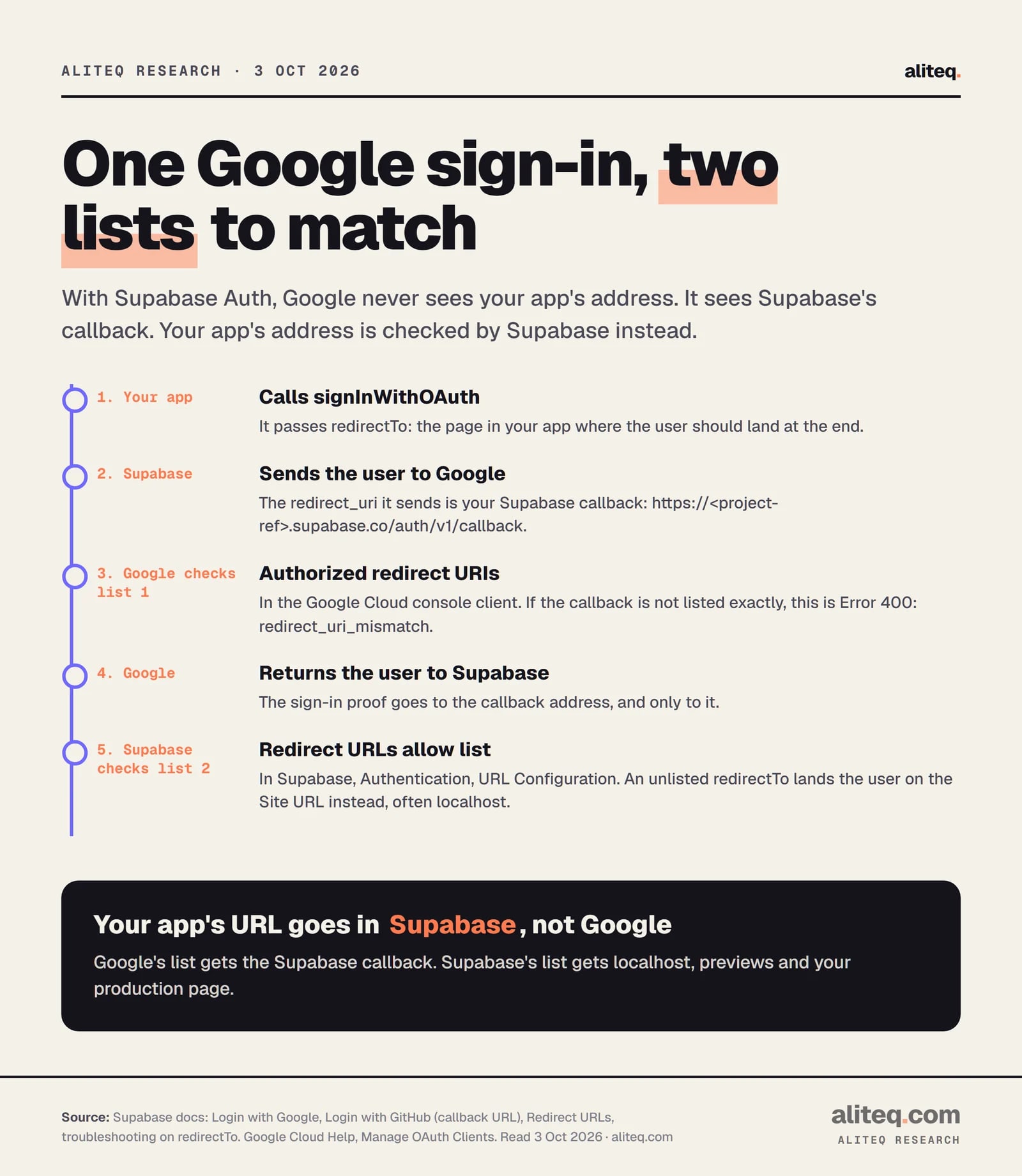
Two lists, two jobs. Google's Authorized redirect URIs gets your Supabase callback URL, which looks like https://<project-ref>.supabase.co/auth/v1/callback. Supabase's own redirect allow list gets your app's addresses. Putting your app's address in Google's list is the most common way to hit this error with Supabase.
Here is why. With Supabase, Google never talks to your app directly. Your app sends the user to Supabase, Supabase sends them to Google, Google sends them back to Supabase's callback, and only then does Supabase send them on to your app. So Google only ever sees Supabase's address as the return address.
Supabase's Google guide says it in one line: "Under Authorized redirect URIs add your Supabase project's callback URL." You do not have to type it. Supabase shows it on the Google provider page under Authentication, Sign In / Providers, with a Copy button. Copy it from there, paste it into Google, and you avoid typos entirely.
The second hop is Supabase's job. In your code, redirectTo names the page in your app where the user should land. Supabase's docs say that URL "should match the Redirect URLs list configuration", found on the URL Configuration page in the Supabase dashboard. That page also holds the Site URL, which Supabase calls the "default redirect URL when no redirectTo is specified". Supabase's docs tell you to change it from http://localhost:3000 to your production address.
Two checks on two lists. Google checks Supabase's callback; Supabase checks your app's address. · aliteq research
If your app sends people to localhost after a successful Google sign-in on your live site, that is the second list, not the first. Supabase's troubleshooting page asks exactly that question, "Why are redirects going to localhost instead of the production site URL?", and answers that you "must set the exact URL in the shown Redirect URL's setting." Google said yes; Supabase did not recognize where you wanted to go.
If an AI tool connected Supabase for you, the same two lists apply. The settings just live in dashboards you may never have opened.
Why does it work on localhost but fail on my preview or live site?
Because each place your app runs has a different address, and every address must be listed somewhere. Your laptop, each preview deploy and your real domain are three different strings. With Supabase, Google's list stays the same and only Supabase's allow list changes. Without Supabase, Google's list needs each one.
The interactive below shows the stages most apps go through, from your laptop to your own domain. Each stage is a new address for sign-in to come back to.
Drag from "works on my laptop" to "a real product"
local
preview
prod
domain
scale
localhost:3000
Who can open it
Only you, on your machine
Where it runs
Your laptop
Rough cost
$0
What this stage adds: The app runs, but only where the code is. Close the laptop and it's gone.
Watch out: Nothing is exposed — and nothing is shareable.
A few specific traps:
localhost vs 127.0.0.1. To an exact string match, these are different addresses, even though they reach the same machine. Supabase's own pages differ here: the Google guide gives http://127.0.0.1:54321/auth/v1/callback for local development, and the GitHub guide gives http://localhost:54321/auth/v1/callback. Copy the one your setup actually uses.
The port.http://localhost:3000 and http://localhost:5173 are different addresses. Check which port your dev server prints.
Preview links. Many hosts give every deploy its own address. Google cannot list them, because it allows no wildcards. Supabase can, and its docs show patterns for Vercel and Netlify previews.
Leftover dev entries. Supabase's guide says to add http://localhost:<port> to Google's JavaScript origins while you build, then "remember to remove this when your application goes into production."
How do Supabase wildcards work, and when are they safe?
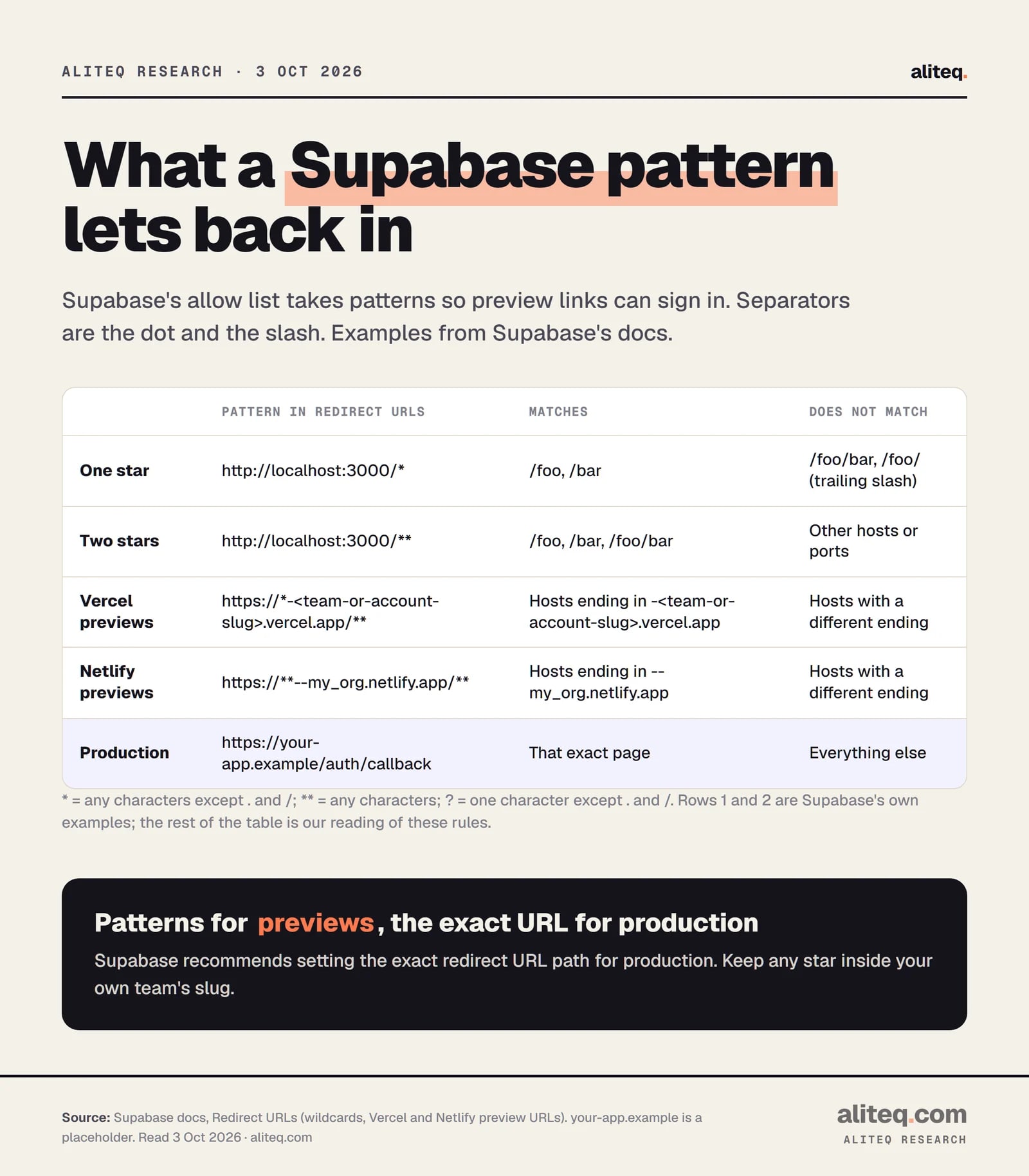
Supabase's allow list accepts patterns so preview links can sign in. A single star matches within one part of the address, and a double star matches across parts. Supabase recommends them for local development and previews, and says to set "the exact redirect URL path" for production.
Supabase's docs define the symbols. * matches "any sequence of non-separator characters", where separators are the dot and the slash. ** matches "any sequence of characters". ? matches one non-separator character. The difference is bigger than it looks, as the examples from Supabase's page show.
Patterns and examples from Supabase's Redirect URLs guide, read Oct 3, 2026. Supabase recommends the exact path for production. · aliteq research
Here is how I would set it up, following Supabase's Vercel example. The Site URL is your real domain. The allow list holds http://localhost:3000/** for your laptop, a preview pattern scoped to your own team slug, and the exact production callback path.
The scoping is the security part. A pattern should only match addresses you control. The RFC's warning applies here too: a wide pattern over a shared hosting domain, or over a domain with forgotten subdomains, can match an address that is not yours. Keep the star inside your own team's slug, never across the whole vercel.app or netlify.app.
What should you tell your AI tool?
Give it the exact error, say whether you use Supabase, and ask it to print the redirect address your code sends. Then fix the lists in the dashboards yourself. An AI tool cannot see your Google Cloud or Supabase settings, so it can only guess which list is wrong.
A prompt that works in plain English:
"Google sign-in fails with Error 400: redirect_uri_mismatch. I use Supabase Auth. Show me where my code calls signInWithOAuth and what redirectTo it passes in local, preview and production. Do not suggest wildcards in Google Cloud. Tell me which address belongs in Google's Authorized redirect URIs and which belongs in Supabase's Redirect URLs list."
You can also check the address yourself. When the error appears, the redirect_uri value is part of the Google sign-in link in your browser's address bar. Compare it, character by character, with your Google list. How to read AI code without coding shows how to find the redirectTo line in a file you did not write.
When the error appears, find the redirect_uri value in the Google link in your address bar.
If you use Supabase, copy the Callback URL from Authentication, Sign In / Providers, Google.
Paste that exact address into Authorized redirect URIs on your Google Cloud client. No wildcards, no extra slash.
Save, then allow 5 minutes to a few hours before you retest.
Add your app's exact production URL to Supabase's Redirect URLs, set the Site URL to your domain, and test from the live address.
Your app asked Google to send the user back to an address that is not on your Google OAuth client's list of authorized redirect URIs. Google compares them exactly, including http or https, letter case and the trailing slash. Add the exact address to the list, or fix the address your app sends.
Which URL do I put in Google Cloud when I use Supabase?
Your Supabase project's callback URL, which looks like https://<project-ref>.supabase.co/auth/v1/callback. Copy it from the Google provider page in the Supabase dashboard. Your app's own addresses go in Supabase's Redirect URLs list, not in Google's.
I fixed the URL and it still fails. Why?
Google's help page says changes may take 5 minutes to a few hours to take effect. Also check you edited the right client: the client ID your app uses must be the one whose list you changed. Then compare the addresses again, character by character.
Can I use a wildcard in Google's authorized redirect URIs?
No. Google's rules forbid wildcard characters in redirect URIs, so every address must be listed in full. For preview links, keep Google pointed at your Supabase callback and use Supabase's allow-list patterns, scoped to your own team's address.
Why does Google sign-in send me to localhost on my live site?
That is usually Supabase, not Google. If the redirectTo address is not on Supabase's Redirect URLs list, you end up at the Site URL, which is often still http://localhost:3000. Set the Site URL to your production domain and add your exact production address to the list.
Is redirect_uri_mismatch a sign my app was hacked?
No. It is Google's check doing its job, almost always after a settings change or a new address. It protects your users by refusing to deliver the sign-in code anywhere you have not approved. Do not loosen it to make the error go away.
Use this in your own page
Teaching this? Paste the live version into your course, blog or answer. Free, no sign-up; the credit line links back here.