That red console error means your browser stopped your own app from reading a reply. What CORS actually is, why the quick "allow everything" fixes backfire, and the right fix for Supabase functions and Next.js.
You tested your app and a red line sits in the browser console. It says a request was blocked by CORS policy. The button does nothing, or the data never loads. Your AI tool offers a fix, and the first three it suggests make things worse.
This page explains the error in plain words and gives the safe fix for the two setups vibe coders hit most: Supabase edge functions and Next.js. The wider checklist is in the vibe-coded app security checklist. I read the docs on October 3, 2026. I did not run the code on this page. It is adapted from the Supabase and Next.js docs. This page has no affiliate links.
What does "blocked by CORS policy" mean?
It means your app's page tried to read a reply from a different address, and the reply did not say your page was allowed to see it. The browser then hides the reply from your code. The request may even have reached the server. The block happens on the way back.
CORS stands for Cross-Origin Resource Sharing. An origin is a domain, a scheme (http or https) and a port. MDN says browsers "restrict cross-origin HTTP requests initiated from scripts", so a page can only read replies from its own origin "unless the response from other origins includes the right CORS headers".
A vibe-coded app hits this all the time. Your front end runs at one address, such as your Lovable preview. Your data comes from another, such as a Supabase function. That is cross-origin, even though both are yours.
One detail trips people up. MDN notes that "for security reasons, specifics about the error are not available to JavaScript". Your app only knows something failed. The real reason is in the browser's console, so read the full red message, not your app's generic "failed to fetch".
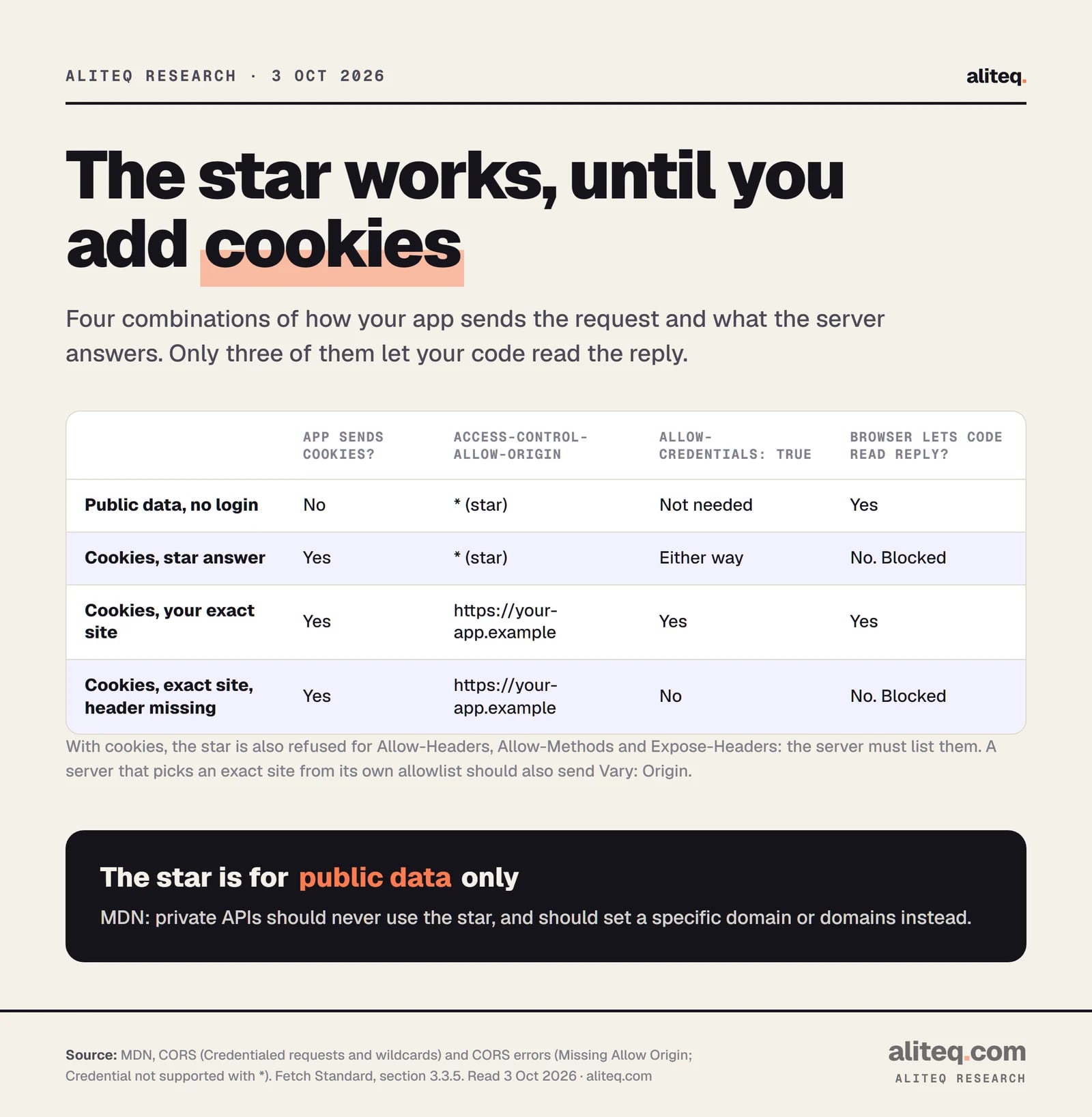
Four cases from MDN's rules for credentialed requests. The star is fine for public data and blocked once cookies are involved. · aliteq research
Is CORS security for my server?
No. CORS is a browser rule that protects your visitors, not a lock on your server. A script, a command-line tool or another server ignores it. So a CORS setting never replaces a login check or database rules on the data itself.
The Fetch standard says why the rule exists. CORS "needs to be an opt-in mechanism to prevent leaking data from responses behind a firewall", and for requests with credentials, "to prevent leaking potentially-sensitive data". The aim is to stop a random web page from using your visitor's browser to read data that visitor can reach.
MDN adds a point that surprises people. A plain form can already send certain requests to any site, so a "simple" request is not blocked from arriving. In MDN's words, the server "still must opt-in using Access-Control-Allow-Origin to share the response with the script". The Fetch standard warns that "any work the server performs might nonetheless leak through side channels, such as timing".
What is a preflight, and why does the error mention OPTIONS?
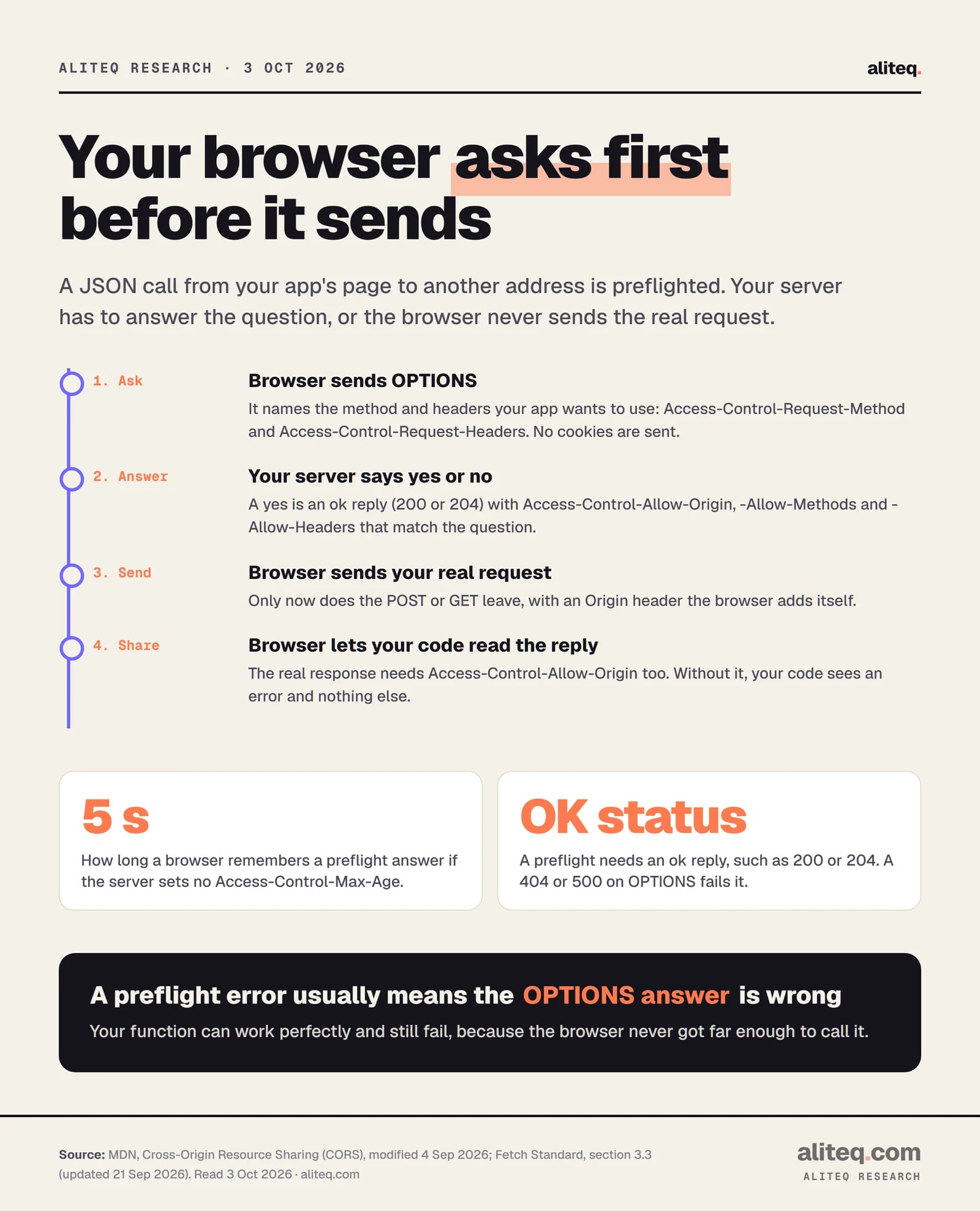
A preflight is a question the browser asks before sending your real request. It sends an OPTIONS request that says which method and headers your app wants to use. If your server does not answer yes, the browser never sends the real request. Your function can be fine and still fail.
Which requests get the question? MDN lists the "simple" ones that skip it: GET, HEAD or POST, with only a short list of safe headers, and a content type of form data or plain text. A JSON call with an Authorization header is not on that list, so it is preflighted. That describes most app calls.
The preflight carries two request headers, Access-Control-Request-Method and Access-Control-Request-Headers. The server must reply with matching Access-Control-Allow-Methods and Access-Control-Allow-Headers, plus Access-Control-Allow-Origin. The Fetch standard says the reply needs an ok status, such as 200 or 204. A 404 or 500 on OPTIONS fails the check.
The browser asks first and sends second. The 5-second default for remembering the answer is MDN's. · aliteq research
Two details help when you debug. A preflight "never includes credentials", per the Fetch standard, so a function that demands a login on every request, OPTIONS included, will fail the preflight. And if your server does not set Access-Control-Max-Age, MDN says the browser remembers the answer for 5 seconds only. That is why the same call can seem to work, then fail again a moment later.
The messages tell you which part broke. MDN documents wording such as "CORS preflight channel did not succeed" and "missing token in CORS header Access-Control-Allow-Headers". The second one means your server did not list a header your app sends. The fix, in MDN's words, is that "the server needs to be updated so that it allows the indicated header, or you need to avoid using that header".
Why does the star wildcard fail with cookies?
The star (*) means any site may read the reply, and browsers refuse it when the request carries credentials such as cookies. MDN says a credentialed request needs the exact origin named, not the star. If you send both, the browser "will block access to the response".
Credentials mean cookies or HTTP authentication. Your app asks for them with credentials: "include". MDN's rule for that case is that the server "must not specify the wildcard" for the allowed origin, and the same goes for the allowed headers and methods. It must also send Access-Control-Allow-Credentials: true. The matching error text is "Credential is not supported if the CORS header 'Access-Control-Allow-Origin' is ''".
Two fixes exist, and MDN names both. On the app side, stop sending credentials if you do not need them. On the server side, name the origin that loaded the page. When a server picks the origin from a list, MDN says it should also send Vary: Origin, so caches do not hand one site's answer to another.
Even then, cookies may not arrive. MDN notes that third-party cookie policies "will still apply regardless of any setup on the server". If your login uses cookies across two domains, expect trouble that no header fixes. Many Supabase apps avoid it because the session token travels in an Authorization header, not a cookie.
Why are "disable CORS" fixes dangerous?
Because they either fix only your own browser or open the door for every site. The common ones are a browser flag, the star wildcard on a private API, no-cors mode and copying back whatever origin asks. Each hides the error without solving it. Some move the problem onto your visitors.
Here is what the sources say about each shortcut:
A browser flag or extension. CORS is enforced by the browser, so turning it off changes only the browser where you did it. Your visitors still see the error. This is plain logic from MDN's description, not a test I ran.
The star wildcard on a private API. MDN's warning is blunt: "Using the wildcard to allow all sites to access a private API is a bad idea." It says the star is for public APIs, and private ones "should instead have a specific domain or domains set".
Copying back whatever origin asks. This avoids the star rule with cookies, but it lets every site read the reply. The Fetch standard calls sharing responses with credentials "rather unsafe" and warns about the "confused deputy problem". Use a short allowlist instead.
mode: "no-cors". MDN says the error goes away but "you lose all access to the response content": the status is 0 and the body is unreadable. It suits a fire-and-forget log call and nothing else.
A proxy you do not control. MDN's option is a server you run that fetches the data and adds the headers. A shared public proxy puts your users' data through someone else's machine.
MDN also lists a safer client-side route: restructure the call so it is a simple request and skips the preflight. That works only for simple cases. For most real apps, fix the server.
How do you fix it in a Supabase edge function?
Use Supabase's withSupabase wrapper, which Supabase says "handles CORS and preflight (OPTIONS) requests for you". If you write the function by hand, answer OPTIONS yourself and add the CORS headers to every reply, including errors. Import the header list from supabase-js, not a hand-typed one.
Supabase's page says plainly that "to invoke edge functions from the browser, you need to handle CORS Preflight requests". The short version for a new function:
// Adapted from the Supabase docs, not run by us.
import { withSupabase } from 'npm:@supabase/server@^1'

export default {
  fetch: withSupabase({ auth: 'user' }, async (req, ctx) => {
    const { name } = await req.json()
    return Response.json({ message: `Hello ${name}!` })
  }),
}
For a function that does not use the wrapper, Supabase's manual version, for @supabase/supabase-js v2.95.0 and later, looks like this:
Notice the error branch also sends corsHeaders. A reply without them looks like a CORS error in the console, and it hides your real error message. This is a classic way to waste an afternoon.
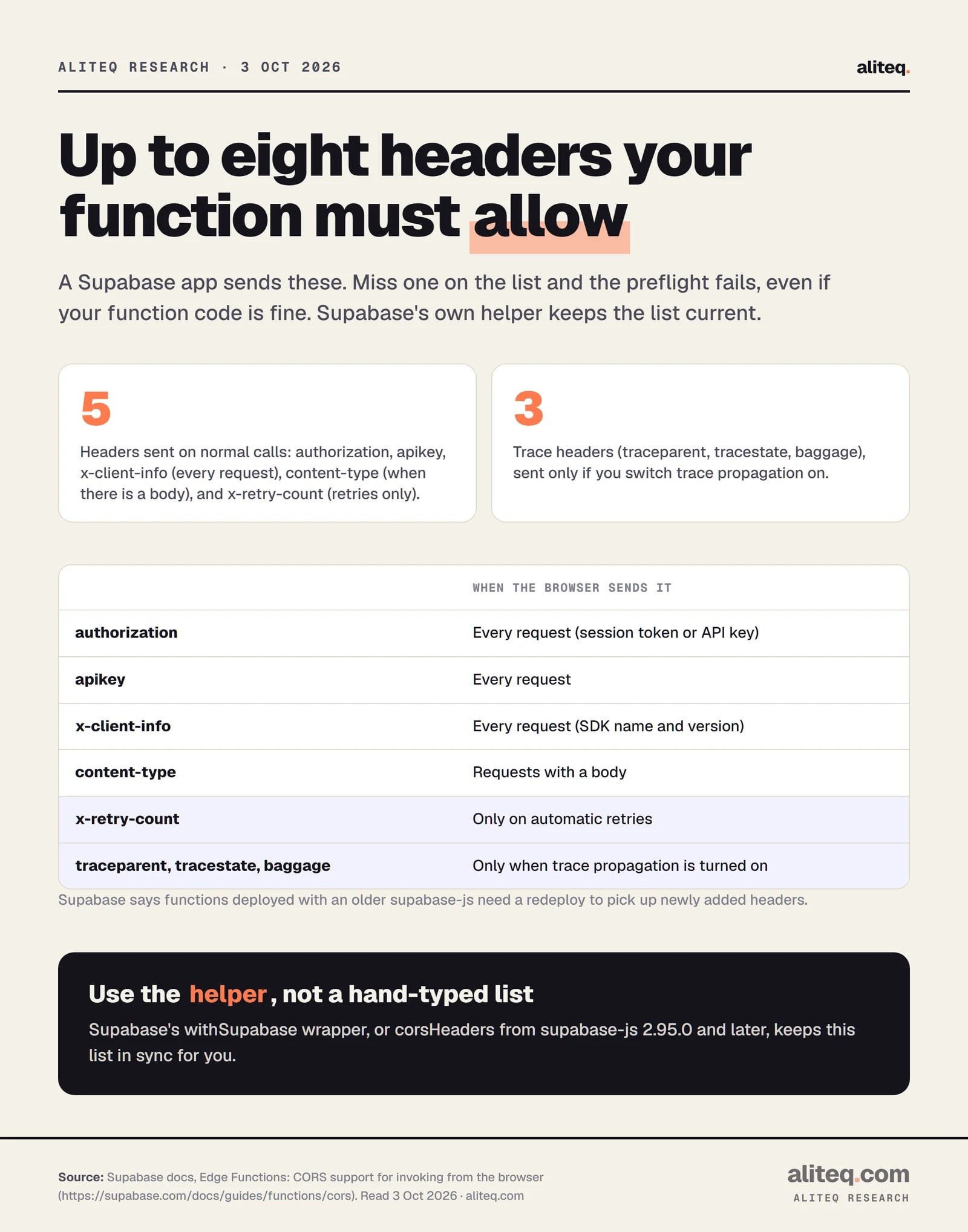
Why import the list? A Supabase app sends several headers: authorization, apikey and x-client-info on every request, content-type when there is a body, x-retry-count on retries, and three trace headers only if you switch on trace propagation. Supabase says functions built with an older client "need a redeploy" to pick up new ones. Miss one, and the preflight fails.
Supabase's documented header list, read Oct 3, 2026. The helper keeps it current. · aliteq research
One more thing to know about the docs' own example. It sets Access-Control-Allow-Origin to *. That is Supabase's choice for a token sent in a header. My reading of the MDN rules is that the star is blocked only for cookie-style credentials, so a header token passes. Supabase does not say this in so many words. If your function returns private data, name your own site instead. Put your origin after the helper so it wins:
// Same idea, one named origin. Adapted, not run by us.
const headers = {
  ...corsHeaders,
  'Access-Control-Allow-Origin': 'https://your-app.example',
  'Vary': 'Origin',
}
I did not find a Supabase page, read today, that covers CORS for the automatic database API, so I make no claim about it here.
How do you fix it in a Next.js route handler?
First check whether you need CORS at all. If your page and your route handler live on the same site, the call is same-origin and no CORS headers are needed. If another origin must call the handler, export an OPTIONS function that returns the headers, and add them to your real replies too.
Next.js documents route handlers for GET, POST, PUT, PATCH, DELETE, HEAD and OPTIONS. Its docs say that if you do not define OPTIONS, Next.js "will automatically implement OPTIONS and set the appropriate Response Allow header". They describe an Allow header only. So the automatic answer does not carry the Access-Control-* headers a browser needs. That is my reading of the docs, not a test I ran.
Next.js shows the headers set with the standard Response. Here is that pattern with a named origin instead of the star, adapted from the docs:
// app/api/hello/route.ts. Adapted from the Next.js docs, not run by us.
const cors = {
  'Access-Control-Allow-Origin': 'https://your-app.example',
  'Access-Control-Allow-Methods': 'GET, POST, OPTIONS',
  'Access-Control-Allow-Headers': 'Content-Type, Authorization',
  'Vary': 'Origin',
}

export async function OPTIONS() {
  return new Response(null, { status: 204, headers: cors })
}

export async function POST(request: Request) {
  const body = await request.json()
  return Response.json({ ok: true, got: body }, { headers: cors })
}
The Next.js docs example uses the star on a GET route. For anything private, a named origin is the safer default. For many routes at once, the docs say to use the Proxy file or the next.config.js headers setting. Their Proxy example keeps a short list of allowed origins and sends back the caller's origin only if it is on the list. That is the allowlist pattern from the previous section.
What should you tell your AI tool?
Give it the exact browser message, name your setup, and ask for a named origin and an OPTIONS answer. Do not accept "allow all origins" or "disable CORS" for a private app. Then retest from the real deployed address, since a preview address is a different origin.
A prompt that works in plain English:
"My app at https://your-app.example calls a Supabase edge function and the browser says it is blocked by CORS. Show me the exact fix. Answer the OPTIONS request, add CORS headers to every response including errors, allow only my own site as the origin, and use the helper from supabase-js instead of a hand-typed header list. Explain each line."
Then check three things in the answer. The origin should be your site, not a star, unless the data is public. The OPTIONS case must return before any login check. And the error replies must carry the headers too. How to read AI code without coding shows how to spot these in a file you did not write.
Open the browser console and read the full red message, not your app's generic failure text.
Find which of the three problems it names: missing allow-origin, a header not allowed, or the preflight itself failing.
Fix it on the server: name your own site, answer OPTIONS with an ok status, and add the headers to error replies.
If you send cookies, drop the star and name the exact origin, plus Allow-Credentials true.
Retest from your real deployed address, then confirm the data is still protected by login and database rules, not by CORS.
What does "blocked by CORS policy" mean in simple words?
Your page asked a different address for data, and that address did not tell the browser your page may read the reply. The browser then hides the reply from your code. The fix is on the server that sends the reply, by returning the right headers.
Is a CORS error a sign my app was hacked?
No. It is a browser safety rule doing its job, and it usually means a missing header or an unanswered OPTIONS check. It does not mean anyone broke in. It also does not mean your data is safe, because CORS is not a login or a database rule.
Why does my request work in Postman or curl but fail in the browser?
Those tools do not enforce the browser's CORS rule. Only browsers hide replies that lack the right headers. So a call that works there proves the server answered, not that a browser may read the reply. Check the headers on the OPTIONS and the real response.
Is it safe to set Access-Control-Allow-Origin to *?
Only for public data. MDN says the star is for public APIs and that private APIs should name a specific domain or domains. The star is also refused when a request carries cookies. For anything private, name your own site.
What is the difference between a preflight and the real request?
The preflight is an OPTIONS request the browser sends first to ask whether your method and headers are allowed. The real request goes out only if the answer is an ok status with matching headers. Both replies need CORS headers.
Do I need CORS if my frontend and backend share one domain?
No. A call to the same origin is not cross-origin, so no CORS headers are needed. Putting your route handlers on the same site as your pages is the simplest way to avoid the whole topic.