Your Replit bill jumped after a few prompts and you can't see why. Replit's own docs explain it: Agent charges by effort, and big projects and long chats cost more per message. What a checkpoint costs, what your credits cover, what hosting adds, and the spending cap every vibe coder should set before the next prompt.
You asked Replit for one small fix. The checkpoint said a few dollars. Then the next one did too. Nothing on screen tells you why a two-line change cost more than the whole first version of your app.
It isn't a glitch, and it isn't random. Replit prices its Agent by effort, and that model has one catch that hits vibe coders the hardest. The longer you work in one project and one chat, the more each new message costs. Replit said so itself.
So I read Replit's pricing page and its billing docs on October 4, 2026, plus the company's own 2025 blog posts on the change. Everything below comes from those pages, dated. I haven't used Replit Agent or seen a Replit bill, and Replit pays us nothing. If you're still choosing a tool, our map of vibe coding tools puts Replit next to Lovable, Bolt, v0 and Cursor in their own words.
Why is Replit so expensive all of a sudden?
Because every request to the Agent is priced by the work it does, and old, large projects need more work per request. Replit's July 2025 recap said "the larger the project and the longer the message thread, the more costly the incremental message becomes." A tiny edit in a big app can cost more than a big feature in a new one.
Here's the mechanism in plain English. An AI model reads text before it answers. In Replit, that text includes your request, the chat so far and the parts of your project it needs. The more it reads, the more it costs. Our explainer on context windows shows why that pile keeps growing.
Replit's recap named three surprises in its own words:
Small changes in big projects cost more. "Some projects and long sessions can now result in larger charges, even for relatively small code changes."
Questions cost money too. Asking the Agent a complex question in a large project "will similarly cost more because of all the context."
Chat lands on the next checkpoint. "The chat cost is summed in the next checkpoint's charges." So a cheap-looking edit can carry the cost of the chat before it.
Watch it happen below: each message adds to what the model has to read again.
Working memory (8k tokens)23% full
hidden instructionsyouthe AIa file
The app's hidden instructions~533 tok
package.json + config~1,333 tok
Everything still fits. Keep going and watch what happens when it doesn't.
Token counts are estimates (~3 characters per token); real tokenizers differ by model.
The current docs say the same thing more briefly. Replit's Plan Mode page says "Charges scale up for more complex requests, or requests in longer context conversations." The fix Replit itself suggested is starting a new chat, "balanced against loss of message thread context."
How effort-based pricing works
You pay per finished request, and the price follows the effort. When the Agent finishes your request in Build mode, it saves one checkpoint and bills it. Simple fixes cost less than big builds. Free Mode work costs nothing within your plan's allowance. Power and Max modes spend credits, and Replit asks before paid work starts.
The pieces, from Replit's billing and Agent docs:
Free Mode. "No-cost everyday Agent work for Core and Pro subscribers within its allowance." Replit picks the model for you. Starter users get it with a daily cap.
Power Mode. "Optimized for cost," using "fewer credits per task." It replaced the old Economy Mode "at the same price."
Max Mode. "More capable models for complex tasks, larger codebases, and harder problems." It costs more per task.
Effort. A per-model setting from Low to Max. Replit says "higher Effort adds cost up to ~2x on the toughest tasks" and "often adds little or nothing on simpler tasks."
Compare models. Runs your prompt on up to four models. Replit: "a Compare 4 run costs about as much as four single runs."
Third-party AI. When the Agent uses Claude, ChatGPT or Gemini behind the scenes, "You're billed at the provider's public API rate, deducted from your Replit credits."
One line catches people. In the paid path, "Plan Mode can perform billable reasoning even when it does not change code." The Plan Mode page is blunter: "All Agent interactions are billable." Planning is still cheaper than building, says Replit, but it isn't free outside Free Mode.
What does one Replit checkpoint cost?
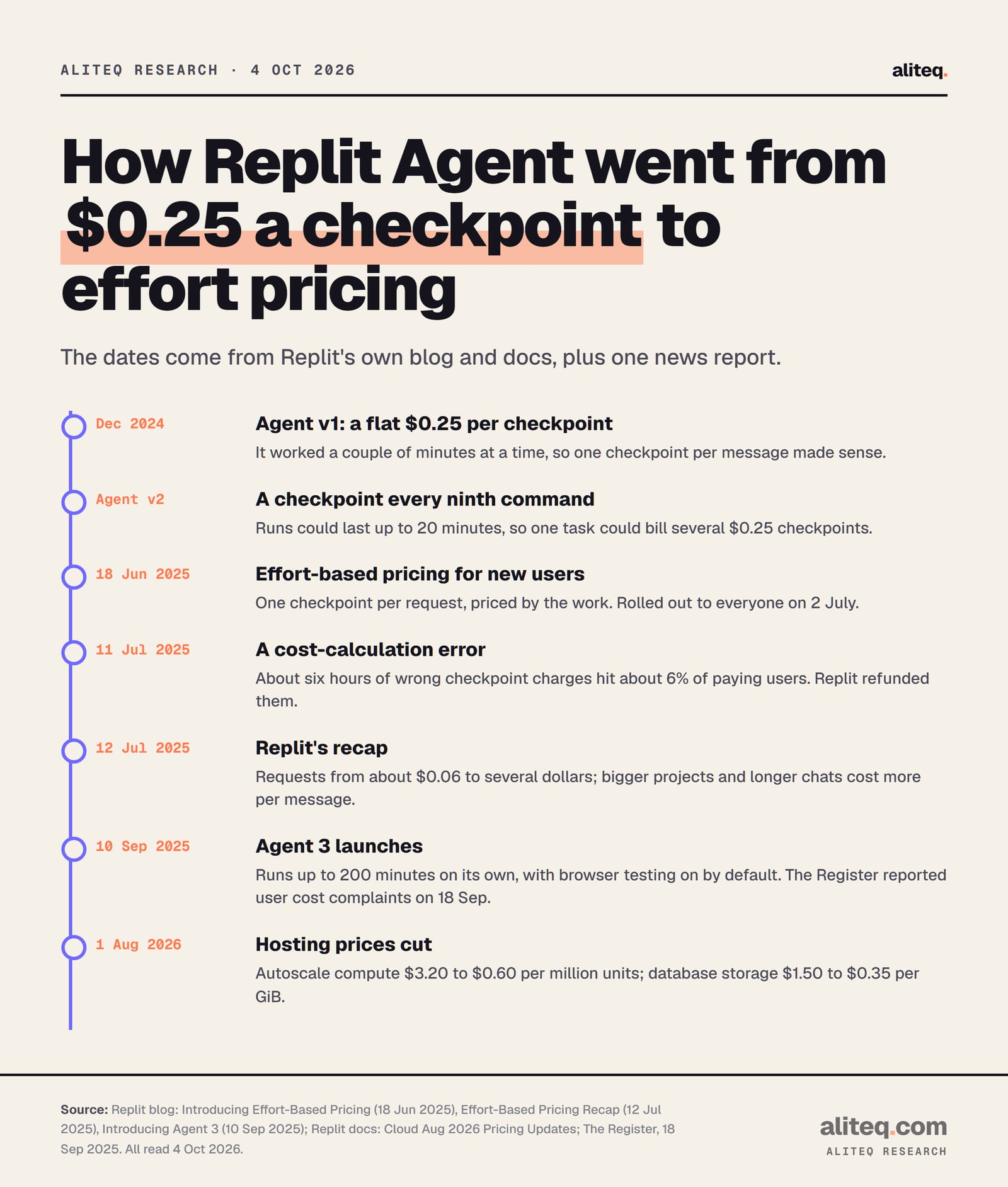
There's no fixed price any more. Replit's docs don't publish a per-checkpoint rate. Its July 2025 recap said "simpler requests may cost as little as $0.06" and more involved ones "will usually cost more than $0.25, sometimes resulting in charges of multiple dollars." You see each checkpoint's real cost by hovering over the usage icon in the Agent tab.
The $0.25 number you still see around the web is history. Replit's June 2025 post said "Previously, the Agent charged $0.25 per checkpoint." Under that model a big task could split into several $0.25 checkpoints. Effort pricing bundles the whole task into one checkpoint with one price.
From Replit's own blog posts and docs, read October 4, 2026. · aliteq research
Two dated details from that recap are worth knowing. On July 11, 2025, "due to an error in cost calculation," checkpoint charges were computed wrongly for about six hours. Replit said it hit about 6% of paying users and refunded every affected charge. It also said the median checkpoint price "only went up slightly," but that "we hadn't appreciated how much it affected power users."
Usage can lag, too. The AI billing doc says "Usage data can take up to 30 minutes to appear on your usage dashboard." Don't judge a busy hour by a dashboard that hasn't caught up.
What your plan's monthly credits cover
Credits are one wallet for everything. Core includes $20 of credits a month and Pro at least $100, and they pay for the Agent, publishing and databases alike. Replit's FAQ says that once they're gone, "you'll be charged for additional usage at pay-as-you-go rates" unless you buy a credit pack or set a budget.
Replit plans and what they include (read Oct 4, 2026, USD)
Price
Starter
Free
Core
$20 a month, or $18 a month billed yearly
Pro
$100 a month, or $90 a month billed yearly
Monthly credits
Starter
Daily Agent credits up to a monthly cap, plus monthly cloud credits
Core
$20
Pro
Starting at $100 (tiered)
Free Mode
Starter
Yes, daily cap
Core
Up to 30 hours of chat, up to 60 projects
Pro
More than Core
Power and Max modes
Starter
No (upgrade needed)
Core
Yes, from credits
Pro
Yes, from credits
Unused credits
Starter
Reset daily (Agent) and monthly (cloud)
Core
Don't roll over
Pro
Roll over for two months
Published apps
Starter
1, goes down after 30 days
Core
Unlimited
Pro
Unlimited
Starter
Core
Pro
Price
Free
$20 a month, or $18 a month billed yearly
$100 a month, or $90 a month billed yearly
Monthly credits
Daily Agent credits up to a monthly cap, plus monthly cloud credits
$20
Starting at $100 (tiered)
Free Mode
Yes, daily cap
Up to 30 hours of chat, up to 60 projects
More than Core
Power and Max modes
No (upgrade needed)
Yes, from credits
Yes, from credits
Unused credits
Reset daily (Agent) and monthly (cloud)
Don't roll over
Roll over for two months
Published apps
1, goes down after 30 days
Unlimited
Unlimited
Three things in the fine print matter for your bill:
The yearly discount is 10%. Core yearly is $18 × 12 = $216, against $240 paid monthly.
Credit packs are small discounts with an expiry. Packs are $100, $300 for $290, $500 for $480 and $1,000 for $950, so 3% to 5% off. They "expire six months after the purchase date."
Auto-reload buys more for you. It will "automatically purchase a new credit pack when your balance runs low." That's handy mid-project and dangerous if you forget it's on. You turn it off in Settings, Billing.
The September 2025 backlash, as reported
The cost problem became news in September 2025. The Register reported on September 18, 2025 that Replit users were protesting "steep cost increases" after Agent 3 launched on 10 September. Users told it that editing existing apps cost far more than building new ones. These are individual users' claims, not Replit figures.
According to The Register, the main complaint was that "certain tasks take longer, and involve more checkpoints, so therefore cost surprisingly more." One user told the outlet that editing older apps was where the money went, and said they spent $1,000 in a week. The same user said their bill had previously been about $180 to $200 a month. Another user, quoted from Reddit, said they used up $70 in a night.
Read that against Replit's own words from two months earlier. Bigger projects and longer chats cost more per message, and Agent 3 was built to run longer on its own. Replit's launch post says it "runs on its own for up to 200 minutes" and that its browser App Testing is "on by default, but can be turned off." More autonomy means more work per request, and you pay for work. The Register said it had asked Replit for comment.
Set a cap before your next prompt
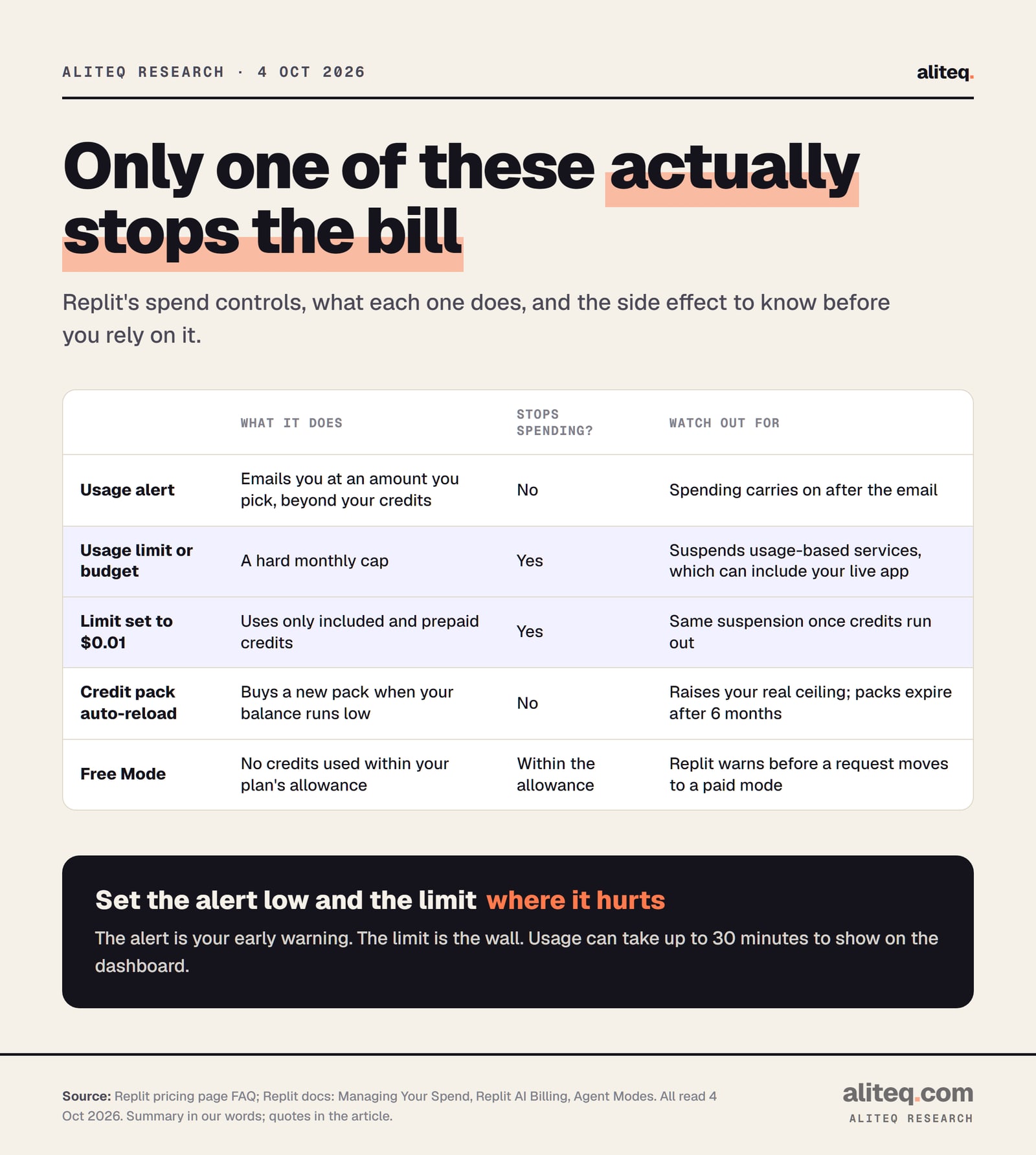
Set two things in Replit's billing settings: a usage alert at a number that would annoy you, and a hard limit at a number that would hurt. An alert only emails you. A usage limit or budget stops spending: Replit says that once it's reached, it will "temporarily suspend all of your usage-based services" until next cycle.
What each control does, in Replit's words. Read October 4, 2026. · aliteq research
Where the settings live, per Replit's docs on October 4, 2026: on Core, open Settings, Account, Usage, then Manage limits in the Account usage section. Alerts and budgets also sit under Account, Billing. Organization budgets must be set in $500 steps.
Add a usage alert at a small amount, say the price of a lunch. It's only an email, so it can't break anything.
Set a usage limit you could pay without wincing. When it's hit, Replit blocks usage-based services until next cycle or until you raise it.
Want to spend only what you've prepaid? Replit's own tip: set the limit to $0.01, and only your included and pack credits get used.
Check whether credit pack auto-reload is on. If it is, your ceiling is higher than you think.
Remember the 30-minute lag. A burst of big requests can pass your alert before the dashboard shows it.
The honest catch: a hard cap can take your live app down. The FAQ says the budget suspends "all of your usage-based services," and Replit's credits pay for publishing and databases too. So if you have real users, set the limit high enough to keep hosting running, and use the alert as your early warning. Our guide to hosting and what it costs explains why a live app keeps costing money while you sleep.
What publishing your Replit app costs
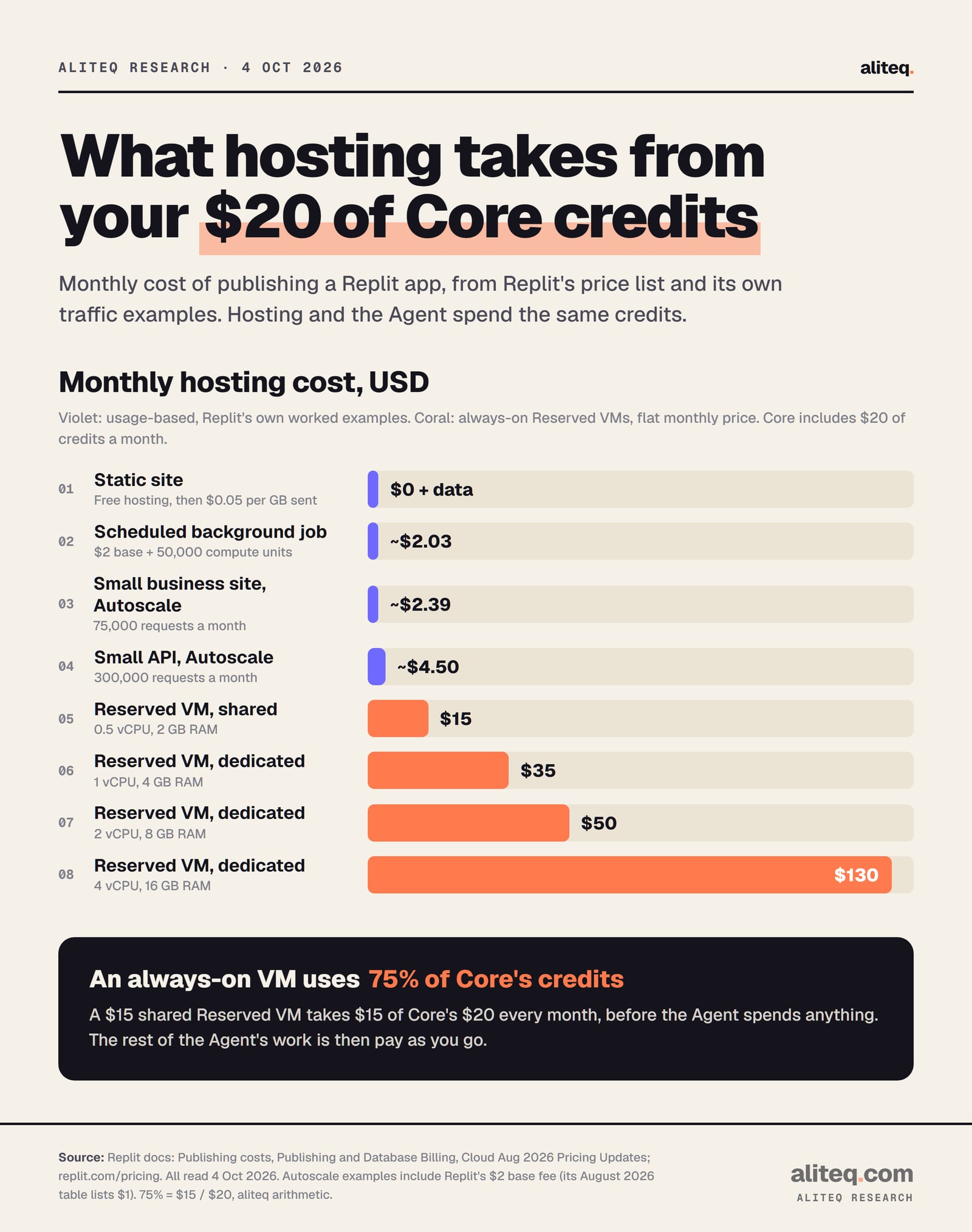
Hosting comes out of the same credits as the Agent. Replit's examples put a small business site at about $2.39 a month and a small API at about $4.50 on Autoscale. An always-on Reserved VM starts at $15 a month. Static sites host free and pay only for data sent. Development databases are free.
Replit's published prices and its own traffic examples. Read October 4, 2026. · aliteq research
Replit publishing and database prices (read Oct 4, 2026, USD)
Autoscale
Price
$0.60 per million compute units, $0.40 per million requests, plus a $1 to $2 base fee
Best for
Sites with uneven traffic; idles after 15 minutes with no visitors
Reserved VM
Price
$15 (shared 0.5 vCPU), $35, $50 or $130 a month (dedicated 1, 2 or 4 vCPU)
Best for
Apps that must stay on all the time
Scheduled
Price
$2 a month plus $0.60 per million compute units
Best for
Jobs that run on a timer
Static
Price
Free hosting, $0.05 per GB sent
Best for
Plain sites with no server code
Production database
Price
$0.16 per compute hour, $0.35 per GiB a month stored
Best for
Live data; sleeps after 5 idle minutes
Development database
Price
Free
Best for
Building and testing
Price
Best for
Autoscale
$0.60 per million compute units, $0.40 per million requests, plus a $1 to $2 base fee
Sites with uneven traffic; idles after 15 minutes with no visitors
Reserved VM
$15 (shared 0.5 vCPU), $35, $50 or $130 a month (dedicated 1, 2 or 4 vCPU)
Apps that must stay on all the time
Scheduled
$2 a month plus $0.60 per million compute units
Jobs that run on a timer
Static
Free hosting, $0.05 per GB sent
Plain sites with no server code
Production database
$0.16 per compute hour, $0.35 per GiB a month stored
Live data; sleeps after 5 idle minutes
Development database
Free
Building and testing
Some notes so the table doesn't mislead you:
The base fee. Replit's publishing page lists the Autoscale base fee as $2 a month, while its August 2026 price-change table lists $1. We print both because the pages disagree.
Compute units. One CPU second is 18 units and one GB-second of memory is 2. Replit's small business example uses 600,000 units, which is $0.36.
Data allowance. Core includes 100 GiB of outbound data a month.
The Reserved VM math. A $15 shared VM uses 75% of Core's $20 in credits every month, before the Agent spends anything.
How to keep each request cheap
Start in Free Mode, keep chats short, and switch up only when a task needs it. Replit's docs recommend Free Mode for everyday work, Power Mode when you need more, and Max with higher Effort only for the hardest problems. Its own recap adds the cheapest habit of all: a fresh chat costs less to continue than a long one.
Free first, then Power. Replit's mode table recommends Power Mode to "Maximize number of prompts per credit."
Leave Effort at the recommended level. Each model shows one. Raising it can add up to about 2x on hard tasks.
Start a new chat for a new job. Replit's recap said this mitigates the long-thread cost, at the price of losing that thread's context.
Write the request like a spec. One clear ask beats five rounds of "no, not like that." Our guide to prompting as writing a spec shows how.
Skip Compare models unless you need it. Four models cost about four runs.
Treat questions as paid. Outside Free Mode, Replit bills Agent answers too, and big projects make them pricier.
Rollbacks don't refund anything, and by default they don't touch your database either. If that matters for your app, our Replit security checks cover what a rollback does and doesn't restore.
Quick answers
Why is Replit so expensive?
Replit Agent charges by effort, and effort grows with project size and chat length. Replit's July 2025 recap said the bigger the project and the longer the thread, the more each new message costs. Max mode, higher Effort and Compare models add more. Credits also pay for hosting.
How much does a Replit checkpoint cost?
There's no fixed price. The docs list none today. Replit's July 2025 recap said simple requests could cost as little as $0.06, and bigger ones usually more than $0.25, sometimes several dollars. Hover the usage icon in the Agent tab to see each checkpoint's cost.
What is Replit effort-based pricing?
It's how Replit bills Agent work since mid-2025. Each request ends in one checkpoint, priced by the work done. It replaced a flat $0.25 per checkpoint. Replit's FAQ says "the Agent will spend more credits as it works longer."
How do I stop Replit charging me more?
Set a usage limit or budget under your account's usage or billing settings. When it's reached, Replit suspends usage-based services until the next cycle. To spend only prepaid credits, Replit suggests setting the limit to $0.01. Turn off credit pack auto-reload too.
How much does Replit Core cost and what's included?
$20 a month, or $18 a month billed yearly. It includes $20 of monthly credits for the Agent, publishing and databases, Free Mode, Plan Mode and unlimited published apps. Unused Core credits don't roll over.
How much does it cost to deploy an app on Replit?
It depends on the type. Static sites host free and pay $0.05 per GB sent. Replit's own Autoscale examples come to about $2.39 a month for a small business site. An always-on Reserved VM starts at $15 a month. It all comes out of your credits first.
Use this in your own page
Teaching this? Paste the live version into your course, blog or answer. Free, no sign-up; the credit line links back here.