Your vibe-coded app went quiet for a week and now it won't load. Here is every Supabase Free limit, the exact thing that breaks when you cross each one, and the real monthly bill once you upgrade.
You open your app and nothing loads. No error you recognize, just a spinner, or a login that never comes back. Then you find the email from Supabase you skimmed last week. Your project was paused.
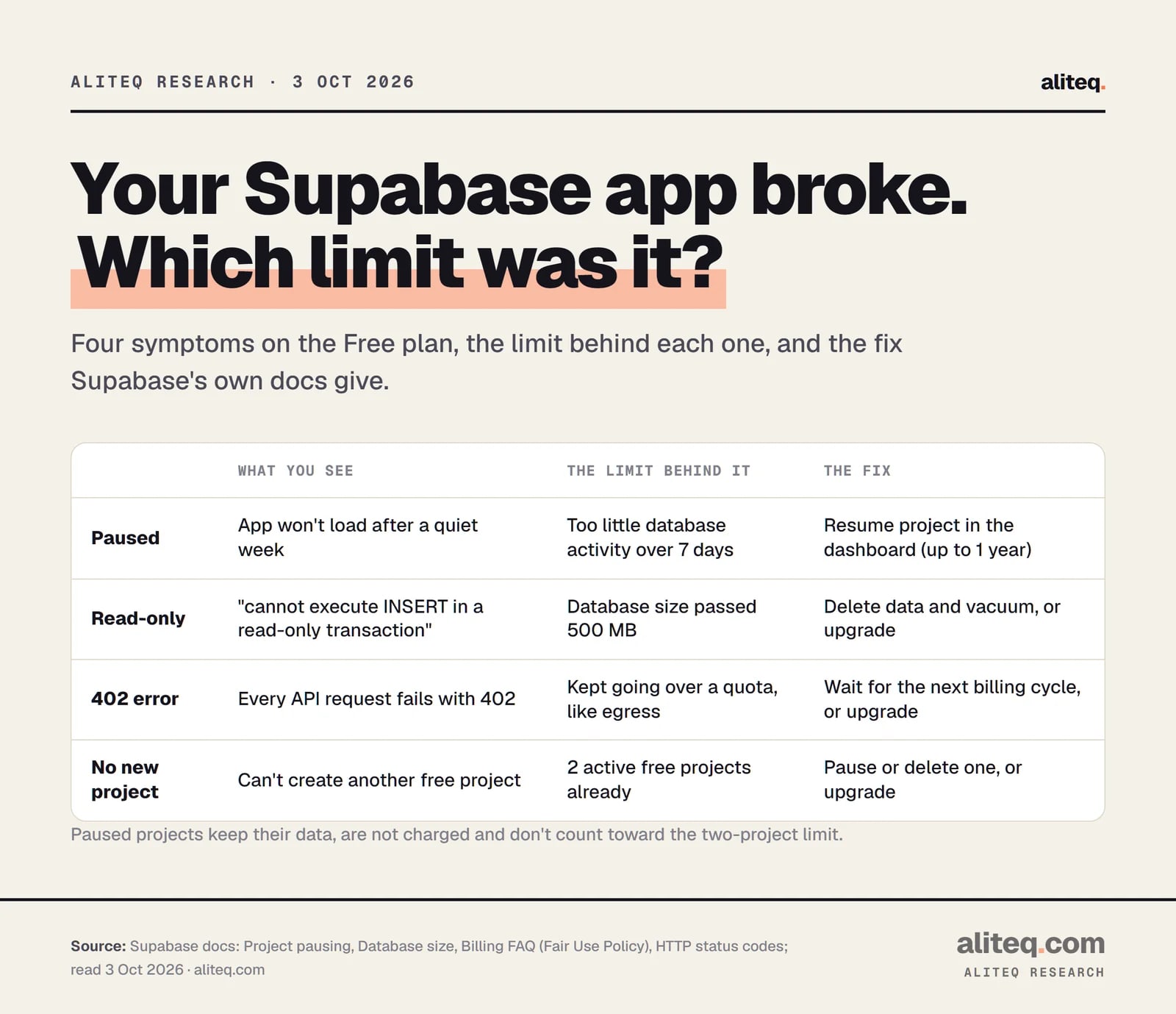
That is the most common way a free Supabase project "breaks", but it is not the only one. A database can also turn read-only, or every request can start returning a 402 error. Each one has a different cause and a different fix. I read Supabase's pricing page and platform docs on October 3, 2026 and put every limit, symptom and price in one place. I did not run a test project into these limits. Supabase does not pay us, and this page has no affiliate links.
Supabase pauses Free projects that show low activity over a 7-day period. Its docs say a project counts as inactive if it "does not receive sufficient user database activity over the past week." Your data is kept. Paid projects are never paused for inactivity.
This bites vibe-coded side projects in a predictable way. You build the app, share it once, get busy, and nobody uses it for a week. Supabase sends the project owner two emails: a warning "roughly one week before the pause takes effect", and a confirmation once it happens. If the owner email is an inbox nobody reads, you find out from your users.
Supabase does not publish an exact activity threshold. Its docs say "a few user requests to the database each day over the previous week is enough" to avoid a pause. Paused projects do not count toward your two-project limit, and Supabase does not charge for them.
How do I get a paused project back?
Open the Supabase dashboard, pick the organization, select the paused project and click Resume project. The docs say it returns "to its previous state, including data and configurations." You can do this for up to a year after the pause.
The one-year window exists because, in Supabase's words, "backups are only retained for a limited period, and platform changes may not be backward compatible with older backups." So don't treat a paused project as storage. If the data matters, export it.
Resuming does not change the rule, so a quiet week will pause it again. If people rely on the app, the docs' own answer is the Pro plan, where "paid projects cannot be paused."
Supabase's docs also list a stopgap: after the warning email, generate activity "by making API calls to your project or sending requests via your connected application." That works for a demo. For an app with real users, I'd rather pay the $25 than build my uptime on a workaround.
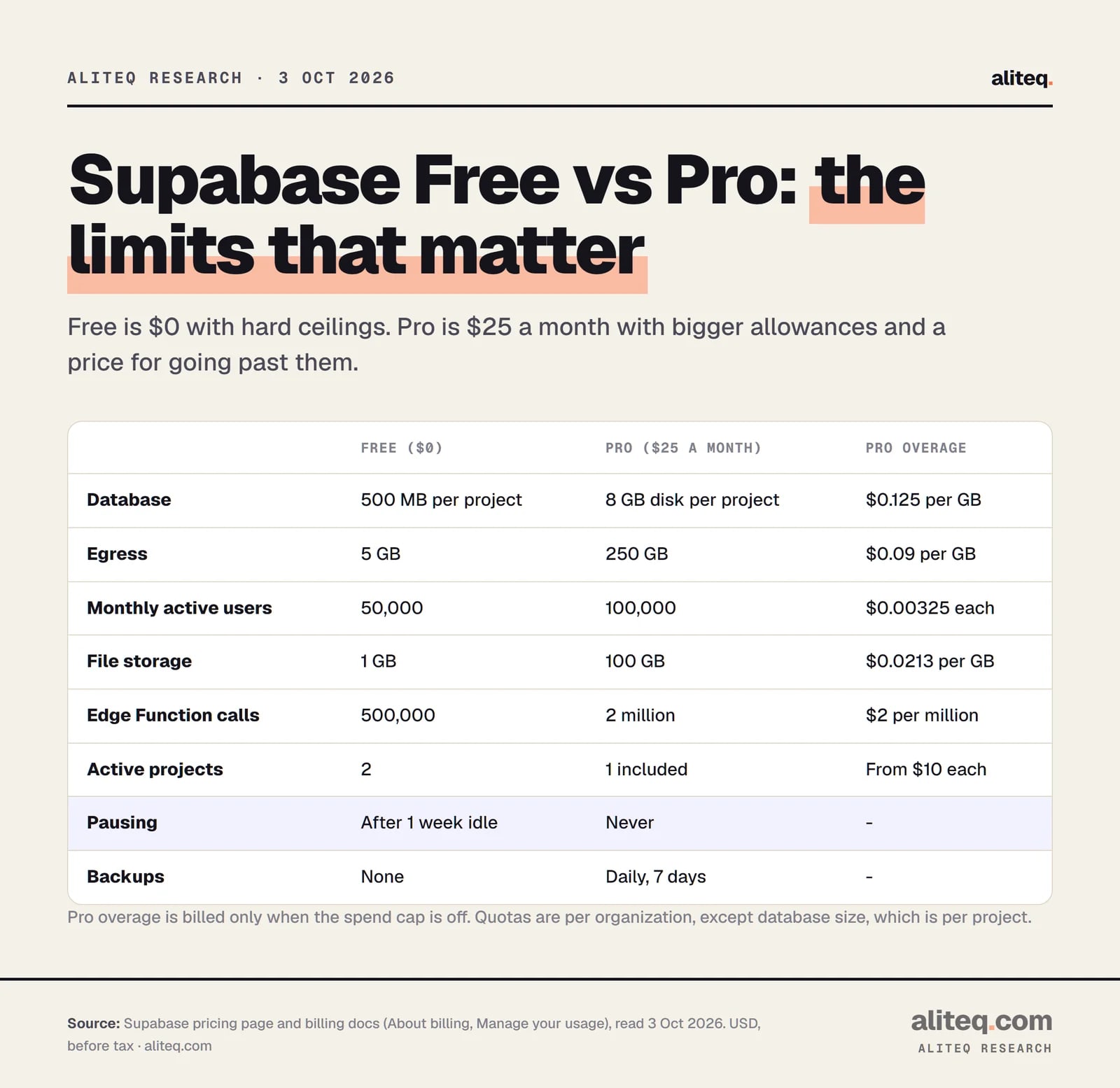
Every Supabase Free plan limit, in one table
Free gives you two active projects, each with its own Postgres database capped at 500 MB, plus shared quotas: 5 GB of egress, 50,000 monthly active users, 1 GB of file storage, 500,000 Edge Function calls and 2 million Realtime messages a month. API requests are unlimited.
Supabase pricing page and billing docs, read October 3, 2026. Pro overage applies only with the spend cap off. · aliteq research
Supabase Free vs Pro: what's included (USD)
Active projects
Free ($0)
2
Pro ($25 a month)
First project included, more from $10 a month each
Database size
Free ($0)
500 MB per project
Pro ($25 a month)
8 GB disk per project, then $0.125 per GB
Egress (data sent out)
Free ($0)
5 GB, plus 5 GB cached
Pro ($25 a month)
250 GB, then $0.09 per GB (cached: 250 GB, then $0.03)
Monthly active users
Free ($0)
50,000
Pro ($25 a month)
100,000, then $0.00325 per user
File storage
Free ($0)
1 GB, 50 MB max upload
Pro ($25 a month)
100 GB, then $0.0213 per GB
Edge Function calls
Free ($0)
500,000
Pro ($25 a month)
2 million, then $2 per million
Realtime
Free ($0)
200 peak connections, 2 million messages
Pro ($25 a month)
500 connections, 5 million messages
Compute
Free ($0)
Nano: shared CPU, 500 MB RAM
Pro ($25 a month)
Micro (1 GB RAM) covered by $10 monthly credit
Pausing
Free ($0)
After 1 week of inactivity
Pro ($25 a month)
Never
Backups
Free ($0)
None (export your own)
Pro ($25 a month)
Daily, kept 7 days
Log retention
Free ($0)
1 day
Pro ($25 a month)
7 days
Free ($0)
Pro ($25 a month)
Active projects
2
First project included, more from $10 a month each
Database size
500 MB per project
8 GB disk per project, then $0.125 per GB
Egress (data sent out)
5 GB, plus 5 GB cached
250 GB, then $0.09 per GB (cached: 250 GB, then $0.03)
Monthly active users
50,000
100,000, then $0.00325 per user
File storage
1 GB, 50 MB max upload
100 GB, then $0.0213 per GB
Edge Function calls
500,000
2 million, then $2 per million
Realtime
200 peak connections, 2 million messages
500 connections, 5 million messages
Compute
Nano: shared CPU, 500 MB RAM
Micro (1 GB RAM) covered by $10 monthly credit
Pausing
After 1 week of inactivity
Never
Backups
None (export your own)
Daily, kept 7 days
Log retention
1 day
7 days
Two details trip people up. First, quotas like egress and users are shared across the whole organization, not given per project. The database size limit is the exception: it is per project. Second, a fresh project already uses some of its 500 MB. The database-size docs put a new project at "~40-60mb" from pre-installed extensions and schemas.
What does each limit do when you cross it?
Each limit fails differently. Pausing takes the whole project offline. A full database turns read-only, so reads work and writes fail. Going over a usage quota first gets you a warning email and a grace period, and then a restriction that can return a 402 error on every request.
Error text and behavior from Supabase's database-size, billing FAQ and HTTP status code docs, read October 3, 2026. · aliteq research
Saving fails with "cannot execute INSERT in a read-only transaction"
Short answer: your database passed 500 MB. The docs say "Free Plan projects enter read-only mode when your database size exceeds 500 MB." Reads still work. Writes fail with Postgres error code 25006.
This is about the size of your data, not the disk. Free projects have 1 GB of disk, but the 500 MB database quota is what triggers read-only. Deleting rows does not free space right away. Postgres marks deleted rows as dead and reclaims the space later through a cleanup step called vacuuming. Supabase runs it automatically, and a manual vacuum full locks the table while it runs.
The usual culprits in a vibe-coded app are logs or events written on every page view, AI chat history stored in full, and images saved inside the database instead of in file storage. Ask your AI tool: "Which tables are largest in my Supabase database, and is anything here that belongs in Storage or can be deleted?" Then check the answer in the dashboard's database report before you delete anything.
Every request returns a 402
Short answer: your organization kept going over a quota, such as egress or monthly active users, and Supabase applied its Fair Use Policy. The error description names the reason, for example exceed_egress_quota. Your data stays reachable in the dashboard.
Supabase first emails you when you go over a Free quota and gives you a grace period. Its billing FAQ lists what can happen if usage stays over: "Pausing projects; Switching databases to read-only mode; Disabling new project launches/transfers; Responding with a 402 status code for all API requests." The restriction usually covers every project in the organization.
There is a sting in the tail. Once a grace period has been used, the FAQ says "if you exceed your plan limits again, you will not receive another grace period and your project will be restricted." The restriction lifts when your quota refills at the start of the next billing cycle, or right away if you upgrade to Pro. Pausing or deleting a project does not undo usage already counted that month.
What eats egress?
Egress is data Supabase sends out to your users: query results, login responses, downloaded files, Edge Function replies and Realtime updates. Free includes 5 GB a month. A page that downloads a whole table and filters it in the browser burns through it fast.
Supabase's own tips are plain: select fewer columns and rows, make fewer queries, cache what you can, and don't return the whole row after every insert or update. The same habits make a slow app faster, which is the subject of why a Lovable app slows down once it has real data.
Monthly active users
A monthly active user is anyone who signs in or refreshes their login token during the billing cycle, counted once however often they return. Free covers 50,000. If you set up login with our Supabase login walkthrough, each real person counts once a month.
What does Supabase Pro actually cost?
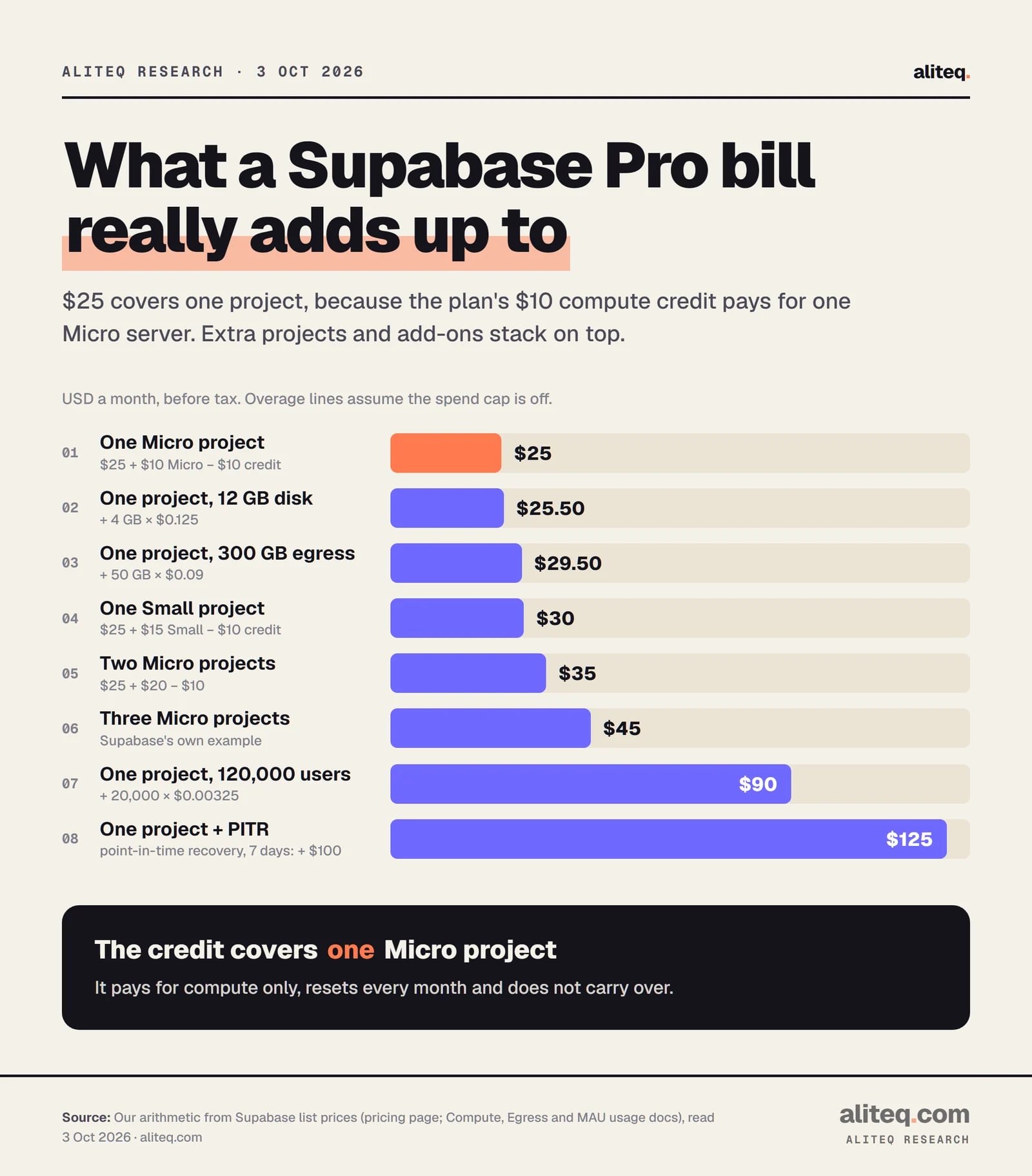
Pro is $25 a month and includes $10 of compute credit, which covers one project on the default Micro size. So one project costs $25. Each extra project adds about $10, and you only pay overage when you turn the spend cap off. Compute and add-ons are billed on top.
Our arithmetic from Supabase list prices read October 3, 2026: $25 plan, $10 compute credit, Micro $10, Small $15, overage rates as listed. Before tax. · aliteq research
Here is how the bill is built, from Supabase's compute and billing docs:
Plan fee: $25 a month, charged up front.
Compute: every project is its own server, billed by the hour. Micro is about $10 a month ($0.01344 an hour), Small about $15. Usage, including compute, is charged after the month ends.
Credit: Pro includes $10 of compute credit a month. It covers compute only, and it resets each month rather than adding up.
Overage: only beyond the included quotas, and only with the spend cap off.
Supabase's own example: three projects on the default size cost "$25 Pro Plan, $30 for 3 projects, $10 Compute credits ⇒ $45 / month." One Small project is $25 + $15 − $10 = $30.
Pro bills, worked from list prices (USD a month)
One Micro project
How it's built
$25 plan + $10 Micro − $10 credit
Total
$25
Two Micro projects
How it's built
$25 + $20 − $10
Total
$35
One Small project
How it's built
$25 + $15 − $10
Total
$30
One project, 300 GB egress
How it's built
$25 + 50 GB × $0.09
Total
$29.50
One project, 120,000 users
How it's built
$25 + 20,000 × $0.00325
Total
$90
One project, point-in-time recovery
How it's built
$25 + $100 for 7 days of recovery
Total
$125
How it's built
Total
One Micro project
$25 plan + $10 Micro − $10 credit
$25
Two Micro projects
$25 + $20 − $10
$35
One Small project
$25 + $15 − $10
$30
One project, 300 GB egress
$25 + 50 GB × $0.09
$29.50
One project, 120,000 users
$25 + 20,000 × $0.00325
$90
One project, point-in-time recovery
$25 + $100 for 7 days of recovery
$125
One upgrade trap: a project created on Free runs on Nano compute. After you upgrade, the docs say Nano "is billed at the same price as Micro," and Supabase does not switch it for you "because of the downtime incurred." Move it to Micro yourself at a quiet hour, because you are paying for Micro either way.
What does the spend cap protect, and what doesn't it?
The spend cap is on by default on Pro. With it on, once you use up a quota "further usage of that item is disallowed until the next billing cycle," so you are never charged overage. It covers usage like egress, users, storage and function calls. It does not cover compute or add-ons.
The covered list, from Supabase's cost-control docs: disk size, egress, Edge Function calls, logs, monthly active users, Realtime messages and connections, image transformations and storage size. The not-covered list: compute, branching, read replicas, custom domains, extra disk speed, IPv4, log drains, phone MFA and point-in-time recovery. Those are things you switch on yourself, so Supabase treats them as predictable.
So the cap answers "can a bot or a bug run up my bill?" mostly with no. It does not answer "will my app stay up?" With the cap on, going over a quota means that feature stops, and repeated overage can lead to the same restrictions as Free. The docs also say the cap can't set a budget per item or send alerts at a dollar amount. Check the organization's usage page yourself.
Make sure Supabase's pause warning email reaches an inbox someone actually reads.
Check database size in the dashboard's database report. Stay well under 500 MB on Free.
Free has no backups. Export your data regularly with the Supabase CLI db dump command.
Watch egress and active users on the organization's usage page, not just your app.
On Pro, leave the spend cap on until you know your normal usage, and move Nano to Micro.
Should I stay on Free or upgrade to Pro?
Stay on Free for prototypes, demos and apps only you use. Upgrade to Pro the moment other people depend on the app, because Pro is never paused and has daily backups. The trigger is not traffic. It is whether a week of silence would hurt someone.
My rule of thumb, straight from the docs' own recommendations:
Free is fine when losing a week of uptime costs nothing and you export the data yourself. The backup docs recommend that free projects "regularly export their data using the Supabase CLI db dump command and maintain off-site backups."
Pro is worth $25 when you have real users, when you store anything you can't recreate, or when the database is heading toward 500 MB.
Hire someone if you are paying for several larger compute sizes or add-ons and can't explain each line on the invoice. That is a design question, not a plan question.
Does Supabase delete my data when it pauses a free project?
No. A paused project keeps its data and settings. Supabase's docs say you can restore it from the dashboard for up to one year after it was paused, and paused projects are not charged.
How long before Supabase pauses a free project?
Supabase pauses Free projects that show low database activity over a 7-day period. It emails the project owner a warning about a week before, and again when the pause happens. Pro projects are never paused.
How do I stop my Supabase project from pausing?
The reliable fix is upgrading to Pro at $25 a month, since paid projects are not paused. Supabase also says real activity helps: a few user requests to the database each day over the week is typically enough.
What happens when a Supabase free database goes over 500 MB?
It switches to read-only mode. Reads still work, but writes fail with the error "cannot execute INSERT in a read-only transaction". Delete data and let Postgres reclaim the space, or upgrade to Pro.
Why is my Supabase API returning a 402 error?
Supabase restricted your organization under its Fair Use Policy, usually after repeatedly going over a quota such as egress, or for an overdue invoice. The error names the reason. It lifts at the next billing cycle or when you upgrade.
How much does Supabase Pro cost per month?
Pro is $25 a month, which includes $10 of compute credit. One project on the default Micro size costs $25 in total. Each extra Micro project adds about $10, plus any overage you allow by turning the spend cap off.