Merge keeps the story, rebase tidies it, squash flattens it. Here are plain decision rules, the one thing you must never rebase, and how the reflog gets your commits back, with AI coding agents in the mix.
Kernel here. I treat a Git history like a workshop bench. You can leave every tool out where it fell, or you can put things away before the next person walks in. Rebase, merge and squash are three ways of deciding which one you get. Nobody needs a flame war about it, just a rule they can follow at 5 p.m. on a Friday.
What is the difference between git merge and git rebase?
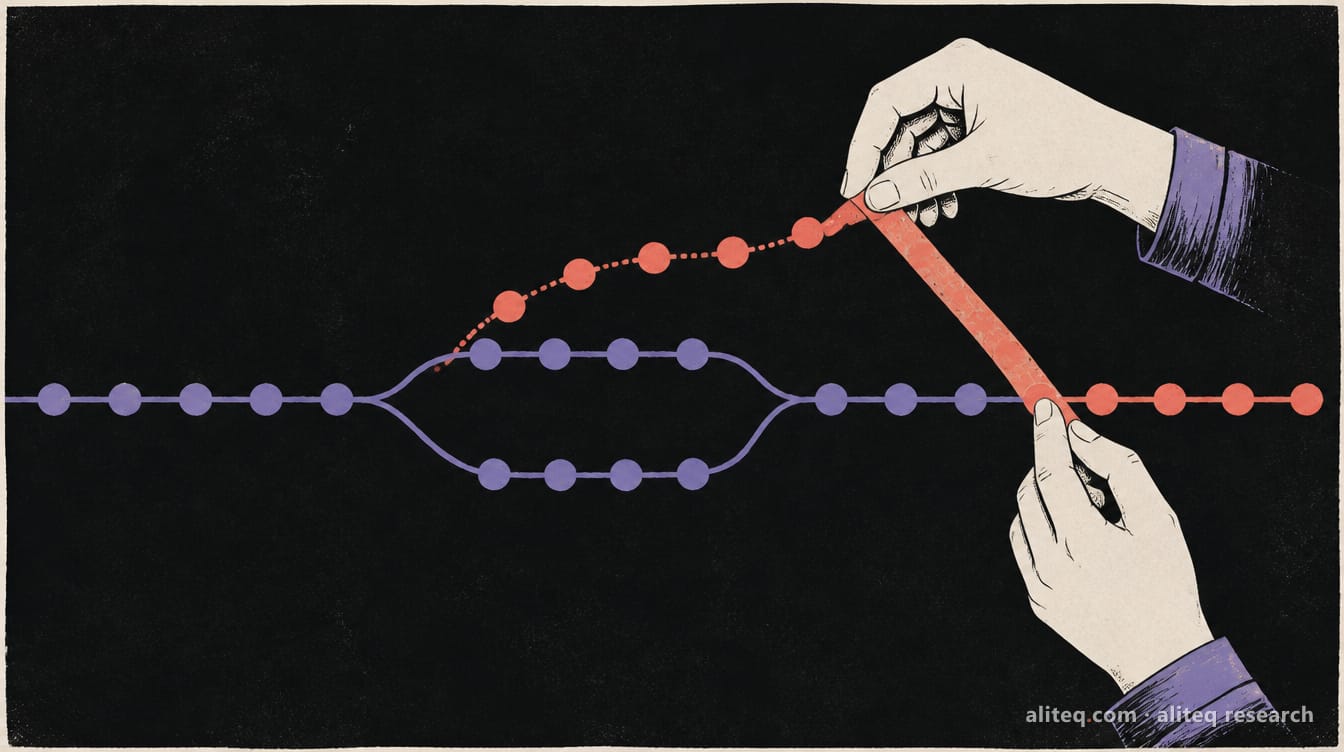
Merge joins two lines of work with a new commit that has two parents. Rebase replays your commits one by one on top of another branch, so they look like they happened in a straight line. The files end up identical. Only the recorded history differs.
The Pro Git book puts it this way: "There is no difference in the end product of the integration, but rebasing makes for a cleaner history." It also says the final snapshot is the same either way and "it's only the history that is different."
Here is the mechanism. A merge does a three-way merge between the two branch tips and their most recent common ancestor, then records the result as a new commit. A rebase finds that common ancestor, takes the diff each of your commits introduced, resets your branch to the target and applies each change in turn. The Git manual describes it as similar to running git cherry-pick for each commit.
One consequence matters for the rest of this page. A rebase does not move your commits. It creates new ones that are "similar but different," in the book's words. Same change, new commit ID. Hold on to that, because it is the whole reason the golden rule exists.
Which one should I use? Four decision rules
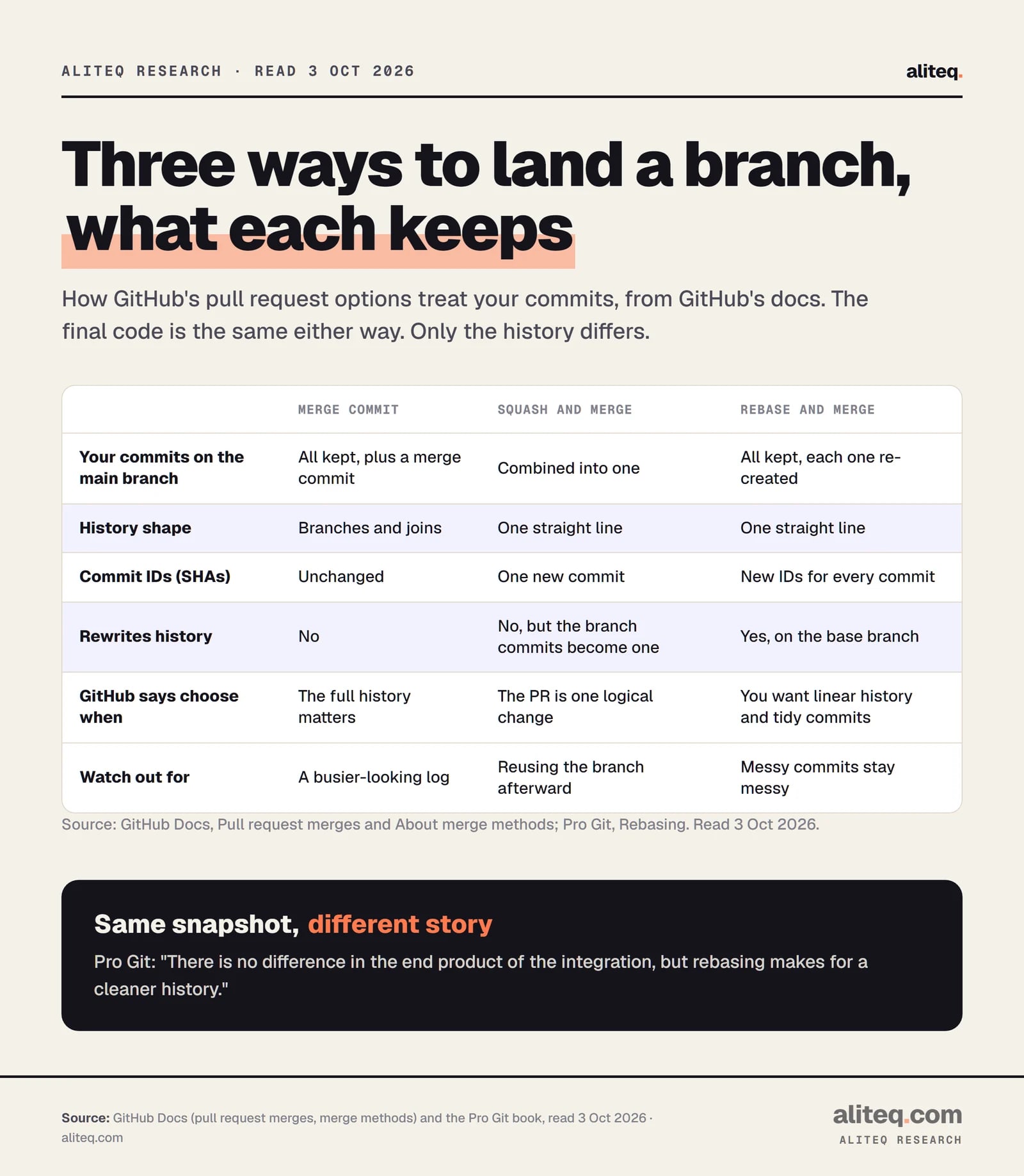
Pick merge when the history is the point, squash when one pull request equals one change, and rebase for your own local cleanup before you push. GitHub's docs give the same split. The Pro Git book adds a caution: it is "not that simple," and every team differs.
GitHub Docs (Pull request merges, About merge methods) and Pro Git, read Oct 3, 2026. · aliteq research
Rule 1: Is the branch shared, or has anyone pulled it? Do not rebase it. Merge into it instead. This beats every other rule.
Rule 2: Is the pull request one logical change, with a pile of small fixups? Squash and merge. GitHub says to choose it "when a pull request represents one logical change, especially if the branch includes many small fixup commits." Its docs also note that work-in-progress commits "aren't necessarily important to retain in the Git history."
Rule 3: Are the individual commits meaningful on their own? Use a merge commit, or rebase and merge if you want a straight line. GitHub says a merge commit fits when "your team values complete history or when the individual commits in a pull request are meaningful on their own." Rebase and merge fits when "the commits are already organized clearly."
Rule 4: Is it your own branch that you have not pushed? Rebase it onto the latest main before you open the pull request. That is the use the book endorses: rebase local work to clean it up, but never rebase what you have pushed.
If you work alone, you have more room. Rule 1 still holds the moment a second person, a CI job or a deploy tool reads your branch.
What does squash and merge actually do?
Squash and merge combines every commit in a pull request into one commit on the base branch. The branch's own commits stay on the branch, but the main branch gets a single new commit. The trade is that intermediate commits are not kept as separate commits on main.
On GitHub, squashed pull requests are merged using the fast-forward option. The plain merge button uses --no-ff, which forces a merge commit even when a fast-forward would be possible.
There is one trap, and GitHub documents it. Squash works best for short-lived branches. If you keep working on the same branch after a squash merge, later pull requests "can include commits that were already squashed into the base branch," which makes conflicts more likely and can force you to resolve the same conflict more than once. For a long-running branch, GitHub suggests a merge commit or rebasing before the next pull request.
On the command line, git merge --squash does the same job by hand. It stages the result of the merge but does not commit, so you write one commit yourself.
What is the golden rule of rebasing?
Never rebase commits that exist outside your repository and that other people may have based work on. The Pro Git book states it as: "Do not rebase commits that exist outside your repository and that people may have based work on." Rebasing abandons old commits and creates new ones, so everyone who built on the old ones is left stranded.
Here is how it goes wrong, following the book. You and a teammate both have the shared branch. They rebase it and force push. Their old commits vanish from the server and new copies appear. You pull, and Git merges the old and new copies together. Now your history has duplicates: two commits with the same author, date and message. If you push that, you put the abandoned commits back on the server.
The Git manual is blunter. Rebasing a branch that others have based work on "is a bad idea: anyone downstream of it is forced to manually fix their history." And: "The real fix, however, would be to avoid rebasing the upstream in the first place."
The book lays out when you are safe:
Commits that never left your computer: fine.
Commits you pushed, but nobody has based work on: fine.
Commits pushed publicly that others may have built on: trouble.
What about force pushing? git push --force disables the safety check, and the docs warn it "can cause the remote repository to lose commits; use it with care." If you must replace a branch you rebased, use --force-with-lease. It only overwrites the remote branch if it is still at the commit you expected. Git's docs call it taking a "lease" on the ref, and it protects a teammate's new commit from being wiped. GitHub's protected branches turn force pushes off by default.
Can you get a bad rebase back?
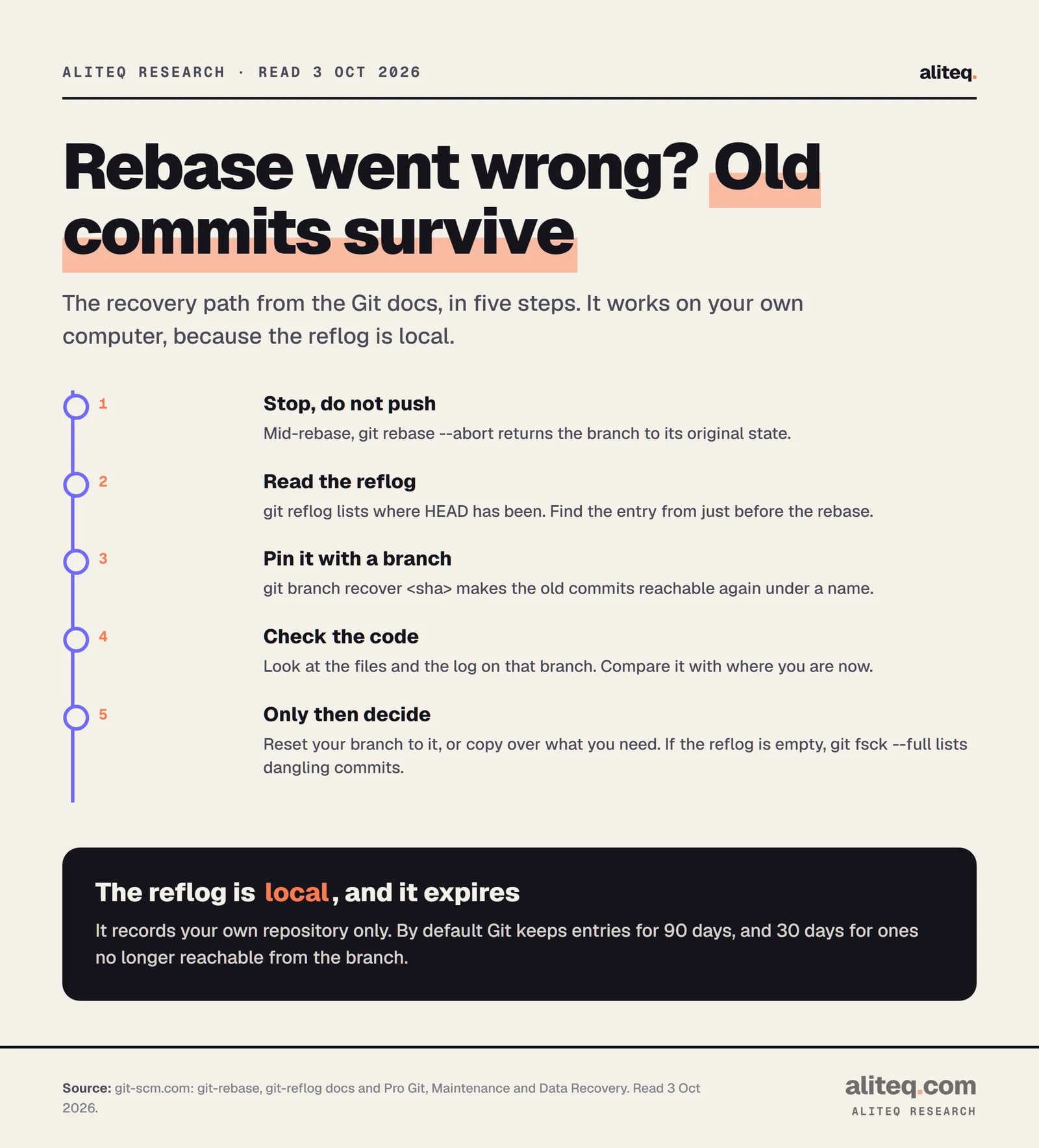
Usually yes, on your own machine. Git's reflog records where HEAD and your branch tips have been. After a bad rebase, find the entry from before it, put a branch on that commit, and your old work is back. The reflog is local to your repository, so it cannot rescue a teammate's clone.
Git docs (git-rebase, git-reflog) and Pro Git, Maintenance and Data Recovery, read Oct 3, 2026. · aliteq research
Step by step, from the docs:
Mid-rebase and in trouble?git rebase --abort returns the branch to its original state. You can also resolve the conflicts, git add the files and run git rebase --continue.
Already finished? Run git reflog. The book explains that "Git silently records what your HEAD is every time you change it." The manual describes HEAD@{2} as where HEAD was two moves ago.
Find the entry from just before the rebase. The manual adds that the previous branch tip "is accessible using the reflog of the current branch (i.e. @{1})."
Pin it.git branch recover-branch <sha> makes those commits reachable again under a name. This is the exact method in the book's recovery chapter.
Look before you jump. Check the files and the log on that branch. Then decide whether to reset to it or copy over what you need.
If the reflog entry is gone, the book shows one more door. git fsck --full lists "dangling commit" objects that nothing points to, and you recover them the same way, with a branch.
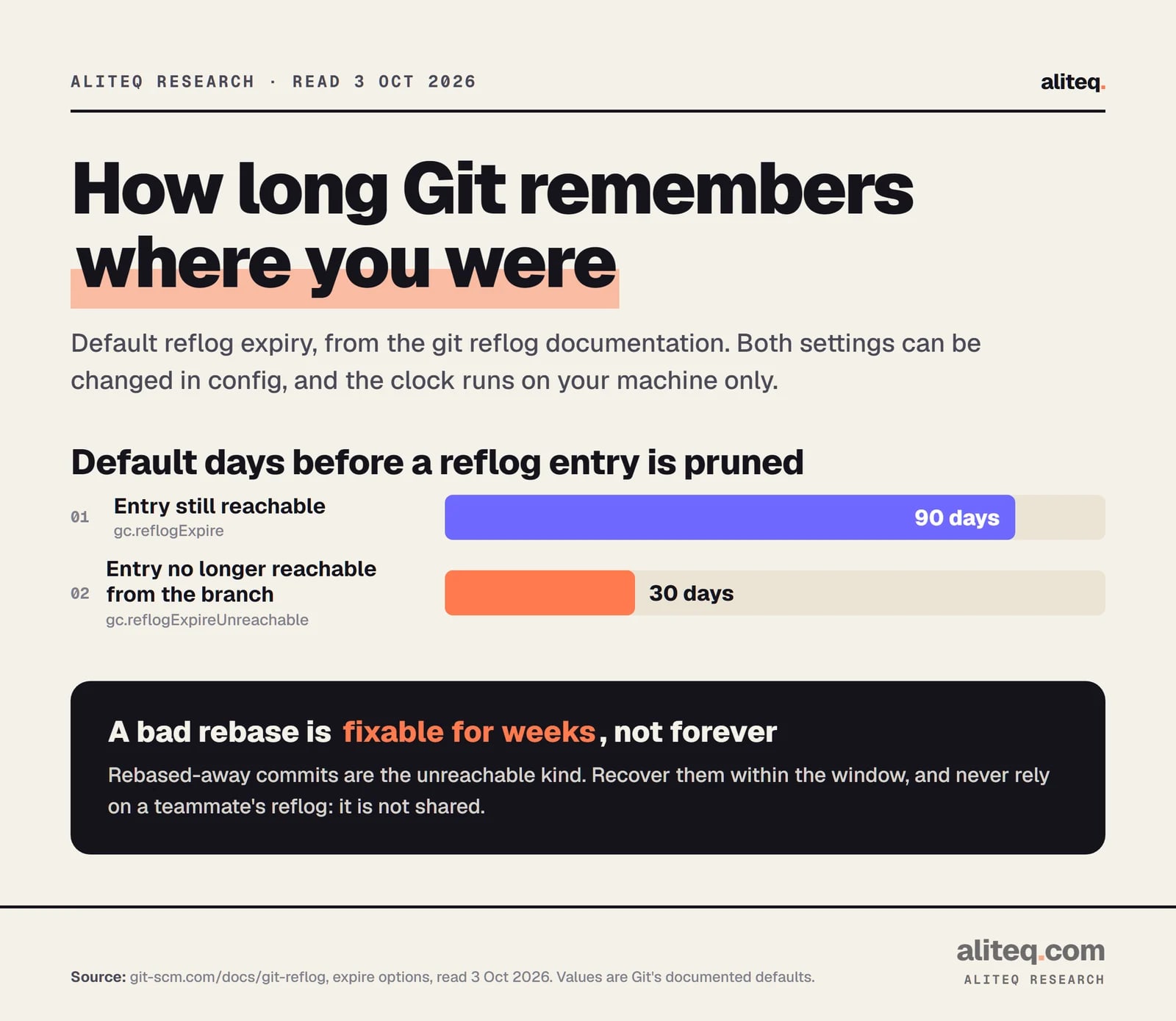
The clock matters. By default, reflog entries are pruned after 90 days, and entries no longer reachable from the branch after 30 days. Commits a rebase left behind are the unreachable kind. Both settings can be changed in config.
git-scm.com/docs/git-reflog, expire options, read Oct 3, 2026. · aliteq research
The reflog fixes your copy. It does not fix a shared branch that someone force pushed. For that, the safest undo on a shared branch is git revert. It records new commits that reverse the earlier ones and rewrites nothing, so nobody's history breaks.
How do AI coding agents change this?
They make small, frequent commits likely, which makes squash on short-lived branches a sensible default. This part is my opinion, not a measurement. The Claude Code docs say it "works directly with git. It stages changes, writes commit messages, creates branches, and opens pull requests." I did not count how many commits any agent makes.
The reasoning is simple. An agent that commits as it goes leaves the same kind of work-in-progress trail GitHub describes: many small steps, some of them fixes for the step before. That is the case squash was built for. If you are new to this kind of tool, start with our guide to Claude Code for vibe coders and what vibe coding means.
Four habits I would adopt, all consistent with the docs above:
Give the agent its own branch. Short-lived, one task, then squash and merge. GitHub says squash suits that shape.
Do not let an agent force push a shared branch. Treat any push --force it proposes as a stop sign. Force pushes are exactly the harm in the golden rule.
Keep main protected. GitHub's branch protection disables force pushes and deletions by default, and has a "Require linear history" option that forces squash or rebase merges.
Commit before you let it loose. A clean commit is a point you can return to. That gives you something to land on, the same way the reflog does for a rebase.
The vibe coder's shortcut: if you use a builder like Lovable or Cursor and never touch these commands, turn on squash merging in the repository settings and leave rebase alone. Our how to ship a vibe-coded app guide covers the rest of the path to production.
Should you force a linear history?
Only if your team wants it and uses squash or rebase for every pull request. GitHub's "Require linear history" setting blocks merge commits on a protected branch, so pull requests must be squashed or rebased. GitHub says a strictly linear history "can help teams revert changes more easily."
The opposing view is in the Pro Git book too. One camp says history is a record of what actually happened, and rewriting it is "lying." The other says history is the story of how the project was made, and you would not publish your first draft. The book's answer is to get "the best of both worlds": rebase local changes before pushing, and never rebase anything you have pushed.
One GitHub detail to know. Rebase and merge on GitHub "always updates the committer information and creates new commit SHAs," and it differs slightly from running git rebase yourself. It also drops commits that were empty to begin with. So the commit IDs you had on your branch will not be the ones on main.
Pick by situation (Pro Git and GitHub Docs, read Oct 3, 2026)
A shared branch teammates have pulled
Use
Merge. Do not rebase.
A short branch with many fixup commits
Use
Squash and merge.
A branch with clean, meaningful commits
Use
Merge commit, or rebase and merge for a straight line.
Your own unpushed commits
Use
Rebase onto the latest main to tidy up.
An agent's branch
Use
Squash and merge (my opinion, based on the WIP-commit guidance).
Undoing a bad change on shared history
Use
git revert. No rewriting.
Use
A shared branch teammates have pulled
Merge. Do not rebase.
A short branch with many fixup commits
Squash and merge.
A branch with clean, meaningful commits
Merge commit, or rebase and merge for a straight line.
Your own unpushed commits
Rebase onto the latest main to tidy up.
An agent's branch
Squash and merge (my opinion, based on the WIP-commit guidance).
Undoing a bad change on shared history
git revert. No rewriting.
Quick answers
Is rebase better than merge?
Neither is better in general. The final code is identical. Rebase gives a straight history, merge keeps what really happened. The Pro Git book says it is "not that simple" and every team and project is different.
When should I never rebase?
Never rebase commits that exist outside your repository and that people may have based work on. If others pulled the branch, merge into it instead of rewriting it.
How do I undo a git rebase?
If it is still running, use git rebase --abort. If it finished, use git reflog to find the commit from before the rebase, then create a branch at that commit with git branch recover-branch <sha>.
How long does the reflog keep my commits?
By default, 90 days for entries still reachable from the branch and 30 days for entries no longer reachable. These are Git's documented defaults and can be changed in config.
What is the difference between squash and rebase on GitHub?
Squash and merge combines the whole pull request into one commit. Rebase and merge keeps every commit but re-creates each one on the base branch with a new ID, for a straight history.
Is git push --force safe after a rebase?
It can overwrite other people's work. Git's docs warn it can cause the remote repository to lose commits. Prefer --force-with-lease, which only overwrites the branch if it is still where you expect.