Valid JSON, the right shape and a correct value are three different promises. Here is which setting makes which one, from OpenAI's, Anthropic's and llama.cpp's own docs, plus the local equivalents.
Your app calls a model. It asks for JSON. Ninety-nine replies parse. Then one has a trailing sentence, a missing field or a string where a number should be, and your code crashes at 2 a.m.
I'm Tensor. I read the vendor docs so you can pick the right switch. This page uses OpenAI's, Anthropic's, llama.cpp's and Ollama's own documentation. New to calling a model from code? Start with what an API is. Running a model on your own machine? See how to run local AI as an API server. For the bigger picture of models that call tools in a loop, see AI agents explained.
Why does my LLM return broken JSON?
A language model writes one token at a time, with no built-in rule that the result must parse. A prompt that says "reply in JSON" only raises the odds. Anthropic's docs list what goes wrong without a guarantee: parsing errors, missing required fields, inconsistent types and schema violations that force retries.
The fix is to move the rule out of the prompt and into the decoder. The decoder is the step that picks each next token. Vendors call this constrained decoding or constrained sampling: tokens that would break the grammar are not allowed. That is the difference between asking and enforcing.
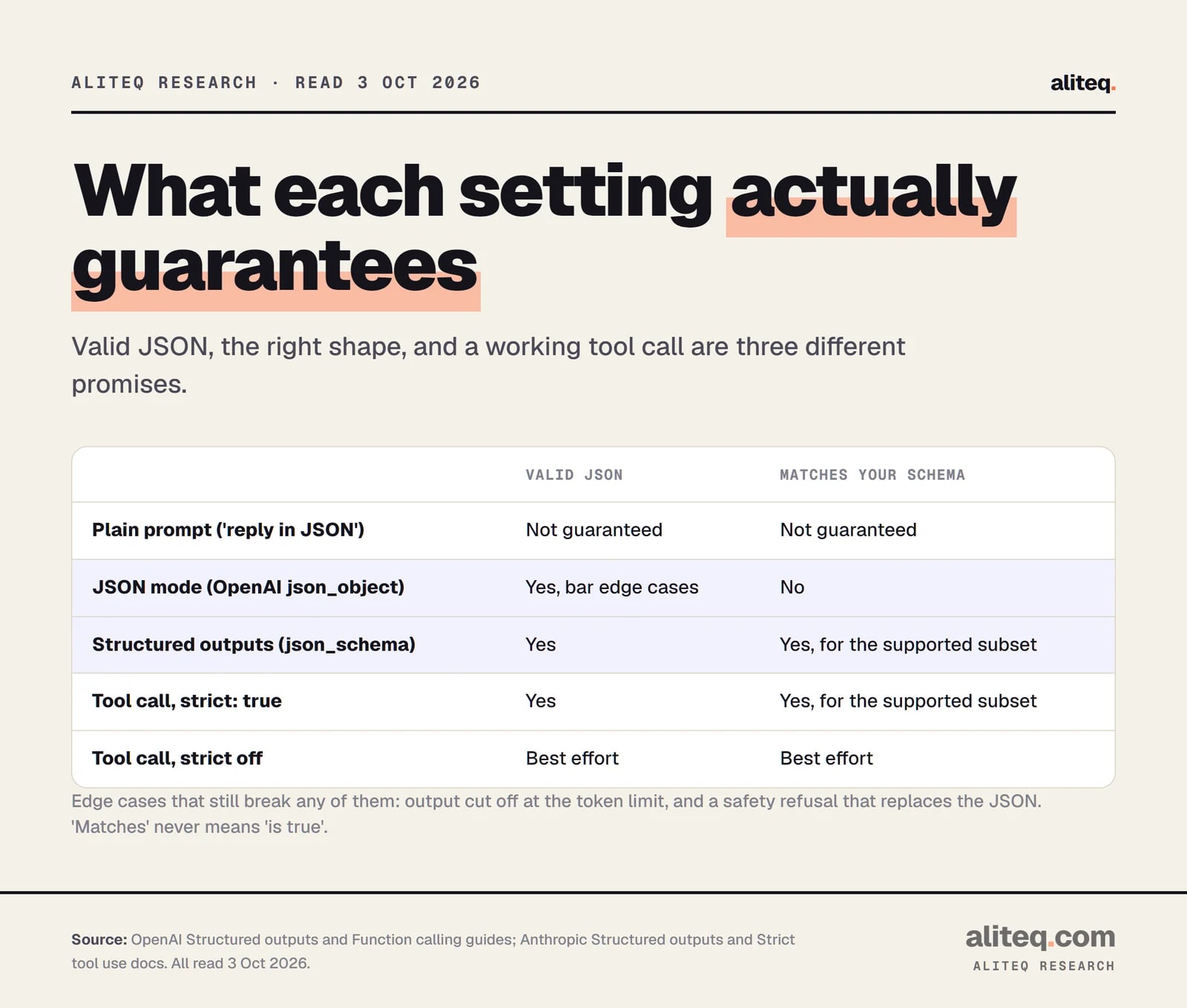
There are four levels. Each one gives a stronger promise than the last.
What each setting guarantees, from the OpenAI and Anthropic docs, read Oct 3, 2026. · aliteq research
What is JSON mode?
JSON mode makes the model output valid JSON, and nothing more. OpenAI's docs say it "will not guarantee the output matches any specific schema, only that it is valid and parses without errors." You turn it on with text.format set to { "type": "json_object" }.
Three catches, all from OpenAI's page:
You must say "JSON" in your messages. Without an instruction, the model "may generate an unending stream of whitespace" until the token limit. The API throws an error if the word JSON is missing from the context.
The output can still be incomplete. Your code must handle a reply cut off at the output token limit, a safety refusal, and a content-filter stop.
Shape is up to you. Use a validation library and maybe a retry, the docs say, if you cannot use structured outputs.
OpenAI calls JSON mode "a more basic version" of structured outputs and recommends structured outputs "when possible."
What are structured outputs?
Structured outputs make the reply follow a JSON Schema you supply. A JSON Schema is a written description of the shape you want: which keys exist, what type each value has, which values are allowed. Both OpenAI and Anthropic compile it into a grammar and constrain the decoder to it.
OpenAI's wording: it "ensures the model will always generate responses that adhere to your supplied JSON Schema, so you don't need to worry about the model omitting a required key, or hallucinating an invalid enum value." Anthropic's docs give the same promise through output_config.format with type json_schema, and list "Always valid" and "Type safe" as the benefits.
Two details help in practice:
Key order follows your schema. OpenAI outputs keys in the order you list them. Anthropic does too, except that required properties come first and optional ones after.
Libraries do the typing. Both vendors' SDKs accept a Pydantic model (Python) or Zod schema (JavaScript) and hand you a parsed object. You do not have to hand-write the schema.
Two costs are worth knowing. Anthropic says the first request with a new schema is slower while the grammar compiles, and compiled grammars are cached for 24 hours from last use. It also injects an extra system prompt describing the format, so input tokens run slightly higher.
What is tool calling, and is it the same thing?
Tool calling, also called function calling, lets the model ask your code to run a function and send back arguments. It is a different job from formatting a reply, but it uses the same schema machinery. Without strict mode, argument shapes are best effort.
OpenAI says that setting strict to true makes calls "reliably adhere to the function schema, instead of being best effort," and recommends always enabling it. Anthropic's example: without strict, a booking tool might get passengers: "2" instead of 2.
OpenAI also draws a clean line between the two uses. If you connect the model to tools, data or functions, use function calling. If you want the model's reply to the user in a fixed shape, use a structured response format. In Anthropic's API you can use both in one request.
Tools are how agents act, so this matters most for AI agents: a malformed argument is a failed step in a loop.
Which should you use?
Use structured outputs when you need data back. Use strict tool calling when the model must act. Use JSON mode only when a model or API has nothing better. Whatever you pick, still validate in code, because a valid shape can hold a wrong value.
JSON mode vs structured outputs vs strict tools
Guarantees valid JSON
JSON mode
Yes, except edge cases
Structured outputs
Yes
Strict tool calling
Yes
Guarantees your schema
JSON mode
No
Structured outputs
Yes (supported subset)
Strict tool calling
Yes (supported subset)
Best for
JSON mode
Older models, simple needs
Structured outputs
Extraction, UI data, reports
Strict tool calling
An agent calling your functions
You still handle
JSON mode
Missing fields, wrong types, cut-offs
Structured outputs
Cut-offs, refusals, wrong values
Strict tool calling
Cut-offs, refusals, wrong values
JSON mode
Structured outputs
Strict tool calling
Guarantees valid JSON
Yes, except edge cases
Yes
Yes
Guarantees your schema
No
Yes (supported subset)
Yes (supported subset)
Best for
Older models, simple needs
Extraction, UI data, reports
An agent calling your functions
You still handle
Missing fields, wrong types, cut-offs
Cut-offs, refusals, wrong values
Cut-offs, refusals, wrong values
What are the limits of a schema?
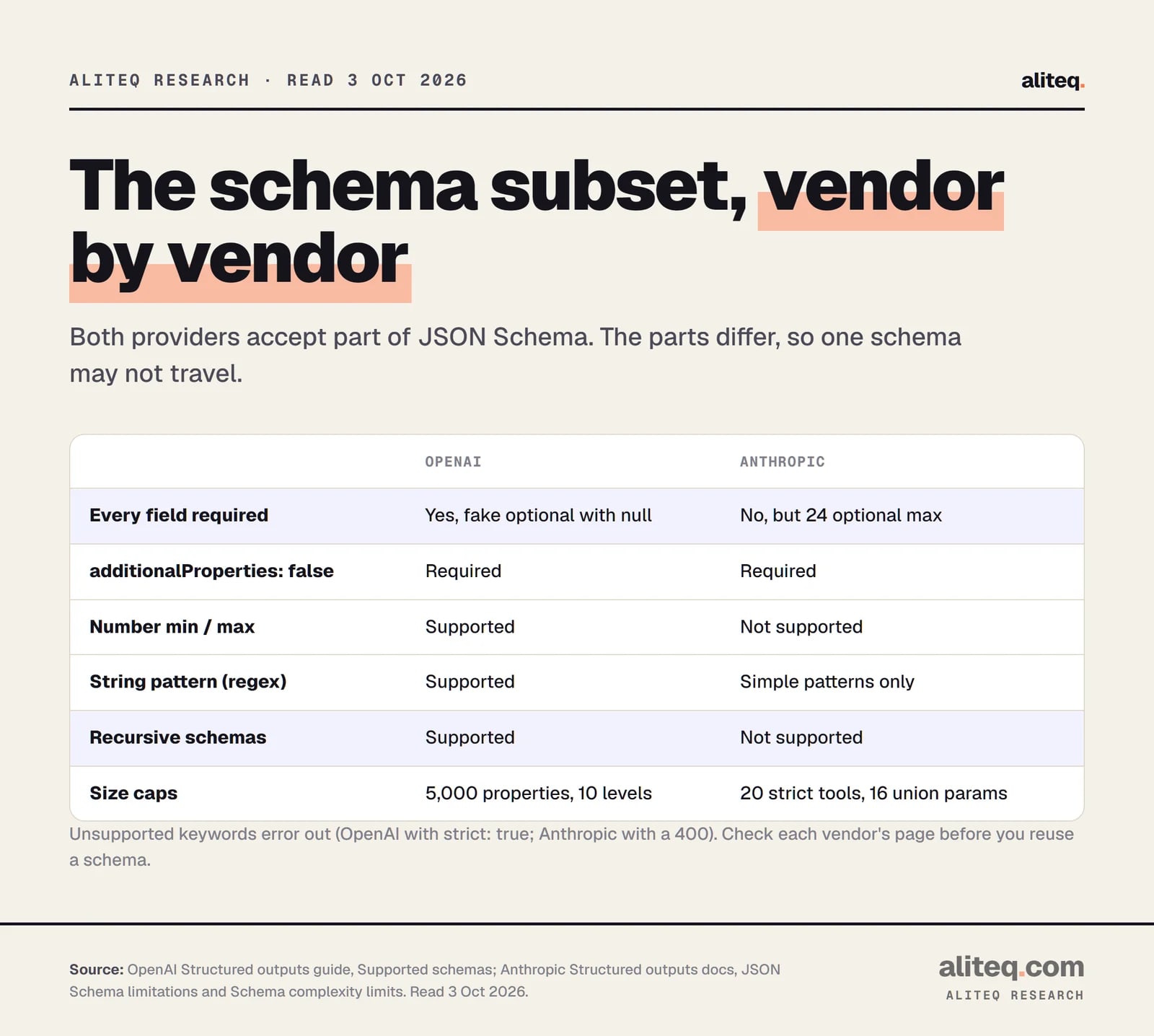
Structured outputs accept a subset of JSON Schema, not all of it. Send a keyword the vendor does not support and you get an error. Anthropic returns a 400. OpenAI rejects the request when strict is true. The subsets also differ between vendors, so one schema may not travel.
Schema support as documented on Oct 3, 2026. Both lists change, so check the live pages. · aliteq research
What OpenAI's page says:
Every field must be required. To make one optional, allow null as a type, such as ["string", "null"].
additionalProperties: false must be set on every object.
The root must be an object, not an anyOf. A Zod discriminated union at the top level breaks this.
Size caps: up to 5,000 object properties, 10 levels of nesting, and 1,000 enum values.
Not supported:allOf, not, if, then, else, dependentRequired and dependentSchemas. Recursive schemas and definitions are supported.
What Anthropic's page says:
Not supported: recursive schemas, numeric limits (minimum, maximum, multipleOf), minLength and maxLength, and external $ref. Array minItems works only for 0 or 1.
Regex is limited. No backreferences, lookahead or lookbehind, or word boundaries.
Complexity caps: 20 strict tools per request, 24 optional parameters in total, and 16 parameters using union types. Beyond these, or if the compiled grammar is too big, you get a 400 error.
The practical rule from Anthropic's tips: make parameters required where you can, flatten nested objects, and mark only the critical tools as strict.
What still breaks even with a schema?
Three things survive every setting. All three are documented, and all three need code on your side.
A cut-off reply. If the output hits the token limit, the JSON is incomplete. Anthropic reports stop_reason: "max_tokens" and tells you to retry with a higher limit. OpenAI reports an incomplete status with the reason max_output_tokens.
A refusal. If the model refuses for safety reasons, the refusal text replaces the JSON. Anthropic notes you get a 200 status, are billed for the tokens, and the output may not match your schema. OpenAI makes refusals programmatically detectable.
A wrong value in the right shape. The decoder guarantees syntax and types. It cannot know that a date is real or a price is correct. Anthropic adds a small related trap: enum capitalization is not guaranteed, so compare enum values case-insensitively.
Anthropic also lists two incompatibilities: structured JSON outputs do not work with citations, and they do not work with message prefilling.
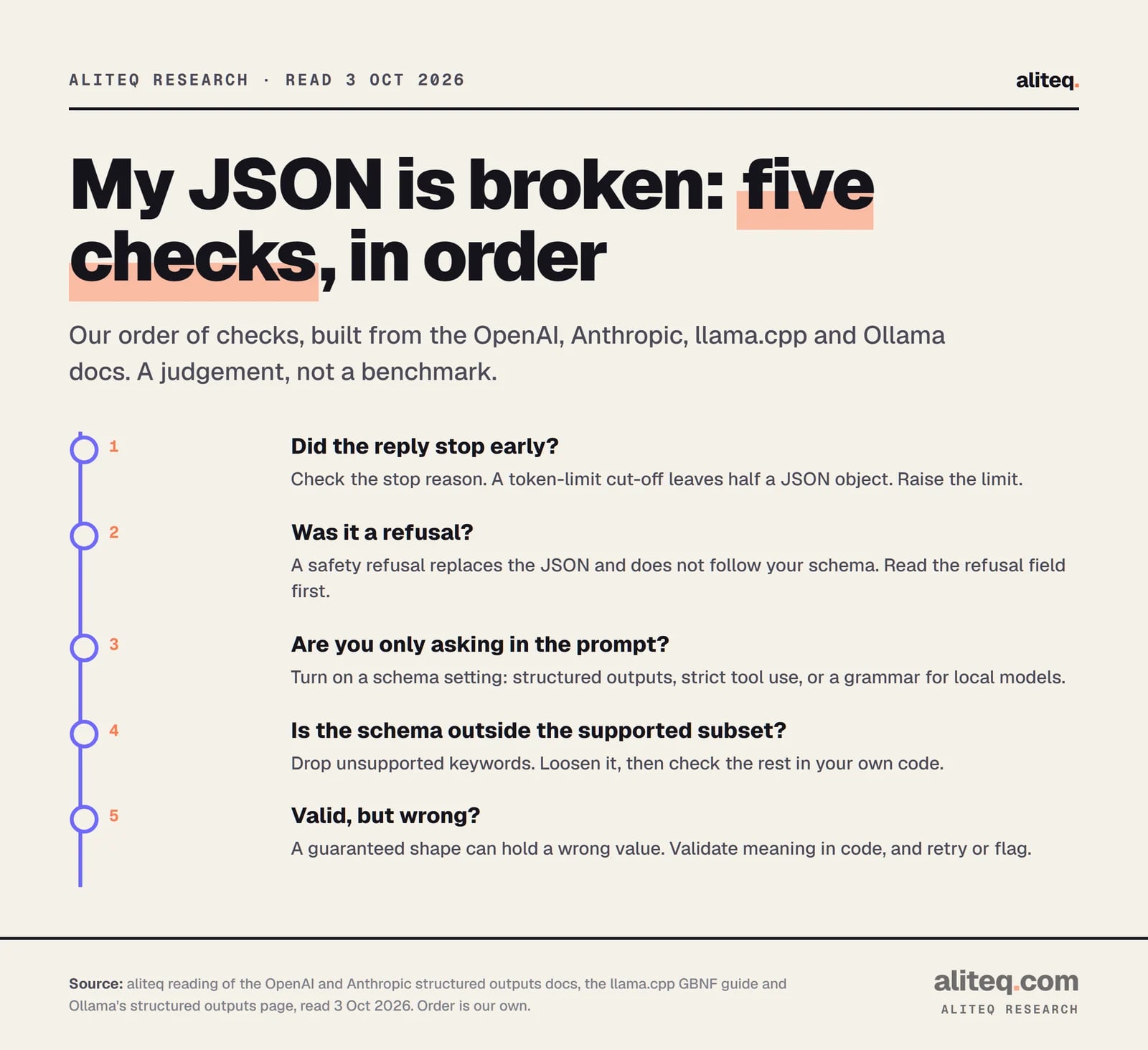
Our order of checks, built from the vendor docs read Oct 3, 2026. A judgement, not a benchmark. · aliteq research
How do you get structured output from a local model?
On your own hardware, the same idea is called a grammar. llama.cpp lets you constrain output with GBNF, short for GGML BNF, a format for defining which text is allowed. Ollama wraps the idea in a format field. Both stop the model from writing tokens that break the rules.
llama.cpp. Its guide says GBNF can "force the model to generate valid JSON." You can pass a grammar by hand (the grammar field on llama-server, or the --grammar and --grammar-file flags). More simply, you can pass a JSON Schema: llama.cpp converts a subset of it to a grammar. It takes the json_schema body field, the response_format field on /chat/completions, or the -j flag on the command line.
Four things the llama.cpp docs say that differ from the cloud APIs:
The model never sees the schema. It only limits the output. "The model has no visibility into the schema," so describe the shape in your prompt. This does not apply to tool calling, where schemas are injected into the prompt.
Unsupported features are skipped silently. There is no error, so test your grammar. The docs point to a validator and a Python converter that prints warnings.
additionalProperties defaults to false, the opposite of the JSON Schema standard.
Known gaps: no uniqueItems, not, if/then/else or patternProperties; numeric minimum and maximum work for integers only; and patterns must start with ^ and end with $.
Ollama. Set format to "json" for plain JSON, or pass a JSON Schema in format. Ollama's docs add that it is ideal to also put the schema in the prompt, and suggest a temperature of 0 for more deterministic output. The same feature works through the OpenAI-compatible response_format field. One limit on that page: Ollama's Cloud does not support structured outputs. I did not test any of it, and the page does not say how Ollama enforces the schema internally.
Most local servers are OpenAI-compatible, so code written against response_format often moves between a cloud model and a local one. The schema subset is where it can bite, so test on both.
A quick path to fix your JSON
Move the shape out of the prompt. Put it in a schema and turn on structured outputs, or set strict on your tools.
Trim the schema to the vendor's subset: required fields, additionalProperties false, no unsupported keywords.
Read the stop reason on every reply. Handle a token-limit cut-off and a refusal before you parse.
Validate values in your own code, such as dates, ranges and IDs. A valid shape can hold a wrong answer.
Running locally? Pass the schema through llama.cpp's json_schema or Ollama's format field, and describe the shape in the prompt too.
Quick answers
What is the difference between JSON mode and structured outputs?
JSON mode guarantees only that the reply is valid JSON. Structured outputs also guarantee it matches the JSON Schema you supply. OpenAI recommends structured outputs over JSON mode whenever possible.
Does structured output stop the model from making things up?
No. It constrains the format, not the facts. A reply can fit your schema and still contain a wrong name, date or number. Validate values in your own code.
Is function calling the same as structured outputs?
They share the schema machinery but have different jobs. Function calling is for the model to request an action from your code. Structured outputs shape the model's reply itself. OpenAI and Anthropic both let you use strict mode on tool arguments.
Why did my structured output request return a 400 error?
Most likely the schema uses a keyword the vendor does not support, or exceeds a complexity limit. Anthropic documents 400 errors for unsupported features and for schemas that are too complex. Simplify the schema first.
Can I force JSON from a local model?
Yes. llama.cpp supports GBNF grammars and a JSON Schema converter, and Ollama accepts a schema in its format field. llama.cpp skips unsupported schema features silently, so test the result.
Do I still need to handle errors with structured outputs?
Yes. A reply can be cut off at the token limit, or replaced by a safety refusal. Both can leave you with output that does not match the schema.