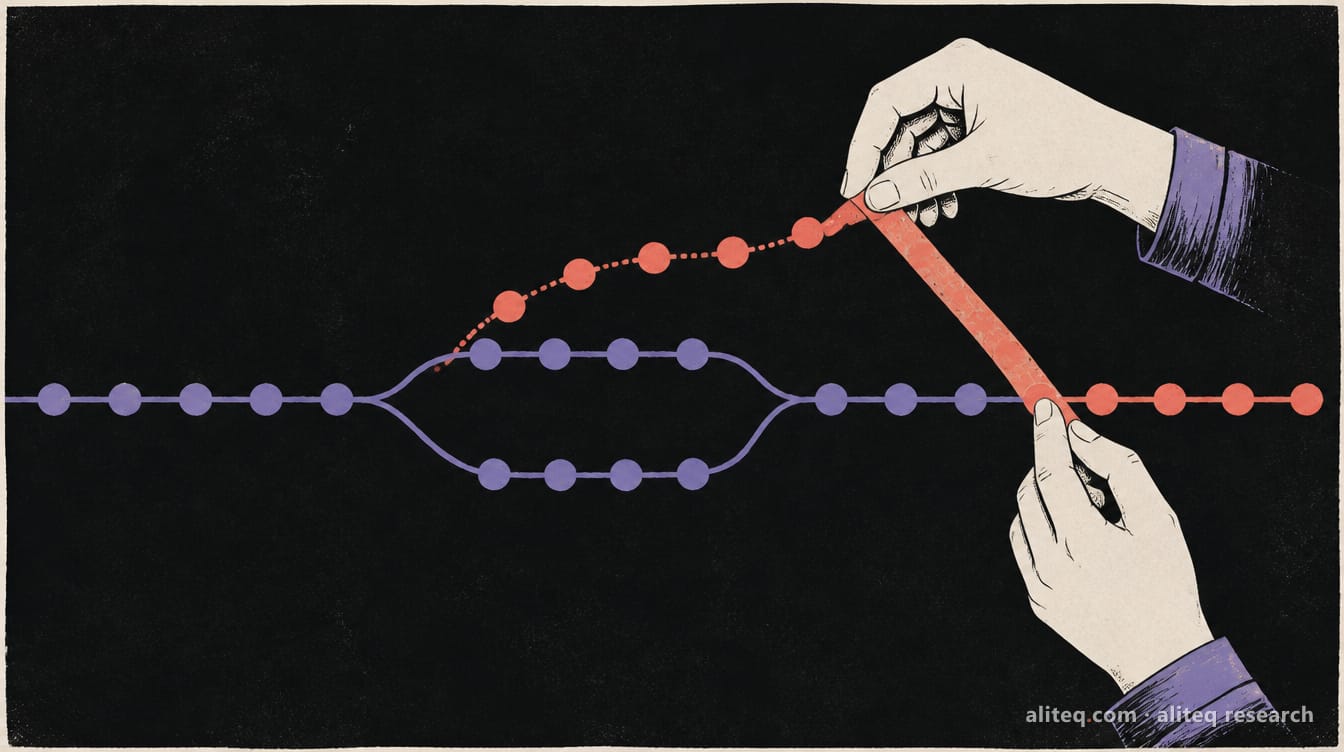
Claude's and OpenAI's APIs stream tokens over server-sent events, a plain HTTP response that never hangs up. Here's when that's all you need, when you really need WebSockets, why polling is fine more often than you'd think, and the proxy and serverless clocks that cut long connections.
You asked your vibe-coded app a question and the answer arrived one word at a time. That typing effect isn't an animation. The server is sending the reply in pieces as the model writes it, over one connection that stays open until the answer is done.
There are three ways to get that kind of live data into a browser. This piece explains each in plain words, then covers the parts that break in production: browser connection caps, proxies that buffer or time out, and serverless platforms that end long connections. I read the specs and vendor docs on October 3, 2026. I didn't benchmark anything, so there are no speed charts here.
What are polling, SSE and WebSockets?
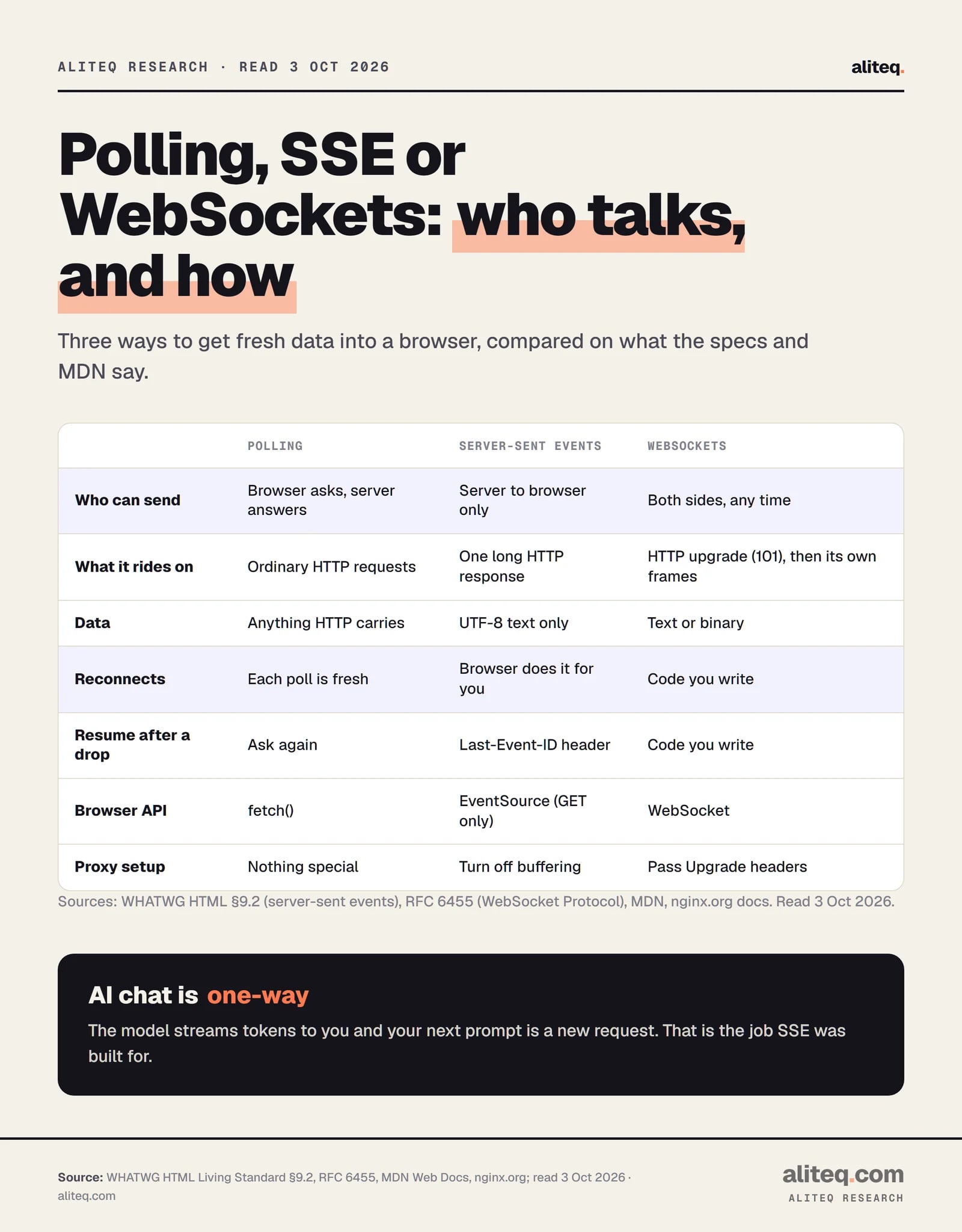
They are three ways for a browser to hear about new data. With polling, the browser asks the server every few seconds. With SSE, the browser asks once and the server keeps the response open, sending events as they happen. With WebSockets, both sides get a two-way pipe and can talk at any time.
Picture a pizza order. Polling is calling the shop every two minutes to ask "ready yet?" SSE is the shop keeping you on the line and saying "in the oven… boxed… out the door." A WebSocket is a walkie-talkie: either of you can press the button.
All three start as an ordinary HTTP request. The difference is what happens after the first answer.
What each option does, from the WHATWG standard, RFC 6455, MDN and nginx docs. · aliteq research
Why do AI chat apps stream over SSE?
Because a chat reply only flows one way. The model writes tokens, the server forwards them, and when you reply, that's a new request. SSE fits that shape exactly. Anthropic's docs say setting "stream": true streams the response "using server-sent events (SSE)". OpenAI's streaming guide says the same.
SSE is just text. The server answers with the content type text/event-stream and writes small blocks separated by a blank line. Here's the shape the WHATWG standard defines, with made-up content:
Each block can carry four fields. data is the payload. event names it. id labels it so you can resume. retry tells the browser how many milliseconds to wait before reconnecting. A line that starts with a colon is a comment, which is useful as a heartbeat.
Two things make SSE pleasant. The browser reconnects on its own when the connection drops. When it does, it sends a Last-Event-ID header with the last ID it saw, so your server can pick up where it left off. The WHATWG standard also lets the server tell the browser to stop reconnecting by answering with status 204 No Content.
One gotcha trips up AI apps. The browser's built-in EventSource takes a URL and one option, withCredentials. There's no way to set the method, a body or custom headers, so it can only make GET requests. Chat requests carry a long prompt in a POST body. So to stream a chat reply in the browser, you read the response with fetch() and parse the same event format yourself, or let the vendor's SDK do it.
Vercel's own guidance lands in the same place. Its WebSocket guide, updated October 1, 2026, says to use SSE "when data only flows from the server to the client" and calls AI response streaming "the most common one-way case."
When do you actually need WebSockets?
You need WebSockets when the browser has to send a steady stream of its own, without waiting for a new request each time. Multiplayer game state, live cursors in a shared doc, typing indicators and voice are the classic cases. If the user only sends something when they hit Enter, you probably don't.
RFC 6455, the WebSocket standard from 2011, describes the deal. The browser sends a normal GET with an Upgrade: websocket header. The server answers 101 Switching Protocols. From then on, the connection isn't HTTP anymore. It carries small frames of text or binary data, in either direction, at any time.
That freedom costs you. With WebSockets you write the reconnect logic, the "what did I miss" logic and the heartbeat yourself. Vercel's guide says it plainly: every client needs reconnect logic, because connections close when the function hits its time limit.
There's one AI case for WebSockets worth knowing. OpenAI's Responses API offers a WebSocket mode for "long-running, tool-call-heavy workflows." That's an agent making many round trips with tools, not a person reading a chat reply. For a normal chat window, SSE is still the default both big APIs document.
Is polling good enough?
Often, yes. If your data changes every few seconds or slower, asking every few seconds is simple, cacheable and survives any proxy. A job status page, a "your export is ready" badge or a dashboard that refreshes every 30 seconds doesn't need an open connection at all.
Polling's costs are easy to see. Every poll is a full request, so a thousand open tabs polling every two seconds is 500 requests a second to your server, most of them answered "nothing new." That can run you into your own rate limits or your host's request billing. It also adds delay equal to half your polling interval, on average.
So use polling when updates are slow and a bit of lag is fine. Move to SSE when users are staring at the screen waiting for the next piece, like a streaming answer or a live build log.
What limits will bite you?
Three kinds: a browser cap on SSE connections, proxies that buffer or time out quiet connections, and serverless platforms that end long runs. None of them shows up on your laptop. All of them show up after launch.
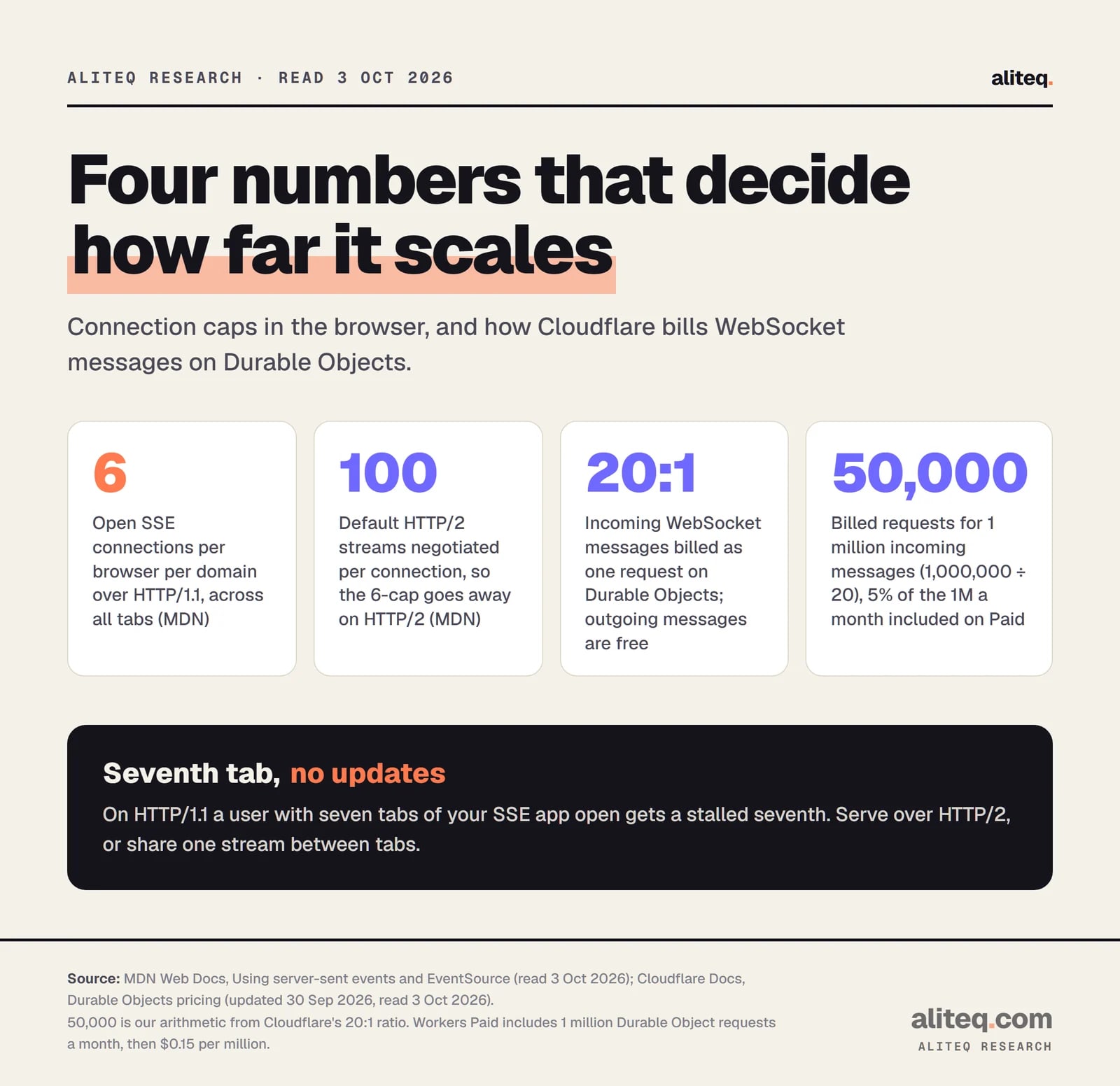
Browser caps from MDN; Durable Objects billing from Cloudflare's pricing page. The 50,000 is our arithmetic. · aliteq research
The six-connection cap
MDN warns that without HTTP/2, SSE hits a limit on open connections that is "per browser + domain" and "set to a very low number (6)." That's six across all tabs. Chrome and Firefox marked the issue "Won't fix." Over HTTP/2 the browser and server negotiate the number of parallel streams, which MDN says defaults to 100.
In practice: if your app opens one SSE stream per tab and a user has seven tabs open over HTTP/1.1, the seventh waits. So check that your host serves your site over HTTP/2. The WHATWG standard also suggests sharing one EventSource between tabs through a shared worker.
Proxies that buffer or hang up
A proxy is a server that sits between the browser and your app, like nginx or Cloudflare. Two of its habits break streaming.
The first is buffering. nginx buffers responses from your app by default (proxy_buffering on). Your tokens pile up in nginx's memory and arrive in one lump at the end, so the typing effect disappears. You can switch buffering off for a stream by sending the response header X-Accel-Buffering: no, which nginx's docs list as a supported switch.
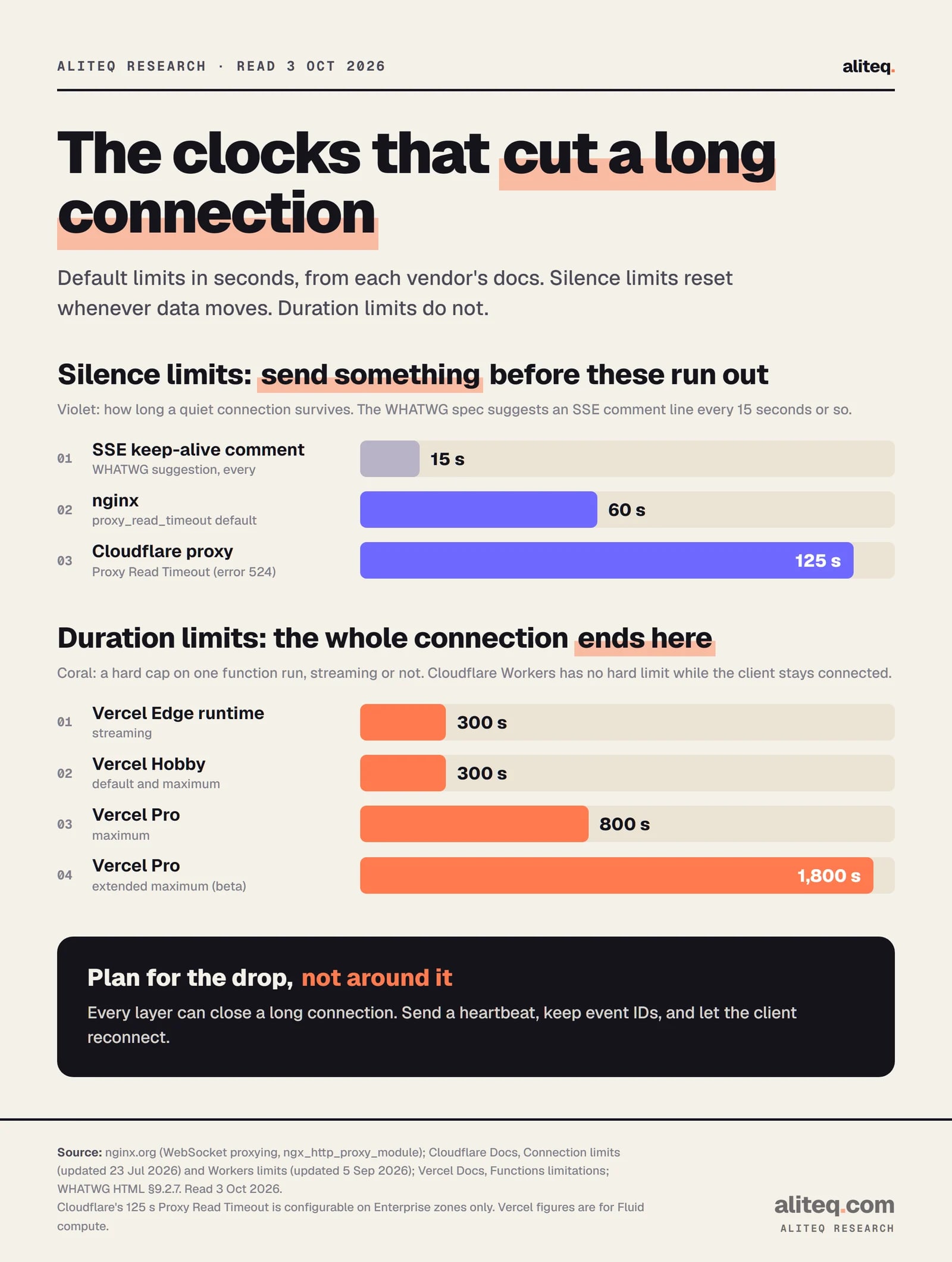
The second is silence. nginx's WebSocket guide says a proxied connection closes "if the proxied server does not transmit any data within 60 seconds." That's the proxy_read_timeout default. If you put Cloudflare's proxy in front of your own server, its Proxy Read Timeout is 125 seconds, and only Enterprise zones can change it. Hit it and users see error 524.
WebSockets have their own proxy step. Because Upgrade is a hop-by-hop header, nginx doesn't pass it to your app unless you set the Upgrade and Connection headers yourself. Skip that and the handshake never completes.
The fix for silence is a heartbeat. The WHATWG standard suggests an SSE comment line "every 15 seconds or so" because "legacy proxy servers are known to, in certain cases, drop HTTP connections after a short timeout." For WebSockets, RFC 6455 says a ping frame can "serve either as a keepalive" or to check the other side is alive.
Silence limits reset whenever data moves. Duration limits end the connection no matter what. · aliteq research
Can serverless platforms do this?
Yes, with time limits. On Vercel, both SSE and WebSockets run inside functions that stop at a maximum duration. On Cloudflare, a Worker can stream as long as the client stays connected, and WebSockets that need shared state go through Durable Objects. If hosting choices are new to you, these limits are the part to check first.
Vercel Functions (Hobby)
SSE / streaming
Yes
WebSockets
Yes, public beta
Time limit
300 s default and maximum
Vercel Functions (Pro)
SSE / streaming
Yes
WebSockets
Yes, public beta
Time limit
300 s default, 800 s maximum, 1,800 s beta
Vercel Edge runtime
SSE / streaming
Yes
WebSockets
Not covered here
Time limit
First byte within 25 s, stream up to 300 s
Cloudflare Workers
SSE / streaming
Yes
WebSockets
Yes
Time limit
No hard limit while the client is connected
Cloudflare Durable Objects
SSE / streaming
Yes
WebSockets
Yes, with hibernation
Time limit
No hard limit while connected; 30 s CPU per message by default
SSE / streaming
WebSockets
Time limit
Vercel Functions (Hobby)
Yes
Yes, public beta
300 s default and maximum
Vercel Functions (Pro)
Yes
Yes, public beta
300 s default, 800 s maximum, 1,800 s beta
Vercel Edge runtime
Yes
Not covered here
First byte within 25 s, stream up to 300 s
Cloudflare Workers
Yes
Yes
No hard limit while the client is connected
Cloudflare Durable Objects
Yes
Yes, with hibernation
No hard limit while connected; 30 s CPU per message by default
Vercel
Vercel added WebSocket support to its Functions as a public beta on all plans in June 2026. Its guide spells out the catches. A connection stays pinned to the function instance that accepted it. It closes when the function reaches its maximum duration. And a reconnecting client can land on a different instance, so anything shared, like who's in a chat room, has to live in an outside store such as Redis.
Next.js has no built-in way to upgrade a request to a WebSocket. Vercel's @vercel/functions package provides experimental_upgradeWebSocket() for that, and the name tells you how settled it is.
SSE streams obey the same duration cap. On Hobby, a stream ends at 300 seconds. That's plenty for one chat answer, but not for a dashboard you leave open all day. The browser's automatic reconnect covers that gap, as long as your server honors Last-Event-ID.
Cloudflare Workers and Durable Objects
Cloudflare's limits page says there's "no hard limit on duration for HTTP-triggered Workers." A Worker can keep streaming as long as the client stays connected. That makes SSE straightforward on Workers.
For WebSockets where many clients share state, Cloudflare points you to Durable Objects, which it calls a "single-point-of-coordination." A Durable Object is one small server instance with its own storage, addressed by name, so every client in the same room reaches the same one.
The money detail is hibernation. Cloudflare's pricing page says calling accept() on a WebSocket bills duration "for the entire time the WebSocket is connected." The Hibernation API avoids that. Clients stay connected while the object sleeps, and "Billable Duration (GB-s) charges do not accrue during hibernation." Pings get answered automatically without waking it.
Messages are cheap. Outgoing messages and incoming pings are free. Incoming messages are billed at 20 to 1, so 1 million incoming messages count as 50,000 requests. The Workers Paid plan includes 1 million Durable Object requests a month, then charges $0.15 per million.
How do you choose?
Start from who talks. If only the server talks, use SSE. If both sides talk constantly, use WebSockets. If updates are slow, poll. Then check your proxy and host limits before launch, not after.
Cursors, game moves, typing indicators, audio. Yes means WebSockets. No means keep going.
Status badges, job progress, a dashboard. Yes means polling is enough, and it's the simplest thing to run.
AI chat replies, build logs, live scores. Use SSE, read it with fetch() if you need a POST body.
HTTP/2 on, proxy buffering off for streams, a heartbeat under 60 seconds, and reconnect logic for your host's duration cap.
If you're using an AI coding tool, you can hand it that last step as a checklist. Ask it to add a 15-second SSE comment heartbeat, an X-Accel-Buffering: no header on the stream route, event IDs, and resume from Last-Event-ID. Then read the diff. If it reaches for a WebSocket library for a one-way chat stream, push back and ask why.
The plumbing is the same frontend-to-backend split as any other feature. If that split is still fuzzy, our frontend vs backend explainer is the place to start.
Quick answers
Is SSE faster than WebSockets?
Neither standard promises a speed difference, and we didn't benchmark one. Both keep one connection open and push data as it's ready. The real difference is direction: SSE is server to browser only, WebSockets go both ways.
Why does ChatGPT-style streaming use SSE?
A chat answer flows one way, from the model to you. Anthropic's and OpenAI's streaming APIs both document SSE as their streaming format. Your next prompt is simply a new request.
Why does my streamed answer arrive all at once?
Something in the path is buffering it. nginx buffers proxied responses by default. Send the header X-Accel-Buffering: no on the stream route, or turn off proxy_buffering for that location.
Why do my SSE streams stop after six tabs?
Over HTTP/1.1, browsers cap open connections at 6 per domain across all tabs, according to MDN. Serve the site over HTTP/2, or share one stream between tabs with a shared worker.
Can I use WebSockets on Vercel?
Yes, as a public beta on all plans since June 2026. Connections close when the function hits its maximum duration, 300 seconds on Hobby, so clients must reconnect and shared state must live in an outside store.
Do I need WebSockets for a chat app?
For streaming the AI's reply, no. For human-to-human chat with typing indicators and presence, WebSockets are the usual choice, and on Cloudflare that means Durable Objects with the Hibernation API.