That gray label means a video was marked as made or changed with AI. Here is when YouTube requires it, where it shows, what happens if you skip it, and why the label is not what decides your ad money.
You open a video and see a small gray line: "Altered or synthetic content." Or you're the creator, and that label just showed up under your own upload. Either way, the question is the same. What does it mean, and is it going to cost money?
I'm the cheap-tech person here, so I care about the second part a lot. I read YouTube's own Help pages on October 4, 2026, not the forum guesses. The short version: the label is about realism, and monetization is about originality. Those are two separate checks, and mixing them up is where people panic.
What does "altered or synthetic content" mean on YouTube?
It means the video was marked as made or meaningfully changed with AI, in a way that could pass for real. YouTube launched the disclosure under that name in March 2024. Its current Help page calls the same rule "Disclosing use of GenAI content," and the Studio setting is called "AI use." The idea hasn't changed.
The launch post on the YouTube Official Blog, dated March 18, 2024, was titled "How we're helping creators disclose altered or synthetic content." The example screenshot in that post shows a Shorts player with a label reading "Altered or synthetic content." That's the phrase most people still search.
YouTube's current Help page puts the goal plainly: "we require creators to disclose when they use AI to meaningfully alter or generate photorealistic content." After a creator answers yes, YouTube says "the content will be labeled as AI generated or altered for viewers."
The phrase hasn't vanished from YouTube's own pages either. Its Help page on text and image posts still says creators using YouTube's AI tools "don't need to take extra steps to disclose the use of altered or synthetic content."
Does it always mean AI? In YouTube's framing, yes. The 2024 blog post covered "altered or synthetic media, including generative AI," and today's page is written entirely around AI tools.
When you must disclose, in YouTube's own words
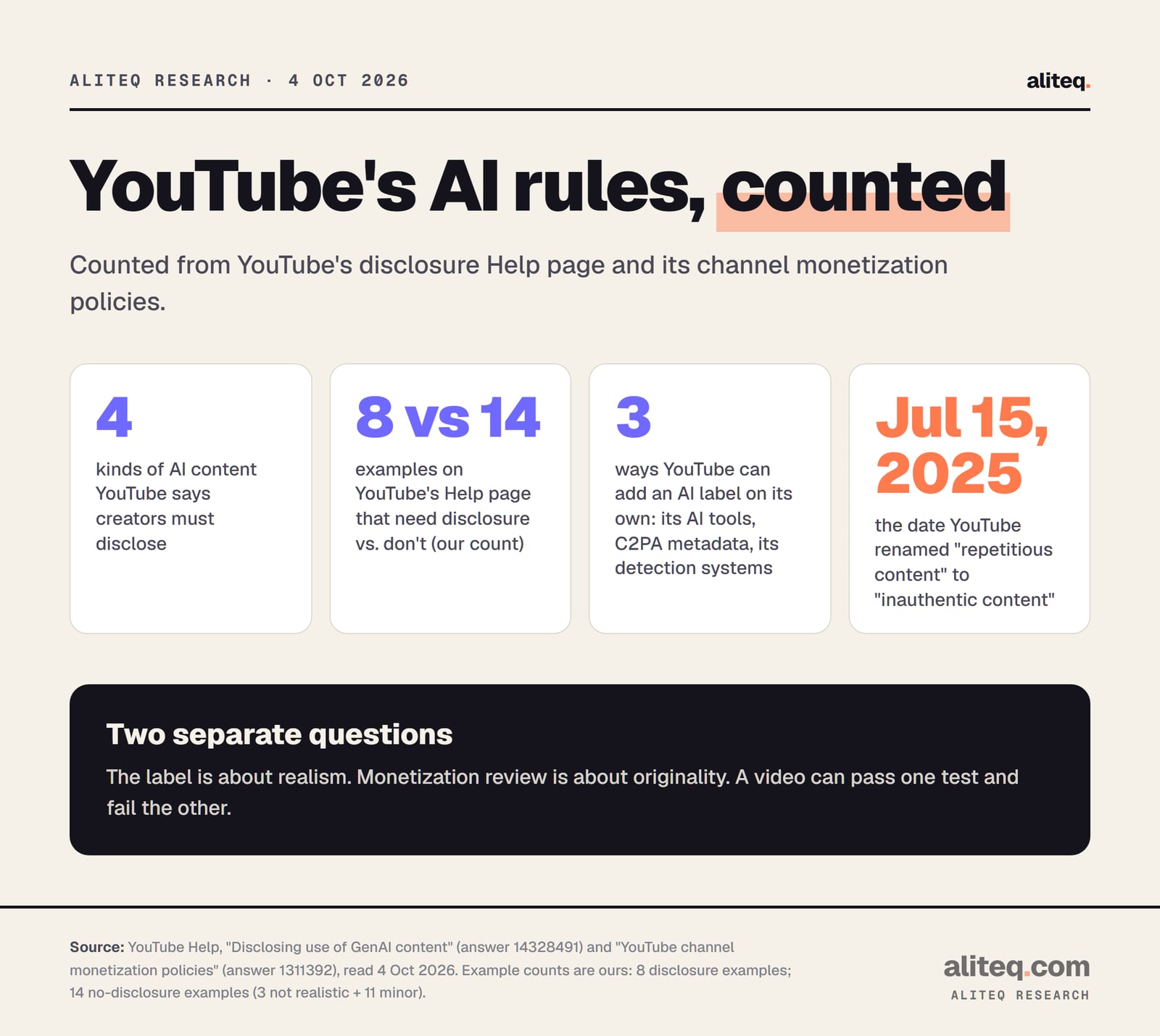
YouTube lists four kinds of content that need the label. All four are about realism. If a viewer could mistake it for something that really happened, or for a real person, you disclose. If it's clearly fantasy or a minor touch-up, you don't.
The Help page says creators must disclose GenAI content that:
"Makes a real person appear to say or do something they didn't do."
"Alters footage of a real event or place."
"Generates a realistic scene that didn't actually occur."
"Creates music that's the main focus of the video."
It adds: "This could include content that is fully or partially altered or created using AI tools." So a mostly real video with one AI-faked moment still counts.
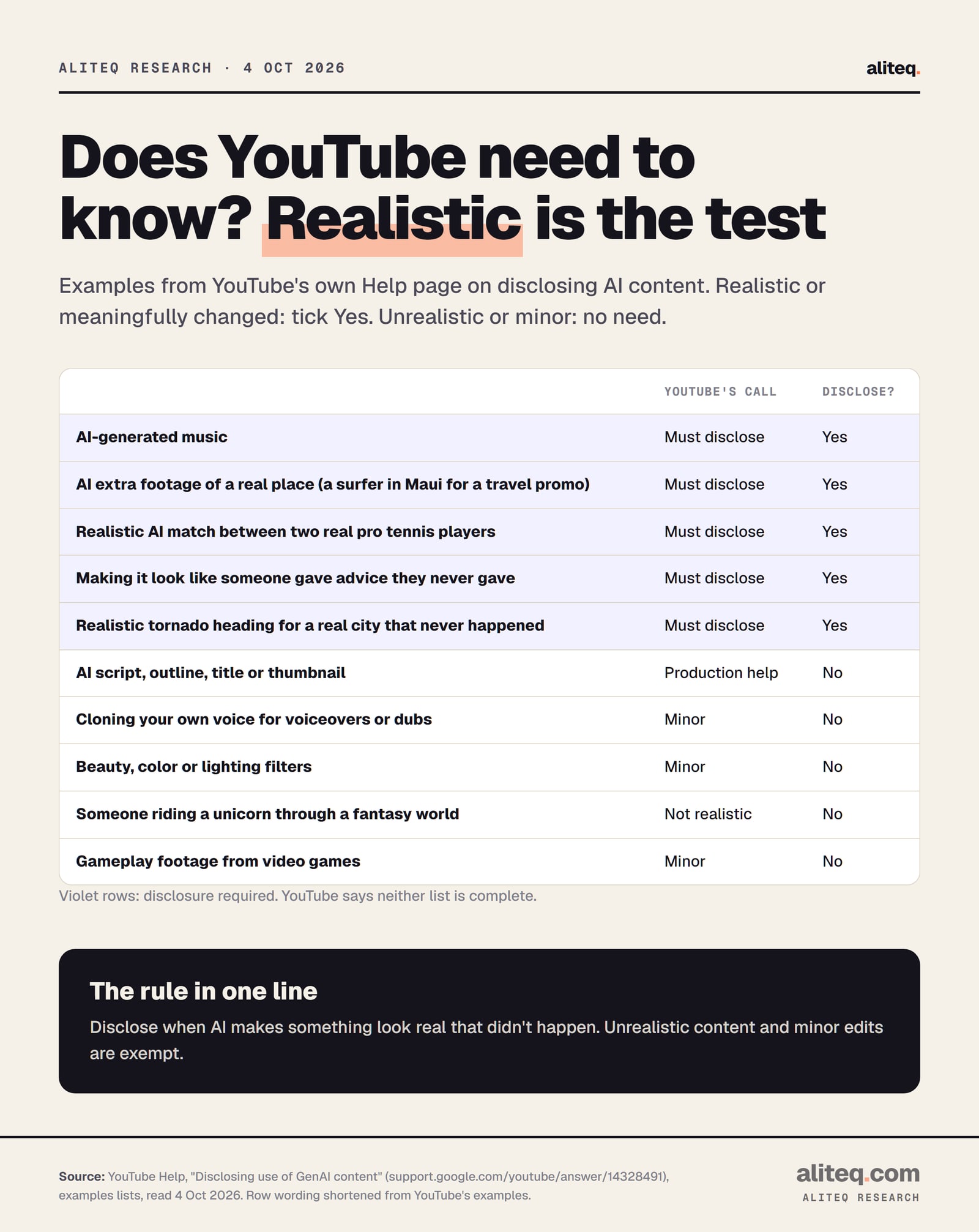
Here are some of YouTube's own examples that need disclosure, word for word:
"AI generated music"
"AI generated extra footage of a real place, like a video of a surfer in Maui for a promotional travel video"
"AI generated realistic videos of a match between two real professional tennis players"
"Making it appear as if someone gave advice that they did not actually give"
"Showing a realistic depiction of a tornado or other weather events moving toward a real city that didn't actually happen"
The full list has eight examples. The other three cover faked hospital scenes, a public figure shown stealing, and a real person shown arrested. YouTube says the list "is not exhaustive."
Ten of YouTube's own examples, shortened. Source: YouTube Help, Disclosing use of GenAI content, read October 4, 2026. · aliteq research
What you don't have to disclose
Unrealistic content and minor edits are exempt. YouTube defines minor edits as ones that are "primarily aesthetic, and don't alter the content in a way that could mislead the viewer about what actually happened." That covers most of the AI tools a faceless channel uses behind the scenes.
YouTube's no-disclosure list includes these, quoted:
"Production assistance, like using generative AI tools to create or improve a video outline, script, thumbnail, title, or infographic"
"Cloning one's own voice to create voice overs or dubs"
"Caption creation"
"Idea generation"
"Applying beauty filters"
"Video sharpening, upscaling or repair and voice or audio repair"
"Gameplay footage from video games"
"Someone riding a unicorn through a fantastical world"
Two of those matter a lot for faceless creators. AI scripts and AI thumbnails don't need the label. And cloning your own voice doesn't either. Note the word "own." The page says nothing that extends that exemption to a stock AI voice, so I won't stretch it. If you're picking a voice, our AI voiceover guide for faceless YouTube covers the options.
The test cuts the other way too. Making a real person "appear to say or do something they didn't do" is on the must-disclose list. A cloned voice of someone else saying words they never said sits right on that line.
How to turn on the AI disclosure
You set it during upload, in YouTube Studio. YouTube's Help page says the "AI use" setting works in Studio "on a computer or mobile device." It sits in the Attributes section. You pick Yes if your video meets the rules above, or No if it doesn't. That's the whole step.
YouTube's steps, verbatim:
"Go to YouTube Studio."
"Follow the steps to upload content."
"In the Attributes section, under "AI use," select Yes if your content meets the disclosure requirements or No if not."
"Continue to select other video details."
Where the label appears
Usually in the expanded description, and sometimes on the player too. YouTube says that for "AI content that is photorealistic, a label in the video player may also appear." For "non-photorealistic or animated" AI content, labels "may appear in the expanded description." Viewers find details in a section called "How this content was made."
YouTube's separate Help page on that section names the disclosure type "Made with AI." It says this "indicates that a video contains content that has been meaningfully altered or synthetically generated."
The rules on placement have shifted since launch. In March 2024, YouTube's blog said the more prominent player label was for "more sensitive topics — like health, news, elections, or finance." Today's Help page ties the player label to photorealistic content instead. If you remember the old rule, that's why it no longer matches.
Why is the label on my video when I didn't add it?
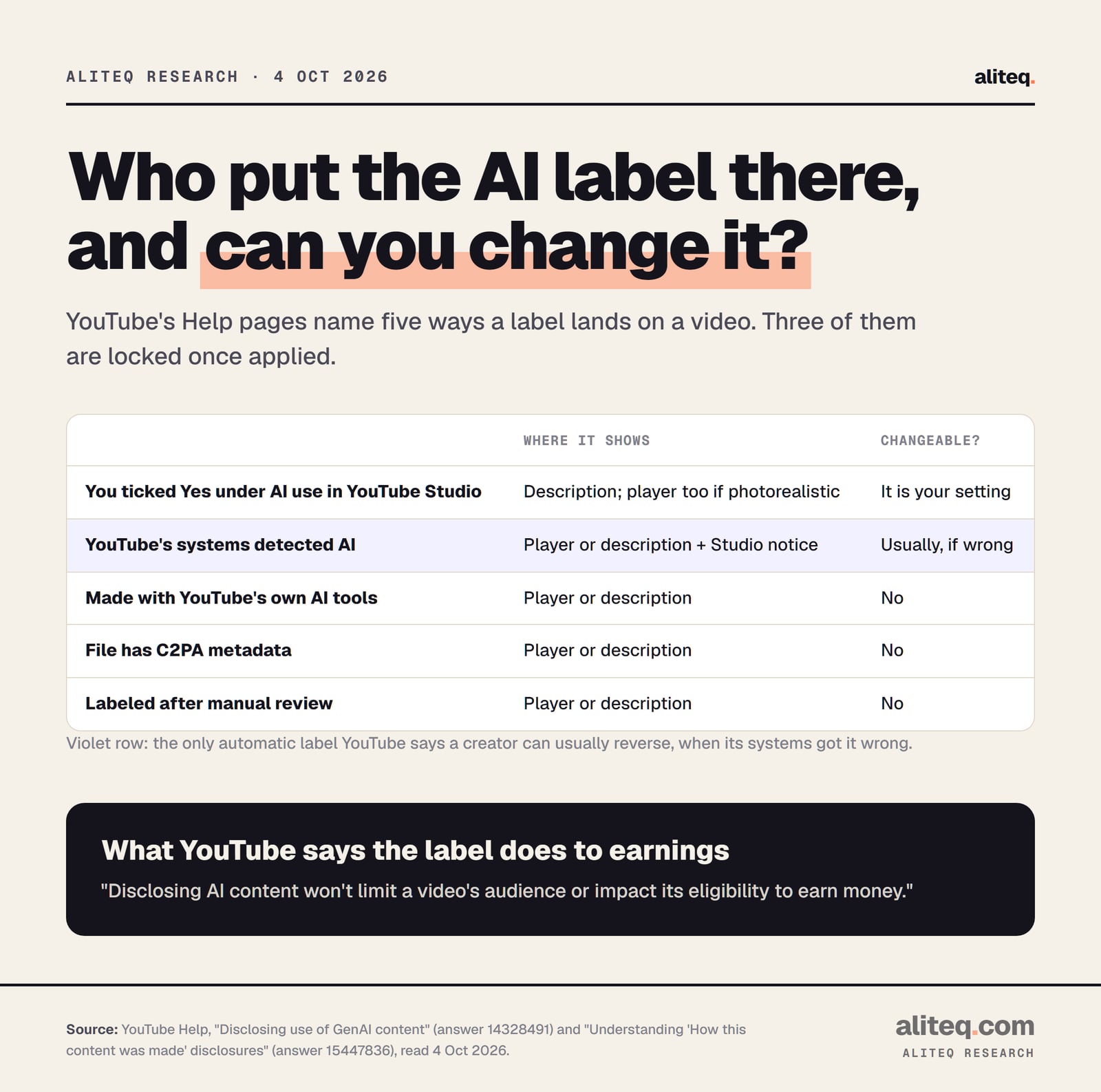
Because YouTube can add it on its own. The Help page names three routes: content made with YouTube's own AI tools, files carrying C2PA metadata, and content "that our internal systems detect is AI generated or altered." You'll get a notification in YouTube Studio when that happens.
C2PA is a standard for Content Credentials: a signed record, stored in the file, of how it was made. Some AI tools write it into their exports. YouTube says it carries forward credentials "that indicate the entire video was made with AI."
Can you remove an automatic label? Sometimes. If YouTube's systems got it wrong, the page says creators can "change AI disclosure in most cases by selecting No in the AI disclosure survey under "Attributes" in YouTube Studio." Three cases are locked, though: "content made with YouTube's AI tools, content containing C2PA metadata, or content labeled after manual review can not be adjusted."
Only select No when the label really is wrong. If your video fits one of the four must-disclose categories, the honest answer is Yes.
Five ways a label lands on a video, and which ones a creator can change. Source: YouTube Help pages 14328491 and 15447836, read October 4, 2026. · aliteq research
What happens if you don't disclose?
YouTube can label the video for you, and repeat offenders risk real penalties. The Help page says creators "who consistently choose not to disclose" may face "manual application of a label, or penalties from YouTube, including removal of content or suspension from the YouTube Partner Program." A label it adds after manual review can't be switched off.
The "How this content was made" page adds that when content is undisclosed, YouTube "may take action to reduce the risk of harm to viewers by proactively applying a label that creators will not have the option to remove."
Note the word "consistently" in the penalty line. YouTube doesn't publish a number of misses that triggers it. I won't invent one. The safe reading is simple: answer the question honestly on every upload.
Disclosure also doesn't make a video allowed. YouTube says "we apply our Community Guidelines to all content on YouTube, including content that is AI generated or altered using AI." A labeled deepfake that breaks the rules is still a rule break.
Does the label hurt monetization?
YouTube says no. Its Help page states: "Disclosing AI content won't limit a video's audience or impact its eligibility to earn money." So ticking Yes is not a demonetization switch. What can stop an AI channel earning is a different set of rules: YouTube's channel monetization policies, which judge originality, not realism.
That's the part the label panic misses. A fully disclosed, honest AI video can still be refused monetization. An undisclosed one can still earn until YouTube acts on it. The two checks run side by side.
Here is the update note at the top of YouTube's monetization policies page, dated July 15, 2025: "We're making a minor update to our "repetitious content" policy to better clarify this includes content that is repetitive or mass-produced. We are also renaming this policy from "repetitious content" to "inauthentic content."" YouTube adds that this content "has always been ineligible for monetization." The policy changelog I read today shows no later change to these rules.
The page's own example of the AI problem is specific. Not allowed to monetize: "AI-generated content made with generic or unoriginal templates giving the impression of mass production without adding the creator's original, authentic insights or perspective."
The example counts are ours, from YouTube's disclosure Help page. Sources: YouTube Help pages 14328491 and 1311392, read October 4, 2026. · aliteq research
What YouTube's monetization rules say about AI videos
Four parts of the policy hit AI channels most: generic or repetitive content, reused content, unsatisfying content, and AI personas on sensitive topics. None of them bans AI. They ban sameness, borrowing without adding anything, shock-bait, and fake experts. The line YouTube draws is whether your own idea shows.
Generic or repetitive content. Not allowed: "Image slideshows, templated storylines, or scrolling text with minimal or no narrative, commentary, or educational value." Allowed: "Same intro and outro for your videos, but the bulk of your content is different." A series format is fine. Interchangeable videos are not.
Reused content. Not allowed: "Content that exclusively features readings of other materials you did not originally create, like text from websites or news feeds." That one catches the "AI voice reads a news article" format. YouTube adds that this policy "applies to your channel as a whole."
Unsatisfying or off-putting content. YouTube says that if you use automated tools, "the final product must still demonstrate your creative vision and provide educational or entertainment value." It allows "using AI to visualize a unique character and narrative you invented." It rejects "videos that stitch together unrelated or inconsistent AI clips to surprise or shock viewers." It also rejects "realistic visuals tricking viewers into believing a fake celebrity death or natural disaster has occurred."
AI personas on sensitive topics. This one is blunt. Channels using AI personas that present as "a human expert providing advice to viewers on topics such as health, legal issues, finances, or politics" are "not allowed to monetize." YouTube's examples include an AI "doctor" and "AI-generated podcast hosts offering financial guidance, investment tips, or wealth management advice."
YouTube's reviewers don't watch everything. The page says they "may focus on" six things: your main theme, most viewed videos, newest videos, biggest share of watch time, video metadata, and your channel's About section. Your best and newest uploads carry the most weight.
If you're still choosing a format, read this next to our guide on how faceless YouTube monetization works and our list of faceless YouTube niches. A niche where your own take is the product is easier to defend than one built on templates.
A quick pre-upload check for AI videos
Two questions cover it. First: could a viewer mistake any part for a real person, place or event? Then tick Yes under AI use. Second: would this video still feel worth watching if it sat next to your last ten? If not, the label isn't your risk. The originality rules are.
Check realism. Real person saying or doing something new, altered real footage, a realistic fake scene, or AI music as the main focus? Disclose.
Skip the false alarms. AI scripts, titles, thumbnails, captions, filters and your own cloned voice don't need the label.
Watch for auto-labels. If YouTube's systems tag a video wrongly, YouTube says you can usually select No in Studio. C2PA and YouTube-tool labels stay.
Run the originality test. No templated slideshows, no reading other people's articles, no AI "expert" giving health, legal or money advice.
Show your own idea. YouTube allows AI used to visualize "a unique character and narrative you invented."
What does "altered or synthetic content" mean on YouTube?
It's the label YouTube introduced in March 2024 for videos made or meaningfully changed with AI that look real. YouTube's current Help page calls the rule "Disclosing use of GenAI content," and the setting is "AI use" in YouTube Studio.
Does "altered or synthetic content" mean the video is AI?
In YouTube's framing, yes. Either the creator said the video was generated or meaningfully altered with AI, or YouTube labeled it through its own AI tools, C2PA metadata, or its detection systems.
Can altered or synthetic content be monetized?
Yes. YouTube says "Disclosing AI content won't limit a video's audience or impact its eligibility to earn money." Monetization depends on the separate channel monetization policies, which reject mass-produced, templated or reused content.
Do I have to disclose an AI voiceover?
Cloning your own voice for voiceovers or dubs is on YouTube's no-disclosure list. Making a real person appear to say something they didn't is on the must-disclose list. YouTube's page doesn't address stock AI voices directly.
Why did YouTube add an AI label I didn't choose?
YouTube can label content made with its AI tools, files with C2PA metadata, or content its systems detect as AI. If its systems made an error, YouTube says you can usually select No in Studio, but C2PA, YouTube-tool and manual-review labels can't be changed.
What happens if I don't disclose AI content?
YouTube says creators who consistently don't disclose may get a label added for them, or penalties including content removal or suspension from the YouTube Partner Program.