Two laptops sold as "RTX 5070 Ti" can feed that chip very different amounts of power. Our budget picks, with each maker's own wattage and price readings from Nov 6, 2026, plus what the watt numbers on a spec sheet actually mean.
Some links on this page are referral links: we may earn a commission, at no cost to you.
Share
Which gaming laptop should you buy? Set your budget, then buy the laptop that feeds its GPU the most power at that price. The GPU name alone doesn't tell you how fast a laptop is: NVIDIA's own table lets makers run the RTX 5070 Ti Laptop GPU anywhere from 60 to 115 W, and makers add Dynamic Boost on top (25 W on the ASUS and Lenovo models below). On Nov 6, 2026, that meant a Lenovo Legion Pro 5i with a 140 W RTX 5070 Ti listed from $1,999.99, while ASUS's thin ROG Zephyrus G16 (2026) with the same chip, at 125 W in its Turbo mode, cost $3,699.99. Every spec and price below was read on the maker's own page that day.
One chip, three prices and two power limits (maker pages, Nov 6, 2026)
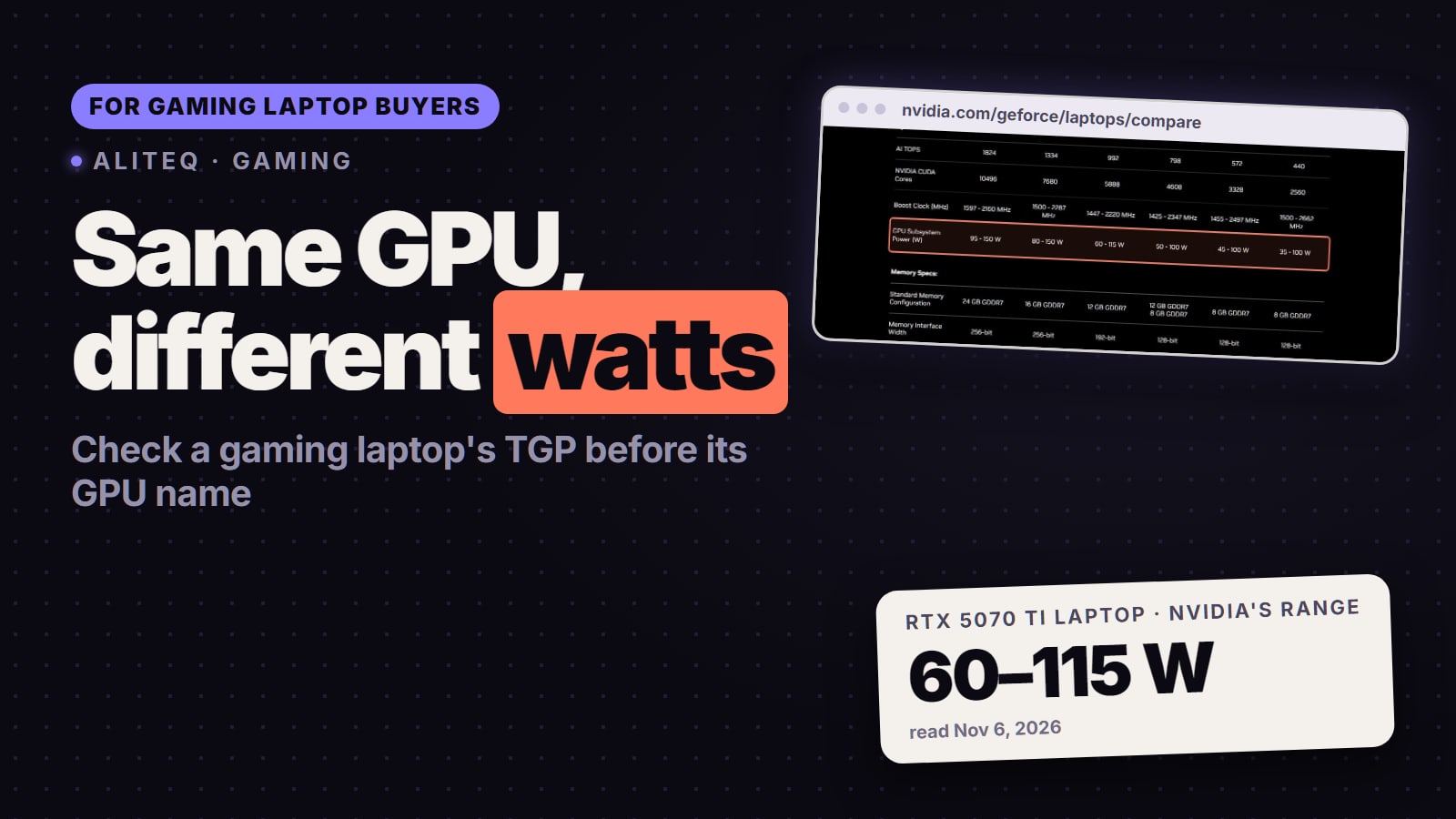
115 W
RTX 5070 Ti Laptop max power
NVIDIA's range, before Dynamic Boost
140 W
Legion Pro 5i RTX 5070 Ti
Lenovo PSREF, Legion Pro 5 16IAX10H
$1999.99
Legion Pro 5i with RTX 5070 Ti
Lowest lenovo.com listing, sale price
$3699.99
Zephyrus G16 (2026) RTX 5070 Ti
ASUS Store, Turbo mode 125 W
Which gaming laptop should I buy for my budget?
Here's the short list by budget, with the GPU wattage each maker publishes. We haven't tested these laptops ourselves. The picks come from the makers' own spec sheets and the prices on their own stores, read on Nov 6, 2026, so you can check every number yourself.
Gaming laptops by budget, with the maker's GPU wattage (read Nov 6, 2026)
About $1,000
Budget
Lenovo LOQ 15 (AMD) · RTX 5050 8GB
Laptop and GPU
100 W (PSREF)
GPU power (maker)
$999.99 (lenovo.com sale)
About $1,550 to $1,650
Budget
ASUS TUF Gaming A16 (2025) · RTX 5060 8GB
Laptop and GPU
115 W, 100 W + 15 W boost (ASUS)
GPU power (maker)
From $1,549.99 (ASUS Store)
Best value, about $2,000 to $2,500
Budget
Lenovo Legion Pro 5i Gen 10 · RTX 5070 Ti 12GB
Laptop and GPU
140 W (PSREF)
GPU power (maker)
$1,999.99 to $2,527.20 by config (lenovo.com sale)
About $3,600
Budget
Lenovo Legion Pro 7i Gen 10 · RTX 5080 16GB
Laptop and GPU
175 W (PSREF)
GPU power (maker)
$3,599.99 (lenovo.com sale)
Thin and light
Budget
ASUS ROG Zephyrus G16 (2026) · RTX 5070 Ti or 5080
Laptop and GPU
125 W or 135 W in Turbo (ASUS)
GPU power (maker)
$3,699.99 or $4,799.99 (ASUS Store)
Budget
Laptop and GPU
GPU power (maker)
Price seen
About $1,000
Lenovo LOQ 15 (AMD) · RTX 5050 8GB
100 W (PSREF)
$999.99 (lenovo.com sale)
About $1,550 to $1,650
ASUS TUF Gaming A16 (2025) · RTX 5060 8GB
115 W, 100 W + 15 W boost (ASUS)
From $1,549.99 (ASUS Store)
Best value, about $2,000 to $2,500
Lenovo Legion Pro 5i Gen 10 · RTX 5070 Ti 12GB
140 W (PSREF)
$1,999.99 to $2,527.20 by config (lenovo.com sale)
About $3,600
Lenovo Legion Pro 7i Gen 10 · RTX 5080 16GB
175 W (PSREF)
$3,599.99 (lenovo.com sale)
Thin and light
ASUS ROG Zephyrus G16 (2026) · RTX 5070 Ti or 5080
125 W or 135 W in Turbo (ASUS)
$3,699.99 or $4,799.99 (ASUS Store)
About $1,000: Lenovo LOQ 15 (AMD). Lenovo's spec sheet for the LOQ 15AHP10 lists the RTX 5050 and RTX 5060 at 100 W, with a 15.6-inch 1080p 144Hz screen. The RTX 5050 version was $999.99 on lenovo.com on Nov 6. It's a 1080p machine; 8GB of graphics memory is the limit you'll feel first in new games.
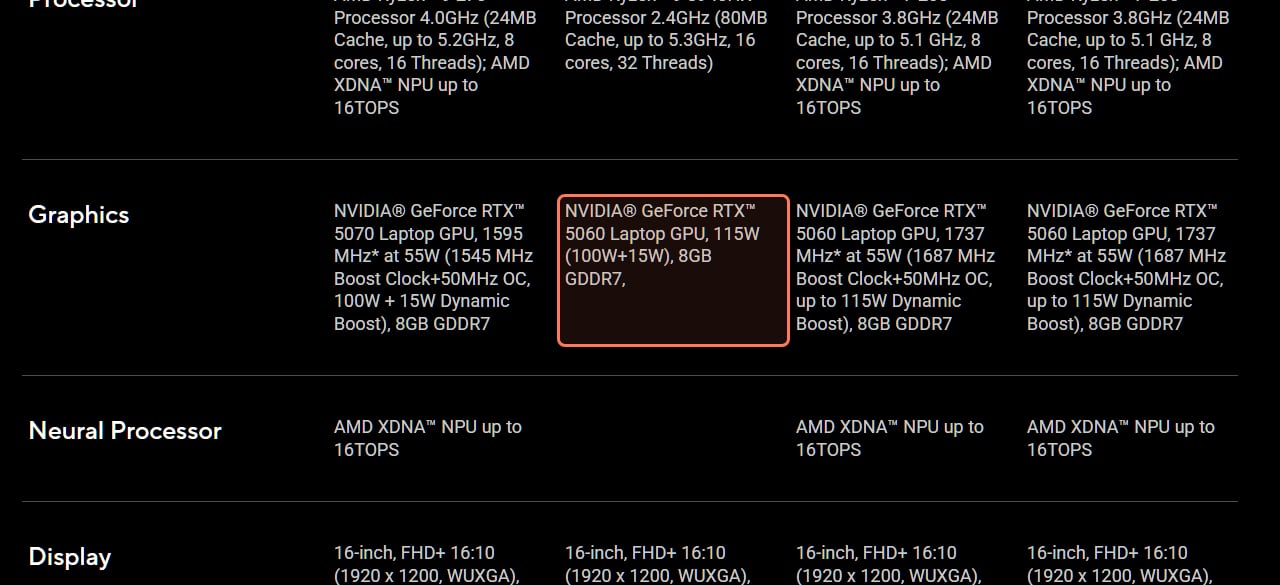
About $1,550 to $1,650: ASUS TUF Gaming A16 or Legion Pro 5i with an RTX 5060. ASUS lists the TUF A16's RTX 5060 at "115W (100W+15W)" on one model, and the ASUS Store started the A16 at $1,549.99. Lenovo's PSREF lists the RTX 5060 in the Legion Pro 5 16IAX10 at 115 W, and that version was $1,649.99. Both run the RTX 5060 at the top of NVIDIA's range.
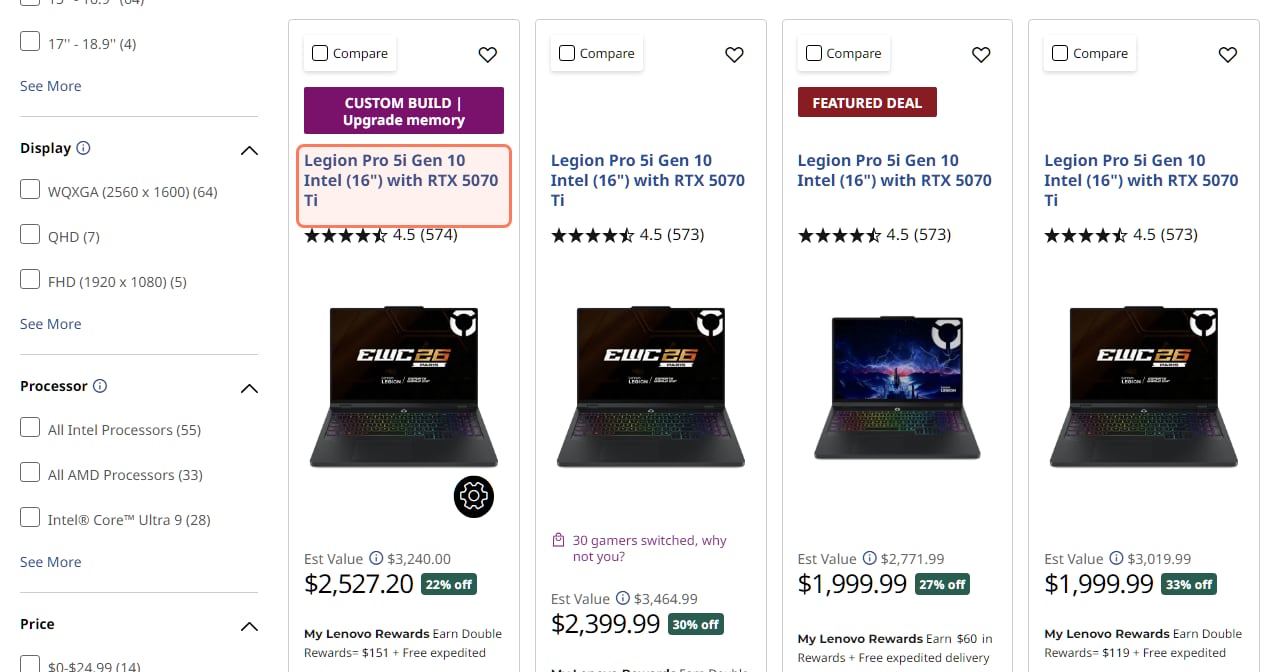
Best value, about $2,000 to $2,500: Lenovo Legion Pro 5i Gen 10 with an RTX 5070 Ti. Lenovo's PSREF for the Legion Pro 5 16IAX10H lists its RTX 5070 Ti at 140 W, the top of NVIDIA's 115 W range plus 25 W of Dynamic Boost, and it gets 12GB of graphics memory instead of 8GB. On Nov 6, lenovo.com had three versions with that chip at $1,999.99, $2,399.99 and $2,527.20; the difference is the processor, memory and storage, so compare the configs before you pick the cheapest.
About $3,600: Lenovo Legion Pro 7i Gen 10 with an RTX 5080. The PSREF for the Legion Pro 7 16IAX10H lists the RTX 5080 and RTX 5090 at 175 W, with a 16-inch 2560 x 1600 OLED at 240Hz. An RTX 5080 version was $3,599.99 on lenovo.com.
Thin and light: ASUS ROG Zephyrus G16 (2026). It weighs 4.30 lbs per ASUS, against 5.34 lbs for the Legion Pro 5i, and has a 16-inch 2.5K OLED at 240Hz. The cost: the RTX 5070 Ti version was $3,699.99 and the RTX 5080 version $4,799.99 on the ASUS Store, and in Turbo mode both run their GPU at lower power (125 W and 135 W) than the thick laptops above. ASUS's Manual mode raises that to 140 W and 160 W, but see what Notebookcheck measured below.
lenovo.com, read Nov 6, 2026: the same Legion Pro 5i with the same RTX 5070 Ti at three prices, set by the processor, memory and storage. These were Black Friday sale prices and they move daily. · Screenshot of lenovo.com by aliteq
Lenovo Legion Pro 5i Gen 10 (RTX 5070 Ti)
The value pick. Lenovo's spec sheet lists its RTX 5070 Ti at 140 W (115 W plus 25 W boost), with 12GB of graphics memory. Check the listing says 5070 Ti, not 5070.
What is TGP on a gaming laptop, and why does it matter?
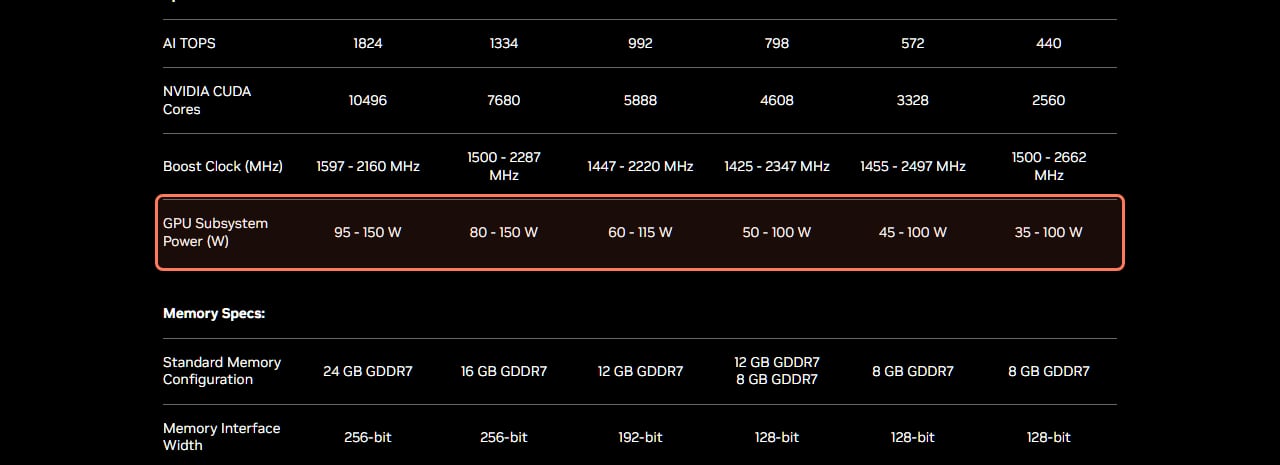
TGP (total graphics power) is how many watts the laptop lets its GPU draw. More watts let the chip hold higher clock speeds in games, so the same GPU name can perform differently in two laptops. NVIDIA publishes the range it allows for each laptop GPU, and laptop makers pick a point inside it to suit their cooling and thickness.
NVIDIA's own compare table (nvidia.com/geforce/laptops/compare), read Nov 6, 2026. The GPU Subsystem Power row is the range makers can choose from, before Dynamic Boost. · Screenshot of nvidia.com by aliteq
RTX 50 laptop GPUs: NVIDIA's power range and memory (read Nov 6, 2026)
RTX 5090
Laptop GPU
95 to 150 W
GPU Subsystem Power
24GB GDDR7
Memory
256-bit
RTX 5080
Laptop GPU
80 to 150 W
GPU Subsystem Power
16GB GDDR7
Memory
256-bit
RTX 5070 Ti
Laptop GPU
60 to 115 W
GPU Subsystem Power
12GB GDDR7
Memory
192-bit
RTX 5070
Laptop GPU
50 to 100 W
GPU Subsystem Power
12GB or 8GB GDDR7
Memory
128-bit
RTX 5060
Laptop GPU
45 to 100 W
GPU Subsystem Power
8GB GDDR7
Memory
128-bit
RTX 5050
Laptop GPU
35 to 100 W
GPU Subsystem Power
8GB GDDR7
Memory
128-bit
Laptop GPU
GPU Subsystem Power
Memory
Bus
RTX 5090
95 to 150 W
24GB GDDR7
256-bit
RTX 5080
80 to 150 W
16GB GDDR7
256-bit
RTX 5070 Ti
60 to 115 W
12GB GDDR7
192-bit
RTX 5070
50 to 100 W
12GB or 8GB GDDR7
128-bit
RTX 5060
45 to 100 W
8GB GDDR7
128-bit
RTX 5050
35 to 100 W
8GB GDDR7
128-bit
Two things to know when you read those numbers on a laptop's spec sheet:
The maker's number usually includes Dynamic Boost. NVIDIA's range for the RTX 5070 Ti tops out at 115 W. Lenovo lists 140 W because it adds Dynamic Boost on top; ASUS spells it out as "115W+25W Dynamic Boost". Compare total with total.
The RTX 5070 comes with 12GB or 8GB. NVIDIA lists both, and Lenovo's PSREF for the Legion Pro 5 16IAX10 lists both versions of the RTX 5070 at 115 W. ASUS's TUF A16 lists its RTX 5070 with 8GB. Check the listing before you buy.
Why the watts on the box aren't what you get all the time
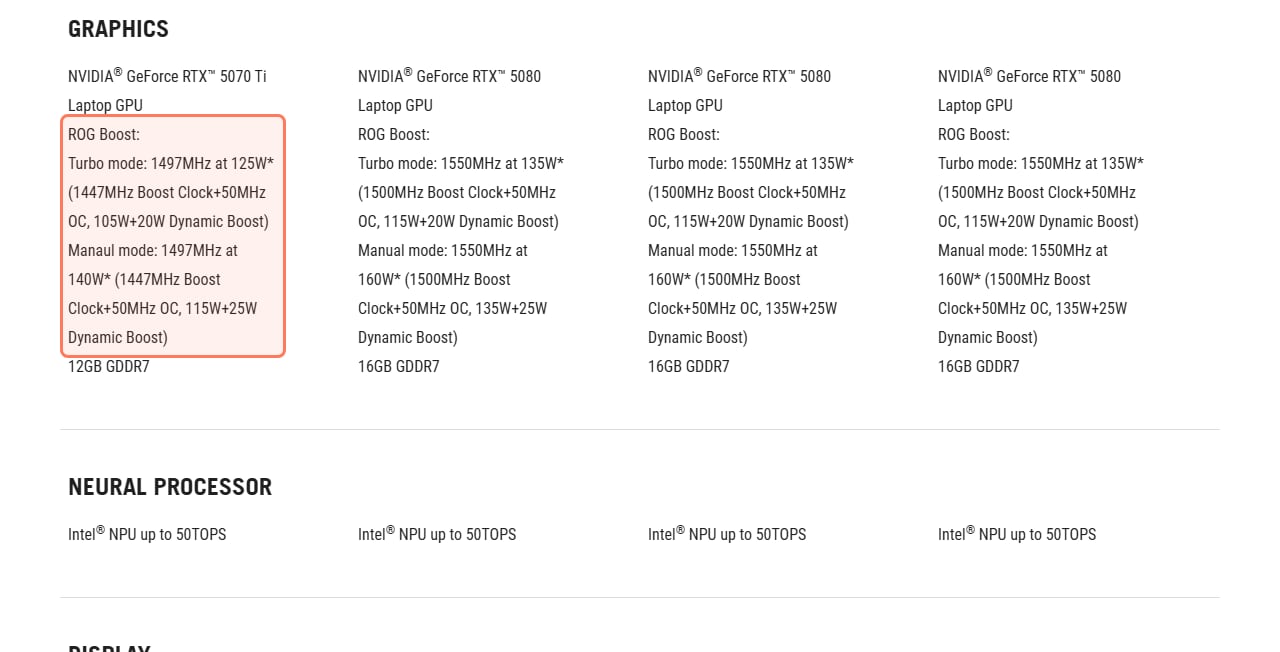
ASUS's own spec page shows the Zephyrus G16 (2026) running the same RTX 5070 Ti at different power in different modes: "Turbo mode: 1497MHz at 125W" (105 W plus 20 W of Dynamic Boost) and 140 W in Manual mode. Its RTX 5080 is rated 135 W in Turbo and 160 W in Manual.
ASUS's ROG Zephyrus G16 (2026) spec page (rog.asus.com/us), read Nov 6, 2026. One laptop, two power limits per GPU, set by the performance mode. · Screenshot of rog.asus.com by aliteq
Notebookcheck measured what that 160 W rating means in practice. It found the RTX 5080 in the Zephyrus G16 (2026) reached 160 W only in pure GPU workloads, and in games "the maximum consumption will hover around 135 Watts for a short while and drop to 105-110 Watts after 20-30 seconds". In Turbo mode, while gaming, "the power consumption is usually 115 Watts", because Dynamic Boost isn't available when the processor is busy too (Notebookcheck, Sep 14, 2026). The takeaway: the spec-sheet number is a ceiling. Cooling decides how close a thin laptop gets to it, so for a thin model, read a review that measured power in games.
Is a thin gaming laptop worth it?
Only if you carry it a lot. On Nov 6, 2026, the Zephyrus G16 (2026) with an RTX 5070 Ti cost $3,699.99 on the ASUS Store and runs that chip at 125 W in Turbo. Lenovo's Legion Pro 5i with the same GPU at 140 W was $1,999.99 at the lowest. You'd pay about $1,700 more for roughly a pound less weight (4.30 lbs against 5.34 lbs, per each maker), an OLED screen and a slimmer case, with less GPU power in Turbo mode (Manual mode matches Lenovo's 140 W on paper).
There's also an upgrade catch. ASUS lists the Zephyrus G16's memory as soldered LPDDR5X with "No expansion possible", so the 16GB versions stay at 16GB. Buy the memory you'll need up front.
Which GPU wattage should I look for?
Use the top of NVIDIA's range as your yardstick, plus Dynamic Boost:
RTX 5050 and RTX 5060: NVIDIA's range tops out at 100 W. The LOQ 15 (100 W) and the TUF A16 and Legion Pro 5i (115 W with boost) are all at or near the top.
RTX 5070: 100 W is NVIDIA's top. The TUF A16 and Legion Pro 5i both list 115 W with boost.
RTX 5070 Ti: 115 W plus 25 W of boost on the models here, so 140 W is the full version. The Legion Pro 5i and Legion Pro 7i list 140 W.
RTX 5080 and RTX 5090: 150 W plus 25 W of boost on the models here, so 175 W is the full version. The Legion Pro 7i and ASUS's ROG Strix G16 (2026) list 175 W ("150W+25W Dynamic Boost" in ASUS's words). The Strix G16 weighs 5.84 lbs and has a 2.5K 300Hz screen; ASUS's US page showed no store price on Nov 6, so check retailers.
A full-power chip one tier down can be the better buy than a starved chip one tier up, so compare wattage and price together, not just the name.
ASUS's TUF Gaming A16 (2025) tech specs (asus.com/us), read Nov 6, 2026: the RTX 5060 at 115 W, written as 100 W plus 15 W of Dynamic Boost. · Screenshot of asus.com by aliteq
ASUS TUF Gaming A16 (RTX 5060)
The mid-budget pick. ASUS lists its RTX 5060 at 115 W (100 W plus 15 W boost) with a 16-inch 165Hz screen. A 1080p and light 1440p machine with 8GB of graphics memory.
How much graphics memory (VRAM) do I need in a gaming laptop?
The RTX 5050 and RTX 5060 have 8GB, per NVIDIA's table, and so do many RTX 5070 laptops (ASUS lists 8GB on the TUF A16). That's fine for 1080p but it's the first limit you'll hit in newer games at high texture settings. The RTX 5070 Ti is the cheapest RTX 50 laptop chip with 12GB on every model, the RTX 5080 has 16GB and the RTX 5090 24GB. You can't add more later, since graphics memory is part of the GPU. If you play at 1440p, see 1080p vs 1440p vs 4K, and our FPS guide covers which settings eat the most memory.
Buying it to run AI models too?
Graphics memory matters even more for local AI, because the model has to fit in it. Check a model against 8, 12, 16 or 24GB in our VRAM calculator before you pick a tier. If a model needs more than any laptop has, renting a desktop GPU by the hour is often cheaper than moving up a laptop tier; today's prices are on /cloud-gpu.
Should I buy a gaming laptop or a desktop?
If you don't need to carry it, a desktop gives you more performance for the money and you can upgrade the GPU later; a laptop's GPU and graphics memory are fixed for life. Compare the two in prebuilt vs build your own and set a budget with how much to spend on a gaming PC. If you want to play away from a desk without a big laptop, a gaming handheld costs less.
The honest limits of this guide
We haven't tested these laptops. The picks come from the makers' own spec sheets and stores, read Nov 6, 2026, and the one measured result we quote is Notebookcheck's.
Lenovo's prices were Black Friday sale prices and changed between our page loads that day. ASUS's were ASUS Store prices. Retailers often sell the same model for less, so check the day you buy.
Watts are a ceiling, not a promise. Cooling, the performance mode and processor load decide how much of it a laptop uses in games.
Same name, different configs: check the exact model number, the GPU (5070 vs 5070 Ti), the graphics memory and the TGP on the listing.
8/ 10
Verdict
Gaming laptop by budget, Nov 2026
Pick your budget, then buy the most GPU power you can at that price. Around $2,000 to $2,500, the Lenovo Legion Pro 5i Gen 10 with a 140 W RTX 5070 Ti and 12GB is the value pick on paper (from $1,999.99 on lenovo.com, Nov 6, 2026). Under that, look for an RTX 5060 at 115 W, like the ASUS TUF Gaming A16. Above it, the Legion Pro 7i's 175 W RTX 5080. Buy a thin laptop like the Zephyrus G16 only if weight matters more than speed.
Best for: Gamers who need to play away from a desk and want the most performance per dollar.
Quick answers
Which gaming laptop should I buy for my budget?
"Around $1,000, the Lenovo LOQ 15 (AMD) with a 100 W RTX 5050 ($999.99 on lenovo.com, Nov 6, 2026). Around $1,550 to $1,650, an RTX 5060 at 115 W, such as the ASUS TUF Gaming A16 (ASUS Store from $1,549.99). Around $2,000 to $2,500, the Legion Pro 5i Gen 10 with a 140 W RTX 5070 Ti and 12GB of graphics memory. From about $3,600, the Legion Pro 7i Gen 10 with a 175 W RTX 5080. Prices change often, so check on the day."
What does TGP mean on a gaming laptop?
"TGP (total graphics power) is how many watts the laptop lets its GPU draw. NVIDIA sets a range for each laptop GPU, for example 60 to 115 W for the RTX 5070 Ti, and makers choose a point in it and often add Dynamic Boost on top. More watts let the same chip run faster, so two laptops with the same GPU name can perform differently."
Is 140 W the maximum for an RTX 5070 Ti laptop?
"Yes, in practice. NVIDIA's table lists 60 to 115 W for the RTX 5070 Ti Laptop GPU, and makers add Dynamic Boost on top: 25 W on the ASUS and Lenovo models here, which ASUS writes as 115W+25W. Lenovo's spec sheets for the Legion Pro 5i and Pro 7i list 140 W."
Does a higher-wattage laptop always run at that wattage?
"No. The rated number is a ceiling. Notebookcheck found the RTX 5080 in the ROG Zephyrus G16 (2026), rated up to 160 W, usually drew about 115 W in games in Turbo mode, because Dynamic Boost isn't available when the processor is busy too. Cooling decides how much a thin laptop can sustain."
Is 8GB of VRAM enough in a gaming laptop?
"For 1080p gaming, mostly yes, but it's the first limit you'll hit in new games at high texture settings, and you can't upgrade it later. The RTX 5070 Ti is the cheapest RTX 50 laptop GPU with 12GB on every model, per NVIDIA."
Is a gaming laptop or a desktop better value?
"A desktop, if you don't need to carry it: more performance for the money and you can upgrade the GPU later. A gaming laptop is worth it when you need to play away from a desk."
Laptop prices in late 2026 move day to day, but the rule doesn't: pick the budget, then buy the most GPU watts and graphics memory it gets you. For screen choices, see IPS vs VA vs OLED, and check a game against your hardware on Can I run it.