Divide the card's price by the hourly rental rate. On Nov 3, 2026 a $1,000 RTX 3090 paid for itself after about 2,000 hours against Runpod ($0.50 an hour) and about 6,200 hours against a typical Vast.ai rental ($0.16). Add electricity and the gap widens. Here's the math, by GPU and by hours a day.
Some links on this page are referral links: we may earn a commission, at no cost to you.
Share
Should you rent a cloud GPU or buy one for AI? For most people, rent. Buying only wins once you'd use the card for thousands of hours. On Nov 3, 2026 an RTX 3090 rented for $0.50 an hour on Runpod's Secure Cloud and a median $0.16 an hour on-demand on Vast.ai. Against a $1,000 card, that's a break-even of about 2,000 hours against Runpod and about 6,200 hours against a typical Vast rental. Pay your own electricity and it moves further out. Buy if you'll run a GPU most days for a year or more, or if your data has to stay on your own machine.
The four numbers behind the answer (read Nov 3, 2026)
$0.50
RTX 3090 on Runpod, per hour
Runpod Secure Cloud, runpod.io/pricing
$0.16
RTX 3090 on Vast.ai, per hour
Median of 28 on-demand offers, our read of Vast's API
350 W
Graphics card power
NVIDIA's spec for the RTX 3090
18.16
Cents per kWh
US residential average, August 2026 (EIA)
How many hours until buying a GPU pays off?
Divide what you'd pay for the card by what renting the same card costs per hour. That's the whole formula. We use a $1,000 RTX 3090 as the worked example because it's the classic 24 GB card for local AI, but used-card prices move week to week, so put in what you'd really pay. On Nov 12, 2026 GPU Poet's eBay tracker put the lowest average for a used 3090 at $1,543, so at that price every break-even below is about 1.5 times longer. Our used RTX 3090 buying guide explains how to check recently sold listings.
On Nov 3, 2026 renting a 3090 cost $0.50 an hour on Runpod's Secure Cloud, the tier on its public price list. On Vast.ai, a marketplace where hosts set their own prices, our read of 28 single-3090 on-demand offers through Vast's API had a median of $0.16 an hour and a cheapest of $0.09. Interruptible (spot) 3090s started at $0.07.
$1,000 ÷ $0.50 = 2,000 hours against Runpod
$1,000 ÷ $0.16 ≈ 6,200 hours against a typical Vast rental
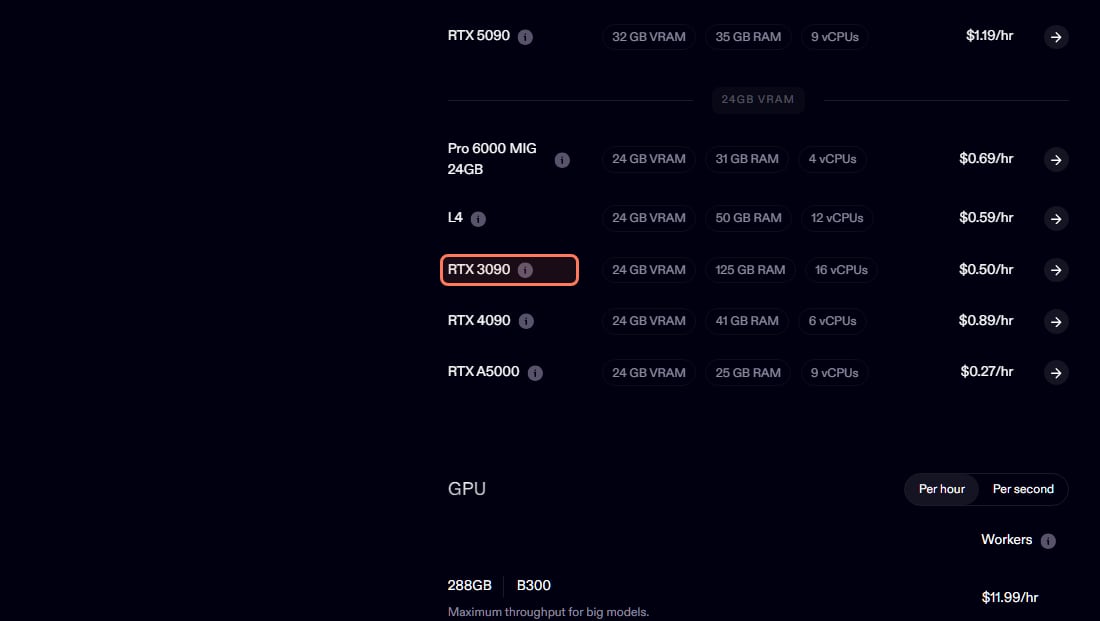
Runpod's own price list (runpod.io/pricing), read Nov 3, 2026: RTX 3090 $0.50 an hour, RTX 4090 $0.89, RTX 5090 $1.19. · Screenshot of runpod.io by aliteq
Hours of use before a $1,000 RTX 3090 pays for itself, before electricity (rental prices read Nov 3, 2026)
vs Runpod Secure Cloud, $0.50/hr≈ 2,000 hours
vs Vast.ai on-demand, median $0.16/hr≈ 6,200 hours
vs Vast.ai on-demand, cheapest $0.09/hr≈ 10,600 hours
vs Vast.ai interruptible, from $0.07/hr≈ 15,000 hours
The cheaper the rental, the longer renting stays the better deal. The cheapest Vast listings come with trade-offs, from host reliability to bandwidth charges, and interruptible instances can be stopped when someone outbids you, so the median is the fairer comparison. Today's prices are on our cloud GPU price table, which updates hourly.
What if I buy a 4090 or 5090 instead?
The break-even comes sooner, because those cards rent for more per hour. Since card prices vary so much, here's the break-even per $1,000 of card price; multiply by what your card costs in thousands. A $2,500 card against Runpod's 5090 rate, for example, is 2.5 × 840 ≈ 2,100 hours.
Break-even hours per $1,000 of card price, before electricity (rates read Nov 3, 2026)
RTX 3090 (24 GB)
Runpod Secure Cloud, per hour
$0.50 → 2,000 hours
Vast.ai on-demand median, per hour
$0.16 → 6,200 hours
RTX 4090 (24 GB)
Runpod Secure Cloud, per hour
$0.89 → 1,100 hours
Vast.ai on-demand median, per hour
$0.46 → 2,200 hours
RTX 5090 (32 GB)
Runpod Secure Cloud, per hour
$1.19 → 840 hours
Vast.ai on-demand median, per hour
$0.65 → 1,500 hours
Runpod Secure Cloud, per hour
Vast.ai on-demand median, per hour
RTX 3090 (24 GB)
$0.50 → 2,000 hours
$0.16 → 6,200 hours
RTX 4090 (24 GB)
$0.89 → 1,100 hours
$0.46 → 2,200 hours
RTX 5090 (32 GB)
$1.19 → 840 hours
$0.65 → 1,500 hours
Runpod rates are from its pricing page; Vast medians are from our read of 39 RTX 4090 and 54 RTX 5090 single-GPU on-demand offers the same day. Bigger cards draw more power too, so the electricity correction below matters more for them.
The other question is whether the card can run your model at all. A 24 GB card fits a lot, but not everything; check the model and quantization you want in our VRAM calculator before you price anything. If it doesn't fit on any card you'd buy, renting a bigger GPU is the answer by default.
Does electricity change the answer?
Yes, and it favors renting, because a rented GPU's hourly price already includes power. NVIDIA rates the RTX 3090 at 350 W. The US average home electricity price was 18.16 cents per kWh in August 2026, per the Energy Information Administration's preliminary figures. So a 3090 running flat out costs about $0.06 an hour (0.35 kW × $0.1816). Subtract that from what you'd save each hour:
Against Runpod: $1,000 ÷ ($0.50 − $0.06) ≈ 2,300 hours
Against a typical Vast rental: $1,000 ÷ ($0.16 − $0.06) ≈ 10,200 hours
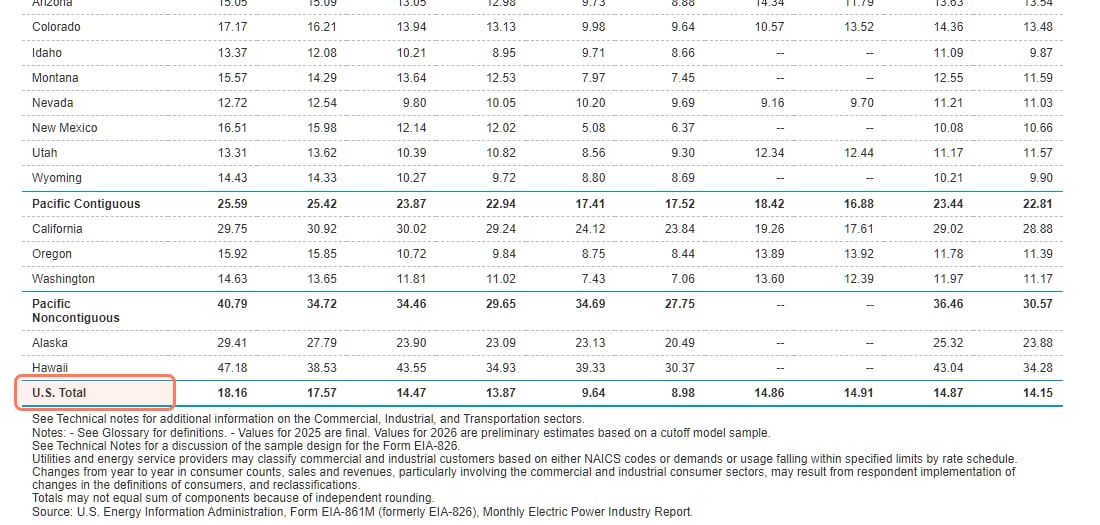
EIA Electric Power Monthly, table 5.6.A, read Nov 3, 2026. The first column is residential, August 2026: 18.16 cents per kWh for the US, 29.75 in California. Use your own rate. · Screenshot of eia.gov by aliteq
Your own rate matters. In California the August 2026 residential average was 29.75 cents per kWh, which makes a 3090 cost about $0.10 an hour to run, and against a typical Vast rental the break-even stretches to about 17,000 hours ($1,000 ÷ $0.06), nearly two years running around the clock.
How many years is that at my usage?
The break-even is in hours; your decision is in years. Here it is after electricity, for a $1,000 RTX 3090:
Time to break even on a $1,000 RTX 3090, after electricity at 18.16 cents per kWh (prices read Nov 3, 2026)
vs Runpod Secure Cloud ($0.50/hr)
2 hours a day
about 3.1 years
8 hours a day
about 9 months
Around the clock
about 3 months
vs Vast.ai on-demand, median ($0.16/hr)
2 hours a day
about 14 years
8 hours a day
about 3.5 years
Around the clock
about 14 months
2 hours a day
8 hours a day
Around the clock
vs Runpod Secure Cloud ($0.50/hr)
about 3.1 years
about 9 months
about 3 months
vs Vast.ai on-demand, median ($0.16/hr)
about 14 years
about 3.5 years
about 14 months
Read across your row. If you'd use a GPU a couple of hours in the evening, renting from Vast is cheaper for longer than the card will stay relevant. If you'd run jobs all working day, every day, buying pays off within a year against Runpod. Most hobby use is closer to the first column than people expect.
What costs does the simple division leave out?
Storage on rented GPUs. Both providers bill storage separately, and both keep billing it when you stop. Runpod's pricing page lists volume disk at $0.10 per GB a month while running and $0.20 while idle. Vast's docs say "Storage charges continue even when instances are stopped" and "Delete instances completely to cease storage billing." Keeping a 100 GB model folder parked on Runpod costs about $20 a month at the idle rate.
Setup time. Every rented session starts with downloading or mounting your models. Per-second billing, which both Runpod and Vast offer, helps, but short sessions carry that fixed overhead.
Resale. A card you own is worth something when you sell it, which pulls the break-even in. Nobody can tell you today what a 3090 will fetch in two years, so treat it as a bonus, not part of the math.
The rest of the computer. A GPU needs a PC with a big enough power supply and room for it. If you don't already have one, add that to the card's price before dividing.
Interest. If you'd put the card on a credit card, add the interest to its price.
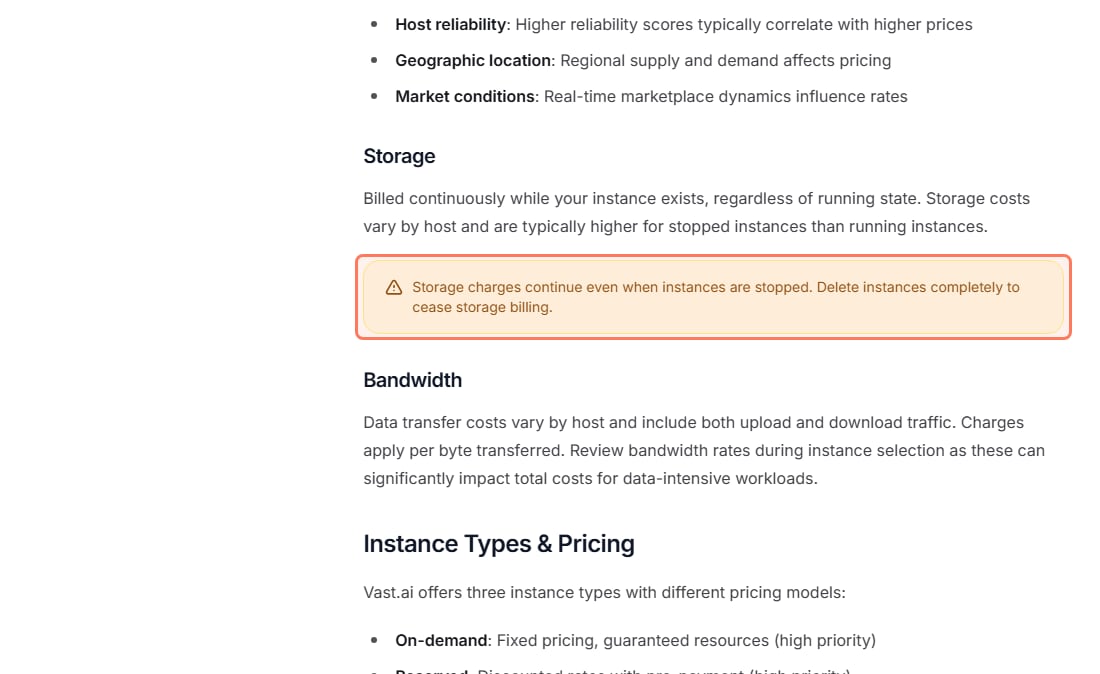
Vast's own docs (docs.vast.ai, Pricing), read Nov 3, 2026: a stopped instance still pays for storage. Delete it when you're done. · Screenshot of docs.vast.ai by aliteq
What do I get from owning that renting can't give me?
Owning gives you things no hourly rate captures: your data never leaves your machine (real for privacy-sensitive work), no queue for capacity, it works offline, and there's nothing to spin up. You also stop watching a meter, and people who pay by the minute tend to experiment less.
Renting gives you flexibility: GPUs bigger than you'd ever buy, no maintenance, no upfront cost, and the option to switch cards when a new model needs more VRAM. A listed price isn't a promise of capacity, though; popular cards sometimes aren't available on the day you want them.
The low-risk path is to rent first, learn how many hours you really use, and buy once you're renting most days.
Rent or buy, in four questions
Does your model fit a card you'd buy?
Check it in the VRAM calculator. No means rent.
Must the data stay on your machine?
Yes means buy.
Hours a week, honestly?
Rent for a month and count them.
Past the break-even within two years?
Card price ÷ hourly rate, after electricity. Yes means buy.
Does your model fit a card you'd buy?
Check it in the VRAM calculator. No means rent.
Must the data stay on your machine?
Yes means buy.
Hours a week, honestly?
Rent for a month and count them.
Past the break-even within two years?
Card price ÷ hourly rate, after electricity. Yes means buy.
Our decision order, using the break-even math on this page.
What about AI video, or a whole team?
For AI video, the honest unit is cost per clip you keep, not cost per hour, and renting carries fixed costs that make small batches expensive. That comparison, against apps and per-second APIs, is in AI video cost per clip: app, API or rented GPU.
If you're deciding for a 10 to 50 person company, the math includes admin time, resale and per-token APIs; that version, with a calculator, is the 3-year cost of an AI server for a small company. For what a specific model costs to run by the hour on each GPU, see cost to run.
8/ 10
Verdict
Rent first, buy when you're renting daily
Rent until the arithmetic says otherwise. A $1,000 RTX 3090 needs about 2,300 hours of use to beat Runpod and about 10,200 to beat a typical Vast rental once you pay for power. Buy if you'll run a GPU most working days for a year or more, if your data must stay local, or if you simply want no meter running.
Best for: Anyone deciding between a cloud GPU and a card of their own for AI
Quick answers
Should I rent a cloud GPU or buy one for AI?
For most people, rent. On Nov 3, 2026 a $1,000 RTX 3090 broke even after about 2,000 hours against Runpod's Secure Cloud ($0.50 an hour) and about 6,200 hours against a typical on-demand Vast.ai rental ($0.16 an hour), before electricity. Buy if you'll run models most days for a year or more, or need your data on your own machine.
How many hours until buying a GPU pays off?
Divide the card's price by the hourly rental rate for the same card. For a $1,000 RTX 3090 that was about 2,000 hours on Runpod and about 6,200 on a typical Vast rental on Nov 3, 2026. Subtract your electricity cost from the hourly rate first for a truer number.
Is it cheaper to run AI locally or in the cloud?
Per hour, local is cheaper once the card is paid off: a 3090 costs about $0.06 an hour in power at the US average rate. But you pay for the card up front, so the cloud is cheaper until you pass the break-even, which for light use can take years.
How much electricity does a GPU use for AI?
NVIDIA rates the RTX 3090 at 350 W. At the US average home rate of 18.16 cents per kWh (EIA, August 2026), that's about $0.06 an hour at full load. Use your own rate; California averaged 29.75 cents.
Do I pay for a rented GPU when it's stopped?
For storage, yes. Vast's docs say storage charges continue when instances are stopped, and Runpod lists volume disk at $0.20 per GB a month while idle. Delete instances you're done with.
Is a 4090 or 5090 worth buying instead of renting?
The break-even comes sooner because they rent for more. Per $1,000 of card price on Nov 3, 2026, a 4090 broke even after about 1,100 hours against Runpod ($0.89) or 2,200 against Vast ($0.46 median), and a 5090 after about 840 or 1,500 hours.
Rent below the break-even, buy above it, and let privacy and convenience break ties. Compare today's prices on our cloud GPU page, check fit in the VRAM calculator, and read the used-3090 guide if the numbers say buy.