Most missed cron runs come down to UTC, a Sunday that is 1 on one platform and 0 on the next, or a schedule that quietly switched itself off. Here are the rules for four schedulers, from their own docs, plus the hourly job we run ourselves.
You set a job for 9 AM. Nine came and went, and the log is empty. Nothing errored, because nothing ran.
I like problems with a number at the bottom, and cron failures nearly always have one. It's an hour offset, a weekday digit, or a day count. So I read the scheduling docs for Cloudflare Workers, Vercel, Supabase and GitHub Actions on October 3, 2026, and lined up the rules that make a job silently skip. None of these vendors pay us.
We also run one of these ourselves. Our GPU price tracker is a Cloudflare Worker on a cron trigger, and its run history shows up later in this piece. If a scheduled job is new to you, our explainer on queues and background jobs covers the "work that happens later" idea first.
My scheduled job didn't run: the six usual causes
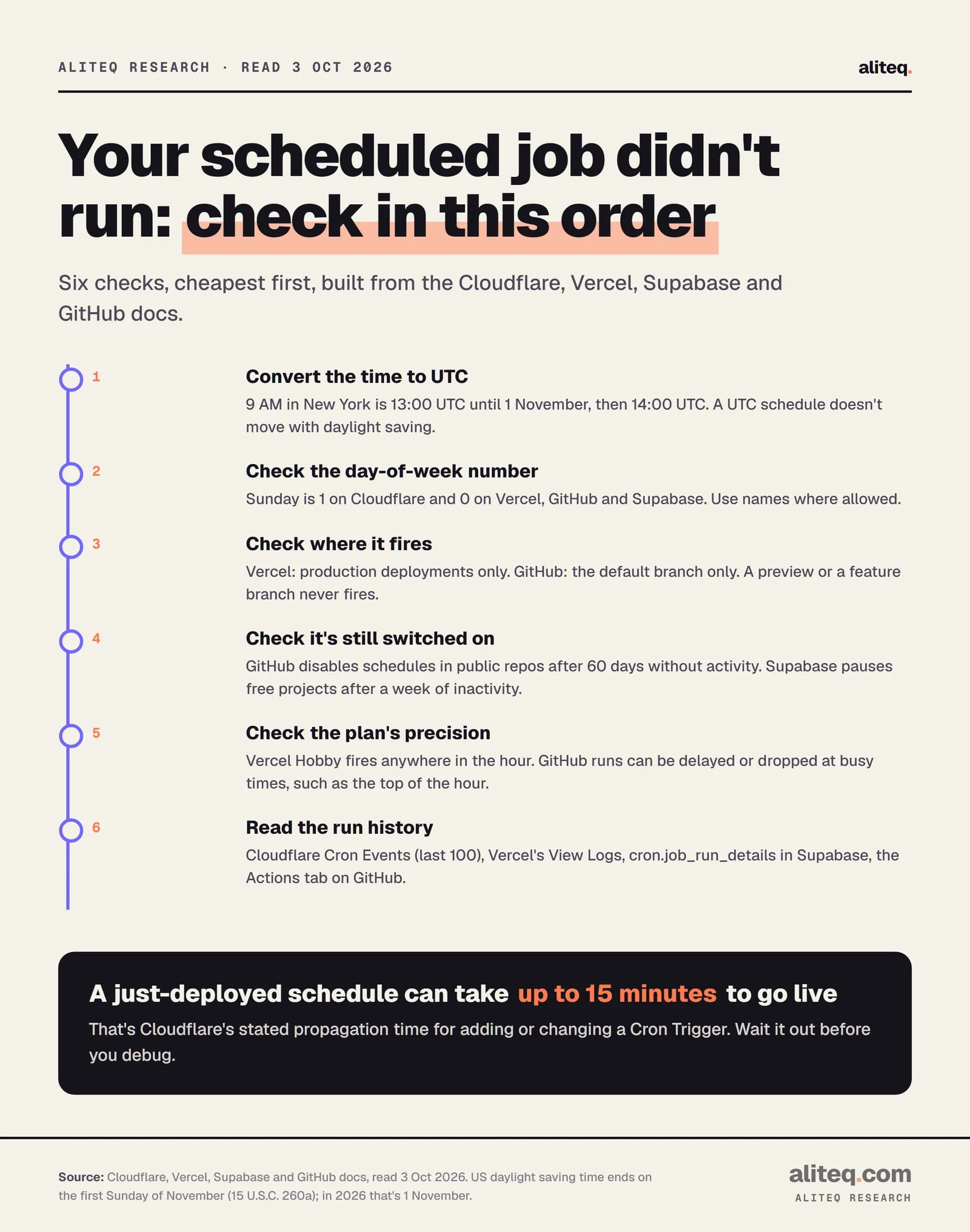
Check the time zone first, then the weekday number, then where the job is allowed to fire. After that, check whether the platform switched it off, how precise your plan is, and finally the run history. That order goes from the cheapest check to the slowest.
Cheapest check first. Built from the Cloudflare, Vercel, Supabase and GitHub docs, read October 3, 2026. · aliteq research
Two of these catch people every fall. US daylight saving time ends at 2 AM on the first Sunday of November, which is 1 November in 2026. A job set to 0 13 * * * runs at 9 AM in New York on 30 October and at 8 AM on 2 November. The UTC schedule didn't move. Your clock did.
The second is a fresh deploy. Cloudflare says adding or changing a Cron Trigger "may take several minutes (up to 15 minutes) to propagate". Give a new schedule that long before you start debugging.
How to read a cron expression
A cron expression is five fields separated by spaces: minute, hour, day of month, month, day of week. A * means "any value". So 30 13 * * * means 13:30 UTC every day.
┌──────── minute (0-59)
│ ┌────── hour (0-23)
│ │ ┌──── day of month (1-31)
│ │ │ ┌── month (1-12)
│ │ │ │ ┌ day of week (see the table)
│ │ │ │ │
30 13 * * *
Each field also takes a few operators. A comma lists values (0,30), a dash makes a range (1-5), and a slash makes a step (*/15 is every 15 minutes). The trap is the last field, because the four platforms don't number the days the same way.
The day-of-week field, by platform
Cloudflare Workers
Sunday is
1
Range
1 to 7 (Saturday = 7)
Day names allowed
Yes (SUN, MON…)
Vercel
Sunday is
0
Range
0 to 6
Day names allowed
No
Supabase Cron (pg_cron)
Sunday is
0 or 7
Range
0 to 6, plus 7
Day names allowed
Yes
GitHub Actions
Sunday is
0
Range
0 to 6
Day names allowed
Yes (SUN-SAT)
Sunday is
Range
Day names allowed
Cloudflare Workers
1
1 to 7 (Saturday = 7)
Yes (SUN, MON…)
Vercel
0
0 to 6
No
Supabase Cron (pg_cron)
0 or 7
0 to 6, plus 7
Yes
GitHub Actions
0
0 to 6
Yes (SUN-SAT)
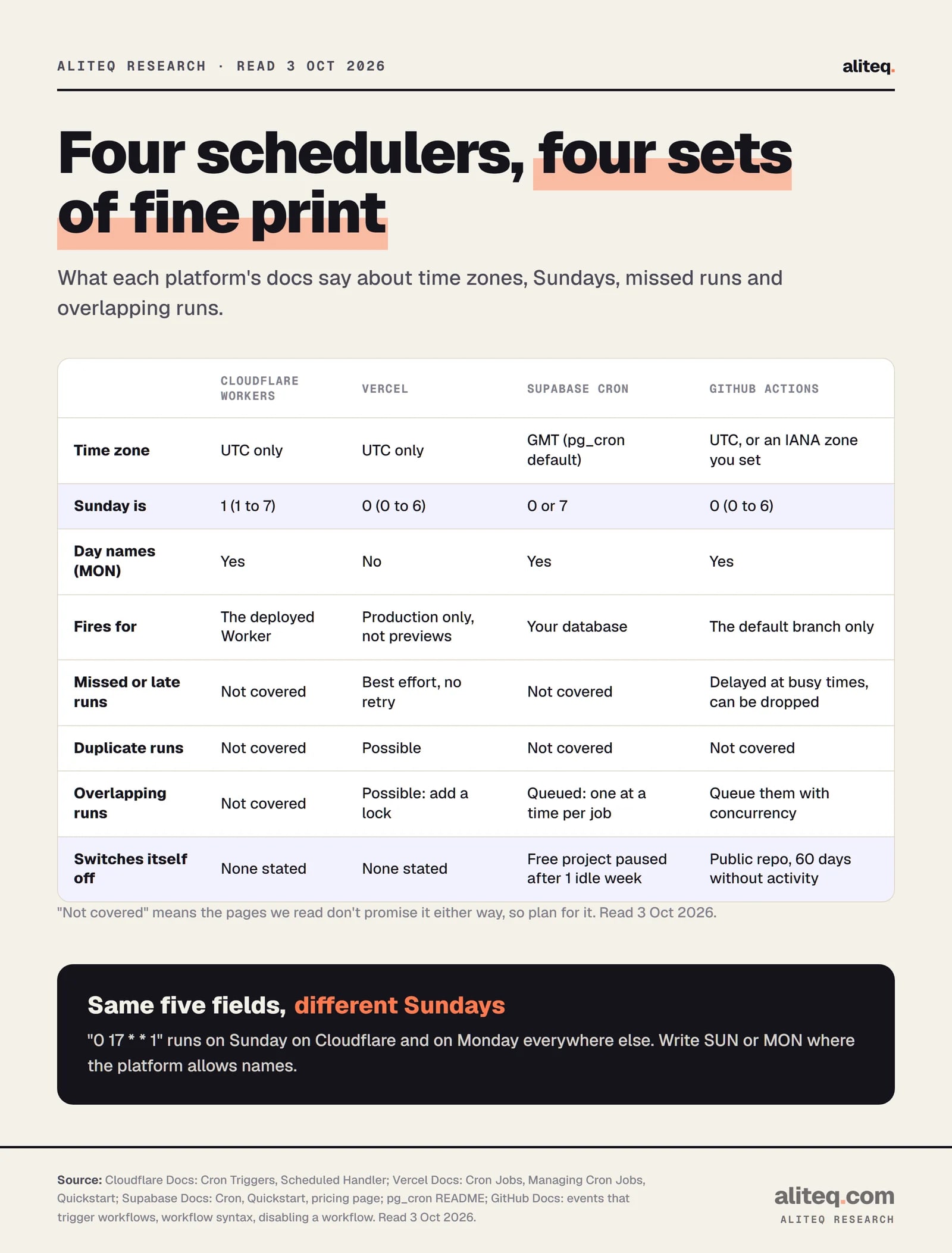
So 0 17 * * 1 fires on Sunday on Cloudflare and on Monday on the other three. Cloudflare's own docs flag this and suggest the three-letter names. Write MON wherever the platform accepts it. On Vercel, which doesn't accept names, leave a comment beside the number.
"Not covered" means the docs we read don't promise it either way. Read October 3, 2026. · aliteq research
Cloudflare Workers Cron Triggers
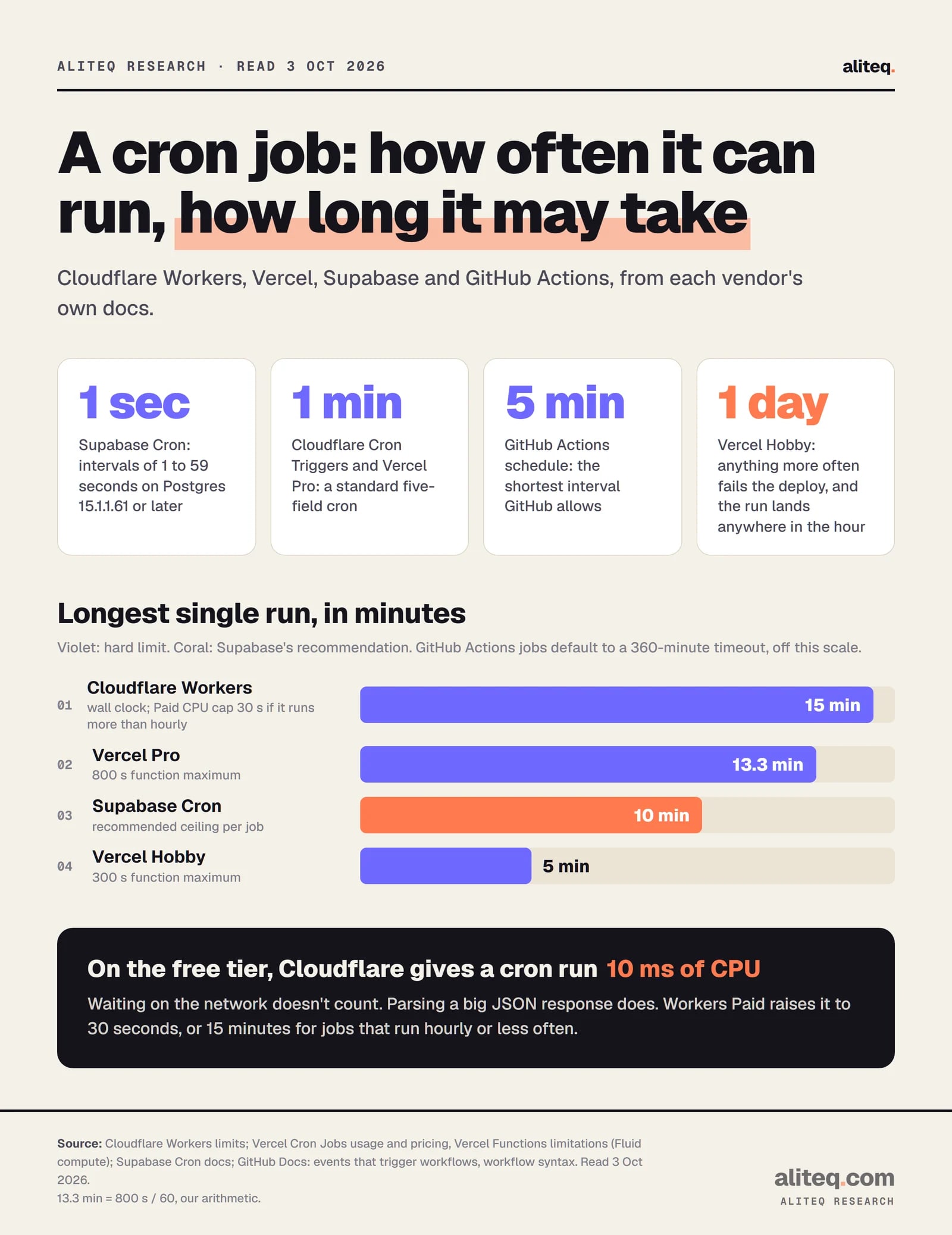
A Cron Trigger calls your Worker's scheduled() handler on a UTC schedule. A run may last up to 15 minutes of wall-clock time. CPU is the tighter limit: 10 ms per run on the free plan, and on Workers Paid 30 seconds for jobs more frequent than hourly, 15 minutes for hourly or less often.
CPU time means time spent computing. Cloudflare's limits page says waiting on fetch(), KV or a database doesn't count. A job that mostly calls APIs fits in very little CPU. A job that parses a big JSON response may not fit in 10 ms.
The rest of the rules, from Cloudflare's docs:
Count. 5 Cron Triggers per account on the free plan, 250 on Workers Paid.
Config. In wrangler.jsonc under triggers.crons. A deploy replaces the old list. An empty array removes every trigger, and leaving the key out keeps whatever is deployed.
Several schedules, one handler.controller.cron holds the exact expression that fired, and it must match your config character for character.
Run history. Workers & Pages, then Settings, then Trigger Events keeps the last 100 runs. Workers Logs keeps longer history. A new or renamed Worker can take 30 minutes to show events.
Local test.wrangler dev exposes /cdn-cgi/local/scheduled, and ?cron= simulates a pattern.
Here's the handler shape from Cloudflare's docs, with two schedules on one Worker:
The pages we read don't promise retries, and they don't say whether a run can arrive twice or overlap the previous one. Treat all three as possible.
Vercel Cron Jobs: your plan sets the schedule
Vercel runs a cron by sending an HTTP GET to a path on your production deployment. On Hobby, a job can run at most once a day, and Vercel may fire it anywhere inside the scheduled hour. Pro and Enterprise allow once a minute, on time to the minute. Every plan allows 100 cron jobs per project.
The Hobby rule fails loudly. An hourly expression like 0 * * * * stops the deploy with "Hobby accounts are limited to daily cron jobs." The timing rule fails quietly. Vercel's example is 0 1 * * *, which "will trigger anywhere between 1:00 am and 1:59 am".
The rest is about where and how the request lands:
Production only. Vercel's quickstart says cron jobs run "only for production deployments and not for preview deployments". A schedule you tested on a preview URL never fired there. Our explainer on what deploying actually means covers previews versus production.
UTC only, numbers only. No MON or JAN, and you can't set day of month and day of week together.
No retries. "Vercel will not retry an invocation if a cron job fails."
No redirects. A 3xx response ends the run, and redirects and cached responses don't appear in the logs. A trailing-slash or www redirect can swallow your job.
Run time. Cron jobs are Vercel Functions, so the function limits apply: 300 seconds on Hobby, up to 800 seconds on Pro and Enterprise.
Lock it. Set a CRON_SECRET environment variable. Vercel sends it as Authorization: Bearer …, and your route rejects anything else.
Cron jobs cost nothing extra on any plan. You pay for the function time they use, like any other request.
Supabase Cron: the job lives in your database
Supabase Cron is the pg_cron extension running inside your Postgres database. A job can run SQL, call a database function, or make an HTTP request, for example to an Edge Function. It can run as often as every second. Supabase recommends no more than 8 jobs at once, each finishing within 10 minutes.
If Supabase is new to you, start with our Supabase explainer. The scheduling part is one SQL call:
select cron.schedule(
  'nightly-cleanup',           -- job name
  '0 3 * * *',                 -- 03:00 GMT every day
  $$ delete from events where event_time < now() - interval '1 week' $$
);
Four details from Supabase's quickstart and the pg_cron README cause most of the surprises:
GMT by default. Supabase's examples label times GMT, and pg_cron's cron.timezone setting defaults to GMT.
Names overwrite. Creating a job with an existing name replaces the old job. Names are case sensitive.
History grows forever.cron.job_run_details is "not cleaned up automatically", even after a job is unscheduled. Supabase's docs include a daily cleanup job that keeps 7 days.
Sub-minute jobs use '30 seconds' style intervals, on Postgres 15.1.1.61 or later.
Then there's the switch-off. Supabase's pricing page says "Free projects are paused after 1 week of inactivity." A paused project's database isn't running, so its jobs don't either. Supabase doesn't say whether a cron run counts as activity, so don't rely on a job to keep a free project awake.
GitHub Actions schedule: free, but not punctual
The schedule trigger runs a workflow on a cron expression, at most once every 5 minutes. It uses UTC unless you add a timezone, and it only runs from the workflow file on the default branch. GitHub warns that scheduled runs can be delayed at busy times, especially the top of every hour, and some may be dropped.
GitHub's advice is to pick an odd minute. So 17 * * * * is a better hourly slot than 0 * * * *.
The quiet failure is the 60-day rule. GitHub's docs say: "In a public repository, scheduled workflows are automatically disabled when no repository activity has occurred in 60 days." Scheduled workflows in a fork of a public repo start disabled. A side project's nightly job can stop in December, and nothing tells you until you look. Re-enable it from the Actions tab.
Two settings help here:
timezone takes an IANA name like America/New_York, so a 9 AM job stays at 9 AM across daylight saving. In the spring-forward hour, a 2:30 AM run moves to 3:00 AM.
concurrency keeps one run of a group going at a time. A new run waits as pending, and by default it replaces any run already pending. Add timeout-minutes too, because a job's default limit is 360 minutes.
13.3 minutes is Vercel's 800-second maximum divided by 60. Read October 3, 2026. · aliteq research
Missed, doubled and overlapping runs: write jobs that are safe to repeat
Assume any run can be skipped, can arrive twice, or can start while the last one is still going. Vercel says all three can happen. The other docs don't rule them out. The fix is idempotency: running the job twice leaves the same result as running it once.
Vercel's docs put it well. "Set user status to active" is safe to run twice. "Increment user credit by 10" isn't, because a duplicate doubles the credit. Their advice, which works on every platform:
Track what you processed. Store event IDs and skip ones you've seen.
Check before you change. "If not already active, then activate."
Catch up, don't count runs. Each run processes everything since the last successful run, so a missed run gets picked up by the next one.
Lock against overlap. Vercel suggests a distributed lock, for example in Redis. On Supabase, pg_cron already runs one instance of each job at a time and queues the next. On GitHub, use concurrency.
Here's how our own job measures up. The aliteq price tracker is a Cloudflare Worker with two triggers: 20 * * * * for an hourly GPU price snapshot and 40 4 * * * for a daily refresh of our model catalog. The handler checks controller.cron to pick the task.
The daily refresh is an upsert keyed on the model's slug, so a duplicate run rewrites the same rows. The hourly snapshot isn't idempotent: it appends rows. A doubled run would add a second snapshot for that hour. We accept that, because our pages read only the newest price per GPU. The worker also fetches each price provider separately, so one provider's outage doesn't cost us the other's snapshot.
The run history is the part I like. From 26 September to October 2, 2026, rows landed in 168 of 168 hours, none missing. They were written between 20 minutes 24 seconds and 21 minutes 41 seconds past each hour. That timestamp is when the database wrote the row, after both providers answered, so it's not the moment the trigger fired. It's still a week with no gaps.
Write the schedule in UTC and note the local time in a comment. Recheck it around the first Sunday of November and the second Sunday of March.
Use day names (MON, SUN) where the platform allows them. On Vercel, comment the weekday number.
Confirm where it fires: Vercel production, GitHub's default branch, a running Supabase project.
Protect HTTP-triggered jobs with a secret, such as Vercel's CRON_SECRET, so a stranger can't run them.
Make every run safe to repeat: skip work already done and process everything since the last success.
Look at the run history a day after launch, not just the deploy log.
For more on the tooling around jobs like these, the software hub collects our developer guides.
Quick answers
What time zone do cron jobs use?
UTC on Cloudflare Workers and Vercel, with no option to change it. Supabase's pg_cron defaults to GMT, which matches UTC. GitHub Actions uses UTC unless you add a timezone setting with an IANA name such as America/New_York.
Why did my Vercel cron job run at the wrong time?
On the Hobby plan, Vercel may fire a job anywhere within the scheduled hour, so 0 1 * can run between 1:00 and 1:59 AM UTC. Hobby also allows only one run a day. Pro and Enterprise run within the minute you set.
Why did my GitHub Actions scheduled workflow stop?
In a public repository, GitHub disables scheduled workflows after 60 days with no repository activity. Re-enable it from the Actions tab. Scheduled workflows also run only from the default branch, and they can be delayed or dropped at busy times like the top of the hour.
Does Vercel retry a failed cron job?
No. Vercel's docs say it will not retry an invocation if a cron job fails. Delivery is best effort, so a run can be missed or occasionally arrive twice. Design the job to catch up on everything since the last successful run.
Can Supabase cron run every few seconds?
Yes. Supabase Cron accepts intervals from 1 to 59 seconds, written like '30 seconds', on Postgres 15.1.1.61 or later. Supabase recommends no more than 8 jobs running at once and each job finishing within 10 minutes.
How many cron triggers do I get on Cloudflare's free plan?
Five per account, with 10 ms of CPU per run. Workers Paid allows 250 per account, and 30 seconds of CPU per run for jobs more frequent than hourly, or 15 minutes for hourly or less often. Every run can last up to 15 minutes of wall-clock time.