Your Lovable or Bolt app got an admin check, and now every read of that table fails with error 42P17. The policy is reading the table it protects, so Postgres stops the loop. The fix Supabase documents keeps RLS on and takes one small function. Plus the three quick fixes that hand your data to anyone.
You asked your AI tool for an admin page. Now the profiles screen is empty for everyone, admins included, and the console says this:
infinite recursion detected in policy for relation "profiles"
The code on that error is 42P17. If you build with Lovable, Bolt, Cursor or anything else that wires Supabase up for you, the cause is one policy that asks a question that can only be answered by asking itself. I'm the security editor here. I'll show you the loop, the fix Supabase documents, and the shortcuts that make the error vanish by making your data public.
I read Supabase's Row Level Security docs, the PostgreSQL docs, the Postgres source and its regression tests on 4 October 2026. I did not create a test project or run any of this SQL. The snippets below are adapted from Supabase's own examples. Supabase does not pay us, and this page has no affiliate links.
What does "infinite recursion detected in policy for relation" mean?
It means a Row Level Security policy reads a table, and reading that table triggers the same policy again. Postgres can't finish the check, so it refuses the whole query. Supabase's docs say Postgres raises 42P17 "and the query fails for every role the policies apply to." Nobody gets rows.
Row Level Security (RLS) is the rule on each table that decides which rows each user may see or change. If that idea is new, Row Level Security explained draws it out first. A policy is one of those rules. It runs as part of your query, with your user's permissions, before any row comes back.
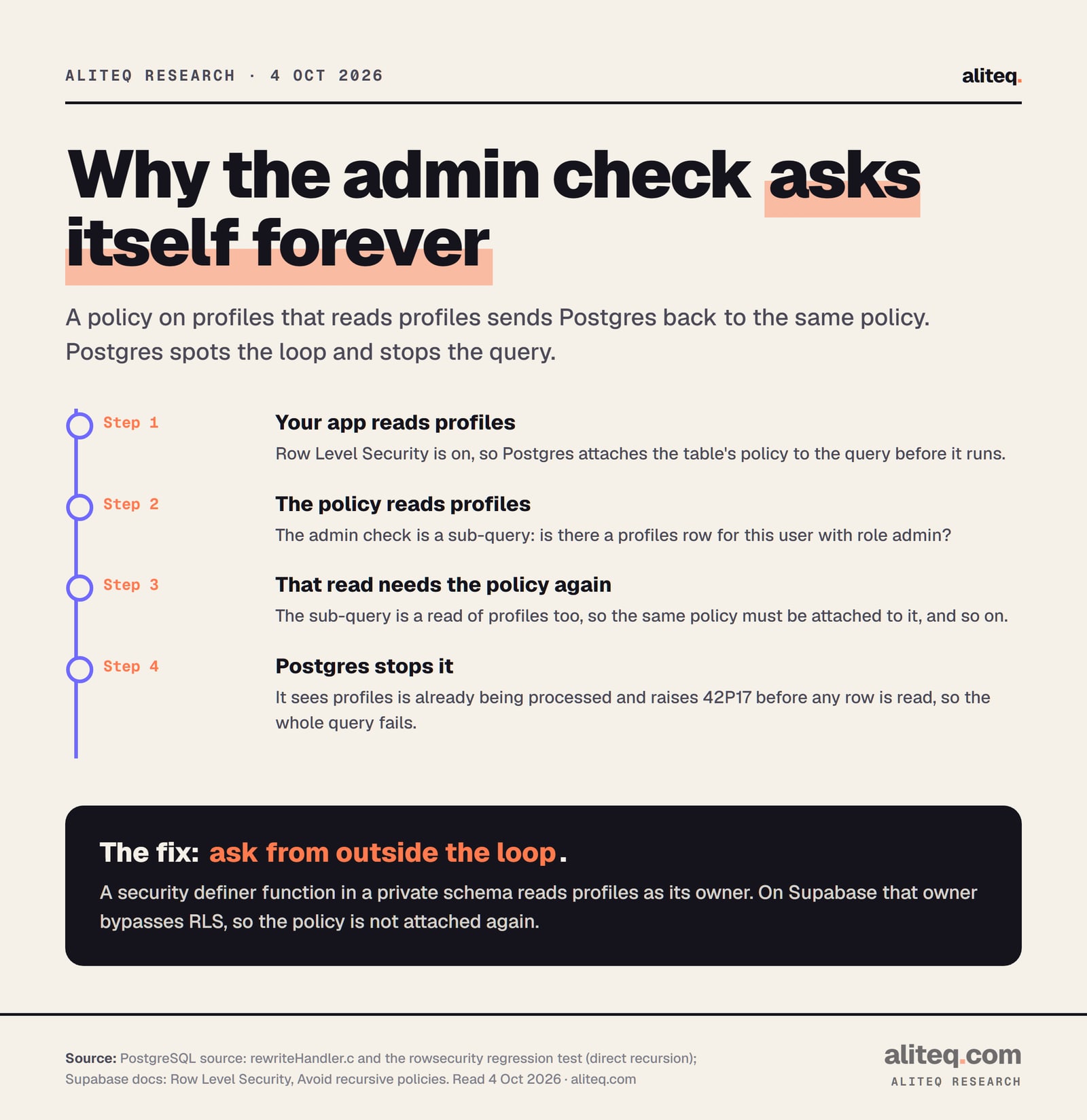
Here's the catch. A policy can contain a sub-query, a small question it asks another table. That sub-query is a normal read. If it reads a table protected by RLS, that table's policy runs too. When the trail leads back to a table Postgres is already checking, you have a loop.
Postgres doesn't wait for the loop to blow up. In its source, the query rewriter keeps a list of the tables whose policies it is expanding. If a policy's sub-query lands on one already in that list, it raises the error. That happens before the query runs, so no rows leak and no rows return.
How the loop forms. From PostgreSQL's rewriteHandler.c and its rowsecurity regression test, and Supabase's RLS docs, read 4 Oct 2026. · aliteq research
Why does my admin check cause it?
Because the admin check asks profiles whether you're an admin, and it asks from inside the policy on profiles. Every read of profiles runs the policy. The policy reads profiles. That read runs the policy. Postgres's own test suite has this exact shape, labelled "direct recursion", and it fails with this error.
A typical version looks like this. Your app keeps a role column on profiles, and someone wants admins to see every profile:
-- The loop: a policy on profiles that reads profiles
create policy "admins can read all profiles"
on public.profiles
for select
to authenticated
using (
  exists (
    select 1 from public.profiles
    where id = (select auth.uid()) and role = 'admin'
  )
);
It reads fine to a human. "Show the row if this user is an admin." Postgres reads it differently. To check that row, it must read profiles. To read profiles, it must apply this policy. That's why it ships so easily: it's the most obvious way to write the rule, for a person or an AI tool.
The two-table version: sharing features
The other common shape needs two tables. Supabase's docs use a to-do app with sharing. A policy on lists checks list_members to see who a list is shared with. A policy on list_members checks lists to see who owns it. In the docs' words, "Two tables whose policies read each other never resolve." Same error, same fix.
How do I fix "infinite recursion detected in policy" safely?
Move the lookup into a security definer function that lives in a private schema, and call that function from the policy. The function reads profiles as its owner, not as your user. On Supabase that owner skips RLS, so the policy isn't applied a second time and the loop is gone. RLS stays on.
A security definer function is a small piece of SQL saved in the database that runs with the permissions of whoever created it. PostgreSQL's docs describe exactly this use: "security-definer functions can be used to access data not available to the calling user." Here's the admin check rebuilt that way, adapted from the pattern in Supabase's docs. Swap id and role for your column names:
-- 1. A schema your app's API can't see
create schema if not exists private;

-- 2. The lookup, done once, as the function's owner
create function private.is_admin()
returns boolean
language sql
security definer
set search_path = ''
stable
as $$
  select exists (
    select 1 from public.profiles
    where id = (select auth.uid()) and role = 'admin'
  );
$$;

-- 3. Only signed-in users may call it
revoke execute on function private.is_admin() from public;
grant usage on schema private to authenticated;
grant execute on function private.is_admin() to authenticated;

-- 4. Replace the looping policy
drop policy "admins can read all profiles" on public.profiles;

create policy "admins can read all profiles"
on public.profiles
for select
to authenticated
using ( (select private.is_admin()) );
Keep your normal "users read their own profile" policy next to it. PostgreSQL combines permissive policies (the default kind) with OR, so a user sees their own row and an admin sees all of them.
Every line in that function earns its place. Here's what each one guards against:
private schema. Supabase warns that a security definer function in an exposed schema "is callable over the Data API with the creator's privileges." In public, anyone with your app's key could call it. Never put one there.
set search_path = ''. Supabase's rule: set it "on every security definer function and schema-qualify the names inside it." That's why the code says public.profiles, not profiles. Without it, a caller could slip in their own table with the same name.
revoke ... from public. PostgreSQL's docs note that new functions are executable by everyone by default. You revoke that, then grant it back to signed-in users only.
(select private.is_admin()). The extra select lets Postgres run the check once per query instead of once per row. Supabase's docs call this caching with an initPlan. It's a speed habit, not a security one.
Why this works, and when it doesn't
Supabase spells it out: "a security definer function only skips RLS when its owner can. On Supabase the owner is postgres, which has bypassrls." Create the function in the SQL editor or a normal migration and that holds. If a role without that power owns it, or the table is set to force row level security, the loop comes back.
For the sharing case, Supabase's docs have the full two-table example. One function returns the IDs of the lists the current user belongs to. Both policies then check against that list instead of reading each other's table.
Is there a fix without a function?
Yes, if the fact you need is small and rarely changes. You can store the role in the user's app_metadata and read it from their login token with auth.jwt(). The policy then reads no table at all, so there's nothing to loop. The trade-off: a role change only lands once the user's token refreshes.
Supabase's docs draw a hard line between the two places you might store it:
raw_app_meta_data (app_metadata): "cannot be updated by the user, so it's a good place to store authorization data."
raw_user_meta_data (user_metadata): "can be updated by the authenticated user." In plain English, any signed-in user can change it from the browser. A role stored there is a role users can give themselves.
The docs also warn that a JWT "is not always up-to-date." If you demote an admin, they keep admin rights until their token is refreshed. For most small apps the function is the simpler, fresher choice.
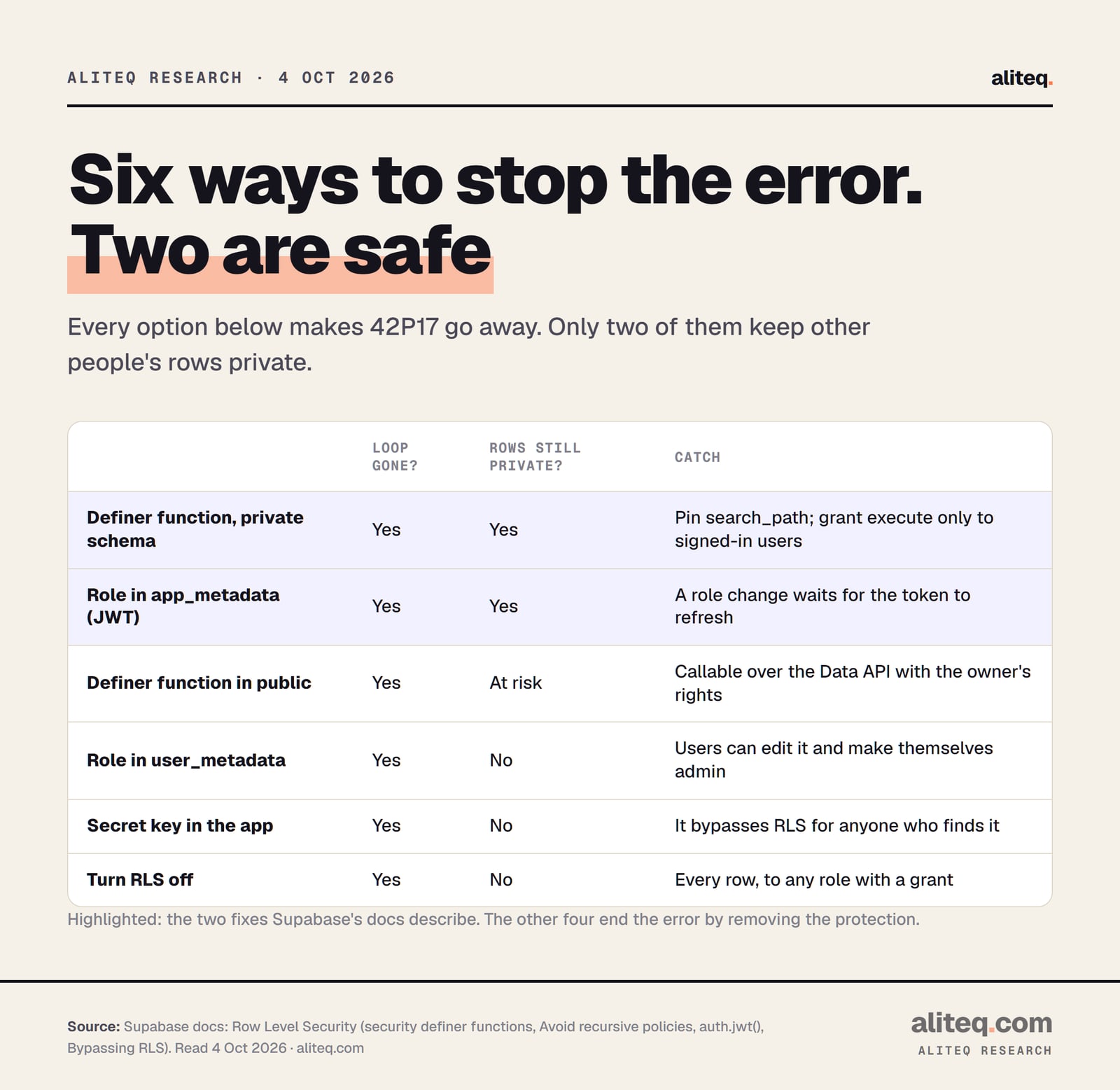
Six ways to make 42P17 go away, and which ones keep rows private. From Supabase's Row Level Security docs, read 4 Oct 2026. · aliteq research
What should I never do to make the error go away?
Don't turn RLS off, don't put the secret key in your app, and don't move the role somewhere users can edit it. All three end the error by ending the protection. The loop is annoying, but it fails closed: nobody sees anything. Each shortcut below fails open instead.
Disabling RLS on profiles. Supabase's docs: "A table in an exposed schema without RLS is readable and writable by any role with a grant on it." Your profiles table is now readable by anyone holding your app's public key. Our page on whether an exposed anon key is a problem explains why that key is only safe while RLS does its job.
Swapping in the secret key. The secret key runs as service_role, which has bypassrls. Supabase: "Never use a secret key in the browser or expose it to customers." If an AI tool suggests it to stop the error, say no.
Replacing the check with using (true). That policy lets every signed-in user read every row. The error is gone because the rule is gone.
Reading the role from user_metadata. No loop, but any user can edit it and make themselves admin.
Watch what turning RLS off actually does. Flip it and look at who can see which rows:
orders.id
owner
item
total
101
alice
Running shoes
$89
102
bob
Desk lamp
$34
103
alice
Headphones
$149
104
carol
Coffee grinder
$59
105
bob
Monitor arm
$72
RLS is off, so every row is readable with the same public key your app sends to every browser — including Carol's, and she never logged in here. This is the exact state the Moltbook and Lovable incidents were found in.
One more trap that sits right next to this one. Row Level Security decides which rows a user can change, not which columns. If users may update their own profile row and role is a column on it, check that your update rules stop them editing role. The RLS policy walkthrough for a users table covers the policies for that table in detail.
Is this the same as the other Supabase RLS errors?
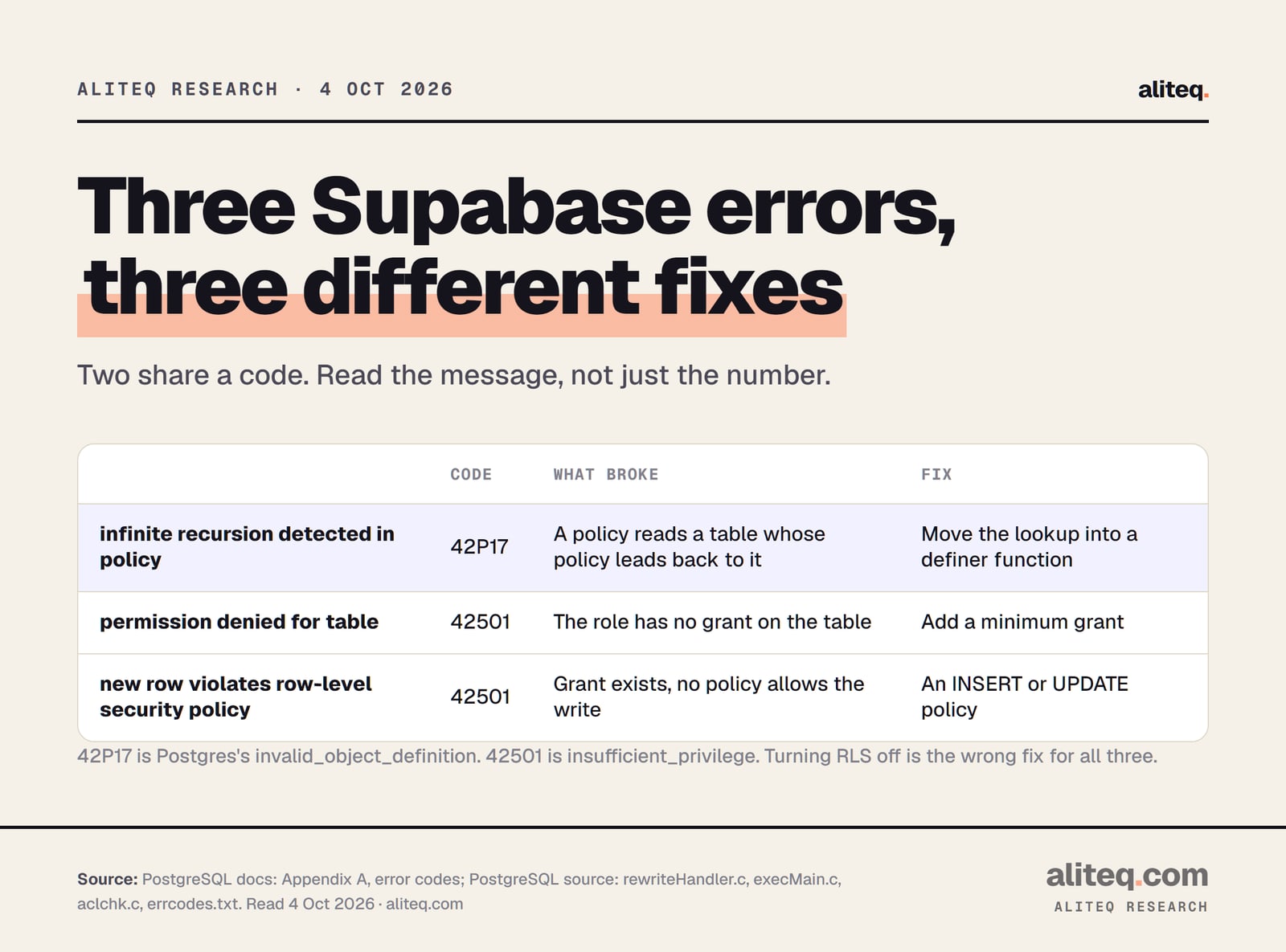
No. "Infinite recursion" is 42P17, Postgres's code for a broken object definition. The other two common RLS errors are both 42501, insufficient privilege. "Permission denied for table" means the role has no grant. "New row violates row-level security policy" means a write has no policy that allows it. Different cause, different fix.
Three errors people mix up. Codes from PostgreSQL's error-code appendix and source, read 4 Oct 2026. · aliteq research
Read the message, not just the code. If yours says "new row violates", you want the RLS write error fix instead. That one is about a missing permission rule, not a loop.
What should I tell my AI coding tool?
Name the pattern you want and the ones you don't. Ask for the role lookup in a security definer function in a private schema, and tell it never to fix RLS errors by disabling RLS or using the secret key. Then read the migration it writes for four specific things before you run it.
Then check what came back:
The function is created in private, not public, and says security definer
It has set search_path = '' and every table name starts with public.
Execute is revoked from public and granted to authenticated only
No line disables RLS, and the old looping policy is dropped, not left beside the new one
How do I check the fix worked?
Test it as three people: an admin, a normal signed-in user and a signed-out visitor. The admin should see every profile. The normal user should see only their own. The visitor should see nothing. Supabase's docs suggest writing exactly these cases as database tests, a member who must be allowed and a non-member who must not.
The error going away proves the loop is gone. It doesn't prove the rule is right. A wrong policy fails silently, by showing rows to the wrong person with no error at all. That's why the three-person test matters more than the green console.
If your app holds other people's personal data, payments or health records, have a developer review the policies before launch. The wider pre-launch list is in our vibe-coded app security checklist, and the Lovable security checks show where to look in that tool.
Quick answers
What does "infinite recursion detected in policy for relation" mean in Supabase?
A Row Level Security policy reads a table whose policy leads back to the same table, so the check can never finish. Postgres detects the loop and fails the query with code 42P17 before reading any rows. Nobody gets data until the policy is fixed.
Why does my admin policy on profiles cause infinite recursion?
The policy checks whether the user is an admin by reading profiles, from inside the policy on profiles. Each read of profiles runs that policy again. Move the check into a security definer function in a private schema and call it from the policy.
Is a security definer function safe?
Yes, if you follow Supabase's rules: create it in a private schema, never in public; set search_path to empty and fully qualify table names; revoke execute from public and grant it only to authenticated. It should return only facts about the current user.
Can I just disable RLS to fix error 42P17?
Don't. Supabase's docs say a table in an exposed schema without RLS is readable and writable by any role with a grant on it. That makes your profiles public to anyone holding your app's key. Fix the policy instead.
Can I store the user's role in the JWT instead?
Yes, in app_metadata, which users cannot edit, and read it with auth.jwt(). Never use user_metadata, which users can change. Role changes take effect only after the user's token refreshes.
Is 42P17 the same as error 42501?
No. 42P17 is invalid_object_definition, the recursion error. 42501 is insufficient_privilege, used by both "permission denied for table" and "new row violates row-level security policy". Each has a different fix.
This page has no affiliate links or sponsored placements. It explains an error and its documented fix; it isn't a security review of your app.
Use this in your own page
Teaching this? Paste the live version into your course, blog or answer. Free, no sign-up; the credit line links back here.