Cloudflare, at every traffic level we priced: $5 a month up to 10 million requests, because it doesn't charge for bandwidth. Vercel Pro stays near $20 to $40 until tens of millions of requests. Netlify's credits get expensive fastest once bandwidth climbs. Four traffic levels priced from each vendor's own pages, re-checked Nov 3, 2026.
Cloudflare is the cheapest place to host a Next.js app as traffic grows, at every level we priced. Workers Paid is $5 a month for 10 million requests and charges nothing for bandwidth, so an app with 10 million requests and 1 TB of transfer comes to about $5.80. The same app is about $40 on Vercel Pro and about $145 on Netlify, before function compute on those two. Vercel stays close behind until tens of millions of requests; Netlify falls behind as soon as bandwidth climbs. Prices read on each vendor's own pages on November 3, 2026.
The three numbers that decide the bill (vendor pages, Nov 3, 2026)
$5
Cloudflare's paid plan, a month
Cloudflare Workers Paid, 10M requests included
$20
Vercel's paid plan, a month
Vercel Pro, includes $20 of usage credit
20
Netlify credits per GB of bandwidth
Netlify bills bandwidth in credits
One disclosure first. This site, aliteq.com, is a Next.js app on Cloudflare Workers, deployed with the OpenNext adapter, and we pay for Workers Paid ourselves. We've never run Vercel or Netlify in production, so on those two we report their docs and pricing pages, not our experience. None of the three pays us, and there are no referral links on this page.
We priced one Next.js app at four sizes, from a side project to a busy site. Each level assumes about 100 KB per request (so 2 million requests means 200 GB) and 30 production deploys a month. Cloudflare stays the cheapest at all four, and the gap widens as bandwidth grows, because bandwidth is the one thing Cloudflare doesn't bill.
Monthly bill as traffic grows (our arithmetic from vendor pages, Nov 3, 2026, USD)
500K requests, 50 GB
Vercel Pro
$20
Netlify (cheapest credit plan)
$19
Cloudflare Workers Paid
$5
2M requests, 200 GB
Vercel Pro
$34 to $40
Netlify (cheapest credit plan)
$33
Cloudflare Workers Paid
$5
10M requests, 1 TB
Vercel Pro
$40
Netlify (cheapest credit plan)
About $145
Cloudflare Workers Paid
$5.80
50M requests, 5 TB
Vercel Pro
$120
Netlify (cheapest credit plan)
About $733
Cloudflare Workers Paid
$23.40
Vercel Pro
Netlify (cheapest credit plan)
Cloudflare Workers Paid
500K requests, 50 GB
$20
$19
$5
2M requests, 200 GB
$34 to $40
$33
$5
10M requests, 1 TB
$40
About $145
$5.80
50M requests, 5 TB
$120
About $733
$23.40
One app at 10M requests and 1 TB a month (our arithmetic, Nov 3, 2026)
NetlifyAbout $145
Pro 15,000-credit tier plus 5 recharges, before compute
Vercel Pro$40
$20 platform fee plus the $20 Flat Rate CDN tier, before functions
Cloudflare Workers Paid$5.80
$5 plan plus $0.80 of CPU time at 7 ms a request
How we got each column, so you can redo it with your own numbers:
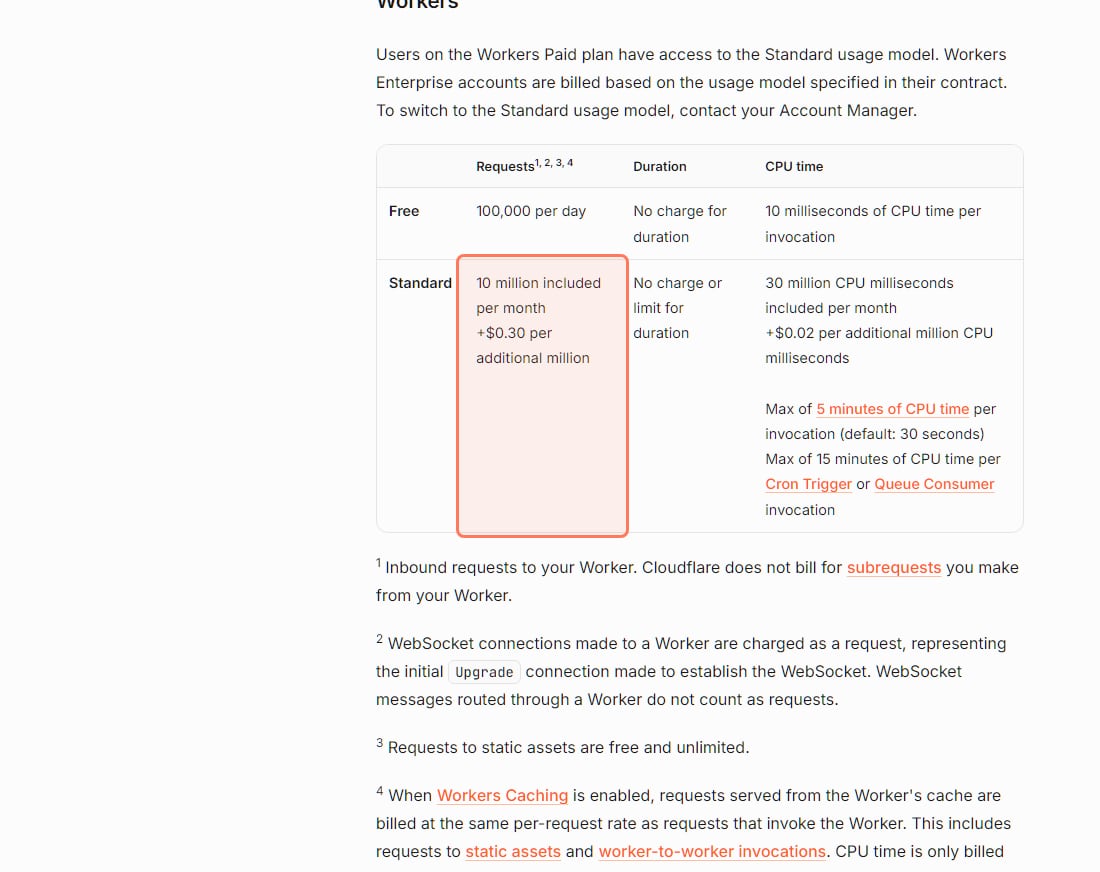
Cloudflare Workers Paid. $5 a month includes 10 million requests and 30 million CPU milliseconds. Past that, $0.30 per million requests and $0.02 per million CPU milliseconds. We assumed every request runs your code for 7 ms of CPU, the figure Cloudflare uses in its own pricing example. At 10 million requests that's 70 million CPU ms, 40 million over, so $0.80 extra. At 50 million it's $12 of requests plus $6.40 of CPU. Requests for static files are free, so a site that serves mostly static pages pays less than this.
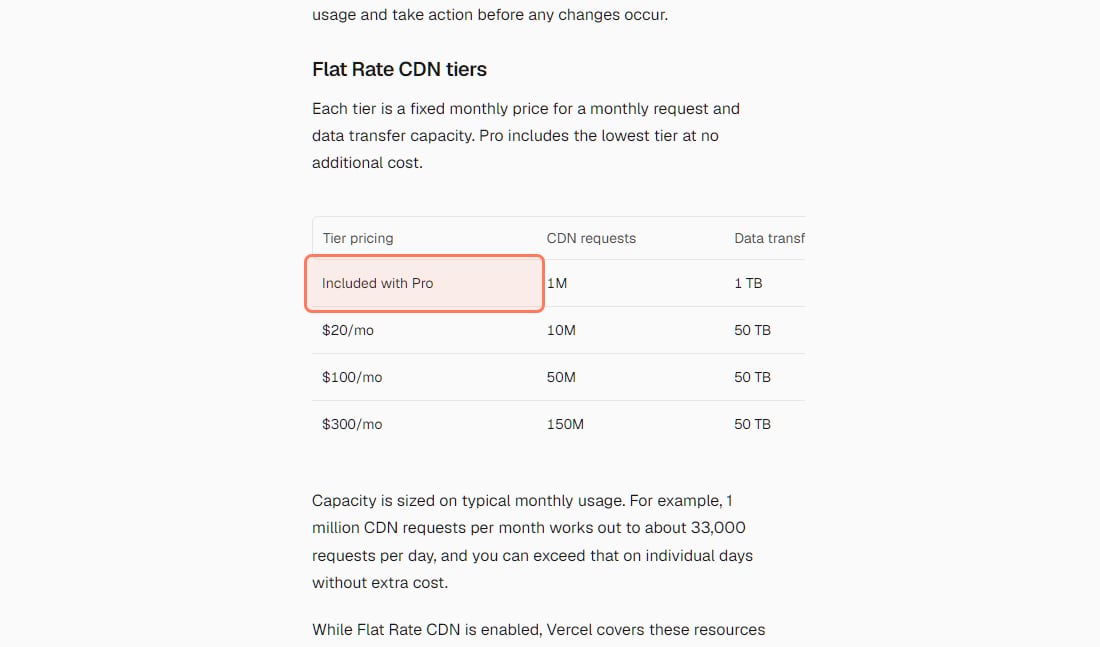
Vercel Pro. $20 a month with $20 of usage credit. On demand in the US, transfer is $0.15 a GB and CDN requests $2 per million, which is the $34 at 2 million requests. Above that we used Vercel's Flat Rate CDN: Pro includes 1 million requests and 1 TB, and the next tiers are $20 a month (10 million requests, 50 TB), $100 (50 million) and $300 (150 million). Functions are extra: $0.60 per million invocations, plus Active CPU from $0.128 an hour and memory from $0.0106 per GB-hour, partly covered by the $20 credit.
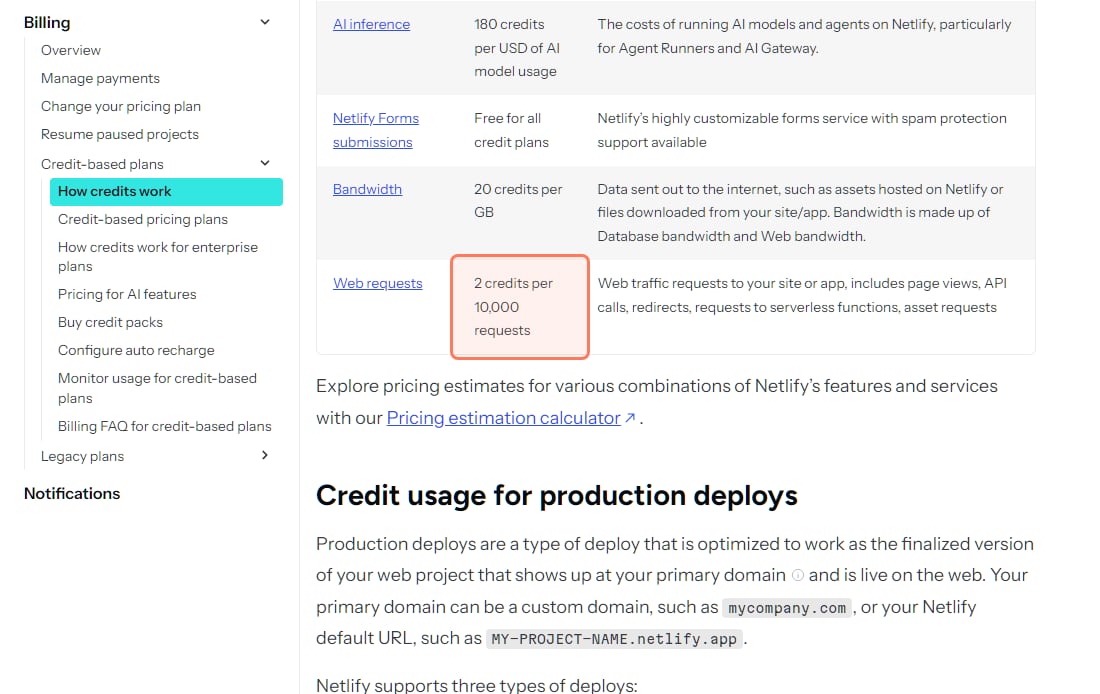
Netlify. Credits: 20 per GB of bandwidth, 2 per 10,000 requests, 15 per production deploy. We picked the cheapest mix of plan and recharges at each level. At 500K requests that's Personal ($9 for 1,000 credits) plus two 500-credit recharges at $5. At 2M it's Pro's 5,000-credit tier ($33). At 10M, 22,450 credits, it's the 15,000-credit tier ($95) plus five 1,500-credit recharges ($50). Compute is extra at 10 credits per GB-hour.
Cloudflare's own Workers pricing table (developers.cloudflare.com/workers/platform/pricing), read November 3, 2026. The included 10 million requests is outlined. · Screenshot of developers.cloudflare.com by aliteq
Two honest limits on that table. First, Vercel and Netlify columns leave out function compute, the cost of your server code running, so their real bills are higher than shown, not lower. Second, your traffic mix matters: an app that streams big files or serves many images moves money toward Cloudflare, and an app whose pages are cheap static files changes less. Netlify's pricing page was also showing different prices to different visitors on November 3, 2026 (more on that below).
What it cost us on Cloudflare
aliteq.com is the Cloudflare column in real life. It serves roughly 100,000 requests on a busy day, about 3 million a month, many of them from search and AI crawlers. In late September 2026, before we switched off link prefetching, the site used about 145 to 190 million CPU milliseconds a month, which worked out to roughly $2 to $3.50 a month on top of the $5 plan. Server-rendered Next.js pages use more CPU than Cloudflare's 7 ms example; Cloudflare's limits page says heavier work like server-side rendering "typically use 10-20 ms".
Why is Cloudflare cheaper at high traffic?
Because Cloudflare doesn't charge for bandwidth, and bandwidth is what grows fastest. Its Workers pricing page says: "There are no additional charges for data transfer (egress) or throughput (bandwidth)." It also says "Requests to static assets are free and unlimited." On Vercel and Netlify, every GB your visitors download is billed once you're past what the plan includes.
One footnote to know about: Cloudflare's pricing page says that when its Workers Caching feature is enabled, requests served from that cache are billed "at the same per-request rate as requests that invoke the Worker", including requests to static assets. CPU time is only billed on a cache miss.
Is Vercel's free plan allowed for a site that makes money?
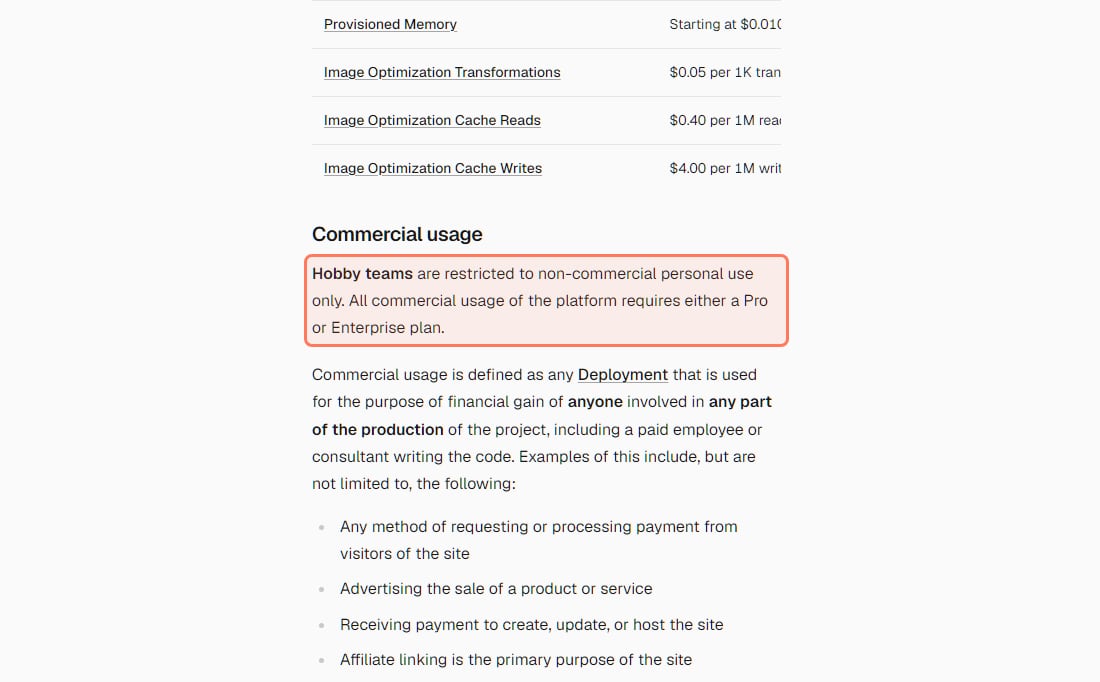
No. Vercel's Hobby plan is for non-commercial personal use only, and ads count. If your app will make money for anyone, budget for Pro at $20 a month from the first day.
Vercel's commercial-usage rule (vercel.com/docs/limits/fair-use-guidelines), read November 3, 2026. · Screenshot of vercel.com by aliteq
Here is the rule as Vercel writes it: "Hobby teams are restricted to non-commercial personal use only. All commercial usage of the platform requires either a Pro or Enterprise plan." Commercial means any deployment used "for the purpose of financial gain of anyone involved in any part of the production of the project, including a paid employee or consultant writing the code."
Vercel lists these examples:
Any method of requesting or processing payment from visitors of the site
Advertising the sale of a product or service
Receiving payment to create, update, or host the site
"Affiliate linking is the primary purpose of the site"
"The inclusion of advertisements, including but not limited to online advertising platforms like Google AdSense"
"Asking for Donations does not fall under commercial usage," Vercel adds. So a portfolio is Hobby. A client site you were paid to build is not, even if the client pays nothing to Vercel. Neither is a side project with one AdSense slot or a Stripe button. If you're adding payments, our guide to Stripe or Paddle in a Lovable app is the next step, and that's also where Hobby stops fitting.
We searched Netlify's pricing page and Terms of Use, and Cloudflare's terms, for "commercial", "non-commercial" and "personal use" on October 3 and again on November 3, 2026. Neither has a matching restriction on its free plan. That's an absence, not a promise, so read the terms yourself before you launch.
What do the free plans include?
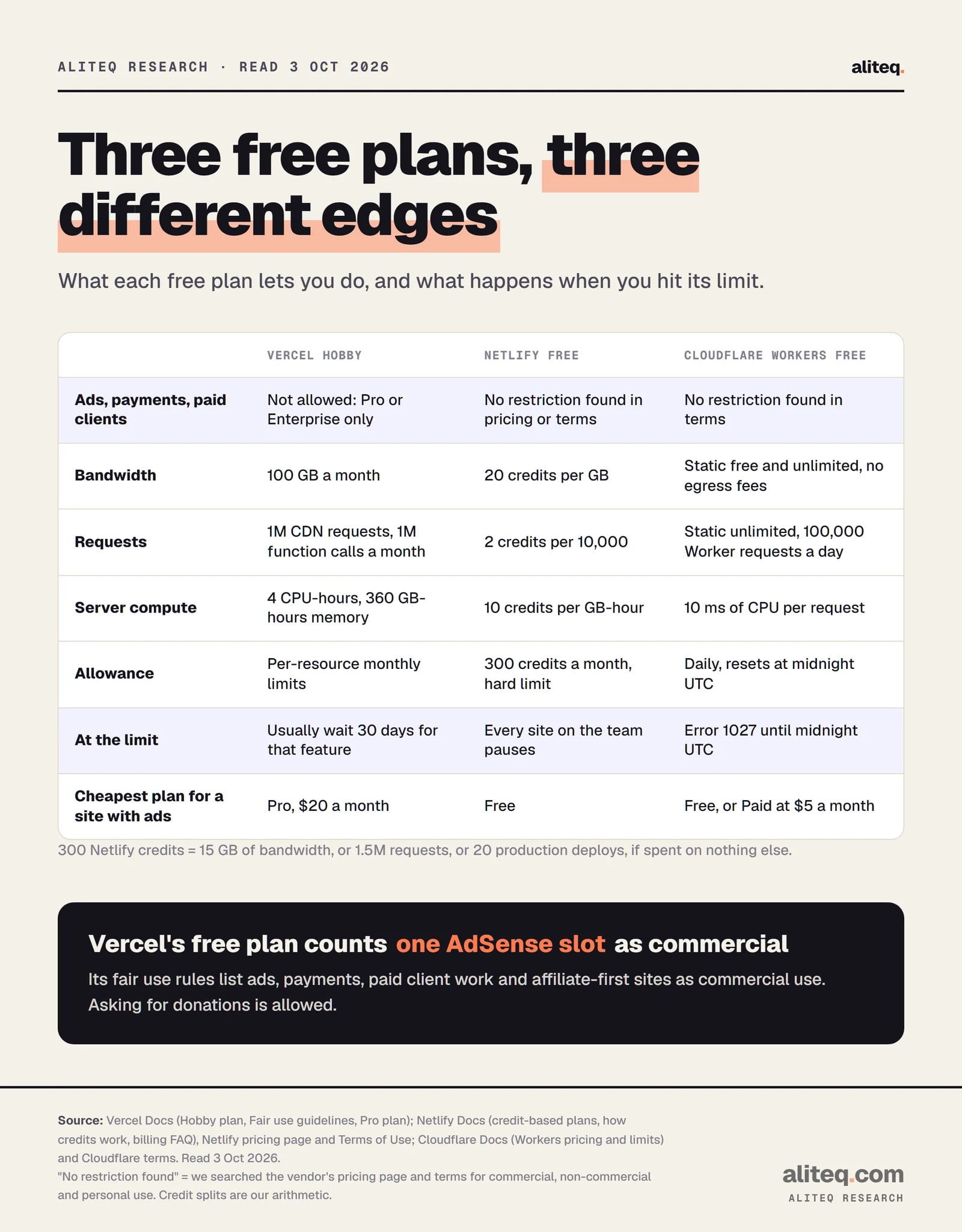
All three host a small app for $0. What differs is what you may do on the free plan and what happens at its edge: Vercel stops a feature for 30 days, Netlify pauses all your sites, and Cloudflare returns an error page until midnight UTC.
What each free plan allows and what happens at its limit. Read October 3, 2026; every figure re-checked November 3, 2026. · aliteq research
Free plans compared (vendor pages, Nov 3, 2026)
Price
Vercel Hobby
$0
Netlify Free
$0
Cloudflare Workers Free
$0
Commercial use
Vercel Hobby
Not allowed (Pro or Enterprise required)
Netlify Free
No restriction found in pricing or terms
Cloudflare Workers Free
No restriction found in terms
Bandwidth
Vercel Hobby
100 GB a month
Netlify Free
Credits: 20 per GB
Cloudflare Workers Free
Static: free and unlimited; no egress fees
Requests
Vercel Hobby
1M CDN requests, 1M function invocations a month
Netlify Free
Credits: 2 per 10,000
Cloudflare Workers Free
Static: unlimited; Worker: 100,000 a day
Server compute
Vercel Hobby
4 Active CPU hours, 360 GB-hours of memory
Netlify Free
Credits: 10 per GB-hour
Cloudflare Workers Free
10 ms of CPU per request
Deploys
Vercel Hobby
100 a day
Netlify Free
15 credits per production deploy
Cloudflare Workers Free
Pages: 500 builds a month
At the limit
Vercel Hobby
Usually wait 30 days for that feature
Netlify Free
All sites on the team pause
Cloudflare Workers Free
Error 1027 until midnight UTC
Vercel Hobby
Netlify Free
Cloudflare Workers Free
Price
$0
$0
$0
Commercial use
Not allowed (Pro or Enterprise required)
No restriction found in pricing or terms
No restriction found in terms
Bandwidth
100 GB a month
Credits: 20 per GB
Static: free and unlimited; no egress fees
Requests
1M CDN requests, 1M function invocations a month
Credits: 2 per 10,000
Static: unlimited; Worker: 100,000 a day
Server compute
4 Active CPU hours, 360 GB-hours of memory
Credits: 10 per GB-hour
10 ms of CPU per request
Deploys
100 a day
15 credits per production deploy
Pages: 500 builds a month
At the limit
Usually wait 30 days for that feature
All sites on the team pause
Error 1027 until midnight UTC
Netlify's 300 free credits look generous until you divide them. Spent on nothing else, they buy 15 GB of bandwidth, or 1.5 million requests, or 20 production deploys. A vibe coder who pushes a fix after every prompt can burn the month in a weekend. Deploy Previews and branch deploys cost 0 credits, so preview first and promote to production less often.
Netlify's credit prices (docs.netlify.com, How credits work), read November 3, 2026. Bandwidth at 20 credits per GB is what makes Netlify the most expensive of the three at high traffic. · Screenshot of docs.netlify.com by aliteq
On Cloudflare Free, 2 million requests a month is about 66,700 a day, under the 100,000 cap. CPU is the limit that bites: the free plan allows 10 ms per request, and server-rendered pages often need more. That's exactly what happened to us. On the free plan, our analytics showed 20,662 "exceeded resources" errors in seven days, served to readers as 503 pages, and moving to Workers Paid on September 27, 2026 took them to zero.
What does overage cost past the included usage?
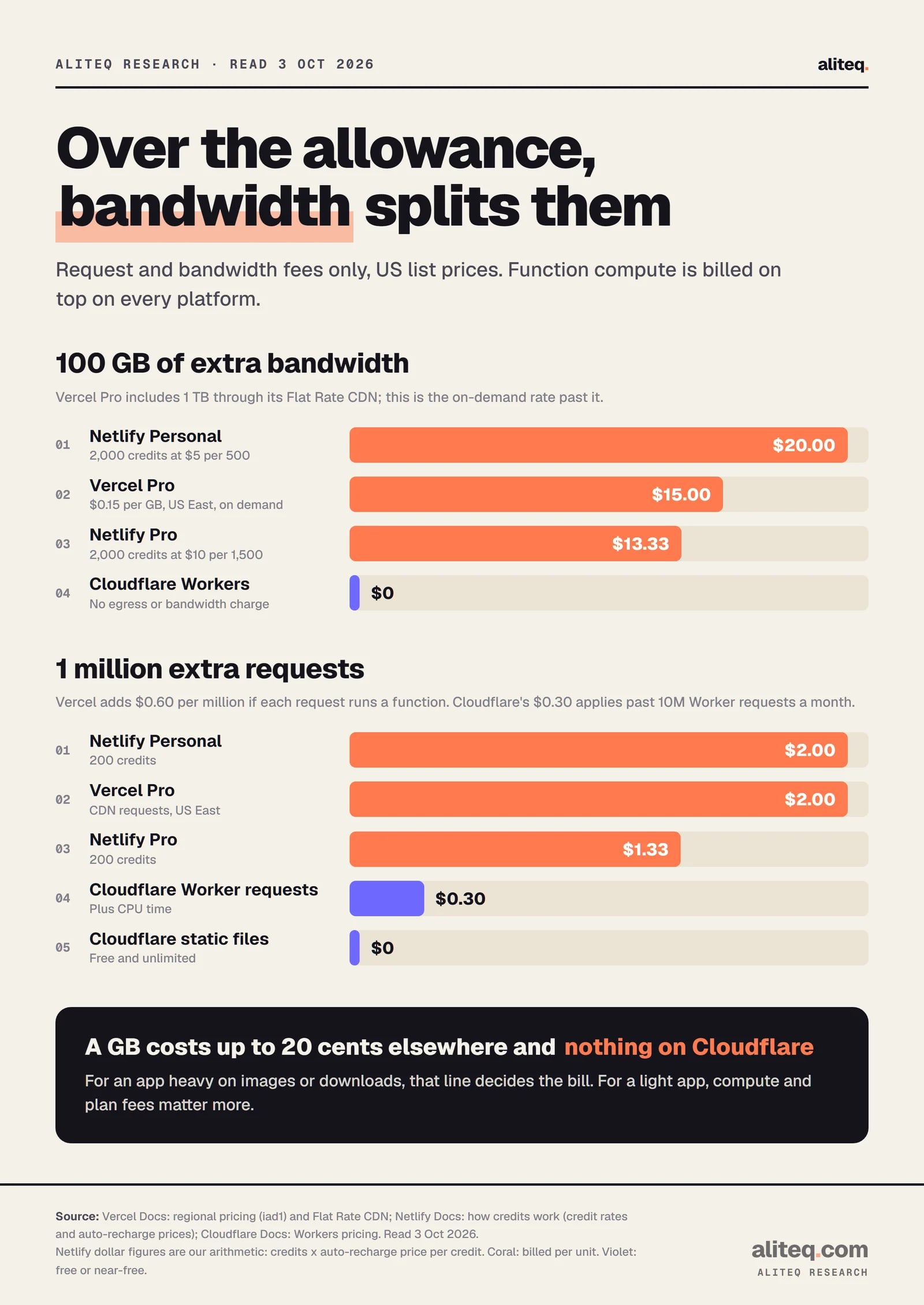
Bandwidth is where they split: about $0.13 to $0.20 a GB on Netlify, $0.15 on Vercel on demand, and $0 on Cloudflare. Requests are cheaper on Cloudflare too.
Vercel Pro is a $20 monthly platform fee with one deploying seat and $20 of usage credit. Extra paid seats are $20 a month each; viewer seats are free. Vercel's Flat Rate CDN gives Pro a lowest tier of 1 million CDN requests and 1 TB of transfer at no extra cost, and you switch it on in your team's Billing settings. "A one-day spike doesn't trigger an upgrade"; a month over capacity moves you to the next tier from the next billing cycle. Vercel also says Flat Rate CDN isn't for bulk file distribution or media-heavy delivery.
Vercel's Flat Rate CDN tiers (vercel.com/docs/pricing/flat-rate-cdn), read November 3, 2026. These tiers are why Vercel stays close to Cloudflare at 10 million requests. · Screenshot of vercel.com by aliteq
Netlify bills everything in credits. Personal includes 1,000 credits a month and Pro starts at 3,000, with Pro tiers of 5,000, 10,000, 15,000 and 20,000 credits. Extra credits come through auto recharge: 500 for $5 on Personal, 1,500 for $10 on Pro. That makes a credit worth 1 cent on Personal and about 0.67 cents on Pro.
Cloudflare Workers Paid has a "minimum charge of $5 USD per month for an account." That covers 10 million requests and 30 million CPU milliseconds a month, then $0.30 per extra million requests and $0.02 per extra million CPU milliseconds. The Paid plan has no daily request cap, and CPU time counts only while your code runs.
Request and bandwidth fees only; function compute is billed on top on every platform. Read October 3, 2026; unchanged on November 3, 2026. · aliteq research
What overage costs, past included usage (USD, Nov 3, 2026)
Vercel Pro, on demand, US
100 GB extra bandwidth
$15.00
1M extra requests (request fee only)
$2.00 CDN, plus $0.60 if each runs a function
Netlify Personal (auto recharge)
100 GB extra bandwidth
$20.00 (2,000 credits)
1M extra requests (request fee only)
$2.00 (200 credits)
Netlify Pro (auto recharge)
100 GB extra bandwidth
$13.33 (2,000 credits)
1M extra requests (request fee only)
$1.33 (200 credits)
Cloudflare Workers Paid
100 GB extra bandwidth
$0
1M extra requests (request fee only)
$0 static; $0.30 past 10M Worker requests
100 GB extra bandwidth
1M extra requests (request fee only)
Vercel Pro, on demand, US
$15.00
$2.00 CDN, plus $0.60 if each runs a function
Netlify Personal (auto recharge)
$20.00 (2,000 credits)
$2.00 (200 credits)
Netlify Pro (auto recharge)
$13.33 (2,000 credits)
$1.33 (200 credits)
Cloudflare Workers Paid
$0
$0 static; $0.30 past 10M Worker requests
What stops a surprise bill on each platform?
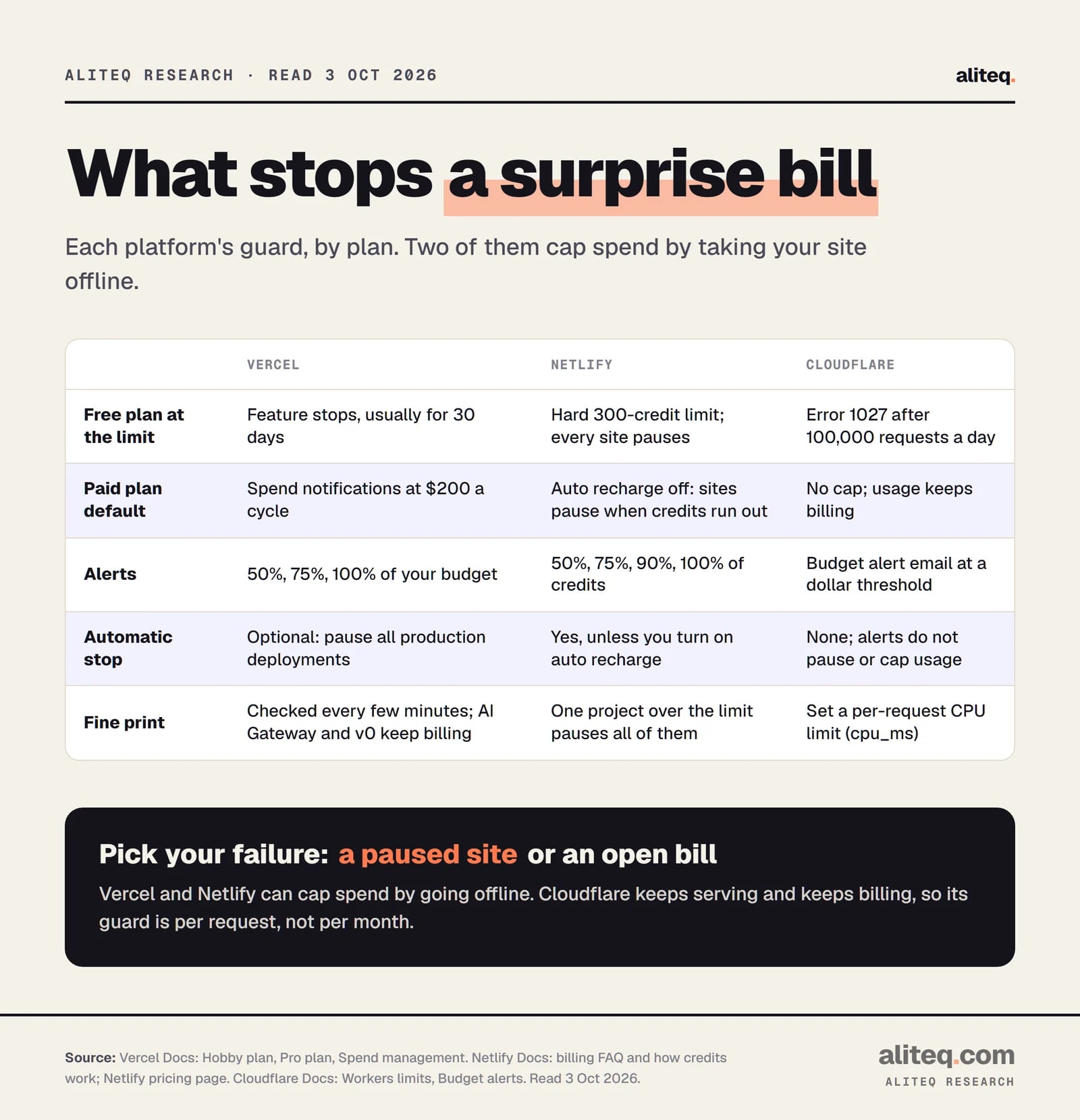
Only Netlify and Vercel can stop your bill automatically, and both do it by taking your site offline. Cloudflare's paid plan has budget alerts that only send an email. Pick the failure you'd rather have: a paused site or an open-ended bill.
What happens at the limit, by plan. Read October 3, 2026; re-checked November 3, 2026. · aliteq research
Vercel Pro has Spend Management. You set a spend amount, and Vercel sends alerts at 50%, 75% and 100%. It can call a webhook and, if you switch it on, pause the production deployment of every project. Vercel is blunt: "Setting a spend amount does not stop usage on its own." The pause switch is the part that caps spend. The check "happens every few minutes", so you can overshoot. Pausing doesn't stop AI Gateway or v0 usage billed to your team, and each project has to be resumed by hand. New customers get spend notifications at $200 a billing cycle by default.
Netlify caps by design. Auto recharge is off by default, so a paid plan behaves like a prepaid card. When the credits run out, "all of your web projects (sites/apps) are paused" and visitors see a "Site not available" page. Read that "all" carefully: one runaway project takes every site on the team down with it. Alerts arrive at 50%, 75%, 90% and 100%. Turning on auto recharge keeps sites up and removes the cap.
Cloudflare caps the free plan by request count: after 100,000 requests in a day, Error 1027 until midnight UTC. On Workers Paid there's no dollar cap. Budget alerts email you when account-wide spend crosses a threshold, and Cloudflare's docs say: "Budget alerts are informational only. They do not pause or cap usage." The real guard is per request: set a CPU limit (cpu_ms) in your Wrangler config so one runaway request can't burn minutes of CPU.
That's the guard we use. We set cpu_ms to 5,000 so a stuck render can't run up the bill. We also found that link prefetching was 47% of our Worker invocations and switched it off. On a usage-billed host, a framework feature can be your biggest customer.
Decide now whether the app will ever show an ad, take a payment or bill a client. If yes, Vercel means Pro from day one.
Estimate monthly GB of transfer and requests, then price them with the traffic table above, not the free tier.
Turn on the guard before launch: Vercel's pause switch, Netlify's default no-recharge, or a Cloudflare cpu_ms limit plus a budget alert.
Keep experiments off the team that hosts your real site, so a runaway project can't pause the one that matters.
Put API keys in the host's environment variables, never in the code you deploy.
That last step matters on every host. Our guide to env variables and secrets explains why a key in your frontend code is public, whichever platform serves it.
Does Next.js run as well on Netlify and Cloudflare as on Vercel?
It runs on all three, through three different routes. Vercel runs it natively, Netlify through the OpenNext adapter, and Cloudflare through vinext (in beta) or the OpenNext adapter. The further you get from Vercel, the more often a Next.js feature needs a workaround, and that's the real price of Cloudflare's lower bill.
Vercel. Its docs call Next.js "a fullstack React framework for the web, maintained by Vercel" and say "deploying to Vercel is zero-configuration". The code lives in the MIT-licensed vercel/next.js repository on GitHub.
Netlify. Its docs say "Netlify supports all major Next.js features with zero configuration, via our open-source OpenNext adapter." Middleware runs as Edge Functions, with a stated Node.js middleware limitation.
Cloudflare. Its Next.js guide says "Cloudflare recommends vinext as the default way to run Next.js applications on Cloudflare Workers" and "vinext is in beta". The OpenNext adapter stays documented for existing apps, which is what we use. Cloudflare Pages is now the route only for a static export.
We hit some of the friction ourselves. Our production build has to use webpack, because Turbopack chunks failed at runtime on Workers. Next.js middleware that needs Node.js doesn't run in our setup, so our redirects live in the config file. Each Worker gets 128 MB of memory on both plans, and we once blew it by loading full article bodies for a list page. If your app is a few pages and a form, you won't meet any of this. If it's a big App Router app with heavy middleware, Vercel removes a layer of problems for $20 a month.
Which one should you pick?
Pick by what your app does and how big it will get. A free personal project fits anywhere. A money-making app is cheapest on Cloudflare at every size, simplest on Vercel Pro, and predictable on Netlify if you can live with a pause at the limit and modest bandwidth.
Pick by situation
Personal project, no ads
Best fit
Any of the three
Why
All free; Vercel Hobby has the fewest moving parts for Next.js
First ad, sale or paid client
Best fit
Cloudflare Free or Netlify Free; Vercel Pro
Why
Vercel Hobby forbids it; the other two have no such clause
Traffic growing past a few million requests
Best fit
Cloudflare Workers Paid
Why
$5 covers 10M requests; no bandwidth fees; set cpu_ms and a budget alert
Lots of images or downloads
Best fit
Cloudflare
Why
No egress fees; static files free and unlimited
Heavy Next.js features, no time for adapters
Best fit
Vercel Pro
Why
Native Next.js; Flat Rate CDN tiers keep it close to Cloudflare at 10M requests
Hard monthly ceiling, no surprises
Best fit
Netlify
Why
Credits stop at the limit unless you enable auto recharge
Best fit
Why
Personal project, no ads
Any of the three
All free; Vercel Hobby has the fewest moving parts for Next.js
First ad, sale or paid client
Cloudflare Free or Netlify Free; Vercel Pro
Vercel Hobby forbids it; the other two have no such clause
Traffic growing past a few million requests
Cloudflare Workers Paid
$5 covers 10M requests; no bandwidth fees; set cpu_ms and a budget alert
Lots of images or downloads
Cloudflare
No egress fees; static files free and unlimited
Heavy Next.js features, no time for adapters
Vercel Pro
Native Next.js; Flat Rate CDN tiers keep it close to Cloudflare at 10M requests
Hard monthly ceiling, no surprises
Netlify
Credits stop at the limit unless you enable auto recharge
Whichever you choose, the host isn't your only bill. The database, auth and AI calls usually cost more than the hosting. Caching decides how often your server code runs at all, and our caching explainer shows why. If you've left the platforms behind and are on raw cloud, why your AWS bill is so high is the same exercise one level down. More developer guides live in the software hub.
Quick answers
Which is cheapest to host a Next.js app as traffic grows: Vercel, Netlify or Cloudflare?
Cloudflare Workers Paid. By our arithmetic from the vendors' pages on Nov 3, 2026, an app with 10 million requests and 1 TB a month costs about $5.80 on Cloudflare, $40 on Vercel Pro with Flat Rate CDN and about $145 on Netlify, before function compute on the last two. At 50 million requests and 5 TB it's about $23.40, $120 and $733. Cloudflare doesn't charge for bandwidth, which is why the gap grows with traffic.
Can I use Vercel's free plan for a commercial site?
No. Vercel's fair use guidelines restrict Hobby to non-commercial personal use and list ads (including Google AdSense), payments, paid client work and sites whose main purpose is affiliate links as commercial. Commercial use needs Pro, at $20 a month, or Enterprise. Asking for donations is allowed.
Does Cloudflare charge for bandwidth?
Not on Workers. Cloudflare's pricing page says there are no additional charges for data transfer (egress) or bandwidth, and requests to static assets are free and unlimited. You pay for Worker requests past 10 million a month ($0.30 per million) and CPU time past 30 million milliseconds ($0.02 per million).
How much does Vercel Pro cost at high traffic?
The plan is $20 a month with $20 of usage credit. With Flat Rate CDN switched on, Pro includes 1 million CDN requests and 1 TB; the next tiers are $20 a month for 10 million requests and 50 TB, $100 for 50 million and $300 for 150 million (Vercel docs, read Nov 3, 2026). Functions are billed on top.
What happens when my Netlify credits run out?
All web projects on the team pause and show a "Site not available" page, and you can't publish new production deploys. On the free plan you wait for the next cycle or upgrade. On Personal or Pro you can buy credits or turn on auto recharge, which is off by default.
Can I set a hard spending cap?
On Vercel Pro, yes, if you turn on the option that pauses production deployments at your spend amount; it checks every few minutes. On Netlify, leaving auto recharge off is the cap. On Cloudflare Workers Paid, no: budget alerts only email you, so set a per-request CPU limit too.
Is Cloudflare Pages still the way to host Next.js on Cloudflare?
Only for a static export. Cloudflare's Next.js guide recommends vinext, which is in beta, on Workers, and keeps the OpenNext adapter for existing apps. aliteq.com runs on Workers with OpenNext.
The short version: Cloudflare is the cheapest home for a growing Next.js app because bandwidth is free, Vercel Pro is the easiest and stays within about $35 of it up to 10 million requests, and Netlify is the one to watch once your bandwidth climbs. For today's numbers, open each vendor's pricing page from the sources below; they change.