Turnip is Mesa's open-source Vulkan driver for Snapdragon's Adreno GPUs. It installs inside one emulator at a time, never system-wide. Here's which handhelds it covers, where Eden, Azahar, Dolphin and Winlator keep the switch, and where the code comes from.
In shooters, the first thing I change on a new PC is the graphics driver. On an Android handheld you can't do that system-wide. The driver ships inside the vendor's firmware, and Android won't let an app swap it.
Emulator developers found a way around that, one app at a time. That's what "install Turnip drivers" really means. It's not a system update. It's a file you hand to one emulator, which loads it in place of the phone's own driver while that emulator runs.
Turnip is Mesa's Vulkan driver for Qualcomm's Adreno GPUs. Mesa is the open-source graphics project behind most Linux drivers. Its docs describe Turnip as "a Vulkan 1.3 driver for Adreno 6xx GPUs" and say there are "no plans to port to a5xx or earlier GPUs." The code has since grown well past 6xx.
Vulkan is the graphics interface that modern emulators speak. Every Android handheld already has a Vulkan driver: Qualcomm's own, baked into the firmware. That's the "stock" or "system" driver. Turnip is an independent rewrite of the same job, built by open-source developers rather than Qualcomm.
Why would you swap? Eden, the Switch emulator, answers that in its own handbook: "Adreno 6xx and 7xx GPUs with Turnip drivers will always have the best compatibility. "Stock" (system) drivers will have better performance on Adreno, but compatibility will suffer." So it's a trade. Turnip may fix a game that renders wrong. The stock driver may run a working game faster.
A few terms you'll see in driver menus:
Freedreno. Mesa's name for the whole Adreno driver family. Mesa's own Android build docs compile Turnip with the switch -Dvulkan-drivers=freedreno, so "freedreno" in a file name usually means Turnip.
Adrenotools package. The .zip format emulators accept. It holds the driver file plus a small meta.json description. Dolphin rejects a package with "missing metadata."
KGSL. The Qualcomm kernel interface stock Android uses. Mesa's Android example builds Turnip for it, which is why it runs on unrooted handhelds.
Which handhelds can use Turnip?
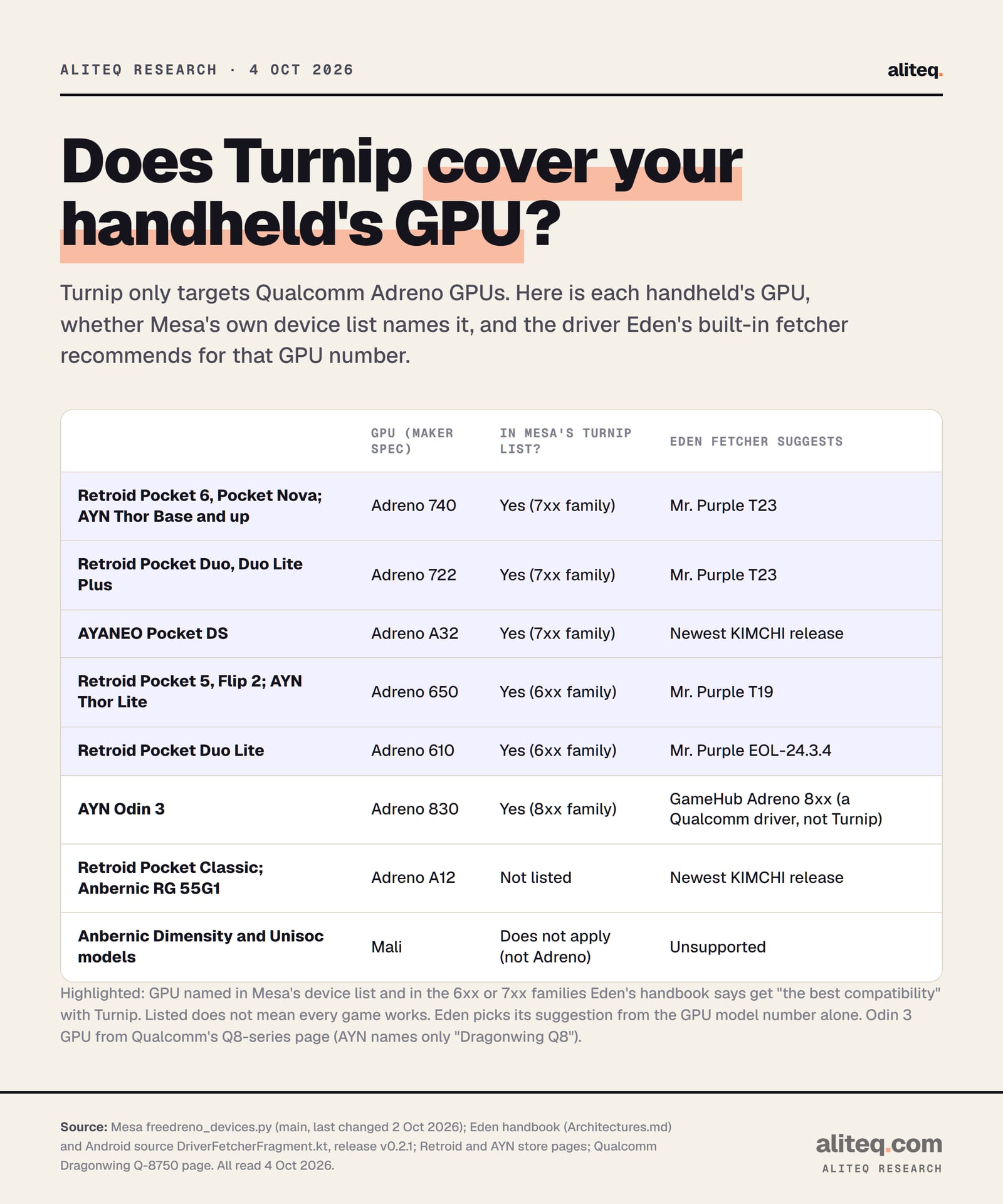
Only Adreno ones. Mesa keeps the list of supported chips in its source file freedreno_devices.py. On October 4, 2026 it named the Adreno 610, 650, 722, 740, A32 and 830, which covers most Retroid, AYN and AYANEO handhelds. It does not list the Adreno A12, and Mali GPUs are a different maker entirely.
Each handheld's GPU against Mesa's own device list and Eden's built-in suggestion. Read Oct 4, 2026. · aliteq research
Here's the same map with the maker's own GPU line:
Retroid Pocket 6, Pocket Nova
GPU (maker spec)
Adreno 740
Mesa's list
Listed, 7xx family
AYN Thor (Base, Pro, Max)
GPU (maker spec)
8 Gen 2 (Adreno 740)
Mesa's list
Listed, 7xx family
Retroid Pocket Duo, Duo Lite Plus
GPU (maker spec)
Adreno 722
Mesa's list
Listed, 7xx family
AYANEO Pocket DS
GPU (maker spec)
Adreno A32
Mesa's list
Listed, 7xx family
Retroid Pocket 5, Flip 2; AYN Thor Lite
GPU (maker spec)
Adreno 650
Mesa's list
Listed, 6xx family
Retroid Pocket Duo Lite
GPU (maker spec)
Adreno 610
Mesa's list
Listed, 6xx family
AYN Odin 3
GPU (maker spec)
Adreno 830
Mesa's list
Listed, 8xx family
Retroid Pocket Classic
GPU (maker spec)
Adreno A12
Mesa's list
Not listed
Anbernic Dimensity and Unisoc models
GPU (maker spec)
Mali
Mesa's list
Not Adreno
GPU (maker spec)
Mesa's list
Retroid Pocket 6, Pocket Nova
Adreno 740
Listed, 7xx family
AYN Thor (Base, Pro, Max)
8 Gen 2 (Adreno 740)
Listed, 7xx family
Retroid Pocket Duo, Duo Lite Plus
Adreno 722
Listed, 7xx family
AYANEO Pocket DS
Adreno A32
Listed, 7xx family
Retroid Pocket 5, Flip 2; AYN Thor Lite
Adreno 650
Listed, 6xx family
Retroid Pocket Duo Lite
Adreno 610
Listed, 6xx family
AYN Odin 3
Adreno 830
Listed, 8xx family
Retroid Pocket Classic
Adreno A12
Not listed
Anbernic Dimensity and Unisoc models
Mali
Not Adreno
Two lines need a mechanic's note:
AYN names chips, not GPUs. Its Thor page says "Lite=SD865" and "Base=8Gen2." Retroid lists the same chips with an Adreno 650 and an Adreno 740. AYN's Odin 3 page says only "Qualcomm Dragonwing Q8." Qualcomm's Q8-series page lists the Q-8750 with an Adreno 830.
Listed isn't the same as polished. Eden's handbook singles out 6xx and 7xx for Turnip. It says "better support for stock drivers (including Adreno 8xx) is in the works." That's why its own fetcher points Adreno 8xx owners at a Qualcomm driver package, not Turnip.
Which handheld should you buy for Turnip?
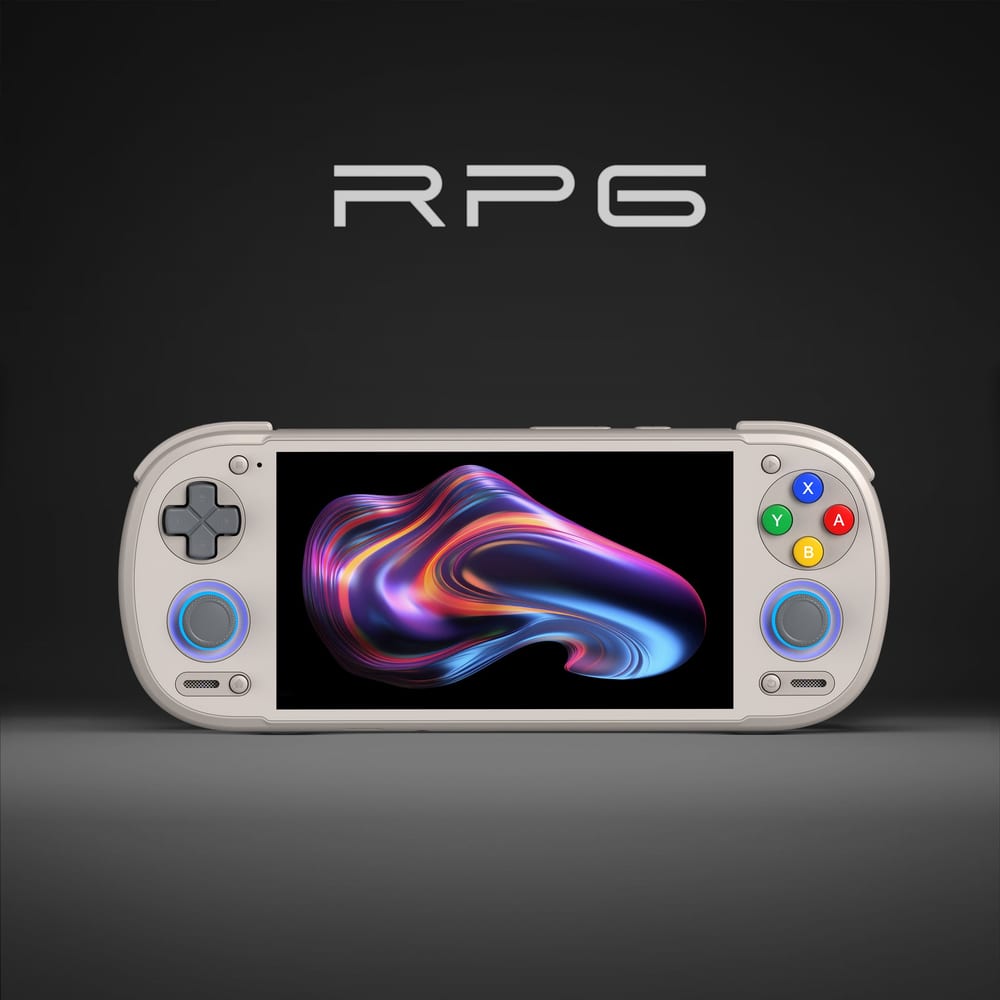
One with an Adreno 6xx or 7xx GPU, since that's where Turnip is best supported. Of the handhelds above, the Retroid Pocket 6 is the one we found sold on Amazon in the US on November 3, 2026: Retroid's own spec sheet lists a Snapdragon 8 Gen 2 with an Adreno 740, the GPU family Mesa lists and Eden recommends Turnip for. AYN sells the Thor and Odin 3 from its own store, and Anbernic's current Dimensity and Unisoc models use Mali GPUs, so Turnip doesn't apply to them.
Retroid Pocket 6: Snapdragon 8 Gen 2, Adreno 740, 5.5-inch 1080p 120Hz AMOLED, 8GB or 12GB of RAM (Retroid's spec sheet, read November 3, 2026). · Image: Retroid Pocket
Retroid Pocket 6, 8GB: the same GPU for less, if you mostly play GameCube, Wii, 3DS and lighter Switch games.
Both pages link to Amazon (affiliate links; we may earn a commission). We haven't tested either device ourselves; the specs are Retroid's.
Where do emulators load a custom driver?
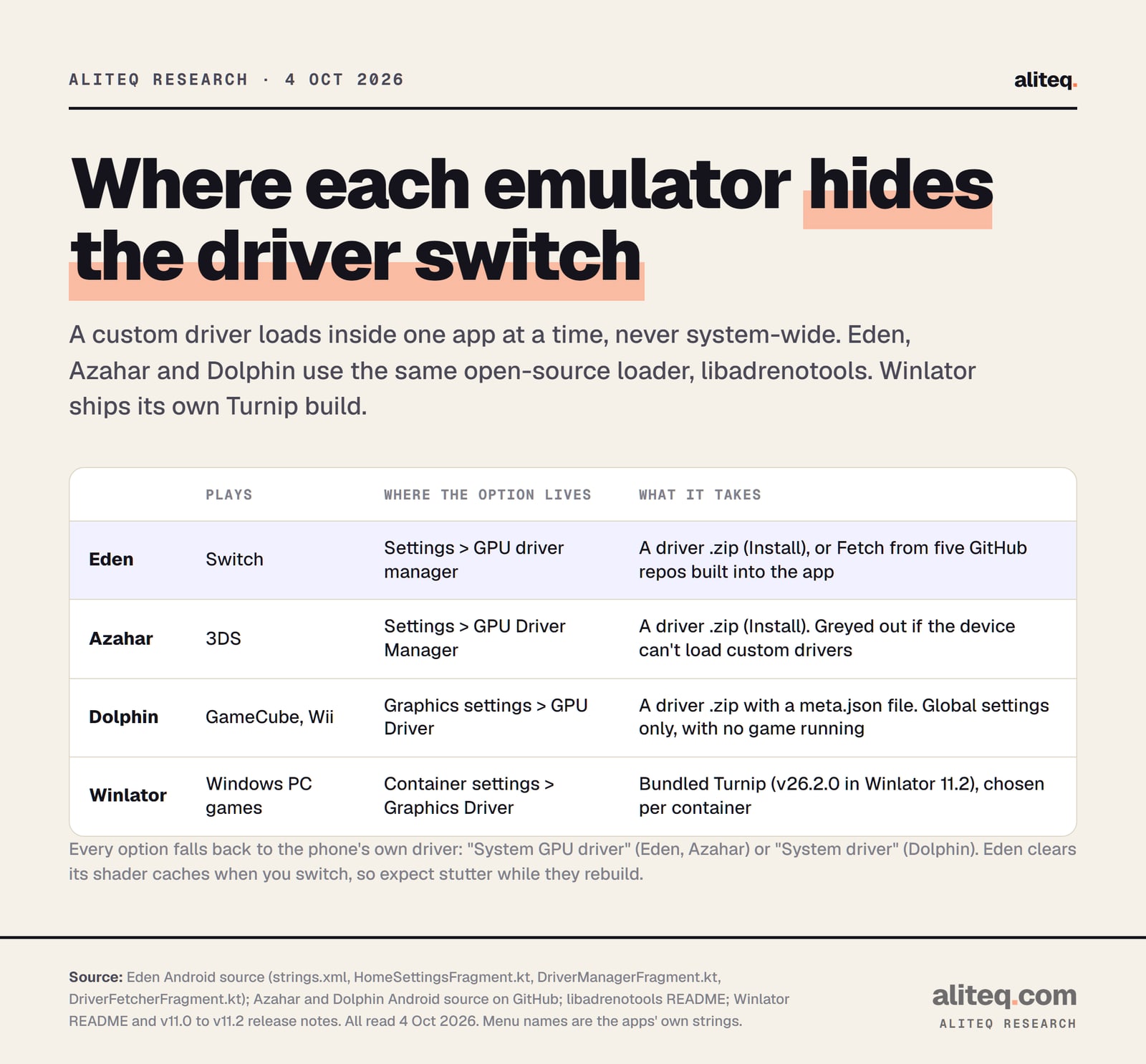
Inside each app's settings, one emulator at a time. Eden, Azahar and Dolphin all use the same open-source loader, libadrenotools, and each one installs a driver from a .zip file. Winlator, which runs Windows games, ships a Turnip build inside the app and lets you pick the graphics driver per container.
The loader's README is blunt about how this works. libadrenotools is "a library for applying rootless Adreno GPU driver modifications/replacements." It needs Android 9 or later on a 64-bit Arm chip. And "each individual app must explicitly make use of libadrenotools in order to load custom drivers." Rootless means you don't need to unlock or modify the handheld.
Where each emulator keeps its driver switch, from the apps' own source and release notes. Read Oct 4, 2026. · aliteq research
Eden (Switch)
Eden has the most complete driver menu. Under Settings, "GPU driver manager" offers two buttons. Install opens a file picker for a driver .zip. Fetch opens Eden's "GPU driver fetcher," which lists releases from five GitHub repos written into Eden's own code, and badges one as "Recommended Driver" for your GPU.
That recommendation comes from your GPU's model number alone, per Eden's v0.2.1 source. Adreno 650 owners get "Mr. Purple T19." Adreno 722 and 740 get "Mr. Purple T23." Adreno 8xx gets "GameHub Adreno 8xx." Two warnings in Eden's own text are worth knowing:
Switching wipes shaders. Eden "has automatically cleared all shader caches" when you change drivers, and says "you may experience some stuttering as shaders rebuild."
Some GPUs can't do it. On an unsupported GPU, Eden shows: "Your GPU does not support driver injection. Attempting to set custom drivers is not recommended."
Azahar (3DS)
Azahar's menu is the plain version of Eden's. Under Settings, "GPU Driver Manager" installs a driver from a .zip file. There's no built-in fetcher. If the handheld can't load custom drivers, the item is greyed out with "Custom driver loading isn't currently supported for this device." The default stays "System GPU driver." For the rest of the setup, see how to set up Azahar.
Dolphin (GameCube and Wii)
Dolphin puts "GPU Driver" inside its Graphics settings. Per Dolphin's source, it only appears in the global settings (not per-game settings), only while no game is running, and only on devices that support custom driver loading. Install takes a .zip, and Dolphin checks the package's metadata and its minimum Android version before accepting it.
Winlator (Windows PC games)
Winlator works differently. It runs Windows games through Wine and translation layers, and it bundles Mesa's Turnip rather than asking you for a file. Version 11.2 (August 19, 2026) "Updated Mesa Turnip (v26.2.0 from @whitebelyash branch)." Version 11.0 "Improved UI for selection of Graphics Driver." You pick the driver in each container's settings.
Where do Turnip builds actually come from?
From Mesa, in source form only. Mesa publishes GPG-signed source tarballs on archive.mesa3d.org and the code on its GitLab. The latest release on October 4, 2026 was Mesa 26.2.4, tagged 1 October. Mesa does not publish a ready-to-load Android package, so every .zip an emulator installs is someone else's build of Mesa's code.
That's the part most guides skip. The five repos in Eden's fetcher are community projects. Some say plainly what they are. One describes itself as "a script for building turnip driver as an adrenotool package from mesa repository." Another warns of "highly unstable & sloppy AdrenoTools Turnip builds - use with caution," aimed at Adreno 8xx.
Not every entry is Turnip at all:
Some packages are Qualcomm's own drivers. One repo's newest releases are labeled "Qualcomm drivers v840 extracted from Meta Ray-Ban Glasses" and "extracted from Quest 3." Eden's "GameHub Adreno 8xx" entry is described as "Snapdragon 8 Elite GPU Drivers, extracted from GameHub."
Those aren't Mesa code. Mesa's core library is MIT-licensed open source. A proprietary driver pulled from another device isn't covered by that licence. I don't link these repos, and this isn't legal advice.
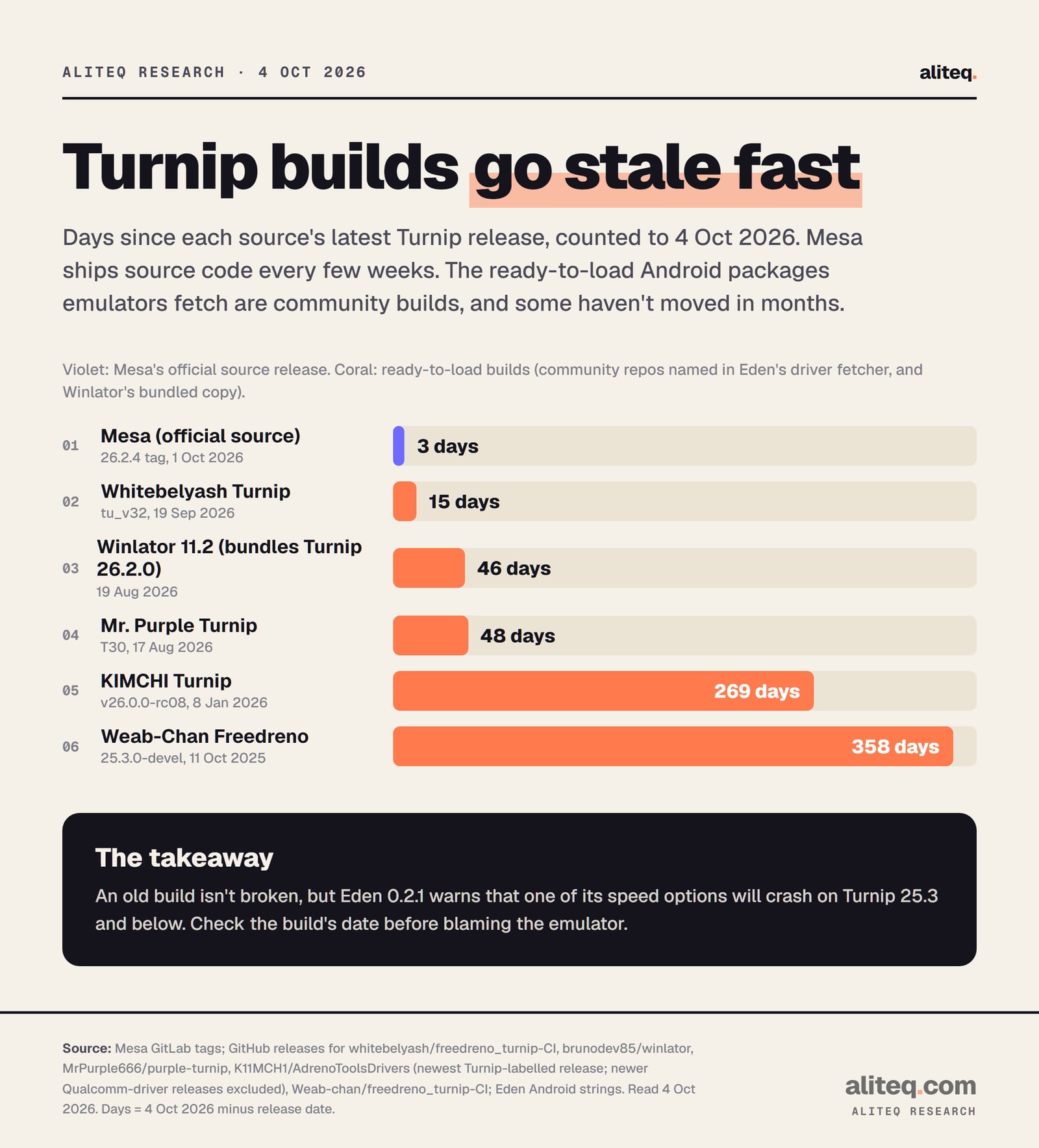
Release dates vary a lot. On October 4, 2026 the newest builds ranged from 15 days old to almost a year old.
Days since each source's latest Turnip release, counted to Oct 4, 2026. Days = Oct 4, 2026 minus the release date. · aliteq research
Age matters for one concrete reason. Eden 0.2.1 has an option to "use optimized vertex buffers" that, in its own words, "Requires Mesa 26.0+ Turnip drivers/ QCOM drivers. Will crash on older Turnip drivers (25.3 and below)." An old package can turn a working setting into a crash.
How do you install a Turnip driver, step by step?
Pick the emulator, open its driver menu, and either fetch a build (Eden) or install a .zip you downloaded from a repo the emulator names. Then set it as the active driver and launch a game. If anything breaks, switch back to the system driver. Nothing outside that one app changes.
Check your GPU. Find the Adreno model on the maker's spec page. If it's Mali, stop here: Turnip doesn't apply.
Open the emulator's driver menu: Settings, GPU driver manager in Eden and Azahar; Graphics settings, GPU Driver in Dolphin with no game running; container settings in Winlator.
In Eden, tap Fetch and start with the build marked Recommended Driver. In Azahar or Dolphin, tap Install and pick the driver .zip from the source you trust.
Select the new driver, launch one game, and expect stutter at first. Eden clears its shader cache on every driver switch.
If a game breaks, switch back to the System GPU driver. Try one change at a time, so you know which one fixed or broke it.
One more boundary. Mesa's Android page also documents replacing the system driver itself. That path needs an unlocked device and a writable vendor partition, and it's written for driver developers. Nothing in this guide needs it.
Quick answers
What is a Turnip driver?
Turnip is Mesa's open-source Vulkan driver for Qualcomm Adreno GPUs. Emulators can load it in place of the handheld's own Qualcomm driver. Eden's handbook says Turnip gives Adreno 6xx and 7xx "the best compatibility," while the stock driver has "better performance." Read Oct 4, 2026.
Do I need root to install Turnip drivers?
No. Eden, Azahar and Dolphin load drivers through libadrenotools, which its README calls "rootless" and which needs Android 9 or later on 64-bit Arm. The driver only runs inside the emulator that loaded it. Replacing the system driver itself is a separate developer path that needs an unlocked device.
Can I use Turnip on the AYN Odin 3?
Mesa's device list names the Odin 3's Adreno 830, in its newest 8xx family. Eden's handbook says better support for Adreno 8xx stock drivers "is in the works," and its fetcher recommends a Qualcomm driver package for 8xx rather than Turnip. Expect 8xx support to change quickly.
Which Turnip driver is best for the Retroid Pocket 5 or 6?
No source we can verify ranks builds by speed. Eden's built-in fetcher recommends "Mr. Purple T19" for the Pocket 5's Adreno 650 and "Mr. Purple T23" for the Pocket 6's Adreno 740, based on GPU number alone (Eden v0.2.1 source, read Oct 4, 2026). Start there and compare with the system driver.
Does Turnip work on Anbernic handhelds?
Only on Adreno models. Anbernic's Dimensity 8300 and Unisoc T820 handhelds use Mali GPUs, so Turnip doesn't apply, and Eden marks non-Adreno GPUs "Unsupported" in its fetcher. Adreno models such as the RG 55G1 (Adreno A12) are a different case, and the A12 isn't in Mesa's device list.
Where can I download Turnip safely?
Mesa publishes the source at archive.mesa3d.org and on its GitLab, not Android packages. For a ready-to-load build, use the emulator's own fetcher (Eden) or a repo the emulator names, and check whether a package is actually Turnip or a repackaged Qualcomm driver. Avoid APK mirrors and "driver pack" downloads from videos.
A driver swap is the handheld version of updating your graphics card driver: free, reversible and worth one careful test. Change one thing, play one game, and keep the system driver one tap away.