Apple's new Mac update ships a command called fm that talks to its on-device language model. No account, no API key, no install. I read Apple's own docs and WWDC sessions to find out what it can do, which Macs get it, and the numbers Apple left out.
I track launches for a living, and this one is easy to miss because it did not come with a keynote slide of its own. It lives in a developer session. So here is the plain version, built from Apple's pages only, all read on 3 October 2026.
Does macOS 27 really have a built-in AI model?
Yes. macOS 27 "Golden Gate" is Apple's current release, and a WWDC26 session says the fm command line tool "comes pre-installed on your Mac" starting from macOS 27. Apple's releases page already lists macOS 27.0.1, dated 28 September 2026.
The model behind it is the same on-device model that powers Apple Intelligence. Apple says this release comes with "a new on-device model, rebuilt from the ground up," that is "more intelligent; better at logic and tool calling." It also now accepts images.
The new part for Terminal people is access. Until now, Apple's model was reachable only from Swift code inside an app. Apple's engineer put it this way: "until now, those models were only available from Swift code."
What can you type? The fm command, in four moves
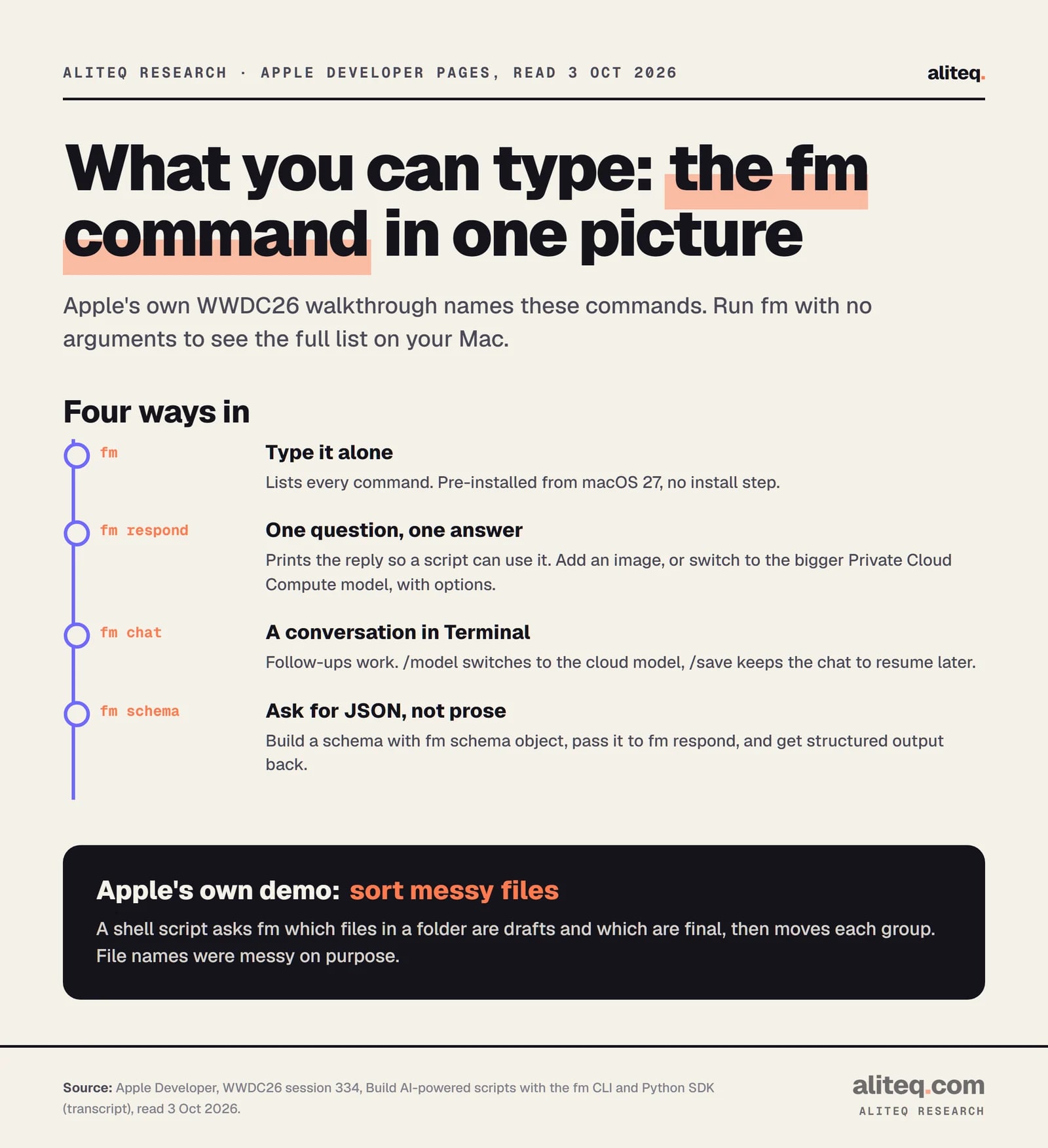
You open Terminal and type fm. Apple's demo shows it listing its commands. The ones Apple names are respond, chat and schema, and it says there are more. Run fm with no arguments on your own Mac to see the full list.
Commands as named in Apple's WWDC26 session 334. Exact option spellings are not printed in the transcript, so run fm --help. · aliteq research
Here is what each does, in Apple's words and mine.
fm respond. You type fm respond and your prompt. The reply prints as output, so a script can use it. Apple says it has options to pick the bigger cloud model, to include an image, and to use a schema.
fm chat. An interactive conversation in Terminal. Inside it, /model switches to the Private Cloud Compute model and /save keeps the chat so you can resume it later.
fm schema. You build a schema with fm schema object, then pass it to fm respond. The model's answer comes back as JSON in the shape you asked for, instead of a paragraph.
That last one is the useful trick for scripts. Prose is hard for a script to read. A fixed shape is not.
What did Apple show it doing?
Apple's own example is a file-sorting script. A project folder is full of drafts, and the file names are messy. The script asks fm which files are drafts and which are final, using a schema with two lists. Then it copies the finals to a backup and moves the drafts to an archive.
Apple's reason for using a model here: it works "even if the names are messy and are difficult to sort predictably." A second demo in session 241 asks fm to rename a photo called IMG_1234 based on what is in the picture. Apple also names summarizing documents and extracting information as uses.
I am not telling you these work well on your files. Apple showed them working on its files. The honest takeaway is the shape of the job: small, fuzzy, repetitive text and image chores inside a script.
Which Macs can run it?
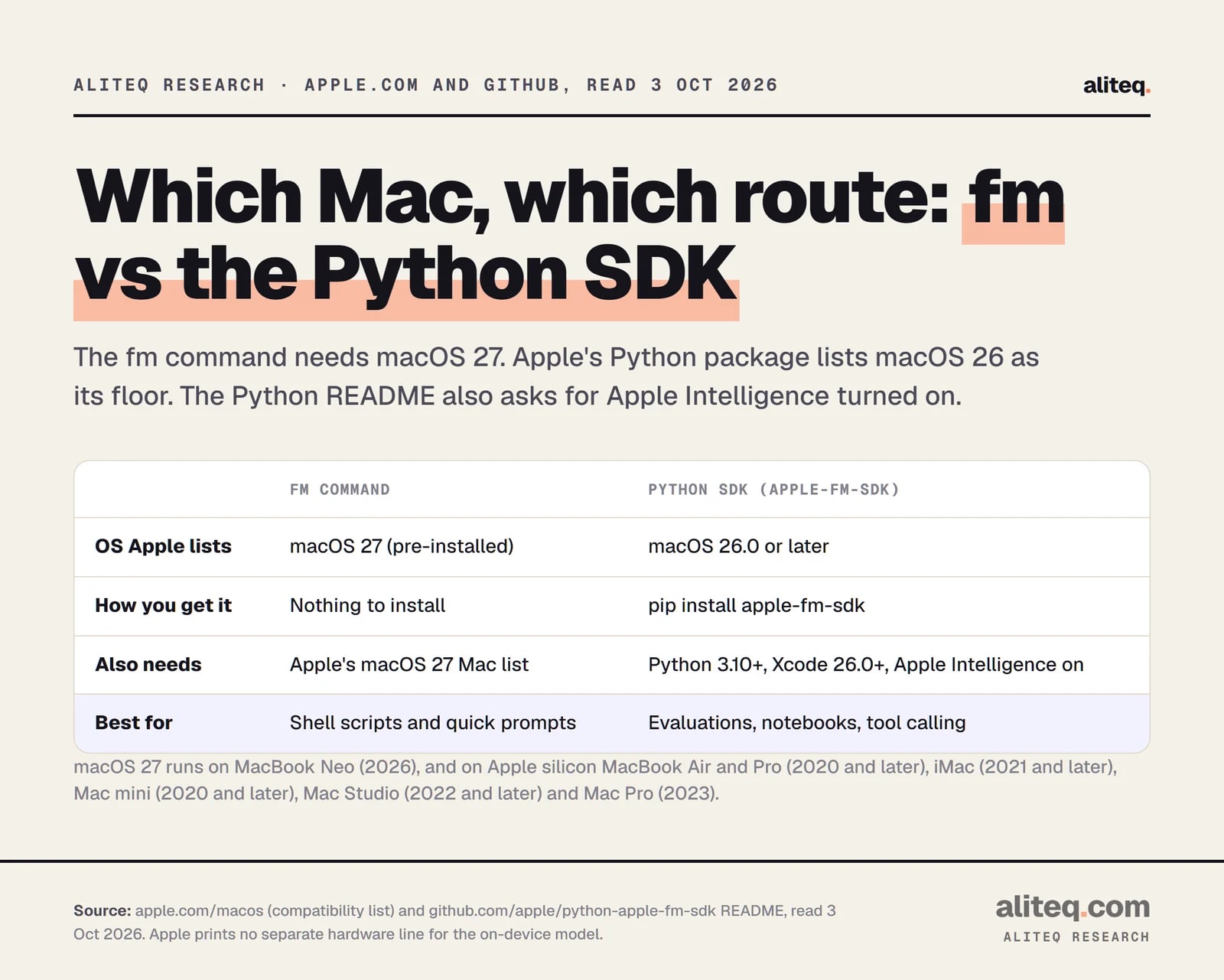
Anything that runs macOS 27. Apple's page lists MacBook Neo (2026), Apple silicon MacBook Air and MacBook Pro (2020 and later), iMac (2021 and later), Mac mini (2020 and later), Mac Studio (2022 and later) and Mac Pro (2023).
From apple.com/macos and the apple-fm-sdk README, read 3 October 2026. · aliteq research
One catch. Apple's Python repository says you need "Apple Intelligence turned on for a compatible Mac." I found no hardware line written for fm itself. Apple prints different Mac lists for different Apple Intelligence features, so check the one for your Mac before you assume. Treat "runs macOS 27" as the floor, not a promise.
What is the Python version?
Apple also released a Python package, apple-fm-sdk, under the Apache-2.0 licence. You install it with pip. It gives Python code the same on-device model, including tool calling and guided generation (the Python name for schema-shaped output).
Its README lists macOS 26.0 or later, Python 3.10 or later, and Xcode 26.0 or later. So the Python route may work on last year's macOS, while the fm command is a macOS 27 feature. Apple pitches the package to people who evaluate Swift app features in batches and analyze results in Python.
On-device vs Private Cloud Compute: what is the difference?
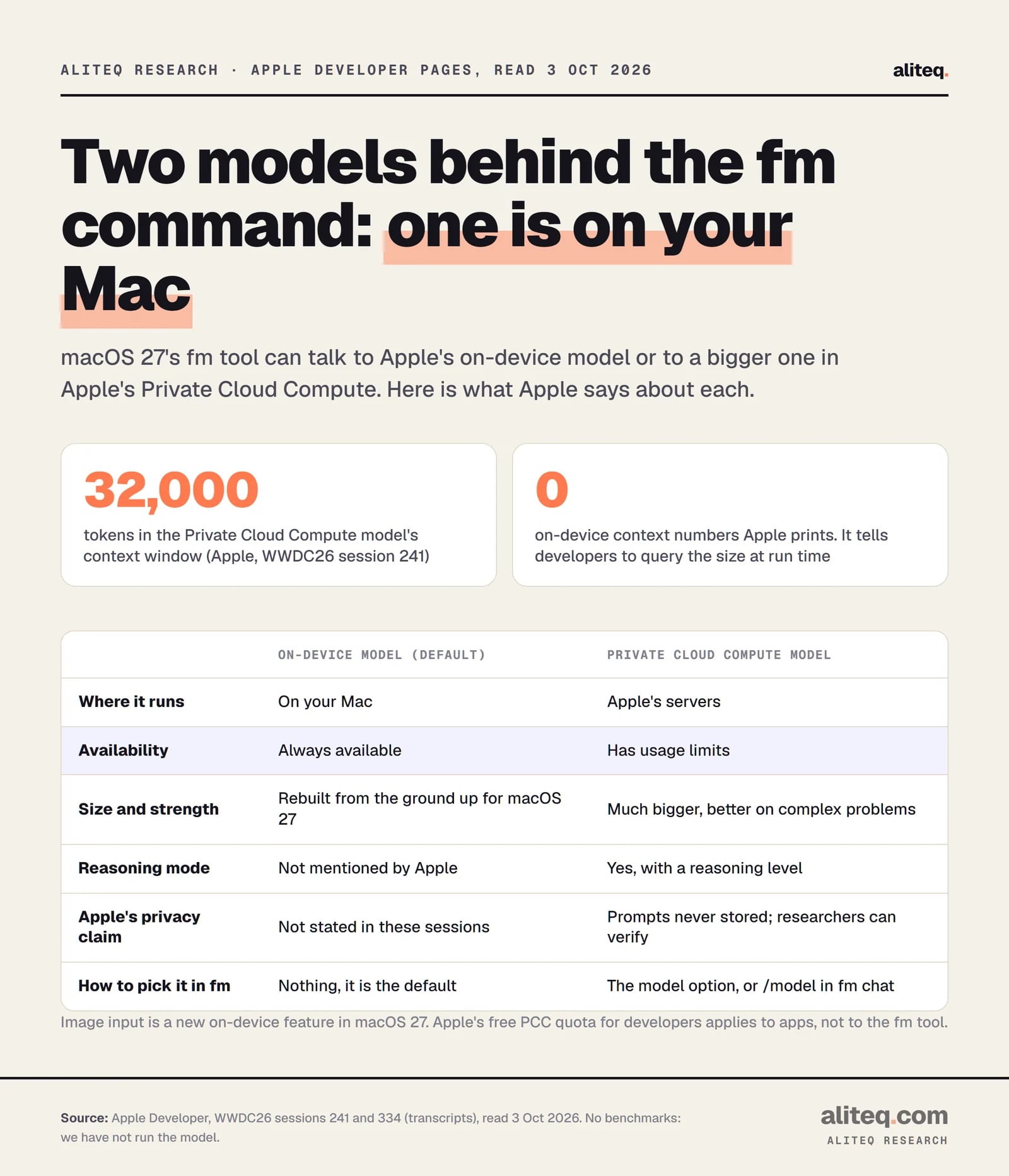
The on-device model runs on your Mac and is "always available." The Private Cloud Compute model runs on Apple's servers, is "much bigger," and has a 32,000-token context window and a reasoning mode. Apple says it has usage limits. In fm you switch with the model option or /model.
Apple, WWDC26 sessions 241 and 334, read 3 October 2026. · aliteq research
On privacy, Apple says of the cloud model: "No prompts are ever stored, and we make it possible for independent researchers to verify these claims." That is Apple's claim about Private Cloud Compute. I did not find a matching sentence for the on-device model in these sessions, though on-device by definition does not leave the Mac.
A trap to avoid: Apple says the cloud model is free for apps from developers with fewer than 2 million first-time downloads. That is a rule for app makers. Apple does not say it covers your own use of fm, so do not assume it does.
What has Apple not told us?
Apple has not printed the on-device model's context window, and no speed or accuracy benchmarks appear in the sources I read. Apple says only that since iOS 26.4 there are APIs to check the context size and count tokens, and developers should use them "to adapt your app to the hardware it's running on."
That sentence suggests the size is not one fixed number for every Mac, but Apple does not spell it out. Blog posts online quote specific figures for it, and they disagree with each other. I left them out.
Also unconfirmed on a primary page: any first-run license step, whether the model downloads separately after the update, and Apple's guidance on coding or math tasks. Run fm and read what it prints.
Confirm it is on Apple's macOS 27 list and that Apple Intelligence is on in System Settings.
With no arguments it lists the commands. Read whatever it prints on first run.
Try fm respond on a throwaway question or file name. Move to fm schema once you want output a script can read.
Cloud mode sends the prompt to Apple's Private Cloud Compute. Pick it on purpose, not by accident.
Where does this fit next to Ollama and local models?
It is a different trade. fm gives you one Apple-supplied model with nothing to download or configure. Tools like Ollama let you choose among many open models, including big ones, if your hardware can hold them. If you want to choose the model, see how to run Gemma 4 locally or serve a local model as an API.
If you are weighing a bigger local setup against renting, our cloud vs local GPU guide covers it, and the cost to run pages show what a model needs in memory. Apple's pitch is the opposite: no choices, no setup, and nothing to pay per token for the on-device model.
Quick answers
Does macOS 27 exist yet?
Yes. Apple's macOS page is headed macOS 27 Golden Gate, and Apple's releases page lists macOS 27.0.1 dated 28 September 2026. The fm command was introduced with it.
What is the fm command in macOS 27?
It is a command line tool, pre-installed from macOS 27, that prompts Apple's on-device language model from Terminal. Apple names fm respond for single answers, fm chat for conversations and fm schema for structured output.
Do I need an account or API key to use fm?
Apple says the Foundation Models framework needs "no API key" and has "no cloud API costs," and describes the on-device model as always available. I did not find a primary statement about any first-run terms, so read what fm shows you the first time.
Is fm the same as Ollama?
No. fm uses one Apple-supplied model that comes with macOS. Ollama runs open models you choose and download. fm needs nothing installed, but you cannot swap in a different model for the on-device default.
Can I use it from Python?
Yes. Apple's apple-fm-sdk package, installed with pip, reaches the same on-device model and supports tool calling and guided generation. Its README lists macOS 26.0 or later, Python 3.10 or later and Xcode 26.0 or later.
How big is the on-device model's context window?
Apple has not published a number in the pages I read. It does provide APIs to check the context size at run time. The bigger Private Cloud Compute model has a 32,000-token context window.