Four ways to run a local model on Apple silicon: mlx-lm, llama.cpp, Ollama and LM Studio. I read each project's docs to sort out who each is for, which model files they take, and the one sysctl the MLX README tells you to try when a model runs slow.
I'm the friend who reads the launch threads, and the Mac local-AI thread is a mess. Half of it says MLX is the Apple-native way. The other half says llama.cpp does it all. Then Ollama quietly shipped its own MLX engine and the argument got harder to follow.
So I went to the source. On October 3, 2026 I read the READMEs, release notes and docs for MLX, mlx-lm, llama.cpp, Ollama and LM Studio, plus Apple's Metal docs. I didn't install or benchmark any of them for this piece, and I won't print a speed number I can't source. What you get is what each one is, what files it eats, and how to stop a model from choking your RAM. For the Windows and Linux side of the same question, see our vLLM vs Ollama vs llama.cpp comparison.
What are MLX and llama.cpp, really?
They are two different inference engines. MLX is an array framework for Apple silicon from Apple machine learning research. llama.cpp is a C/C++ engine built on the ggml library that runs on many kinds of hardware, Macs included. Neither is a chat app. You run models through them.
MLX's README calls it "an array framework for machine learning on Apple silicon, brought to you by Apple machine learning research". It has Python, C++, C and Swift APIs, and a CUDA backend for Linux. mlx-lm is the package on top that generates text and fine-tunes language models. You install it with pip install mlx-lm and run mlx_lm.generate or mlx_lm.chat.
llama.cpp's README says "Apple silicon is a first-class citizen - optimized via ARM NEON, Accelerate and Metal frameworks". Its build guide says "On MacOS, Metal is enabled by default. Using Metal makes the computation run on the GPU." Both projects are MIT licensed, per their GitHub pages. The README's current quick start uses llama cli and llama serve; older guides use llama-server, which is the same server tool.
Which runtime fits you?
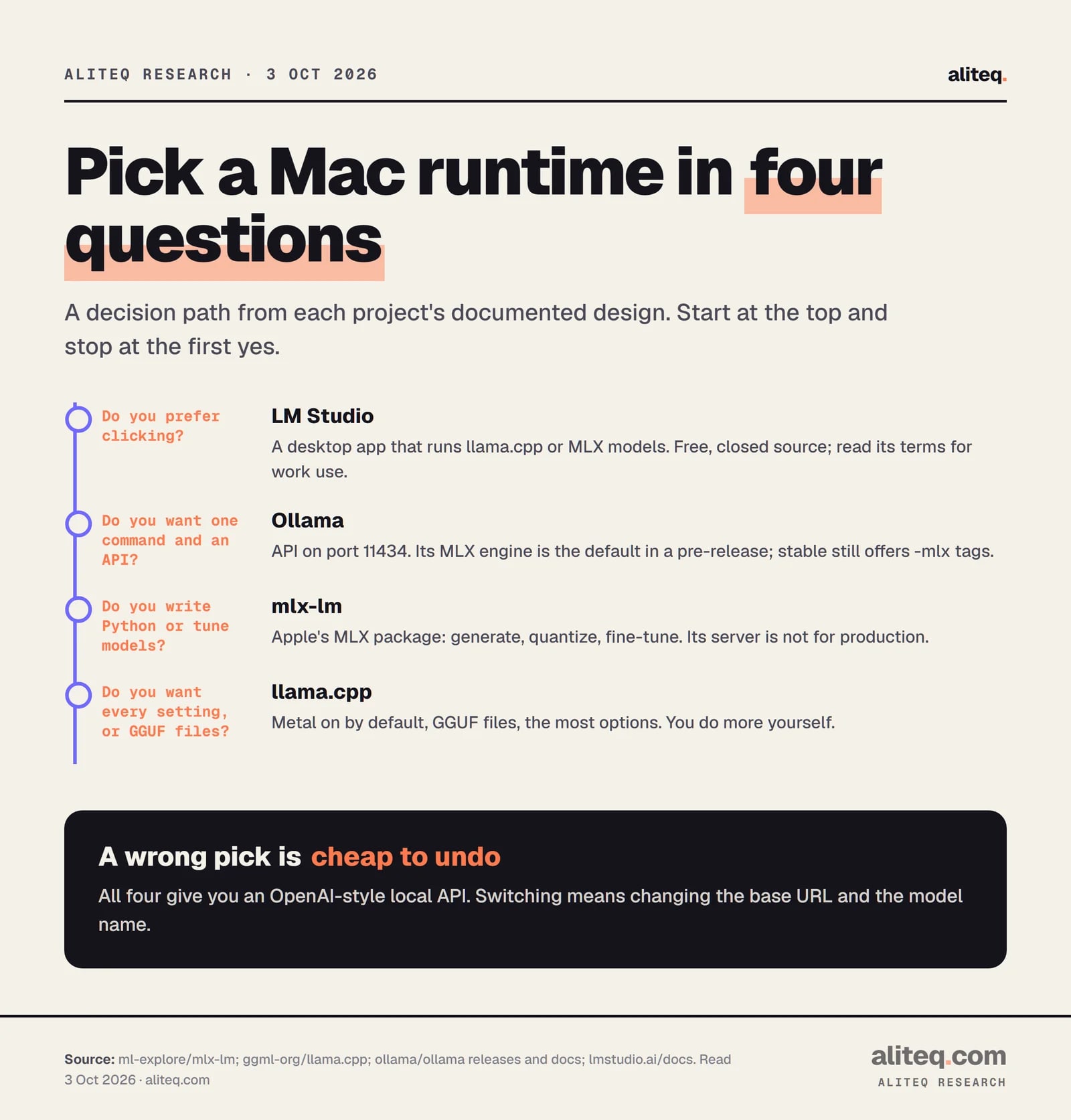
Choose by the way you work. A person who wants to click picks LM Studio. A person who wants one command picks Ollama. A Python user who wants to quantize or fine-tune picks mlx-lm. Someone who wants every dial, or GGUF files, picks llama.cpp. The decision comes from each project's documented design.
A decision path from each project's documented design. Read October 3, 2026. · aliteq research
The four on a Mac
mlx-lm
Engine on a Mac
MLX (Apple ML research)
Model files
MLX-format weights
Default API port
8080
llama.cpp
Engine on a Mac
Metal, via ggml
Model files
GGUF
Default API port
8080
Ollama
Engine on a Mac
llama.cpp, plus an MLX engine
Model files
GGUF or safetensors import
Default API port
11434
LM Studio
Engine on a Mac
llama.cpp or MLX, your pick
Model files
GGUF or MLX
Default API port
1234
Engine on a Mac
Model files
Default API port
mlx-lm
MLX (Apple ML research)
MLX-format weights
8080
llama.cpp
Metal, via ggml
GGUF
8080
Ollama
llama.cpp, plus an MLX engine
GGUF or safetensors import
11434
LM Studio
llama.cpp or MLX, your pick
GGUF or MLX
1234
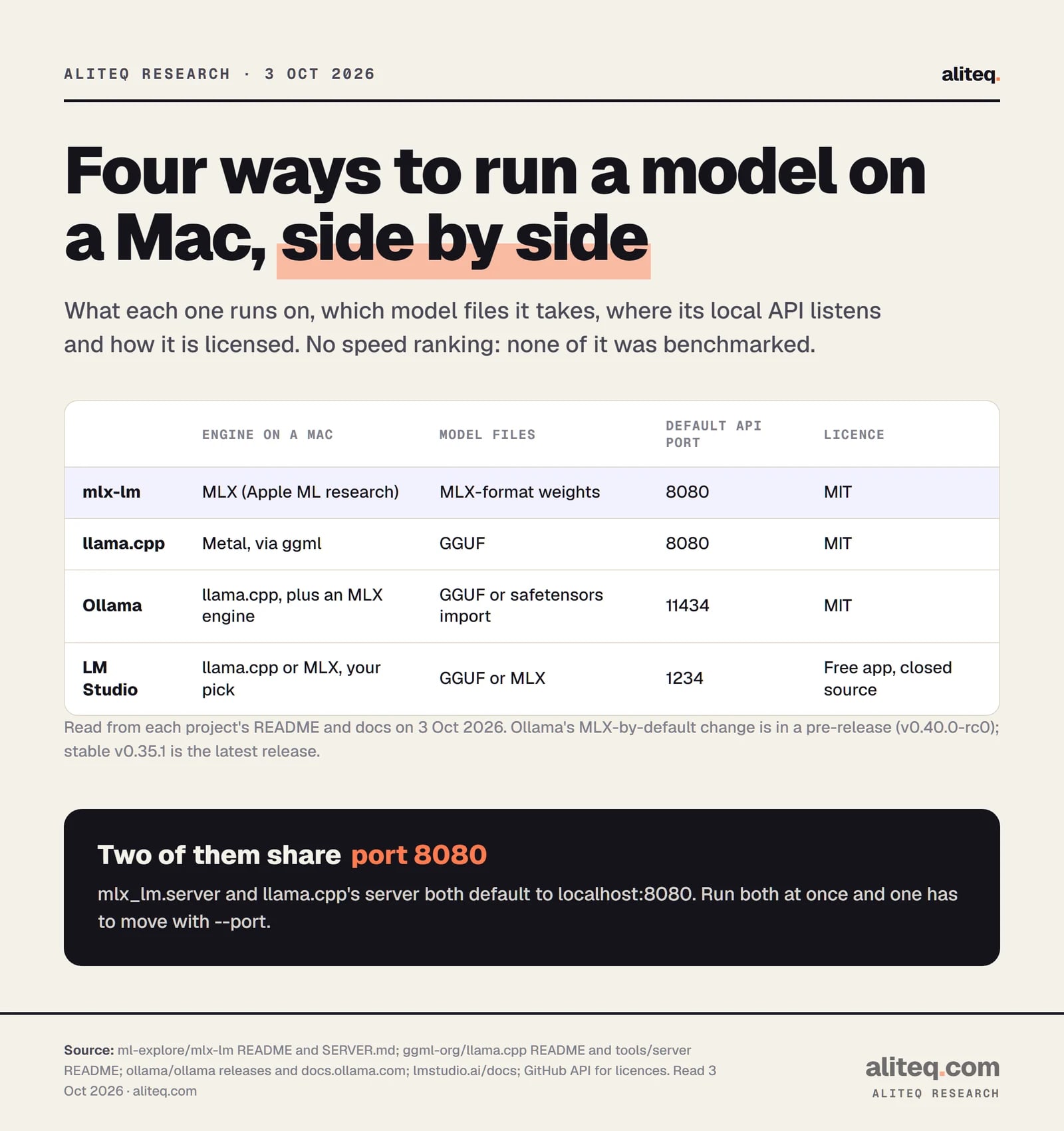
Two cautions from the docs. The mlx-lm server page says it "is not recommended for production as it only implements basic security checks". And mlx-lm's server and llama.cpp's server both default to port 8080 on localhost, so run one of them on another port with --port if you want both up. Our guide to running a local model as an API server covers the client side.
Where do Ollama and LM Studio fit?
Both wrap engines. LM Studio's docs say it runs models with llama.cpp on every platform, and on Apple silicon also with Apple's MLX. Ollama's README still lists llama.cpp as its backend, but its release notes show a second engine, built on MLX, that has grown through 2026.
Here is the Ollama timeline from its GitHub releases:
v0.14.0 (Jan 10, 2026): experimental image generation "powered by MLX".
v0.15.5 (Feb 3, 2026): GLM-4.7-Flash on "Ollama's experimental MLX engine".
v0.32.12 (Aug 14, 2026): an -mlx tag next to the normal one, as in ollama run qwen3.8:27b-mlx, described as optimized for Apple Silicon.
v0.34.1 (Sep 14, 2026): creating a model from MLX safetensors is no longer experimental.
v0.40.0-rc0 (Sep 25, 2026, a pre-release): "on Apple Silicon devices, model architectures supported by the MLX runtime will automatically run on MLX."
That last line is a pre-release, and the latest stable tag on 3 October was v0.35.1. So for now, on stable Ollama, you pick the MLX build yourself by name. The release says additional models will be enabled during the pre-release, and we don't know which ones. Ollama's macOS docs list macOS Sonoma (v14) or newer and an Apple M series chip. If you want help managing models once it's running, see how to manage local models in Ollama.
LM Studio's Mac requirements are Apple silicon and macOS 14.0 or newer, with 16 GB of RAM or more recommended. Its MLX engine is a separate open project, mlx-engine, built on mlx-lm, and Macs on LM Studio 0.3.4 or newer ship with it. One difference to know about: LM Studio's parallel-requests page says its Max Concurrent Predictions setting (default 4) is "supported for LM Studio's llama.cpp engine, with MLX coming soon" as of 3 October. We read that as a gap for the MLX engine, so check the page again before relying on it. For a comparison of those two apps, see Ollama vs LM Studio.
Do MLX and llama.cpp use the same model files?
No. llama.cpp uses GGUF, a single file that holds the weights and the model's metadata. MLX uses its own weight format, and the community publishes converted models under mlx-community on Hugging Face. The same model usually exists in both forms, so you download the one your runtime reads.
Hugging Face's docs describe GGUF as "a binary format that is optimized for quick loading and saving of models", developed by the creator of llama.cpp. They describe the MLX community as "contributors converting and publishing weights for MLX format". mlx-lm's default model is mlx-community/Llama-3.2-3B-Instruct-4bit, and the README says thousands more are available.
Engine, model files, API port and licence for each runtime. Read October 3, 2026. · aliteq research
Two more format facts from the docs:
Quantizing your own model.mlx_lm.convert --model <repo> -q converts and quantizes a Hugging Face model to MLX. The options include --q-bits, --q-group-size and a --q-mode of affine, mxfp4, nvfp4 or mxfp8. The project also documents methods meant to reduce quality loss from quantization, such as DWQ and AWQ.
Ollama imports. Its import docs take a Safetensors directory or a GGUF file. They also say Ollama "does not quantize GGUF models during import", so quantize first with llama.cpp's llama-quantize.
We can't tell you how the quality of an MLX 4-bit model compares with a GGUF 4-bit one. Neither project's docs publish a like-for-like comparison, and we didn't run one. Our explainer on what a token is helps if the word "context" in the next section is new.
How does unified memory change the math?
On Apple silicon the CPU and GPU share one pool of RAM. MLX's README says arrays "live in shared memory", so operations run on either device "without transferring data". That means a Mac has no separate VRAM figure. The model weights and the context cache both come out of the same memory your apps use.
Apple's Metal docs add a guardrail. recommendedMaxWorkingSetSize is "an approximation of how much memory, in bytes, this GPU device can allocate without affecting its runtime performance", and Apple says to keep the GPU's total footprint below that value. llama.cpp's Metal code reads that same value and logs it when it starts. So on any Mac, the GPU has a recommended ceiling that is lower than your total RAM. Apple's pages we read don't give the ceiling as a fraction of RAM, so we don't print one.
For sizing, the weights are the big item and the context cache grows with the length of your prompt. Our cost to run calculator does that arithmetic for a GPU's VRAM, and the same weights-plus-cache logic applies on a Mac, with the shared pool as the budget.
What is iogpu.wired_limit_mb?
It's a macOS setting that the MLX README tells you to raise when a large model runs slowly. The README says models "large relative to the total RAM available on the machine can be slow", and that mlx-lm tries to speed them up by wiring the memory the model and cache occupy. That needs macOS 15 or newer.
If you see the warning that begins "[WARNING] Generating with a model that requires ...", the README says the model "will likely be slow on the given machine". Its fix:
sudo sysctl iogpu.wired_limit_mb=N
The README says N should be "larger than the size of the model in megabytes but smaller than the memory size of the machine". It's a number in megabytes, so a 20 GB model needs more than 20,480.
Be careful with that one. It comes from the MLX project's README. I did not find it in Apple's developer documentation, so Apple isn't backing it. It needs sudo, it changes a system-wide setting, and the README's own rule is that the number has to stay under your machine's memory, which leaves macOS and your apps the rest. We didn't find a source on whether it survives a restart, so check before you assume. Treat it as a tool for a model that already fits, as the README says, not a way to run a model that doesn't.
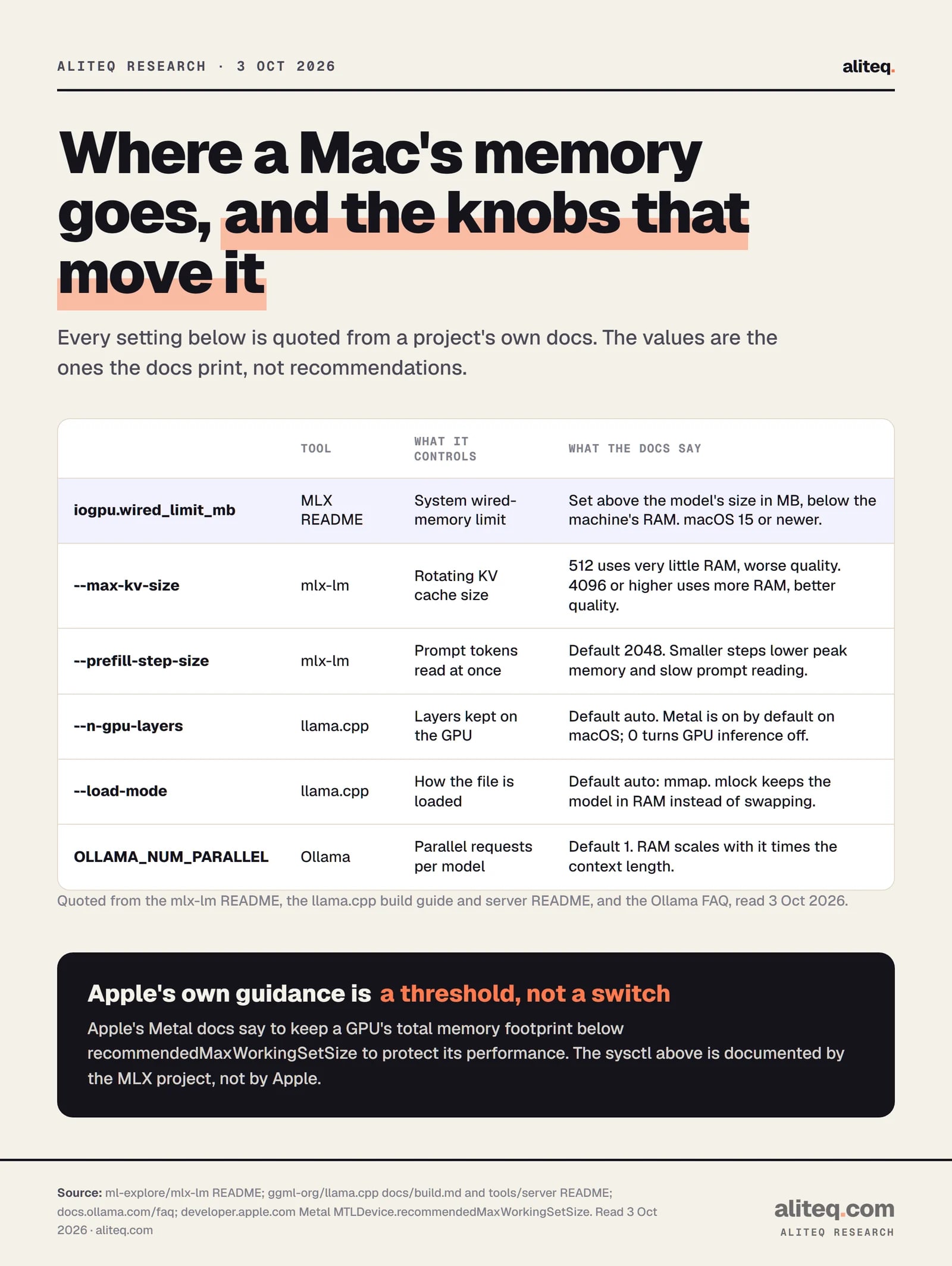
Memory settings quoted from each project's docs. Read October 3, 2026. · aliteq research
What other settings save memory?
Each runtime has a few dials, and the docs name them. The context cache is the usual culprit when memory runs out on a long chat. Shrink the cache, read the prompt in smaller steps, or run fewer requests at once.
mlx-lm, rotating cache.--max-kv-size n caps the cache. Per the README, "smaller values like 512 will use very little RAM but result in worse quality", while 4096 or higher uses more RAM with better quality.
mlx-lm, prefill.--prefill-step-size sets how many prompt tokens are read at once. The default is 2048. Smaller steps use less peak memory "at some cost to prompt processing speed".
mlx-lm, cache quantization. The server's --kv-bits 4 quantizes the cache. Its docs warn that a quantized cache doesn't support batching, so the server handles requests one at a time.
llama.cpp, GPU layers.--n-gpu-layers defaults to auto. --n-gpu-layers 0 turns GPU inference off even in a Metal build.
llama.cpp, load mode. The default is auto, which uses mmap. The mlock option keeps the model in RAM rather than letting the system swap or compress it.
Ollama, parallel requests.OLLAMA_NUM_PARALLEL defaults to 1, and its FAQ says required RAM "will scale by OLLAMA_NUM_PARALLEL * OLLAMA_CONTEXT_LENGTH".
Is MLX faster than llama.cpp?
We can't tell you, and neither can the projects' docs. We found no speed figure from MLX, llama.cpp, Ollama or LM Studio that names the model, quantization, chip and context length together, so we print none. Treat any "MLX is X% faster" claim as noise unless it names all four and says who measured it.
One reason to be careful: the runtimes aren't isolated. LM Studio can run either engine, and Ollama now has both. A speed test of "Ollama vs llama.cpp" may be comparing two different engines. If you want a real answer for your Mac, run your own model through both with the same prompt and context, and write down the settings. We haven't done that test.
Check your Mac: Apple silicon, and macOS 14 or newer for LM Studio and Ollama. The wired-limit sysctl needs macOS 15.
Pick the file format your runtime reads: GGUF for llama.cpp, MLX weights for mlx-lm, either in LM Studio.
Start with the simplest tool that fits how you work, per the decision path above. Switching later is a base-URL change.
If a model that fits RAM runs slowly, read the mlx-lm warning, then consider the wired limit with a value below your total memory.
Shrink the context cache or the parallel requests before you reach for a smaller model.
For the wider set of local-AI guides, start at the AI hub. aliteq sells none of these tools and earns nothing from these links. Every fact above was read from the project's own docs or release notes on October 3, 2026.
Quick answers
Should I use MLX or llama.cpp on a Mac?
Pick by workflow. mlx-lm suits Python users who want to quantize or fine-tune, and llama.cpp suits people who want GGUF files and the most settings. Both run on Apple silicon and both are MIT licensed. We can't rank them on speed because none of the docs publish a comparable benchmark.
Does Ollama use MLX?
Yes, in part. Its README lists llama.cpp as its backend, but its release notes show an MLX engine for Apple Silicon, with -mlx model tags on stable builds. A v0.40.0 pre-release says supported models will run on MLX by default. The latest stable release on 3 October was v0.35.1.
What is iogpu.wired_limit_mb?
A macOS sysctl the MLX README suggests raising when a model that fits in RAM runs slowly. Set it above the model size in MB and below your machine's memory, on macOS 15 or newer. It's documented by the MLX project, not found in Apple's developer docs, so use it with care.
Can LM Studio run both MLX and GGUF models?
On Apple silicon Macs, yes. Its docs say it runs models with llama.cpp and also with Apple's MLX. LM Studio's parallel-requests page says its concurrent-predictions setting works with the llama.cpp engine, with MLX coming soon, as of October 3, 2026.
Can I run llama.cpp and the mlx-lm server at the same time?
Yes, but both default to localhost port 8080. Start one with a different --port and point each client at its own base URL. The mlx-lm server docs also say it isn't recommended for production.
How much RAM do I need to run a local model on a Mac?
More than the model file, plus room for the context cache. Apple's Metal docs say to keep a GPU's total footprint under its recommended working set, which is lower than total RAM. LM Studio recommends 16 GB or more and says 8 GB Macs should stick to smaller models and modest context sizes.