A small model guesses the next few words and the big one checks them all at once. Same answers, fewer slow steps. What the original paper measured, what llama.cpp and vLLM actually let you switch on, and when it won't help.
Token generation is the slow part of running a model at home. Each new word needs a full trip through the weights, one after another. A card can have plenty of spare math and still sit waiting on memory. Speculative decoding puts that idle math to work.
I read the original paper and the current docs for llama.cpp, vLLM and LM Studio on October 3, 2026. I didn't install or benchmark any of it for this piece, so you won't find a tokens-per-second table here. The only speedup numbers below come from the paper, with the conditions printed next to them.
What is speculative decoding?
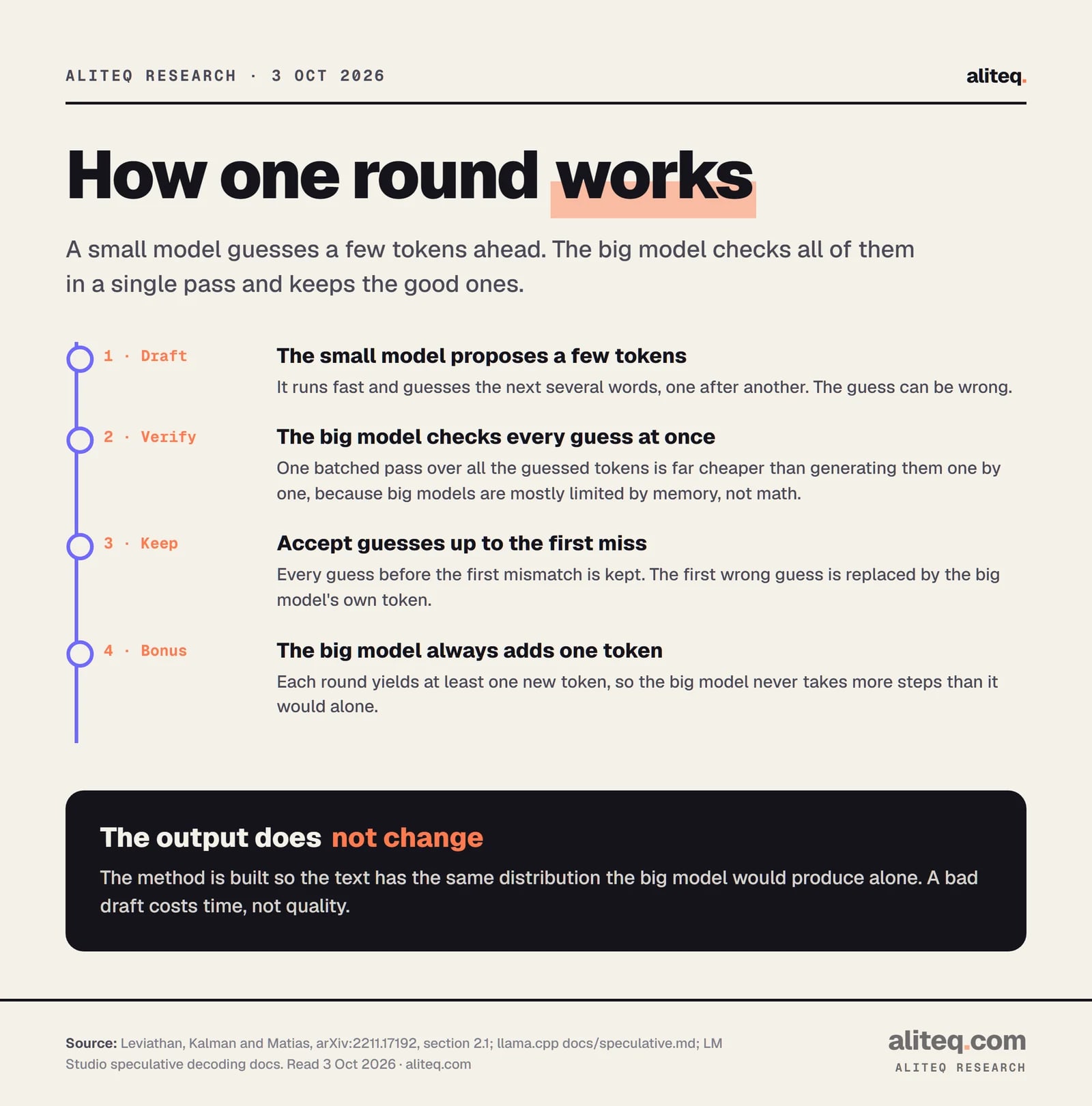
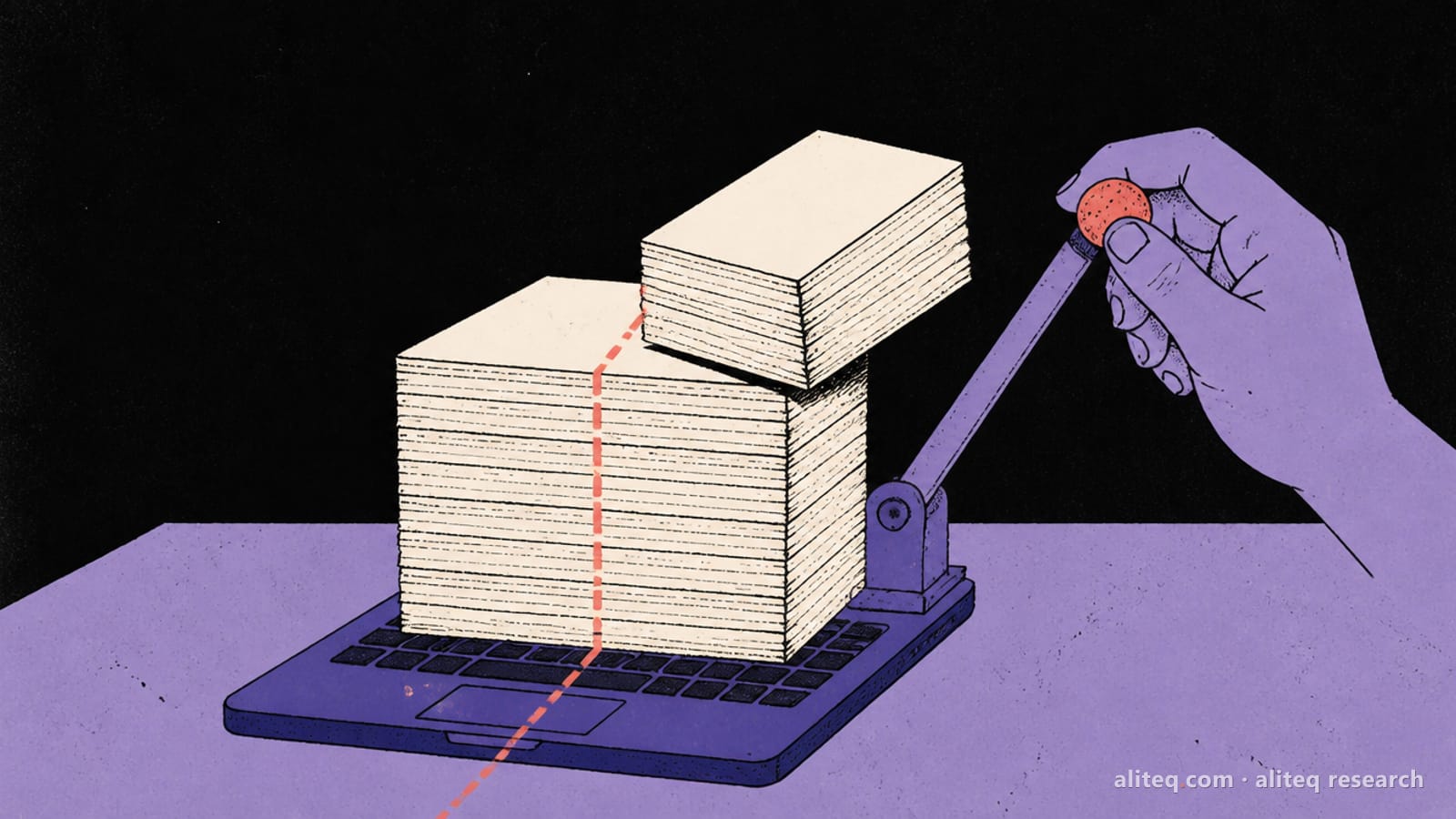
A small draft model proposes several tokens ahead. Your big target model then checks all of them in one batched pass, keeps the ones it agrees with, and replaces the first miss with its own token. The paper calls the result an exact method: faster sampling "without any changes to the outputs".
The paper is "Fast Inference from Transformers via Speculative Decoding" by Yaniv Leviathan, Matan Kalman and Yossi Matias at Google (arXiv:2211.17192, first posted November 30, 2022). Its opening complaint is simple: "decoding K tokens takes K serial runs of the model." Speculative decoding breaks that chain.
One round, as described in section 2.1 of the paper. Read October 3, 2026. · aliteq research
Two details make it safe. First, every round produces at least one new token, so the big model never takes more steps than it would alone. Second, the accept-or-reject rule is built so the text matches what the big model would have produced by itself. llama.cpp's own doc puts the speed argument plainly: computing n tokens in a batch "is more efficient than computing n sequentially".
Why does checking guesses cost so little?
Because a big model's generation step is usually limited by memory bandwidth, not arithmetic. Checking five guessed tokens in one pass reads the weights once, the same as producing one token. The extra math lands on compute the card wasn't using. The paper says this is the observation behind the method.
In its words, inference from large models "is often not bottlenecked on arithmetic operations, but rather on memory bandwidth and communication, so additional computation resources might be available." I'd read that as a hardware person: it's the same reason a card with huge FLOPs can still feel slow at one-user chat. The flip side is in section 3.4: the method does more total arithmetic. It only pays when that spare compute really exists.
How much faster is it, really?
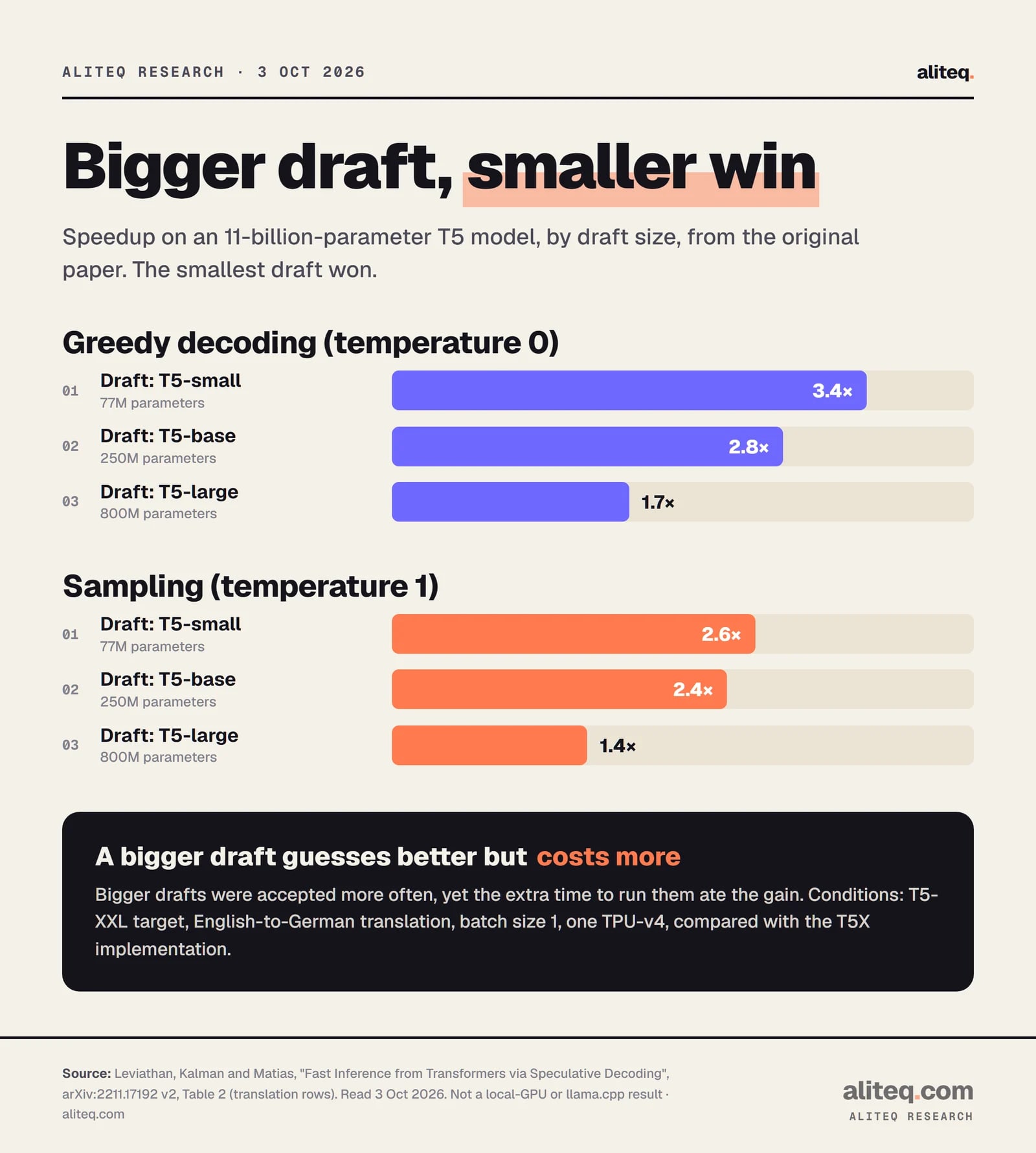
In the paper's own test it was 2X to 3X, under narrow conditions. The target was T5-XXL (11 billion parameters), the batch size was 1, the hardware was one TPU-v4, and the baseline was the T5X implementation. That isn't a local GPU running a quantized chat model, so treat the numbers as a shape, not a forecast.
Table 2 of arXiv:2211.17192, English-to-German rows. T5-XXL target, batch size 1, one TPU-v4. Read October 3, 2026. · aliteq research
The shape is the useful part. The smallest draft (77 million parameters) gave the biggest gain, 3.4X with greedy decoding. The 800 million draft was accepted more often, but it cost more to run, and the speedup fell to 1.7X. Sampling at temperature 1 gave smaller gains than greedy, 2.6X for the best draft. The paper's summarization rows show the same pattern, from 3.1X down to 1.7X across the same temperatures and draft sizes.
So the rule is "small and good enough", not "as smart as possible". LM Studio's docs say the same thing in plain language: if the draft isn't fast or accurate enough, generation "will not increase, and could actually decrease."
When does it help on a local setup?
It helps most when one person is chatting with one model and the draft guesses well, for example on predictable text or code. It helps less when your card is already busy with many requests, or when the output is hard to guess. The vLLM docs frame it as a tool for "medium-to-low QPS" memory-bound workloads.
What makes a draft guess well comes down to two things, per LM Studio's docs: how small and fast it is next to the main model, and how often its suggestions are right. Some prompts suit it better than others. Here is how I'd sort the cases, from the docs and the paper's logic:
Likely to help: a single user, a large target model, a much smaller draft from the same family, text that follows patterns (code, structured edits, summaries).
Likely to disappoint: a target model that is already small, a draft that is not far smaller, or creative output at high temperature.
Different story under load: vLLM's own qualitative table rates a draft model "High gain" at low request rates but only "Medium gain" at high ones, because a busy GPU has less spare compute.
Memory counts too. A draft model is a second model that has to fit. If your target already fills your VRAM, there's no room for a draft. Our GPU guide for local AI and the cost to run calculator show what a given model takes before you add anything.
What are the ways to draft?
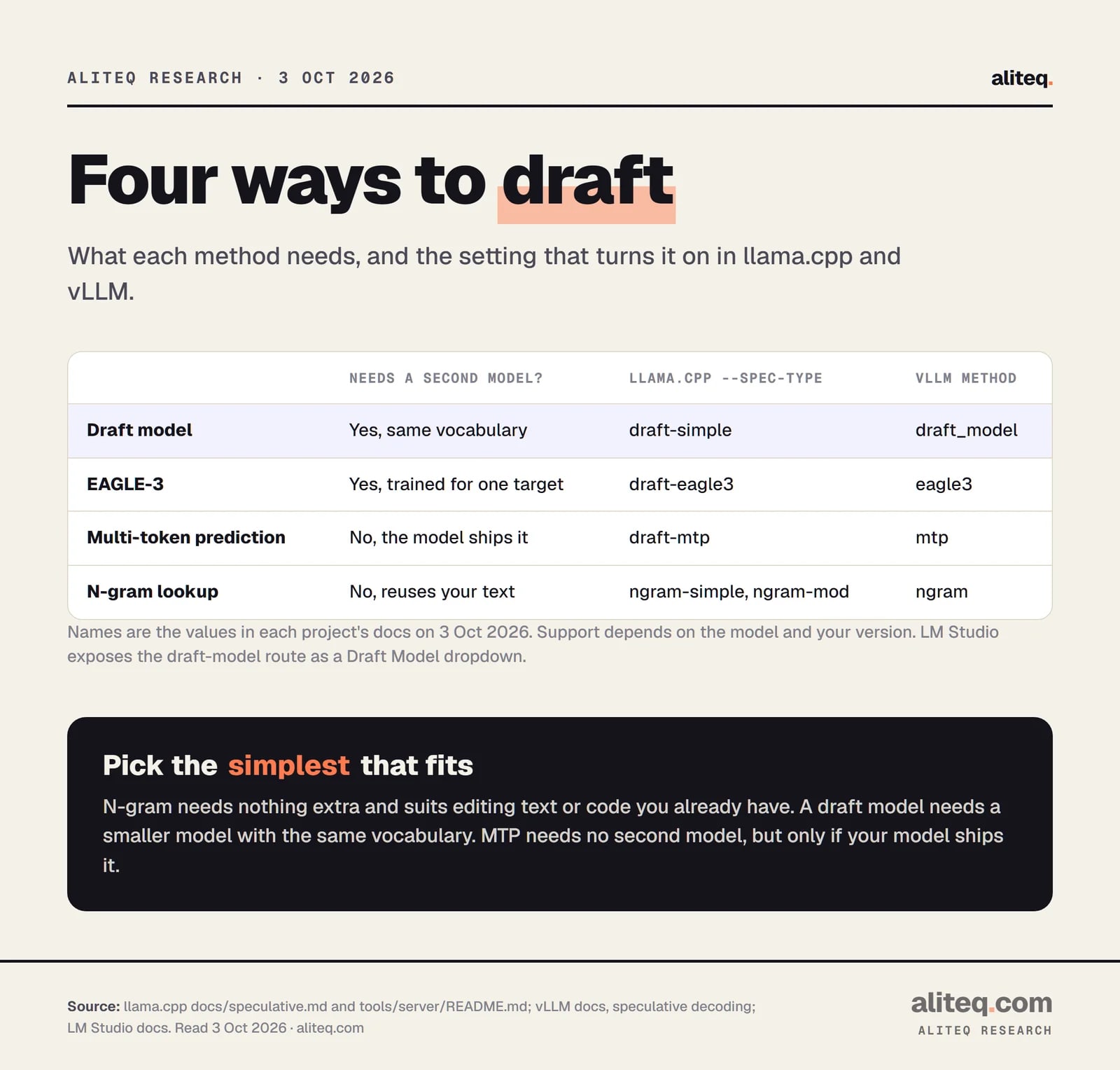
There are four main ones. A plain draft model, a draft head trained for one specific target (EAGLE-3), multi-token prediction (MTP) built into the model, and n-gram lookup that reuses text you already have. The last two need no second model, which makes them the easiest to try.
Method names as written in the llama.cpp and vLLM docs. Read October 3, 2026. · aliteq research
Draft model. The classic version. LM Studio's docs say the draft "must have the same vocabulary as the main model", and its examples pair Llama 3.1 8B Instruct with Llama 3.2 1B Instruct. vLLM also says draft and target must share a vocabulary by default, with an option (use_heterogeneous_vocab) to bridge different tokenizers for the draft-model method.
EAGLE-3. A small head that reads the target model's internal state, so it guesses better than a standalone model of the same size. The catch from llama.cpp's doc: it is "trained for a specific target model", so you need one made for yours.
MTP (multi-token prediction). Some models are built to predict several tokens at once. vLLM's doc describes the target as one that "includes native multi-token prediction capability", so "you do not need to provide a separate draft model." Its docs also cover Gemma 4 assistant checkpoints this way, with a separate mtp method. If you're sizing a Gemma 4 for your card, start with our Gemma 4 12B guide.
N-gram. No second model at all. llama.cpp's doc says these methods "rely on patterns that have already appeared in the generated text" and suggests rewriting source code as an example. It also lists reasoning models that repeat their thinking in the final answer, and summarization.
How do you turn it on in llama.cpp?
Point llama-server at a second model with -md and choose a --spec-type. The option --model-draft still works as an alias. Older tutorials that use --draft-max will fail, because the server README now says that argument "has been removed"; use --spec-draft-n-max instead.
Here is a draft-model setup, assembled from the flag tables in the server README (I did not run it, and the model file names are placeholders):
The docs' --spec-type table lists draft-simple for "a simple draft model", and the EAGLE-3 example in the docs passes both -md and --spec-type. I couldn't confirm from the docs whether -md alone is enough, so I'd pass both. --spec-draft-n-max is how many tokens to draft per round; the documented default is 3.
If you'd rather skip the second model, the docs show these two:
# reuse patterns from text already in the context (the docs' example is refactoring code)
llama-server -m big-model.gguf --spec-type ngram-simple

# let the model's own MTP heads draft, if your model ships them
llama-server -m big-model.gguf --spec-type draft-mtp
--spec-default turns on the default setup, which the docs say enables ngram-mod. The docs also warn that stochastic sampling can differ between CPU and GPU backends because of floating-point math, and say to "use greedy sampling when exact output matching is required."
To see whether it's working, the server prints a line such as draft acceptance rate = 0.57576 ( 171 accepted / 297 generated). That's the docs' example of the format, not a result. A low accepted share is your sign the draft is a poor match. For a proper test, the docs point to a SPEED-Bench client in the repo that compares a baseline run with a speculative one. If you're still choosing a runner, see how to run a local model as an API server and the vLLM vs Ollama vs llama.cpp comparison.
How do you turn it on in vLLM?
Pass a JSON object to --speculative-config with a method, a model if one is needed, and how many tokens to propose. The vLLM docs list draft models, EAGLE, MTP, n-gram, suffix decoding and more. Its own guide describes the feature as for "medium-to-low QPS" workloads.
The draft-model example in the vLLM docs serves a Qwen3 4B target with a Qwen3 0.6B draft:
For MTP on a Gemma 4 target, the docs use "method":"mtp" with the assistant checkpoint in the model field and num_speculative_tokens set to 1. They say an older release may treat that checkpoint as a generic draft model and fail, so upgrade rather than force it. They also note that pipeline parallelism wasn't composable with speculative decoding as of vLLM 0.15.0 and earlier, so check your version if you split a model across cards.
On quality, vLLM's docs call the sampling "theoretically lossless up to the precision limits of hardware numerics". They add that floating-point precision and batch size can cause small output differences. That matches the llama.cpp warning above. It's the same honest caveat: the math is exact, the chips are not.
What about Ollama and LM Studio?
LM Studio documents it as a setting. In Power User mode or higher, you load a model, then pick a Draft Model in the chat sidebar. It also publishes a size guideline for the largest draft to expect gains from: up to 1B for a 7B model, 3B for 14B, and 7B for 32B. It shows no gain for a 3B main model. It's vendor guidance, not a benchmark.
For Ollama, I found no speculative-decoding setting in its README or FAQ on October 3, 2026. That isn't proof it can't do it, only that I didn't find it documented in those two places. Both tools run llama.cpp underneath in most setups, but I won't assume a flag passes through.
Should you bother?
Try the no-extra-model options first. If you have one user, a large model and text that repeats itself (code edits, summaries), ngram or MTP costs you one flag. Reach for a draft model only if you have the VRAM to spare. Test on your own prompts, because the paper and the docs agree the result depends on the draft and the task.
My rule from the numbers: the draft should be tiny next to the target, from the same family, and you should measure acceptance rate before you believe any speedup. If it's low, switch it off. A bad draft never changes your answers, but it will waste your time.
Quick answers
Does speculative decoding change the model's answers?
It is designed not to. The paper says it samples "without any changes to the outputs", and the accept-or-reject rule keeps the same distribution as the big model alone. In practice, floating-point differences can still cause tiny variations, which both llama.cpp's and vLLM's docs mention. Greedy sampling gives the most repeatable match.
How much faster will it make my local model?
There is no honest single number. The original paper reported 2X to 3X for an 11B T5 model at batch size 1 on one TPU-v4, and its own table runs from 1.4X to 3.4X depending on draft size and sampling. The llama.cpp and vLLM docs we read give no speedup figures. Measure on your own hardware and prompts.
Do I need a second model?
Not always. A draft model and EAGLE-3 need one. N-gram methods reuse text already in your context, and MTP uses prediction heads built into models that ship them. llama.cpp and vLLM both list n-gram and MTP options that need no separate draft file.
What is a good draft model?
One from the same family, with the same vocabulary, and far smaller than the target. LM Studio's docs pair Llama 3.1 8B with Llama 3.2 1B, and suggest a draft of at most about 1B for a 7B model. The paper found its smallest draft gave the biggest speedup.
Is the old --draft-max flag still valid in llama.cpp?
No. The server README on October 3, 2026 lists it as removed and tells you to use --spec-draft-n-max. The draft model flag -md still works, and --model-draft is listed as an alias of --spec-draft-model.
Does it help when many people use the server at once?
Less. vLLM's docs rate draft models as high gain at low request rates and medium gain at high ones, because a busy GPU has less spare compute. For a team server, test with your real traffic before turning it on.