Your AI-written Python script runs for you and crashes for everyone else. The cause is almost always the same: packages installed in the wrong place. Here is what a virtual environment fixes, what uv changes, and when plain pip is still fine.
An AI tool wrote you a Python script. It ran fine on your laptop. Then you sent it to a friend, or deployed it, and it died with ModuleNotFoundError: No module named 'requests'. I'm Glitch, and this is one of the most common walls a new Python user hits. This page explains why it happens, what a virtual environment is, and how uv compares with pip and venv.
Why does Python say ModuleNotFoundError when the package is installed?
Because "installed" means installed for one specific Python. Your computer can hold several Pythons, and each has its own list of packages. The error means the Python that ran your script has no copy of that package, even if another Python on the same machine does.
Here is a version of it from my laptop (output trimmed to the useful lines). My main Python had requests installed. A brand-new environment did not.
$ python -c "import requests; print(requests.__version__)"
2.34.2

$ .venv\Scripts\python -c "import requests"
ModuleNotFoundError: No module named 'requests'
Same machine, same script, two answers. That is "works on my machine" in one screen. If you want help reading what the script itself does, see how to read AI code without coding.
What is a virtual environment?
A virtual environment is a folder, usually named .venv, that holds a Python interpreter and its own set of packages for one project. The Python docs describe it as lightweight and "isolated from the packages in the base environment, so that only those explicitly installed in the virtual environment are available."
The Python tutorial explains why you want one. If app A needs version 1.0 of a library and app B needs version 2.0, one shared install cannot satisfy both. Give each app its own environment and the clash disappears.
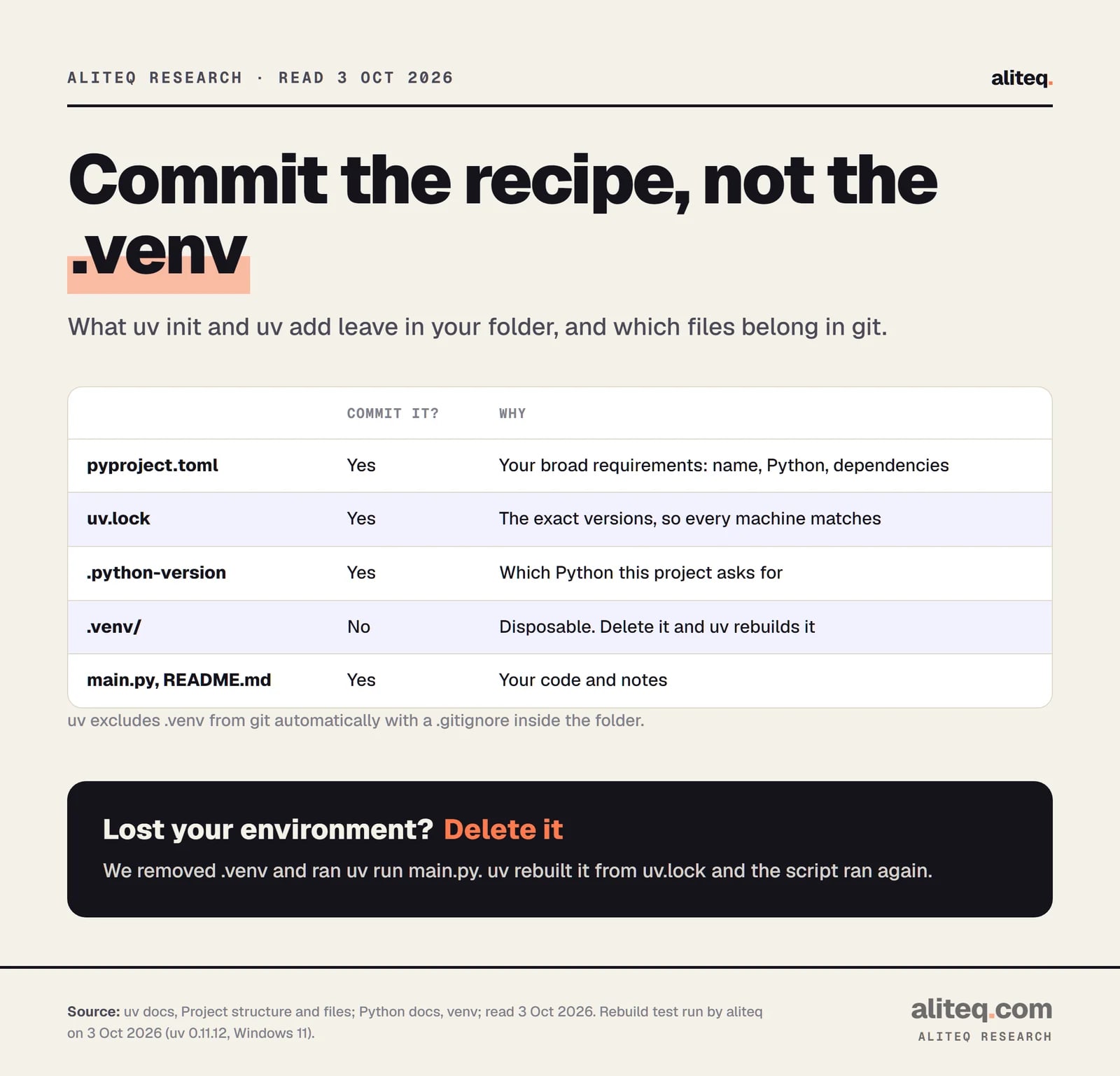
The docs also say a virtual environment is disposable: it "should be simple to delete and recreate it from scratch." You do not put your code inside it, and you do not commit it to git. Keep that in mind, because it shapes everything below.
Python Packaging User Guide and uv docs, read Oct 3, 2026. Commands also run by aliteq. · aliteq research
How do you make and use one with pip and venv?
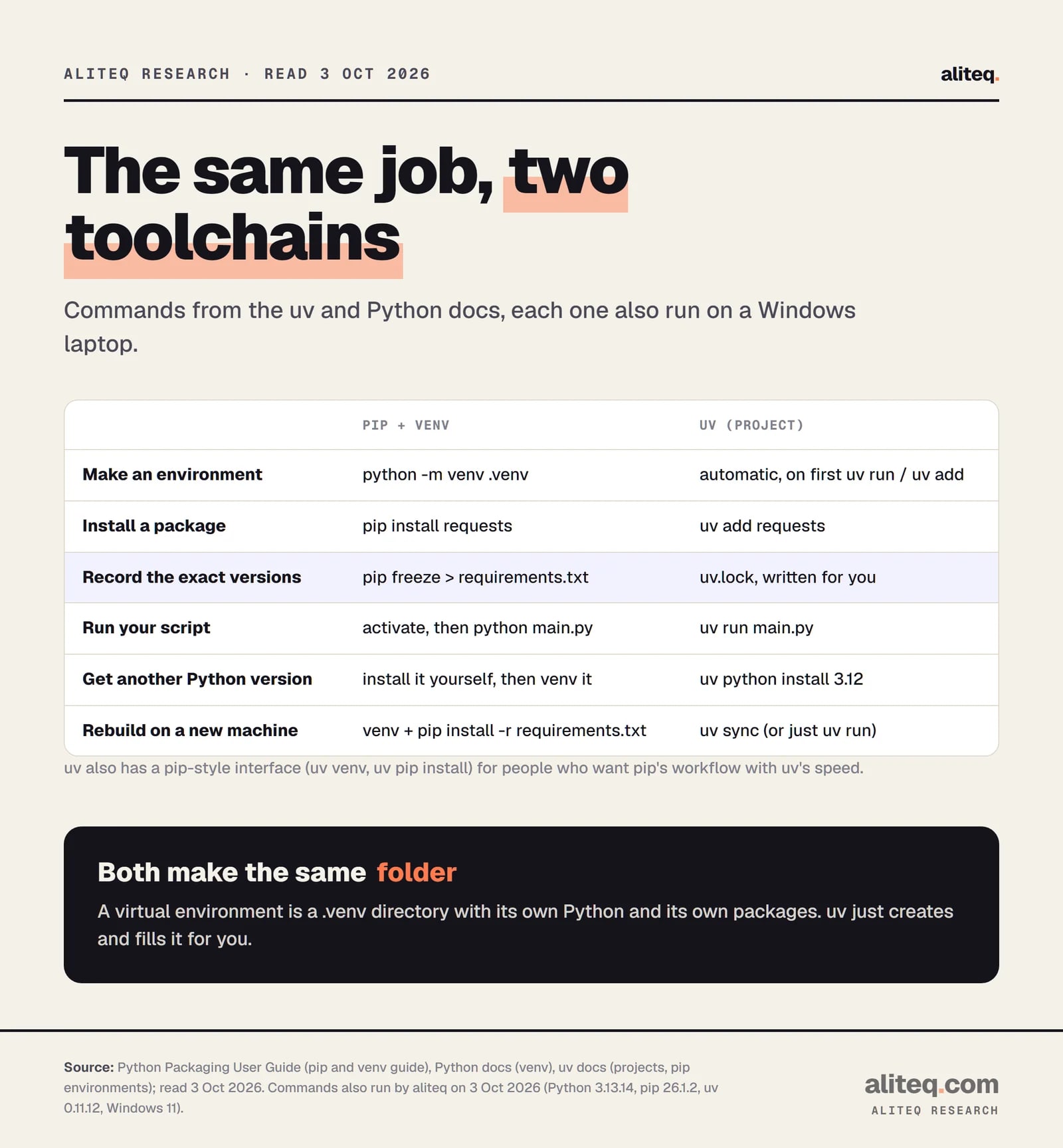
You create the folder with python -m venv .venv, activate it, then install with pip. This is the standard-library route from the Python Packaging User Guide and needs nothing extra. Activation puts the environment's python and pip first on your shell's PATH.
The guide suggests checking that it worked with which python (or where python on Windows). The path should end in .venv. To record what you installed, run pip freeze > requirements.txt. To rebuild on another machine, make a new environment and run pip install -r requirements.txt.
Three habits cause most of the pain here. People forget to activate, so pip installs into the wrong Python. They open a new terminal and the activation is gone, because the guide notes that closing your shell deactivates the environment. And they run the script with a different Python than the one they installed into. Calling python -m pip instead of bare pip helps, because it ties pip to the Python you named.
There is also a safety reason. The packaging spec on externally managed environments says that using Python tools on an operating-system-managed Python "can be confusing at best and outright break the entire underlying operating system at worst." Those Pythons can carry a marker file that makes pip refuse to install and point you to a virtual environment instead.
What does uv change?
uv is a Python package and project manager from Astral. Its docs say it replaces pip, pip-tools, pipx, poetry, pyenv, virtualenv and more, and claim it is "10-100x faster than pip" (their number, not mine; my own small test is below). Its project commands make the environment, install packages, and lock versions in one flow.
Here is the whole thing from an empty folder. These are real outputs from my laptop, with a few blank or repeated lines trimmed.
$ uv init
Initialized project `uvdemo`

$ uv add requests
Using CPython 3.11.15
Creating virtual environment at: .venv
Resolved 6 packages in 327ms
Prepared 5 packages in 411ms
Installed 5 packages in 146ms
 + certifi==2026.7.22
 + charset-normalizer==3.5.2
 + idna==3.20
 + requests==2.34.2
 + urllib3==2.8.0

$ uv run main.py
2.34.2
Notice what I did not do. I never created or activated an environment. uv add made .venv, installed the package and wrote two files. uv run then ran the script inside that environment. The docs say uv run "will create the project environment if it does not exist yet or ensure it is up-to-date if it exists."
Those two files matter. pyproject.toml lists the broad requirements (mine said requests>=2.34.2). uv.lock lists the exact version of every package, with hashes. The docs say to commit uv.lock so every machine installs the same set, and not to edit it by hand.
uv docs, Project structure and files, read Oct 3, 2026. Rebuild test run by aliteq. · aliteq research
What happens when your environment breaks?
You delete it and let the tool rebuild it. This is the payoff of the "disposable folder" idea. With uv I removed .venv and ran the script again. uv noticed the environment was missing, rebuilt it from the lockfile, and the script printed its answer.
$ rm -rf .venv
$ uv run main.py
Using CPython 3.11.15
Creating virtual environment at: .venv
Installed 5 packages in 218ms
2.34.2
With pip, the same recovery is a new python -m venv, an activation, and pip install -r requirements.txt. That works, but only if your requirements.txt is complete and current. The pip freeze file is a snapshot you must remember to refresh. With uv, the lockfile updates itself when you use uv add or uv run.
Can uv install Python itself?
Yes, and it is a quiet advantage for beginners. By default uv downloads a Python version when it cannot find one. The docs say that behavior can be switched off, and uv python install 3.12 fetches a specific version on purpose. A .python-version file records which one your project wants.
On my laptop, uv python install 3.12 downloaded and installed Python 3.12.13 in 11.66 seconds. Running a command with --python 3.12 then built an environment on it without touching my system Python. The docs add that uv treats Pythons it installs as "managed" and everything else, including Pythons from pyenv, as "system."
That solves a second flavor of "works on my machine": the script needs Python 3.12 and your friend has 3.9. Pinning the version in the project means uv fetches the right one.
How does the pip-style interface work?
uv also has uv venv and uv pip install, which copy the pip workflow with uv's speed. Use it when you have an existing requirements.txt project and do not want to restructure. The docs call it intended for "legacy workflows or cases where the high-level commands do not provide enough control."
$ uv venv
Using CPython 3.12.13
Creating virtual environment at: .venv

$ uv pip install requests
Resolved 5 packages in 221ms
Installed 5 packages in 140ms
One difference is a guardrail. The docs say that unlike pip, uv requires a virtual environment by default. When I ran uv pip install requests with none present, it stopped:
error: No virtual environment found; run `uv venv` to create an environment, or pass `--system` to install into a non-virtual environment
That is the right default. It stops the original mistake, installing into the wrong Python, before it happens.
Is uv really faster than pip?
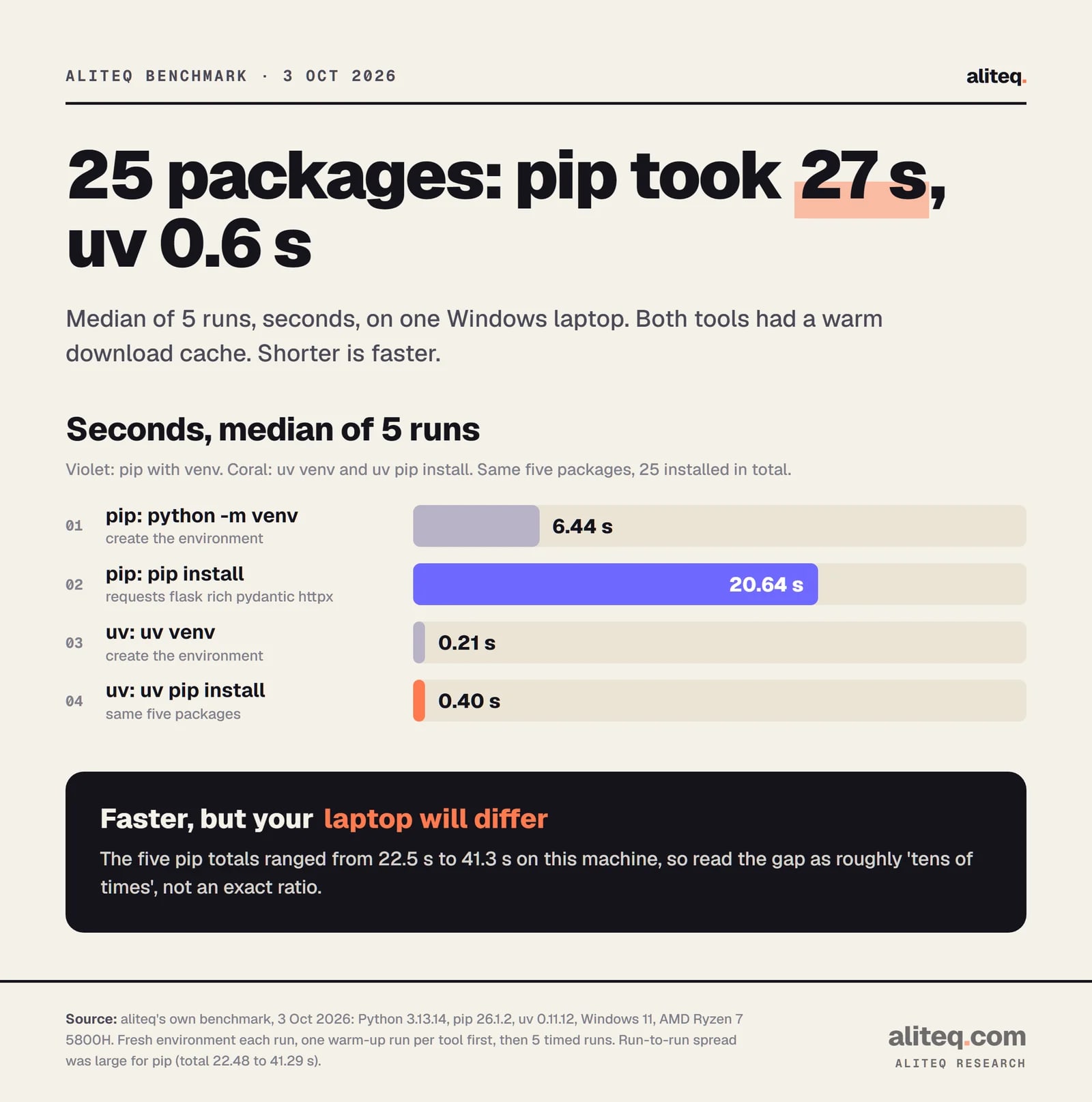
On my machine, a lot. I made a fresh environment and installed five popular packages (requests, flask, rich, pydantic and httpx, 25 packages in total with dependencies), five timed runs per tool after one warm-up run. The median total was 27 seconds for python -m venv plus pip install, and 0.6 seconds for uv venv plus uv pip install.
aliteq benchmark, Oct 3, 2026. One Windows laptop, warm download caches, median of 5 runs. · aliteq research
Treat the exact ratio with suspicion. The five pip totals ranged from 22.5 to 41.3 seconds on this machine, and a Windows laptop with antivirus running is a noisy place to time anything. Both tools had already downloaded the files, so a cold first install on a slow network would be dominated by the download. The honest summary is that uv was dramatically faster here, and that environment creation, not only package install, was a big part of pip's time.
When should you stay on pip?
Stay on pip when it already works for you and a change would cost more than it saves. The uv docs are candid that their pip interface is "not intended to be an exact clone of pip," and that the further you stray from common workflows, the more you may hit differences. Switching is a choice, not a duty.
Good reasons to keep pip and venv:
Your project is stable. A working requirements.txt and a documented python -m venv step are fine.
Your host or team expects it. Many tutorials, CI files and Dockerfiles assume pip. Match them, or change them together.
You use pip's own config. The compatibility page says uv does not read pip.conf or PIP_INDEX_URL. It uses its own uv.toml and UV_INDEX_URL instead.
You want zero new tools. venv and pip ship with Python. uv is another thing to install and keep updated.
Reasons to try uv: you start a new project, you are tired of activating environments, you want a lockfile without extra tools, or you need several Python versions side by side. You can also try it without commitment, since uv pip works on a normal requirements.txt.
What should you do first?
Pick one environment per project and always run your script through it. The tool matters less than the habit. If you are fixing a ModuleNotFoundError right now, these four steps cover both routes.
Run python -c "import sys; print(sys.executable)" (or py on Windows). That path is the Python that cannot see your package.
Run python -m venv .venv, or uv venv. Keep it in the project folder so editors can find it.
Use python -m pip install <package> after activating, or uv add <package> in a uv project.
Activate first, or use uv run script.py. Commit pyproject.toml and uv.lock (or requirements.txt), never .venv.
Quick answers
What does ModuleNotFoundError: No module named mean?
The Python running your script has no copy of that package. It may be installed for a different Python on the same machine. Install it into the Python you actually use, ideally inside a virtual environment for the project.
Do I need a virtual environment for every Python project?
The Python Packaging User Guide recommends one whenever you use third-party packages. Each project gets its own, so installing or upgrading in one cannot break another. A throwaway script that uses only the standard library does not need one.
Is uv a replacement for pip?
For many workflows, yes. uv has project commands (uv add, uv run, uv sync) and a pip-style interface (uv pip install). Its docs say it is not an exact clone of pip, so check edge cases before moving a complex setup.
Should I commit my .venv folder to git?
No. The Python docs say a virtual environment is not checked into source control and should be easy to delete and recreate. Commit your dependency list instead: uv.lock and pyproject.toml, or requirements.txt.
Does uv work on Windows, Mac and Linux?
The uv docs say it supports all three. I only ran it on Windows 11 for this page. The commands differ slightly for activation, but uv run avoids activation altogether.
Why can uv run my script without me activating anything?
uv run finds or creates the project's .venv, brings it up to date, then runs your command inside it. That is why the docs recommend it over activating by hand.