Your app's sign-up, reset and receipt emails can cost nothing or several hundred dollars, depending on the vendor and the volume. We priced five services at four volumes from their own pricing pages, then listed the DNS records Gmail and Yahoo check first.
Every app sends the same three emails: welcome, password reset and receipt. Nobody budgets for them, because the first few thousand cost nothing. Then the app grows, and the bill turns out to depend on which pricing page you signed up from.
I don't trust a fee table until I've done the math at more than one volume, so I did it at four. I read the pricing pages of Resend, Postmark, Amazon SES, SendGrid and Mailgun on October 3, 2026 and priced 1,000, 10,000, 100,000 and 1,000,000 emails a month. We haven't sent mail through any of them for this piece, and none of them pay us. If you're still writing the code that sends these emails, start with our guide to a daily summary email that stays off the spam list.
What each vendor charges
Two models sit side by side. Amazon SES bills per email, at $0.10 per 1,000 on its à la carte pricing. The other four sell monthly plans with an allowance, starting at $15 to $20 for 10,000 to 50,000 emails.
Entry prices and the free tier (USD, read Oct 3, 2026)
Resend
Free tier
3,000 a month, 100 a day
First paid plan
Pro $20 for 50,000
Overage per 1,000
$0.90 on Pro
Postmark
Free tier
100 a month, no overage
First paid plan
Basic $15 for 10,000
Overage per 1,000
$1.80 on Basic
Amazon SES
Free tier
Up to $200 AWS credits for new customers
First paid plan
No plan needed: $0.10 per 1,000 à la carte
Overage per 1,000
Not applicable, pure per-email
SendGrid
Free tier
60-day trial, 100 a day
First paid plan
Essentials $19.95 for 50,000
Overage per 1,000
Not published
Mailgun
Free tier
100 a day
First paid plan
Basic $15 for 10,000
Overage per 1,000
$1.80 on Basic
Free tier
First paid plan
Overage per 1,000
Resend
3,000 a month, 100 a day
Pro $20 for 50,000
$0.90 on Pro
Postmark
100 a month, no overage
Basic $15 for 10,000
$1.80 on Basic
Amazon SES
Up to $200 AWS credits for new customers
No plan needed: $0.10 per 1,000 à la carte
Not applicable, pure per-email
SendGrid
60-day trial, 100 a day
Essentials $19.95 for 50,000
Not published
Mailgun
100 a day
Basic $15 for 10,000
$1.80 on Basic
The details below come straight from each vendor's page.
Resend. Its pricing page links a Markdown version of the price list, which we used. Pro is $20 for 50,000 emails or $35 for 100,000. Scale runs from $90 for 100,000 to $650 for 1,000,000. The Free plan "is limited to 100 emails per day." Overage is opt-in: it's "billed in buckets of 1,000 emails at your plan's overage rate" once you switch on "Transactional Overages" in team settings. Inbound email counts against the same quota.
Postmark. The page shows Basic at $15, Pro at $16.50 and Platform at $18, each "Starting at 10,000 emails/month". The larger tiers come from the page's own price slider. Basic is $55 for 50,000, $115 for 125,000 and $775 for 1.5 million. Postmark says it does not offer "a tier between 100 emails/month (our free developer plan) and 10,000 emails/month."
Amazon SES. SES now has three plans. Essentials is $0.16 per 1,000 with no monthly fee, Pro is $0.22 plus $105 a month, and Enterprise is $0.23 plus $500. À la carte pricing is still $0.10 per 1,000, "with no minimum fees." Attachment data costs $0.12 per GB on top.
SendGrid. The SendGrid pricing page now lives on twilio.com. Essentials is $19.95 for 50,000 or $34.95 for 100,000. Pro runs from $89.95 for 100,000 to $799 for 1.5 million. The page says overage charges "may apply" but doesn't print a rate, so we only priced tiers that include the volume.
Mailgun. Basic is $15 for 10,000 emails with extra emails at $1.80 per 1,000. Foundation is $35 for 50,000 or $75 for 100,000. Scale is $700 for 1,000,000. The two larger plans start with a free month.
The SES plan change most people will miss
New SES accounts don't start on the $0.10 rate anymore. The pricing page says accounts "with no metered SES activity since June 1, 2025 will start on the Essentials plan beginning July 21, 2026." Essentials is $0.16 per 1,000, 60% more than à la carte. You "can upgrade or switch to à-la-carte pricing at any time." So check which one your account is on before you compare SES with anyone.
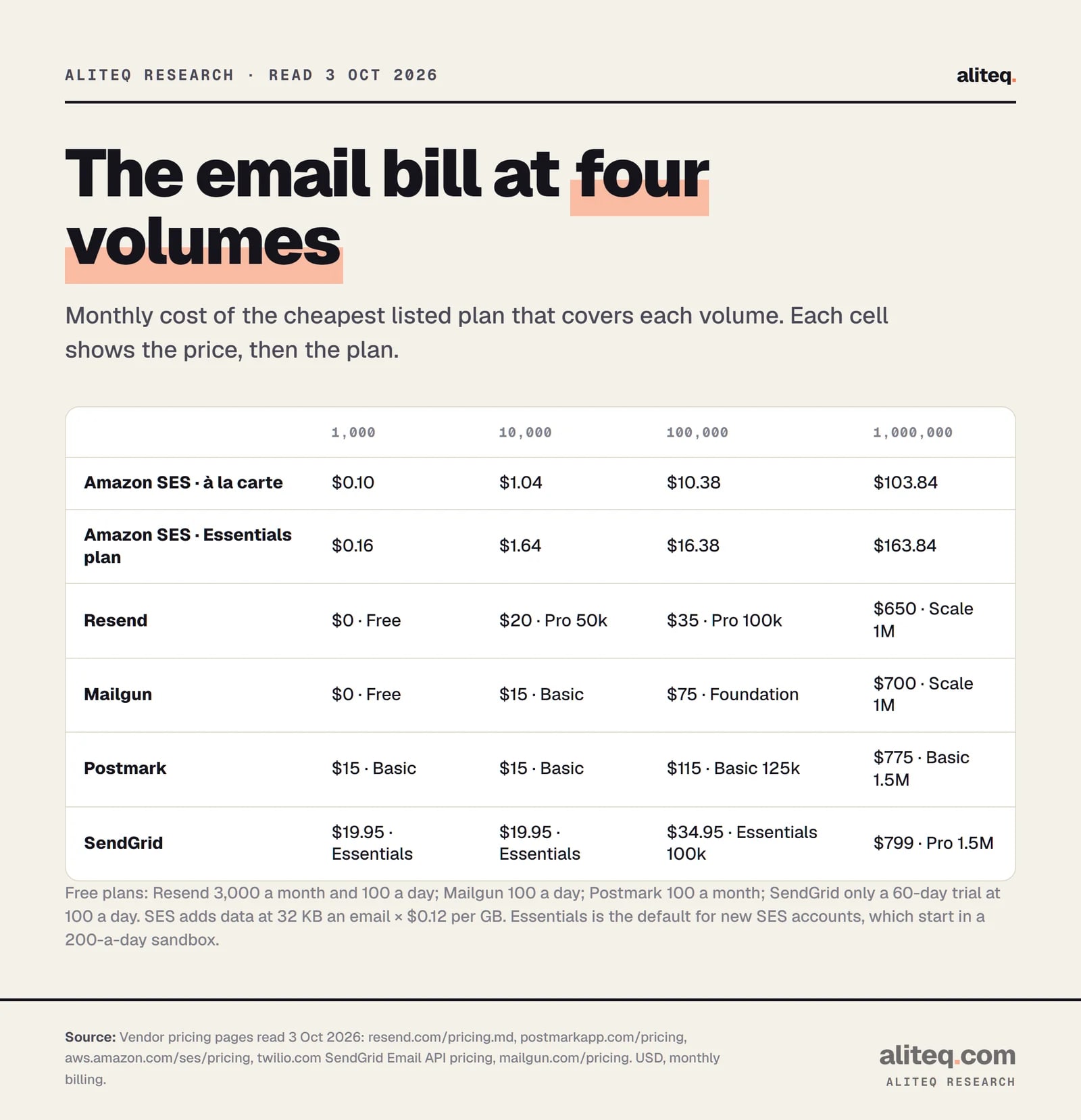
The monthly bill at 1k, 10k, 100k and 1M emails
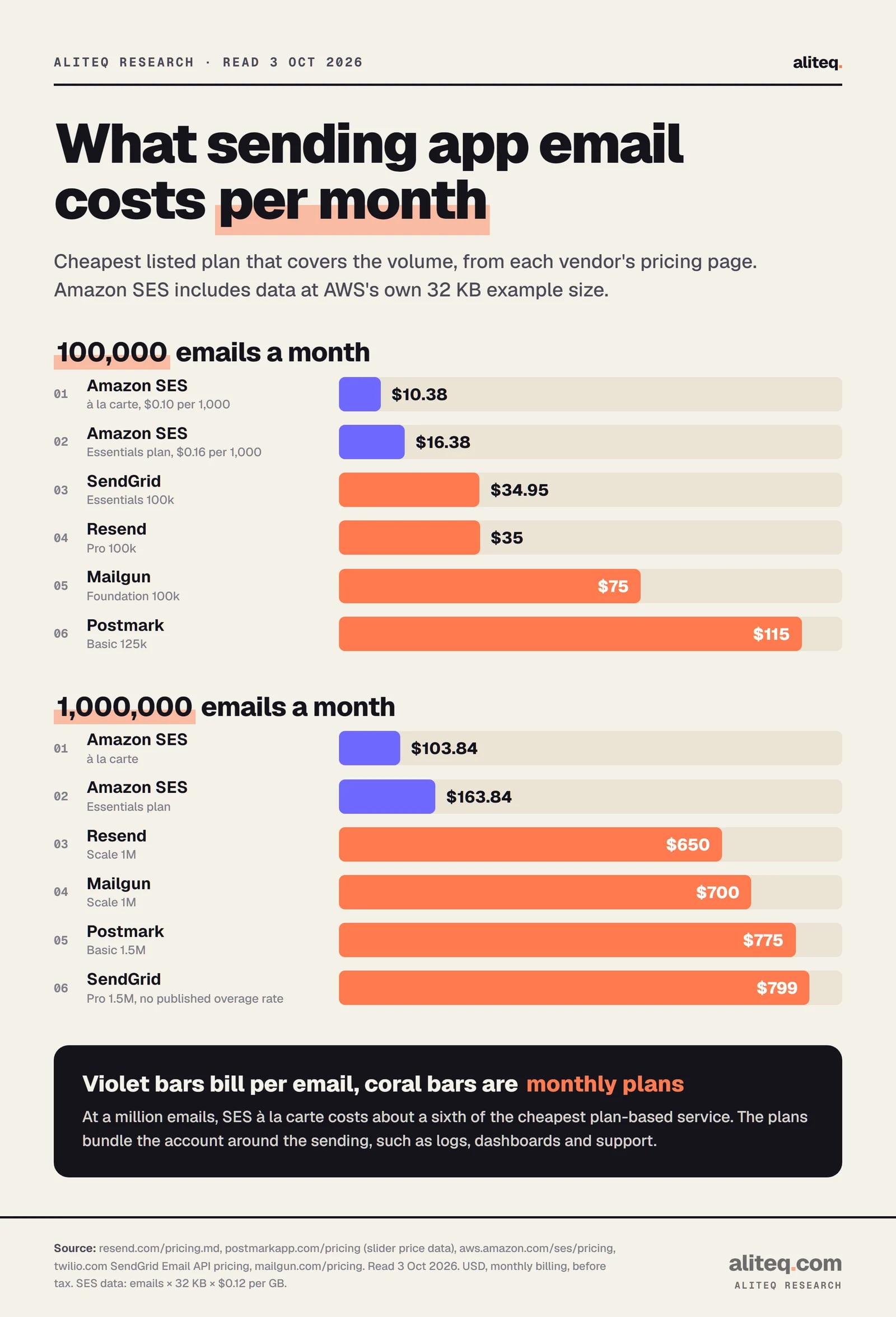
At 1,000,000 emails a month, the plan-based services cost $650 to $799 and SES costs $104 to $164. The formula for SES is emails ÷ 1,000 × rate + emails × 32 KB × $0.12 per GB. For the others it's the plan price, plus published overage where that's cheaper than the next plan.
Cheapest listed plan that covers each volume, read October 3, 2026. Violet bars bill per email, coral bars are monthly plans. · aliteq research
Monthly cost of transactional email (USD)
Amazon SES, à la carte
1,000
$0.10
10,000
$1.04
100,000
$10.38
1,000,000
$103.84
Amazon SES, Essentials plan
1,000
$0.16
10,000
$1.64
100,000
$16.38
1,000,000
$163.84
Resend
1,000
$0 (Free)
10,000
$20 (Pro 50k)
100,000
$35 (Pro 100k)
1,000,000
$650 (Scale 1M)
Mailgun
1,000
$0 (Free)
10,000
$15 (Basic)
100,000
$75 (Foundation 100k)
1,000,000
$700 (Scale 1M)
Postmark
1,000
$15 (Basic)
10,000
$15 (Basic)
100,000
$115 (Basic 125k)
1,000,000
$775 (Basic 1.5M)
SendGrid
1,000
$19.95 (Essentials)
10,000
$19.95 (Essentials)
100,000
$34.95 (Essentials 100k)
1,000,000
$799 (Pro 1.5M)
1,000
10,000
100,000
1,000,000
Amazon SES, à la carte
$0.10
$1.04
$10.38
$103.84
Amazon SES, Essentials plan
$0.16
$1.64
$16.38
$163.84
Resend
$0 (Free)
$20 (Pro 50k)
$35 (Pro 100k)
$650 (Scale 1M)
Mailgun
$0 (Free)
$15 (Basic)
$75 (Foundation 100k)
$700 (Scale 1M)
Postmark
$15 (Basic)
$15 (Basic)
$115 (Basic 125k)
$775 (Basic 1.5M)
SendGrid
$19.95 (Essentials)
$19.95 (Essentials)
$34.95 (Essentials 100k)
$799 (Pro 1.5M)
The assumptions behind each cell:
Message size. SES charges $0.12 per GB of data. We used the 32 KB message from AWS's own pricing example, which adds $3.84 at a million emails. A receipt with a PDF attached is bigger, so add its size.
Free tiers. Resend's free 3,000 and Mailgun's free 100 a day both cover 1,000 emails a month. Both also cap you at 100 in a single day. A launch day with 150 sign-ups would hit that cap, so plan a paid month around launches. SendGrid's free option is a trial that ends after 60 days, so we priced its first paid plan.
The cheaper path. We checked plan plus overage against the next plan up. Postmark at 100,000 is cheaper on its 125,000 tier ($115) than on 50,000 plus overage ($55 + 50 × $1.80 = $145). Mailgun at a million costs $700 either way: Scale 1M, or Scale 750k plus 250,000 at $0.60 per 1,000.
Not included. Dedicated IPs, extra domains, longer log retention, email validation and tax.
At a million emails, SES à la carte comes to $103.84 including data. The cheapest plan, Resend Scale, is $650, which is 6.3 times more. The gap is about $546 a month.
The same numbers as the table above, with the plan each price comes from. · aliteq research
What the cheaper price leaves to you
SES is cheapest at every paid volume, but it starts locked. New SES accounts sit in a sandbox, and you build more of the account around the sending yourself. That's the real trade.
The SES developer guide lists the sandbox limits. You can only send "to verified email addresses and domains", at "a maximum of 200 messages per 24-hour period" and "1 message per second." The sandbox applies per AWS Region. To send to real users, you file a production access request in the console.
The plan services bundle things SES bills separately or leaves to you:
Logs. Postmark keeps 45 days of message history by default. Mailgun keeps 1 day on Basic and 30 days on Scale. Resend keeps 30 days on its self-serve plans.
Dedicated IPs. Resend charges $30 a month, for Scale customers above 3,000 emails a day. Postmark starts at $50 per IP, from 300,000 emails a month and on Pro plans or higher. SES Standard dedicated IPs are $24.95 each a month. Mailgun includes one on Scale.
Separate streams. Postmark runs transactional and broadcast mail as separate "Message Streams". Resend counts only /emails API sends against the transactional quota, so newsletters sent as broadcasts don't use it up.
For a small app sending 10,000 emails a month, the dollar gap is $14 to $19. That's likely less than the value of the time you'd spend getting SES out of the sandbox. Past 100,000 a month the gap grows to hundreds of dollars, and that's when SES starts to pay for the setup.
Deliverability: the DNS records that decide the inbox
The cheapest email is worthless in a spam folder. Google and Yahoo publish their rules, and your provider gives you the DNS records to meet them. You add those records to your domain, the same way you'd point a domain at a server (our DNS explainer covers the basics).
Three records do the work, and each has a one-line job:
SPF (Sender Policy Framework) lists the servers allowed to send mail for your domain.
DKIM (DomainKeys Identified Mail) signs each message so the receiver can check it came from you and wasn't changed.
DMARC tells the receiver what to do when SPF and DKIM fail, and can send you reports.
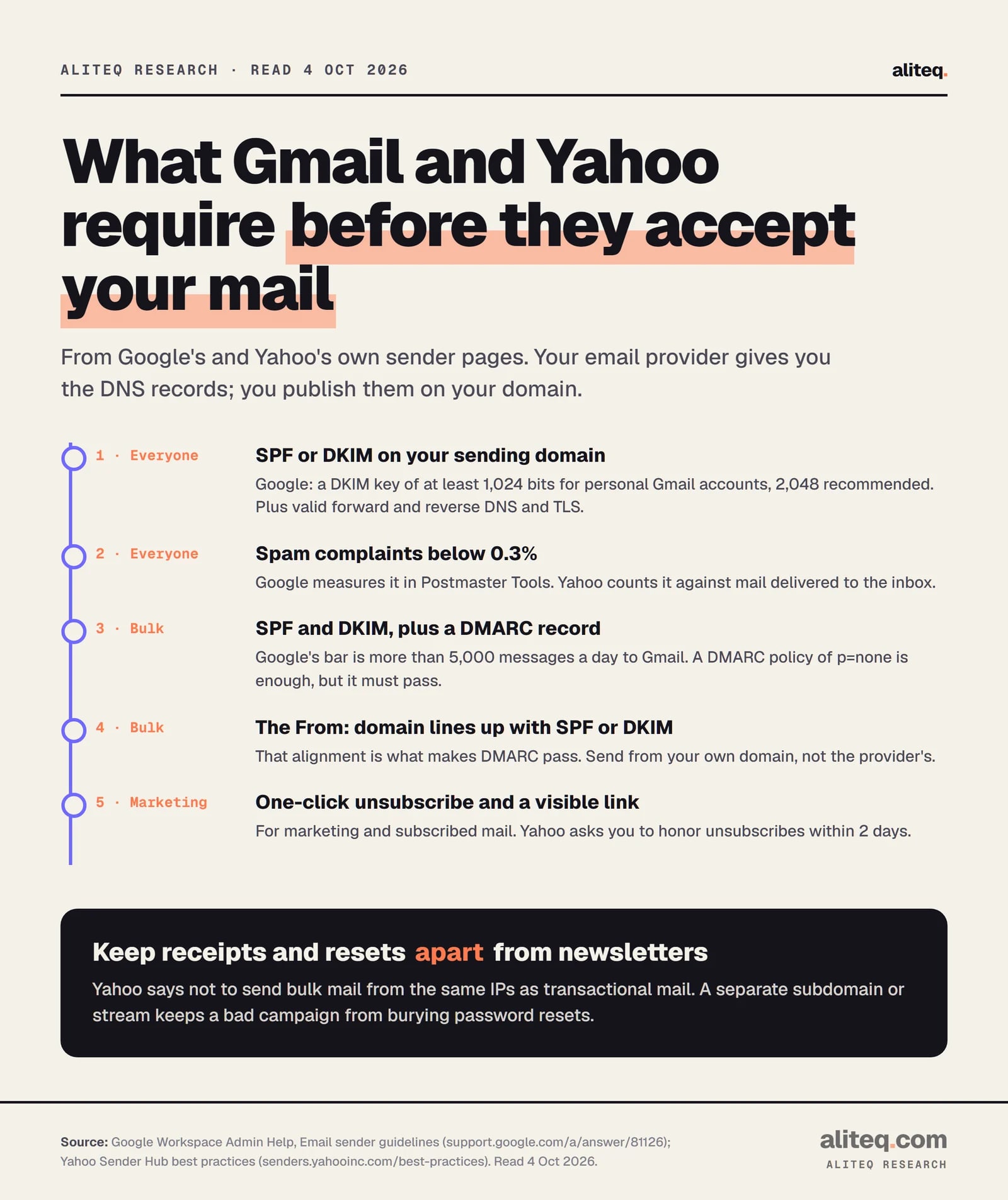
Summarized from Google's and Yahoo's sender pages, read October 4, 2026. · aliteq research
Google's sender guidelines split the rules in two. Every sender to Gmail needs SPF or DKIM, valid forward and reverse DNS, a TLS connection, and spam complaints below 0.3% in Postmaster Tools. Senders of more than 5,000 messages a day to Gmail accounts also need both SPF and DKIM, plus DMARC. Google says the "DMARC enforcement policy can be set to none." The From: domain must line up with the SPF or DKIM domain, and marketing mail needs one-click unsubscribe.
Yahoo's rules match on the main points. Bulk senders need SPF, DKIM and "a valid DMARC policy with at least p=none", and "DMARC must pass". They must "honor unsubscribes within 2 days" and keep spam below 0.3%. Yahoo's page doesn't give a number for "bulk", so treat its rules as the target from day one.
One Google detail trips people up. "Sending to personal Gmail accounts requires a DKIM key of 1024 bits or longer," and Google recommends 2048-bit. Your provider generates the DKIM key and shows you the records. Your job is to publish them on your domain.
Add the SPF and DKIM records your provider shows you to your domain's DNS. Send from your own domain, not the provider's shared one.
Publish a DMARC record. Start at p=none with a reporting address, then tighten it once the reports look clean.
Split transactional mail from newsletters with a subdomain or a separate stream. Yahoo says not to send bulk mail from the same IPs as transactional mail.
Put a rate limit on sign-up and password-reset forms. A bot that triggers 10,000 resets can burn your quota and your sender reputation.
Watch spam complaints in Google Postmaster Tools. The line both Google and Yahoo draw is 0.3%.
That fourth step is where a cheap bill turns expensive. Our piece on rate limits for vibe-coded apps shows how one script can create 10,000 fake sign-ups overnight, and each one can trigger a welcome email.
Which one to pick
Pick by volume first, then by how much setup you want to own. Under 3,000 emails a month, start free on Resend or Mailgun. From 10,000 to 100,000, the paid plans differ by tens of dollars. Above that, SES is cheaper by hundreds a month if you'll handle the sandbox and the plumbing.
Side project, under 3,000 emails a month: Resend Free or Mailgun Free cost $0. Watch the 100-a-day cap on launch days.
Growing app, 10,000 to 100,000 a month: Mailgun Basic and Postmark Basic are $15 at 10,000. At 100,000, Resend Pro and SendGrid Essentials are about $35.
A million a month and rising: SES à la carte at about $104, if you'll request production access and build your own logs. Resend Scale at $650 is the cheapest of the plans.
Already on AWS: SES makes sense from the start. Check whether your account is on Essentials ($0.16) or à la carte ($0.10).
Amazon SES, at every paid volume we priced. À la carte costs $0.10 per 1,000 emails, about $104 a month for a million emails including data. The cheapest plan service at that volume, Resend Scale, is $650. Read October 3, 2026.
Is there a free transactional email service?
Resend's Free plan covers 3,000 emails a month and Mailgun's Free plan covers 100 a day. Both cap you at 100 emails in a single day. Postmark's free plan is 100 emails a month, and SendGrid offers a 60-day trial at 100 a day.
Why does my new Amazon SES account cost $0.16 instead of $0.10?
Since July 21, 2026, new SES accounts start on the Essentials plan at $0.16 per 1,000 emails. AWS says you can switch to à la carte pricing at $0.10 per 1,000 at any time.
Can I send password resets from SES right away?
Not to real users. A new SES account is in a sandbox: verified addresses only, 200 emails per 24 hours and 1 per second, per AWS Region. You request production access in the SES console.
Do I need DMARC for app emails?
Google requires DMARC once you send more than 5,000 messages a day to Gmail accounts, and a policy of p=none is enough. Yahoo requires it for bulk senders. Publishing one early costs nothing and gives you reports on who sends as your domain.
Should receipts and newsletters use the same sending setup?
Yahoo's sender page says not to send bulk mail from the same IPs as transactional mail. Use a separate subdomain or a separate stream, so a complaint-heavy campaign can't drag down your password resets.