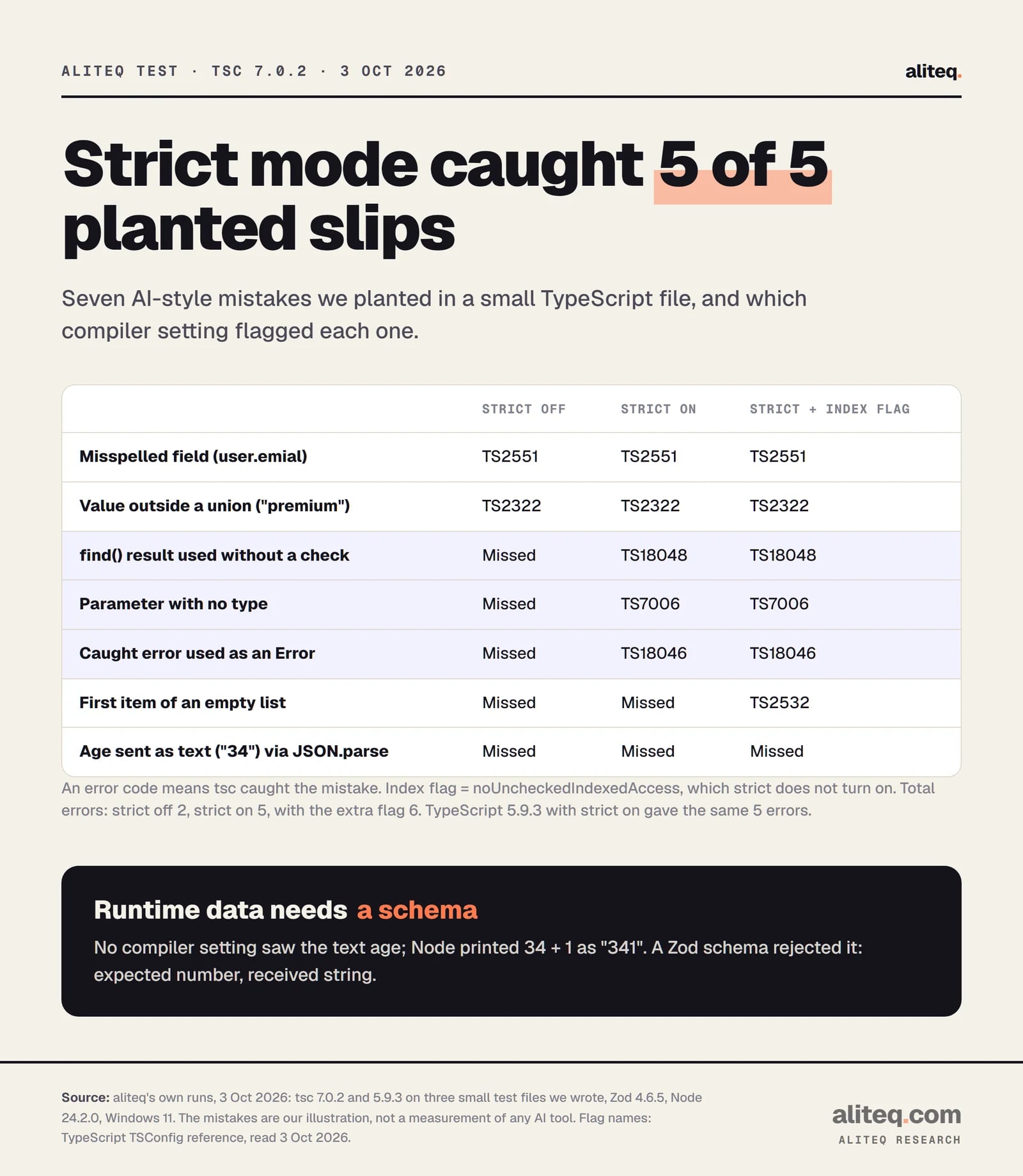
We planted five typical AI slips in a TypeScript file. Strict mode flagged all five in about a second; with strict off, three slipped through. Then a form sent the age as text and the type checker saw nothing. Here is where the compiler helps and where you need a schema.
Kernel here. I treat software like a workshop, and in my workshop the cheapest tool is the one that checks my work before I cut. When an AI writes the code, I want that tool even more. The model types fast and confidently. It does not always know what your data looks like.
Why does typed code help when an AI writes it?
Types give the compiler a written description of your data, so it can check every line against it in seconds. An AI produces plausible code, not proven code. The type checker is the first reviewer that reads all of it, never gets tired, and costs nothing per run.
The TypeScript handbook puts the idea plainly. A static type checker tells you about bugs "before our code runs". It knows the "shapes and behaviors of what our values will be". That is exactly what a model guesses at when it writes a function call or reads a field.
There is research on how often models trip on this. A 2025 paper from ETH Zurich and UC Berkeley tested six open-weight models writing TypeScript on two standard coding benchmarks. In its words, "on average 94% of compilation errors result from failing type checks." Only about 6% were syntax errors. Those were small open models on puzzle-style tasks, not today's biggest models on a real app, so read it as a direction, not a rate for your tool.
The practical point holds anyway. A compile error is a bug you find in one second instead of one support ticket later. If you have read why AI invents functions that do not exist, this is the cheapest net for that habit: call a method that is not there, and the compiler names it.
What did strict mode catch in our test file?
All five planted mistakes. We wrote a 31-line file with slips that AI tools often make, then ran tsc 7.0.2 with strict on. It reported five errors with line numbers and, for a typo, a suggested fix. With strict off, the same file produced two errors and three slipped through.
Here is the file. Each comment names the mistake:
type User = { id: string; email: string; plan: "free" | "pro" };

const users: User[] = [{ id: "u1", email: "ana@example.com", plan: "pro" }];

// 1. find() can come back empty
export function planFor(id: string) {
  const user = users.find((u) => u.id === id);
  return user.plan;
}

// 2. a misspelled field
export function receiptLine(user: User) {
  return `Receipt sent to ${user.emial}`;
}

// 3. a parameter with no type
export function toCents(amount) {
  return Math.round(amount * 100);
}

// 4. a caught error treated as an Error
export async function charge() {
  try {
    await fetch("https://example.com/charge");
  } catch (err) {
    console.log(err.message);
  }
}

// 5. a plan name that does not exist
export const upgraded: User = { id: "u2", email: "bo@example.com", plan: "premium" };
And here is what npx tsc (version 7.0.2, "strict": true) printed, copied as is:
src/checkout.ts(8,10): error TS18048: 'user' is possibly 'undefined'.
src/checkout.ts(13,34): error TS2551: Property 'emial' does not exist on type 'User'. Did you mean 'email'?
src/checkout.ts(17,25): error TS7006: Parameter 'amount' implicitly has an 'any' type.
src/checkout.ts(26,17): error TS18046: 'err' is of type 'unknown'.
src/checkout.ts(31,68): error TS2322: Type '"premium"' is not assignable to type '"free" | "pro"'.
TypeScript 5.9.3, the version this site still builds with, printed the same five errors with the same codes. Then we ran 7.0.2 again with --strict false. Only two errors remained: the misspelled field and the made-up plan name. The empty lookup, the untyped input and the unchecked error all passed in silence.
aliteq's own runs, Oct 3, 2026: tsc 7.0.2 on a test file we wrote, plus Zod 4.6.5 at runtime. Flag names from the TSConfig reference. · aliteq research
Notice which three strict caught that loose mode missed. They are the "it worked when I tried it" bugs. A lookup that finds nothing, an input that might be anything, an error that might not be an Error. Those pass a happy-path demo and fail in front of a customer.
Which strict flags matter, and what does strict leave out?
The strict flag turns on a family of nine checks at once. The two that matter most, says the handbook, are noImplicitAny and strictNullChecks. A few useful checks sit outside the family, such as noUncheckedIndexedAccess, and you have to turn those on by name.
The TSConfig reference lists the family: alwaysStrict, strictNullChecks, strictBindCallApply, strictBuiltinIteratorReturn, strictFunctionTypes, strictPropertyInitialization, noImplicitAny, noImplicitThis and useUnknownInCatchVariables. It also warns that "future versions of TypeScript may introduce additional stricter checking under this flag", so an upgrade can surface new errors.
What each big one does, in plain words:
strictNullChecks
What it stops
Using a value that might be missing, like a lookup that found nothing
Error from our run
TS18048
noImplicitAny
What it stops
Inputs with no type, which turn off checking for that value
Error from our run
TS7006
useUnknownInCatchVariables
What it stops
Treating any thrown thing as an Error without checking
Error from our run
TS18046
noUncheckedIndexedAccess (not in strict)
What it stops
Reading list[0] as if the list could never be empty
Error from our run
TS2532
What it stops
Error from our run
strictNullChecks
Using a value that might be missing, like a lookup that found nothing
TS18048
noImplicitAny
Inputs with no type, which turn off checking for that value
TS7006
useUnknownInCatchVariables
Treating any thrown thing as an Error without checking
TS18046
noUncheckedIndexedAccess (not in strict)
Reading list[0] as if the list could never be empty
TS2532
That last row is the one I add on every project I control. Our file had tags[0].toUpperCase() on an empty list. Strict mode passed it. Adding --noUncheckedIndexedAccess produced a sixth error: "Object is possibly 'undefined'." AI-written code reads the first item of a list a lot.
One more thing strict cannot stop: an AI that silences the checker. A type assertion (as User) or a ! after a value tells the compiler to trust you. The handbook is blunt: assertions are removed at compile time and "there is no runtime checking associated with a type assertion." If an AI fixes a red squiggle with as or any, it has hidden the error, not fixed it. Reading what the AI changed is how you catch that.
What do types not catch?
Anything that arrives while the app is running. TypeScript checks your code, then erases the types before it runs. A form post, an API response, a webhook or a model's JSON output is not checked by the compiler, because the compiler never sees it.
The handbook says it in one line: "Type annotations never change the runtime behavior of your program." The trouble starts where outside data enters. TypeScript's own type files declare that JSON.parse returns any, and so does response.json() in the browser types. Assign that to a typed variable and the compiler simply believes you.
We tested it. This file passes tsc with zero errors:
type Signup = { email: string; age: number };

// What a form or API actually sends: age arrives as text
const body = '{"email": "ana@example.com", "age": "34"}';

const signup: Signup = JSON.parse(body);
console.log("age next year:", signup.age + 1);
Running it with Node 24.2.0 printed this:
age next year: 341
No crash, no warning. Just a wrong number that looks fine in a log. JavaScript glued the text "34" to 1. The type said number. The data said otherwise, and the data won.
This is the blind spot that matters most for AI-built apps. Every API call, every form and every AI tool call crosses this line. The compiler guards everything inside it and nothing at the edge.
How do you validate input with a schema?
Describe the data once as a schema, check every outside input against it at runtime, and derive the TypeScript type from the same schema. Zod, which calls itself "a TypeScript-first schema validation library with static type inference", does all three. Bad input then fails loudly at the edge instead of quietly inside.
Here is the same signup, checked with Zod 4.6.5:
import * as z from "zod";

const Signup = z.object({
  email: z.email(),
  age: z.number().int().min(13),
});
type Signup = z.infer<typeof Signup>;

const body = '{"email": "ana@example.com", "age": "34"}';

const result = Signup.safeParse(JSON.parse(body));
if (!result.success) {
  console.log(z.prettifyError(result.error));
} else {
  const signup: Signup = result.data;
  console.log("age next year:", signup.age + 1);
}
It printed this, and the bad age never reached the rest of the code:
✖ Invalid input: expected number, received string
  → at age
Two details make this work. First, z.infer builds the TypeScript type from the schema, so the check and the type can never drift apart. Second, safeParse returns either the clean data or an error, and the compiler makes you handle both. Zod's docs say .parse returns "a strongly-typed deep clone" when the input is valid.
Zod also needs the compiler on your side. Its requirements page says: "You must enable strict mode in your tsconfig.json." Zod is not the only option. The rule is the point: one schema at each boundary, before the data touches anything else.
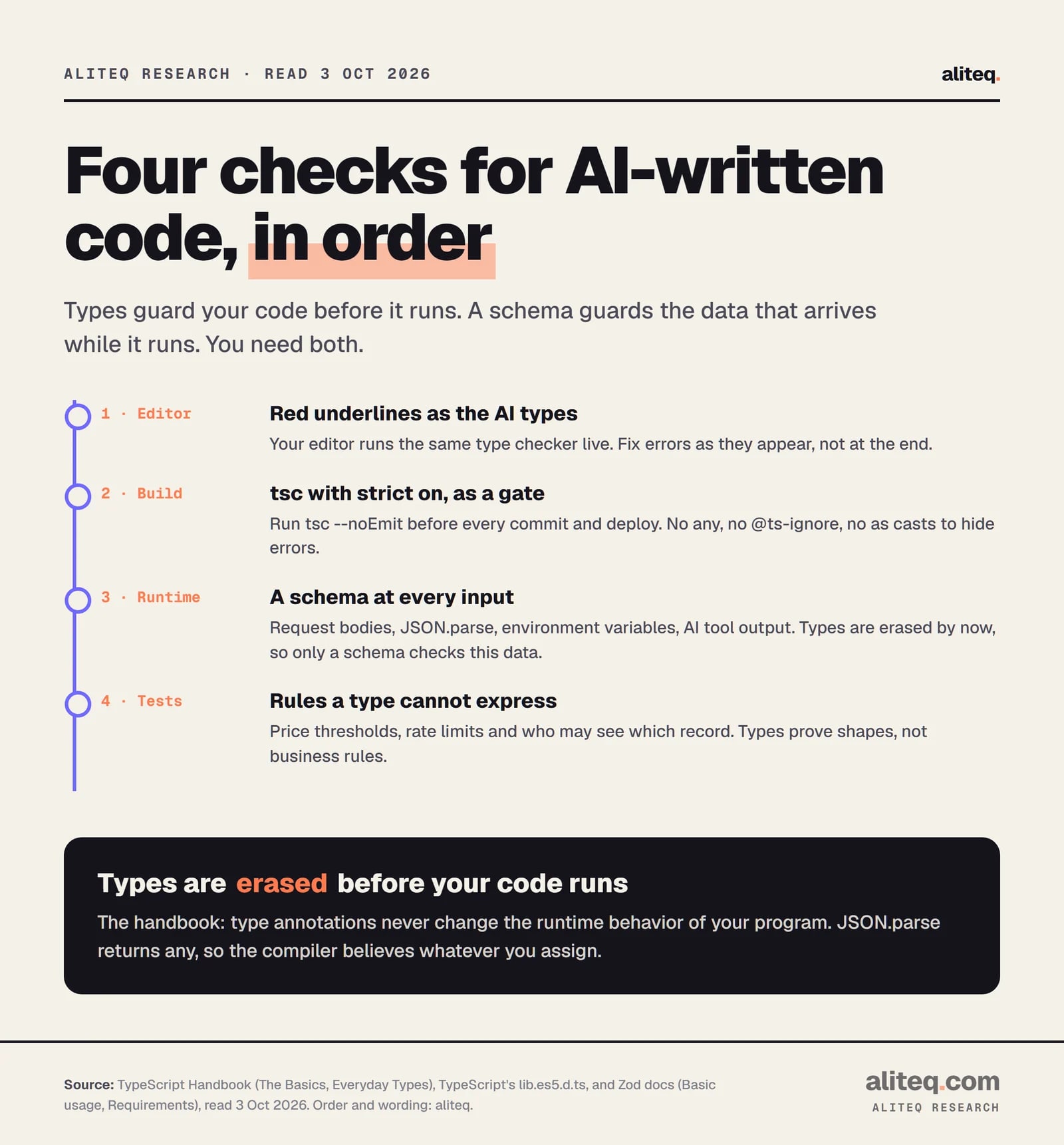
aliteq's checklist, built from the TypeScript handbook and Zod docs, read Oct 3, 2026. · aliteq research
What changed in TypeScript 6 and 7?
Two things that help anyone using AI tools. TypeScript 6.0 made strict mode the default in March 2026. TypeScript 7.0, a native rewrite of the compiler in Go, shipped on July 8, 2026 and type-checks large projects roughly 8 to 12 times faster.
The 6.0 post is short on the first point: "strict is now true by default." If a project relied on the old default of false, it now has to say so in tsconfig.json. The 7.0 post confirms that 7.0 keeps 6.0's defaults. So a brand-new TypeScript project today starts strict unless someone turns it off.
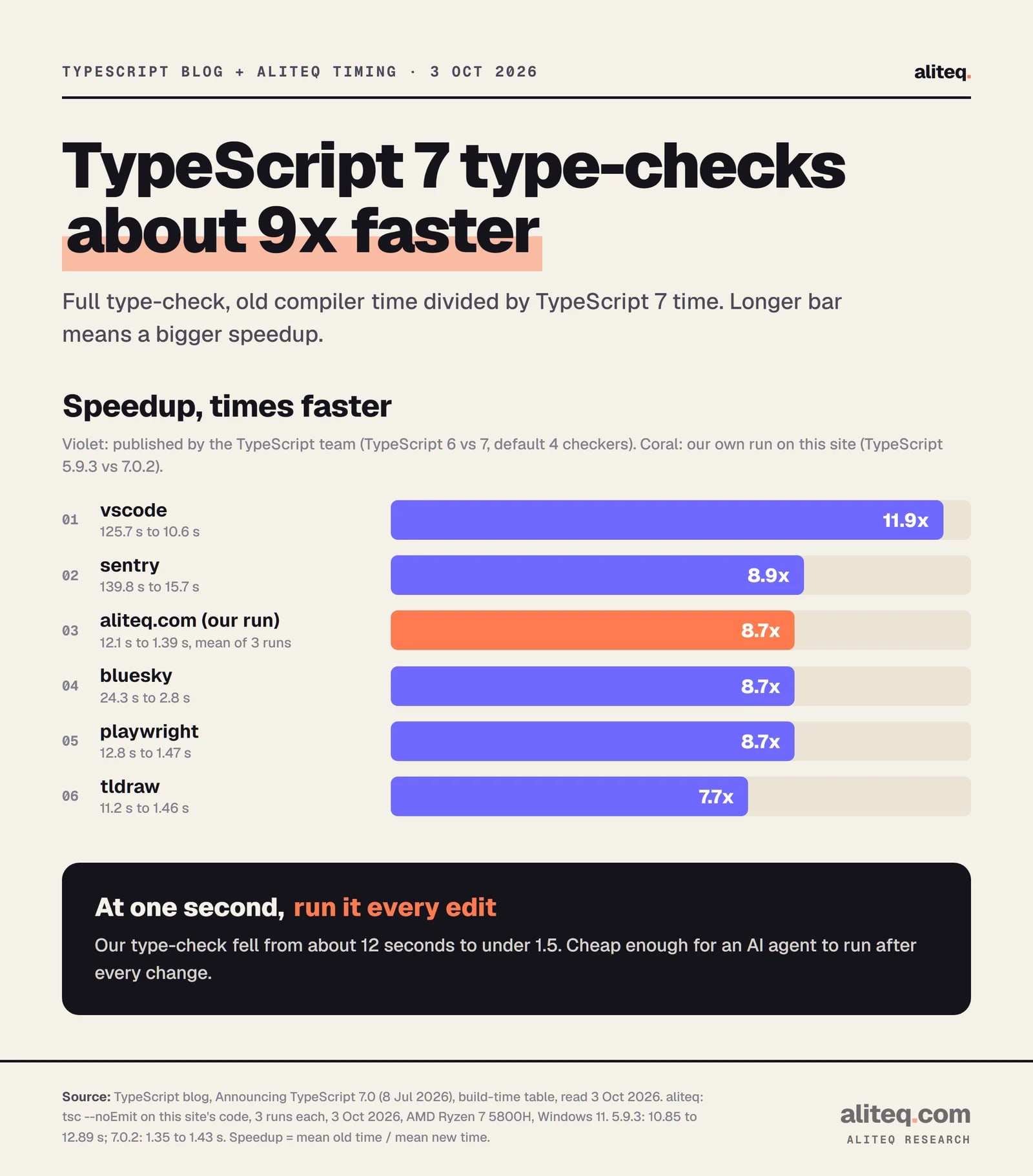
On speed, the TypeScript team published full-build times for big open-source projects. VS Code went from 125.7 seconds to 10.6. Sentry went from 139.8 to 15.7. The team's summary is "speedups between 8x and 12x on full builds". On npm, typescript@latest was 7.0.2 when we checked.
We timed our own code too. This site runs on TypeScript, and its gate before any commit or deploy is npm run check, which runs tsc --noEmit and then ESLint. We ran that same type-check three times with each compiler on the same laptop. TypeScript 5.9.3 took 10.9 to 12.9 seconds. TypeScript 7.0.2 took 1.35 to 1.43 seconds. Both found zero errors.
TypeScript blog, Announcing TypeScript 7.0 (Jul 8, 2026), and aliteq's own timing, Oct 3, 2026. Our figure: mean of 3 runs each. · aliteq research
That works out to about 8.7 times faster for us, in line with the team's numbers. Why should a vibe coder care about seconds? Because an AI agent can run the checker after every edit. At one second, there is no excuse to skip it.
We have not switched the site to 7.0 yet, and the reason is in the same post. TypeScript 7.0 "does not ship with an API", and tools such as typescript-eslint still need one. The team ships a side-by-side package, @typescript/typescript6, for exactly that. The post also says Vue, MDX, Astro and Svelte projects "will need to continue using TypeScript 6.0 for now". Check your stack before you switch.
How do you make the compiler your AI's reviewer?
Turn strict on, add one or two extra flags, make the type check a command the AI must run before it says "done", and forbid silencing the checker. Then put a schema at every place data enters. That is the whole setup, and it costs nothing.
Set "strict": true in tsconfig.json (already the default since 6.0). Add "noUncheckedIndexedAccess": true.
Add a check script, such as "check": "tsc --noEmit && eslint .", and run it before every commit and deploy.
Tell your AI tool in its rules file: run the check after every change and fix every error before finishing.
Ban the escape hatches in that same file: no any, no @ts-ignore, no as casts to make an error go away.
Put a schema on every outside input: request bodies, JSON.parse, environment variables and AI tool output.
Keep a few tests for the rules a type cannot express, such as prices, limits and who can see what.
This is how we work on this site. Nothing ships until npm run check is clean, and an AI agent that skips it has not finished the job. If you build with Claude Code, the verify loop is the same idea: the model writes, a cheap check judges, the model fixes. For the security side of an AI-built app, start with the six checks before you share it.
Quick answers
Does TypeScript make AI-generated code safe?
No. It catches a class of mistakes early: wrong field names, missing values, untyped inputs and impossible values. It does not check data at runtime, business logic, or security. Pair strict mode with a schema at every input and a few tests for the rules that matter.
Is strict mode on by default in TypeScript?
Yes, since TypeScript 6.0 (March 2026), and TypeScript 7.0 keeps that default. An older project can still turn it off in its config. Open tsconfig.json and look for "strict": true.
Why did my TypeScript app crash on data that matched the type?
The data probably did not match. Types are erased before code runs, and JSON.parse and response.json() return any, so the compiler trusts whatever you assign. Check outside data with a schema such as Zod and use the type it infers.
Should I let the AI use any or @ts-ignore to fix errors?
No. Both switch the checker off for that spot, and a type assertion has no runtime check either. The handbook says a wrong assertion produces no exception. Ask the AI to fix the cause, such as handling the empty case, instead.
Is TypeScript 7 ready to use?
It shipped as 7.0 on July 8, 2026 and was the latest npm release on October 3, 2026. It has no programmatic API yet, so tools like typescript-eslint need the 6.0 side-by-side package. Vue, MDX, Astro and Svelte projects should stay on 6.0 for now.
Do I still need tests if I use strict TypeScript?
Yes, but fewer of the boring kind. Types already rule out wrong shapes and missing values. Tests should check what types cannot express, such as a price threshold, a rate limit or who is allowed to see which record.